Home › Utilities

 ML
ML
 USen-US
 DEde-DE
 FRfr-FR
 GBen-GB
 ITit
ITit DKen-GB
 TRen-GB
 CAen-CA
 ESes-ES
 BRpt-BR
 CHde-CH
 RUru
RUru NLnl
NLnl BEen-GB
 SEsv
SEsv NOen-GB
 MXes-MX
 ATde-DE
 AUen-AU
 INen-GB
 PLen-GB
 SAen-GB
 PTpt-PT
 ARes-MX
 GRen-GB
 UAen-GB
 ZAen-GB
 CNzh-Hans-CN
 CZen-GB
 AEen-GB
 CLes-MX
 HUen-GB
 ROen-GB
 ECes-MX
 NZen-AU
 UYen-GB
 EGen-GB
 HRen-GB
 ILen-GB
 PKen-GB
 THen-GB
 CRes-MX
 HKzh-Hant-HK
 IEen-GB
 JPja
JPja SGen-GB
 COes-MX
 LVen-GB
 OMen-GB
 PEes-MX
 SKen-GB
 TWzh-Hant-TW
 BGen-GB
 DOes-MX
 FIen-GB
 GTes-MX
 IDen-GB
 KHen-GB
 KRko
KRko KWen-GB
 LUen-GB
 MTen-GB
 MYen-GB
 PHen-GB
 SIen-GB
 VNen-GB
 ALen-GB
 AMen-GB
 AZen-GB
 BBen-GB
 BFen-GB
 BHen-GB
 BOes-MX
 BYen-GB
 CYen-GB
 DZen-GB
 GHen-GB
 ISen-GB
 KEen-GB
 LKen-GB
 MDen-GB
 MUen-GB
 NAen-GB
 NPen-GB
 PYes-MX
 QAen-GB
 SNen-GB
 SVes-MX
 UZen-GB
 YEen-GB
 AFen-GB
 AGen-GB
 AIen-GB
 AOen-GB
 BAen-GB
 BJen-GB
 BMen-GB
 BNen-GB
 BSen-GB
 BWen-GB
 BZen-GB
 CDen-GB
 CGen-GB
 CIfr-FR
 CMfr-FR
 CVen-GB
 DMen-GB
 EEen-GB
 FJen-GB
 FMen-GB
 GAfr-FR
 GDen-GB
 GEen-GB
 GMen-GB
 GWen-GB
 GYen-GB
 HNes-MX
 IQen-GB
 JMen-GB
 JOen-GB
 KNen-GB
 KYen-GB
 LAen-GB
 LBen-GB
 LCen-GB
 LRen-GB
 LTen-GB
 LYen-GB
 MAen-GB
 MEen-GB
 MGen-GB
 MKen-GBMLen-GB
 MNen-GB
 MOzh-Hant-HK
 MRen-GB
 MSen-GB
 MWen-GB
 MZen-GB
 NEen-GB
 NGen-GB
 NIes-MX
 PAes-MX
 PGen-GB
 PWen-GB
 RSen-GB
 RWen-GB
 SCen-GB
 SLen-GB
 SRen-GB
 STen-GB
 SZen-GB
 TCen-GB
 TDen-GB
 TMen-GB
 TNen-GB
 TOen-GB
 TTen-GB
 TZen-GB
 UGen-GB
 VCen-GB
 VEes-MX
 VGen-GB
 VUen-GB
 XKen-GB
 ZMen-GB
 ZWen-GB
167 of 167 storefronts
Content in en-US
Content in en-US
Information
Preview 2 platforms

iPhone 7 images




iPad 6 images


What’s New Version 4.4
Prizmo Go 4.4 brings enhanced support for iOS 26 with Liquid Glass integration for a modern experience.
- App icon updated for Liquid Glass
- Stability enhancements & optimization for iOS 26
Other improvements:
- Prizmo Go is now localized in 25 languages
Requirements
- Prizmo Go now requires iOS 17.5 or Higher
Description
Aim at text. Shoot. It's yours! Prizmo Go lets you quickly grab text with the camera. After text is recognized in a blink of an eye, you can interact with it in many useful ways. Or just send it to other apps. And if you've got a Mac, you can even copy/paste it there. No more retyping. Feels like magic, just at your fingertips.
Additionally, Prizmo Go provides rich interactions with the captured text. After shooting, text from the original picture is revealed, and swiping through it allows fast and accurate text selection directly from the image. Selected text can then be read aloud, or you can tap to browse to any printed website address, call phone numbers, trigger Mail app from an email address, or even reveal physical address in Apple Maps and initiate navigation to that place.
Prizmo Go comes with enhancements specifically built for VoiceOver, in addition to spoken guidance prior to shooting. That, combined with its text-to-speech capabilities, make it a great companion in case you need help reading printed documents.
"Prizmo Go is the perfect example of how an app category can be reinvented with fresh approaches and modern tech."
— Federico Viticci (MacStories)
"By far this app is hands-down the most culturally inclusive app for individuals with visual deficits AND typical vision."
— Bridging Apps
"Prizmo Go does a fantastic job of recognizing text, specifically now with new machine learning features where the app better understands the gutter of a physical book."
— Josh Ginter (The Sweet Setup)
PHOTO CAPTURE
- Camera-based text capture for iPhone & iPad
- Real-time text highlighting in camera preview
- Flash and device orientation detection
- Innovative image stabilization
TEXT RECOGNITION
- Advanced image preprocessing
- Orientation detection (machine learning)
- Curved text handling
- Robust neural network-based on-device OCR (works without internet connection) + Apple OCR
- Accurate Cloud OCR (*) option (Internet connection required)
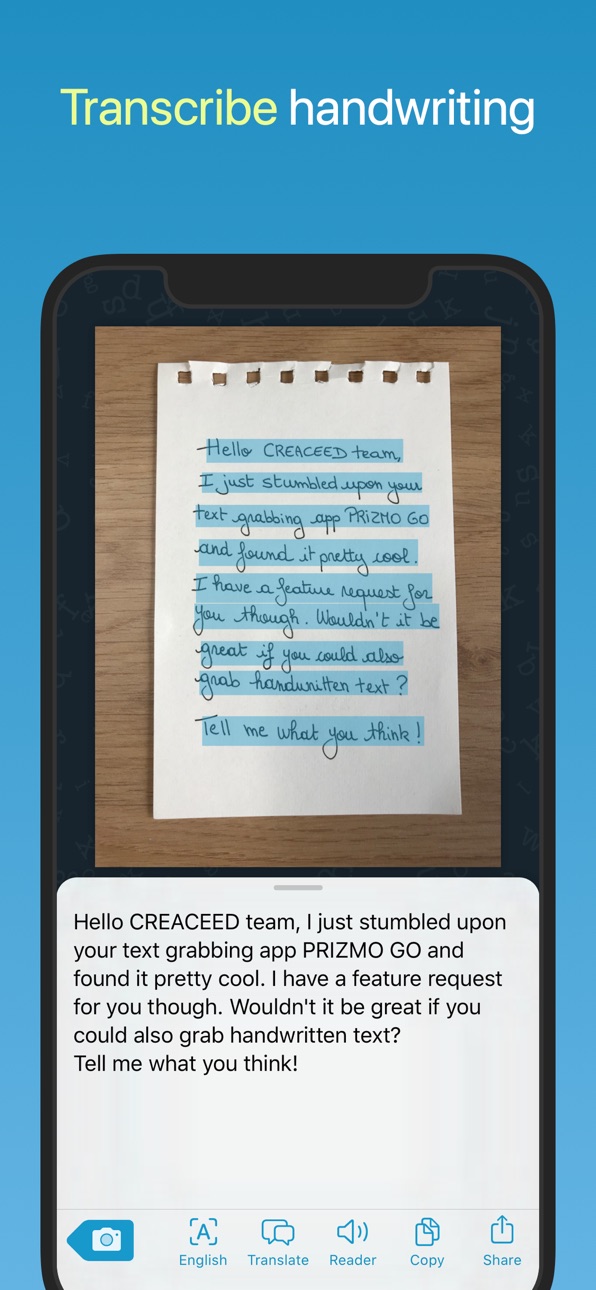
- Handwritten text recognition (*)
- QR code recognition
TEXT INTERACTION
- Text selection by swiping through the picture
- Copy/paste to other apps or to the Mac (*)
- Interaction with detected information: phone numbers, email addresses, physical addresses, websites (*)
- Audio (text-to-speech) reader with word highlighting
- Translation into many languages (*)
ACCESSIBILITY
- Full support of VoiceOver and improved workflow for low vision and blind users
- Text-to-speech output
- Spoken guidance prior to actual shooting
- Deep integration with Dynamic Type for improved & customisable text appearance
OTHER FEATURES & AUTOMATION
- Copy to the Mac with Universal Clipboard
- 3D Touch Quick Actions
- iPad Multitasking: support for Slide Over/Split View
- Supports Action Extension and 'Open In'
- URL scheme mechanism (x-callback-url) to trigger Prizmo Go from other apps like Shortcuts, and retrieve recognized text.
- Siri Shortcuts
- iOS: Dark Mode, Core ML, Apple OCR, Shortcuts Actions, SF Symbols, Voice Control (Accessibility)
(*) Requires a purchase, see app for available options.
Full list of OCR languages available on https://creaceed.com/prizmogo
Volume Purchase (VPP): see Prizmo Go (Volume Ed.)
Terms of Use: https://creaceed.com/terms
Privacy Policy: https://creaceed.com/privacy
Feedback: prizmo@creaceed.com
In-App Purchases ML pricing
Plans Subscription
Pro Plan (monthly) · Monthly—
Pro Plan (yearly) · Yearly—
One-Time Purchases
Essential Pack—
10-pack Trial—
Capabilities
In-App Purchases
Accessibility
ipadiphonemacrealityDevicetvoswatch
Version history 25 versions
Build 882113590v4.42026-02-04 08:45:14
Prizmo Go 4.4 brings enhanced support for iOS 26 with Liquid Glass integration for a modern experience.
- App icon updated for Liquid Glass
- Stability enhancements & optimization for iOS 26
Other improvements:
- Prizmo Go is now localized in 25 languages
Requirements
- Prizmo Go now requires iOS 17.5 or Higher
Build 874770299v4.3.12025-05-15 10:18:55
PRIVACY ENHANCEMENTS: Prizmo Go no longer relies on App Center (Microsoft) for anonymous features analytics and crash reporting. Anonymous crash reports are now handled through built-in mechanism of iOS (user opt-in), and features analytics has been completely removed.
Build 868900296v4.32024-09-12 09:05:57
NEW FEATURES & ENHANCEMENTS
• Optimized for latest iOS
• App icons update (standard / dark / tinted)
• Control Button to initiate text capture: action button, lock screen, and control center
• Support for Arabic with on-device OCR (Apple)
Build 868378295v4.2.32024-08-21 21:51:07
Modernization for latest OS & bug fixes
Build 864974366v4.2.22024-04-05 14:02:47
Modernization for latest OS & bug fixes
Build 862076019v4.2.12023-12-11 10:03:35
Fixed a bug where the camera preview could stop working.
Build 860428231v4.22023-10-17 09:06:35
Prizmo Go 4.2 is an important update that brings major improvements for iOS 17, including new OCR languages, support for Personal Voice, and Shortcuts improvements.
NEW FEATURES & IMPROVEMENTS
- Added Vietnamese and Thai support for on-device OCR.
- Added support for Personal Voice(s) in Prizmo Go reader. You can now use your own voice after setting it up in iOS settings.
- Shortcuts integration: major update of Prizmo Go's Shortcuts actions with the latest OS features and by adding app shortcuts. You can now automate Prizmo Go workflows with finer control and better overall OS & other apps interactions. Prizmo Go's 'Grab Text' action takes advantage of iOS 17 extended run time and will now return the scanned text as a result to be consumed in the workflow (the previous behavior of "wait to return" is deprecated).
- Refined photos and calendar permissions for enhanced privacy.
- Optimized for iOS 17.
REQUIREMENTS
- Prizmo Go now requires iOS 15 or later to run. The most modern features require iOS 17.
Build 860216664v4.1.12023-09-26 13:27:51
Fixed a bug where the captured photo could become corrupt with a close-up shot using the ultra-wide lens on iOS 17.
Build 855262088v4.12023-03-03 08:14:36
Added support for 4 new on-device OCR languages with high accuracy: Japanese, Korean, Ukrainian, and Russian. (iOS 16 required)
Build 853686787v4.0.12022-12-05 10:30:16
- Handling of close-up shot that could appear blurred on latest iPhone Pro models (13 Pro / 14 Pro) by automatically switching to the most appropriate lens.
- Fixed a crash that could occasionally occur with multi-column layouts + improved parsing of hyphen-terminated text lines.
## More information about Prizmo Go 4.0 ##
Prizmo Go 4.0 is an important update that brings major improvements to text processing (OCR), rich interactions, as well as optimization for iOS 16 & important bug fixes.
Prizmo Go is the reference app for effective text grabbing on iOS that will give you a significant upgrade over the built-in Live Text feature for when you need it, in terms of covered languages (139 vs. 8), handwriting, recognition accuracy, AI-based translation, text selection experience, and interaction/sharing capabilities.
TEXT PROCESSING / OCR
- Major update of the Cloud OCR engine that now supports 139 languages as well as handwriting in 9 languages, and which further improves its already state-of-the-art accuracy. Also, handwriting vs. print handling is now fully automatic, with no user pre-selection needed.
- Major overhaul of text layout understanding for both on-device and Cloud OCR engines. Text layout gets a new interpretation from raw OCR output for improving text selection.
- Cloud OCR is now faster by using the nearest server. Server location can be manually changed "Settings > Cloud OCR > Server Location".
- Cloud OCR still provides excellent privacy on top of its industry-leading performance, with user data being immediately deleted after processing & not used for any other purpose.
RICH INTERACTIONS
- Detected datas like phone numbers, postal addresses, URLs, emails, QR codes are now directly highlighted over the image for immediate interaction by tapping.
BUSINESS MODEL UPDATE
- "Export Pack" has been renamed as "Essential Pack" with no feature change. "Premium Plan" is now "Pro Plan", with the same features. An intermediate subscription plan "Standard Plan" is now offered with limited cloud features (OCR quota & no AI-based translation) at a more affordable pricing. A one-week trial period is now available for all plans.
OTHER ENHANCEMENTS
- Added a Lock Screen widget for quick access to Prizmo Go.
- Added support for text-to-speech new "Premium" quality voices of iOS 16.
- Use of contextual menus with modern iOS style all over the app.
- Added the ability to choose the source language when translating a text.
Prizmo Go now requires iOS 14 or higher.
Build 852527634v4.02022-11-15 07:49:35
Prizmo Go 4.0 is an important update that brings major improvements to text processing (OCR), rich interactions, as well as optimization for iOS 16 & important bug fixes.
Prizmo Go is the reference app for effective text grabbing on iOS that will give you a significant upgrade over the built-in Live Text feature for when you need it, in terms of covered languages (139 vs. 8), handwriting, recognition accuracy, AI-based translation, text selection experience, and interaction/sharing capabilities.
TEXT PROCESSING / OCR
- Major update of the Cloud OCR engine that now supports 139 languages as well as handwriting in 9 languages, and which further improves its already state-of-the-art accuracy. Also, handwriting vs. print handling is now fully automatic, with no user pre-selection needed.
- Major overhaul of text layout understanding for both on-device and Cloud OCR engines. Text layout gets a new interpretation from raw OCR output for improving text selection.
- Cloud OCR is now faster by using the nearest server. Server location can be manually changed "Settings > Cloud OCR > Server Location".
- Cloud OCR still provides excellent privacy on top of its industry-leading performance, with user data being immediately deleted after processing & not used for any other purpose.
RICH INTERACTIONS
- Detected datas like phone numbers, postal addresses, URLs, emails, QR codes are now directly highlighted over the image for immediate interaction by tapping.
BUSINESS MODEL UPDATE
- "Export Pack" has been renamed as "Essential Pack" with no feature change. "Premium Plan" is now "Pro Plan", with the same features. An intermediate subscription plan "Standard Plan" is now offered with limited cloud features (OCR quota & no AI-based translation) at a more affordable pricing. A one-week trial period is now available for all plans.
OTHER ENHANCEMENTS
- Added a Lock Screen widget for quick access to Prizmo Go.
- Added support for text-to-speech new "Premium" quality voices of iOS 16.
- Use of contextual menus with modern iOS style all over the app.
- Added the ability to choose the source language when translating a text.
Prizmo Go now requires iOS 14 or higher.
Build 845144034v3.22021-11-15 10:18:59
Prizmo Go 3.2 brings an all-new Shortcuts Action that now works in the background, support for multiple windows on iPadOS, enhancements for iOS 15 & important bug fixes.
SHORTCUTS ACTION
Prizmo Go now features an all-new Shortcuts Action to recognize the text of an input image that operates in the background. It means that you won't leave the Shortcuts app anymore when running. This new action requires iOS 14 or later. The pre-existing action remains available and allows manually grabbing some text from the image into the clipboard.
ENHANCEMENTS
• Improved multitasking capabilities by allowing the creation of multiple windows of Prizmo Go on iPadOS.
• Full compatibility and enhancements with iOS 15 including transparent navigation bars and inset grouped table views.
BUG FIXES
• Fixed erroneous page overlay in the camera view that could be misaligned on some iPad devices.
• Fixed a bug that would prevent editing the recognized text on iOS 15.
Prizmo Go now requires iOS 13 or later.
Build 841068763v3.1.32021-06-16 09:06:18
Fixed text layout issues that could occur when Apple OCR is used.
Build 840941312v3.1.22021-03-18 08:26:54
Fixed a crash at app launch on iOS 12.
Build 840797047v3.1.12021-03-11 08:08:08
Updated some missing localizations in various languages.
Build 840370664v3.12021-02-08 11:27:30
Prizmo Go 3.1 is an important update that improves OCR processing.
- Apple OCR is now the default on-device OCR when the requested language is available. Apple OCR provides superior accuracy & performance on latest generation iPhone and iPad with machine learning capabilities.
- Apple OCR is updated to take advantage of iOS 14 latest OCR advances: better accuracy and language support beyond English now totalling 8 languages (English, Simplified & Traditional Chinese, French, German, Italian, Portuguese, Spanish). Other languages (28 in total) are still processed with the alternative high-performance on-device OCR with machine learning.
- OCR selection is now exposed in "Settings > Advanced OCR Selection" and lets the user control which OCR engine is chosen when multiple options exist. This setting provides additional control for specific situations.
- Cloud OCR has been upgraded for better text recognition accuracy, both for print & handwriting.
Build 838502671v3.0.52020-11-05 15:26:15
- Improved handling of user privacy with support for photo albums security constraints of iOS 14.
- Fixed a bug where selecting a picture in Photos picker could fail on iOS 14.
Build 838383532v3.0.42020-10-27 16:59:48
Fixed an imaging subsystem crash that could randomly occur while shooting or editing.
Build 838299037v3.0.32020-10-23 07:55:56
- Added support for new iPhone (late 2020) screen sizes.
- Fixed a start-up crash that could occur in specific app installation situations.
Build 836260398v3.0.22020-06-11 07:32:04
• Modernization for latest OS & bug fixes
Build 833107457v3.0.12020-01-20 08:27:46
- Improved x-callback-url and Shortcuts Action handling by allowing to re-take the picture before returning to the calling application.
- added Capture Chime preference to enable/disable capture sounds (Settings ▸ Camera ▸ Capture Chime).
- Fixed a bug where the camera preview could stop working in some situations.
- Fixed glitches in the user interface for right-to-left languages.
Build 833009903v3.02019-10-08 08:15:59
# Optimized for iOS 13, and more.
Prizmo Go 3.0 is fully optimized for iOS 13. Dark Mode is supported, and Prizmo Go also provides a new icon theme based on iOS 13 SF Symbols. Other iOS 13 features include support for highly accurate Apple OCR, Shortcuts Actions (Shortcuts app), Core ML-based document orientation detection, and the new iOS 13 Voice Control feature. Finally, Prizmo Go 3.0 also features specific processing for curved text.
# Curved Text Recognition
Prizmo Go now provides curved text recognition. Text from curved book or magazine pages receives specific processing both for improved OCR accuracy and superior finger-based text selection directly on the image. Text overlay now gently osculates curved contents.
# Dark Mode and SF Symbols (iOS 13)
Prizmo Go got a facelift to support the new Dark Mode of iOS 13, and to be coherent with iOS 13 new visual language with updated SF Symbols-compliant user interface.
# Shortcuts Action (iOS 13)
Prizmo Go now features a Shortcuts Action with input parameters to recognize the text of an input image. To use the action in Shortcuts app, connect "Wait to return" and "Get clipboard" blocks after Prizmo Go's action. Clipboard is used as a workaround to iOS extension memory constraint. Prizmo Go's X-Callback-URL API remains available in addition to this Shortcuts Action.
# Apple OCR (iOS 13)
Prizmo Go 3.0 brings support for Apple OCR (iOS 13 required). You can enable Apple OCR from Prizmo Go ’s OCR settings (Settings ▸ Use Apple OCR), and it will be used when English on-device OCR is picked from the list. Apple OCR brings improved accuracy in most situations. Apple OCR is available without limitations to both Export Pack owners and Premium Plan subscribers.
# New Languages with On-device OCR
Five new languages are supported by the on-device OCR (previously only supported by the Cloud OCR): Arabic, Chinese (Simplified), Chinese (Traditional), Hebrew, and Japanese.
# Orientation Detection with Machine Learning / Core ML
Prizmo Go has been trained to recognize the document orientation when taking a picture ( Latin alphabet only at this time). It means that if you take a picture of a text that has been rotated (left, right, or upside down), Prizmo Go will automatically restore the appropriate orientation. To activate this feature, tap the Compass button in the camera view.
# Accessibility (iOS 13)
Support for new accessibility feature: Voice Control.
Build 829922804v2.2.22019-01-15 08:40:54
iOS 12-related bug fixes.
Build 829843115v2.2.12019-01-10 09:16:46
iOS 12-related bug fixes.
Build 829425845v2.22018-12-10 13:38:13
Updated for the new iPad Pro
- Handling of new iPad Pro display sizes (11" and 12.9")
Price history by region
Currency
Show
Columns
Search
Availability 167 of 167 storefronts
| Region | Language | Price | Ratings | Avg | Version |
|---|---|---|---|---|---|
| US | en-US | Free | 278 | 4.4 | 4.4 |
| DE | de-DE | Free | 193 | 3.5 | 4.4 |
| FR | fr-FR | Free | 150 | 3.9 | 4.4 |
| GB | en-GB | Free | 100 | 3.9 | 4.4 |
| IT | it | Free | 78 | 4.1 | 4.4 |
| DK | en-GB | Free | 66 | 4.0 | 4.4 |
| TR | en-GB | Free | 58 | 3.2 | 4.4 |
| CA | en-CA | Free | 56 | 3.7 | 4.4 |
| ES | es-ES | Free | 56 | 3.6 | 4.4 |
| BR | pt-BR | Free | 47 | 3.7 | 4.4 |
| CH | de-CH | Free | 47 | 4.0 | 4.4 |
| RU | ru | Free | 47 | 2.4 | 4.4 |
| NL | nl | Free | 46 | 3.7 | 4.4 |
| BE | en-GB | Free | 43 | 3.8 | 4.4 |
| SE | sv | Free | 41 | 3.7 | 4.4 |
| NO | en-GB | Free | 26 | 4.2 | 4.4 |
| MX | es-MX | Free | 25 | 3.7 | 4.4 |
| AT | de-DE | Free | 23 | 4.5 | 4.4 |
| AU | en-AU | Free | 21 | 4.3 | 4.4 |
| IN | en-GB | Free | 20 | 4.0 | 4.4 |
| PL | en-GB | Free | 17 | 3.3 | 4.4 |
| SA | en-GB | Free | 17 | 4.2 | 4.4 |
| PT | pt-PT | Free | 16 | 4.2 | 4.4 |
| AR | es-MX | Free | 13 | 3.4 | 4.4 |
| GR | en-GB | Free | 13 | 3.9 | 4.4 |
| UA | en-GB | Free | 13 | 2.9 | 4.4 |
| ZA | en-GB | Free | 12 | 4.3 | 4.4 |
| CN | zh-Hans-CN | Free | 10 | 3.7 | 4.4 |
| CZ | en-GB | Free | 10 | 3.1 | 4.4 |
| AE | en-GB | Free | 9 | 3.2 | 4.4 |
| CL | es-MX | Free | 9 | 3.4 | 4.4 |
| HU | en-GB | Free | 9 | 3.2 | 4.4 |
| RO | en-GB | Free | 7 | 5.0 | 4.4 |
| EC | es-MX | Free | 6 | 4.2 | 4.4 |
| NZ | en-AU | Free | 6 | 4.8 | 4.4 |
| UY | en-GB | Free | 6 | 4.0 | 4.4 |
| EG | en-GB | Free | 5 | 3.4 | 4.4 |
| HR | en-GB | Free | 5 | 3.4 | 4.4 |
| IL | en-GB | Free | 5 | 4.6 | 4.4 |
| PK | en-GB | Free | 5 | 4.8 | 4.4 |
| TH | en-GB | Free | 5 | 3.8 | 4.4 |
| CR | es-MX | Free | 4 | 4.5 | 4.4 |
| HK | zh-Hant-HK | Free | 4 | 4.5 | 4.4 |
| IE | en-GB | Free | 4 | 3.5 | 4.4 |
| JP | ja | Free | 4 | 3.8 | 4.4 |
| SG | en-GB | Free | 4 | 3.3 | 4.4 |
| CO | es-MX | Free | 3 | 4.3 | 4.4 |
| LV | en-GB | Free | 3 | 4.3 | 4.4 |
| OM | en-GB | Free | 3 | 2.7 | 4.4 |
| PE | es-MX | Free | 3 | 4.0 | 4.4 |
| SK | en-GB | Free | 3 | 3.0 | 4.4 |
| TW | zh-Hant-TW | Free | 3 | 3.3 | 4.4 |
| BG | en-GB | Free | 2 | 2.5 | 4.4 |
| DO | es-MX | Free | 2 | 5.0 | 4.4 |
| FI | en-GB | Free | 2 | 3.0 | 4.4 |
| GT | es-MX | Free | 2 | 4.0 | 4.4 |
| ID | en-GB | Free | 2 | 5.0 | 4.4 |
| KH | en-GB | Free | 2 | 4.0 | 4.4 |
| KR | ko | Free | 2 | 5.0 | 4.4 |
| KW | en-GB | Free | 2 | 2.5 | 4.4 |
| LU | en-GB | Free | 2 | 4.0 | 4.4 |
| MT | en-GB | Free | 2 | 3.0 | 4.4 |
| MY | en-GB | Free | 2 | 5.0 | 4.4 |
| PH | en-GB | Free | 2 | 5.0 | 4.4 |
| SI | en-GB | Free | 2 | 2.5 | 4.4 |
| VN | en-GB | Free | 2 | 5.0 | 4.4 |
| AL | en-GB | Free | 1 | 5.0 | 4.4 |
| AM | en-GB | Free | 1 | 5.0 | 4.4 |
| AZ | en-GB | Free | 1 | 5.0 | 4.4 |
| BB | en-GB | Free | 1 | 4.0 | 4.4 |
| BF | en-GB | Free | 1 | 5.0 | 4.4 |
| BH | en-GB | Free | 1 | 2.0 | 4.4 |
| BO | es-MX | Free | 1 | 5.0 | 4.4 |
| BY | en-GB | Free | 1 | 5.0 | 4.4 |
| CY | en-GB | Free | 1 | 5.0 | 4.4 |
| DZ | en-GB | Free | 1 | 3.0 | 4.4 |
| GH | en-GB | Free | 1 | 5.0 | 4.4 |
| IS | en-GB | Free | 1 | 5.0 | 4.4 |
| KE | en-GB | Free | 1 | 5.0 | 4.4 |
| LK | en-GB | Free | 1 | 5.0 | 4.4 |
| MD | en-GB | Free | 1 | 1.0 | 4.4 |
| MU | en-GB | Free | 1 | 5.0 | 4.4 |
| NA | en-GB | Free | 1 | 5.0 | 4.4 |
| NP | en-GB | Free | 1 | 1.0 | 4.4 |
| PY | es-MX | Free | 1 | 5.0 | 4.4 |
| QA | en-GB | Free | 1 | 5.0 | 4.4 |
| SN | en-GB | Free | 1 | 5.0 | 4.4 |
| SV | es-MX | Free | 1 | 1.0 | 4.4 |
| UZ | en-GB | Free | 1 | 5.0 | 4.4 |
| YE | en-GB | Free | 1 | 3.0 | 4.4 |
| AF | en-GB | Free | 0 | — | 4.4 |
| AG | en-GB | Free | 0 | — | 4.4 |
| AI | en-GB | Free | 0 | — | 4.4 |
| AO | en-GB | Free | 0 | — | 4.4 |
| BA | en-GB | Free | 0 | — | 4.4 |
| BJ | en-GB | Free | 0 | — | 4.4 |
| BM | en-GB | Free | 0 | — | 4.4 |
| BN | en-GB | Free | 0 | — | 4.4 |
| BS | en-GB | Free | 0 | — | 4.4 |
| BW | en-GB | Free | 0 | — | 4.4 |
| BZ | en-GB | Free | 0 | — | 4.4 |
| CD | en-GB | Free | 0 | — | 4.4 |
| CG | en-GB | Free | 0 | — | 4.4 |
| CI | fr-FR | Free | 0 | — | 4.4 |
| CM | fr-FR | Free | 0 | — | 4.4 |
| CV | en-GB | Free | 0 | — | 4.4 |
| DM | en-GB | Free | 0 | — | 4.4 |
| EE | en-GB | Free | 0 | — | 4.4 |
| FJ | en-GB | Free | 0 | — | 4.4 |
| FM | en-GB | Free | 0 | — | 4.4 |
| GA | fr-FR | Free | 0 | — | 4.4 |
| GD | en-GB | Free | 0 | — | 4.4 |
| GE | en-GB | Free | 0 | — | 4.4 |
| GM | en-GB | Free | 0 | — | 4.4 |
| GW | en-GB | Free | 0 | — | 4.4 |
| GY | en-GB | Free | 0 | — | 4.4 |
| HN | es-MX | Free | 0 | — | 4.4 |
| IQ | en-GB | Free | 0 | — | 4.4 |
| JM | en-GB | Free | 0 | — | 4.4 |
| JO | en-GB | Free | 0 | — | 4.4 |
| KN | en-GB | Free | 0 | — | 4.4 |
| KY | en-GB | Free | 0 | — | 4.4 |
| LA | en-GB | Free | 0 | — | 4.4 |
| LB | en-GB | Free | 0 | — | 4.4 |
| LC | en-GB | Free | 0 | — | 4.4 |
| LR | en-GB | Free | 0 | — | 4.4 |
| LT | en-GB | Free | 0 | — | 4.4 |
| LY | en-GB | Free | 0 | — | 4.4 |
| MA | en-GB | Free | 0 | — | 4.4 |
| ME | en-GB | Free | 0 | — | 4.4 |
| MG | en-GB | Free | 0 | — | 4.4 |
| MK | en-GB | Free | 0 | — | 4.4 |
| ML | en-GB | Free | 0 | — | 4.4 |
| MN | en-GB | Free | 0 | — | 4.4 |
| MO | zh-Hant-HK | Free | 0 | — | 4.4 |
| MR | en-GB | Free | 0 | — | 4.4 |
| MS | en-GB | Free | 0 | — | 4.4 |
| MW | en-GB | Free | 0 | — | 4.4 |
| MZ | en-GB | Free | 0 | — | 4.4 |
| NE | en-GB | Free | 0 | — | 4.4 |
| NG | en-GB | Free | 0 | — | 4.4 |
| NI | es-MX | Free | 0 | — | 4.4 |
| PA | es-MX | Free | 0 | — | 4.4 |
| PG | en-GB | Free | 0 | — | 4.4 |
| PW | en-GB | Free | 0 | — | 4.4 |
| RS | en-GB | Free | 0 | — | 4.4 |
| RW | en-GB | Free | 0 | — | 4.4 |
| SC | en-GB | Free | 0 | — | 4.4 |
| SL | en-GB | Free | 0 | — | 4.4 |
| SR | en-GB | Free | 0 | — | 4.4 |
| ST | en-GB | Free | 0 | — | 4.4 |
| SZ | en-GB | Free | 0 | — | 4.4 |
| TC | en-GB | Free | 0 | — | 4.4 |
| TD | en-GB | Free | 0 | — | 4.4 |
| TM | en-GB | Free | 0 | — | 4.4 |
| TN | en-GB | Free | 0 | — | 4.4 |
| TO | en-GB | Free | 0 | — | 4.4 |
| TT | en-GB | Free | 0 | — | 4.4 |
| TZ | en-GB | Free | 0 | — | 4.4 |
| UG | en-GB | Free | 0 | — | 4.4 |
| VC | en-GB | Free | 0 | — | 4.4 |
| VE | es-MX | Free | 0 | — | 4.4 |
| VG | en-GB | Free | 0 | — | 4.4 |
| VU | en-GB | Free | 0 | — | 4.4 |
| XK | en-GB | Free | 0 | — | 4.4 |
| ZM | en-GB | Free | 0 | — | 4.4 |
| ZW | en-GB | Free | 0 | — | 4.4 |
Change log 29 changes · ML
✎
releaseNotes updated
Prizmo Go 4.4 brings enhanced support for iOS 26 with Liquid Glass integration for a modern experience.
- App icon updated for Liquid Glass
- Stability enhancem
✎
description updated
Aim at text. Shoot. It's yours! Prizmo Go lets you quickly grab text with the camera. After text is recognized in a blink of an eye, you can interact with it in
✎
subtitle updated
Image to text, OCR, translate.
✎
name updated
Prizmo Go › Scan Text + OCR
◆
Version 4.4 released
Prizmo Go 4.4 brings enhanced support for iOS 26 with Liquid Glass integration for a modern experience.
- App icon updated for Liquid Glass
- Stability enhancements & optimization for iOS 26
Other improvements:
- Prizmo Go is now localized
◆
Version 4.3.1 released
PRIVACY ENHANCEMENTS: Prizmo Go no longer relies on App Center (Microsoft) for anonymous features analytics and crash reporting. Anonymous crash reports are now handled through built-in mechanism of iOS (user opt-in), and features analytics
◆
Version 4.3 released
NEW FEATURES & ENHANCEMENTS
• Optimized for latest iOS
• App icons update (standard / dark / tinted)
• Control Button to initiate text capture: action button, lock screen, and control center
• Support for Arabic with on-device OCR (Apple)
◆
Version 4.2.3 released
Modernization for latest OS & bug fixes
◆
Version 4.2.2 released
Modernization for latest OS & bug fixes
◆
Version 4.2.1 released
Fixed a bug where the camera preview could stop working.
◆
Version 4.2 released
Prizmo Go 4.2 is an important update that brings major improvements for iOS 17, including new OCR languages, support for Personal Voice, and Shortcuts improvements.
NEW FEATURES & IMPROVEMENTS
- Added Vietnamese and Thai support for on-dev
◆
Version 4.1.1 released
Fixed a bug where the captured photo could become corrupt with a close-up shot using the ultra-wide lens on iOS 17.
◆
Version 4.1 released
Added support for 4 new on-device OCR languages with high accuracy: Japanese, Korean, Ukrainian, and Russian. (iOS 16 required)
◆
Version 4.0.1 released
- Handling of close-up shot that could appear blurred on latest iPhone Pro models (13 Pro / 14 Pro) by automatically switching to the most appropriate lens.
- Fixed a crash that could occasionally occur with multi-column layouts + improved
◆
Version 4.0 released
Prizmo Go 4.0 is an important update that brings major improvements to text processing (OCR), rich interactions, as well as optimization for iOS 16 & important bug fixes.
Prizmo Go is the reference app for effective text grabbing on iOS t
◆
Version 3.2 released
Prizmo Go 3.2 brings an all-new Shortcuts Action that now works in the background, support for multiple windows on iPadOS, enhancements for iOS 15 & important bug fixes.
SHORTCUTS ACTION
Prizmo Go now features an all-new Shortcuts Action t
◆
Version 3.1.3 released
Fixed text layout issues that could occur when Apple OCR is used.
◆
Version 3.1.2 released
Fixed a crash at app launch on iOS 12.
◆
Version 3.1.1 released
Updated some missing localizations in various languages.
◆
Version 3.1 released
Prizmo Go 3.1 is an important update that improves OCR processing.
- Apple OCR is now the default on-device OCR when the requested language is available. Apple OCR provides superior accuracy & performance on latest generation iPhone and iP
◆
Version 3.0.5 released
- Improved handling of user privacy with support for photo albums security constraints of iOS 14.
- Fixed a bug where selecting a picture in Photos picker could fail on iOS 14.
◆
Version 3.0.4 released
Fixed an imaging subsystem crash that could randomly occur while shooting or editing.
◆
Version 3.0.3 released
- Added support for new iPhone (late 2020) screen sizes.
- Fixed a start-up crash that could occur in specific app installation situations.
◆
Version 3.0.2 released
• Modernization for latest OS & bug fixes
◆
Version 3.0.1 released
- Improved x-callback-url and Shortcuts Action handling by allowing to re-take the picture before returning to the calling application.
- added Capture Chime preference to enable/disable capture sounds (Settings ▸ Camera ▸ Capture Chime).
-
◆
Version 3.0 released
# Optimized for iOS 13, and more.
Prizmo Go 3.0 is fully optimized for iOS 13. Dark Mode is supported, and Prizmo Go also provides a new icon theme based on iOS 13 SF Symbols. Other iOS 13 features include support for highly accurate Apple
◆
Version 2.2.2 released
iOS 12-related bug fixes.
◆
Version 2.2.1 released
iOS 12-related bug fixes.
◆
Version 2.2 released
Updated for the new iPad Pro
- Handling of new iPad Pro display sizes (11" and 12.9")