Home › Music

 ZM
ZM
 USen-US
 MXes-MX
 CLes-MX
 COes-MX
 CRes-MX
 GTes-MX
 BRpt-BR
 ARes-MX
 BOes-MX
 DOes-MX
 PAes-MX
 AGen-GB
 AIen-GB
 AOen-GB
 BBen-GB
 BFen-GB
 BJen-GB
 BSen-GB
 BWen-GB
 BZen-GB
 CDen-GB
 CGen-GB
 CIfr-FR
 CMfr-FR
 CVen-GB
 DMen-GB
 DZen-GB
 ECes-MX
 GAfr-FR
 GDen-GB
 GHen-GB
 GMen-GB
 GWen-GB
 GYen-GB
 HNes-MX
 JMen-GB
 KEen-GB
 KNen-GB
 KYen-GB
 LCen-GB
 LRen-GB
 LYen-GB
 MAen-GB
 MGen-GB
 MLen-GB
 MSen-GB
 MUen-GB
 MWen-GB
 MZen-GB
 NAen-GB
 NEen-GB
 NGen-GB
 NIes-MX
 PEes-MX
 PYes-MX
 RWen-GB
 SCen-GB
 SLen-GB
 SNen-GB
 SRen-GB
 STen-GB
 SVes-MX
 SZen-GB
 TCen-GB
 TDen-GB
 TNen-GB
 TTen-GB
 TZen-GB
 UGen-GB
 UYen-GB
 VCen-GB
 VEes-MX
 VGen-GBZMen-GB
 ZWen-GB
75 of 75 storefronts
Content in en-US
Content in en-US
Information
Preview 3 platforms
iPhone 4 images


iPad 4 images



Apple Watch 1 image

What’s New Version 8.62.1
• TuneIn is now available for all Play-Fi users. Stream radio and podcasts the world over!
• Napster updated to the latest and greatest streaming experience.
• Additional UI updates, such as for “Stream From”.
• Various fixes and improvements.
Description
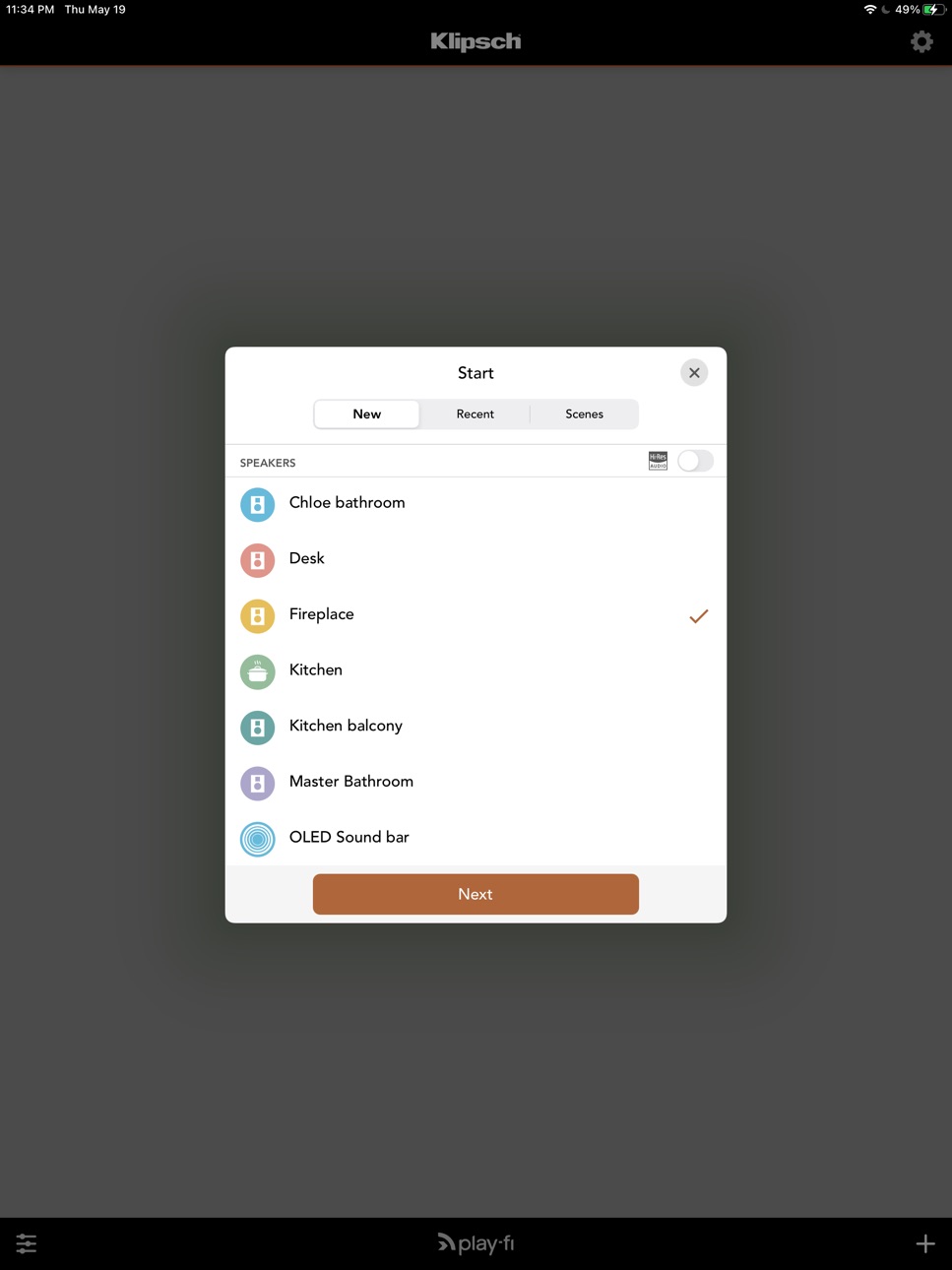
The Klipsch Stream App gives you access and full control of your Klipsch Stream Wireless Multi-Room Audio system, delivering high resolution streaming audio to any room of your home where your Klipsch Stream-enabled sound bar, wireless speaker, tabletop stereo speaker system, or wifi amplifier is located. Using the Klipsch Stream app on your phone or tablet, easily select the room(s) you want to listen to music in and select the source you want to listen to. Choose from a variety of internet streaming radio stations, content stored on your phone/tablet, content stored on a network attached storage drive, or even your CD player or turntable (when connected to the Klipsch Gate or Powergate product).
The Klipsch Stream app easily allows you to set up and name the rooms in your home where your Klipsch Stream-enabled products are located and gives you full control of volume. Choose one room or stream to them all at once for a complete multi-room audio experience.
The Klipsch Stream App gives you access and full control of your Klipsch Stream Wireless Multi-Room Audio system, delivering high resolution streaming audio to any room of your home where your Klipsch Stream-enabled sound bar, wireless speaker, tabletop stereo speaker system, or wifi amplifier is located. Using the Klipsch Stream app on your phone or tablet, easily select the room(s) you want to listen to music in and select the source you want to listen to. Choose from a variety of internet streaming radio stations, content stored on your phone/tablet, content stored on a network attached storage drive, or even your CD player or turntable (when connected to the Klipsch Gate or Powergate product).
The Klipsch Stream app easily allows you to set up and name the rooms in your home where your Klipsch Stream-enabled products are located and gives you full control of volume. Choose one room or stream to them all at once for a complete multi-room audio experience.
The app offers built-in streaming options: stream from worldwide music services; use AM/FM and Internet radio, connect to DLNA servers, or play anything from your device's music library, including your iTunes playlists. The app automatically organizes and indexes the music for you.
The app also handles set-up for your speakers, and gives you full control of volume and speaker selection. Choose one, set up speaker groups, or stream to all of them at once. Manage speaker groups for Spotify Connect, too.
Please note that the Klipsch Stream app is the companion app to Klipsch Stream Wireless Multi-Room Audio products or other DTS® Play-Fi® enabled products and is not intended as a standalone application.
Accessibility
ipadiphonemacrealityDevicetvoswatch
Version history 25 versions
Build 870181470v8.62.12024-11-05 21:10:45
• TuneIn is now available for all Play-Fi users. Stream radio and podcasts the world over!
• Napster updated to the latest and greatest streaming experience.
• Additional UI updates, such as for “Stream From”.
• Various fixes and improvements.
Build 869633978v8.61.22024-10-13 11:05:25
• TuneIn is now available for all Play-Fi users. Stream radio and podcasts the world over!
• Napster updated to the latest and greatest streaming experience.
• Additional UI updates, such as for “Stream From”.
• Various fixes and improvements.
Build 862952634v8.60.72024-09-19 08:51:56
• TuneIn is now available for all Play-Fi users. Stream radio and podcasts the world over!
• Napster updated to the latest and greatest streaming experience.
• Additional UI updates, such as for “Stream From”.
• Various fixes and improvements.
Build 856277465v8.30.132023-05-11 18:15:00
• Gapless playback now available for all Transferred playback
• Faster start of playback for most music services
• Improvements for Spotify, Airplay, and Google Cast, where supported
• Many fixes based on user feedback
Build 852769361v8.21.12022-12-19 15:43:44
• Gapless playback for newer Play-Fi products
• Improvements for Media Server playback
• Additional product fixes
Build 849283683v7.21.12022-06-16 00:35:28
• Now Playing screen updated! An enhanced look with improved controls for a better music listening experience
• When browsing tracks in Amazon Music, Qobuz, and TIDAL, you can now see the audio quality prior to playback
• Amazon Music now supports Shuffle and Play Queue
• Tidal menu and browsing has been updated
• Transfers and Presets now support Critical Listening mode
• Various fixes and improvements for Stream From, iHeartRadio, and more
Build 841162408v6.32.2103272021-04-01 01:40:54
• New speaker software.
• AIFF playback crash fixes.
• Bug fixes and tweaks.
Build 840336479v6.31.2102022021-02-10 23:39:13
• Amazon Music, Tidal, and Media Server now support Transfer from Now Playing and Presets
• Additional options for Amazon Music Hi-Res quality setting
• Fixed Napster server error
• Improved SXM playback
• App Settings page now has sections for better navigation
Build 840103651v6.30.2101082021-01-27 11:10:36
• Amazon Music, Tidal, and Media Server now support Transfer from Now Playing and Presets
• Additional options for Amazon Music Hi-Res quality setting
• Fixed Napster server error
• Improved SXM playback
• App Settings page now has sections for better navigation
Build 838925232v6.23.2011092020-11-24 09:07:22
• Philips TV and speaker products now support Pandora and AirPlay
• SiriusXM now supports Presets and Transfer
• Amazon Music content can now be saved as hardware Presets for certain Audiolab, McIntosh, Phorus, Rotel, and SVS products
• “Line-In Streaming” is now “Stream From”
• New login method for Tidal to support their service update (Transfer feature temporarily disabled)
• New languages: Indonesian, Korean, Malay, and Thai
• General improvements to the music service and media server browsing experience
Build 838198946v6.22.2010262020-11-06 19:49:41
• Philips TV and speaker products now support Pandora and AirPlay
• SiriusXM now supports Presets and Transfer
• Amazon Music content can now be saved as hardware Presets for certain Audiolab, McIntosh, Phorus, Rotel, and SVS products
• “Line-In Streaming” is now “Stream From”
• New login method for Tidal to support their service update (Transfer feature temporarily disabled)
• New languages: Indonesian, Korean, Malay, and Thai
• General improvements to the music service and media server browsing experience
Build 836940136v6.11.2007202020-07-22 03:56:29
• Compatibility for upcoming release of DTS Play-Fi for Philips TVs
• Added quality settings for Amazon Music
• Improved browsing and stability for Amazon Music, iHeartRadio, and Pandora.
• Other fixes and enhancements based on user feedback
Build 836773292v6.10.2007142020-07-19 00:17:02
• Compatibility for upcoming release of DTS Play-Fi for Philips TVs
• Added quality settings for Amazon Music
• Improved browsing and stability for Amazon Music, iHeartRadio, and Pandora.
• Other fixes and enhancements based on user feedback
Build 836174904v6.00.2005262020-06-02 03:01:48
• Compatibility for upcoming release of DTS Play-Fi for Philips TVs
• Added quality settings for Amazon Music
• Improved browsing and stability for Amazon Music, iHeartRadio, and Pandora.
• Other fixes and enhancements based on user feedback
Build 834151076v5.22.2001312020-02-07 18:46:41
• Updated SiriusXM: Station playback is now more responsive
• QPlay 2: Stream directly from the QQMusic app
• Media Server (DLNA) compatibility and playback improvements
• And lots of other fixes and improvements based on your feedback
Build 832777079v5.11.1909182019-09-21 00:26:04
• Preset Widget: You can now add presets to the new Play-Fi widget on the iOS Home Screen
• US Residents can enjoy Radio.com, a free new music service and listen to exclusive local and national radio stations, such as KROQ, Jack FM, and more!
• Residents of Australia, Canada, and New Zealand can now enjoy their favorite iHeartRadio stations and podcasts through DTS Play-Fi.
• Transfer Button: For certain Play-Fi products, you will now find a new button on the Now Playing screen to transfer playback from the app directly to the product.
• Transfer Preset: A new option for presets allows you to automatically start playback from the Play-Fi product when recalling the preset. Great for parties!
Build 827167820v4.84.1811212018-12-08 04:06:28
• A selection of DTS Play-Fi products now work with Amazon Alexa devices like the Echo and Dot. To find out more, go to the Play-Fi website, and also look for the Play-Fi skill on the Amazon Alexa app store
• Alexa Cast: DTS Play-Fi products that support “Works with Alexa” can now use the Cast functionality in supported apps, like Amazon Music
• Sling: The above products can now have the audio playback transferred to them from the phone/tablet when streaming from Deezer, iHeartRadio, Internet Radio, Napster, Pandora, Qobuz, SoundMachine, or Tidal
• Play-Fi Playlists: Save any queue of songs from any of our music services as a Play-Fi Playlist to easily recall your custom track lists
• App Presets & Recents: View and recall your most recent streaming sessions, and manually save any to a Preset in the app
• Global Play Queue: Create and edit a queue across multiple sources
• New Music Service: SOUNDMACHINE – Music for Business
• Added support for Tidal and iHeartRadio in Presets (for compatible Play-Fi products)
• Improved Media Server track listing and rendering
• Added more playback options and searching for KKBox, and improved performance
• Lots of other software fixes and improvements
Build 826573570v4.60.1804302018-05-09 14:56:39
• A selection of DTS Play-Fi products now work with Amazon Alexa devices like the Echo and Dot. To find out more, go to the Play-Fi website, and also look for the Play-Fi skill on the Amazon Alexa app store
• Added support for Tidal and iHeartRadio in Presets (for compatible Play-Fi products)
• Improved Media Server track listing and rendering
• Added more playback options and searching for KKBox, and improved performance
• Lots of other software fixes and improvements
Build 825983190v4.43.1802012018-04-05 01:33:10
• New TV Audio mode available for Line In broadcasting. Stream audio from the big game to stay in sync with the action as you move from room to room
• iHeartRadio playlist editing now available for premium subscribers
• Multi-zone auto connect
• Text color issue fixed on Line-In screen
• Lots of fixes
Build 825437974v4.41.1801222018-01-31 14:28:29
• New TV Audio mode available for Line In broadcasting. Stream audio from the big game to stay in sync with the action as you move from room to room
• iHeartRadio playlist editing now available for premium subscribers
• Multi-zone auto connect
• Lots of fixes
Build 823451629v4.38.1712012017-12-21 19:12:09
• Amazon Music Search: You can now search through the entire Amazon Music Catalog for purchased, uploaded, and subscribed content
• Amazon music is now available in the EU and Japan!
• Auto-connect will preserve critical listening state
• Bug fixes and performance improvements
Build 823016391v4.1.1707262017-08-10 18:41:18
• Amazon Music now supports listening to your purchased or uploaded music
• iHeartRadio now supports On Demand content for All Access subscribers
• Critical Listening mode now displays file information with bit depth and sampling frequency
• Improved Auto Reconnect: resumes faster, and now also recalls what was last playing
• Lots and lots of fixes and improvements
Build 821678071v3.81.1705022017-05-15 18:33:05
• Qobuz
• Configure surround sound audio using a Play-Fi receiver
Build 820527025v3.71.100802017-01-13 18:38:17
Fixes a crash when using Spotify Connect.
Build 820297074v3.70.100152017-01-10 18:11:32
• Single speaker surround
• Remote zone control and metadata
• Critical Listening native support of 24 bit / 192 kHz
• Control Play-Fi playback via Apple Watch
No pricing data captured yet — comparisons appear once the app has paid storefronts or in-app purchases.
Availability 75 of 75 storefronts
| Region | Language | Price | Ratings | Avg | Version |
|---|---|---|---|---|---|
| US | en-US | Free | 501 | 4.5 | 8.62.1 |
| MX | es-MX | Free | 18 | 4.8 | 8.62.1 |
| CL | es-MX | Free | 11 | 4.7 | 8.62.1 |
| CO | es-MX | Free | 8 | 4.9 | 8.62.1 |
| CR | es-MX | Free | 4 | 4.0 | 8.62.1 |
| GT | es-MX | Free | 3 | 4.7 | 8.62.1 |
| BR | pt-BR | Free | 2 | 4.5 | 8.62.1 |
| AR | es-MX | Free | 1 | 5.0 | 8.62.1 |
| BO | es-MX | Free | 1 | 5.0 | 8.62.1 |
| DO | es-MX | Free | 1 | 5.0 | 8.62.1 |
| PA | es-MX | Free | 1 | 5.0 | 8.62.1 |
| AG | en-GB | Free | 0 | — | 8.62.1 |
| AI | en-GB | Free | 0 | — | 8.62.1 |
| AO | en-GB | Free | 0 | — | 8.62.1 |
| BB | en-GB | Free | 0 | — | 8.62.1 |
| BF | en-GB | Free | 0 | — | 8.62.1 |
| BJ | en-GB | Free | 0 | — | 8.62.1 |
| BS | en-GB | Free | 0 | — | 8.62.1 |
| BW | en-GB | Free | 0 | — | 8.62.1 |
| BZ | en-GB | Free | 0 | — | 8.62.1 |
| CD | en-GB | Free | 0 | — | 8.62.1 |
| CG | en-GB | Free | 0 | — | 8.62.1 |
| CI | fr-FR | Free | 0 | — | 8.62.1 |
| CM | fr-FR | Free | 0 | — | 8.62.1 |
| CV | en-GB | Free | 0 | — | 8.62.1 |
| DM | en-GB | Free | 0 | — | 8.62.1 |
| DZ | en-GB | Free | 0 | — | 8.62.1 |
| EC | es-MX | Free | 0 | — | 8.62.1 |
| GA | fr-FR | Free | 0 | — | 8.62.1 |
| GD | en-GB | Free | 0 | — | 8.62.1 |
| GH | en-GB | Free | 0 | — | 8.62.1 |
| GM | en-GB | Free | 0 | — | 8.62.1 |
| GW | en-GB | Free | 0 | — | 8.62.1 |
| GY | en-GB | Free | 0 | — | 8.62.1 |
| HN | es-MX | Free | 0 | — | 8.62.1 |
| JM | en-GB | Free | 0 | — | 8.62.1 |
| KE | en-GB | Free | 0 | — | 8.62.1 |
| KN | en-GB | Free | 0 | — | 8.62.1 |
| KY | en-GB | Free | 0 | — | 8.62.1 |
| LC | en-GB | Free | 0 | — | 8.62.1 |
| LR | en-GB | Free | 0 | — | 8.62.1 |
| LY | en-GB | Free | 0 | — | 8.62.1 |
| MA | en-GB | Free | 0 | — | 8.62.1 |
| MG | en-GB | Free | 0 | — | 8.62.1 |
| ML | en-GB | Free | 0 | — | 8.62.1 |
| MS | en-GB | Free | 0 | — | 8.62.1 |
| MU | en-GB | Free | 0 | — | 8.62.1 |
| MW | en-GB | Free | 0 | — | 8.62.1 |
| MZ | en-GB | Free | 0 | — | 8.62.1 |
| NA | en-GB | Free | 0 | — | 8.62.1 |
| NE | en-GB | Free | 0 | — | 8.62.1 |
| NG | en-GB | Free | 0 | — | 8.62.1 |
| NI | es-MX | Free | 0 | — | 8.62.1 |
| PE | es-MX | Free | 0 | — | 8.62.1 |
| PY | es-MX | Free | 0 | — | 8.62.1 |
| RW | en-GB | Free | 0 | — | 8.62.1 |
| SC | en-GB | Free | 0 | — | 8.62.1 |
| SL | en-GB | Free | 0 | — | 8.62.1 |
| SN | en-GB | Free | 0 | — | 8.62.1 |
| SR | en-GB | Free | 0 | — | 8.62.1 |
| ST | en-GB | Free | 0 | — | 8.62.1 |
| SV | es-MX | Free | 0 | — | 8.62.1 |
| SZ | en-GB | Free | 0 | — | 8.62.1 |
| TC | en-GB | Free | 0 | — | 8.62.1 |
| TD | en-GB | Free | 0 | — | 8.62.1 |
| TN | en-GB | Free | 0 | — | 8.62.1 |
| TT | en-GB | Free | 0 | — | 8.62.1 |
| TZ | en-GB | Free | 0 | — | 8.62.1 |
| UG | en-GB | Free | 0 | — | 8.62.1 |
| UY | en-GB | Free | 0 | — | 8.62.1 |
| VC | en-GB | Free | 0 | — | 8.62.1 |
| VE | es-MX | Free | 0 | — | 8.62.1 |
| VG | en-GB | Free | 0 | — | 8.62.1 |
| ZM | en-GB | Free | 0 | — | 8.62.1 |
| ZW | en-GB | Free | 0 | — | 8.62.1 |
Change log 28 changes · ZM
✎
releaseNotes updated
• TuneIn is now available for all Play-Fi users. Stream radio and podcasts the world over!
• Napster updated to the latest and greatest streaming experience.
•
✎
description updated
The Klipsch Stream App gives you access and full control of your Klipsch Stream Wireless Multi-Room Audio system, delivering high resolution streaming audio to
✎
name updated
Klipsch Stream
◆
Version 8.62.1 released
• TuneIn is now available for all Play-Fi users. Stream radio and podcasts the world over!
• Napster updated to the latest and greatest streaming experience.
• Additional UI updates, such as for “Stream From”.
• Various fixes and improvemen
◆
Version 8.61.2 released
• TuneIn is now available for all Play-Fi users. Stream radio and podcasts the world over!
• Napster updated to the latest and greatest streaming experience.
• Additional UI updates, such as for “Stream From”.
• Various fixes and improvemen
◆
Version 8.60.7 released
• TuneIn is now available for all Play-Fi users. Stream radio and podcasts the world over!
• Napster updated to the latest and greatest streaming experience.
• Additional UI updates, such as for “Stream From”.
• Various fixes and improvemen
◆
Version 8.30.13 released
• Gapless playback now available for all Transferred playback
• Faster start of playback for most music services
• Improvements for Spotify, Airplay, and Google Cast, where supported
• Many fixes based on user feedback
◆
Version 8.21.1 released
• Gapless playback for newer Play-Fi products
• Improvements for Media Server playback
• Additional product fixes
◆
Version 7.21.1 released
• Now Playing screen updated! An enhanced look with improved controls for a better music listening experience
• When browsing tracks in Amazon Music, Qobuz, and TIDAL, you can now see the audio quality prior to playback
• Amazon Music now s
◆
Version 6.32.210327 released
• New speaker software.
• AIFF playback crash fixes.
• Bug fixes and tweaks.
◆
Version 6.31.210202 released
• Amazon Music, Tidal, and Media Server now support Transfer from Now Playing and Presets
• Additional options for Amazon Music Hi-Res quality setting
• Fixed Napster server error
• Improved SXM playback
• App Settings page now has sections
◆
Version 6.30.210108 released
• Amazon Music, Tidal, and Media Server now support Transfer from Now Playing and Presets
• Additional options for Amazon Music Hi-Res quality setting
• Fixed Napster server error
• Improved SXM playback
• App Settings page now has sections
◆
Version 6.23.201109 released
• Philips TV and speaker products now support Pandora and AirPlay
• SiriusXM now supports Presets and Transfer
• Amazon Music content can now be saved as hardware Presets for certain Audiolab, McIntosh, Phorus, Rotel, and SVS products
• “Li
◆
Version 6.22.201026 released
• Philips TV and speaker products now support Pandora and AirPlay
• SiriusXM now supports Presets and Transfer
• Amazon Music content can now be saved as hardware Presets for certain Audiolab, McIntosh, Phorus, Rotel, and SVS products
• “Li
◆
Version 6.11.200720 released
• Compatibility for upcoming release of DTS Play-Fi for Philips TVs
• Added quality settings for Amazon Music
• Improved browsing and stability for Amazon Music, iHeartRadio, and Pandora.
• Other fixes and enhancements based on user feedbac
◆
Version 6.10.200714 released
• Compatibility for upcoming release of DTS Play-Fi for Philips TVs
• Added quality settings for Amazon Music
• Improved browsing and stability for Amazon Music, iHeartRadio, and Pandora.
• Other fixes and enhancements based on user feedbac
◆
Version 6.00.200526 released
• Compatibility for upcoming release of DTS Play-Fi for Philips TVs
• Added quality settings for Amazon Music
• Improved browsing and stability for Amazon Music, iHeartRadio, and Pandora.
• Other fixes and enhancements based on user feedbac
◆
Version 5.22.200131 released
• Updated SiriusXM: Station playback is now more responsive
• QPlay 2: Stream directly from the QQMusic app
• Media Server (DLNA) compatibility and playback improvements
• And lots of other fixes and improvements based on your feedback
◆
Version 5.11.190918 released
• Preset Widget: You can now add presets to the new Play-Fi widget on the iOS Home Screen
• US Residents can enjoy Radio.com, a free new music service and listen to exclusive local and national radio stations, such as KROQ, Jack FM, and mor
◆
Version 4.84.181121 released
• A selection of DTS Play-Fi products now work with Amazon Alexa devices like the Echo and Dot. To find out more, go to the Play-Fi website, and also look for the Play-Fi skill on the Amazon Alexa app store
• Alexa Cast: DTS Play-Fi product
◆
Version 4.60.180430 released
• A selection of DTS Play-Fi products now work with Amazon Alexa devices like the Echo and Dot. To find out more, go to the Play-Fi website, and also look for the Play-Fi skill on the Amazon Alexa app store
• Added support for Tidal and iHe
◆
Version 4.43.180201 released
• New TV Audio mode available for Line In broadcasting. Stream audio from the big game to stay in sync with the action as you move from room to room
• iHeartRadio playlist editing now available for premium subscribers
• Multi-zone auto conn
◆
Version 4.41.180122 released
• New TV Audio mode available for Line In broadcasting. Stream audio from the big game to stay in sync with the action as you move from room to room
• iHeartRadio playlist editing now available for premium subscribers
• Multi-zone auto conn
◆
Version 4.38.171201 released
• Amazon Music Search: You can now search through the entire Amazon Music Catalog for purchased, uploaded, and subscribed content
• Amazon music is now available in the EU and Japan!
• Auto-connect will preserve critical listening state
• B
◆
Version 4.1.170726 released
• Amazon Music now supports listening to your purchased or uploaded music
• iHeartRadio now supports On Demand content for All Access subscribers
• Critical Listening mode now displays file information with bit depth and sampling frequency
◆
Version 3.81.170502 released
• Qobuz
• Configure surround sound audio using a Play-Fi receiver
◆
Version 3.71.10080 released
Fixes a crash when using Spotify Connect.
◆
Version 3.70.10015 released
• Single speaker surround
• Remote zone control and metadata
• Critical Listening native support of 24 bit / 192 kHz
• Control Play-Fi playback via Apple Watch