Home › Lifestyle

 MO
MO
 DEde-DE
 USen-US
 NLnl
NLnl FRfr-FR
 ITit
ITit GBen-GB
 AUen-AU
 ESes-ES
 CAen-CA
 PLen-GB
 BEen-GB
 SEsv
SEsv CNzh-Hans-CN
 ATde-DE
 CHde-CH
 CZen-GB
 DKen-GB
 PTpt-PT
 HUen-GB
 RUru
RUru NOen-GB
 ROen-GB
 ZAen-GB
 UAen-GB
 FIen-GB
 TRen-GB
 TWzh-Hant-TW
 INen-GB
 SKen-GB
 NZen-AU
 ILen-GB
 THen-GB
 BGen-GB
 GRen-GB
 LTen-GB
 IEen-GB
 SIen-GB
 VNen-GB
 JPja
JPja LUen-GB
 HRen-GB
 LVen-GB
 SAen-GB
 MYen-GB
 EEen-GB
 KRko
KRko HKzh-Hant-HK
 SGen-GB
 IDen-GB
 AEen-GB
 BYen-GB
 EGen-GB
 PHen-GB
 CYen-GB
 RSen-GB
 ISen-GB
 MTen-GB
 AMen-GB
 JOen-GB
 KWen-GB
 MUen-GB
 GEen-GB
 LBen-GB
 MDen-GB
 MKen-GB
 AZen-GB
 BAen-GB
 GHen-GB
 KGen-GB
 MEen-GB
 NAen-GB
 NGen-GB
 OMen-GB
 PKen-GB
 UZen-GB
 BMen-GB
 BWen-GB
 IQen-GB
 KEen-GBMOzh-Hant-HK
 MVen-GB
 TMen-GB
 AFen-GB
 ALen-GB
 BNen-GB
 BTen-GB
 FJen-GB
 FMen-GB
 KHen-GB
 NRen-GB
 PGen-GB
 PWen-GB
 QAen-GB
 SBen-GB
 TJen-GB
 TOen-GB
 TZen-GB
 UGen-GB
 VUen-GB
 XKen-GB
 YEen-GB
 ZMen-GB
 ZWen-GB
103 of 103 storefronts
Content in en-US
Content in en-US
Information
Preview 4 platforms
iPhone 5 images


iPad 5 images


Mac 4 images


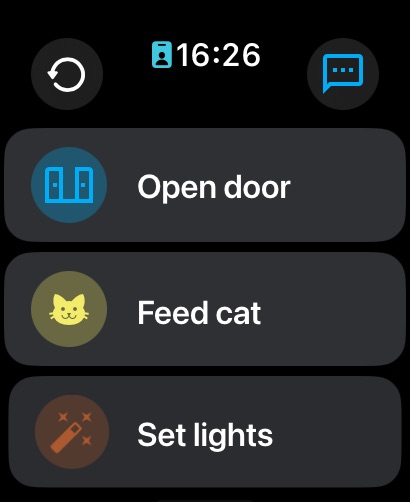
Apple Watch 1 image
What’s New Version 2026.7.0
• Kiosk Mode Rebuilt: Easier to configure and more reliable than ever.
• Smarter Shortcuts: App Intents have been cleaned up to provide richer context and a smoother experience.
• Apple Watch Upgrades: Added mTLS support and a brand-new settings screen right on your wrist.
• CarPlay Enhancements: Configure CarPlay directly from your car screen, no iPhone interaction required!
• Improved Pickers: Entity pickers now include area and device context.
• Better Camera Previews: Added a WebRTC player for cameras in push notification previews.
• Snooze notifications: Notifications now come with snooze options, and you can customize in settings.
Description
The Home Assistant Companion app allows you to access your Home Assistant instance on the go. Home Assistant is the smart home solution focused on privacy, choice, and sustainability. It runs locally in your home via a device like the Home Assistant Green or Raspberry Pi.
This app connects to all the most powerful features of Home Assistant,
- One app to control the whole home - Home Assistant is compatible with the biggest brands in the smart home, connecting to thousands of smart devices and services.
- Discover automatically and quickly configure new devices - such as Philips Hue, Sonos, and IKEA Tradfri.
- Automate everything - Make all the devices in your home work in harmony - have your lights dim when you start watching a movie, or turn off your heat when you’re away from home.
- Keep your home’s data in the home - use it privately to see past trends and averages.
- Connect to open standards with hardware add-ons - including Z-Wave, Zigbee, Matter, Thread, and Bluetooth.
- Connect anywhere - If you would like to access this app while away from home, the most secure and simple way to get started is Home Assistant Cloud.
The app unlocks your smartphone or tablet as a home automation tool.
- Securely share your location, using it to automate heating, security, and so much more.
- Get notifications on what's happening in your home, from detecting leaks to doors left open, you have full control over what it tells you.
- Carplay functionality lets you open a garage or disable the security system from the dash of your car.
- Build your own widgets to control any device in your home with a tap.
- Integrate Home Assistant's functionality into Shortcuts, for example have your phone’s morning alarm turn on the coffee machine.
- Apple Watch compatibility can show your home's temperature on a watch face or quickly activate devices.
- Text or talk to your local voice assistant on your device.
- Mac compatibility allows you to control your home from your desktop, but also to share data to build automation, like having your streaming lights turn on when your camera is active.
Join the over 1 million users and empower your home with better privacy, choice and sustainability.
Compatible with: Airthings, Amazon Alexa, Amcrest, Apple HomeKit, Apple TV, ASUSWRT, August, Belink WeMo, Bluetooth, Bose SoundTouch, Broadlink, BTHome, deCONZ, Denon, Devolo, DLNA, Ecobee, Ecovacs, Ecowitt, Elgato, EZVIZ, Fritz, Fully Kiosk, GoodWe, Govee, Growatt, Hikvision, Hive, Home Connect, Homematic, HomeWizard, Honeywell, iCloud, IFTTT, IKEA Tradfri, Insteon, Jellyfin, LG Smart TVs, LIFX, Logitech Harmony, Lutron Caseta, Magic Home, Matter, MotionEye, MQTT, MusicCast, Nanoleaf, Netatmo, Nuki, OctoPrint, ONVIF, Opower, Overkiz, OwnTracks, Panasonic Viera, Philips Hue, Pi-hole, Plex, Reolink, Ring, Roborock, Roku, Samsung TVs, Sense, Sensiba, Shelly, SmartThings, SolarEdge, Sonarr, Sonos, Sony Bravia, Spotify, Steam, SwitchBot, Synology, Tado, Tasmota, Tesla Wall, Thread, Tile, TP-Link Smart Home, Tuya, UniFi, UPnP, Verisure, Vizio, Wallbox, WebRTC, WiZ, WLED, Xbox, Xiaomi BLE, Yale, Yeelight, YoLink, Z-Wave, Zigbe
Capabilities
Siri
Accessibility
ipadiphonemacrealityDevicetvoswatch
Version history 25 versions
Build 887301096v2026.7.02026-07-05 22:09:00
• Kiosk Mode Rebuilt: Easier to configure and more reliable than ever.
• Smarter Shortcuts: App Intents have been cleaned up to provide richer context and a smoother experience.
• Apple Watch Upgrades: Added mTLS support and a brand-new settings screen right on your wrist.
• CarPlay Enhancements: Configure CarPlay directly from your car screen, no iPhone interaction required!
• Improved Pickers: Entity pickers now include area and device context.
• Better Camera Previews: Added a WebRTC player for cameras in push notification previews.
• Snooze notifications: Notifications now come with snooze options, and you can customize in settings.
Build 886481372v2026.6.02026-06-04 12:20:17
- Remove unnecessary refresh after Matter device commissioning.
- Bug fixes and improvements for Kiosk Mode (Labs).
- Fix issue where location permission screen was being displayed in a loop.
- Improved Home Assistant Invitation screen.
Build 885071753v2026.5.02026-05-26 07:24:13
* Added a new barometer sensor for supported iPhone and iPad models.
* Added a new app icon shortcuts configurator.
* Added a new “Assist prompt” option for CarPlay quick access.
* Added a cloudhook connection check in server settings.
* Improved CarPlay Assist feedback and playback troubleshooting.
* Improved the camera player gestures.
* Improved mTLS certificate handling, including support for using the same certificate with multiple servers.
* Fixed issues with on-device speech-to-text submission.
* Fixed duplicate connection error messages and reconnection loops.
* Fixed kiosk mode brightness persisting after leaving the app.
* Fixed several macOS mTLS display and profile request issues.
* Fixed URL normalization issues for manually entered and IPv6 server URLs s.
Build 884778101v2026.4.12026-04-22 21:41:41
- Fix crash on Kiosk mode
- Improved mTLS certificates compatibility
- Fix scroll and focus on text field
- Fix issue where widgets that were going blank due to extension crash
- Hide hidden entities in CarPlay
- Added re-authentication flow for expired tokens
- Prevent crash on call_service from deep link
- Validate frontend message origin
Build 882506960v2026.4.02026-04-07 07:07:36
- Improved CarPlay UI (iOS 26+)
- Added Kiosk mode (“Labs” feature)
- Added mTLS (“Labs” feature)
- Added Apple Watch folders
Build 882315377v2026.2.12026-02-10 22:04:10
Fix crash on iOS 15 and 16
———————————————
- You can now directly add entities from your dashboard to CarPlay, Apple Watch, and Widgets. Simply tap on the desired entity from your dashboard, tap the more menu, and select “Add to.”
- The entity picker has been improved.
- The download manager has been improved.
- The app now preserves the current page when switching between internal and external URLs.
- The WebRTC camera player has been improved.
- The connection security block screen instructions have been improved.
- An experimental setting has been added to enable drawing the Home Assistant Dashboard edge-to-edge.
- A “quick search” gesture action option has been added.
- The app now automatically refreshes after 5 minutes of inactivity (this can be disabled under companion app settings > general).
- The visibility of disabled, hidden, configuration, and diagnostic entities has been removed from CarPlay.
- The widgets entity state now reflects device-class-specific state.
- A connection troubleshooting tool has been added to the error screen.
- A “mute response” setting has been added for Assist.
- Several crashes in the background due to the database updater have been fixed.
Build 882167220v2026.22026-02-09 17:19:33
- You can now directly add entities from your dashboard to CarPlay, Apple Watch, and Widgets. Simply tap on the desired entity from your dashboard, tap the more menu, and select “Add to.”
- The entity picker has been improved.
- The download manager has been improved.
- The app now preserves the current page when switching between internal and external URLs.
- The WebRTC camera player has been improved.
- The connection security block screen instructions have been improved.
- An experimental setting has been added to enable drawing the Home Assistant Dashboard edge-to-edge.
- A “quick search” gesture action option has been added.
- The app now automatically refreshes after 5 minutes of inactivity (this can be disabled under companion app settings > general).
- The visibility of disabled, hidden, configuration, and diagnostic entities has been removed from CarPlay.
- The widgets entity state now reflects device-class-specific state.
- A connection troubleshooting tool has been added to the error screen.
- A “mute response” setting has been added for Assist.
- Several crashes in the background due to the database updater have been fixed.
Build 881249833v2026.1.12026-01-06 19:34:25
CarPlay
- Diagnostic and configuration entities are now hidden.
- Fixed the issue where CarPlay wouldn’t perform a lock operation when displayed from the quick access tab.
- The entity area is now visible in the quick access tab.
Control Center
- Several new controls have been added to open domain-specific entities in the app.
- New control for fan domain
Entity Picker
- The search functionality has been improved. Now, it’s possible to filter entities by their ID, name, and the area they belong to.
Native WebRTC Player (Alpha)
- Audio has been added to the player. To try it out, add a control center control called “Open camera.” Please note that this is still in early development, and a known issue is that the microphone is requested even when it’s not in use.
Local Push
- The activation issue where the iPhone required a reboot to enable it has been fixed.
Build 880760604v2026.12026-01-05 22:13:27
CarPlay
- Diagnostic and configuration entities are now hidden.
- Fixed the issue where CarPlay wouldn’t perform a lock operation when displayed from the quick access tab.
- The entity area is now visible in the quick access tab.
Control Center
- Several new controls have been added to open domain-specific entities in the app.
- New control for fan domain
Entity Picker
- The search functionality has been improved. Now, it’s possible to filter entities by their ID, name, and the area they belong to.
Native WebRTC Player (Alpha)
- Audio has been added to the player. To try it out, add a control center control called “Open camera.” Please note that this is still in early development, and a known issue is that the microphone is requested even when it’s not in use.
Local Push
- The activation issue where the iPhone required a reboot to enable it has been fixed.
Build 880288682v2025.12.12025-12-03 14:51:04
- Fix issue where App freezes in URL settings when running on iOS below 26
Build 880231267v2025.12.02025-12-01 19:43:31
- Fix missing “Add” button for watch complications
Build 880107067v2025.11.22025-11-26 19:42:31
- Lock screen widgets (‘Details’ and ‘Gauge’) can now execute scripts on tap (replacing old iOS Actions)
Build 880054110v2025.11.12025-11-25 20:48:13
- Fixed issue where connection security level screen was shown for users with all URLs already https
- Fixed issue where user ended up in a dead state (blank screen) when entered the wrong URL in settings and force closed the app
Build 879515157v2025.11.02025-11-24 18:33:39
We’ve redesigned the onboarding experience to make getting started with Home Assistant easier, faster, and more secure than ever.
You’ll now be prompted to choose between two connection security levels — giving you more control and peace of mind, especially when accessing your Home Assistant remotely. For details, check out our companion app documentation.
Bug Fixes and Improvements
• Fixed Apple Watch app header buttons not responding
• Improved stability for CarPlay connections
• Resolved an issue where the Watch Assist pipeline picker wouldn’t open
• Widgets now migrate correctly after restoring from an iPhone backup
Note regarding this release note:
For languages other than English, we rely on AI translations. If you see any issues with the text, please let us know.
Build 878531705v2025.10.02025-10-07 21:55:31
- Fix for Apple Watch notifications that include attachments not loading correctly.
Build 878400384v2025.9.32025-09-25 18:42:58
- Fix missing actions for Apple Watch notifications.
Build 878333950v2025.9.22025-09-23 01:41:11
We are ready for iOS 26! Let us know if we missed anything. Enjoy!
- Fix issue where some buttons tap were not working properly.
Build 878004505v2025.9.02025-09-15 04:27:15
We are ready for iOS 26! Let us know if we missed anything. Enjoy!
Build 878114529v2025.9.12025-09-15 21:26:21
We are ready for iOS 26! Let us know if we missed anything. Enjoy!
- Fixed issue on watch notifications not displaying correct content.
Build 876847772v2025.7.22025-07-31 15:57:49
- Improved access to companion app settings when the Home Assistant server is down or misconfigured.
- Fixed script execution for scripts that had their IDs altered in Home Assistant.
- Fixed the Improv pairing flow UI.
Build 876390235v2025.7.12025-07-15 17:33:32
- Fix issue where Apple Watch app was not launching for some users.
Build 876359924v2025.72025-07-14 07:49:24
- Fix issue where when Home Assistant server is down or disconnected for some reason, user was left without an option to open companion App settings. You will now see an empty state + settings button.
Build 875812253v2025.62025-07-05 11:07:58
- Added option to open entity “more-info” dialog from Control center, widgets, shortcuts, and deeplinking;
- Now it is possible to reorder servers, just drag and drop in the companion app settings;
- Fixed missing unit of measurement in CarPlay sensor states;
IMPORTANT: If you previously used the “local push” option, you will need to opt-in again; it’s now coming disabled by default when you onboard a new server, and this App version resets the toggle.
Build 874024625v2025.52025-05-19 07:06:25
- Improved onboarding
- Control center switch now also includes “input_boolean” domain
- Fix for CarPlay not reflecing configuration overrides
Build 873295274v2025.32025-03-31 09:02:48
- New ‘Custom Widget’: Create your own widgets by quickly selecting the entities you want to display and defining their actions when tapped. Note that displaying the state of an entity within the widget is currently in Beta and opt-in. You can enable it using a toggle in the widget configuration dialog, accessible directly from the home screen. If you have any questions, please refer to the documentation link available in the custom widget configuration screen.
- Added support for Assist LLM streamed responses.
- Assist will resume recording if its response ends with a follow-up question.
No pricing data captured yet — comparisons appear once the app has paid storefronts or in-app purchases.
Availability 103 of 103 storefronts
| Region | Language | Price | Ratings | Avg | Version |
|---|---|---|---|---|---|
| DE | de-DE | Free | 3.6k | 4.7 | 2026.7.0 |
| US | en-US | Free | 3.6k | 4.7 | 2026.7.0 |
| NL | nl | Free | 1.2k | 4.6 | 2026.7.0 |
| FR | fr-FR | Free | 1.2k | 4.8 | 2026.7.0 |
| IT | it | Free | 960 | 4.7 | 2026.7.0 |
| GB | en-GB | Free | 757 | 4.6 | 2026.7.0 |
| AU | en-AU | Free | 676 | 4.8 | 2026.7.0 |
| ES | es-ES | Free | 613 | 4.7 | 2026.7.0 |
| CA | en-CA | Free | 572 | 4.7 | 2026.7.0 |
| PL | en-GB | Free | 519 | 4.7 | 2026.7.0 |
| BE | en-GB | Free | 446 | 4.7 | 2026.7.0 |
| SE | sv | Free | 430 | 4.7 | 2026.7.0 |
| CN | zh-Hans-CN | Free | 429 | 4.7 | 2026.7.0 |
| AT | de-DE | Free | 412 | 4.8 | 2026.7.0 |
| CH | de-CH | Free | 324 | 4.7 | 2026.7.0 |
| CZ | en-GB | Free | 319 | 4.8 | 2026.7.0 |
| DK | en-GB | Free | 286 | 4.6 | 2026.7.0 |
| PT | pt-PT | Free | 282 | 4.8 | 2026.7.0 |
| HU | en-GB | Free | 264 | 4.9 | 2026.7.0 |
| RU | ru | Free | 255 | 4.4 | 2026.7.0 |
| NO | en-GB | Free | 190 | 4.8 | 2026.7.0 |
| RO | en-GB | Free | 173 | 4.9 | 2026.7.0 |
| ZA | en-GB | Free | 157 | 4.8 | 2026.7.0 |
| UA | en-GB | Free | 146 | 4.8 | 2026.7.0 |
| FI | en-GB | Free | 119 | 4.5 | 2026.7.0 |
| TR | en-GB | Free | 118 | 4.8 | 2026.7.0 |
| TW | zh-Hant-TW | Free | 114 | 4.8 | 2026.7.0 |
| IN | en-GB | Free | 98 | 4.7 | 2026.7.0 |
| SK | en-GB | Free | 98 | 4.7 | 2026.7.0 |
| NZ | en-AU | Free | 97 | 4.8 | 2026.7.0 |
| IL | en-GB | Free | 94 | 4.7 | 2026.7.0 |
| TH | en-GB | Free | 77 | 4.9 | 2026.7.0 |
| BG | en-GB | Free | 75 | 4.8 | 2026.7.0 |
| GR | en-GB | Free | 74 | 4.8 | 2026.7.0 |
| LT | en-GB | Free | 72 | 4.7 | 2026.7.0 |
| IE | en-GB | Free | 56 | 4.8 | 2026.7.0 |
| SI | en-GB | Free | 56 | 4.7 | 2026.7.0 |
| VN | en-GB | Free | 45 | 4.5 | 2026.7.0 |
| JP | ja | Free | 42 | 4.5 | 2026.7.0 |
| LU | en-GB | Free | 40 | 4.7 | 2026.7.0 |
| HR | en-GB | Free | 38 | 4.8 | 2026.7.0 |
| LV | en-GB | Free | 37 | 4.7 | 2026.7.0 |
| SA | en-GB | Free | 37 | 4.9 | 2026.7.0 |
| MY | en-GB | Free | 36 | 4.7 | 2026.7.0 |
| EE | en-GB | Free | 35 | 4.6 | 2026.7.0 |
| KR | ko | Free | 32 | 4.3 | 2026.7.0 |
| HK | zh-Hant-HK | Free | 28 | 4.4 | 2026.7.0 |
| SG | en-GB | Free | 27 | 4.7 | 2026.7.0 |
| ID | en-GB | Free | 21 | 5.0 | 2026.7.0 |
| AE | en-GB | Free | 18 | 4.9 | 2026.7.0 |
| BY | en-GB | Free | 18 | 4.9 | 2026.7.0 |
| EG | en-GB | Free | 16 | 5.0 | 2026.7.0 |
| PH | en-GB | Free | 14 | 5.0 | 2026.7.0 |
| CY | en-GB | Free | 13 | 4.8 | 2026.7.0 |
| RS | en-GB | Free | 12 | 4.8 | 2026.7.0 |
| IS | en-GB | Free | 10 | 5.0 | 2026.7.0 |
| MT | en-GB | Free | 8 | 5.0 | 2026.7.0 |
| AM | en-GB | Free | 4 | 5.0 | 2026.7.0 |
| JO | en-GB | Free | 4 | 5.0 | 2026.7.0 |
| KW | en-GB | Free | 4 | 4.5 | 2026.7.0 |
| MU | en-GB | Free | 4 | 4.8 | 2026.7.0 |
| GE | en-GB | Free | 3 | 5.0 | 2026.7.0 |
| LB | en-GB | Free | 3 | 5.0 | 2026.7.0 |
| MD | en-GB | Free | 3 | 5.0 | 2026.7.0 |
| MK | en-GB | Free | 3 | 5.0 | 2026.7.0 |
| AZ | en-GB | Free | 2 | 5.0 | 2026.7.0 |
| BA | en-GB | Free | 2 | 4.5 | 2026.7.0 |
| GH | en-GB | Free | 2 | 5.0 | 2026.7.0 |
| KG | en-GB | Free | 2 | 5.0 | 2026.7.0 |
| ME | en-GB | Free | 2 | 5.0 | 2026.7.0 |
| NA | en-GB | Free | 2 | 5.0 | 2026.7.0 |
| NG | en-GB | Free | 2 | 5.0 | 2026.7.0 |
| OM | en-GB | Free | 2 | 5.0 | 2026.7.0 |
| PK | en-GB | Free | 2 | 5.0 | 2026.7.0 |
| UZ | en-GB | Free | 2 | 5.0 | 2026.7.0 |
| BM | en-GB | Free | 1 | 5.0 | 2026.7.0 |
| BW | en-GB | Free | 1 | 5.0 | 2026.7.0 |
| IQ | en-GB | Free | 1 | 5.0 | 2026.7.0 |
| KE | en-GB | Free | 1 | 5.0 | 2026.7.0 |
| MO | zh-Hant-HK | Free | 1 | 5.0 | 2026.7.0 |
| MV | en-GB | Free | 1 | 5.0 | 2026.7.0 |
| TM | en-GB | Free | 1 | 5.0 | 2026.7.0 |
| AF | en-GB | Free | 0 | — | 2026.7.0 |
| AL | en-GB | Free | 0 | — | 2026.7.0 |
| BN | en-GB | Free | 0 | — | 2026.7.0 |
| BT | en-GB | Free | 0 | — | 2026.7.0 |
| FJ | en-GB | Free | 0 | — | 2026.7.0 |
| FM | en-GB | Free | 0 | — | 2026.7.0 |
| KH | en-GB | Free | 0 | — | 2026.7.0 |
| NR | en-GB | Free | 0 | — | 2026.7.0 |
| PG | en-GB | Free | 0 | — | 2026.7.0 |
| PW | en-GB | Free | 0 | — | 2026.7.0 |
| QA | en-GB | Free | 0 | — | 2026.7.0 |
| SB | en-GB | Free | 0 | — | 2026.7.0 |
| TJ | en-GB | Free | 0 | — | 2026.7.0 |
| TO | en-GB | Free | 0 | — | 2026.7.0 |
| TZ | en-GB | Free | 0 | — | 2026.7.0 |
| UG | en-GB | Free | 0 | — | 2026.7.0 |
| VU | en-GB | Free | 0 | — | 2026.7.0 |
| XK | en-GB | Free | 0 | — | 2026.7.0 |
| YE | en-GB | Free | 0 | — | 2026.7.0 |
| ZM | en-GB | Free | 0 | — | 2026.7.0 |
| ZW | en-GB | Free | 0 | — | 2026.7.0 |
Change log 29 changes · MO
✎
releaseNotes updated
• Kiosk Mode Rebuilt: Easier to configure and more reliable than ever.
• Smarter Shortcuts: App Intents have been cleaned up to provide richer context and a smo
✎
description updated
The Home Assistant Companion app allows you to access your Home Assistant instance on the go. Home Assistant is the smart home solution focused on privacy, choi
✎
subtitle updated
Open Source Home Automation
✎
name updated
Home Assistant
◆
Version 2026.7.0 released
• Kiosk Mode Rebuilt: Easier to configure and more reliable than ever.
• Smarter Shortcuts: App Intents have been cleaned up to provide richer context and a smoother experience.
• Apple Watch Upgrades: Added mTLS support and a brand-new set
◆
Version 2026.6.0 released
- Remove unnecessary refresh after Matter device commissioning.
- Bug fixes and improvements for Kiosk Mode (Labs).
- Fix issue where location permission screen was being displayed in a loop.
- Improved Home Assistant Invitation screen.
◆
Version 2026.5.0 released
* Added a new barometer sensor for supported iPhone and iPad models.
* Added a new app icon shortcuts configurator.
* Added a new “Assist prompt” option for CarPlay quick access.
* Added a cloudhook connection check in server settings.
* Im
◆
Version 2026.4.1 released
- Fix crash on Kiosk mode
- Improved mTLS certificates compatibility
- Fix scroll and focus on text field
- Fix issue where widgets that were going blank due to extension crash
- Hide hidden entities in CarPlay
- Added re-authentication fl
◆
Version 2026.4.0 released
- Improved CarPlay UI (iOS 26+)
- Added Kiosk mode (“Labs” feature)
- Added mTLS (“Labs” feature)
- Added Apple Watch folders
◆
Version 2026.2.1 released
Fix crash on iOS 15 and 16
———————————————
- You can now directly add entities from your dashboard to CarPlay, Apple Watch, and Widgets. Simply tap on the desired entity from your dashboard, tap the more menu, and select “Add to.”
- The ent
◆
Version 2026.2 released
- You can now directly add entities from your dashboard to CarPlay, Apple Watch, and Widgets. Simply tap on the desired entity from your dashboard, tap the more menu, and select “Add to.”
- The entity picker has been improved.
- The downloa
◆
Version 2026.1.1 released
CarPlay
- Diagnostic and configuration entities are now hidden.
- Fixed the issue where CarPlay wouldn’t perform a lock operation when displayed from the quick access tab.
- The entity area is now visible in the quick access tab.
Control C
◆
Version 2026.1 released
CarPlay
- Diagnostic and configuration entities are now hidden.
- Fixed the issue where CarPlay wouldn’t perform a lock operation when displayed from the quick access tab.
- The entity area is now visible in the quick access tab.
Control C
◆
Version 2025.12.1 released
- Fix issue where App freezes in URL settings when running on iOS below 26
◆
Version 2025.12.0 released
- Fix missing “Add” button for watch complications
◆
Version 2025.11.2 released
- Lock screen widgets (‘Details’ and ‘Gauge’) can now execute scripts on tap (replacing old iOS Actions)
◆
Version 2025.11.1 released
- Fixed issue where connection security level screen was shown for users with all URLs already https
- Fixed issue where user ended up in a dead state (blank screen) when entered the wrong URL in settings and force closed the app
◆
Version 2025.11.0 released
We’ve redesigned the onboarding experience to make getting started with Home Assistant easier, faster, and more secure than ever.
You’ll now be prompted to choose between two connection security levels — giving you more control and peace o
◆
Version 2025.10.0 released
- Fix for Apple Watch notifications that include attachments not loading correctly.
◆
Version 2025.9.3 released
- Fix missing actions for Apple Watch notifications.
◆
Version 2025.9.2 released
We are ready for iOS 26! Let us know if we missed anything. Enjoy!
- Fix issue where some buttons tap were not working properly.
◆
Version 2025.9.1 released
We are ready for iOS 26! Let us know if we missed anything. Enjoy!
- Fixed issue on watch notifications not displaying correct content.
◆
Version 2025.9.0 released
We are ready for iOS 26! Let us know if we missed anything. Enjoy!
◆
Version 2025.7.2 released
- Improved access to companion app settings when the Home Assistant server is down or misconfigured.
- Fixed script execution for scripts that had their IDs altered in Home Assistant.
- Fixed the Improv pairing flow UI.
◆
Version 2025.7.1 released
- Fix issue where Apple Watch app was not launching for some users.
◆
Version 2025.7 released
- Fix issue where when Home Assistant server is down or disconnected for some reason, user was left without an option to open companion App settings. You will now see an empty state + settings button.
◆
Version 2025.6 released
- Added option to open entity “more-info” dialog from Control center, widgets, shortcuts, and deeplinking;
- Now it is possible to reorder servers, just drag and drop in the companion app settings;
- Fixed missing unit of measurement in Car
◆
Version 2025.5 released
- Improved onboarding
- Control center switch now also includes “input_boolean” domain
- Fix for CarPlay not reflecing configuration overrides
◆
Version 2025.3 released
- New ‘Custom Widget’: Create your own widgets by quickly selecting the entities you want to display and defining their actions when tapped. Note that displaying the state of an entity within the widget is currently in Beta and opt-in. You