Home › Education

 US
US
USen-US AUen-AU
 PHen-GB
 ZAen-GB
 VNen-GB
 CAen-CA
 CNzh-Hans-CN
 GBen-GB
 SEsv
SEsv NOen-GB
 EGen-GB
 SAen-GB
 INen-GB
 AEen-GB
 JPja
JPja SGen-GB
 HKzh-Hant-HK
 MYen-GB
 BEen-GB
 IDen-GB
 KRko
KRko ESes-ES
 ITit
ITit QAen-GB
 DEde-DE
 NZen-AU
 TRen-GB
 FRfr-FR
 TWzh-Hant-TW
 KWen-GB
 HUen-GB
 CHde-CH
 NLnl
NLnl PKen-GB
 THen-GB
 UAen-GB
 CZen-GB
 JOen-GB
 PLen-GB
 RUru
RUru DKen-GB
 GRen-GB
 MNen-GB
 ATde-DE
 BHen-GB
 ILen-GB
 KHen-GB
 OMen-GB
 ROen-GB
 ALen-GB
 FIen-GB
 IEen-GB
 KZen-GB
 LKen-GB
 MDen-GB
 MMen-GB
 MOzh-Hant-HK
 MTen-GB
 AFen-GB
 AMen-GB
 AZen-GB
 BAen-GB
 BGen-GB
 BMen-GB
 BNen-GB
 BTen-GB
 BYen-GB
 CYen-GB
 EEen-GB
 FJen-GB
 FMen-GB
 GEen-GB
 HRen-GB
 IQen-GB
 ISen-GB
 KGen-GB
 LAen-GB
 LBen-GB
 LTen-GB
 LUen-GB
 LVen-GB
 MEen-GB
 MKen-GB
 MRen-GB
 MVen-GB
 NPen-GB
 NRen-GB
 PGen-GB
 PTpt-PT
 PWen-GB
 RSen-GB
 SBen-GB
 SIen-GB
 SKen-GB
 TJen-GB
 TMen-GB
 TOen-GB
 UZen-GB
 VUen-GB
 XKen-GB
 YEen-GB
101 of 101 storefronts
Content in en-US
Content in en-US
Information
Preview 2 platforms
iPhone 4 images


iPad 4 images


What’s New Version 3.28.1
- Inbox message video & audio recordings now play in an in-app player instead of opening in Safari.
Description
Stay connected. Encourage success.
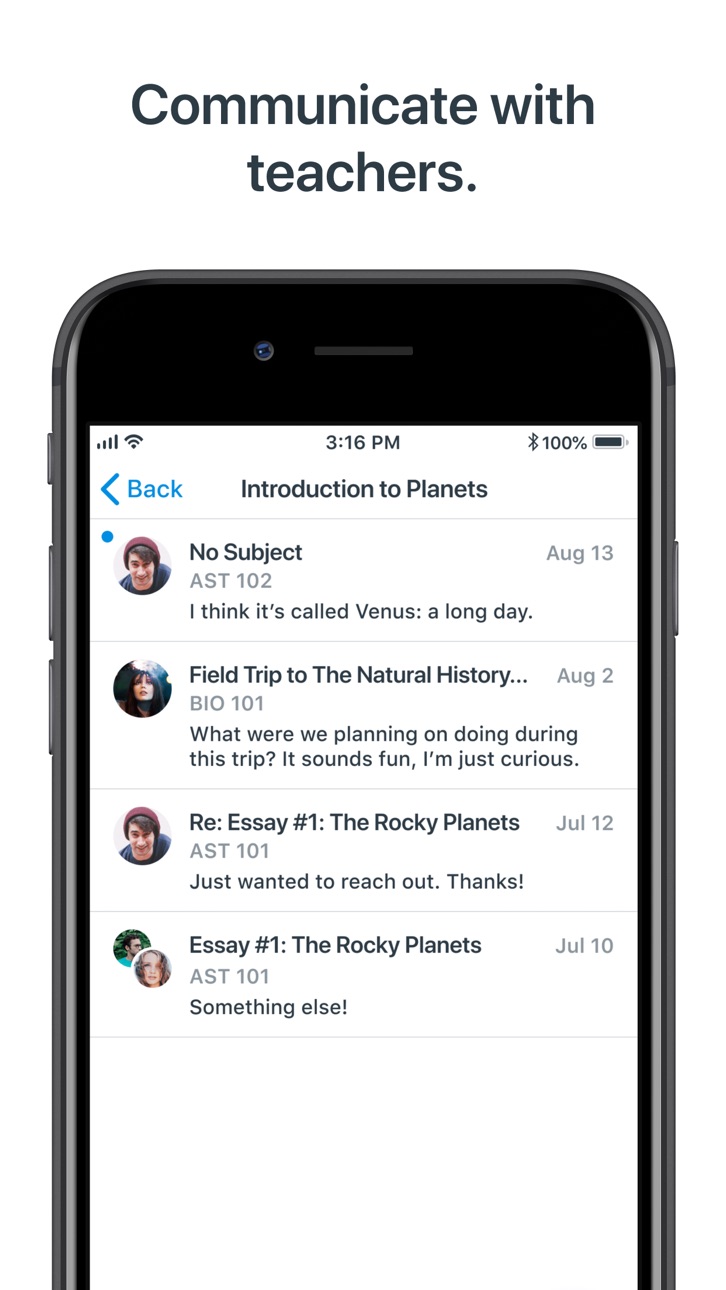
Canvas Parent helps parents and guardians track student progress, support learning, and communicate with teachers in real time.
What you can do
• Communicate: Message teachers directly to ask questions or follow up on school updates or particular grade & page
• Check progress: View grades, assignments, due dates, and homework across all courses
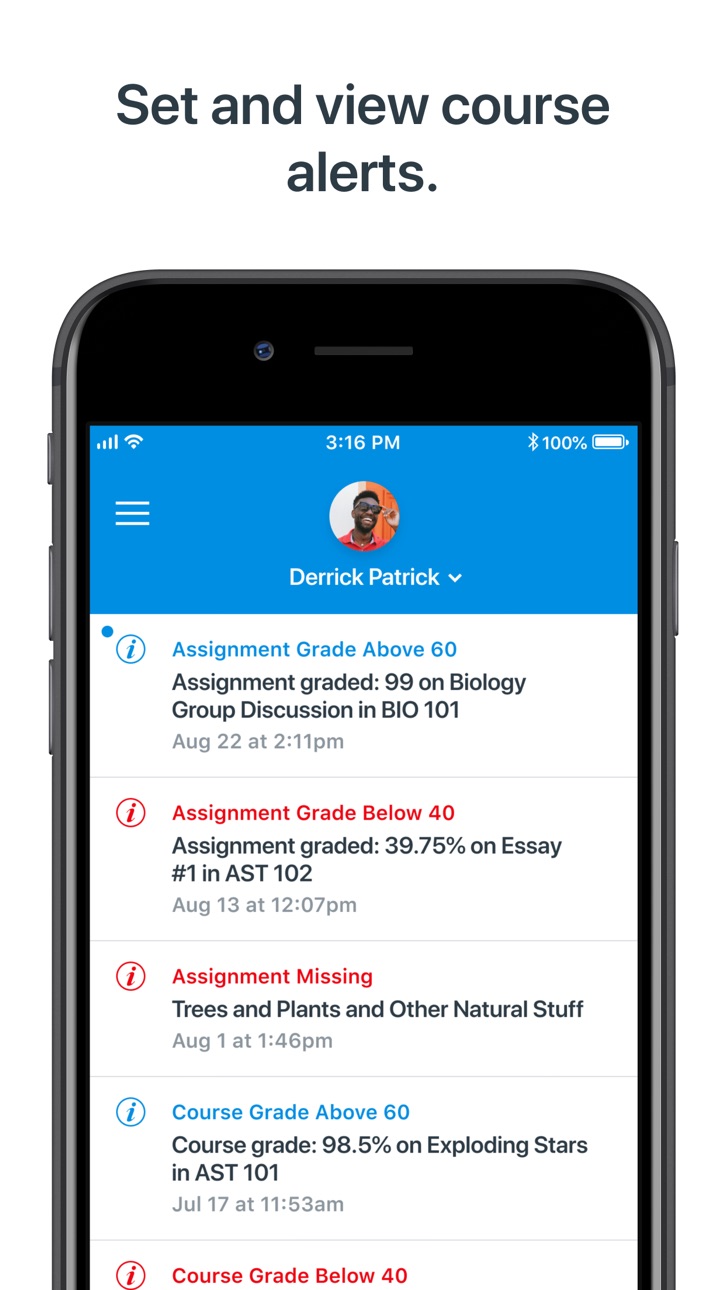
• Get alerts: Receive real-time notifications for missing work, low scores, or new announcements
• Encourage: See teacher feedback, celebrate milestones, and help your student stay organized
• Plan ahead: Use the calendar view to track upcoming tasks, events, and class updates
Canvas Parent is more than a grade monitor—it’s a progress tracker that helps families and schools work together.
Accessibility
developerUrlipadiphonemacrealityDevicetvoswatch
Version history 25 versions
Build 887281976v3.28.12026-06-29 09:42:14
- Inbox message video & audio recordings now play in an in-app player instead of opening in Safari.
Build 885159423v3.28.02026-06-03 08:58:36
- Discontinued support for iOS 17.
- Added support for prompting users when a required app update is available.
- Added support for MDM logins to the New Canvas Login UI.
- Increased security for data protection.
- Updated privacy settings in applicable regions.
- Fixed a bug about email link formatting.
Build 883710494v3.27.32026-03-31 08:14:32
- Front page tab is now always visible when the front page is available for a course.
- Fixed urls pointing to cross-shard course files in Syllabus not working.
Build 883065935v3.27.22026-03-09 09:18:08
- Renamed “Submission & Rubric” button to “Submission & Feedback” on Assignment Details.
- Fixed freezes occurring on iOS 26 on Grade List screen.
- Fixed assignments not appearing if there are more than 10 grading periods.
- Fixed a bug in Inbox where the "reply" button incorrectly appeared.
Build 882743953v3.27.12026-03-03 09:12:21
- Renamed “Submission & Rubric” button to “Submission & Feedback” on Assignment Details.
- Fixed freezes occurring on iOS 26 on Grade List screen.
- Fixed assignments not appearing if there are more than 10 grading periods.
- Fixed a bug in Inbox where the "reply" button incorrectly appeared.
Build 881849080v3.27.02026-02-02 09:14:44
- Added Liquid Glass support.
- Added Korean language localization.
- Improved searching on the "Find your school" screen.
- Improved scrolling performance on grades screen.
- Fixed not showing the correct login screen in some cases.
- Fixed displaying points instead of letter grade for assignments with letter grade display and zero possible points.
- Fixed layout issues when the camera is opened to attach photos in the Inbox.
Build 880181371v3.26.02025-12-08 09:47:05
- Improved submission status display on various screens.
- Added immersive experience for embedded videos for institutions where this feature is enabled.
- Future grading periods now appear when filtering grades.
- Improved submission status display for discussion checkpoints.
- App icons now support Liquid Glass.
Build 879479139v3.25.02025-11-10 10:19:14
- Discussion checkpoints are now handled in the grade list, and the syllabus summary.
- Fixed assignments not loading in some cases.
- Fixed QR code login failing for some users.
- Fixed groups from concluded courses being shown in All Courses view.
- Fixed file downloads not working on the submission screen.
- Fixed observers unable to see quiz submission feedback when Assignment Enhancements is enabled.
- Fixed To-Dos for pages and ungraded discussions not being shown in the syllabus summary.
- Fixed course picker not loading for new messages in some cases.
- Fixed some crashes affecting iOS 26 users.
Build 878326958v3.24.02025-09-29 07:08:56
- Fixed the reply button from the menu in Inbox’s navigation bar adding all recipients.
- Fixed some file links not loading from rich content.
Build 877774717v3.23.02025-09-05 07:41:09
- Improved scrolling performance on grades list screen.
Build 877482346v3.22.12025-08-25 12:05:10
- Redesigned Instructure logo.
- Redesigned Canvas Mobile app logos.
- Added support for displaying custom grade statuses.
- Fixed infinite loading animation upon login.
Build 877148685v3.22.02025-08-14 09:59:44
- Redesigned Instructure logo.
- Redesigned Canvas Mobile app logos.
- Added support for displaying custom grade statuses.
Build 876129844v3.21.12025-07-08 07:19:37
- Fixed a bug that caused the camera not appearing on the QR login screen.
- Fixed font size issue with navigation bar subtitled headers on (200%+) accessibility size.
Build 875376702v3.21.02025-06-12 06:16:04
- Added further explanation to the QR login screen.
- Improved accessibility on various screens.
- Fixed "Submission & Rubric" page displaying only the assignment's details.
- Fixed an issue that made the grade list screen jump when scrolling.
- Fixed some content being truncated when switching Dark/Light themes.
Build 874277669v3.20.02025-04-29 08:27:30
- The current grading period is now auto-selected when entering the grades screen.
- Fixed letter grades being displayed incorrectly in some cases.
- Fixed grades screen showing all observed users' assignments not just the selected observee's.
Build 873622191v3.19.02025-04-03 09:49:33
- Inbox signature is now added to inbox messages if the feature flag is enabled.
- Added Settings menu with System Settings option for dark mode.
- Added re-login support for expired sessions.
- Improved accessibility on various screens.
- Removed the "Canvas on Github" link from the settings screen.
Build 872939899v3.18.02025-03-06 21:01:58
- Inbox received a new design and some extra functions.
- Updated the app icon, now it also supports Dark and Tinted modes on iOS 18.
- Updated dark colors to provide better accessibility.
- Landscape mode is now supported.
- Reduced loading time on the Grades screen.
- Improved accessibility on various screens.
- Fixed embedded Studio videos not showing in some cases.
Build 872234999v3.17.02025-02-06 09:20:10
- Improved accessibility on various screens.
- Fixed a bug that caused the grade list to become unresponsive sometimes.
Build 870924833v3.16.02024-12-09 09:45:55
- Improved support for New Quizzes.
- Fixed "No Submission" & "On Paper" assignments displaying “Not Submitted” status.
- Fixed some tab bar issues on iPads running iOS 18.
- Fixed file uploads failing when the filename contained a quotation mark.
- Fixed the calendar not displaying the filter list and events properly in some cases.
Build 870276048v3.15.02024-11-11 13:52:00
- Improved course file authentication.
- Fixed alert list not refreshing after an alert is read or dismissed.
- Fixed some assignments being visible on the grades screen when they shouldn't be.
- Fixed “Based on graded assignments” toggle not updating letter grades.
Build 869463972v3.14.02024-10-09 07:06:45
- Add support to the submission viewer to properly display for non-enhanced assignments.
- Grades list utilize the screen more wisely.
- Fixed issues on the calendar event screen.
- Fixed an issue where submission status would sometimes display an incorrect value.
Build 868497346v3.13.02024-08-29 06:52:41
- Added submission feedback button to assignment details screen.
Build 867838392v3.12.02024-08-05 08:09:31
- Added Irish language localization.
- Added Hindi language localization.
- The minimum supported OS version has been increased to iOS 16.
- Fixed videos not being played in inbox messages.
- Fixed some courses and groups not appearing in the calendar filter.
- Fixed where graded assignments were not showing the graded label on the assignments details screen.
- Fixed where threshold alerts were shown for courses where quantitative data restriction is enabled.
Build 866328305v3.11.02024-05-31 15:15:21
- Embedded videos, including Studio files now can be played in full screen or in picture-in-picture mode on iOS 17.
- Enabled embedded videos on the front page to play.
- The main Calendar screen was updated with new visuals.
- Calendar filter screen was updated with new visuals and the capability to filter by the personal calendar as well.
Build 866027037v3.10.12024-05-21 12:30:29
- Added Mastery tool to the side menu.
- Grade list got a visual update.
- “Missing” tag is visible for all submission types now.
- Fixed some screens reloading and resetting videos after switching back from other apps.
- Fixed missing localizations.
- Fixed embedded Studio videos not loading on some screens.
No pricing data captured yet — comparisons appear once the app has paid storefronts or in-app purchases.
Availability 101 of 101 storefronts
| Region | Language | Price | Ratings | Avg | Version |
|---|---|---|---|---|---|
| US | en-US | Free | 111.7k | 4.4 | 3.28.1 |
| AU | en-AU | Free | 1.8k | 4.1 | 3.28.1 |
| PH | en-GB | Free | 998 | 4.6 | 3.28.1 |
| ZA | en-GB | Free | 343 | 4.2 | 3.28.1 |
| VN | en-GB | Free | 277 | 4.8 | 3.28.1 |
| CA | en-CA | Free | 249 | 4.4 | 3.28.1 |
| CN | zh-Hans-CN | Free | 168 | 4.9 | 3.28.1 |
| GB | en-GB | Free | 153 | 4.1 | 3.28.1 |
| SE | sv | Free | 103 | 2.7 | 3.28.1 |
| NO | en-GB | Free | 93 | 3.2 | 3.28.1 |
| EG | en-GB | Free | 81 | 4.9 | 3.28.1 |
| SA | en-GB | Free | 72 | 4.5 | 3.28.1 |
| IN | en-GB | Free | 68 | 4.6 | 3.28.1 |
| AE | en-GB | Free | 63 | 4.6 | 3.28.1 |
| JP | ja | Free | 52 | 4.3 | 3.28.1 |
| SG | en-GB | Free | 41 | 4.6 | 3.28.1 |
| HK | zh-Hant-HK | Free | 40 | 4.6 | 3.28.1 |
| MY | en-GB | Free | 40 | 4.7 | 3.28.1 |
| BE | en-GB | Free | 34 | 3.7 | 3.28.1 |
| ID | en-GB | Free | 32 | 4.9 | 3.28.1 |
| KR | ko | Free | 30 | 4.6 | 3.28.1 |
| ES | es-ES | Free | 22 | 4.6 | 3.28.1 |
| IT | it | Free | 19 | 4.0 | 3.28.1 |
| QA | en-GB | Free | 19 | 4.5 | 3.28.1 |
| DE | de-DE | Free | 13 | 3.4 | 3.28.1 |
| NZ | en-AU | Free | 12 | 4.5 | 3.28.1 |
| TR | en-GB | Free | 10 | 4.5 | 3.28.1 |
| FR | fr-FR | Free | 9 | 4.6 | 3.28.1 |
| TW | zh-Hant-TW | Free | 9 | 4.4 | 3.28.1 |
| KW | en-GB | Free | 8 | 5.0 | 3.28.1 |
| HU | en-GB | Free | 7 | 4.9 | 3.28.1 |
| CH | de-CH | Free | 5 | 4.6 | 3.28.1 |
| NL | nl | Free | 5 | 4.4 | 3.28.1 |
| PK | en-GB | Free | 5 | 4.6 | 3.28.1 |
| TH | en-GB | Free | 5 | 5.0 | 3.28.1 |
| UA | en-GB | Free | 5 | 5.0 | 3.28.1 |
| CZ | en-GB | Free | 4 | 5.0 | 3.28.1 |
| JO | en-GB | Free | 4 | 5.0 | 3.28.1 |
| PL | en-GB | Free | 4 | 4.8 | 3.28.1 |
| RU | ru | Free | 4 | 4.0 | 3.28.1 |
| DK | en-GB | Free | 3 | 4.0 | 3.28.1 |
| GR | en-GB | Free | 3 | 4.3 | 3.28.1 |
| MN | en-GB | Free | 3 | 5.0 | 3.28.1 |
| AT | de-DE | Free | 2 | 5.0 | 3.28.1 |
| BH | en-GB | Free | 2 | 5.0 | 3.28.1 |
| IL | en-GB | Free | 2 | 4.5 | 3.28.1 |
| KH | en-GB | Free | 2 | 5.0 | 3.28.1 |
| OM | en-GB | Free | 2 | 5.0 | 3.28.1 |
| RO | en-GB | Free | 2 | 4.5 | 3.28.1 |
| AL | en-GB | Free | 1 | 2.0 | 3.28.1 |
| FI | en-GB | Free | 1 | 5.0 | 3.28.1 |
| IE | en-GB | Free | 1 | 4.0 | 3.28.1 |
| KZ | en-GB | Free | 1 | 4.0 | 3.28.1 |
| LK | en-GB | Free | 1 | 5.0 | 3.28.1 |
| MD | en-GB | Free | 1 | 5.0 | 3.28.1 |
| MM | en-GB | Free | 1 | 5.0 | 3.28.1 |
| MO | zh-Hant-HK | Free | 1 | 5.0 | 3.28.1 |
| MT | en-GB | Free | 1 | 1.0 | 3.28.1 |
| AF | en-GB | Free | 0 | — | 3.28.1 |
| AM | en-GB | Free | 0 | — | 3.28.1 |
| AZ | en-GB | Free | 0 | — | 3.28.1 |
| BA | en-GB | Free | 0 | — | 3.28.1 |
| BG | en-GB | Free | 0 | — | 3.28.1 |
| BM | en-GB | Free | 0 | — | 3.28.1 |
| BN | en-GB | Free | 0 | — | 3.28.1 |
| BT | en-GB | Free | 0 | — | 3.28.1 |
| BY | en-GB | Free | 0 | — | 3.28.1 |
| CY | en-GB | Free | 0 | — | 3.28.1 |
| EE | en-GB | Free | 0 | — | 3.28.1 |
| FJ | en-GB | Free | 0 | — | 3.28.1 |
| FM | en-GB | Free | 0 | — | 3.28.1 |
| GE | en-GB | Free | 0 | — | 3.28.1 |
| HR | en-GB | Free | 0 | — | 3.28.1 |
| IQ | en-GB | Free | 0 | — | 3.28.1 |
| IS | en-GB | Free | 0 | — | 3.28.1 |
| KG | en-GB | Free | 0 | — | 3.28.1 |
| LA | en-GB | Free | 0 | — | 3.28.1 |
| LB | en-GB | Free | 0 | — | 3.28.1 |
| LT | en-GB | Free | 0 | — | 3.28.1 |
| LU | en-GB | Free | 0 | — | 3.28.1 |
| LV | en-GB | Free | 0 | — | 3.28.1 |
| ME | en-GB | Free | 0 | — | 3.28.1 |
| MK | en-GB | Free | 0 | — | 3.28.1 |
| MR | en-GB | Free | 0 | — | 3.28.1 |
| MV | en-GB | Free | 0 | — | 3.28.1 |
| NP | en-GB | Free | 0 | — | 3.28.1 |
| NR | en-GB | Free | 0 | — | 3.28.1 |
| PG | en-GB | Free | 0 | — | 3.28.1 |
| PT | pt-PT | Free | 0 | — | 3.28.1 |
| PW | en-GB | Free | 0 | — | 3.28.1 |
| RS | en-GB | Free | 0 | — | 3.28.1 |
| SB | en-GB | Free | 0 | — | 3.28.1 |
| SI | en-GB | Free | 0 | — | 3.28.1 |
| SK | en-GB | Free | 0 | — | 3.28.1 |
| TJ | en-GB | Free | 0 | — | 3.28.1 |
| TM | en-GB | Free | 0 | — | 3.28.1 |
| TO | en-GB | Free | 0 | — | 3.28.1 |
| UZ | en-GB | Free | 0 | — | 3.28.1 |
| VU | en-GB | Free | 0 | — | 3.28.1 |
| XK | en-GB | Free | 0 | — | 3.28.1 |
| YE | en-GB | Free | 0 | — | 3.28.1 |
Reviews 30 reviews · US
★★★★★
Keeps freezing
When I scroll through my kids grades in a particular class it freezes and I have to leave the app and come back in. I still cannot get past a certain point and it freezes again. This does not allow me to see my child’s grades on individual assignments.
Girl mom of 2 - 19872026-03-02
★★★★★
Ok for most part
Works for the most part. I’m still new to using it so maybe I’m still learning but seems pretty straightforward but it’s freezes up when I go in to look at the assignments and I can’t see all of them so I don’t know what is going on. I will back out and try to reopen it and it keeps freezing in the same spot.
Maddiesmommy🌸2026-02-24
★★★★★
Screen Freezing
Have had many issues over the past couple months when trying to access grades. Screen will scroll briefly but then freeze. Happens repeatedly. Tried updating and forced close of app. Does not happen for student or teacher canvas apps.
DiLyMa532026-02-18
★★★★★
Required garbage
This app is absolutely terrible. 5 seconds into opening the app on iOS and it freezes every. Single. Time. The user interface is not user friendly and the only options you get for notifications are things you don’t want to be notified about anyway. The only reason I use this app is because the school district requires it to track our child’s grades.
8610272026-01-30
★★★★★
Keeps freezing and crashing!
I do not know why it keeps doing this, but anytime I try to check my child’s grades on certain courses it will not let you swipe, it will then freeze and the only way to get out of it is to fully close the app. I like to keep track daily of what my kid is missing and what he needs to work on and I can’t do that if it keeps crashing!
Persephone11062026-01-28
★★★★★
hangs always scrolling past first page of results
Completely unstable if I scroll down past the first page of assignments for my student in any class. I’ve reinstalled, but it still hangs doing the same thing, in the same place. I tried to report a problem through the Apple App Store but the links are broken in Apple App Store.
Ranger Randall2026-01-07
★★★★★ · edited
Annoying bug with filters for quarters
Been years and this bug still exists. Launch the app, choose a quarter to filter. Works fine. But after 5 seconds, the results get unfiltered automatically, showing you every item. Update: developer responded asking if I can share with support. No problem at all, happy to. But how? App has no way to contact support, developer response didn’t indicate. App support link from this App Store page goes to a page with lots of links. Confusing.
Jan 2026: Another update, same old bugs. App freezes after scrolling just a few lines. Does this company even have a single QA or QE person? Do they even car
akarnik2026-01-02
★★★★★
Bug in 3.26.0
Click the “Courses” tab, then pick a course, then when scrolling through the assignments the app will crash (screen freezes, and have to swipe up and to right to see selection of open apps, then swipe down on Canvas to close, then can click on Canvas button to reopen). If you don’t scroll those courses, you can still click on assignments within that course, but as soon as you scroll…freeze. But not every course. And the courses that crash the app are always the same courses. The ones that don’t never do.
Also, give parents the full “to do” list the students get. Trying to navigate the calenda
someguypi2025-12-16
★★★★★
Needs more notification options
Please make it so notifications are a quick push message. We have to click through to see anything. This would be a much better app if for example, there was a message from a teacher, a preview of it was shown in a push message. A quick way for parents to see if an assignment is missing vs “you’re subscribed to daily….”.
Emails or push notifications telling me there’s something over in the app you may or may not want to see is useless this day and age
KappySays2025-09-12
★★★★★
It won’t load
I have been using this app for 3 years with no issues. I don’t know if something changed recently, but I can’t get past a spinning logo. It’s like it’s trying to load something, but nothing ever happens. I have deleted and reinstalled it and nothing helps. Now I have to log into the website every time I need to check my kids work and it’s a pain.
Jen363342025-08-22
★★★★★
Can’t Find schools District
This new K12 Canvas apps are so CONFUSING!!!! It’s stressing me and my student out because not only is it not working but there are things missing like school names to be able to access and log in! Also adding a new student to the dashboard is not going as planned because I need a URL and I copied that just for it not to work! This is upsetting and stressful and overwhelming for both students and parents. My son continues to have difficulty attending classes because it’s just a loop waiting for the teacher to let him join! My kindergartner will be starting soon and I can’t even add him or chec
QueenRiivera2025-08-20
★★★★★
App stopped working
This app worked last year 2024 but now even after deleting and redownloading it, it does not even open. I’m not sure why but it’s frustrating to have to always open a web browser and turn my phone sideways to read things. I’m not sure if others are having the same issue or not but this school year 2025 it’s not even opening.
AnaliseElsie2025-08-18
★★★★★
Could be way better
A few months ago I stopped receiving notifications from the app. I’ve gone through my phone settings to make sure I hadn’t muted them and do not see that there are notifications from the app. (Can’t find the canvas parent app in the list of apps) Even though the when I open the app and go to my settings it does show I have notifications on. Hate that you can’t see when teacher add comments on assignments
I always have to open a web browser and sign in to see them. Frustrating because I feel like I’m missing updates from the school.
91Smith2025-03-01
★★★★★
Cannot scroll
After selecting a class to view assignments, it’s often (but not always) impossible to scroll down, so that you can’t actually see any grades beyond the first screen.
Also, I often get an email saying that an assignment has been graded, but that assignment does not appear in the list for that class.
In combination, those two bugs make it nearly impossible to figure out what is due or overdue, or what the grade is.
bcc90002025-01-29
★★★★★
Use a computer
I’d encourage parents to just log in to the website because that’s what I’ve ended up doing. The app freezes, won’t scroll, takes a ridiculously amount of time to load each screen and parents are using this app for quick, on the go school progress updates of their children. The time it takes for the app screen to load, I can log in from a computer faster.
Elleanm2025-01-27
★★★★★
Frustrated
The app keeps freezing and loads way too slow. I have fiber so it’s not my internet. Please do something!!! Also it says the assignment is missing or late when the assignment has already been submitted.
Can someone fix this app!!!? I reiterate the above comments. What has happened to this app? It is so slow and draggy. So frustrating. It takes forever to load a class and then you have to wait again to scroll up or down. This started mid last semester so it thought it was too full. But now it’s a new semester with no assignments to “clog” it up and nothing has changed. Please, developers, fi
No potty-potty2025-01-10
★★★★★
Breaks with each update
I appreciate being able to see my student’s progress, but this app stinks. First they put out an update that made the header REEEEEAAAAALLLYYYY BIG and you could literally only see one assignment at a time. The next update fixed that, but now the scroll is broken - at first it won’t scroll at all, then it scrolls SOME, then it stops again and you cannot see everything you need to. Get your act together, Canvas coders!
Mama Bowes2025-01-10
★★★★★
Some bugs
The app is great in that I can keep up with grades but when I click on a class my daughter has and look at individual graded assignments, it just stops letting me scroll through. It’s like it freezes and I can’t scroll up or down. I then have to restart the app, only to have it happen again!
jaycherylbaker2024-12-30
★★★★★
Would give 0 star
Apple, please take action. I wrote to canvas team twice. I can’t even scroll through the grades based on assignments, quizzes etc. on the mobile. Every single time I have to use a laptop to see the grades. Does anyone even work, here? The whole semester this has been the case. If this app is not fixed please remove them from the APP store.
Deepa’s XS Max2024-12-18
★★★★★
Needs work
The app had started to improve a lot since last school year, but now it’s rendered useless. Once you open a course to review graded assignments it freezes and you lose all scrolling ability. It’s very frustrating. It has not been fixed in weeks/months and I see others have complained about the same thing. Please resolve this once and for all.
Kathwhitm2024-12-07
★★★★★
I Hope The People Who Wrote This App Aren’t Teaching Our Children
This app is absolute garbage. It’s disorganized, it freezes constantly, and for some reason I have to have 2 accounts so I get an email every time a flea farts at my kids’ school that I can’t send to junk because they all come from randomized email addresses. It’s required by the school system, so I imagine someone’s getting a kickback.
KFelscher2024-12-03
★★★★★
Untested & Buggy: Won’t let you scroll to the bottom of a list
When you go to Courses >> pick a class >> Grades, you get a list of assignments. There are three sections you can collapse or expand (overdue, upcoming, past). There are two problems: 1) it takes way to long to load a few text fields, and 2) you may have a list of assignments that spills off the page, but you can’t scroll down!!!! What the heck??
Phb92024-11-19
★★★★★
Poor integration with internet links
I’m able to see grades and other basic things that my students teacher post, however, when I attempt to go to links that are imbedded in any Google or other docs from the app, it does not work natively from the mobile app. It does from the website if I go directly online on my computer, but the mobile app has very poor integration with any imbedded links.
P-Bo20112024-09-18
★★★★★
Wasted Screen Space
I have turned my font size down as low as it will go and I still have only 50% of the screen to see grades for each class. I also have a huge chat button that I don’t need in the same grade area, so it’s a serious challenge to see assignment grades, which is the whole point of this app. How about shrinking the size of the huge grade box and giving more screen space to the actual grades? Who actually asked for this “improvement”? How about adding more of the website functionality before messing around with font size?
VikV2024-09-12
★★★★★
Works, but some annoying things for the user
The app works as intended, but in recent updates there is a huge block (half of my iPhone screen) with the title of the course and percentage for the grade (letter grade is cut off). Then in the bottom corner is a chat box. The result is that I can only see scores for one assignment at a time. That’s frustrating- and not necessary. Please look at the user experience for iPhone users and adjust the font/box for the name of the course so I can see more than one assignment score at a time.
Ineedmorecoffee!!!!2024-09-02
★★★★★
What happened to the dashboard
What happened to this key feature of being able to see all the courses and other options? Messages and assignments and the like?
Cerrieberrie2024-08-27
★★★★★
Broken
I used canvas parent for my middle schooler for the past 3 years. Now that we’ve moved to high school, I can’t get canvas parent to work. Just a blue spinning circle.
Also, I wish the creators would figure out how to combine all the functionality of each canvas platform into a single sign-on platform. I’m a student, have children in middle and high school, and I’m a teacher. I use all three versions but have to continually log in and out of various platforms. Fix it, please.
Kyoteki2024-08-06
★★★★★
Disappointed 😡😡
Unfortunately my sons school district has decided to use this app. The concept of this app is good but I don’t think it’s very user friendly. I’ve been trying to delete messages and work from 4 years ago. I hate that it doesn’t let you swipe to delete old messages. My child is no longer at that school and I still can’t get her off of the app. Trying to get anyone to help gives me a headache, my head is actually hurting writing this. The student canvas is not any better. My son submits work and yet it always says he never submitted it. Really wish the school district would stop using this App.
lita c.2024-05-16
★★★★★
“Load new language” error, wont start
It was working fine until recently. Now when I try to start the app, I get “Upeated language settings - The app needs to restart to use the new language settings. Please relaunch the app”. No matter how many times I close (remove from background operation), it keeps showing the same error. Please fix!
skip2k2024-02-26
★★★★★
App not loading
This has been a great app. It has allowed me to keep track of our kids’ progress in their school classes. However, recently the app has not been loading. When opening the app, only a spinning Canvas logo is displayed and doesn’t load beyond that. I tried deleting and reinstalling the app, but that didn’t work. Tried reporting the problem to Apple, but was informed that reporting is not available for this app. Some of the teachers exclusively use Canvas to report their students’ progress. I can access Canvas in my web browser. But, the app was very nice.
Unhappy Minion2024-02-08
Change log 28 changes · US
✎
releaseNotes updated
- Inbox message video & audio recordings now play in an in-app player instead of opening in Safari.
✎
description updated
Stay connected. Encourage success.
Canvas Parent helps parents and guardians track student progress, support learning, and communicate with teachers in real tim
✎
name updated
Canvas Parent
◆
Version 3.28.1 released
- Inbox message video & audio recordings now play in an in-app player instead of opening in Safari.
◆
Version 3.28.0 released
- Discontinued support for iOS 17.
- Added support for prompting users when a required app update is available.
- Added support for MDM logins to the New Canvas Login UI.
- Increased security for data protection.
- Updated privacy settings
◆
Version 3.27.3 released
- Front page tab is now always visible when the front page is available for a course.
- Fixed urls pointing to cross-shard course files in Syllabus not working.
◆
Version 3.27.2 released
- Renamed “Submission & Rubric” button to “Submission & Feedback” on Assignment Details.
- Fixed freezes occurring on iOS 26 on Grade List screen.
- Fixed assignments not appearing if there are more than 10 grading periods.
- Fixed a bug in
◆
Version 3.27.1 released
- Renamed “Submission & Rubric” button to “Submission & Feedback” on Assignment Details.
- Fixed freezes occurring on iOS 26 on Grade List screen.
- Fixed assignments not appearing if there are more than 10 grading periods.
- Fixed a bug in
◆
Version 3.27.0 released
- Added Liquid Glass support.
- Added Korean language localization.
- Improved searching on the "Find your school" screen.
- Improved scrolling performance on grades screen.
- Fixed not showing the correct login screen in some cases.
- Fixe
◆
Version 3.26.0 released
- Improved submission status display on various screens.
- Added immersive experience for embedded videos for institutions where this feature is enabled.
- Future grading periods now appear when filtering grades.
- Improved submission statu
◆
Version 3.25.0 released
- Discussion checkpoints are now handled in the grade list, and the syllabus summary.
- Fixed assignments not loading in some cases.
- Fixed QR code login failing for some users.
- Fixed groups from concluded courses being shown in All Cour
◆
Version 3.24.0 released
- Fixed the reply button from the menu in Inbox’s navigation bar adding all recipients.
- Fixed some file links not loading from rich content.
◆
Version 3.23.0 released
- Improved scrolling performance on grades list screen.
◆
Version 3.22.1 released
- Redesigned Instructure logo.
- Redesigned Canvas Mobile app logos.
- Added support for displaying custom grade statuses.
- Fixed infinite loading animation upon login.
◆
Version 3.22.0 released
- Redesigned Instructure logo.
- Redesigned Canvas Mobile app logos.
- Added support for displaying custom grade statuses.
◆
Version 3.21.1 released
- Fixed a bug that caused the camera not appearing on the QR login screen.
- Fixed font size issue with navigation bar subtitled headers on (200%+) accessibility size.
◆
Version 3.21.0 released
- Added further explanation to the QR login screen.
- Improved accessibility on various screens.
- Fixed "Submission & Rubric" page displaying only the assignment's details.
- Fixed an issue that made the grade list screen jump when scrolli
◆
Version 3.20.0 released
- The current grading period is now auto-selected when entering the grades screen.
- Fixed letter grades being displayed incorrectly in some cases.
- Fixed grades screen showing all observed users' assignments not just the selected observee
◆
Version 3.19.0 released
- Inbox signature is now added to inbox messages if the feature flag is enabled.
- Added Settings menu with System Settings option for dark mode.
- Added re-login support for expired sessions.
- Improved accessibility on various screens.
-
◆
Version 3.18.0 released
- Inbox received a new design and some extra functions.
- Updated the app icon, now it also supports Dark and Tinted modes on iOS 18.
- Updated dark colors to provide better accessibility.
- Landscape mode is now supported.
- Reduced loadin
◆
Version 3.17.0 released
- Improved accessibility on various screens.
- Fixed a bug that caused the grade list to become unresponsive sometimes.
◆
Version 3.16.0 released
- Improved support for New Quizzes.
- Fixed "No Submission" & "On Paper" assignments displaying “Not Submitted” status.
- Fixed some tab bar issues on iPads running iOS 18.
- Fixed file uploads failing when the filename contained a quotatio
◆
Version 3.15.0 released
- Improved course file authentication.
- Fixed alert list not refreshing after an alert is read or dismissed.
- Fixed some assignments being visible on the grades screen when they shouldn't be.
- Fixed “Based on graded assignments” toggle n
◆
Version 3.14.0 released
- Add support to the submission viewer to properly display for non-enhanced assignments.
- Grades list utilize the screen more wisely.
- Fixed issues on the calendar event screen.
- Fixed an issue where submission status would sometimes dis
◆
Version 3.13.0 released
- Added submission feedback button to assignment details screen.
◆
Version 3.12.0 released
- Added Irish language localization.
- Added Hindi language localization.
- The minimum supported OS version has been increased to iOS 16.
- Fixed videos not being played in inbox messages.
- Fixed some courses and groups not appearing in t
◆
Version 3.11.0 released
- Embedded videos, including Studio files now can be played in full screen or in picture-in-picture mode on iOS 17.
- Enabled embedded videos on the front page to play.
- The main Calendar screen was updated with new visuals.
- Calendar fil
◆
Version 3.10.1 released
- Added Mastery tool to the side menu.
- Grade list got a visual update.
- “Missing” tag is visible for all submission types now.
- Fixed some screens reloading and resetting videos after switching back from other apps.
- Fixed missing loca