Home › Business

 CD
CD
 USen-US
 CAen-CA
 AUen-AU
 MXes-MX
 UAen-GB
 AGen-GB
 AIen-GB
 ALen-GB
 AOen-GB
 ARes-MX
 BAen-GB
 BBen-GB
 BFen-GB
 BJen-GB
 BOes-MX
 BRpt-BR
 BSen-GB
 BWen-GB
 BYen-GB
 BZen-GBCDen-GB
 CGen-GB
 CIfr-FR
 CLes-MX
 CMfr-FR
 COes-MX
 CRes-MX
 CVen-GB
 DMen-GB
 DOes-MX
 DZen-GB
 ECes-MX
 GAfr-FR
 GDen-GB
 GHen-GB
 GMen-GB
 GTes-MX
 GWen-GB
 GYen-GB
 HNes-MX
 JMen-GB
 KEen-GB
 KNen-GB
 KYen-GB
 LCen-GB
 LRen-GB
 LYen-GB
 MAen-GB
 MDen-GB
 MGen-GB
 MKen-GB
 MLen-GB
 MSen-GB
 MUen-GB
 MWen-GB
 MZen-GB
 NAen-GB
 NEen-GB
 NGen-GB
 NIes-MX
 NZen-AU
 PAes-MX
 PEes-MX
 PYes-MX
 RSen-GB
 RUru
RUru RWen-GB
 SCen-GB
 SLen-GB
 SNen-GB
 SRen-GB
 STen-GB
 SVes-MX
 SZen-GB
 TCen-GB
 TDen-GB
 TNen-GB
 TTen-GB
 TZen-GB
 UGen-GB
 UYen-GB
 VCen-GB
 VEes-MX
 ZMen-GB
 ZWen-GB
 ATNot Available
 BENot Available
 BGNot Available
 CHNot Available
 DENot Available
 DKNot Available
 EENot Available
 ESNot Available
 FRNot Available
 GBNot Available
 GRNot Available
 HRNot Available
 HUNot Available
 IENot Available
 ITNot Available
 LTNot Available
 LUNot Available
 LVNot Available
 MTNot Available
 NLNot Available
 NONot Available
 PTNot Available
 RONot Available
 SENot Available
 SINot Available
 SKNot Available
 VGNot Available
85 of 112 storefronts
Content in en-US
Content in en-US
Information
Apple ID1083085660
Bundle IDcom.ryohei.haruki.CircleCalendar
SellerSeller
Min iOS8.1
Min macOS11.0
Device familiesiphone, ipad, ipod
Released2016-02-20
Copyright© 2018 Nakayubi Corporation
Preview 2 platforms
iPhone 3 images


iPad 3 images


What’s New Version 2.5
This update from Apple will improve the functionality of this app. No new features are included.
fixed bug
Description
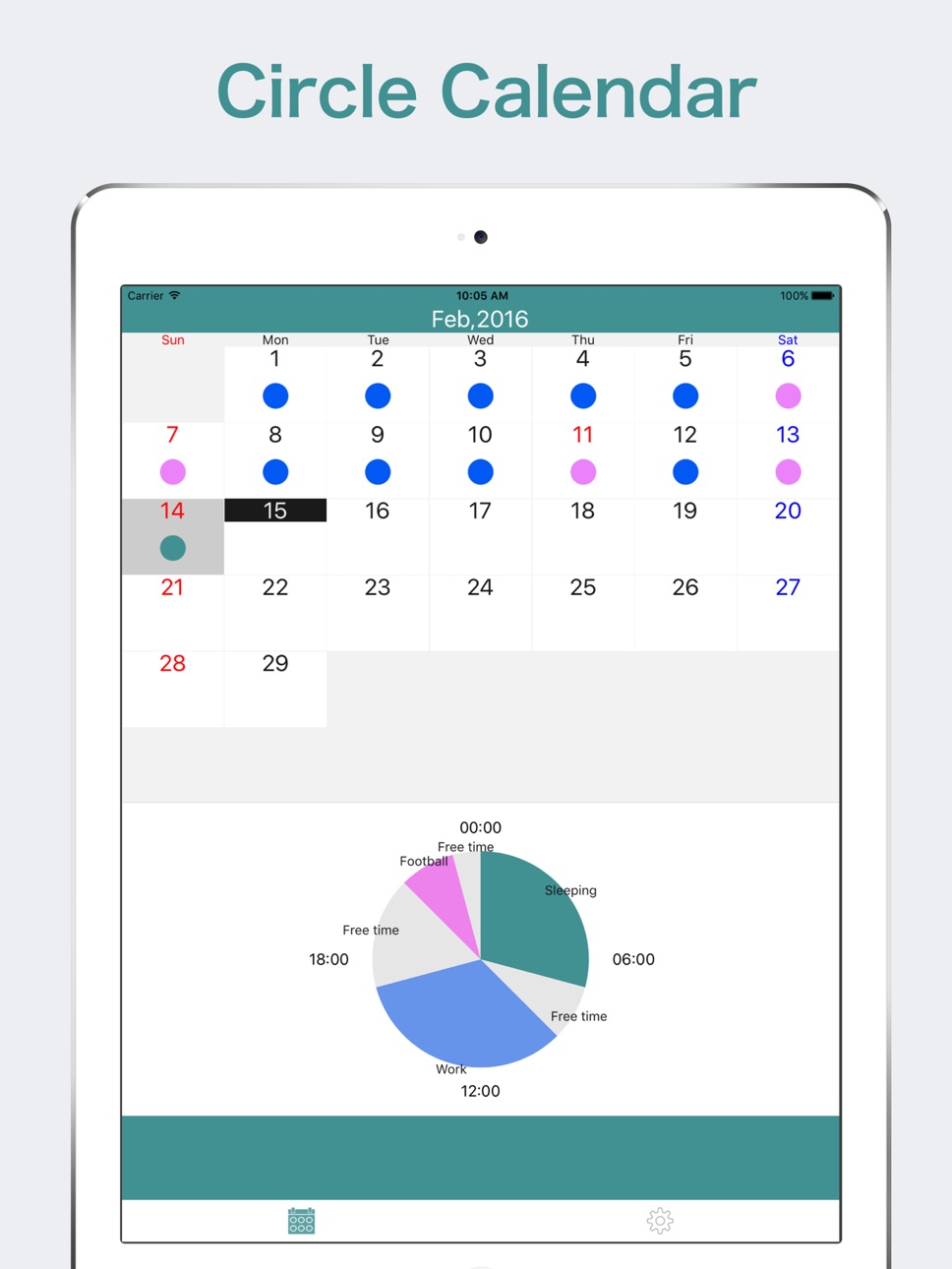
Circle Calendar manage the schedule of the day in the circle schedule.
Visualize the wasted time!
Simple and stylish calendar app!
-FEATURES
*Equipped with a circle scheduler calendar.
*It can be operated intuitively.
-POSSIBLE
*Create a circle schedule
It automatically creates a circle schedule by entering the plan.
*Notification
It can be optionally set for each plan.
*Colorize
It can change the color for each schedule and task.
*Copy and Paste
It can copy and paste the whole schedule.
-HOW TO
*Delete a schedule or plan
Delete menu will appear by pressing the pie chart long.If you want to delete a plan one by one,from the detailed screen, Delete menu will appear by swiping the plan from right to left.
*Copy a schedule
Copy menu will appear by pressing the pie chart long.After selecting copy, you can paste it by tapping a date. After selecting the copy, you can paste it by tapping a date. By pressing the "Finish" button in the upper right-hand corner, you can exit the paste.
*Notification setting
You will be notified reach by turning on the switch of plans. Settings screen, you can choose whether to receive many minutes before the start time from the notification menu.
* Registration as a model and quotation
By push "Register this plan" of the registration screen,check box will be marked. And pushing "save button", it will be automatically registered as a model.
In addition, you can quote by pressing the "Choose from registerd plans".
-Note
In the free version, the schedule can be registered in the month will be up to 15.
Upper limit can be extended by watching short movie and removed by buying premium-menu.
coding&design:App Kaihatsu Man from Japan
In-App Purchases CD pricing
One-Time Purchases
No Ads and No limits—
Capabilities
In-App Purchases
Accessibility
ipadiphonemacrealityDevicetvoswatch
Version history 11 versions
Build 825536027v2.52018-01-05 02:59:37
This update from Apple will improve the functionality of this app. No new features are included.
fixed bug
Build 820070534v2.42016-12-10 00:56:01
Thank you for using!
This update is for bug fix mainly.
-Fixed a bug when selecting color.
Thank you.
Build 819924098v2.32016-12-04 00:43:49
Thank you for always using!
In this time, addition and improvement of functions are the main.
- Add and edit colors
- Now you can add schedule for days.
When crossing the day, the part after 24 o'clock is added to the schedule of the next day all together.
- Add vibration when receiving notification
Thank you!
Build 819367483v2.22016-10-23 00:23:55
Thank you for using!
This update is to fix bug mainly.
-bug fix on touching part of 'free time'.
-bug fix on passcode scene.
The keyboard didn't appear when you input passcode on iOS10.
We fixed it.
-You become able to open app store in this app.
Thank you!
Build 819217257v2.12016-10-11 00:52:32
-bug fix on deleting template.
-Input a new plan to touch part of 'freetime'.
-Change a logic of selecting color when create a new plan.
Build 819047006v2.02016-09-30 02:02:02
Thank you for using this app!
-Added coloring function of each plan
-Added function to register as model
Plans can be registered as model in any when you add .
You will be able to easily add the plan.
-Changed UI
-Deleted characters of 'Free time'
We deleted characters of 'Free time' on a pie chart.
It is also possible to display screen in any.Please look 'Setting'.
- Set up a schedule limit
In the free version, the schedule can be registered in the month will be up to 15.
Upper limit can be extended by watching short movie and removed by buying premium-menu.
(Already those who removed ads, there is no limit)
There is a very selfish, thank you as you acknowledge for better service.
Thank you.
Build 818866023v1.42016-09-16 02:41:50
-support iOS10
Build 818250743v1.32016-07-26 15:27:03
-bug fix in changing color.
-enable to set end time ’24:00’
Build 817443830v1.22016-05-20 00:53:30
-細かなバグを修正
Build 816824738v1.12016-03-31 00:46:23
-Add function of password
-bug fix
-change icon image
Build 816416052v1.02016-02-20 00:31:56
Price history by region
Currency
Show
Columns
Search
Availability 85 of 112 storefronts
| Region | Language | Price | Ratings | Avg | Version |
|---|---|---|---|---|---|
| US | en-US | Free | 13 | 3.9 | 2.5 |
| CA | en-CA | Free | 3 | 2.3 | 2.5 |
| AU | en-AU | Free | 1 | 5.0 | 2.5 |
| MX | es-MX | Free | 1 | 5.0 | 2.5 |
| UA | en-GB | Free | 1 | 5.0 | 2.5 |
| AG | en-GB | Free | 0 | — | 2.5 |
| AI | en-GB | Free | 0 | — | 2.5 |
| AL | en-GB | Free | 0 | — | 2.5 |
| AO | en-GB | Free | 0 | — | 2.5 |
| AR | es-MX | Free | 0 | — | 2.5 |
| BA | en-GB | Free | 0 | — | 2.5 |
| BB | en-GB | Free | 0 | — | 2.5 |
| BF | en-GB | Free | 0 | — | 2.5 |
| BJ | en-GB | Free | 0 | — | 2.5 |
| BO | es-MX | Free | 0 | — | 2.5 |
| BR | pt-BR | Free | 0 | — | 2.5 |
| BS | en-GB | Free | 0 | — | 2.5 |
| BW | en-GB | Free | 0 | — | 2.5 |
| BY | en-GB | Free | 0 | — | 2.5 |
| BZ | en-GB | Free | 0 | — | 2.5 |
| CD | en-GB | Free | 0 | — | 2.5 |
| CG | en-GB | Free | 0 | — | 2.5 |
| CI | fr-FR | Free | 0 | — | 2.5 |
| CL | es-MX | Free | 0 | — | 2.5 |
| CM | fr-FR | Free | 0 | — | 2.5 |
| CO | es-MX | Free | 0 | — | 2.5 |
| CR | es-MX | Free | 0 | — | 2.5 |
| CV | en-GB | Free | 0 | — | 2.5 |
| DM | en-GB | Free | 0 | — | 2.5 |
| DO | es-MX | Free | 0 | — | 2.5 |
| DZ | en-GB | Free | 0 | — | 2.5 |
| EC | es-MX | Free | 0 | — | 2.5 |
| GA | fr-FR | Free | 0 | — | 2.5 |
| GD | en-GB | Free | 0 | — | 2.5 |
| GH | en-GB | Free | 0 | — | 2.5 |
| GM | en-GB | Free | 0 | — | 2.5 |
| GT | es-MX | Free | 0 | — | 2.5 |
| GW | en-GB | Free | 0 | — | 2.5 |
| GY | en-GB | Free | 0 | — | 2.5 |
| HN | es-MX | Free | 0 | — | 2.5 |
| JM | en-GB | Free | 0 | — | 2.5 |
| KE | en-GB | Free | 0 | — | 2.5 |
| KN | en-GB | Free | 0 | — | 2.5 |
| KY | en-GB | Free | 0 | — | 2.5 |
| LC | en-GB | Free | 0 | — | 2.5 |
| LR | en-GB | Free | 0 | — | 2.5 |
| LY | en-GB | Free | 0 | — | 2.5 |
| MA | en-GB | Free | 0 | — | 2.5 |
| MD | en-GB | Free | 0 | — | 2.5 |
| MG | en-GB | Free | 0 | — | 2.5 |
| MK | en-GB | Free | 0 | — | 2.5 |
| ML | en-GB | Free | 0 | — | 2.5 |
| MS | en-GB | Free | 0 | — | 2.5 |
| MU | en-GB | Free | 0 | — | 2.5 |
| MW | en-GB | Free | 0 | — | 2.5 |
| MZ | en-GB | Free | 0 | — | 2.5 |
| NA | en-GB | Free | 0 | — | 2.5 |
| NE | en-GB | Free | 0 | — | 2.5 |
| NG | en-GB | Free | 0 | — | 2.5 |
| NI | es-MX | Free | 0 | — | 2.5 |
| NZ | en-AU | Free | 0 | — | 2.5 |
| PA | es-MX | Free | 0 | — | 2.5 |
| PE | es-MX | Free | 0 | — | 2.5 |
| PY | es-MX | Free | 0 | — | 2.5 |
| RS | en-GB | Free | 0 | — | 2.5 |
| RU | ru | Free | 0 | — | 2.5 |
| RW | en-GB | Free | 0 | — | 2.5 |
| SC | en-GB | Free | 0 | — | 2.5 |
| SL | en-GB | Free | 0 | — | 2.5 |
| SN | en-GB | Free | 0 | — | 2.5 |
| SR | en-GB | Free | 0 | — | 2.5 |
| ST | en-GB | Free | 0 | — | 2.5 |
| SV | es-MX | Free | 0 | — | 2.5 |
| SZ | en-GB | Free | 0 | — | 2.5 |
| TC | en-GB | Free | 0 | — | 2.5 |
| TD | en-GB | Free | 0 | — | 2.5 |
| TN | en-GB | Free | 0 | — | 2.5 |
| TT | en-GB | Free | 0 | — | 2.5 |
| TZ | en-GB | Free | 0 | — | 2.5 |
| UG | en-GB | Free | 0 | — | 2.5 |
| UY | en-GB | Free | 0 | — | 2.5 |
| VC | en-GB | Free | 0 | — | 2.5 |
| VE | es-MX | Free | 0 | — | 2.5 |
| ZM | en-GB | Free | 0 | — | 2.5 |
| ZW | en-GB | Free | 0 | — | 2.5 |
Not available in: AT, BE, BG, CH, DE, DK, EE, ES, FR, GB, GR, HR, HU, IE, IT, LT, LU, LV, MT, NL, NO, PT, RO, SE, SI, SK, VG
Change log 15 changes · CD
✎
releaseNotes updated
This update from Apple will improve the functionality of this app. No new features are included.
fixed bug
✎
description updated
Circle Calendar manage the schedule of the day in the circle schedule.
Visualize the wasted time!
Simple and stylish calendar app!
-FEATURES
*Equipped with a c
✎
subtitle updated
One day planner by pie chart.
✎
name updated
Circle Calendar
◆
Version 2.5 released
This update from Apple will improve the functionality of this app. No new features are included.
fixed bug
◆
Version 2.4 released
Thank you for using!
This update is for bug fix mainly.
-Fixed a bug when selecting color.
Thank you.
◆
Version 2.3 released
Thank you for always using!
In this time, addition and improvement of functions are the main.
- Add and edit colors
- Now you can add schedule for days.
When crossing the day, the part after 24 o'clock is added to the schedule of the next
◆
Version 2.2 released
Thank you for using!
This update is to fix bug mainly.
-bug fix on touching part of 'free time'.
-bug fix on passcode scene.
The keyboard didn't appear when you input passcode on iOS10.
We fixed it.
-You become able to open app store in th
◆
Version 2.1 released
-bug fix on deleting template.
-Input a new plan to touch part of 'freetime'.
-Change a logic of selecting color when create a new plan.
◆
Version 2.0 released
Thank you for using this app!
-Added coloring function of each plan
-Added function to register as model
Plans can be registered as model in any when you add .
You will be able to easily add the plan.
-Changed UI
-Deleted characters of '
◆
Version 1.4 released
-support iOS10
◆
Version 1.3 released
-bug fix in changing color.
-enable to set end time ’24:00’
◆
Version 1.2 released
-細かなバグを修正
◆
Version 1.1 released
-Add function of password
-bug fix
-change icon image
◆
Version 1.0 released