Home › Entertainment

 MS
MS
 USen-US
 AUen-AU
 GBen-GB
 AEen-GB
 AFen-GB
 AGen-GB
 AIen-GB
 ALen-GB
 AMen-GB
 AOen-GB
 ARes-MX
 ATde-DE
 AZen-GB
 BAen-GB
 BBen-GB
 BEen-GB
 BFen-GB
 BGen-GB
 BHen-GB
 BJen-GB
 BMen-GB
 BNen-GB
 BOes-MX
 BRpt-BR
 BSen-GB
 BTen-GB
 BWen-GB
 BYen-GB
 BZen-GB
 CAen-CA
 CDen-GB
 CGen-GB
 CHde-CH
 CIfr-FR
 CLes-MX
 CMfr-FR
 CNzh-Hans-CN
 COes-MX
 CRes-MX
 CVen-GB
 CYen-GB
 CZen-GB
 DEde-DE
 DKen-GB
 DMen-GB
 DOes-MX
 DZen-GB
 ECes-MX
 EEen-GB
 EGen-GB
 ESes-ES
 FIen-GB
 FJen-GB
 FMen-GB
 FRfr-FR
 GAfr-FR
 GDen-GB
 GEen-GB
 GHen-GB
 GMen-GB
 GRen-GB
 GTes-MX
 GWen-GB
 GYen-GB
 HKzh-Hant-HK
 HNes-MX
 HRen-GB
 HUen-GB
 IDen-GB
 IEen-GB
 ILen-GB
 INen-GB
 IQen-GB
 ISen-GB
 ITit
ITit JMen-GB
 JOen-GB
 JPja
JPja KEen-GB
 KGen-GB
 KHen-GB
 KNen-GB
 KRko
KRko KWen-GB
 KYen-GB
 KZen-GB
 LAen-GB
 LBen-GB
 LCen-GB
 LKen-GB
 LRen-GB
 LTen-GB
 LUen-GB
 LVen-GB
 LYen-GB
 MAen-GB
 MDen-GB
 MEen-GB
 MGen-GB
 MKen-GB
 MLen-GB
 MMen-GB
 MNen-GB
 MOzh-Hant-HK
 MRen-GBMSen-GB
 MTen-GB
 MUen-GB
 MVen-GB
 MWen-GB
 MXes-MX
 MYen-GB
 MZen-GB
 NAen-GB
 NEen-GB
 NGen-GB
 NIes-MX
 NLnl
NLnl NOen-GB
 NPen-GB
 NRen-GB
 NZen-AU
 OMen-GB
 PAes-MX
 PEes-MX
 PGen-GB
 PHen-GB
 PKen-GB
 PLen-GB
 PTpt-PT
 PWen-GB
 PYes-MX
 QAen-GB
 ROen-GB
 RSen-GB
 RUru
RUru RWen-GB
 SAen-GB
 SBen-GB
 SCen-GB
 SEsv
SEsv SGen-GB
 SIen-GB
 SKen-GB
 SLen-GB
 SNen-GB
 SRen-GB
 STen-GB
 SVes-MX
 SZen-GB
 TCen-GB
 TDen-GB
 THen-GB
 TJen-GB
 TMen-GB
 TNen-GB
 TOen-GB
 TRen-GB
 TTen-GB
 TWzh-Hant-TW
 TZen-GB
 UAen-GB
 UGen-GB
 UYen-GB
 UZen-GB
 VCen-GB
 VEes-MX
 VGen-GB
 VNen-GB
 VUen-GB
 XKen-GB
 YEen-GB
 ZAen-GB
 ZMen-GB
 ZWen-GB
175 of 175 storefronts
Content in en-US
Content in en-US
Information
Preview 2 platforms
iPhone 9 images



iPad 8 images





What’s New Version 5.1
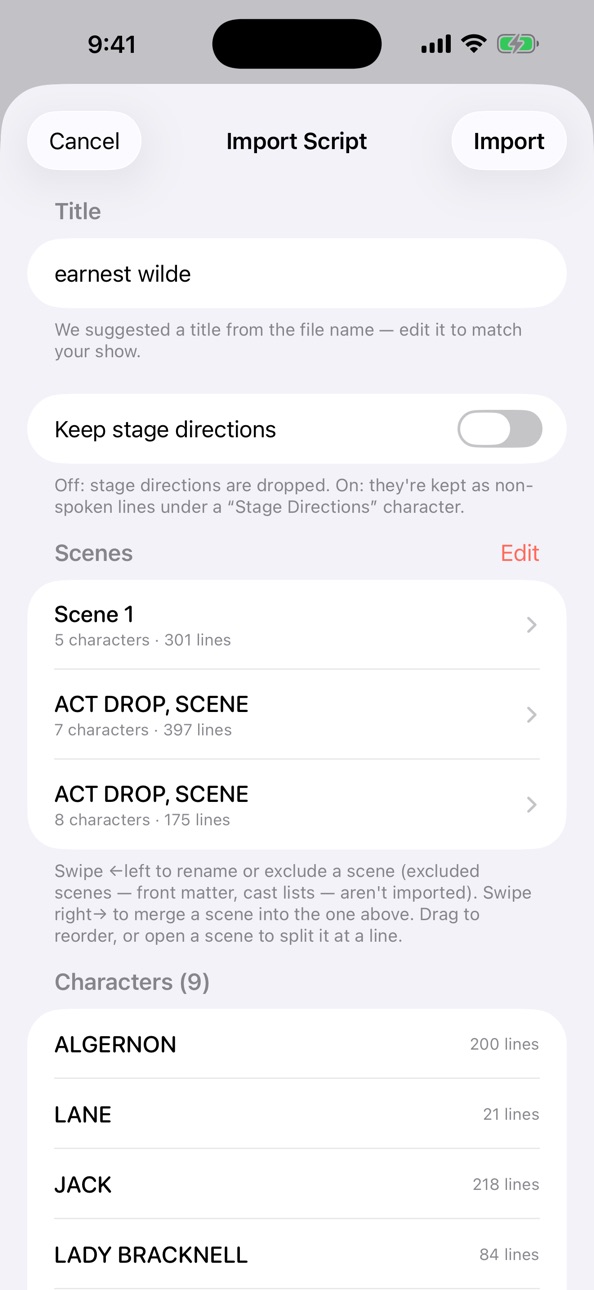
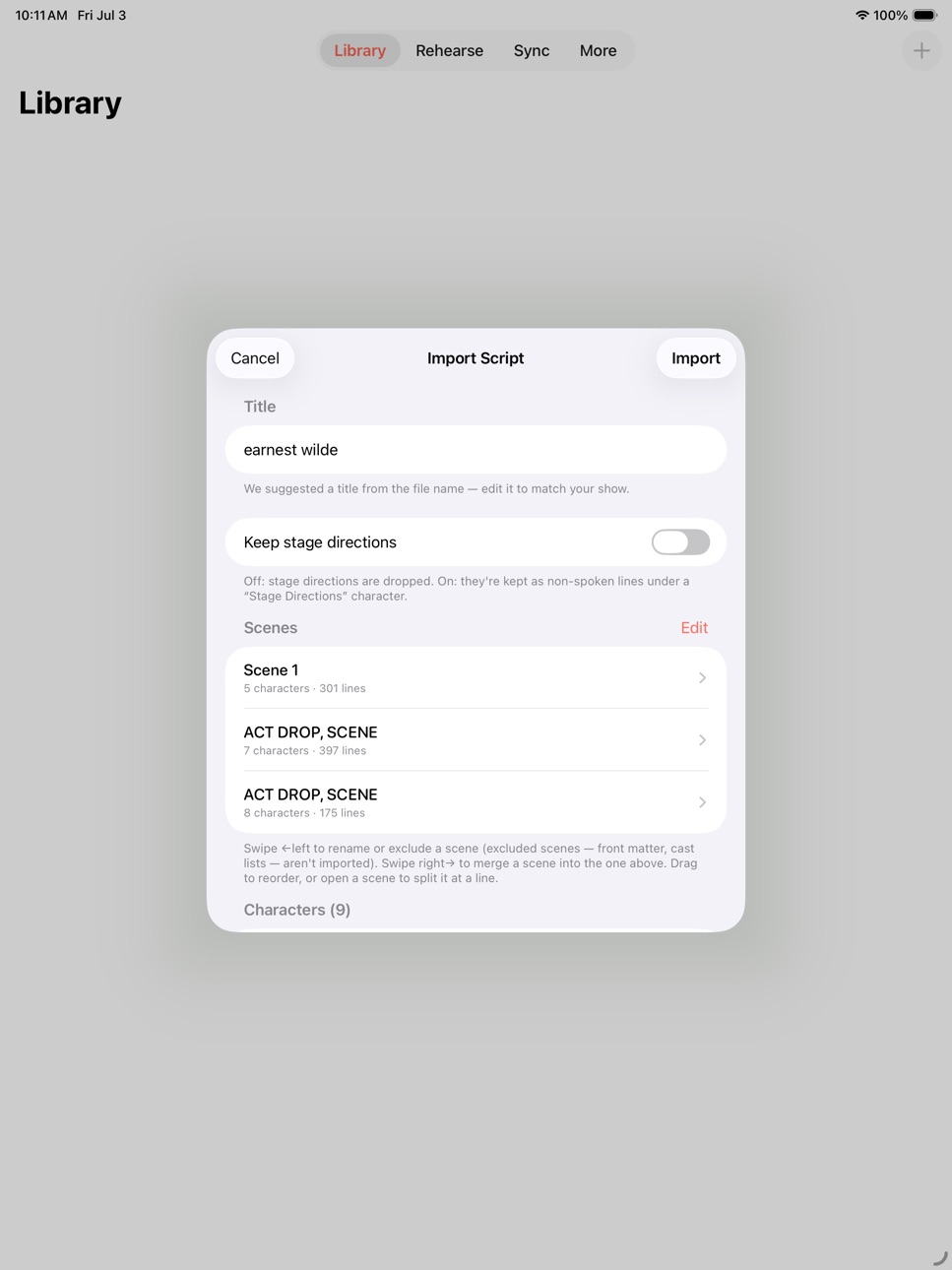
Curtain up on Script Import!
Typing a whole play in by hand? No longer. Now you hand Off Book! a script and it does the reading — scenes, characters, and every last
line — while you go warm up.
• Import a whole script. Feed it a PDF or a text file and Off Book! pulls out
the scenes, characters, and lines for you. No more thumb cramps.
• .fdx & Fountain get the VIP treatment. Final Draft and Fountain files take the
express lane and map almost perfectly — no guessing, no notes.
• A dress rehearsal before you commit. Everything lands in a preview first:
rename, merge or split scenes, cut what you don't want, tidy up character
names. Everything is in preview until you save.
• Hear it before you record. Imported lines you haven't recorded yet get read
aloud in their own per-character voices — so a brand-new show is rehearsable
by ear from minute one.
• Fluff a line? Insert it mid-scene. Tap the + right where it belongs and drop
it in. No more tacking it on the end and dragging it up the pecking order.
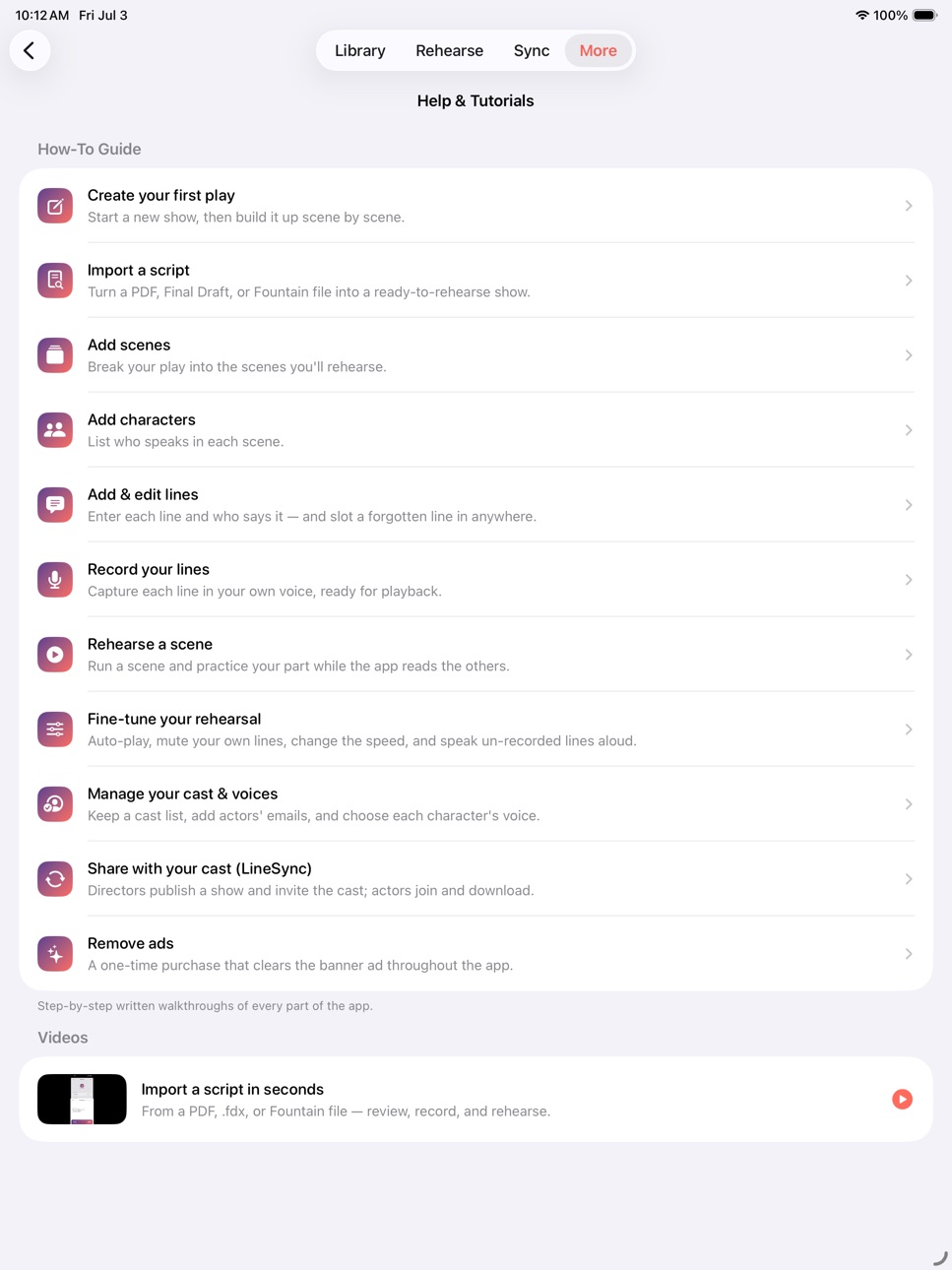
• A brand-new how-to guide. More → Help & Tutorials now has plain-English,
step-by-step walkthroughs for the whole app — importing, rehearsing, sharing
with your cast, the works.
Your shows, scenes, lines, and recordings all carry over when you update.
Nothing to re-do.
Found a bug or just want to say hi? The support link's right there. I read every
single message.
Now go learn your lines.
Break a leg!
— Steve
Description
**Ad free version of Offbook!**
Hi — I'm Steve. I'm a working actor, and I built Off Book! for myself because I
was tired of scribbling on scripts and recording lines into voice memos I could
never find again. Turns out a bunch of other actors wanted it too. So here it is,
made by an actor, for actors.
THE GIST
Record your script line by line, then play it back to run your scenes anywhere —
on the bus, at the gym, pacing your kitchen at 1am the night before opening.
It's dead simple:
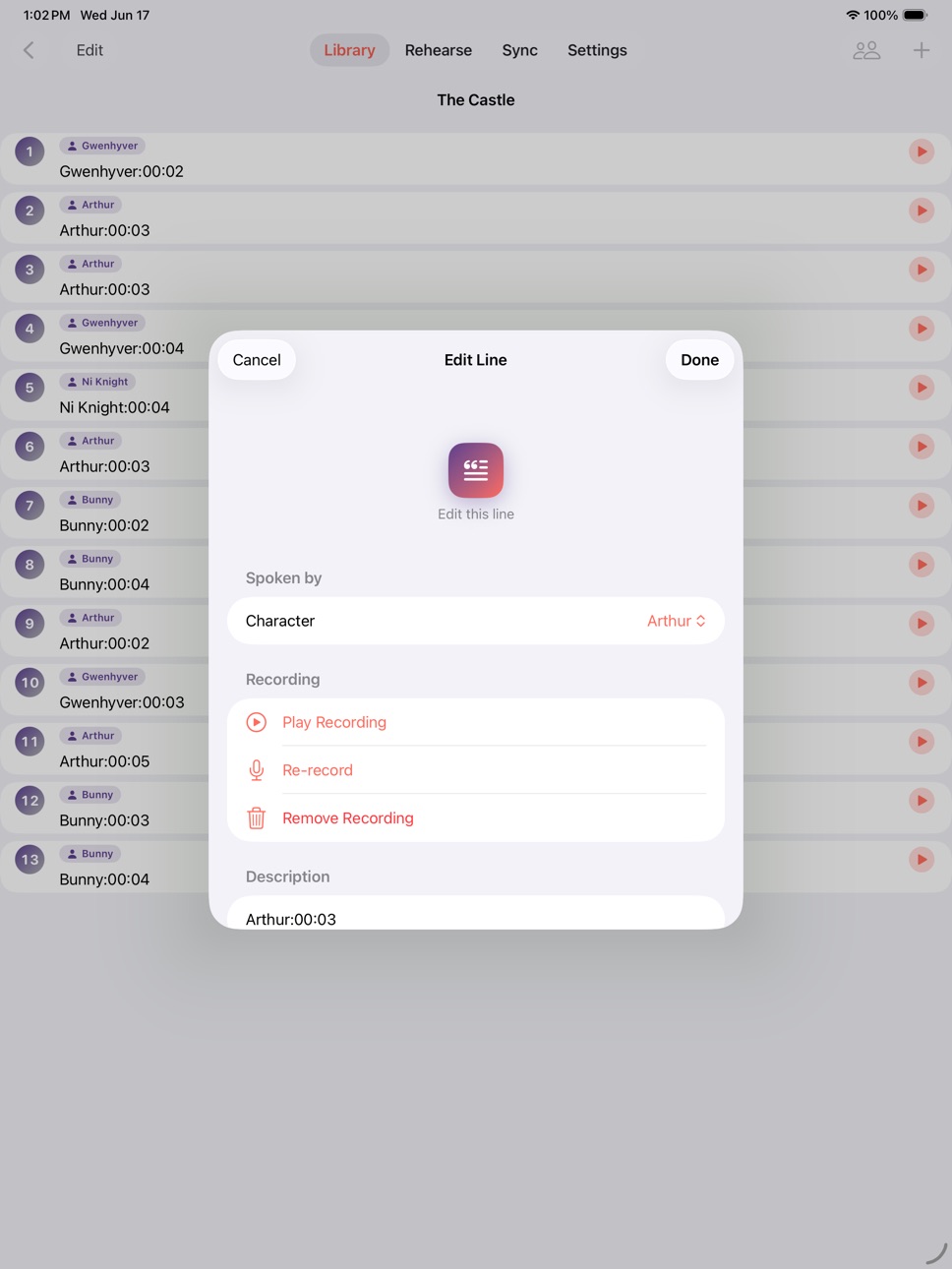
• Make a Work (your play), add your Scenes, drop in your Characters, and Record
your Lines.
• Recorded a 30-line scene and one line's out of order? Don't you dare start over.
Tap the "+" to slip a new line in, or just press-and-hold a line and drag it
where it belongs. Voilà.
• Scenes out of order too? Same deal — long-press and drag. Fixed.
NOW REHEARSE
Tap the Rehearse icon and you're in. Play the whole scene, or pick the character
YOU'RE playing and flip on "Mute My Line" — the scene plays right up to your cue,
then pauses just long enough for you to nail the line before your next cue rolls
in. Want a little nudge? "Cue My Line" gives you a friendly *ding* right before
it's your turn.
And here's the good part for runaround rehearsing: playback keeps going when your
screen locks or you switch apps. Lock-screen, Control Center, and headphone
controls all work — so you can run lines completely hands-free. Speed it up, slow
it down, loop a scene till it sticks.
LINESYNC — RUN LINES WITH YOUR CAST
Doing a show with other people? LineSync lets a director share a show's lines and
recordings with the whole cast across phones. Invite your actors by email; they
sync everything to their own phone for FREE. As castmates record their lines, the
director hears them show up automatically — no nagging. LineSync is a small
monthly subscription per show, paid by the director. The cast never pays a dime.
BUILT FOR EVERY ACTOR
Dynamic Type, VoiceOver, and Dark Mode work throughout — because the stage is for
everybody.
Got a slick feature idea, or (gasp!) found a bug? Hit the support link and there's
an email box waiting at the bottom — I read them myself.
Now go get off book. Break a leg.
— Steve
——— PRO TIPS ———
• "It won't save my lines!" → You probably skipped the microphone permission.
Reinstall and tap YES when it asks, or go to iPhone Settings → Off Book! →
switch Microphone ON.
• To DELETE a Line, Character, Scene, or Work: swipe right-to-left and tap Delete.
Careful — deleting a Character also deletes its Lines.
• Long scene, phone left unattended? Set Auto-Lock to a long time (or Never) so it
doesn't nap mid-rehearsal.
Privacy Policy: https://thelyonessgroup.com/offbook/privacy
Terms of Use (EULA): https://www.apple.com/legal/internet-services/itunes/dev/stdeula/
In-App Purchases MS pricing
One Month LineSync Subscription Subscription
Subscription—
LineSync Show 1 Subscription
Monthly—
LineSync Show 2 Subscription
Monthly—
LineSync Show 3 Subscription
Monthly—
LineSync Show 4 Subscription
Monthly—
LineSync Show 5 Subscription
Monthly—
Capabilities
In-App Purchases
Accessibility
ipadiphonemacrealityDevicetvoswatch
Version history 25 versions
Build 887800457v5.12026-07-04 05:14:37
Curtain up on Script Import!
Typing a whole play in by hand? No longer. Now you hand Off Book! a script and it does the reading — scenes, characters, and every last
line — while you go warm up.
• Import a whole script. Feed it a PDF or a text file and Off Book! pulls out
the scenes, characters, and lines for you. No more thumb cramps.
• .fdx & Fountain get the VIP treatment. Final Draft and Fountain files take the
express lane and map almost perfectly — no guessing, no notes.
• A dress rehearsal before you commit. Everything lands in a preview first:
rename, merge or split scenes, cut what you don't want, tidy up character
names. Everything is in preview until you save.
• Hear it before you record. Imported lines you haven't recorded yet get read
aloud in their own per-character voices — so a brand-new show is rehearsable
by ear from minute one.
• Fluff a line? Insert it mid-scene. Tap the + right where it belongs and drop
it in. No more tacking it on the end and dragging it up the pecking order.
• A brand-new how-to guide. More → Help & Tutorials now has plain-English,
step-by-step walkthroughs for the whole app — importing, rehearsing, sharing
with your cast, the works.
Your shows, scenes, lines, and recordings all carry over when you update.
Nothing to re-do.
Found a bug or just want to say hi? The support link's right there. I read every
single message.
Now go learn your lines.
Break a leg!
— Steve
Build 887401737v5.0.12026-06-29 07:04:31
A little spring cleaning to make rehearsing smoother:
-Cast, meet Scenes! Add characters to a scene by tapping right from your cast list — pick a whole bunch at once instead of typing them one by one.
-No more "wait, where am I?" — your Scenes screen now says so loud and clear.
-Fixed a pesky rehearse screen bug that could squish multiple scenes into one row. Special shout-out to Cyndi and Laura for alerting me to this!
Build 824835577v4.72017-11-26 16:54:47
This update from Apple will improve the functionality of this app. No new features are included.
Various Update for iPhone X
Build 823911593v4.62017-10-05 03:16:17
New Feature - "Line Call!" Call for line while you are rehearsing and your character is muted by simply double tapping on the line! Please checkout the new tutorial video in the help section to see this in action. A special thanks to user "Tony" for the wonderful suggestion!
Build 823552766v4.52017-09-05 21:40:38
Bug Fix - On some phones, new actors/actor changes in LineSync'd shows would not receive all of the sync'd lines. This has been fixed. Special thanks to users "Mark" and "Kraz" for their patience and assistance in solving this issue!!
Bug Fix - Crashbug when popping between line recording and character add has been fixed. A special thanks to user "Isabel"! for this find!!
As always, please keep those bug fixes and feature suggestions coming! I'll get them in as soon as I can!
Build 822524424v4.42017-06-13 17:24:28
Enhancement - During rehearsal, If you have the "Play Next Scene" option turned on, when the end of the work is reached, the work will restart from the beginning and play through again. Thank you to user "Lizzy" for this suggestion!
Bug Fix - During Rehearsal Auto-Play, if a user had inserted blank scenes into the middle of the work, the app would crash when it attempted to play those scenes. This has been fixed.
Build 821971138v4.32017-05-02 17:54:50
Multiple LineSync Bug Fixes. Thanks to all users for your assistance!
FYI - If you are just accepting a line sync of a long work (1.5 - 2hrs+) please be patient. It can take quite some time to download that much audio, depending on your network speed.
Build 821374691v4.22017-03-19 15:18:49
**Bug Fixes**
LineSync termination before complete sync has been fixed
Blank Show Title after LineSync/FullSync has been fixed
Thanks to all users who submitted reports!!
Build 821201115v4.12017-03-08 15:22:06
***New Feature*** Auto Play Entire Show - For those who want to go rehearse the entire show in one shot from any starting point, visit the rehearsal settings and flip the "Play Next Scene(s)" switch! Please note if you have the "Scene Repeat" switch on, you will be unable to turn on "Play Next Scene(s)". Check out the new feature video in the help section describing this!
*** New Feature*** Background Rehearsal - By popular demand: the app will now continue to play your audio/rehearse your scene(s) when the app goes to the background!
Various LineSync Fixes and Performance Enhancements
Don't forget to long press on a show for Re-Sync from cloud!
Build 821028017v4.0.92017-02-21 16:44:11
***BugFix - When LineSync subscription is expired, user was unable to create new show without restarting app
***BugFix - LineSync "You have already purchased this product" fixed
***BugFix - On older devices and when editing cast member information, the keyboard would block the save button
As always, please email me with any other bugs you may find! Thanks! --Steve
Build 819826558v4.0.82016-11-22 16:44:20
**Bug Fix** : LineSync disconnects prevented some users from having fully sync'd lines. This has been repaired. Special thanks to "Joel" for reporting this bug!!
*New Feature*: Line Sync users can now force an entire show "Re-Sync" by navigating to the "Works" tab, and then long pressing on the show you wish to re-sync. This will pull the entire show back down from the cloud and onto your phone. Please be aware this may take a significant amount of time if the show is fairly large!
Build 819624469v4.0.72016-11-06 22:21:40
**Bug Fix** : When subscribing to LineSync, periodically the enable switch would not appear in the LineSync invite list. This has been fixed. Thank you to user "Natalie" for finding this one for me!
If any of you are having this issue after this latest update, please contact me through the app, and I will resolve it! Thanks!
Build 819210793v4.0.62016-10-13 19:25:06
***New Features for Rehearsal Settings***: Rehearsal settings have been moved to a separate pop up screen and are now "Sticky". You can set them once, and they will remain the way you set them from session to session.
*New Feature: Scene Repeat*: You can now decide if you would like the autoplay to repeat the scene or not. This is on by default
*New Feature: PlayBack Speed*: You can now adjust the play back speed of your cast mates' lines to get your cues faster! Normal speed = 1.0, Double Speed = 2.0, Half Speed = .5. (This setting will not affect the speed of lines for the character that you are playing)
Please view the new Rehearsal Settings Video in the Help Section for further explanation of these settings, and as always, feel free to contact me with questions/comments/suggestions!
Build 818981346v4.0.52016-09-21 22:29:46
New Feature: Due to the great amount of feedback I received on removing the manual control during the rehearse process, it is now back in the app! There is a new setting in the "Help" section called "Auto Play on Rehearse". It is on by default. When this setting is on, the scene will play through during rehearsal and then repeat. If you do not want this behavior, go into the "Help" section and turn off "Auto Play on Rehearse". When you play the scene you will only hear the current line and will have to manually forward to the next line when you are ready.
Thanks for the feedback!
New Feature: Layout Updates for iPhone 4
BugFix: LineSync Bandwidth Reduction
Build 818924524v4.0.42016-09-16 18:37:43
New Feature: "Pause Before My Line" added to Rehearse screen.
A new feature has been added which will give you the opportunity to say your line in a pause, and then hear it repeated for you immediately after. The pause will last exactly as long as the recorded line, so you can preserve your cadence! Thank you to user Alana for suggesting this feature!
"Play Through Scene" and "Repeat All" have been removed as I felt they were redundant. Now, the Rehearse screen will automatically play through the entire scene, and then repeat it once you get to the end.
"Repeat Line" will repeat the selected line until the stop button is pressed.
Bug Fix: LineSync bandwidth usage greatly reduced
Build 818853392v4.0.32016-09-12 19:55:06
BugFix: After applying the latest iOS update, some phones experienced data corruption in OffBook which would cause the app to fail on launch. This has been fixed. Deepest apologies to any of you who may have lost any work.
Build 818757237v4.0.22016-09-06 19:53:23
BugFix: App Crash on Partial LineSync Upload
BugFix: App Crash On LineSync Tutorial Video View Fixed
BugFix: Work Edit "information" buttons will now always appear in Works List
Build 818671991v4.02016-09-02 15:24:44
Welcome to OffBook! 4.0!
New Feature: LineSync! Available through in-app purchase, you can now share your recorded lines with other members of your cast!
New Feature: Line Insert - On the line listing for a scene, simply tap on the purple "plus" sign to insert a line immediately after the line you clicked!
New Feature: Continuous Record - For legacy users - this will keep you on the record screen after line save, and not pop you back to the listing. It will mean for speedier recording sessions.
As always, please watch the in-app tutorial videos, and send me your questions, comments, and suggestions!
Build 817946689v3.22016-06-29 21:04:28
Feature: CueMyLine and RepeatAll/Line has now been added for iPhone 4s!
BugFix: Ads no longer blocking select buttons on iPhone 4s phones. Many thanks to user Todd for writing me and pointing this out! Thanks, Todd!
Build 817912138v3.12016-06-28 02:53:56
Feature: Scene Reordering has been added to version 3.0 interface rebuild! Simply long press on a scene and drag to a new position to set the order (just the same as line reordering). A special thank you to user Mikaella for writing me to tell me that this feature from v.2.0 was overlooked during the interface revamp. Thank you, Mikaella!
Build 817623321v3.02016-06-02 20:02:09
New Feature: Version 3.0 is here! Completely revamped interface flow! It is now much easier and more straightforward to create Works, Scenes, Characters, and Record Lines! I have added a new video explaining how the new flow works, so please give it a look! If you are super courageous, please feel free to go right ahead and dive in!
In Short: After creating a WORK, tap the button to "Edit Cast of Characters". This will bring you to a screen where you type in all of the cast members in the WORK. After that click done, and then onto "Edit Scenes". You then add all of the SCENES in the WORK. When you are done, tap on a SCENE and you will see a list of the entire CAST. Simply check off which cast members are in that SCENE, and you are good to go! Repeat for the rest of the SCENES. This will save you from having to retype character names over and over as before.
Please note: To begin recording Lines, you must have already created a WORK, added at least one CAST member, created at least one SCENE, and added at least one CAST member to that SCENE. Otherwise, the "Lines" tab will not show your WORK/SCENE.
As always, please feel free to contact me with any issues or suggestions!
Build 817393424v2.722016-05-14 17:31:10
BugFix: Phone will no longer go to sleep during Line Recording or Rehearsal
Thank you so much to a wonderful user for writing and alerting me to this issue! Now when you rehearse, regardless of your lock timer, the screen will remain active. Please keep those suggestions coming! Thanks!
Build 817300873v2.712016-05-06 23:03:57
BugFix: Line editing button crash fixed
Build 817250678v2.72016-05-02 18:04:17
(New Feature): A video help section has now been added to the main screen which links to Youtube instructional videos. Added by popular demand!
BugFix: Intermittent Crashes with duplicate scene/character objects
***Many other stability improvements
Build 817186316v2.62016-04-26 17:46:21
(New Feature): App will now exist in the background, so that if you press the home key, you can return to where you left off later! Thank you so much to user "Sambaliii" for making this suggestion!
BugFix: Recording timer fixed to properly reset to zero during line record/stop
BugFix: Mute My Line/Cue My Line now properly blocked if character not selected
As always, please continue to send me your comments & suggestions!
Price history by region
Currency
Show
Columns
Search
Availability 175 of 175 storefronts
| Region | Language | Price | Ratings | Avg | Version |
|---|---|---|---|---|---|
| US | en-US | USD 2.99 | 13 | 3.5 | 5.1 |
| AU | en-AU | AUD 4.99 | 3 | 4.0 | 5.1 |
| GB | en-GB | GBP 2.99 | 1 | 5.0 | 5.1 |
| AE | en-GB | AED 12.99 | 0 | — | 5.1 |
| AF | en-GB | USD 2.99 | 0 | — | 5.1 |
| AG | en-GB | USD 2.99 | 0 | — | 5.1 |
| AI | en-GB | USD 2.99 | 0 | — | 5.1 |
| AL | en-GB | USD 3.99 | 0 | — | 5.1 |
| AM | en-GB | USD 3.99 | 0 | — | 5.1 |
| AO | en-GB | USD 2.99 | 0 | — | 5.1 |
| AR | es-MX | USD 2.99 | 0 | — | 5.1 |
| AT | de-DE | EUR 2.99 | 0 | — | 5.1 |
| AZ | en-GB | USD 3.99 | 0 | — | 5.1 |
| BA | en-GB | EUR 2.99 | 0 | — | 5.1 |
| BB | en-GB | USD 3.99 | 0 | — | 5.1 |
| BE | en-GB | EUR 2.99 | 0 | — | 5.1 |
| BF | en-GB | USD 2.99 | 0 | — | 5.1 |
| BG | en-GB | EUR 2.99 | 0 | — | 5.1 |
| BH | en-GB | USD 2.99 | 0 | — | 5.1 |
| BJ | en-GB | USD 3.99 | 0 | — | 5.1 |
| BM | en-GB | USD 2.99 | 0 | — | 5.1 |
| BN | en-GB | USD 2.99 | 0 | — | 5.1 |
| BO | es-MX | USD 2.99 | 0 | — | 5.1 |
| BR | pt-BR | BRL 19.9 | 0 | — | 5.1 |
| BS | en-GB | USD 2.99 | 0 | — | 5.1 |
| BT | en-GB | USD 2.99 | 0 | — | 5.1 |
| BW | en-GB | USD 2.99 | 0 | — | 5.1 |
| BY | en-GB | USD 3.99 | 0 | — | 5.1 |
| BZ | en-GB | USD 2.99 | 0 | — | 5.1 |
| CA | en-CA | CAD 3.99 | 0 | — | 5.1 |
| CD | en-GB | USD 2.99 | 0 | — | 5.1 |
| CG | en-GB | USD 2.99 | 0 | — | 5.1 |
| CH | de-CH | CHF 3 | 0 | — | 5.1 |
| CI | fr-FR | USD 3.99 | 0 | — | 5.1 |
| CL | es-MX | CLP 2990 | 0 | — | 5.1 |
| CM | fr-FR | USD 3.99 | 0 | — | 5.1 |
| CN | zh-Hans-CN | CNY 22 | 0 | — | 5.1 |
| CO | es-MX | COP 14900 | 0 | — | 5.1 |
| CR | es-MX | USD 2.99 | 0 | — | 5.1 |
| CV | en-GB | USD 2.99 | 0 | — | 5.1 |
| CY | en-GB | EUR 2.99 | 0 | — | 5.1 |
| CZ | en-GB | CZK 79 | 0 | — | 5.1 |
| DE | de-DE | EUR 2.99 | 0 | — | 5.1 |
| DK | en-GB | DKK 29 | 0 | — | 5.1 |
| DM | en-GB | USD 2.99 | 0 | — | 5.1 |
| DO | es-MX | USD 2.99 | 0 | — | 5.1 |
| DZ | en-GB | USD 2.99 | 0 | — | 5.1 |
| EC | es-MX | USD 2.99 | 0 | — | 5.1 |
| EE | en-GB | EUR 2.99 | 0 | — | 5.1 |
| EG | en-GB | EGP 149.99 | 0 | — | 5.1 |
| ES | es-ES | EUR 2.99 | 0 | — | 5.1 |
| FI | en-GB | EUR 2.99 | 0 | — | 5.1 |
| FJ | en-GB | USD 2.99 | 0 | — | 5.1 |
| FM | en-GB | USD 2.99 | 0 | — | 5.1 |
| FR | fr-FR | EUR 2.99 | 0 | — | 5.1 |
| GA | fr-FR | USD 2.99 | 0 | — | 5.1 |
| GD | en-GB | USD 2.99 | 0 | — | 5.1 |
| GE | en-GB | USD 3.99 | 0 | — | 5.1 |
| GH | en-GB | USD 3.99 | 0 | — | 5.1 |
| GM | en-GB | USD 2.99 | 0 | — | 5.1 |
| GR | en-GB | EUR 2.99 | 0 | — | 5.1 |
| GT | es-MX | USD 2.99 | 0 | — | 5.1 |
| GW | en-GB | USD 2.99 | 0 | — | 5.1 |
| GY | en-GB | USD 2.99 | 0 | — | 5.1 |
| HK | zh-Hant-HK | HKD 22 | 0 | — | 5.1 |
| HN | es-MX | USD 2.99 | 0 | — | 5.1 |
| HR | en-GB | EUR 2.99 | 0 | — | 5.1 |
| HU | en-GB | HUF 1490 | 0 | — | 5.1 |
| ID | en-GB | IDR 49000 | 0 | — | 5.1 |
| IE | en-GB | EUR 2.99 | 0 | — | 5.1 |
| IL | en-GB | ILS 9.9 | 0 | — | 5.1 |
| IN | en-GB | INR 299 | 0 | — | 5.1 |
| IQ | en-GB | USD 2.99 | 0 | — | 5.1 |
| IS | en-GB | USD 3.99 | 0 | — | 5.1 |
| IT | it | EUR 2.99 | 0 | — | 5.1 |
| JM | en-GB | USD 2.99 | 0 | — | 5.1 |
| JO | en-GB | USD 2.99 | 0 | — | 5.1 |
| JP | ja | JPY 500 | 0 | — | 5.1 |
| KE | en-GB | USD 3.99 | 0 | — | 5.1 |
| KG | en-GB | USD 2.99 | 0 | — | 5.1 |
| KH | en-GB | USD 2.99 | 0 | — | 5.1 |
| KN | en-GB | USD 2.99 | 0 | — | 5.1 |
| KR | ko | KRW 4400 | 0 | — | 5.1 |
| KW | en-GB | USD 2.99 | 0 | — | 5.1 |
| KY | en-GB | USD 2.99 | 0 | — | 5.1 |
| KZ | en-GB | KZT 1790 | 0 | — | 5.1 |
| LA | en-GB | USD 2.99 | 0 | — | 5.1 |
| LB | en-GB | USD 2.99 | 0 | — | 5.1 |
| LC | en-GB | USD 2.99 | 0 | — | 5.1 |
| LK | en-GB | USD 2.99 | 0 | — | 5.1 |
| LR | en-GB | USD 2.99 | 0 | — | 5.1 |
| LT | en-GB | EUR 2.99 | 0 | — | 5.1 |
| LU | en-GB | EUR 2.99 | 0 | — | 5.1 |
| LV | en-GB | EUR 2.99 | 0 | — | 5.1 |
| LY | en-GB | USD 2.99 | 0 | — | 5.1 |
| MA | en-GB | USD 2.99 | 0 | — | 5.1 |
| MD | en-GB | USD 3.99 | 0 | — | 5.1 |
| ME | en-GB | EUR 2.99 | 0 | — | 5.1 |
| MG | en-GB | USD 2.99 | 0 | — | 5.1 |
| MK | en-GB | USD 2.99 | 0 | — | 5.1 |
| ML | en-GB | USD 2.99 | 0 | — | 5.1 |
| MM | en-GB | USD 2.99 | 0 | — | 5.1 |
| MN | en-GB | USD 2.99 | 0 | — | 5.1 |
| MO | zh-Hant-HK | USD 2.99 | 0 | — | 5.1 |
| MR | en-GB | USD 2.99 | 0 | — | 5.1 |
| MS | en-GB | USD 2.99 | 0 | — | 5.1 |
| MT | en-GB | EUR 2.99 | 0 | — | 5.1 |
| MU | en-GB | USD 3.99 | 0 | — | 5.1 |
| MV | en-GB | USD 2.99 | 0 | — | 5.1 |
| MW | en-GB | USD 2.99 | 0 | — | 5.1 |
| MX | es-MX | MXN 69 | 0 | — | 5.1 |
| MY | en-GB | MYR 14.9 | 0 | — | 5.1 |
| MZ | en-GB | USD 2.99 | 0 | — | 5.1 |
| NA | en-GB | USD 2.99 | 0 | — | 5.1 |
| NE | en-GB | USD 2.99 | 0 | — | 5.1 |
| NG | en-GB | NGN 4900 | 0 | — | 5.1 |
| NI | es-MX | USD 2.99 | 0 | — | 5.1 |
| NL | nl | EUR 2.99 | 0 | — | 5.1 |
| NO | en-GB | NOK 39 | 0 | — | 5.1 |
| NP | en-GB | USD 3.99 | 0 | — | 5.1 |
| NR | en-GB | USD 2.99 | 0 | — | 5.1 |
| NZ | en-AU | NZD 4.99 | 0 | — | 5.1 |
| OM | en-GB | USD 2.99 | 0 | — | 5.1 |
| PA | es-MX | USD 2.99 | 0 | — | 5.1 |
| PE | es-MX | PEN 12.9 | 0 | — | 5.1 |
| PG | en-GB | USD 2.99 | 0 | — | 5.1 |
| PH | en-GB | PHP 199 | 0 | — | 5.1 |
| PK | en-GB | PKR 900 | 0 | — | 5.1 |
| PL | en-GB | PLN 14.99 | 0 | — | 5.1 |
| PT | pt-PT | EUR 2.99 | 0 | — | 5.1 |
| PW | en-GB | USD 2.99 | 0 | — | 5.1 |
| PY | es-MX | USD 2.99 | 0 | — | 5.1 |
| QA | en-GB | QAR 9.99 | 0 | — | 5.1 |
| RO | en-GB | RON 14.99 | 0 | — | 5.1 |
| RS | en-GB | EUR 2.99 | 0 | — | 5.1 |
| RU | ru | RUB 249 | 0 | — | 5.1 |
| RW | en-GB | USD 2.99 | 0 | — | 5.1 |
| SA | en-GB | SAR 12.99 | 0 | — | 5.1 |
| SB | en-GB | USD 2.99 | 0 | — | 5.1 |
| SC | en-GB | USD 2.99 | 0 | — | 5.1 |
| SE | sv | SEK 39 | 0 | — | 5.1 |
| SG | en-GB | SGD 3.98 | 0 | — | 5.1 |
| SI | en-GB | EUR 2.99 | 0 | — | 5.1 |
| SK | en-GB | EUR 2.99 | 0 | — | 5.1 |
| SL | en-GB | USD 2.99 | 0 | — | 5.1 |
| SN | en-GB | USD 3.99 | 0 | — | 5.1 |
| SR | en-GB | USD 2.99 | 0 | — | 5.1 |
| ST | en-GB | USD 2.99 | 0 | — | 5.1 |
| SV | es-MX | USD 2.99 | 0 | — | 5.1 |
| SZ | en-GB | USD 2.99 | 0 | — | 5.1 |
| TC | en-GB | USD 2.99 | 0 | — | 5.1 |
| TD | en-GB | USD 2.99 | 0 | — | 5.1 |
| TH | en-GB | THB 99 | 0 | — | 5.1 |
| TJ | en-GB | USD 2.99 | 0 | — | 5.1 |
| TM | en-GB | USD 2.99 | 0 | — | 5.1 |
| TN | en-GB | USD 2.99 | 0 | — | 5.1 |
| TO | en-GB | USD 2.99 | 0 | — | 5.1 |
| TR | en-GB | TRY 149.99 | 0 | — | 5.1 |
| TT | en-GB | USD 2.99 | 0 | — | 5.1 |
| TW | zh-Hant-TW | TWD 90 | 0 | — | 5.1 |
| TZ | en-GB | TZS 9900 | 0 | — | 5.1 |
| UA | en-GB | USD 3.99 | 0 | — | 5.1 |
| UG | en-GB | USD 3.99 | 0 | — | 5.1 |
| UY | en-GB | USD 2.99 | 0 | — | 5.1 |
| UZ | en-GB | USD 2.99 | 0 | — | 5.1 |
| VC | en-GB | USD 2.99 | 0 | — | 5.1 |
| VE | es-MX | USD 2.99 | 0 | — | 5.1 |
| VG | en-GB | USD 2.99 | 0 | — | 5.1 |
| VN | en-GB | VND 99000 | 0 | — | 5.1 |
| VU | en-GB | USD 2.99 | 0 | — | 5.1 |
| XK | en-GB | EUR 2.99 | 0 | — | 5.1 |
| YE | en-GB | USD 2.99 | 0 | — | 5.1 |
| ZA | en-GB | ZAR 59.99 | 0 | — | 5.1 |
| ZM | en-GB | USD 3.99 | 0 | — | 5.1 |
| ZW | en-GB | USD 3.99 | 0 | — | 5.1 |
Change log 28 changes · MS
✎
releaseNotes updated
Curtain up on Script Import!
Typing a whole play in by hand? No longer. Now you hand Off Book! a script and it does the reading — scenes, characters, and ev
✎
description updated
**Ad free version of Offbook!**
Hi — I'm Steve. I'm a working actor, and I built Off Book! for myself because I
was tired of scribbling on scripts and recordin
✎
name updated
Off Book! Pro
◆
Version 5.1 released
Curtain up on Script Import!
Typing a whole play in by hand? No longer. Now you hand Off Book! a script and it does the reading — scenes, characters, and every last
line — while you go warm up.
• Import a whole script. Feed it a PD
◆
Version 5.0.1 released
A little spring cleaning to make rehearsing smoother:
-Cast, meet Scenes! Add characters to a scene by tapping right from your cast list — pick a whole bunch at once instead of typing them one by one.
-No more "wait, where am
◆
Version 4.7 released
This update from Apple will improve the functionality of this app. No new features are included.
Various Update for iPhone X
◆
Version 4.6 released
New Feature - "Line Call!" Call for line while you are rehearsing and your character is muted by simply double tapping on the line! Please checkout the new tutorial video in the help section to see this in action. A special thanks to user
◆
Version 4.5 released
Bug Fix - On some phones, new actors/actor changes in LineSync'd shows would not receive all of the sync'd lines. This has been fixed. Special thanks to users "Mark" and "Kraz" for their patience and assistance in solving this issue!!
Bug
◆
Version 4.4 released
Enhancement - During rehearsal, If you have the "Play Next Scene" option turned on, when the end of the work is reached, the work will restart from the beginning and play through again. Thank you to user "Lizzy" for this suggestion!
Bug F
◆
Version 4.3 released
Multiple LineSync Bug Fixes. Thanks to all users for your assistance!
FYI - If you are just accepting a line sync of a long work (1.5 - 2hrs+) please be patient. It can take quite some time to download that much audio, depending on your ne
◆
Version 4.2 released
**Bug Fixes**
LineSync termination before complete sync has been fixed
Blank Show Title after LineSync/FullSync has been fixed
Thanks to all users who submitted reports!!
◆
Version 4.1 released
***New Feature*** Auto Play Entire Show - For those who want to go rehearse the entire show in one shot from any starting point, visit the rehearsal settings and flip the "Play Next Scene(s)" switch! Please note if you have the "Scene Repe
◆
Version 4.0.9 released
***BugFix - When LineSync subscription is expired, user was unable to create new show without restarting app
***BugFix - LineSync "You have already purchased this product" fixed
***BugFix - On older devices and when editing cast member inf
◆
Version 4.0.8 released
**Bug Fix** : LineSync disconnects prevented some users from having fully sync'd lines. This has been repaired. Special thanks to "Joel" for reporting this bug!!
*New Feature*: Line Sync users can now force an entire show "Re-Sync" by navig
◆
Version 4.0.7 released
**Bug Fix** : When subscribing to LineSync, periodically the enable switch would not appear in the LineSync invite list. This has been fixed. Thank you to user "Natalie" for finding this one for me!
If any of you are having this issue af
◆
Version 4.0.6 released
***New Features for Rehearsal Settings***: Rehearsal settings have been moved to a separate pop up screen and are now "Sticky". You can set them once, and they will remain the way you set them from session to session.
*New Feature: Scene
◆
Version 4.0.5 released
New Feature: Due to the great amount of feedback I received on removing the manual control during the rehearse process, it is now back in the app! There is a new setting in the "Help" section called "Auto Play on Rehearse". It is on by defa
◆
Version 4.0.4 released
New Feature: "Pause Before My Line" added to Rehearse screen.
A new feature has been added which will give you the opportunity to say your line in a pause, and then hear it repeated for you immediately after. The pause will last exactly as
◆
Version 4.0.3 released
BugFix: After applying the latest iOS update, some phones experienced data corruption in OffBook which would cause the app to fail on launch. This has been fixed. Deepest apologies to any of you who may have lost any work.
◆
Version 4.0.2 released
BugFix: App Crash on Partial LineSync Upload
BugFix: App Crash On LineSync Tutorial Video View Fixed
BugFix: Work Edit "information" buttons will now always appear in Works List
◆
Version 4.0 released
Welcome to OffBook! 4.0!
New Feature: LineSync! Available through in-app purchase, you can now share your recorded lines with other members of your cast!
New Feature: Line Insert - On the line listing for a scene, simply tap on the purple "
◆
Version 3.2 released
Feature: CueMyLine and RepeatAll/Line has now been added for iPhone 4s!
BugFix: Ads no longer blocking select buttons on iPhone 4s phones. Many thanks to user Todd for writing me and pointing this out! Thanks, Todd!
◆
Version 3.1 released
Feature: Scene Reordering has been added to version 3.0 interface rebuild! Simply long press on a scene and drag to a new position to set the order (just the same as line reordering). A special thank you to user Mikaella for writing me to t
◆
Version 3.0 released
New Feature: Version 3.0 is here! Completely revamped interface flow! It is now much easier and more straightforward to create Works, Scenes, Characters, and Record Lines! I have added a new video explaining how the new flow works, so pleas
◆
Version 2.72 released
BugFix: Phone will no longer go to sleep during Line Recording or Rehearsal
Thank you so much to a wonderful user for writing and alerting me to this issue! Now when you rehearse, regardless of your lock timer, the screen will remain activ
◆
Version 2.71 released
BugFix: Line editing button crash fixed
◆
Version 2.7 released
(New Feature): A video help section has now been added to the main screen which links to Youtube instructional videos. Added by popular demand!
BugFix: Intermittent Crashes with duplicate scene/character objects
***Many other stability im
◆
Version 2.6 released
(New Feature): App will now exist in the background, so that if you press the home key, you can return to where you left off later! Thank you so much to user "Sambaliii" for making this suggestion!
BugFix: Recording timer fixed to properly