Home › Utilities

 BB
BB
 USen-US
 CAen-CA
 GBen-GB
 AUen-AU
 DEde-DE
 INen-GB
 FRfr-FR
 MXes-MX
 ESes-ES
 ITit
ITit BRpt-BR
 ROen-GB
 NLnl
NLnl COes-MX
 HUen-GB
 NZen-AU
 TRen-GB
 BGen-GB
 PLen-GB
 CHde-CH
 GRen-GB
 UAen-GB
 CLes-MX
 IDen-GB
 TWzh-Hant-TW
 ZAen-GB
 ARes-MX
 DKen-GB
 PTpt-PT
 CNzh-Hans-CN
 KRko
KRko NOen-GB
 RUru
RUru ATde-DE
 SEsv
SEsv SAen-GB
 BEen-GB
 CZen-GB
 EEen-GB
 HRen-GB
 MKen-GB
 MYen-GB
 THen-GB
 ILen-GB
 AZen-GB
 BNen-GB
 IEen-GB
 JPja
JPja LTen-GB
 SIen-GB
 VNen-GB
 AEen-GB
 ALen-GB
 DZen-GB
 ECes-MX
 FIen-GB
 KEen-GB
 NGen-GB
 PHen-GB
 PKen-GB
 RSen-GB
 SGen-GB
 BHen-GB
 BYen-GB
 CGen-GB
 CYen-GB
 GEen-GB
 HKzh-Hant-HK
 ISen-GB
 JMen-GB
 JOen-GB
 KZen-GB
 LBen-GB
 MAen-GB
 MEen-GB
 SKen-GB
 TTen-GB
 TZen-GB
 UYen-GB
 AFen-GB
 AGen-GB
 AIen-GB
 AMen-GB
 AOen-GB
 BAen-GBBBen-GB
 BFen-GB
 BJen-GB
 BMen-GB
 BOes-MX
 BSen-GB
 BTen-GB
 BWen-GB
 BZen-GB
 CDen-GB
 CIfr-FR
 CMfr-FR
 CRes-MX
 CVen-GB
 DMen-GB
 DOes-MX
 EGen-GB
 FJen-GB
 FMen-GB
 GAfr-FR
 GDen-GB
 GHen-GB
 GMen-GB
 GTes-MX
 GWen-GB
 GYen-GB
 HNes-MX
 IQen-GB
 KGen-GB
 KHen-GB
 KNen-GB
 KWen-GB
 KYen-GB
 LAen-GB
 LCen-GB
 LKen-GB
 LRen-GB
 LUen-GB
 LVen-GB
 LYen-GB
 MDen-GB
 MGen-GB
 MLen-GB
 MMen-GB
 MNen-GB
 MOzh-Hant-HK
 MRen-GB
 MSen-GB
 MTen-GB
 MUen-GB
 MVen-GB
 MWen-GB
 MZen-GB
 NAen-GB
 NEen-GB
 NIes-MX
 NPen-GB
 NRen-GB
 OMen-GB
 PAes-MX
 PEes-MX
 PGen-GB
 PWen-GB
 PYes-MX
 QAen-GB
 RWen-GB
 SBen-GB
 SCen-GB
 SLen-GB
 SNen-GB
 SRen-GB
 STen-GB
 SVes-MX
 SZen-GB
 TCen-GB
 TDen-GB
 TJen-GB
 TMen-GB
 TNen-GB
 TOen-GB
 UGen-GB
 UZen-GB
 VCen-GB
 VEes-MX
 VGen-GB
 VUen-GB
 XKen-GB
 YEen-GB
 ZMen-GB
 ZWen-GB
175 of 175 storefronts
Content in en-US
Content in en-US
Information
Apple ID1056649790
Bundle IDcom.mobytestudio.gauges
SellerSeller
Min iOS12.0
Min macOS11.0
Device familieswatch, iphone, ipad, ipod
Released2015-11-16
Copyright© 2020 Boluga Ltd
Privacy policyLink ↗
Preview 3 platforms
iPhone 5 images


iPad 5 images


Apple Watch 5 images

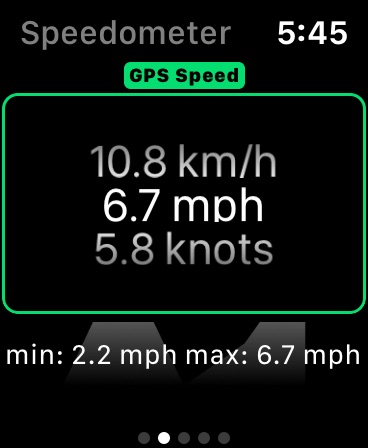


What’s New Version 4.2.2
New screenshots (English)
Description
Gauges is an all-in-one utility with GPS, Altimeter, Speedometer, Barometer, Accelerometer, Magnetometer, Sound level and Light meter:
1. Speed information (kph, mph and knots)
2. GPS Altitude (meters and feet), and also Pressure Altitude with 1013.25 mbar setting.
3. Barometric information (hPa, Hg, PSI, kPa, and mmHg)
4. Accelerometer (G forces)
5. Location and heading (Latitude, Longitude, Magnetic and True heading)
6. Magnetic force (in microtesla and Gauss)
7. Sound level meter (dB)
8. Luminance
9. All the previous combined!
A real-time graph shows the updated values for each instrument, and a map is available when location and heading are selected.
Sliding the instrument to the left exposes the option to mark the value - a quick annotation of the current value for future comparison.
Minimum and Maximum values for each instrument are recorded, and can also be reset with a tap.
Unit definitions available through Wiki links.
Share the sensor information, or use it on other apps, such as a note or email.
Things you can do with this app:
* Find hidden cameras, metal structures or even electric wires behind walls, with the Magnetometer
* Check if the weather is improving, with the Barometer
* Check how fast your train, plane or boat is going with the GPS Speedometer
* Find your current Altitude with the GPS altimeter, or an altitude calibrated to 1023.25, or your own QNH setting on the Barometer
* Discover how many G's you endure on a roller coaster ride
* Record all this and more and explore the data on a spreadsheet (In App Purchase required!)
Also available:
* Recording of all the data that you can later share with other Apps in CSV format. (You need to do an in-app Purchase for this feature).
* View all sensor information at once (In-App purchase required).
* Option to produce spoken values at regular intervals.
* Data update frequency from 1 ms to 1 second. (In-App purchase required).
* Ability to enable and disable each instrument (In-App purchase required).
Continued use of GPS running in the background can dramatically decrease battery life.
In-App Purchases BB pricing
One-Time Purchases
Record Unlock—
Capabilities
In-App Purchases
Accessibility
ipadiphonemacrealityDevicetvoswatch
Version history 25 versions
Build 840107711v4.2.22021-01-20 16:45:28
New screenshots (English)
Build 839302444v4.2.12021-01-09 09:00:59
Fix for invalid GPS value.
Build 838377733v4.22020-10-29 09:34:11
** Added languages: French, German, and Spanish **
Build 838208526v4.12020-10-21 13:17:32
** Small bug fixes **
Build 836473861v4.0.42020-06-18 21:33:03
* Fixed a crash bug caused by tapping in an empty label *
Build 836001452v4.0.32020-05-28 07:55:51
** Fixed a bug that caused sessions to include previous session data **
Build 833625160v4.0.22019-11-16 07:57:53
* Permissions welcome screen changes, to stop accidental dismiss *
Build 833558502v4.0.12019-11-12 09:06:01
* Fixed a crash involving disabling some instruments and selecting a different unit *
* Fixed a font sizing issue in the All Instruments page *
Build 833303009v4.02019-10-25 09:15:19
* Unit selection is no longer a circular, but rather a precise tap to select *
* Refined UI to show the instrument dedicated full screen button *
* Fixed some issues with graphics, mainly negative values in case of altitude (Hello Netherlands) *
* Stand alone Apple Watch App - It will show the Watch sensor values, it is not a companion app that relays your phone's data *
* Some updates related to the latest iOS versions, such as dark mode *
Build 831095057v3.82019-04-27 10:01:51
** Fixed realtime pressure altitude graph **
Build 830713050v3.72019-03-23 11:35:38
** Fixed: Copy/Paste problem when one or more instruments were disabled **
Build 830154812v3.62019-01-31 22:21:50
** Improved rate of accelerometer recordings **
** Added QNH setting for barometer altimeter **
Build 829312614v3.5.92018-11-18 18:23:06
** Related to Ads - New GDPR privacy controls for EU and EEA specific countries **
Build 828017002v3.5.82018-07-30 20:50:42
* A couple of crashing bugs fixed *
* Privacy concerns addressed, by stopping sensitive sensors when the app is not being used (or recording) *
* 1 ms recordings ensured by stopping UI updates *
Build 827498579v3.5.72018-06-12 09:45:30
** Location improvements, such as latitude and longitude display in degrees, minutes and seconds **
** Other small refinements **
Build 827193836v3.5.62018-05-23 09:44:33
** Improvements **
Build 826275236v3.5.32018-04-24 10:59:15
** Disabled instruments will not be displayed (Available only after Unlocked) **
** Small improvements dealing with calibration and sensor accuracy **
** Better update interval up to 1 ms **
Build 825738747v3.5.22018-01-24 04:43:44
* Copy bug fix
* Multiple session delete, export *
Build 825579179v3.5.12018-01-09 19:26:36
• Minimum and Maximum values now reset per instrument
• All Gauges screen correctly displays the units selected in each instrument
• Fixed crash situation where speech was enabled on a disabled instrument
▷▷ Special thanks to the anonymous user that provided excellent feedback!
Build 825546044v3.52018-01-05 22:30:05
New features based on feedback
********************************
- Tap the all screen instrument to jump to instrument screen
- Minumum & Maximum values reset fix (tap the min/max)
- New details focus screen by tapping the instrument name
Build 825385451v3.4.12017-12-21 17:10:29
** Fixed some crashes when Barometer is not available, such as in some iPad models **
Build 825325027v3.42017-12-16 09:35:07
* Added minimum and maximum lines to graphics *
* Added a way to mark a value for future comparison, useful for values that tend to vary slowly with time, like barometric pressure! *
Build 824737758v3.3.22017-11-26 15:10:55
** Improvements for large files generated by longer recordings **
Build 824694597v3.3.12017-11-22 10:17:39
** Fix for really big recording files **
Build 824421979v3.32017-11-16 04:11:24
** iPhone X support **
** Improvements **
Price history by region
Currency
Show
Columns
Search
Availability 175 of 175 storefronts
| Region | Language | Price | Ratings | Avg | Version |
|---|---|---|---|---|---|
| US | en-US | Free | 3.0k | 4.6 | 4.2.2 |
| CA | en-CA | Free | 190 | 4.5 | 4.2.2 |
| GB | en-GB | Free | 139 | 4.6 | 4.2.2 |
| AU | en-AU | Free | 91 | 4.4 | 4.2.2 |
| DE | de-DE | Free | 84 | 4.6 | 4.2.2 |
| IN | en-GB | Free | 76 | 4.7 | 4.2.2 |
| FR | fr-FR | Free | 71 | 4.4 | 4.2.2 |
| MX | es-MX | Free | 59 | 4.7 | 4.2.2 |
| ES | es-ES | Free | 35 | 4.4 | 4.2.2 |
| IT | it | Free | 31 | 4.7 | 4.2.2 |
| BR | pt-BR | Free | 30 | 4.4 | 4.2.2 |
| RO | en-GB | Free | 19 | 4.7 | 4.2.2 |
| NL | nl | Free | 18 | 4.0 | 4.2.2 |
| CO | es-MX | Free | 16 | 4.9 | 4.2.2 |
| HU | en-GB | Free | 16 | 4.5 | 4.2.2 |
| NZ | en-AU | Free | 16 | 4.8 | 4.2.2 |
| TR | en-GB | Free | 16 | 4.5 | 4.2.2 |
| BG | en-GB | Free | 15 | 4.7 | 4.2.2 |
| PL | en-GB | Free | 15 | 4.4 | 4.2.2 |
| CH | de-CH | Free | 14 | 4.2 | 4.2.2 |
| GR | en-GB | Free | 14 | 4.0 | 4.2.2 |
| UA | en-GB | Free | 14 | 4.5 | 4.2.2 |
| CL | es-MX | Free | 13 | 4.5 | 4.2.2 |
| ID | en-GB | Free | 13 | 4.7 | 4.2.2 |
| TW | zh-Hant-TW | Free | 13 | 4.9 | 4.2.2 |
| ZA | en-GB | Free | 12 | 4.8 | 4.2.2 |
| AR | es-MX | Free | 11 | 4.9 | 4.2.2 |
| DK | en-GB | Free | 9 | 4.4 | 4.2.2 |
| PT | pt-PT | Free | 9 | 5.0 | 4.2.2 |
| CN | zh-Hans-CN | Free | 8 | 4.5 | 4.2.2 |
| KR | ko | Free | 8 | 4.1 | 4.2.2 |
| NO | en-GB | Free | 8 | 4.6 | 4.2.2 |
| RU | ru | Free | 8 | 4.6 | 4.2.2 |
| AT | de-DE | Free | 7 | 4.7 | 4.2.2 |
| SE | sv | Free | 7 | 4.1 | 4.2.2 |
| SA | en-GB | Free | 6 | 4.0 | 4.2.2 |
| BE | en-GB | Free | 5 | 4.2 | 4.2.2 |
| CZ | en-GB | Free | 5 | 4.8 | 4.2.2 |
| EE | en-GB | Free | 5 | 4.8 | 4.2.2 |
| HR | en-GB | Free | 5 | 4.0 | 4.2.2 |
| MK | en-GB | Free | 5 | 5.0 | 4.2.2 |
| MY | en-GB | Free | 5 | 5.0 | 4.2.2 |
| TH | en-GB | Free | 5 | 4.8 | 4.2.2 |
| IL | en-GB | Free | 4 | 3.8 | 4.2.2 |
| AZ | en-GB | Free | 3 | 5.0 | 4.2.2 |
| BN | en-GB | Free | 3 | 4.7 | 4.2.2 |
| IE | en-GB | Free | 3 | 4.7 | 4.2.2 |
| JP | ja | Free | 3 | 3.7 | 4.2.2 |
| LT | en-GB | Free | 3 | 3.7 | 4.2.2 |
| SI | en-GB | Free | 3 | 4.3 | 4.2.2 |
| VN | en-GB | Free | 3 | 5.0 | 4.2.2 |
| AE | en-GB | Free | 2 | 5.0 | 4.2.2 |
| AL | en-GB | Free | 2 | 4.5 | 4.2.2 |
| DZ | en-GB | Free | 2 | 5.0 | 4.2.2 |
| EC | es-MX | Free | 2 | 5.0 | 4.2.2 |
| FI | en-GB | Free | 2 | 5.0 | 4.2.2 |
| KE | en-GB | Free | 2 | 3.5 | 4.2.2 |
| NG | en-GB | Free | 2 | 5.0 | 4.2.2 |
| PH | en-GB | Free | 2 | 5.0 | 4.2.2 |
| PK | en-GB | Free | 2 | 5.0 | 4.2.2 |
| RS | en-GB | Free | 2 | 5.0 | 4.2.2 |
| SG | en-GB | Free | 2 | 2.0 | 4.2.2 |
| BH | en-GB | Free | 1 | 5.0 | 4.2.2 |
| BY | en-GB | Free | 1 | 5.0 | 4.2.2 |
| CG | en-GB | Free | 1 | 4.0 | 4.2.2 |
| CY | en-GB | Free | 1 | 5.0 | 4.2.2 |
| GE | en-GB | Free | 1 | 5.0 | 4.2.2 |
| HK | zh-Hant-HK | Free | 1 | 2.0 | 4.2.2 |
| IS | en-GB | Free | 1 | 3.0 | 4.2.2 |
| JM | en-GB | Free | 1 | 5.0 | 4.2.2 |
| JO | en-GB | Free | 1 | 4.0 | 4.2.2 |
| KZ | en-GB | Free | 1 | 5.0 | 4.2.2 |
| LB | en-GB | Free | 1 | 5.0 | 4.2.2 |
| MA | en-GB | Free | 1 | 1.0 | 4.2.2 |
| ME | en-GB | Free | 1 | 5.0 | 4.2.2 |
| SK | en-GB | Free | 1 | 5.0 | 4.2.2 |
| TT | en-GB | Free | 1 | 5.0 | 4.2.2 |
| TZ | en-GB | Free | 1 | 5.0 | 4.2.2 |
| UY | en-GB | Free | 1 | 4.0 | 4.2.2 |
| AF | en-GB | Free | 0 | — | 4.2.2 |
| AG | en-GB | Free | 0 | — | 4.2.2 |
| AI | en-GB | Free | 0 | — | 4.2.2 |
| AM | en-GB | Free | 0 | — | 4.2.2 |
| AO | en-GB | Free | 0 | — | 4.2.2 |
| BA | en-GB | Free | 0 | — | 4.2.2 |
| BB | en-GB | Free | 0 | — | 4.2.2 |
| BF | en-GB | Free | 0 | — | 4.2.2 |
| BJ | en-GB | Free | 0 | — | 4.2.2 |
| BM | en-GB | Free | 0 | — | 4.2.2 |
| BO | es-MX | Free | 0 | — | 4.2.2 |
| BS | en-GB | Free | 0 | — | 4.2.2 |
| BT | en-GB | Free | 0 | — | 4.2.2 |
| BW | en-GB | Free | 0 | — | 4.2.2 |
| BZ | en-GB | Free | 0 | — | 4.2.2 |
| CD | en-GB | Free | 0 | — | 4.2.2 |
| CI | fr-FR | Free | 0 | — | 4.2.2 |
| CM | fr-FR | Free | 0 | — | 4.2.2 |
| CR | es-MX | Free | 0 | — | 4.2.2 |
| CV | en-GB | Free | 0 | — | 4.2.2 |
| DM | en-GB | Free | 0 | — | 4.2.2 |
| DO | es-MX | Free | 0 | — | 4.2.2 |
| EG | en-GB | Free | 0 | — | 4.2.2 |
| FJ | en-GB | Free | 0 | — | 4.2.2 |
| FM | en-GB | Free | 0 | — | 4.2.2 |
| GA | fr-FR | Free | 0 | — | 4.2.2 |
| GD | en-GB | Free | 0 | — | 4.2.2 |
| GH | en-GB | Free | 0 | — | 4.2.2 |
| GM | en-GB | Free | 0 | — | 4.2.2 |
| GT | es-MX | Free | 0 | — | 4.2.2 |
| GW | en-GB | Free | 0 | — | 4.2.2 |
| GY | en-GB | Free | 0 | — | 4.2.2 |
| HN | es-MX | Free | 0 | — | 4.2.2 |
| IQ | en-GB | Free | 0 | — | 4.2.2 |
| KG | en-GB | Free | 0 | — | 4.2.2 |
| KH | en-GB | Free | 0 | — | 4.2.2 |
| KN | en-GB | Free | 0 | — | 4.2.2 |
| KW | en-GB | Free | 0 | — | 4.2.2 |
| KY | en-GB | Free | 0 | — | 4.2.2 |
| LA | en-GB | Free | 0 | — | 4.2.2 |
| LC | en-GB | Free | 0 | — | 4.2.2 |
| LK | en-GB | Free | 0 | — | 4.2.2 |
| LR | en-GB | Free | 0 | — | 4.2.2 |
| LU | en-GB | Free | 0 | — | 4.2.2 |
| LV | en-GB | Free | 0 | — | 4.2.2 |
| LY | en-GB | Free | 0 | — | 4.2.2 |
| MD | en-GB | Free | 0 | — | 4.2.2 |
| MG | en-GB | Free | 0 | — | 4.2.2 |
| ML | en-GB | Free | 0 | — | 4.2.2 |
| MM | en-GB | Free | 0 | — | 4.2.2 |
| MN | en-GB | Free | 0 | — | 4.2.2 |
| MO | zh-Hant-HK | Free | 0 | — | 4.2.2 |
| MR | en-GB | Free | 0 | — | 4.2.2 |
| MS | en-GB | Free | 0 | — | 4.2.2 |
| MT | en-GB | Free | 0 | — | 4.2.2 |
| MU | en-GB | Free | 0 | — | 4.2.2 |
| MV | en-GB | Free | 0 | — | 4.2.2 |
| MW | en-GB | Free | 0 | — | 4.2.2 |
| MZ | en-GB | Free | 0 | — | 4.2.2 |
| NA | en-GB | Free | 0 | — | 4.2.2 |
| NE | en-GB | Free | 0 | — | 4.2.2 |
| NI | es-MX | Free | 0 | — | 4.2.2 |
| NP | en-GB | Free | 0 | — | 4.2.2 |
| NR | en-GB | Free | 0 | — | 4.2.2 |
| OM | en-GB | Free | 0 | — | 4.2.2 |
| PA | es-MX | Free | 0 | — | 4.2.2 |
| PE | es-MX | Free | 0 | — | 4.2.2 |
| PG | en-GB | Free | 0 | — | 4.2.2 |
| PW | en-GB | Free | 0 | — | 4.2.2 |
| PY | es-MX | Free | 0 | — | 4.2.2 |
| QA | en-GB | Free | 0 | — | 4.2.2 |
| RW | en-GB | Free | 0 | — | 4.2.2 |
| SB | en-GB | Free | 0 | — | 4.2.2 |
| SC | en-GB | Free | 0 | — | 4.2.2 |
| SL | en-GB | Free | 0 | — | 4.2.2 |
| SN | en-GB | Free | 0 | — | 4.2.2 |
| SR | en-GB | Free | 0 | — | 4.2.2 |
| ST | en-GB | Free | 0 | — | 4.2.2 |
| SV | es-MX | Free | 0 | — | 4.2.2 |
| SZ | en-GB | Free | 0 | — | 4.2.2 |
| TC | en-GB | Free | 0 | — | 4.2.2 |
| TD | en-GB | Free | 0 | — | 4.2.2 |
| TJ | en-GB | Free | 0 | — | 4.2.2 |
| TM | en-GB | Free | 0 | — | 4.2.2 |
| TN | en-GB | Free | 0 | — | 4.2.2 |
| TO | en-GB | Free | 0 | — | 4.2.2 |
| UG | en-GB | Free | 0 | — | 4.2.2 |
| UZ | en-GB | Free | 0 | — | 4.2.2 |
| VC | en-GB | Free | 0 | — | 4.2.2 |
| VE | es-MX | Free | 0 | — | 4.2.2 |
| VG | en-GB | Free | 0 | — | 4.2.2 |
| VU | en-GB | Free | 0 | — | 4.2.2 |
| XK | en-GB | Free | 0 | — | 4.2.2 |
| YE | en-GB | Free | 0 | — | 4.2.2 |
| ZM | en-GB | Free | 0 | — | 4.2.2 |
| ZW | en-GB | Free | 0 | — | 4.2.2 |
Change log 29 changes · BB
✎
releaseNotes updated
New screenshots (English)
✎
description updated
Gauges is an all-in-one utility with GPS, Altimeter, Speedometer, Barometer, Accelerometer, Magnetometer, Sound level and Light meter:
1. Speed information (kp
✎
subtitle updated
All-in-one sensor utility
✎
name updated
Gauges
◆
Version 4.2.2 released
New screenshots (English)
◆
Version 4.2.1 released
Fix for invalid GPS value.
◆
Version 4.2 released
** Added languages: French, German, and Spanish **
◆
Version 4.1 released
** Small bug fixes **
◆
Version 4.0.4 released
* Fixed a crash bug caused by tapping in an empty label *
◆
Version 4.0.3 released
** Fixed a bug that caused sessions to include previous session data **
◆
Version 4.0.2 released
* Permissions welcome screen changes, to stop accidental dismiss *
◆
Version 4.0.1 released
* Fixed a crash involving disabling some instruments and selecting a different unit *
* Fixed a font sizing issue in the All Instruments page *
◆
Version 4.0 released
* Unit selection is no longer a circular, but rather a precise tap to select *
* Refined UI to show the instrument dedicated full screen button *
* Fixed some issues with graphics, mainly negative values in case of altitude (Hello Netherlan
◆
Version 3.8 released
** Fixed realtime pressure altitude graph **
◆
Version 3.7 released
** Fixed: Copy/Paste problem when one or more instruments were disabled **
◆
Version 3.6 released
** Improved rate of accelerometer recordings **
** Added QNH setting for barometer altimeter **
◆
Version 3.5.9 released
** Related to Ads - New GDPR privacy controls for EU and EEA specific countries **
◆
Version 3.5.8 released
* A couple of crashing bugs fixed *
* Privacy concerns addressed, by stopping sensitive sensors when the app is not being used (or recording) *
* 1 ms recordings ensured by stopping UI updates *
◆
Version 3.5.7 released
** Location improvements, such as latitude and longitude display in degrees, minutes and seconds **
** Other small refinements **
◆
Version 3.5.6 released
** Improvements **
◆
Version 3.5.3 released
** Disabled instruments will not be displayed (Available only after Unlocked) **
** Small improvements dealing with calibration and sensor accuracy **
** Better update interval up to 1 ms **
◆
Version 3.5.2 released
* Copy bug fix
* Multiple session delete, export *
◆
Version 3.5.1 released
• Minimum and Maximum values now reset per instrument
• All Gauges screen correctly displays the units selected in each instrument
• Fixed crash situation where speech was enabled on a disabled instrument
▷▷ Special thanks to the anonymous
◆
Version 3.5 released
New features based on feedback
********************************
- Tap the all screen instrument to jump to instrument screen
- Minumum & Maximum values reset fix (tap the min/max)
- New details focus screen by tapping the instrument name
◆
Version 3.4.1 released
** Fixed some crashes when Barometer is not available, such as in some iPad models **
◆
Version 3.4 released
* Added minimum and maximum lines to graphics *
* Added a way to mark a value for future comparison, useful for values that tend to vary slowly with time, like barometric pressure! *
◆
Version 3.3.2 released
** Improvements for large files generated by longer recordings **
◆
Version 3.3.1 released
** Fix for really big recording files **
◆
Version 3.3 released
** iPhone X support **
** Improvements **