Home › Productivity

 ZM
ZM
 USen-US
 DEde-DE
 GBen-GB
 AUen-AU
 CAen-CA
 ITit
ITit RUru
RUru BRpt-BR
 CNzh-Hans-CN
 FRfr-FR
 ESes-ES
 SEsv
SEsv IEen-GB
 INen-GB
 NLnl
NLnl CHde-CH
 MXes-MX
 PLen-GB
 SGen-GB
 ZAen-GB
 ARes-MX
 BEen-GB
 CLes-MX
 CZen-GB
 FIen-GB
 HUen-GB
 IDen-GB
 LTen-GB
 LUen-GB
 MAen-GB
 NOen-GB
 NZen-AU
 PHen-GB
 PKen-GB
 SAen-GB
 SKen-GB
 THen-GB
 TRen-GB
 AEen-GB
 AFen-GB
 AGen-GB
 AIen-GB
 ALen-GB
 AOen-GB
 ATde-DE
 BAen-GB
 BBen-GB
 BFen-GB
 BGen-GB
 BHen-GB
 BJen-GB
 BMen-GB
 BNen-GB
 BOes-MX
 BSen-GB
 BTen-GB
 BWen-GB
 BYen-GB
 BZen-GB
 CDen-GB
 CGen-GB
 CIfr-FR
 CMfr-FR
 COes-MX
 CRes-MX
 CVen-GB
 CYen-GB
 DKen-GB
 DMen-GB
 DOes-MX
 DZen-GB
 ECes-MX
 EEen-GB
 EGen-GB
 FJen-GB
 FMen-GB
 GAfr-FR
 GDen-GB
 GHen-GB
 GMen-GB
 GRen-GB
 GTes-MX
 GWen-GB
 GYen-GB
 HNes-MX
 HRen-GB
 ILen-GB
 IQen-GB
 ISen-GB
 JMen-GB
 JOen-GB
 KEen-GB
 KGen-GB
 KHen-GB
 KNen-GB
 KWen-GB
 KYen-GB
 KZen-GB
 LAen-GB
 LBen-GB
 LCen-GB
 LKen-GB
 LRen-GB
 LVen-GB
 LYen-GB
 MDen-GB
 MEen-GB
 MGen-GB
 MKen-GB
 MLen-GB
 MMen-GB
 MNen-GB
 MRen-GB
 MSen-GB
 MTen-GB
 MUen-GB
 MVen-GB
 MWen-GB
 MYen-GB
 MZen-GB
 NAen-GB
 NEen-GB
 NGen-GB
 NIes-MX
 NPen-GB
 NRen-GB
 OMen-GB
 PAes-MX
 PEes-MX
 PGen-GB
 PTpt-PT
 PWen-GB
 PYes-MX
 QAen-GB
 ROen-GB
 RSen-GB
 RWen-GB
 SBen-GB
 SCen-GB
 SIen-GB
 SLen-GB
 SNen-GB
 SRen-GB
 STen-GB
 SVes-MX
 SZen-GB
 TCen-GB
 TDen-GB
 TJen-GB
 TMen-GB
 TNen-GB
 TOen-GB
 TTen-GB
 TZen-GB
 UAen-GB
 UGen-GB
 UYen-GB
 UZen-GB
 VCen-GB
 VEes-MX
 VGen-GB
 VNen-GB
 VUen-GB
 XKen-GBZMen-GB
 ZWen-GB
166 of 166 storefronts
Content in en-US
Content in en-US
Information
Preview 2 platforms
iPhone 9 images


iPad 7 images



What’s New Version 26.2.2
Clean Text 26.2.2 improves the premium experience and makes syncing more reliable across your devices.
• Improved Restore Purchases feedback for a clearer experience
• Fixed Regular Expression replacement behavior with special characters such as $
• Improved iCloud sync stability between iPhone and iPad
Description
Clean Text helps you edit, correct, and organize text quickly and reliably, making everyday writing tasks easier. It’s designed for anyone who works with text: writers, students, developers, marketers, and anyone who copies and pastes content between different apps. From fixing formatting issues to preparing clean, readable text for emails, documents, websites, and social posts, Clean Text keeps your work consistent and well organized.
Complete Text Cleanup
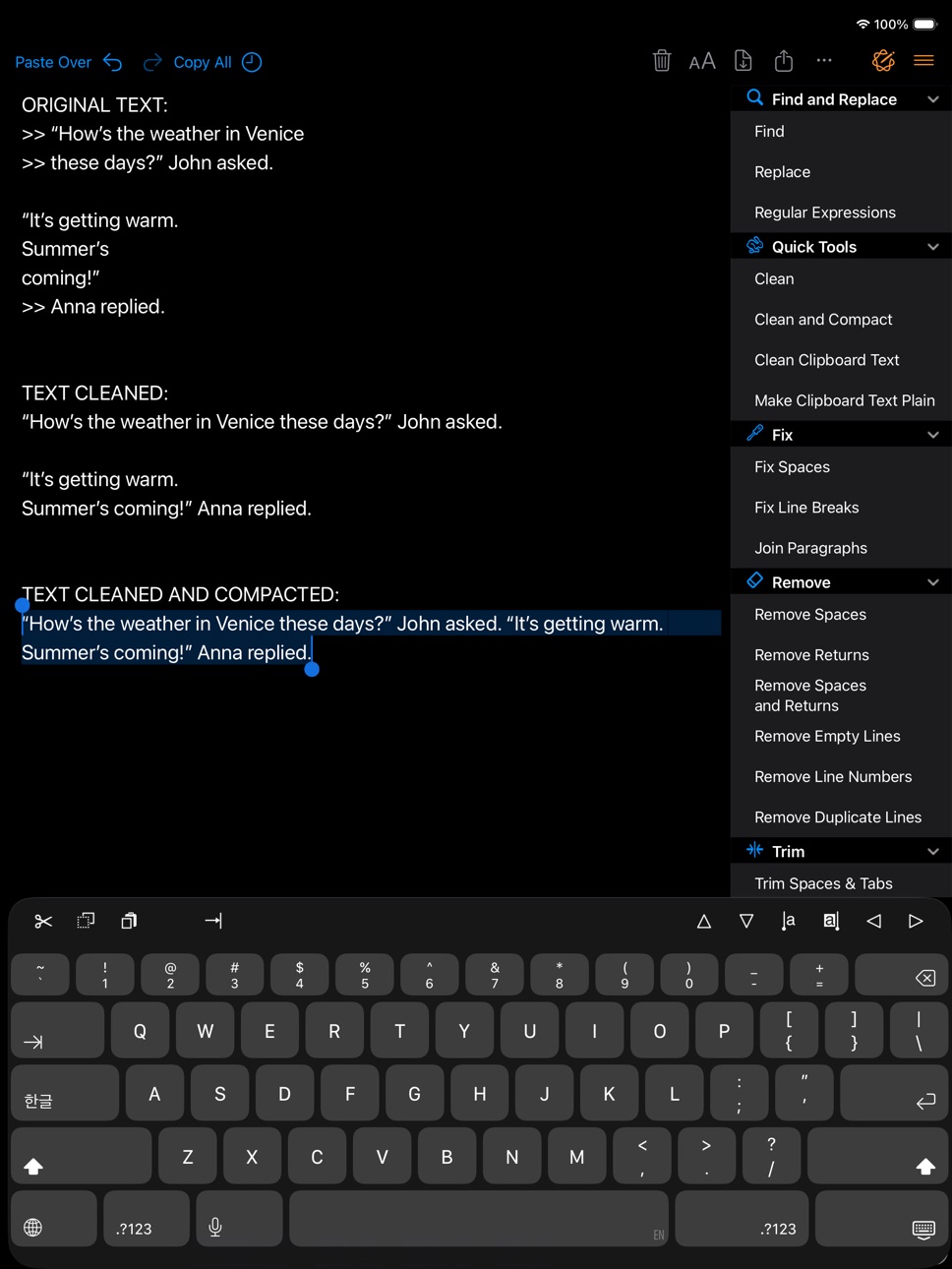
Clean Text solves the most common formatting problems that appear when copying text from emails, PDFs, web pages, or chat messages. Remove empty lines, extra spaces, tabs, unwanted characters, smart quotes, or line breaks in seconds. A rich set of cleanup tools lets you standardize content with a single tap, making even the messiest text immediately usable.
Editing with Apple Writing Tools
Clean Text supports Apple Writing Tools, integrating them alongside all the classic text cleaning and formatting features. You can use them to correct, rewrite, summarize, and improve your text directly in the app. AI-based features are always optional and are only activated when you choose to use them.
Powerful Find and Replace
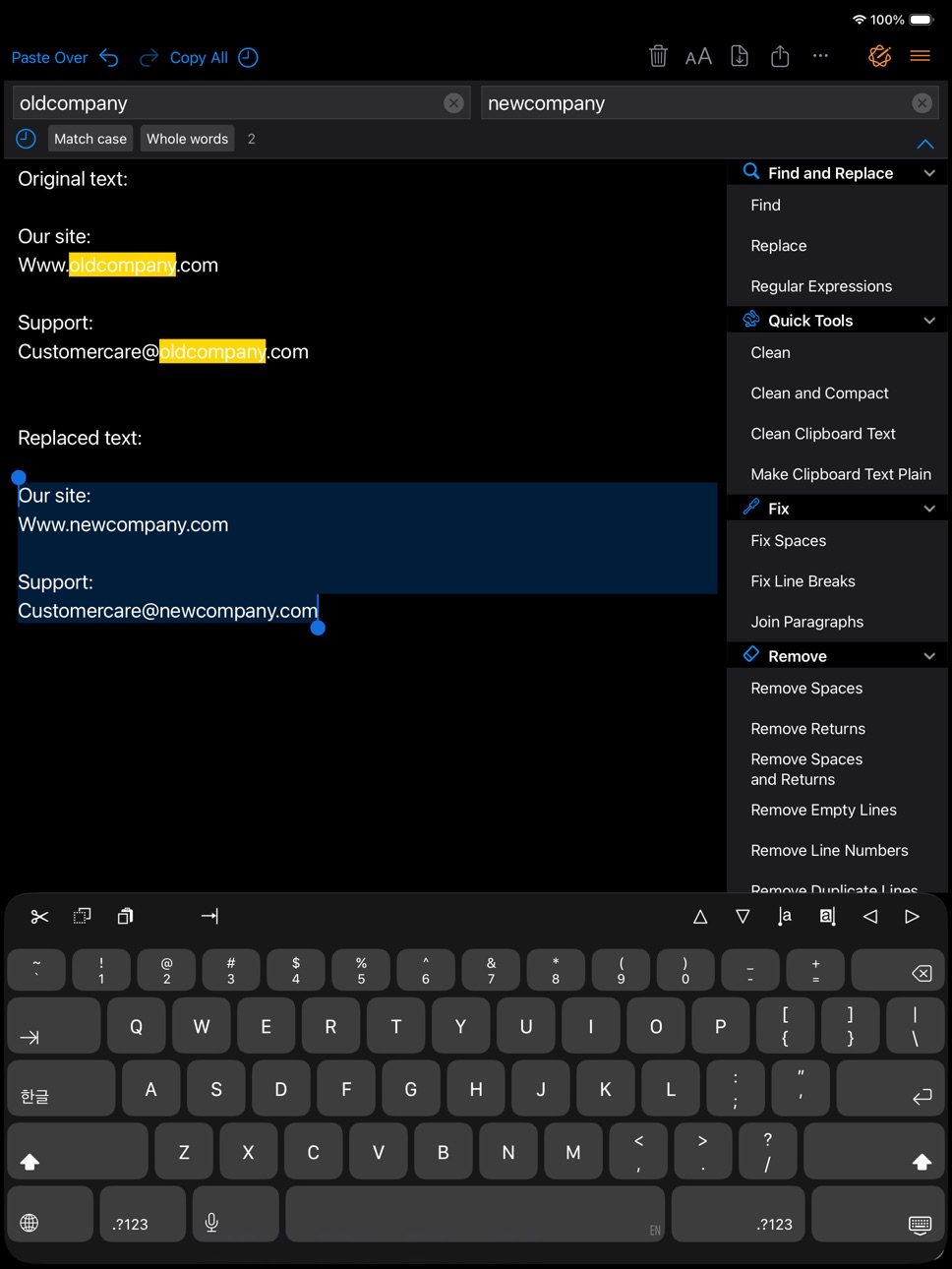
Real-time search instantly highlights all matches in the text, making it easy to locate words, phrases, or patterns even in long documents. Options like Case Sensitive and Whole Word give you precise control, while the live preview makes replacements safe and reliable.
Recent Texts and Smart History
Quickly access recently copied texts and reuse previously applied transformations to speed up repetitive workflows.
Seamless Cross-Device Integration
Thanks to iCloud, you can start working on iPhone or iPad and instantly find your text on your other devices. Recent changes are always available, with no manual steps required.
Designed for iOS and iPadOS
Clean Text integrates naturally with the system:
• Dark Mode support
• iPad multitasking
• External keyboards and shortcuts
• Context menus and system integrations
Key Features:
• Smart Clean and Clean & Compact
• Clean clipboard content without pasting
• Fix spaces, lines, and paragraphs
• Convert tabs, spaces, and quotation marks
• Text case conversion (uppercase, lowercase, title case, sentence case)
• Indentation tools and line numbering
• Line sorting and reordering
• Encoding and decoding (URL, Base64, ROT13)
• Convert HTML to plain text
• Creative text transformations
• Text statistics (characters, words, lines)
• Find and replace with real-time highlighting
• Regular expression support
• Ignore List to protect specific words
• Shortcuts and automation support
Clean Text for iPhone and iPad is aligned with the macOS version in features and behavior, delivering a consistent experience across platforms with over 100 text transformation actions.
AI Features Note
AI-based features are separate from traditional tools and are never applied automatically. Apimac continues to independently develop and improve all classic text cleaning and formatting features.
Subscriptions and Purchases
With the purchase you unlock all the app’s core features. In addition, subscribers benefit from continuous improvements, new features, and regular updates delivered to the app over time.
Plans available:
• Monthly subscription: 1-month free trial, then automatically renews at the monthly price
• Annual subscription: 1-month free trial, then automatically renews at the annual price
• Lifetime purchase: one-time payment with unlimited access to all features and continuous improvements
Subscriptions renew automatically unless cancelled at least 24 hours before the end of the period. You can manage or cancel your subscription anytime in your App Store account settings.
Privacy Policy: https://www.apimac.com/about/privacy/
Terms of Use (EULA): https://www.apple.com/legal/internet-services/itunes/dev/stdeula/
In-App Purchases ZM pricing
Subscriptions Group Subscription
Monthly Subscription · Monthly—
Annual Subscription · Yearly—
One-Time Purchases
Lifetime License—
Capabilities
In-App Purchases
Accessibility
ipadiphonemacrealityDevicetvoswatch
Version history 17 versions
Build 883992569v26.2.12026-04-02 01:25:05
• Refinements and performance improvements.
Build 884041867v26.2.22026-04-02 20:40:29
Clean Text 26.2.2 improves the premium experience and makes syncing more reliable across your devices.
• Improved Restore Purchases feedback for a clearer experience
• Fixed Regular Expression replacement behavior with special characters such as $
• Improved iCloud sync stability between iPhone and iPad
Build 883154153v26.22026-03-12 09:07:37
- Improvements to legacy purchase recognition
- Minor improvements and optimizations
Build 882747158v26.12026-02-26 23:33:15
This update focuses on stability and reliability.
• Further improvements to the recognition of previous purchases
• Improved overall stability
• Internal code optimizations and performance improvements
Our goal is to make Clean Text even more solid and dependable.
Build 882585704v26.0.22026-02-20 19:15:04
- Regular expression support has been refined to provide more accurate and consistent results, especially with multiline text.
- Support for previous purchases has been improved, ensuring more reliable access to premium features.
- This update also brings further improvements to enhance the overall experience across the app.
Build 881798542v262026-02-17 20:51:08
• Full multilingual support
Clean Text is now fully localized in 10 languages, including menus, actions, statistics, and system features. Everything feels native in the language you use.
• Recent texts and smart history
A new Recent section lets you quickly access copied texts and reuse previous transformations, making repeated workflows faster and more efficient.
• Apple Writing Tools integration
Clean Text now works with Apple Writing Tools, allowing you to proofread, rewrite, summarize, and adjust tone directly from the app when Apple Intelligence is available.
• Better organization, faster access
All text actions have been reorganized into clearer sections, with Find & Replace now front and center for quicker everyday use.
• Many new text transformations
New tools for replacing characters, formatting text, encoding and decoding content, developer-friendly naming styles, and creative text effects.
• Redesigned interface
Improved Dark Mode, clearer icons, better spacing, and a more balanced toolbar make Clean Text easier to read and faster to use in any lighting condition.
• Consistent menus and statistics across languages
Context menus, text statistics, and quick actions are now available in all supported languages for a uniform experience throughout the app.
• Feature parity with macOS
Clean Text for iPhone and iPad is now aligned with the macOS version, with the same features, action names, and consistent behavior across platforms.
• General optimizations
Smoother interactions and a more responsive experience across the app.
Build 857376874v5.02023-07-07 03:21:00
• Ignore List
• General design improvements
• Fix for all known bugs
Ignore List
Often when you want to change a text automatically it contains words that should not be changed. To take a simple example, if you apply the UPPERCASE filter to a sentence, you don't want the word iPhone to become IPHONE, so we've added the new Ignore List feature to Clean Text. All the words in this list will not be modified by the various filters. Inserting a word in the new Ignore List is very simple: select the word and choose "Add to Ignore List" from the contextual menu, do the same to remove a word from the Ignore List. If you want to see and edit the ignore list directly, choose the appropriate item from the menu on the Navigation bar. All in perfect Apimac style.
Build 838297204v4.32020-10-22 21:51:15
• Code optimizations
• Smoother use with transitions
Build 837737392v4.22020-10-12 16:13:09
• A new menu in the top bar allows you to use in Portrait orientation also the functions previously available only in Landscape orientation: Save text as document; Choose theme; Clear all text.
• Improves the conversion reliability of CJK and German quotes.
Build 836543653v4.12020-06-27 18:00:46
Addresses an issue that occurs using the Change Case functionality
Build 829313167v4.02019-03-24 00:58:06
• Clean Text features are now available with other apps installed on your iPhone or iPad. Using them is easy: when you are in any app, select some text and touch "Share", then choose Clean Text in the activity view.
• New "Copy Highlighted" item in edit options menu. Now you can copy to the clipboard all the text highlighted by a search (useful in RegEx searches).
• Various code optimizations.
Build 829241246v3.62018-11-14 21:15:13
• Action groups can be quickly collapsed and expanded to get a view with the actions that are most useful to you.
• New action to divide the text into lines no longer than 72 characters.
• New action to convert quotation marks in German-style as in the phrases „Guten Morgen!“ and »Guten Appetit!«.
Build 827136465v3.02018-05-15 17:46:29
• Improvements in the interface of Find, Replace and Regex panels
• Recent Searches functionality
• URL Schemes support to launch and use Clean Text features using other apps that support this technology (like Workflow)
Build 824291029v2.62017-11-27 09:31:27
Version 2.0
• Code tune-up to improve iCloud sync with Clean Text Menu for Mac (Clean Text Menu for Mac is separate purchase)
• Themes: choose from four very accurate themes: Classic, Relax, Dark and Dev
• Support for the Keyboard Shortcut Bar on iPad with Cut, Copy and Paste; Arrows Keys; Select and Deselect text
• Show total number of characters, words, spaces and lines in a text
• Chose the size of displayed text
• Support for the In-App review to provide feedback on the App Store without leaving the app
• New text transformes:
- Remove spaces, returns and duplicate lines
- Trim leading and trailing spaces and returns
- Remove duplicate lines
- Replace spaces with returns and vice versa
- Add and remove line numbers
- Extract unique words
Version 2.2
• New Tab key on the iPad Keyboard Shortcut Bar
• New Extract text transformer group with:
- Extract links (new)
- Extract email addresses (new)
- Extract phone numbers (new)
- Extract unique words (since version 2.0)
• Minor code optimizations
Version 2.6
• New transformers to replace one return with two returns and vice versa
• Supports opening text files from other apps and Files app
• Supports exporting text files to other apps and Files app
• Interface optimization for iPhone X
• Code optimizations
Thanks to all of you for the positive reviews, this makes us work on the app with even more enthusiasm!
The Clean Text Team
Build 822050202v2.22017-05-08 21:54:53
Version 2.0
• Code tune-up to improve iCloud sync with Clean Text Menu for Mac (Clean Text Menu for Mac is separate purchase).
• Themes: choose from four very accurate themes: Classic, Relax, Dark and Dev.
• Support for the Keyboard Shortcut Bar on iPad with Cut, Copy and Paste; Arrows Keys; Select and Deselect text.
• Show total number of characters, words, spaces and lines in a text.
• Chose the size of displayed text.
• Support for the In-App review to provide feedback on the App Store without leaving the app.
• New text transformes:
- Remove spaces, returns and duplicate lines
- Trim leading and trailing spaces and returns
- Remove duplicate lines
- Replace spaces with returns and vice versa
- Add and remove line numbers
- Extract unique words
Version 2.2
• New Tab key on the iPad Keyboard Shortcut Bar.
• New Extract text transformer group with:
- Extract links (new)
- Extract email addresses (new)
- Extract phone numbers (new)
- Extract unique words (since version 2.0)
• Minor code optimizations.
Thanks to all of you for the positive reviews, this makes us work on the app with even more enthusiasm!
The Clean Text Team
Build 821970277v2.02017-05-02 22:16:06
• Code tune-up to improve iCloud sync with Clean Text Menu for Mac (Clean Text Menu for Mac requires a separate purchase).
• Themes: choose from four very accurate themes: Classic, Relax, Dark and Dev.
• Support for the Keyboard Shortcut Bar on iPad with Cut, Copy and Paste; Arrows Keys; Select and Deselect text.
• Show total number of characters, words, spaces and lines in a text.
• Chose the size of displayed text.
• Support for the In-App review to provide feedback on the App Store without leaving the app.
• 12 new text transformes:
- Remove spaces, returns and duplicate lines
- Trim leading and trailing spaces and returns
- Remove duplicate lines
- Replace spaces with returns and vice versa
- Add and remove line numbers
- Extract unique words
Thanks to all of you for the positive reviews, this makes us work on the app with even more enthusiasm!
The Clean Text Team
Build 813328146v1.02016-08-24 23:53:49
Price history by region
Currency
Show
Columns
Search
Availability 166 of 166 storefronts
| Region | Language | Price | Ratings | Avg | Version |
|---|---|---|---|---|---|
| US | en-US | Free | 202 | 4.6 | 26.2.2 |
| DE | de-DE | Free | 42 | 4.5 | 26.2.2 |
| GB | en-GB | Free | 33 | 4.3 | 26.2.2 |
| AU | en-AU | Free | 19 | 4.8 | 26.2.2 |
| CA | en-CA | Free | 14 | 3.7 | 26.2.2 |
| IT | it | Free | 14 | 4.5 | 26.2.2 |
| RU | ru | Free | 7 | 4.7 | 26.2.2 |
| BR | pt-BR | Free | 6 | 5.0 | 26.2.2 |
| CN | zh-Hans-CN | Free | 6 | 4.2 | 26.2.2 |
| FR | fr-FR | Free | 6 | 4.5 | 26.2.2 |
| ES | es-ES | Free | 4 | 5.0 | 26.2.2 |
| SE | sv | Free | 4 | 3.3 | 26.2.2 |
| IE | en-GB | Free | 3 | 4.7 | 26.2.2 |
| IN | en-GB | Free | 3 | 4.7 | 26.2.2 |
| NL | nl | Free | 3 | 4.7 | 26.2.2 |
| CH | de-CH | Free | 2 | 5.0 | 26.2.2 |
| MX | es-MX | Free | 2 | 5.0 | 26.2.2 |
| PL | en-GB | Free | 2 | 5.0 | 26.2.2 |
| SG | en-GB | Free | 2 | 3.0 | 26.2.2 |
| ZA | en-GB | Free | 2 | 4.5 | 26.2.2 |
| AR | es-MX | Free | 1 | 5.0 | 26.2.2 |
| BE | en-GB | Free | 1 | 5.0 | 26.2.2 |
| CL | es-MX | Free | 1 | 5.0 | 26.2.2 |
| CZ | en-GB | Free | 1 | 5.0 | 26.2.2 |
| FI | en-GB | Free | 1 | 5.0 | 26.2.2 |
| HU | en-GB | Free | 1 | 5.0 | 26.2.2 |
| ID | en-GB | Free | 1 | 5.0 | 26.2.2 |
| LT | en-GB | Free | 1 | 5.0 | 26.2.2 |
| LU | en-GB | Free | 1 | 5.0 | 26.2.2 |
| MA | en-GB | Free | 1 | 5.0 | 26.2.2 |
| NO | en-GB | Free | 1 | 5.0 | 26.2.2 |
| NZ | en-AU | Free | 1 | 5.0 | 26.2.2 |
| PH | en-GB | Free | 1 | 5.0 | 26.2.2 |
| PK | en-GB | Free | 1 | 4.0 | 26.2.2 |
| SA | en-GB | Free | 1 | 5.0 | 26.2.2 |
| SK | en-GB | Free | 1 | 5.0 | 26.2.2 |
| TH | en-GB | Free | 1 | 5.0 | 26.2.2 |
| TR | en-GB | Free | 1 | 1.0 | 26.2.2 |
| AE | en-GB | Free | 0 | — | 26.2.2 |
| AF | en-GB | Free | 0 | — | 26.2.2 |
| AG | en-GB | Free | 0 | — | 26.2.2 |
| AI | en-GB | Free | 0 | — | 26.2.2 |
| AL | en-GB | Free | 0 | — | 26.2.2 |
| AO | en-GB | Free | 0 | — | 26.2.2 |
| AT | de-DE | Free | 0 | — | 26.2.2 |
| BA | en-GB | Free | 0 | — | 26.2.2 |
| BB | en-GB | Free | 0 | — | 26.2.2 |
| BF | en-GB | Free | 0 | — | 26.2.2 |
| BG | en-GB | Free | 0 | — | 26.2.2 |
| BH | en-GB | Free | 0 | — | 26.2.2 |
| BJ | en-GB | Free | 0 | — | 26.2.2 |
| BM | en-GB | Free | 0 | — | 26.2.2 |
| BN | en-GB | Free | 0 | — | 26.2.2 |
| BO | es-MX | Free | 0 | — | 26.2.2 |
| BS | en-GB | Free | 0 | — | 26.2.2 |
| BT | en-GB | Free | 0 | — | 26.2.2 |
| BW | en-GB | Free | 0 | — | 26.2.2 |
| BY | en-GB | Free | 0 | — | 26.2.2 |
| BZ | en-GB | Free | 0 | — | 26.2.2 |
| CD | en-GB | Free | 0 | — | 26.2.2 |
| CG | en-GB | Free | 0 | — | 26.2.2 |
| CI | fr-FR | Free | 0 | — | 26.2.2 |
| CM | fr-FR | Free | 0 | — | 26.2.2 |
| CO | es-MX | Free | 0 | — | 26.2.2 |
| CR | es-MX | Free | 0 | — | 26.2.2 |
| CV | en-GB | Free | 0 | — | 26.2.2 |
| CY | en-GB | Free | 0 | — | 26.2.2 |
| DK | en-GB | Free | 0 | — | 26.2.2 |
| DM | en-GB | Free | 0 | — | 26.2.2 |
| DO | es-MX | Free | 0 | — | 26.2.2 |
| DZ | en-GB | Free | 0 | — | 26.2.2 |
| EC | es-MX | Free | 0 | — | 26.2.2 |
| EE | en-GB | Free | 0 | — | 26.2.2 |
| EG | en-GB | Free | 0 | — | 26.2.2 |
| FJ | en-GB | Free | 0 | — | 26.2.2 |
| FM | en-GB | Free | 0 | — | 26.2.2 |
| GA | fr-FR | Free | 0 | — | 26.2.2 |
| GD | en-GB | Free | 0 | — | 26.2.2 |
| GH | en-GB | Free | 0 | — | 26.2.2 |
| GM | en-GB | Free | 0 | — | 26.2.2 |
| GR | en-GB | Free | 0 | — | 26.2.2 |
| GT | es-MX | Free | 0 | — | 26.2.2 |
| GW | en-GB | Free | 0 | — | 26.2.2 |
| GY | en-GB | Free | 0 | — | 26.2.2 |
| HN | es-MX | Free | 0 | — | 26.2.2 |
| HR | en-GB | Free | 0 | — | 26.2.2 |
| IL | en-GB | Free | 0 | — | 26.2.2 |
| IQ | en-GB | Free | 0 | — | 26.2.2 |
| IS | en-GB | Free | 0 | — | 26.2.2 |
| JM | en-GB | Free | 0 | — | 26.2.2 |
| JO | en-GB | Free | 0 | — | 26.2.2 |
| KE | en-GB | Free | 0 | — | 26.2.2 |
| KG | en-GB | Free | 0 | — | 26.2.2 |
| KH | en-GB | Free | 0 | — | 26.2.2 |
| KN | en-GB | Free | 0 | — | 26.2.2 |
| KW | en-GB | Free | 0 | — | 26.2.2 |
| KY | en-GB | Free | 0 | — | 26.2.2 |
| KZ | en-GB | Free | 0 | — | 26.2.2 |
| LA | en-GB | Free | 0 | — | 26.2.2 |
| LB | en-GB | Free | 0 | — | 26.2.2 |
| LC | en-GB | Free | 0 | — | 26.2.2 |
| LK | en-GB | Free | 0 | — | 26.2.2 |
| LR | en-GB | Free | 0 | — | 26.2.2 |
| LV | en-GB | Free | 0 | — | 26.2.2 |
| LY | en-GB | Free | 0 | — | 26.2.2 |
| MD | en-GB | Free | 0 | — | 26.2.2 |
| ME | en-GB | Free | 0 | — | 26.2.2 |
| MG | en-GB | Free | 0 | — | 26.2.2 |
| MK | en-GB | Free | 0 | — | 26.2.2 |
| ML | en-GB | Free | 0 | — | 26.2.2 |
| MM | en-GB | Free | 0 | — | 26.2.2 |
| MN | en-GB | Free | 0 | — | 26.2.2 |
| MR | en-GB | Free | 0 | — | 26.2.2 |
| MS | en-GB | Free | 0 | — | 26.2.2 |
| MT | en-GB | Free | 0 | — | 26.2.2 |
| MU | en-GB | Free | 0 | — | 26.2.2 |
| MV | en-GB | Free | 0 | — | 26.2.2 |
| MW | en-GB | Free | 0 | — | 26.2.2 |
| MY | en-GB | Free | 0 | — | 26.2.2 |
| MZ | en-GB | Free | 0 | — | 26.2.2 |
| NA | en-GB | Free | 0 | — | 26.2.2 |
| NE | en-GB | Free | 0 | — | 26.2.2 |
| NG | en-GB | Free | 0 | — | 26.2.2 |
| NI | es-MX | Free | 0 | — | 26.2.2 |
| NP | en-GB | Free | 0 | — | 26.2.2 |
| NR | en-GB | Free | 0 | — | 26.2.2 |
| OM | en-GB | Free | 0 | — | 26.2.2 |
| PA | es-MX | Free | 0 | — | 26.2.2 |
| PE | es-MX | Free | 0 | — | 26.2.2 |
| PG | en-GB | Free | 0 | — | 26.2.2 |
| PT | pt-PT | Free | 0 | — | 26.2.2 |
| PW | en-GB | Free | 0 | — | 26.2.2 |
| PY | es-MX | Free | 0 | — | 26.2.2 |
| QA | en-GB | Free | 0 | — | 26.2.2 |
| RO | en-GB | Free | 0 | — | 26.2.2 |
| RS | en-GB | Free | 0 | — | 26.2.2 |
| RW | en-GB | Free | 0 | — | 26.2.2 |
| SB | en-GB | Free | 0 | — | 26.2.2 |
| SC | en-GB | Free | 0 | — | 26.2.2 |
| SI | en-GB | Free | 0 | — | 26.2.2 |
| SL | en-GB | Free | 0 | — | 26.2.2 |
| SN | en-GB | Free | 0 | — | 26.2.2 |
| SR | en-GB | Free | 0 | — | 26.2.2 |
| ST | en-GB | Free | 0 | — | 26.2.2 |
| SV | es-MX | Free | 0 | — | 26.2.2 |
| SZ | en-GB | Free | 0 | — | 26.2.2 |
| TC | en-GB | Free | 0 | — | 26.2.2 |
| TD | en-GB | Free | 0 | — | 26.2.2 |
| TJ | en-GB | Free | 0 | — | 26.2.2 |
| TM | en-GB | Free | 0 | — | 26.2.2 |
| TN | en-GB | Free | 0 | — | 26.2.2 |
| TO | en-GB | Free | 0 | — | 26.2.2 |
| TT | en-GB | Free | 0 | — | 26.2.2 |
| TZ | en-GB | Free | 0 | — | 26.2.2 |
| UA | en-GB | Free | 0 | — | 26.2.2 |
| UG | en-GB | Free | 0 | — | 26.2.2 |
| UY | en-GB | Free | 0 | — | 26.2.2 |
| UZ | en-GB | Free | 0 | — | 26.2.2 |
| VC | en-GB | Free | 0 | — | 26.2.2 |
| VE | es-MX | Free | 0 | — | 26.2.2 |
| VG | en-GB | Free | 0 | — | 26.2.2 |
| VN | en-GB | Free | 0 | — | 26.2.2 |
| VU | en-GB | Free | 0 | — | 26.2.2 |
| XK | en-GB | Free | 0 | — | 26.2.2 |
| ZM | en-GB | Free | 0 | — | 26.2.2 |
| ZW | en-GB | Free | 0 | — | 26.2.2 |
Change log 21 changes · ZM
✎
releaseNotes updated
Clean Text 26.2.2 improves the premium experience and makes syncing more reliable across your devices.
• Improved Restore Purchases feedback for a clearer exper
✎
description updated
Clean Text helps you edit, correct, and organize text quickly and reliably, making everyday writing tasks easier. It’s designed for anyone who works with text:
✎
subtitle updated
Improve text with pro tools
✎
name updated
Clean Text
◆
Version 26.2.2 released
Clean Text 26.2.2 improves the premium experience and makes syncing more reliable across your devices.
• Improved Restore Purchases feedback for a clearer experience
• Fixed Regular Expression replacement behavior with special characters su
◆
Version 26.2.1 released
• Refinements and performance improvements.
◆
Version 26.2 released
- Improvements to legacy purchase recognition
- Minor improvements and optimizations
◆
Version 26.1 released
This update focuses on stability and reliability.
• Further improvements to the recognition of previous purchases
• Improved overall stability
• Internal code optimizations and performance improvements
Our goal is to make Clean Text even
◆
Version 26.0.2 released
- Regular expression support has been refined to provide more accurate and consistent results, especially with multiline text.
- Support for previous purchases has been improved, ensuring more reliable access to premium features.
- This upd
◆
Version 26 released
• Full multilingual support
Clean Text is now fully localized in 10 languages, including menus, actions, statistics, and system features. Everything feels native in the language you use.
• Recent texts and smart history
A new Recent sec
◆
Version 5.0 released
• Ignore List
• General design improvements
• Fix for all known bugs
Ignore List
Often when you want to change a text automatically it contains words that should not be changed. To take a simple example, if you apply the UPPERCASE filter t
◆
Version 4.3 released
• Code optimizations
• Smoother use with transitions
◆
Version 4.2 released
• A new menu in the top bar allows you to use in Portrait orientation also the functions previously available only in Landscape orientation: Save text as document; Choose theme; Clear all text.
• Improves the conversion reliability of CJK a
◆
Version 4.1 released
Addresses an issue that occurs using the Change Case functionality
◆
Version 4.0 released
• Clean Text features are now available with other apps installed on your iPhone or iPad. Using them is easy: when you are in any app, select some text and touch "Share", then choose Clean Text in the activity view.
• New "Copy Highlighted"
◆
Version 3.6 released
• Action groups can be quickly collapsed and expanded to get a view with the actions that are most useful to you.
• New action to divide the text into lines no longer than 72 characters.
• New action to convert quotation marks in German-sty
◆
Version 3.0 released
• Improvements in the interface of Find, Replace and Regex panels
• Recent Searches functionality
• URL Schemes support to launch and use Clean Text features using other apps that support this technology (like Workflow)
◆
Version 2.6 released
Version 2.0
• Code tune-up to improve iCloud sync with Clean Text Menu for Mac (Clean Text Menu for Mac is separate purchase)
• Themes: choose from four very accurate themes: Classic, Relax, Dark and Dev
• Support for the Keyboard Shortcut
◆
Version 2.2 released
Version 2.0
• Code tune-up to improve iCloud sync with Clean Text Menu for Mac (Clean Text Menu for Mac is separate purchase).
• Themes: choose from four very accurate themes: Classic, Relax, Dark and Dev.
• Support for the Keyboard Shortcu
◆
Version 2.0 released
• Code tune-up to improve iCloud sync with Clean Text Menu for Mac (Clean Text Menu for Mac requires a separate purchase).
• Themes: choose from four very accurate themes: Classic, Relax, Dark and Dev.
• Support for the Keyboard Shortcut Ba
◆
Version 1.0 released