Home › Utilities

 US
US
USen-US CNzh-Hans-CN
 SEsv
SEsv SKen-GB
 BEen-GB
 DEde-DE
 OMen-GB
 SAen-GB
 AEen-GB
 ALen-GB
 AMen-GB
 ATde-DE
 AUen-AU
 AZen-GB
 BAen-GB
 BHen-GB
 CAen-CA
 CHde-CH
 CYen-GB
 DKen-GB
 EEen-GB
 EGen-GB
 ESes-ES
 FIen-GB
 FRfr-FR
 GBen-GB
 GEen-GB
 HKzh-Hant-HK
 HUen-GB
 IEen-GB
 ILen-GB
 IQen-GB
 ITit
ITit JOen-GB
 JPja
JPja KWen-GB
 LBen-GB
 LTen-GB
 LUen-GB
 LVen-GB
 MDen-GB
 MEen-GB
 MKen-GB
 MTen-GB
 NLnl
NLnl NOen-GB
 NZen-AU
 PTpt-PT
 QAen-GB
 ROen-GB
 RSen-GB
 SIen-GB
 TRen-GB
 TWzh-Hant-TW
 UAen-GB
 XKen-GB
 YEen-GB
 BYNot Available
 RUNot Available
57 of 59 storefronts
Content in en-US
Content in en-US
Information
Preview 2 platforms
iPhone 4 images


iPad 6 images




What’s New Version 1.9.13
A UI bug has been resolved, which prevented the measurement screen animation from displaying.
Description
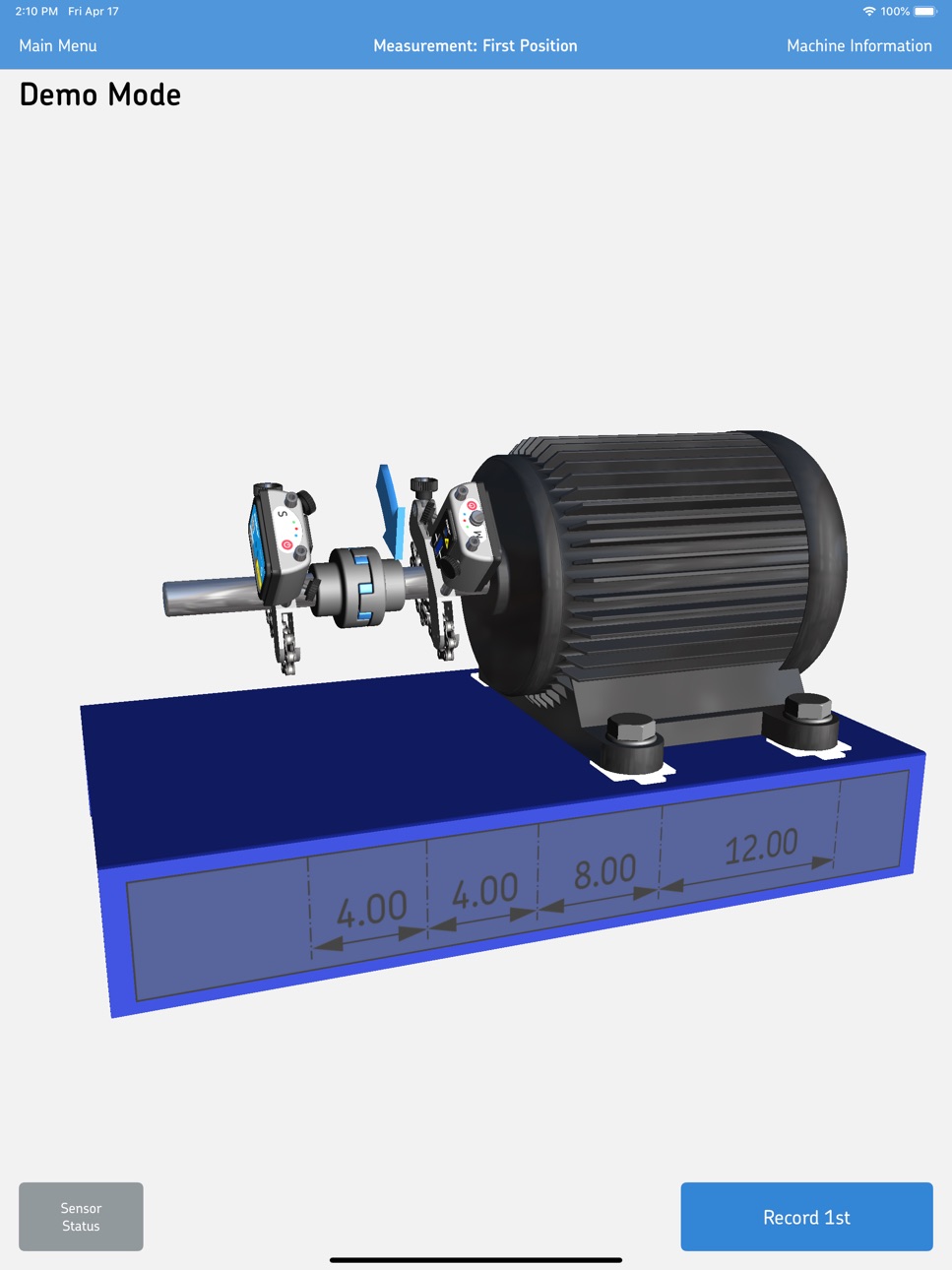
The Horizontal shaft alignment app is designed to be used with the SKF Shaft Alignment Tool TKSA 51 or TKSA 71. Together, the hardware and the app form an alignment system that allows shaft alignments of many rotating machines to be made in an intuitive and easy way. The system uses line laser to PSD technology that enables highly accurate and reliable shaft alignments. The hardware and its app communicate wirelessly via Bluetooth®. Without the hardware the app can nonetheless be used, as it features a fully functional demonstration mode allowing the complete alignment process to be experienced before purchasing the TKSA 51 or TKSA 71 instrument.
KEY FEATURES:
• Very easy-to-use – The Horizontal shaft alignment app focuses on making the main alignment tasks as easy as possible and enabling accurate shaft alignments.
• Full measurement flexibility – The Horizontal shaft alignment app uses a flexible three position measurement method that allows measurements to start at any angle and if the space is limited alignments can be performed with a total of 40° rotation only.
• Demonstration mode – The Horizontal shaft alignment app offers a fully functional demonstration mode allowing the complete alignment process to be experienced before purchasing a supported SKF Shaft Alignment Tool.
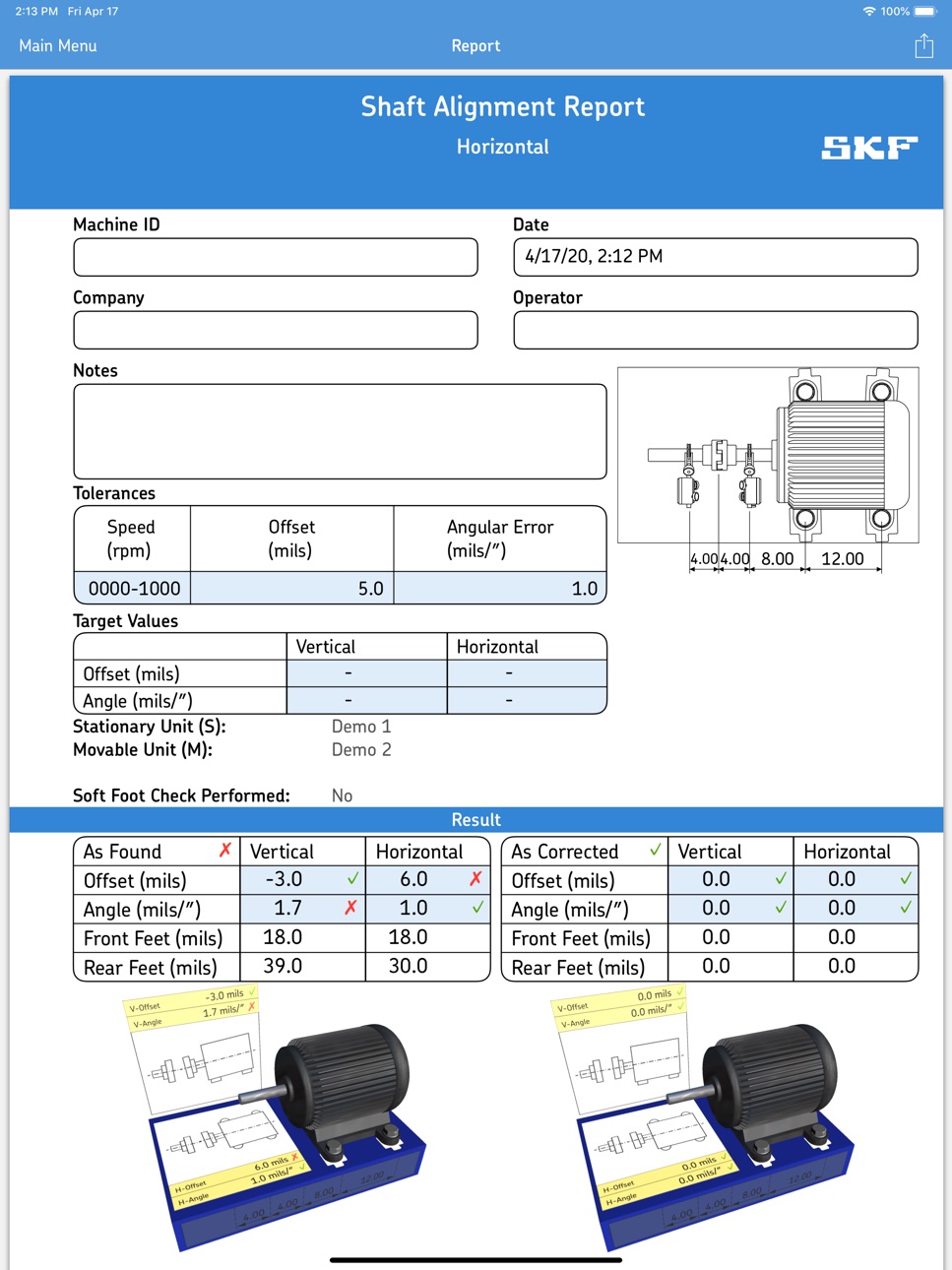
• Automatic alignment report – Automatically generated alignment reports give a complete overview of the alignment process and results. The reports can be customised with additional notes, a machine picture, a signature and can easily be shared via email or cloud services.
• Explanatory videos – Easy to follow videos demonstrating how to set up and perform accurate measurements using the TKSA 51 or TKSA 71.
• 3D Animations – 3D animations guide the user through the alignment process, allowing accurate shaft alignment to be performed in a very easy way.
• Machine library and QR code scanner – Helps keeping track of the machines that have been measured. Machine information like distances, the machine picture, and other details are saved for each machine and can be reused the next time the same machine is measured. QR codes can be scanned to identify a machine and quickly retrieve its details. The library can also be used for easy access to all the reports generated for each machine in one place.
HARDWARE – SKF Shaft Alignment Tool TKSA 51 and TKSA 71:
The SKF TKSA 51 and TKSA 71 systems use a pair of measurement units that are combined with laser transmitter and detectors to measure and correct shaft alignment with high accuracy and reliability. The data is transferred in real time through Bluetooth® 4.0 LE to the app.
IMPORTANT NOTE:
This app is designed to be used with the SKF Shaft Alignment Tool TKSA 51 or TKSA 71 hardware.
The SKF TKSA 51 or TKSA 71 can be purchased separately from your local SKF Authorized Distributor.
For more information and technical specifications about the SKF Shaft Alignment Tool, please visit our website.
Accessibility
ipadiphonemacrealityDevicetvoswatch
Version history 24 versions
Build 885843046v1.9.132026-06-11 19:21:24
A UI bug has been resolved, which prevented the measurement screen animation from displaying.
Build 884260472v1.9.112026-04-08 16:48:12
This update introduces full compatibility with iOS 26, along with a refined integration of Apple’s Liquid Glass UI, delivering a cleaner and more fluid visual experience throughout the app.
We have also implemented several performance enhancements to ensure smoother operation and improved responsiveness. In addition, a series of minor bug fixes have been addressed to maintain reliability and overall stability.
Enjoy the upgraded experience.
Build 868582765v1.9.102024-08-30 18:57:53
Target value bug fixes and other performance improvements.
Build 866456891v1.9.92024-06-13 02:22:37
- Bug fixes and performance enhancements
Build 865325806v1.9.82024-04-19 18:41:37
Bug fixes: incorrect offset information in reports.
Build 862829018v1.9.72024-01-25 16:27:13
Bug fixes and performance enhancements
Build 855950565v1.9.62023-03-31 19:15:49
Bug Fixes and performance enhancements
Build 849180813v1.9.52022-05-17 23:37:22
iOS v15 support.
Minor bug fixes and performance improvements.
Build 848316029v1.9.42022-04-21 18:00:21
Performance improvements and minor bug fixes
Build 844421449v1.9.32021-10-02 11:35:51
1: Firebase crashlytics and analytics
2: Performance improvements and minor bug fixes
Build 835581651v1.9.22020-04-22 06:23:53
Bug fixes and updated to iOS 13 and iPadOS.
Build 830187663v1.9.12019-03-15 15:07:14
Bug fixes and improvements.
Build 825192027v1.8.22017-12-20 14:12:57
Better support for iPhone X.
You can now change the name of the machine in a report.
Bug fixes and improvements.
Build 823754375v1.8.12017-09-28 22:01:03
Added 3D touch shortcut for starting a new measurement & using the QR code scanner.
Added sharing of (multiple) reports directly from the main menu.
Added next button when entering distances.
Fixed Feedback button on iPhone.
Better support for portrait mode on iPhone.
Better iOS 11 support.
Bug fixes and improvements.
Build 821932381v1.8.02017-06-26 07:58:29
Fix for entering negative target values.
Bug fixes and improvements.
Build 821429743v1.7.02017-04-07 13:34:00
Fixed Angles:
New measurement method for measuring with fixed angles (the 9-12-3 method) without using the inclinometers for situations were they can't be used.
Target values can be now specified with four different methods:
As target angle and offset in the coupling.
As target foot values for all four foot pairs.
Thermal growth calculation.
Hot-to-cold measurements.
Reports:
Reports can now contain up to four additional photos, for documenting the measurement or machine condition.
Bug fixes and improvements.
Build 820226828v1.6.02017-01-20 12:41:37
- A machine library has been added which lets you keep track of machines and the reports for those machines.
- QR codes can be used to identify the machines and retrieve machine details.
- Thermal Growth Compensation has been made easier by using Target Values which can be entered as either an angle and offset, or feet values.
- Bug fixes and improvements.
Build 819208523v1.5.12016-11-10 10:23:12
- Bug fixes and improvements.
Build 818872625v1.5.02016-09-27 10:55:40
- Added support for the new SKF TKSA 71 hardware.
Build 817208164v1.0.42016-05-13 10:16:47
- Stability improvements.
Build 815111167v1.0.32016-01-11 07:15:17
- Graphical presentation of:
- where the laser beams hit the detectors, shown in the Sensor Status view.
- the current angle difference between the two measuring units, shown in the Sensor Status view
- App Store descriptions for all eight supported SKF languages
- Additional assistance links in the Help section
- Miscellaneous bug fixes
Build 813291122v1.0.22015-09-24 08:45:57
Minor bug fixes
Build 813138033v1.0.12015-08-31 07:25:59
Minor bug fixes
Build 812310944v1.0.02015-05-20 12:24:16
No pricing data captured yet — comparisons appear once the app has paid storefronts or in-app purchases.
Availability 57 of 59 storefronts
| Region | Language | Price | Ratings | Avg | Version |
|---|---|---|---|---|---|
| US | en-US | Free | 10 | 3.7 | 1.9.13 |
| CN | zh-Hans-CN | Free | 6 | 4.0 | 1.9.13 |
| SE | sv | Free | 2 | 3.0 | 1.9.13 |
| SK | en-GB | Free | 2 | 2.5 | 1.9.13 |
| BE | en-GB | Free | 1 | 5.0 | 1.9.13 |
| DE | de-DE | Free | 1 | 5.0 | 1.9.13 |
| OM | en-GB | Free | 1 | 3.0 | 1.9.13 |
| SA | en-GB | Free | 1 | 3.0 | 1.9.13 |
| AE | en-GB | Free | 0 | — | 1.9.13 |
| AL | en-GB | Free | 0 | — | 1.9.13 |
| AM | en-GB | Free | 0 | — | 1.9.13 |
| AT | de-DE | Free | 0 | — | 1.9.13 |
| AU | en-AU | Free | 0 | — | 1.9.13 |
| AZ | en-GB | Free | 0 | — | 1.9.13 |
| BA | en-GB | Free | 0 | — | 1.9.13 |
| BH | en-GB | Free | 0 | — | 1.9.13 |
| CA | en-CA | Free | 0 | — | 1.9.13 |
| CH | de-CH | Free | 0 | — | 1.9.13 |
| CY | en-GB | Free | 0 | — | 1.9.13 |
| DK | en-GB | Free | 0 | — | 1.9.13 |
| EE | en-GB | Free | 0 | — | 1.9.13 |
| EG | en-GB | Free | 0 | — | 1.9.13 |
| ES | es-ES | Free | 0 | — | 1.9.13 |
| FI | en-GB | Free | 0 | — | 1.9.13 |
| FR | fr-FR | Free | 0 | — | 1.9.13 |
| GB | en-GB | Free | 0 | — | 1.9.13 |
| GE | en-GB | Free | 0 | — | 1.9.13 |
| HK | zh-Hant-HK | Free | 0 | — | 1.9.13 |
| HU | en-GB | Free | 0 | — | 1.9.13 |
| IE | en-GB | Free | 0 | — | 1.9.13 |
| IL | en-GB | Free | 0 | — | 1.9.13 |
| IQ | en-GB | Free | 0 | — | 1.9.13 |
| IT | it | Free | 0 | — | 1.9.13 |
| JO | en-GB | Free | 0 | — | 1.9.13 |
| JP | ja | Free | 0 | — | 1.9.13 |
| KW | en-GB | Free | 0 | — | 1.9.13 |
| LB | en-GB | Free | 0 | — | 1.9.13 |
| LT | en-GB | Free | 0 | — | 1.9.13 |
| LU | en-GB | Free | 0 | — | 1.9.13 |
| LV | en-GB | Free | 0 | — | 1.9.13 |
| MD | en-GB | Free | 0 | — | 1.9.13 |
| ME | en-GB | Free | 0 | — | 1.9.13 |
| MK | en-GB | Free | 0 | — | 1.9.13 |
| MT | en-GB | Free | 0 | — | 1.9.13 |
| NL | nl | Free | 0 | — | 1.9.13 |
| NO | en-GB | Free | 0 | — | 1.9.13 |
| NZ | en-AU | Free | 0 | — | 1.9.13 |
| PT | pt-PT | Free | 0 | — | 1.9.13 |
| QA | en-GB | Free | 0 | — | 1.9.13 |
| RO | en-GB | Free | 0 | — | 1.9.13 |
| RS | en-GB | Free | 0 | — | 1.9.13 |
| SI | en-GB | Free | 0 | — | 1.9.13 |
| TR | en-GB | Free | 0 | — | 1.9.13 |
| TW | zh-Hant-TW | Free | 0 | — | 1.9.13 |
| UA | en-GB | Free | 0 | — | 1.9.13 |
| XK | en-GB | Free | 0 | — | 1.9.13 |
| YE | en-GB | Free | 0 | — | 1.9.13 |
Not available in: BY, RU
Change log 27 changes · US
✎
releaseNotes updated
A UI bug has been resolved, which prevented the measurement screen animation from displaying.
✎
description updated
The Horizontal shaft alignment app is designed to be used with the SKF Shaft Alignment Tool TKSA 51 or TKSA 71. Together, the hardware and the app form an align
✎
name updated
SKF Shaft alignment
◆
Version 1.9.13 released
A UI bug has been resolved, which prevented the measurement screen animation from displaying.
◆
Version 1.9.11 released
This update introduces full compatibility with iOS 26, along with a refined integration of Apple’s Liquid Glass UI, delivering a cleaner and more fluid visual experience throughout the app.
We have also implemented several performance enhan
◆
Version 1.9.10 released
Target value bug fixes and other performance improvements.
◆
Version 1.9.9 released
- Bug fixes and performance enhancements
◆
Version 1.9.8 released
Bug fixes: incorrect offset information in reports.
◆
Version 1.9.7 released
Bug fixes and performance enhancements
◆
Version 1.9.6 released
Bug Fixes and performance enhancements
◆
Version 1.9.5 released
iOS v15 support.
Minor bug fixes and performance improvements.
◆
Version 1.9.4 released
Performance improvements and minor bug fixes
◆
Version 1.9.3 released
1: Firebase crashlytics and analytics
2: Performance improvements and minor bug fixes
◆
Version 1.9.2 released
Bug fixes and updated to iOS 13 and iPadOS.
◆
Version 1.9.1 released
Bug fixes and improvements.
◆
Version 1.8.2 released
Better support for iPhone X.
You can now change the name of the machine in a report.
Bug fixes and improvements.
◆
Version 1.8.1 released
Added 3D touch shortcut for starting a new measurement & using the QR code scanner.
Added sharing of (multiple) reports directly from the main menu.
Added next button when entering distances.
Fixed Feedback button on iPhone.
Better support
◆
Version 1.8.0 released
Fix for entering negative target values.
Bug fixes and improvements.
◆
Version 1.7.0 released
Fixed Angles:
New measurement method for measuring with fixed angles (the 9-12-3 method) without using the inclinometers for situations were they can't be used.
Target values can be now specified with four different methods:
As target angl
◆
Version 1.6.0 released
- A machine library has been added which lets you keep track of machines and the reports for those machines.
- QR codes can be used to identify the machines and retrieve machine details.
- Thermal Growth Compensation has been made easier b
◆
Version 1.5.1 released
- Bug fixes and improvements.
◆
Version 1.5.0 released
- Added support for the new SKF TKSA 71 hardware.
◆
Version 1.0.4 released
- Stability improvements.
◆
Version 1.0.3 released
- Graphical presentation of:
- where the laser beams hit the detectors, shown in the Sensor Status view.
- the current angle difference between the two measuring units, shown in the Sensor Status view
- App Store descriptions for all eight
◆
Version 1.0.2 released
Minor bug fixes
◆
Version 1.0.1 released
Minor bug fixes
◆
Version 1.0.0 released