Home › Weather

 US
US
1 of 1 storefronts
Content in en-US
Content in en-US
Information
Preview 3 platforms


iPhone 10 images






iPad 10 images


Apple Watch 5 images


What’s New Version 26.5.9
- Improved accessibility across the app, with better VoiceOver support, larger touch targets, clearer contrast, and support for Reduce Motion, Differentiate Without Color, and Smart Invert.
- Added a close button to quickly return to your current location while viewing a saved location.
- More improvements to the hourly "Rain later" button.
Description
Hello Weather gives you beautiful, trustworthy forecasts powered by the best weather data on Earth. With hyperlocal real-time updates and a joyful design that’s easy to read at a glance, you’ll always be prepared for anything coming your way.
Five reasons why you’ll love planning your day with Hello Weather...
1. All the info you need is right in your face.
Our gorgeous, information-rich design shows you everything that matters in one simple screen. You’ll see the current conditions and future forecasts in an instant.
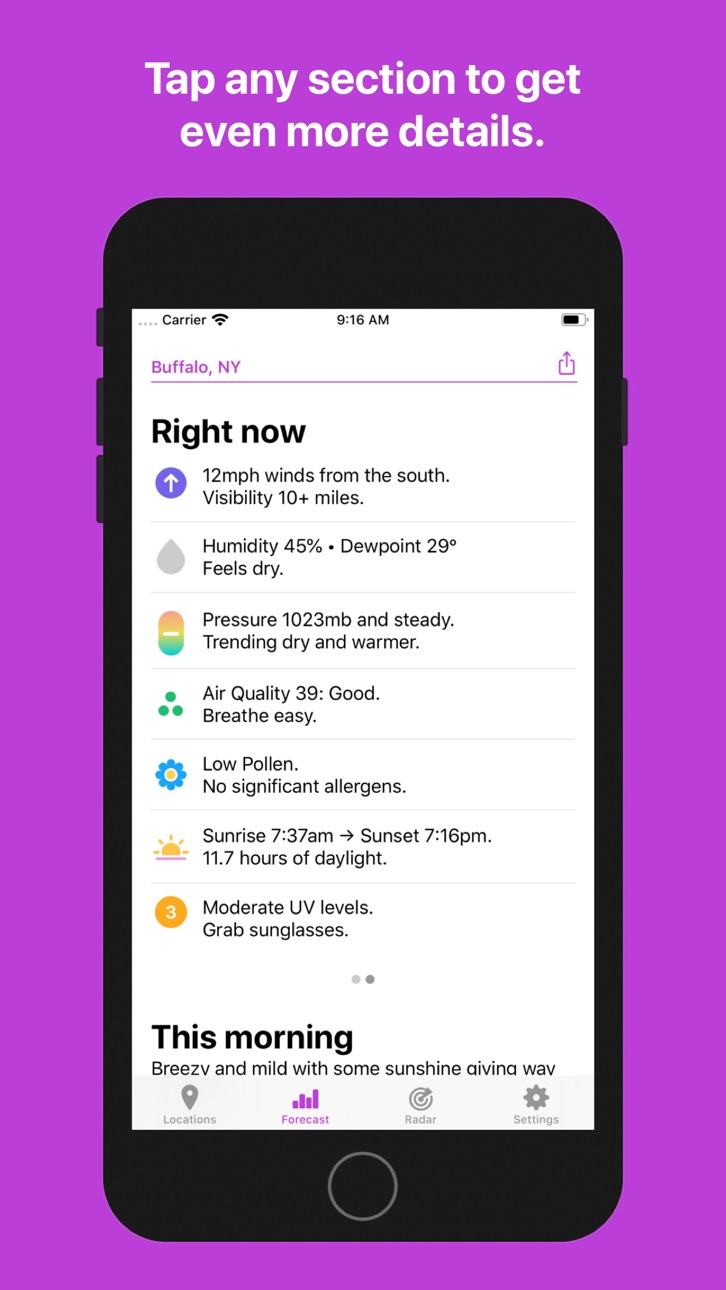
2. Simple on the surface. Details one tap away.
Sometimes you need to dig deeper. Is it going to be windy enough to fly a kite today? When’s the best time to go? Just tap on the wind card (or any of our 12 data points) and you’ll see a super friendly specialized chart showing what’s what.
3. You’ll get predictions you can trust.
Hello Weather is powered by the world’s best data sources, like Apple Weather, AccuWeather, Foreca, and The Weather Company. Pick the provider that's best in your area, or switch back and forth to compare. (Upgrade required.)
4. You don’t need to be a weather expert.
What does barometric pressure mean? Is the dewpoint good or bad? We translated those esoteric stats into human words, so you’ll know how it really feels outside.
5. It’ll make you smile.
We filled the app with tons of thoughtful little touches to brighten your day. You’ll love the beautiful color themes, automatic night mode, and sweet secret extras.
And that's not all…
• It works everywhere, from your phone to your wrist.
Hello Weather is great on the iPhone or iPad, and when you’re on the go, our excellent widgets, notifications, and Apple Watch companion app will keep you updated proactively.
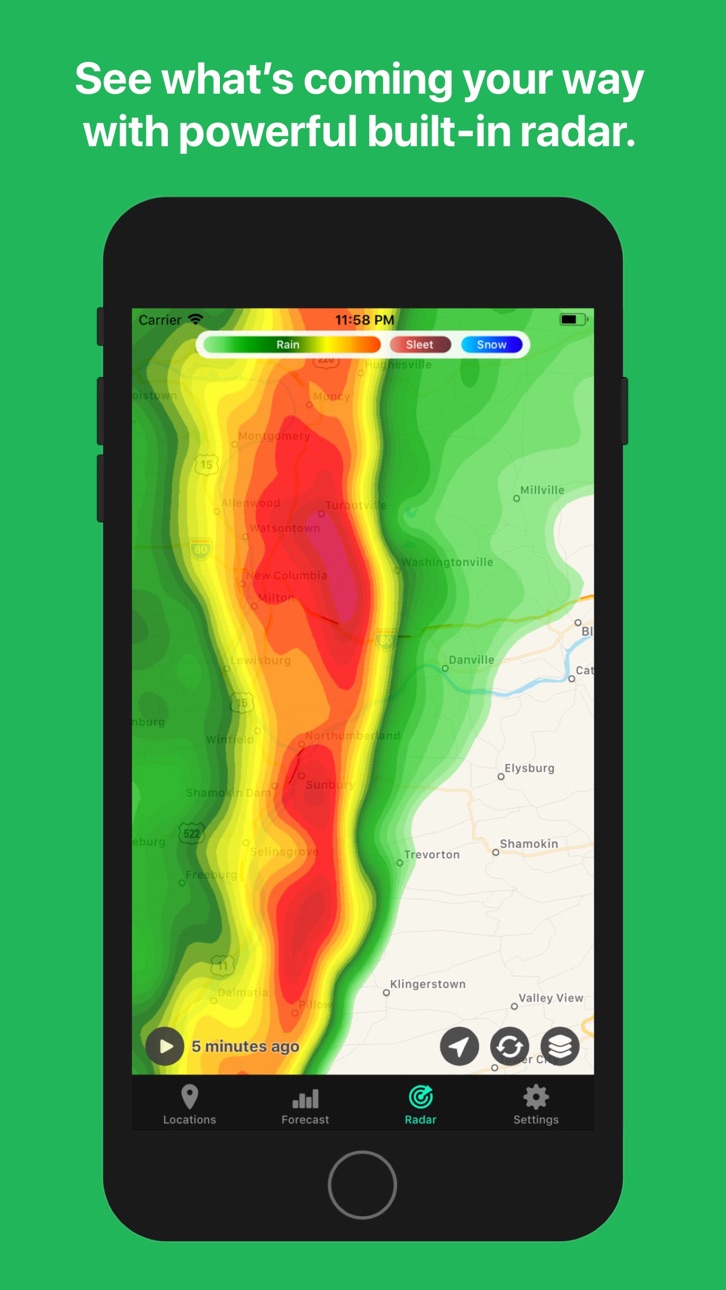
• Radar’s built right in.
When there's a storm front ahead, we've got your back. Our powerful radar tab shows you exactly what's headed your way.
• Super duper customizable.
Tune your app’s layout and appearance to your heart's content. Pick custom icon sets, themes, charts, data points, and tweak fiddly details if you want. It looks great in dark mode, too!
• Made with care by a tiny indie company.
We pour a lot of love into our app, and we take great care of our customers. We're always just an email away, and we're staunch defenders of your privacy.
Here's what the experts say:
"An easy, straightforward weather app that shows you just what you need to know."
— AppAdvice
"Hello Weather strips it down to the essence."
— Macworld
"Very smart, with a clean layout and readable graphs. It eschews complexity without limiting information."
— TechRadar
"One of my very favorites in recent years. It’s attractive, original, and highly useful."
— Daring Fireball
---
Hello Weather's free to use, but it's way better if you upgrade for the Pro stuff.
Free features:
• No ads or gimmicks.
• Simple and easy to read forecasts.
• Automatic color themes and dark mode.
• Powered by Apple Weather.
• Weather units customization, including simultaneous Fahrenheit & Celsius mode.
• Real-time precipitation estimates.
• Basic radar.
Upgrade to Pro and get:
• Widgets for your Home Screen and Lock Screen.
• Notifications for precipitation, severe weather alerts, and future forecasts.
• Apple Watch app and complications.
• More data sources: AccuWeather, Custom Weather, Foreca, OpenWeather, Pirate Weather, The Weather Company, Tomorrow.io, Visual Crossing, Weatherbit, and Xweather.
• Radar animation and options.
• Air quality and pollen info (available with certain data sources.)
• Weather icon sets, themes, and loads of additional customization options.
• Custom app icons.
• Some secret stuff too!
ONE MORE THING:
We're proud to have the strongest and most transparent privacy policy we can muster. We'll never track you, sell ads, collect data, or do anything like that.
• Privacy Policy: https://helloweather.com/privacy
• Terms of Use: https://helloweather.com/privacy#terms
Thanks so much for trying Hello Weather! We hope you like it.
In-App Purchases US pricing
Hello Weather Fan Club Subscription
Monthly Family · Monthly 7-day free trial$2.99
Yearly Family · Yearly 7-day free trial$29.99
Pro Subscription
Monthly · Monthly$1.99
Monthly Family · Monthly$2.99
Yearly · Yearly 7-day free trial$19.99
Yearly Family · Yearly 7-day free trial$29.99
One-Time Purchases
Lifetime$99.99
Lifetime (Family)$149.99
Capabilities
In-App Purchases
Accessibility
ipadiphonemacrealityDevicetvoswatch
Version history 25 versions
Build 887920472v26.5.92026-07-07 05:55:56
- Improved accessibility across the app, with better VoiceOver support, larger touch targets, clearer contrast, and support for Reduce Motion, Differentiate Without Color, and Smart Invert.
- Added a close button to quickly return to your current location while viewing a saved location.
- More improvements to the hourly "Rain later" button.
Build 887571302v26.5.42026-07-01 04:41:06
- Improved minute-by-minute precipitation — better across Europe and now available in more places worldwide.
- The hourly "Rain later" button now tells you when rain or snow is expected, like later today or tomorrow.
- Foreca now includes air quality and pollen forecasts.
- Visual Crossing now includes air quality, moonrise, and moonset times.
- Tomorrow.io now includes air quality.
- Tapping the Forecast tab now refreshes your weather.
- Fixed clipped text on the rectangular hourly Apple Watch complication.
- Fixed incorrect humidity widget text showing phrases like "Feels dry" instead of matching the app.
- Subscriptions now stay active during temporary billing issues while payment is retried.
- Smaller improvements, including an Alert Options notifications shortcut and a cleaner pollen chart.
Build 887171832v26.5.22026-06-19 15:16:58
Renamed "The Weather Company" to "The Weather Channel" and added AQI and Pollen.
Build 886453157v26.5.12026-06-03 16:33:20
- WWDC Celebration: 50% off your first year of Hello Weather Pro!
- Fixed a few time display issues in charts, widgets, and sunrise/sunset screens.
- Fixed a few more issues with Apple Watch crown scrolling.
Build 885049441v26.4.42026-04-29 19:48:48
• Improved radar playback and timeline scrubbing reliability.
Build 884106575v26.4.32026-04-03 20:40:06
- 10th Anniversary Celebration: 50% off your first year of Hello Weather Pro for new subscribers!
Build 883856572v26.4.12026-03-28 16:28:51
Ye olde bug fixes:
- Fixed an Apple Watch scrolling issue when weather alerts are present. Now you can use the crown to scroll the forecast, and you won't get stuck.
- Fixed tab bar behavior in iOS 26.4, so tabs won't minimize down to a small button while scrolling.
- Fixed a small visual issue with severe weather alert colors.
Build 882808393v26.3.62026-03-13 01:52:11
Just a few friendly fixes and improvements:
- Improved forecast loading times, up to 2x faster than before.
- Fixed intermittent reliability issues with The Weather Company data source.
- Added a new Inline Current Icon Watch complication for a compact icon display.
- Fixed a navigational bug with Alert Options.
- Improved Help & Support with integrated Contact Us and self-service options.
Build 882307441v26.2.322026-02-09 22:27:35
- Improved reliability for purchases, restores, and subscription management.
Build 882246740v26.2.312026-02-07 10:30:31
- Fixed anniversary promo showing for some ineligible users.
- (Prepping for a new anniversary promo system with more flexibility!)
- Added a new option to mute weather alerts by keyword.
- Fixed a rare off-by-one issue with morning/evening notifications.
- Fixed radar animation not resuming after pause in some cases.
- Fixed a missing wind icon with some icon themes.
- Fixed Watch complication showing summary text instead of icon.
Build 882025177v26.2.292026-02-03 16:32:58
- Preparing for our ten year anniversary!
Build 881907909v26.2.242026-01-28 03:22:03
- Fixed freezing temperature threshold for precipitation type display.
- Fixed a Watch complication gradient issue at temperature boundaries.
- Fixed a couple of crashes in widgets and hourly details.
Build 881752939v26.2.232026-01-23 20:31:14
- Fix 24hr formatted times in the hourly chart view.
Build 881722408v26.2.222026-01-22 01:58:52
- Even more fixing issues with non-English locales.
Build 881648519v26.2.212026-01-20 02:02:49
- Fixed a few more formatting issues with non-English locales.
Build 881467647v26.2.202026-01-15 09:01:08
- Fixed date and time formatting issues in some locales.
Build 880889976v26.2.172026-01-05 15:35:42
Radar improvements:
- Added a new setting to control radar animation speed.
- Fixed location pin sometimes appearing behind precipitation layers.
- Fixed visual glitches when showing lots of watches and warnings.
- Smaller tuneups and bug fixes.
General stuff:
- Tidied up Appearance and Layout settings.
- Improved sync and reliability issues with the Watch app.
- Improved Smart Stack relevance scoring for Watch widgets.
- Fixed mismatched dates between daily and daily details screens.
- Fixed moonrise/moonset details for locations in high latitudes.
Build 879442579v26.2.12025-11-03 09:39:09
Rolled back daily widget changes after hearing some bug reports. We'll fix it and try again!
Build 879349919v26.2.02025-10-31 13:57:19
Bug fix bonanza:
- Widgets now support the new daily temperature range chart, showing high and low temps at a glance.
- Added the daily range chart to the Apple Watch app too.
- Fixed overflowing text in lock screen widgets.
- Fixed the lock screen hourly widget to show sunrise/sunset times and icons.
- Fixed Watch crown scrolling issues.
- Fixed positioning issues with the radar "reset location" button.
- Improved hourly chart sizing for newer iPhone models.
- Various tweaks and improvements for iOS 26.1 compatibility.
Build 878925629v26.1.02025-10-15 15:10:26
- Small revisions for the radar view—fixed some issues with iOS 26 beta.
- Added a new Glass weather icon set, for an even more translucent forecast! Give it a try and let us know if you like it.
Build 878108779v26.02025-09-15 18:28:22
New iOS 26 support! Summary of changes:
- New Liquid Glass interface for tabs, menus, and various other bits.
- New quick-access options on the Forecast and Radar views—just tap the ••• button to see them.
- Added a new Forecast Options settings screen, so it's easier to customize every little detail in one place.
- Locations search is easier to reach, at the bottom now.
- Refreshed Settings designs.
- New Liquid Glass-friendly Home Screen icons.
- New option for Tab Color—you can toggle this off if you prefer your tabs to be monochrome.
- Other bug fixes and improvements.
Let us know what you think of the updates!
Build 877396433v4.1.52025-08-20 16:28:44
Improved performance of the Watch app, fixed a few more crashes.
Build 876908984v4.1.42025-08-02 17:06:10
Fixed a couple of crashes in the Watch app and the tropical storm radar layer.
Build 876622386v4.1.32025-07-25 21:31:51
Fixing a few bugs and crashes, improving performance.
Build 876591390v4.1.22025-07-22 21:38:33
Added a new option for the daily forecast. Now you can choose what happens when you tap on the daily chart:
- See the details for the specific day you tapped, or…
- See a textual summary for all the days.
Head over to Settings > Appearance > Daily Forecast to change this.
(Also, pro tip: you can long press on the daily chart to make quick adjustments.)
Price history by region
Currency
Show
Columns
Search
Availability 1 of 1 storefronts
| Region | Language | Price | Ratings | Avg | Version |
|---|---|---|---|---|---|
| US | en-US | Free | 9.3k | 4.7 | 26.5.9 |
Change log 29 changes · US
✎
releaseNotes updated
- Improved accessibility across the app, with better VoiceOver support, larger touch targets, clearer contrast, and support for Reduce Motion, Differentiate Wit
✎
description updated
Hello Weather gives you beautiful, trustworthy forecasts powered by the best weather data on Earth. With hyperlocal real-time updates and a joyful design that’s
✎
subtitle updated
Super useful forecasts & radar
✎
name updated
Hello Weather
◆
Version 26.5.9 released
- Improved accessibility across the app, with better VoiceOver support, larger touch targets, clearer contrast, and support for Reduce Motion, Differentiate Without Color, and Smart Invert.
- Added a close button to quickly return to your c
◆
Version 26.5.4 released
- Improved minute-by-minute precipitation — better across Europe and now available in more places worldwide.
- The hourly "Rain later" button now tells you when rain or snow is expected, like later today or tomorrow.
- Foreca now includes a
◆
Version 26.5.2 released
Renamed "The Weather Company" to "The Weather Channel" and added AQI and Pollen.
◆
Version 26.5.1 released
- WWDC Celebration: 50% off your first year of Hello Weather Pro!
- Fixed a few time display issues in charts, widgets, and sunrise/sunset screens.
- Fixed a few more issues with Apple Watch crown scrolling.
◆
Version 26.4.4 released
• Improved radar playback and timeline scrubbing reliability.
◆
Version 26.4.3 released
- 10th Anniversary Celebration: 50% off your first year of Hello Weather Pro for new subscribers!
◆
Version 26.4.1 released
Ye olde bug fixes:
- Fixed an Apple Watch scrolling issue when weather alerts are present. Now you can use the crown to scroll the forecast, and you won't get stuck.
- Fixed tab bar behavior in iOS 26.4, so tabs won't minimize down to a sma
◆
Version 26.3.6 released
Just a few friendly fixes and improvements:
- Improved forecast loading times, up to 2x faster than before.
- Fixed intermittent reliability issues with The Weather Company data source.
- Added a new Inline Current Icon Watch complication
◆
Version 26.2.32 released
- Improved reliability for purchases, restores, and subscription management.
◆
Version 26.2.31 released
- Fixed anniversary promo showing for some ineligible users.
- (Prepping for a new anniversary promo system with more flexibility!)
- Added a new option to mute weather alerts by keyword.
- Fixed a rare off-by-one issue with morning/evening
◆
Version 26.2.29 released
- Preparing for our ten year anniversary!
◆
Version 26.2.24 released
- Fixed freezing temperature threshold for precipitation type display.
- Fixed a Watch complication gradient issue at temperature boundaries.
- Fixed a couple of crashes in widgets and hourly details.
◆
Version 26.2.23 released
- Fix 24hr formatted times in the hourly chart view.
◆
Version 26.2.22 released
- Even more fixing issues with non-English locales.
◆
Version 26.2.21 released
- Fixed a few more formatting issues with non-English locales.
◆
Version 26.2.20 released
- Fixed date and time formatting issues in some locales.
◆
Version 26.2.17 released
Radar improvements:
- Added a new setting to control radar animation speed.
- Fixed location pin sometimes appearing behind precipitation layers.
- Fixed visual glitches when showing lots of watches and warnings.
- Smaller tuneups and bug f
◆
Version 26.2.1 released
Rolled back daily widget changes after hearing some bug reports. We'll fix it and try again!
◆
Version 26.2.0 released
Bug fix bonanza:
- Widgets now support the new daily temperature range chart, showing high and low temps at a glance.
- Added the daily range chart to the Apple Watch app too.
- Fixed overflowing text in lock screen widgets.
- Fixed the loc
◆
Version 26.1.0 released
- Small revisions for the radar view—fixed some issues with iOS 26 beta.
- Added a new Glass weather icon set, for an even more translucent forecast! Give it a try and let us know if you like it.
◆
Version 26.0 released
New iOS 26 support! Summary of changes:
- New Liquid Glass interface for tabs, menus, and various other bits.
- New quick-access options on the Forecast and Radar views—just tap the ••• button to see them.
- Added a new Forecast Options se
◆
Version 4.1.5 released
Improved performance of the Watch app, fixed a few more crashes.
◆
Version 4.1.4 released
Fixed a couple of crashes in the Watch app and the tropical storm radar layer.
◆
Version 4.1.3 released
Fixing a few bugs and crashes, improving performance.
◆
Version 4.1.2 released
Added a new option for the daily forecast. Now you can choose what happens when you tap on the daily chart:
- See the details for the specific day you tapped, or…
- See a textual summary for all the days.
Head over to Settings > Appearanc