Home › Photo & Video

Information
Preview 2 platforms
iPhone 5 images


iPad 5 images



What’s New Version 4.5.5
Performance improvements and bug fixes.
Description
Capture, perfect, and share your photos with ACDSee Pro for iPhone. ACDSee Pro combines a professional-grade camera and photo editor with all the tools you need to produce stunning photographs.
Camera
Harness the full power of your device's camera with specialized shooting modes, lossless RAW, TIFF and PNG support, manual controls for exposure/focus/white balance, real-time effects and adjustments, HDR & flash fusion, separate exposure and focus points, dual-axis level indicator, and more.
Edit
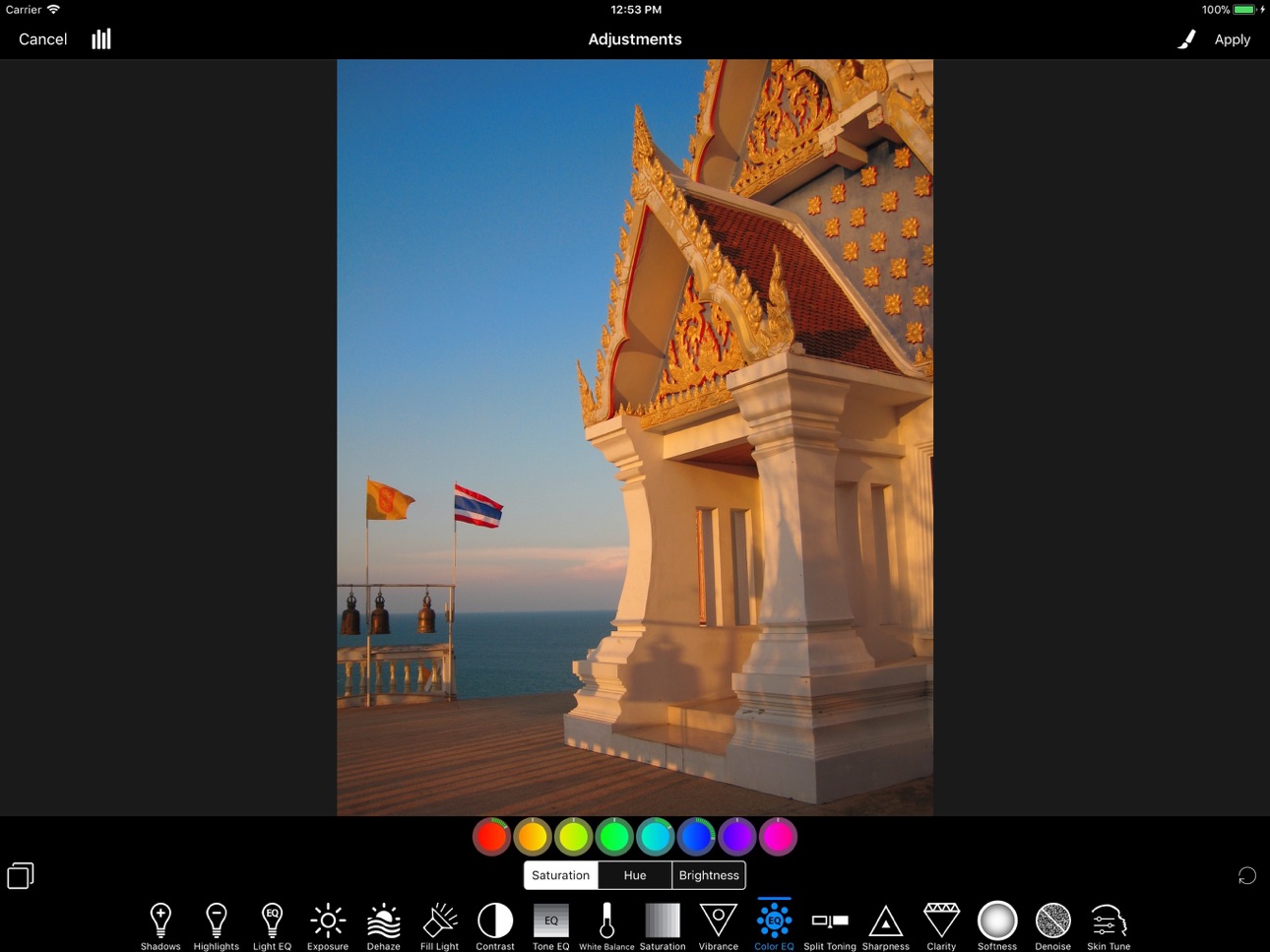
Perfect your photos with a powerful, nondestructive photo editor with RAW processing. Use gradients and brushing to selectively apply adjustments and special effects, including shadows & highlights, contrast, dehaze, white balance, saturation, vibrance, sharpness, split toning, and noise removal, and our one-of-a-kind Light EQ, Tone EQ, and Color EQ.
Collage
Convenient collage maker for sharing your memories. Quickly combine multiple photos into a single image for easy sharing. Choose from over 100 layouts.
—
CAMERA FEATURES
RAW Support
Shoot RAW on capable devices and write captured photos in DNG format.
Lossless TIFF/PNG
Write captured photos in lossless TIFF or PNG format, or choose one of three JPEG quality settings.
Manual Controls
Precisely control exposure, focus and white balance, including a custom white balance preset. Real-time overexposure and underexposure visualization.
Shutter Priority Mode
Set the shutter speed and ACDSee Camera Pro automatically chooses the ISO for proper exposure.
Selfie Mode
Look your best with skin smoothing and lightening, plus a front-facing torch/flash for low-light situations.
Real-time Effect Filters
Choose from 24 effects, including high-quality black & white, Orton, film grain, halftone, and various color tone filters.
Real-time Adjustments
See brightness, contrast, vibrance, sharpness, clarity, skin tune and vignette adjustments in real time and add additional noise reduction during capture.
Exposure Bracketing
Capture three exposures at once at different exposure levels.
HDR Fusion
Combine three shots taken at different exposures to create a single high-dynamic-range image, with manual override of composition parameters.
Flash Fusion
Combine a naturally-illuminated capture with a flash-illuminated capture.
Video Mode
Capture those special moments with video and apply filters and adjustments in real-time.
Flash Modes
Choose from six flash modes: Off, On, Auto, Torch, Torch & flash, and Flash Fusion. All modes work with either the rear-facing or the front-facing camera.
Focus and Exposure
Touch to select focus and exposure point. For more precise control, independently select focus and exposure points.
Lockable AF, AE and AWB
Independently lock focus, exposure, and white balance.
Cropping modes
Crop before you shoot to square, 4:3, 3:2, and 16:9 aspect ratios. Independent settings for front and rear cameras, still photo and video modes.
Level Indicator
Compose your shots with precise alignment using a dual-axis level indicator.
—
EDITOR FEATURES
Image adjustments, including:
- Shadows & Highlights
- Light EQ
- Exposure
- Dehaze
- Contrast
- Tone EQ
- Fill Light
- White Balance
- Saturation & Vibrance
- Color EQ
- Split Toning
- Sharpness
- Clarity
- Softness
- Denoise
- Skin Tune
Effects
Apply a variety of creative effects to your photos, including film, light leaks, halftone, and more.
Use gradients and brushes to mask adjustments.
Focus
Bring your subject into focus. Simulate a shallow depth of field by blurring the background.
Vignette
Adds a vignette effect around the edges of your photo.
Geometry
Crop, rotate, straighten, and mirror your photo.
Filter Splash
Creatively splash on effects such as selective coloring to draw attention to your subject.
ACDSee is a trademark of ACD Systems International Inc. and may be registered in Canada, the United States, the European Union, Japan, or certain other jurisdictions.
Accessibility
ipadiphonemacrealityDevicetvoswatch
Version history 25 versions
Build 882958846v4.5.52026-06-04 23:12:17
Performance improvements and bug fixes.
Build 850316922v4.5.42022-06-21 20:44:03
Performance improvements and bug fixes
Build 847804983v4.5.32022-03-19 17:13:28
Performance improvements and bug fixes
Build 845382624v4.5.12021-11-17 18:00:18
Performance improvements and bug fixes
Build 844692820v4.5.02021-10-14 22:44:46
Added all 21 Photo Effect filters from ACDSee Photo Studio.
Performance improvements and bug fixes
Build 842029268v4.4.32021-05-28 21:41:00
Performance improvements and bug fixes
Build 841968369v4.4.22021-04-28 23:52:58
Performance improvements and bug fixes
Build 840113343v4.4.12021-01-20 19:29:51
Performance improvements and bug fixes
Build 839627712v4.42021-01-14 20:16:28
Performance improvements and bug fixes
Build 833031783v4.3.12019-10-05 01:49:31
Performance improvements and bug fixes
Build 832747525v4.32019-09-13 01:56:21
Added iOS Share Extension to allow other apps to open images in ACDSee Pro
Performance improvements and bug fixes
Build 832457746v4.2.22019-08-21 20:29:47
Performance improvements and bug fixes
Build 831598089v4.2.12019-06-15 13:37:49
Performance improvements and bug fixes
Build 829493096v4.2.02018-12-03 22:42:21
Added filename field to Export settings
Performance improvements and bug fixes
Build 828886763v4.1.92018-10-11 16:08:57
Performance improvements and bug fixes
Build 828555575v4.1.82018-09-12 16:17:33
Performance improvements and bug fixes
Build 828101573v4.1.72018-08-03 16:18:03
Performance improvements and bug fixes
Build 827710069v4.1.62018-06-29 16:44:18
Performance improvements and bug fixes
Build 827328714v4.1.52018-05-29 16:50:59
Performance improvements and bug fixes
Build 824192190v4.1.22017-10-29 18:55:41
• Fixed items not sorted correctly within collections
• Other bug fixes, stability and performance enhancements
Build 824164014v4.1.12017-10-26 23:08:42
• Fixed incorrect output in some cases when saving/exporting images larger than 4096 pixels
• Other bug fixes, stability and performance enhancements
Build 824110350v4.12017-10-23 15:13:09
• Access to Albums, Events and Faces synced from iTunes
• Bug fixes, stability and performance enhancements
Build 823989100v4.02017-10-16 19:02:28
• Photos can now be captured, opened and exported using the new HEIF format (on supporting hardware).
• A Text tool has been added Edit mode.
• Edit mode is now 100% color managed and utilizes wide color device displays.
• Images can now be imported from file storage providers for editing or adding to a collage.
• Images can now be exported from other apps and opened in ACDSee for editing.
• The Collections browser has been redesigned to make it easier to locate collections, and can now browse Moments.
• Looped animations created from Live Photos can now be played back.
• The Camera settings UI has been redesigned and additional settings are available.
◦ Raw capture can now be configured to produce DNG, DNG+JPEG or separate DNG and processed assets.
◦ Captures with adjustments can now be output as original / edited assets, allowing the adjustments to be modified later, or the adjusted image can be output to a separate asset from the unadjusted photo.
◦ The drawer button can be long pressed to go directly to the camera settings.
◦ The output format indicator can be tapped to go directly to the photo capture settings.
• Startup and general operation is much faster and more stable.
• Numerous bug fixes, stability and performance enhancements have been applied.
Build 823385931v3.1.42017-08-22 18:52:31
Fixed large images with sharpening applied not saved correctly on iOS 10
Build 822926547v3.1.32017-07-18 01:37:04
Fixed an issue with "Enable volume button shutter" in camera.
Increased collage resolution.
Price history by region
Currency
Show
Columns
Search
Availability 9 of 9 storefronts
| Region | Language | Price | Ratings | Avg | Version |
|---|---|---|---|---|---|
 US US | en-US | USD 5.99 | 1.1k | 4.8 | 4.5.5 |
 MX MX | es-MX | MXN 129 | 48 | 4.8 | 4.5.5 |
 LU LU | en-GB | EUR 6.99 | 9 | 4.6 | 4.5.5 |
 LR LR | en-GB | USD 5.99 | 0 | — | 4.5.5 |
 MW MW | en-GB | USD 5.99 | 0 | — | 4.5.5 |
 NG NG | en-GB | NGN 9900 | 0 | — | 4.5.5 |
 SL SL | en-GB | USD 5.99 | 0 | — | 4.5.5 |
 TC TC | en-GB | USD 5.99 | 0 | — | 4.5.5 |
 VG VG | en-GB | USD 5.99 | 0 | — | 4.5.5 |
Change log 28 changes · US
✎
releaseNotes updated
Performance improvements and bug fixes.
✎
description updated
Capture, perfect, and share your photos with ACDSee Pro for iPhone. ACDSee Pro combines a professional-grade camera and photo editor with all the tools you need
✎
name updated
ACDSee Pro
◆
Version 4.5.5 released
Performance improvements and bug fixes.
◆
Version 4.5.4 released
Performance improvements and bug fixes
◆
Version 4.5.3 released
Performance improvements and bug fixes
◆
Version 4.5.1 released
Performance improvements and bug fixes
◆
Version 4.5.0 released
Added all 21 Photo Effect filters from ACDSee Photo Studio.
Performance improvements and bug fixes
◆
Version 4.4.3 released
Performance improvements and bug fixes
◆
Version 4.4.2 released
Performance improvements and bug fixes
◆
Version 4.4.1 released
Performance improvements and bug fixes
◆
Version 4.4 released
Performance improvements and bug fixes
◆
Version 4.3.1 released
Performance improvements and bug fixes
◆
Version 4.3 released
Added iOS Share Extension to allow other apps to open images in ACDSee Pro
Performance improvements and bug fixes
◆
Version 4.2.2 released
Performance improvements and bug fixes
◆
Version 4.2.1 released
Performance improvements and bug fixes
◆
Version 4.2.0 released
Added filename field to Export settings
Performance improvements and bug fixes
◆
Version 4.1.9 released
Performance improvements and bug fixes
◆
Version 4.1.8 released
Performance improvements and bug fixes
◆
Version 4.1.7 released
Performance improvements and bug fixes
◆
Version 4.1.6 released
Performance improvements and bug fixes
◆
Version 4.1.5 released
Performance improvements and bug fixes
◆
Version 4.1.2 released
• Fixed items not sorted correctly within collections
• Other bug fixes, stability and performance enhancements
◆
Version 4.1.1 released
• Fixed incorrect output in some cases when saving/exporting images larger than 4096 pixels
• Other bug fixes, stability and performance enhancements
◆
Version 4.1 released
• Access to Albums, Events and Faces synced from iTunes
• Bug fixes, stability and performance enhancements
◆
Version 4.0 released
• Photos can now be captured, opened and exported using the new HEIF format (on supporting hardware).
• A Text tool has been added Edit mode.
• Edit mode is now 100% color managed and utilizes wide color device displays.
• Images can now be
◆
Version 3.1.4 released
Fixed large images with sharpening applied not saved correctly on iOS 10
◆
Version 3.1.3 released
Fixed an issue with "Enable volume button shutter" in camera.
Increased collage resolution.