Home › Education

 US
US
1 of 1 storefronts
Content in en-US
Content in en-US
Information
Preview 2 platforms
iPhone 3 images


iPad 3 images


What’s New Version 3.15.0
The following features have been added:
- Calendar feature (allows you to open class notes directly from the calendar)
- Names are now displayed with the laser pointer
- Students can now view all class responses in real time in a list view.
- Expanded Paper library (approx. 200 items)
- Expanded illustration library (approx. 230 items)
- Functionality improvements and bug fixes.
Description
MetaMoJi ClassRoom provides an interactive teaching environment for individual study, group study, and collaborative learning. As a social learning platform, Share for Classroom allows teachers to digitally guide student work progress in real-time online interaction. The app provides teachers with a virtual whiteboard canvas to customize highly visual lesson plans including drawing, handwriting, images, websites, even audio and video files.
As students work through the lesson plans, teachers can monitor their progress with a virtual look over the shoulder. Since all results of document markup are displayed in real-time, student engagement in lesson plans can become highly interactive. For distance learning situations, the cloud-based streaming environment provides an ideal way for instructor and student to work closer together. All work is displayed as it is entered in real-time, making it easier to illustrate and share lessons and ideas.
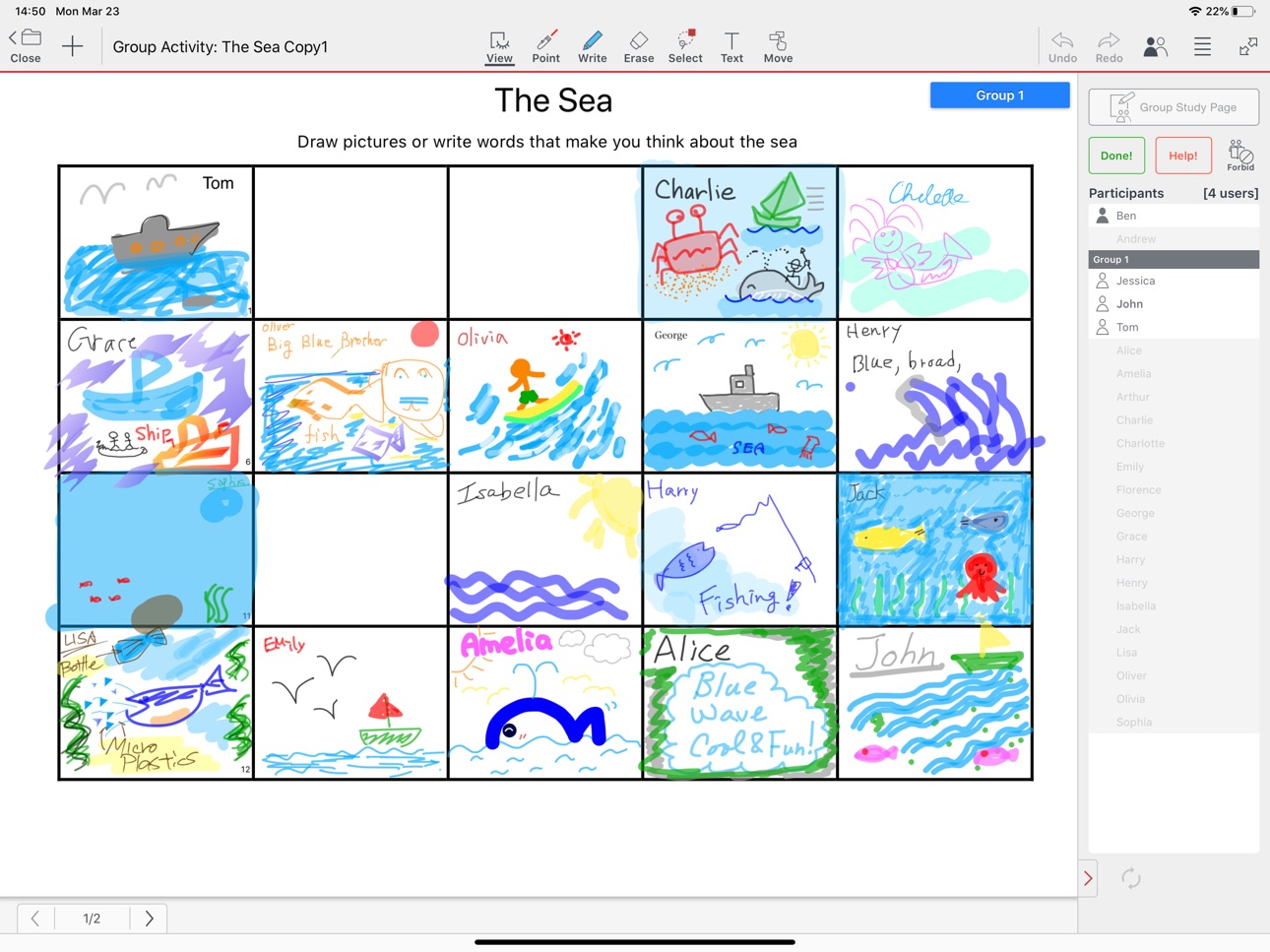
MetaMoJi ClassRoom allows teachers to distribute a “Class Note” to their students. The note is either created from scratch with the powerful tools within the app or by importing files from PDF or Microsoft Office formats. Opening the Class Note starts a class. The students can write answers, sketch drawings or import photos and graphics to illustrate their ideas. Teachers can monitor how each student or group is progressing through the lesson. Easy management controls even allow the teacher to pass presentation control to the student to demonstrate their work.
Following the lesson presented in class, students can join collaborative study groups and work through their homework together by checking in to the same document and sharing ideas within it. Teachers can used the platform for wraparound tutoring opportunities, helping students individually or in a group in virtual sessions. Teachers can even run an interactive lecture with their remote students.
The winner of two Envisioneering awards at CES Showstoppers 2014, MetaMoJi ClassRoom is based on the same framework as the multi-award winning MetaMoJi Share.
Key Features:
•Teachers can monitor up to 50 students working in real-time within each session
•The vast palette of tools allow you to enter text, handwriting, drawings, photos, audio files and web pages – all in high resolution scalable vector graphics
•Teachers can develop lessons from scratch or by marking up imported PDF or Microsoft Office files via Google Drive
•Teachers can control the lesson session so that all students will view the same page and zoomed area and use highlighter options to emphasize a point
•Video and audio recording options can capture an accurate record of the lesson session
•Notes and folders can be automatically synchronized and stored to our cloud service allowing you to back-up and manage your documents across multiple devices
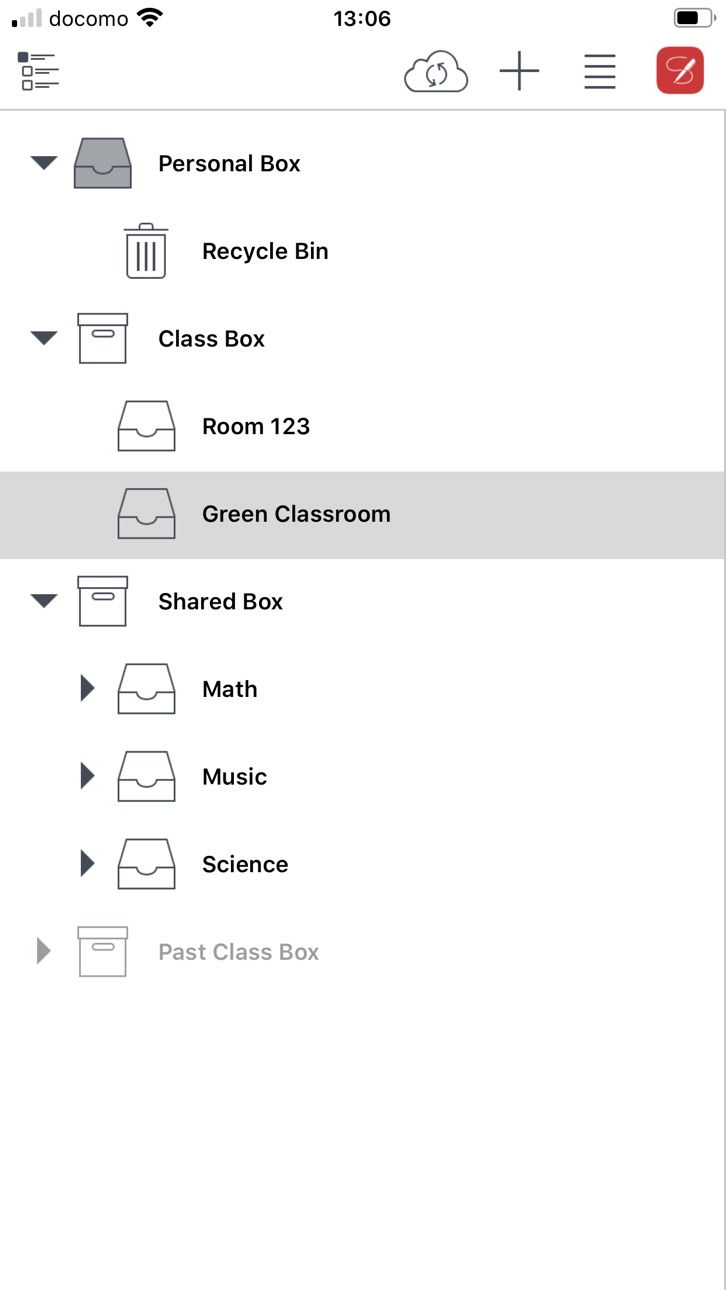
•The Shared Box and Class Box capability allows co-editing and ownership of documents
•Interactively browse the web from within the app and mark up sites
•Password protect documents for privacy and organize in tagged folders which can be automatically synchronized
•Shapes tool provides editable shapes
•Shape recognition converts your drawing to a basic shape
•Smart cropping tool vastly extends photo editing
•Notes can be exported and imported via an WebDAV server or Storage Provider
•The InOutBox tool transfer files between the app and a PC
•The Class Coordinator tool to deliver class materials from a web browser
•User management tools facilitate adding students and groups and assigning permissions
Accessibility
ipadiphonemacrealityDevicetvoswatch
Version history 25 versions
Build 883564406v3.15.02026-03-25 01:59:33
The following features have been added:
- Calendar feature (allows you to open class notes directly from the calendar)
- Names are now displayed with the laser pointer
- Students can now view all class responses in real time in a list view.
- Expanded Paper library (approx. 200 items)
- Expanded illustration library (approx. 230 items)
- Functionality improvements and bug fixes.
Build 867309606v3.14.92024-08-07 00:28:15
-Fixed issues when using Apple Pencil Pro.
-Bug fixes
Build 863081932v3.14.72024-01-23 05:07:43
-Bug fixes
Build 858555943v3.14.32023-07-19 00:37:51
- Batch export/import of Notes
- Change the default for 'Allow students to save to My Box or Copy Page' to On.
- Sorting order of monitoring etc. can now be selected from 'by name' and 'by user ID'.
- Functionality improvements
Build 855949228v3.14.22023-03-31 04:13:04
- Bug fixes
Build 855620165v3.14.12023-03-21 22:43:43
- Enhancement of Monitoring function
(Added mode to tell which page the student is working on)
- Bulk distribution of multiple Notes added
- Added combining multiple Notes function
- Added Class Note restore function
- Added a function to prohibit student from saving Class Note individually
- Functionality improvements
Build 853094656v3.13.72022-11-01 23:57:41
Bug fixes
Build 851949228v3.13.52022-09-02 06:43:47
- Bug fixes
Build 850965215v3.13.42022-07-20 23:48:23
- Bug fixes
Build 850455386v3.13.32022-06-27 23:11:02
- Bug fixes
Build 849716002v3.13.12022-06-03 00:26:57
- Bug fixes
Build 847778744v3.13.02022-03-24 00:10:33
- Added a function to log in to view and export notes after graduation
- Questionnaire function added
- Automatic grouping and student grouping possible
- Additional functionality for students to submit freely created notes
- Flowchart Diagram added.
- Supports transparent images
- Improvement of turning function
- Added the ability to save images on notes and Video to your device's album
- View Video upload status at all times
- Edit of someone else is now reflected quickly
- Displays the status of "○/?" even during individual instruction
- Added ability to share notes with links
- Added a function that allows you to view learning results focusing on a student
- Added a setting that prevents students from password notes
- Changed the default setting of "Allow Student to edit others' writings" to OFF
- Compatible with Macs with M1 chips
- Changed supported OS to 11.4 or later
- Bug fixes
Build 846839361v3.12.72022-01-26 23:45:52
- Bug fixes
Build 844459995v3.12.62021-10-05 00:53:53
- Fixed an issue when using the hardware keyboard in iOS 15.
- Bug fixes
Build 843661812v3.12.52021-08-19 01:00:10
Fixed a time-consuming problem opening the QR code reader
Build 843527265v3.12.42021-08-16 13:12:37
・Enhanced single sign-on support
・Added functions to read and create QR codes
・Added start/close settings to Class Note
・Added submission/ scoring function to Class Note
・Added settings to allow/prevent students from editing one another's writings.
・Added angular display during angular change of sector
・Added functionality to distribute class notes to multiple classes at once.
Build 841744555v3.12.22021-04-23 00:42:20
- Bug fixes
Build 840946506v3.12.12021-03-24 10:01:47
- Supported offline editing of class note
- Added settings that allow students to add pages / move / delete class note
- Added more graphic editings (horizontal flip, vertical flip, rotation by 15°, angle display during rotation)
- Extended the maximum recording time for Audio Button from 5 minutes to 8 hours
Build 838448522v3.11.72020-11-02 01:19:04
- Supported iOS 14
- Bug fixes
Build 838135899v3.11.62020-10-13 03:52:40
- Expanded operation log
- Bug fixes
Build 836963449v3.11.52020-07-31 01:04:47
- Bug fixes
Build 836002312v3.11.42020-05-20 01:42:33
- Fixed an issue that prevented the text from being propagated to other terminals by tapping outside the frame when there are undetermined characters in the text frame.
- Minor bux fixes
Build 835614966v3.11.32020-04-23 21:38:53
- Fixed a problem that might not respond when the audio button was pressed.
- Fixed a problem that subsequent editing would be reflected in a
share layer when the student returned from picture-in-picture of the video.
- Minor bug fix
Build 835171386v3.11.12020-03-25 14:31:18
- Added more functions (mask units, picture-in-picture, etc.)
- Support iPhone and Split View
- Minor bug fixes
Build 834247155v3.10.32020-01-07 21:27:53
- Bug fixes
No pricing data captured yet — comparisons appear once the app has paid storefronts or in-app purchases.
Availability 1 of 1 storefronts
| Region | Language | Price | Ratings | Avg | Version |
|---|---|---|---|---|---|
| US | en-US | Free | 1 | 5.0 | 3.15.0 |
Change log 28 changes · US
✎
releaseNotes updated
The following features have been added:
- Calendar feature (allows you to open class notes directly from the calendar)
- Names are now displayed with the laser
✎
description updated
MetaMoJi ClassRoom provides an interactive teaching environment for individual study, group study, and collaborative learning. As a social learning platform, S
✎
name updated
MetaMoJi ClassRoom
◆
Version 3.15.0 released
The following features have been added:
- Calendar feature (allows you to open class notes directly from the calendar)
- Names are now displayed with the laser pointer
- Students can now view all class responses in real time in a list view.
◆
Version 3.14.9 released
-Fixed issues when using Apple Pencil Pro.
-Bug fixes
◆
Version 3.14.7 released
-Bug fixes
◆
Version 3.14.3 released
- Batch export/import of Notes
- Change the default for 'Allow students to save to My Box or Copy Page' to On.
- Sorting order of monitoring etc. can now be selected from 'by name' and 'by user ID'.
- Functionality improvements
◆
Version 3.14.2 released
- Bug fixes
◆
Version 3.14.1 released
- Enhancement of Monitoring function
(Added mode to tell which page the student is working on)
- Bulk distribution of multiple Notes added
- Added combining multiple Notes function
- Added Class Note restore function
- Added a function to
◆
Version 3.13.7 released
Bug fixes
◆
Version 3.13.5 released
- Bug fixes
◆
Version 3.13.4 released
- Bug fixes
◆
Version 3.13.3 released
- Bug fixes
◆
Version 3.13.1 released
- Bug fixes
◆
Version 3.13.0 released
- Added a function to log in to view and export notes after graduation
- Questionnaire function added
- Automatic grouping and student grouping possible
- Additional functionality for students to submit freely created notes
- Flowchart
◆
Version 3.12.7 released
- Bug fixes
◆
Version 3.12.6 released
- Fixed an issue when using the hardware keyboard in iOS 15.
- Bug fixes
◆
Version 3.12.5 released
Fixed a time-consuming problem opening the QR code reader
◆
Version 3.12.4 released
・Enhanced single sign-on support
・Added functions to read and create QR codes
・Added start/close settings to Class Note
・Added submission/ scoring function to Class Note
・Added settings to allow/prevent students from editing one another's w
◆
Version 3.12.2 released
- Bug fixes
◆
Version 3.12.1 released
- Supported offline editing of class note
- Added settings that allow students to add pages / move / delete class note
- Added more graphic editings (horizontal flip, vertical flip, rotation by 15°, angle display during rotation)
- Extended
◆
Version 3.11.7 released
- Supported iOS 14
- Bug fixes
◆
Version 3.11.6 released
- Expanded operation log
- Bug fixes
◆
Version 3.11.5 released
- Bug fixes
◆
Version 3.11.4 released
- Fixed an issue that prevented the text from being propagated to other terminals by tapping outside the frame when there are undetermined characters in the text frame.
- Minor bux fixes
◆
Version 3.11.3 released
- Fixed a problem that might not respond when the audio button was pressed.
- Fixed a problem that subsequent editing would be reflected in a
share layer when the student returned from picture-in-picture of the video.
- Minor bug fix
◆
Version 3.11.1 released
- Added more functions (mask units, picture-in-picture, etc.)
- Support iPhone and Split View
- Minor bug fixes
◆
Version 3.10.3 released
- Bug fixes