Home › Education

 US
US
USen-US AUen-AU
 INen-GB
 HKzh-Hant-HK
 MOzh-Hant-HK
 AEen-GB
 AFen-GB
 ALen-GB
 AMen-GB
 AZen-GB
 BAen-GB
 BHen-GB
 BMen-GB
 BNen-GB
 BTen-GB
 BYen-GB
 CAen-CA
 CHde-CH
 CNzh-Hans-CN
 EGen-GB
 FJen-GB
 FMen-GB
 GBen-GB
 GEen-GB
 IDen-GB
 ILen-GB
 IQen-GB
 ISen-GB
 JOen-GB
 JPja
JPja KGen-GB
 KHen-GB
 KRko
KRko KWen-GB
 KZen-GB
 LAen-GB
 LBen-GB
 LKen-GB
 MDen-GB
 MEen-GB
 MKen-GB
 MMen-GB
 MNen-GB
 MRen-GB
 MVen-GB
 MYen-GB
 NOen-GB
 NPen-GB
 NRen-GB
 NZen-AU
 OMen-GB
 PGen-GB
 PHen-GB
 PKen-GB
 PWen-GB
 QAen-GB
 RSen-GB
 RUru
RUru SAen-GB
 SBen-GB
 SGen-GB
 THen-GB
 TJen-GB
 TMen-GB
 TOen-GB
 TRen-GB
 TWzh-Hant-TW
 UAen-GB
 UZen-GB
 VNen-GB
 VUen-GB
 XKen-GB
 YEen-GB
 ZAen-GB
 ATNot Available
 BENot Available
 BGNot Available
 CYNot Available
 CZNot Available
 DENot Available
 DKNot Available
 EENot Available
 ESNot Available
 FINot Available
 FRNot Available
 GRNot Available
 HRNot Available
 HUNot Available
 IENot Available
 ITNot Available
 LTNot Available
 LUNot Available
 LVNot Available
 MTNot Available
 NLNot Available
 PLNot Available
 PTNot Available
 RONot Available
 SENot Available
 SINot Available
 SKNot Available
74 of 101 storefronts
Content in en-US
Content in en-US
Information
Apple ID965705471
Bundle IDcom.blogspot.mathjoy.MathSymbols
SellerSeller
Min iOS16.6
Min macOS13.5
Device familiesiphone, ipad
Released2015-03-01
Copyright© 2017 Jeff Simon Software
Privacy policyLink ↗
Preview 2 platforms
iPhone 3 images


iPad 3 images


What’s New Version 5.1
Liquid Glass
Onboarding now uses Liquid Glass elements in iOS 26.
Minor Fixes
HappyKey has been optimized for iOS 26.
Description
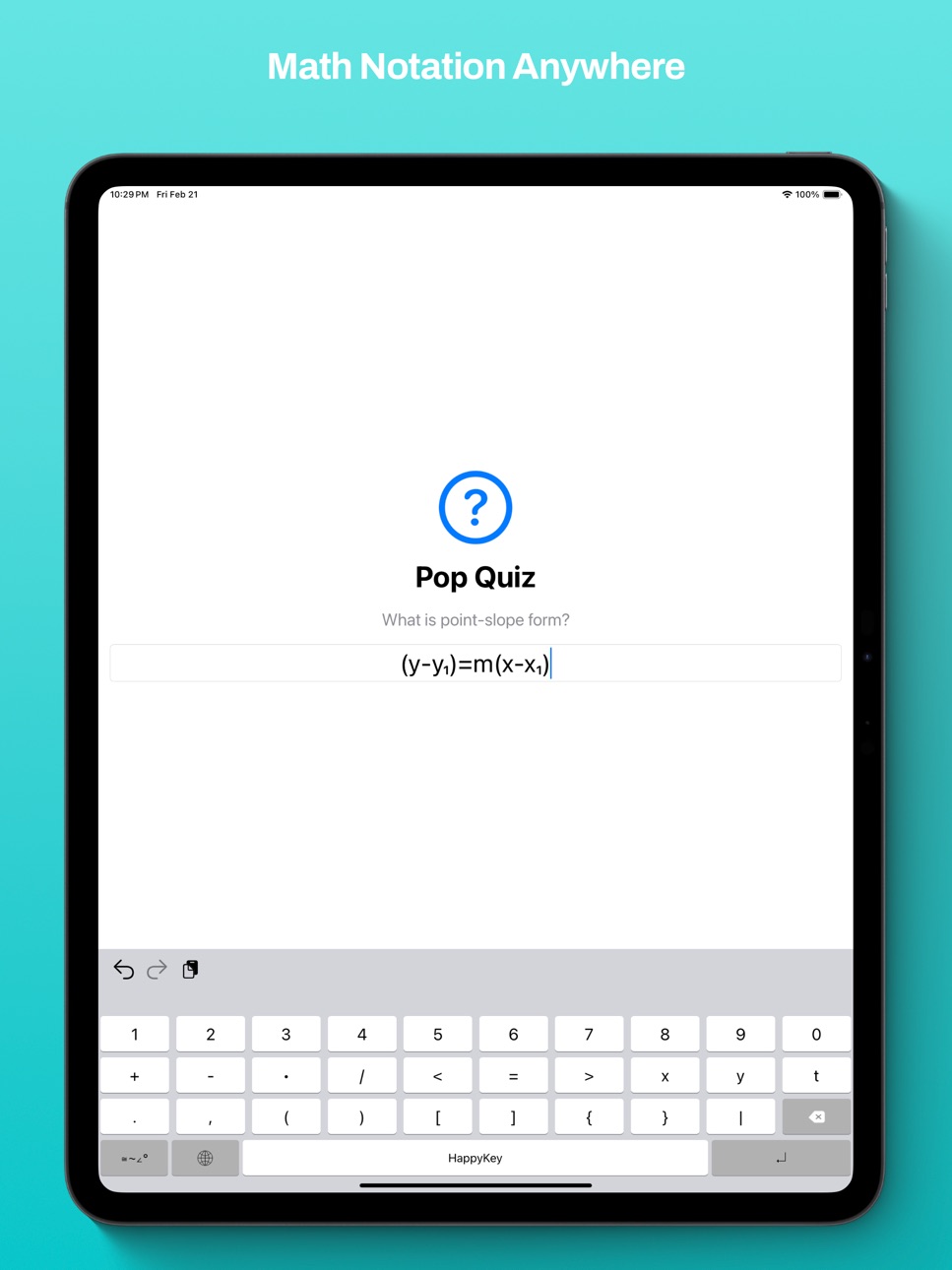
HappyKey provides you with a simple keyboard with many useful math symbols. It will fulfill all of your math notation needs with numbers, superscripts, pi, math operators and relations, infinity, and beyond.
Install the app first, then to setup the keyboard go to Settings > General > Keyboard > Keyboards > Add New Keyboard > HappyKey
Note: This is not a calculator. This is an additional keyboard that makes it easier to type math notation.
Credit for the keyboard functionality and design goes to the open source Tasty Imitation Keyboard by Alexei Baboulevitch (GitHub user archagon).
Accessibility
ipadiphonemacrealityDevicetvoswatch
Version history 8 versions
Build 884677827v5.12026-04-19 19:16:16
Liquid Glass
Onboarding now uses Liquid Glass elements in iOS 26.
Minor Fixes
HappyKey has been optimized for iOS 26.
Build 872677531v5.02025-03-14 07:00:33
New Guided Setup Experience
A much improved user interface that guides new users through enabling the keyboard and how to use it
Dark Mode Icons (iOS 18 Required)
HappyKey's icon has been updated to have dark and tinted variants to match the rest of your App Library
Build 829120996v4.0.22019-06-17 14:02:00
iPad Pro (3rd Generation) optimized
iOS 12 optimized
Build 826345598v4.0.12018-10-29 19:11:07
Minor bug fixes
New in 4.0
Rebuilt from the ground up!
New icon and user interface
The long awaited multiplication sign (×) is finally here! Just long press on the multiplication dot (•) to select it.
Build 825353618v4.02018-03-11 17:00:11
Rebuilt from the ground up!
New icon and user interface
The long awaited multiplication sign (×) is finally here! Just long press on the multiplication dot (•) to select it.
Build 812842380v32017-06-12 15:17:17
- New characters: comma and square brackets
- Minor improvements
Build 811944547v22015-03-15 22:23:51
- Two new symbols join the party! Square root and +/-.
- New name!
Build 811751027v12015-03-01 03:00:31
No pricing data captured yet — comparisons appear once the app has paid storefronts or in-app purchases.
Availability 74 of 101 storefronts
| Region | Language | Price | Ratings | Avg | Version |
|---|---|---|---|---|---|
| US | en-US | Free | 9 | 3.7 | 5.1 |
| AU | en-AU | Free | 3 | 4.3 | 5.1 |
| IN | en-GB | Free | 2 | 3.0 | 5.1 |
| HK | zh-Hant-HK | Free | 1 | 4.0 | 5.1 |
| MO | zh-Hant-HK | Free | 1 | 3.0 | 5.1 |
| AE | en-GB | Free | 0 | — | 5.1 |
| AF | en-GB | Free | 0 | — | 5.1 |
| AL | en-GB | Free | 0 | — | 5.1 |
| AM | en-GB | Free | 0 | — | 5.1 |
| AZ | en-GB | Free | 0 | — | 5.1 |
| BA | en-GB | Free | 0 | — | 5.1 |
| BH | en-GB | Free | 0 | — | 5.1 |
| BM | en-GB | Free | 0 | — | 5.1 |
| BN | en-GB | Free | 0 | — | 5.1 |
| BT | en-GB | Free | 0 | — | 5.1 |
| BY | en-GB | Free | 0 | — | 5.1 |
| CA | en-CA | Free | 0 | — | 5.1 |
| CH | de-CH | Free | 0 | — | 5.1 |
| CN | zh-Hans-CN | Free | 0 | — | 5.1 |
| EG | en-GB | Free | 0 | — | 5.1 |
| FJ | en-GB | Free | 0 | — | 5.1 |
| FM | en-GB | Free | 0 | — | 5.1 |
| GB | en-GB | Free | 0 | — | 5.1 |
| GE | en-GB | Free | 0 | — | 5.1 |
| ID | en-GB | Free | 0 | — | 5.1 |
| IL | en-GB | Free | 0 | — | 5.1 |
| IQ | en-GB | Free | 0 | — | 5.1 |
| IS | en-GB | Free | 0 | — | 5.1 |
| JO | en-GB | Free | 0 | — | 5.1 |
| JP | ja | Free | 0 | — | 5.1 |
| KG | en-GB | Free | 0 | — | 5.1 |
| KH | en-GB | Free | 0 | — | 5.1 |
| KR | ko | Free | 0 | — | 5.1 |
| KW | en-GB | Free | 0 | — | 5.1 |
| KZ | en-GB | Free | 0 | — | 5.1 |
| LA | en-GB | Free | 0 | — | 5.1 |
| LB | en-GB | Free | 0 | — | 5.1 |
| LK | en-GB | Free | 0 | — | 5.1 |
| MD | en-GB | Free | 0 | — | 5.1 |
| ME | en-GB | Free | 0 | — | 5.1 |
| MK | en-GB | Free | 0 | — | 5.1 |
| MM | en-GB | Free | 0 | — | 5.1 |
| MN | en-GB | Free | 0 | — | 5.1 |
| MR | en-GB | Free | 0 | — | 5.1 |
| MV | en-GB | Free | 0 | — | 5.1 |
| MY | en-GB | Free | 0 | — | 5.1 |
| NO | en-GB | Free | 0 | — | 5.1 |
| NP | en-GB | Free | 0 | — | 5.1 |
| NR | en-GB | Free | 0 | — | 5.1 |
| NZ | en-AU | Free | 0 | — | 5.1 |
| OM | en-GB | Free | 0 | — | 5.1 |
| PG | en-GB | Free | 0 | — | 5.1 |
| PH | en-GB | Free | 0 | — | 5.1 |
| PK | en-GB | Free | 0 | — | 5.1 |
| PW | en-GB | Free | 0 | — | 5.1 |
| QA | en-GB | Free | 0 | — | 5.1 |
| RS | en-GB | Free | 0 | — | 5.1 |
| RU | ru | Free | 0 | — | 5.1 |
| SA | en-GB | Free | 0 | — | 5.1 |
| SB | en-GB | Free | 0 | — | 5.1 |
| SG | en-GB | Free | 0 | — | 5.1 |
| TH | en-GB | Free | 0 | — | 5.1 |
| TJ | en-GB | Free | 0 | — | 5.1 |
| TM | en-GB | Free | 0 | — | 5.1 |
| TO | en-GB | Free | 0 | — | 5.1 |
| TR | en-GB | Free | 0 | — | 5.1 |
| TW | zh-Hant-TW | Free | 0 | — | 5.1 |
| UA | en-GB | Free | 0 | — | 5.1 |
| UZ | en-GB | Free | 0 | — | 5.1 |
| VN | en-GB | Free | 0 | — | 5.1 |
| VU | en-GB | Free | 0 | — | 5.1 |
| XK | en-GB | Free | 0 | — | 5.1 |
| YE | en-GB | Free | 0 | — | 5.1 |
| ZA | en-GB | Free | 0 | — | 5.1 |
Not available in: AT, BE, BG, CY, CZ, DE, DK, EE, ES, FI, FR, GR, HR, HU, IE, IT, LT, LU, LV, MT, NL, PL, PT, RO, SE, SI, SK
Change log 12 changes · US
✎
releaseNotes updated
Liquid Glass
Onboarding now uses Liquid Glass elements in iOS 26.
Minor Fixes
HappyKey has been optimized for iOS 26.
✎
description updated
HappyKey provides you with a simple keyboard with many useful math symbols. It will fulfill all of your math notation needs with numbers, superscripts, pi, math
✎
subtitle updated
Math notation made easy!
✎
name updated
HappyKey
◆
Version 5.1 released
Liquid Glass
Onboarding now uses Liquid Glass elements in iOS 26.
Minor Fixes
HappyKey has been optimized for iOS 26.
◆
Version 5.0 released
New Guided Setup Experience
A much improved user interface that guides new users through enabling the keyboard and how to use it
Dark Mode Icons (iOS 18 Required)
HappyKey's icon has been updated to have dark and tinted variants to match t
◆
Version 4.0.2 released
iPad Pro (3rd Generation) optimized
iOS 12 optimized
◆
Version 4.0.1 released
Minor bug fixes
New in 4.0
Rebuilt from the ground up!
New icon and user interface
The long awaited multiplication sign (×) is finally here! Just long press on the multiplication dot (•) to select it.
◆
Version 4.0 released
Rebuilt from the ground up!
New icon and user interface
The long awaited multiplication sign (×) is finally here! Just long press on the multiplication dot (•) to select it.
◆
Version 3 released
- New characters: comma and square brackets
- Minor improvements
◆
Version 2 released
- Two new symbols join the party! Square root and +/-.
- New name!
◆
Version 1 released