Home › Travel

 US
US
1 of 1 storefronts
Content in en-US
Content in en-US
Information
Apple ID954599668
Bundle IDta.gpsOdometerPro
SellerSeller
Min iOS9.0
Min macOS11.0
Device familiesiphone, ipad, ipod
Released2015-01-16
Copyright© 2025 Kevin WIllett
Privacy policyLink ↗
Preview 2 platforms
iPhone 7 images



iPad 7 images


What’s New Version 2.13
- Added refresh and pause buttons to Widgets.
- Added lock screen Widget.
- Better support for newer devices and operating systems.
- Widgets and Notifications are now customizable. (You control what information is displayed)
- New trips are created via 'templates' instead of the 'Trip name to auto increment' setting.
- Please see the support page for more details.
Please send crash reports if crashes occur.
Please contact the developer via email if you have questions or notice any errors or issues.
Description
A simple and easy to use odometer. GPS Odometer only does one thing, and does it well: measure distance traveled. Includes run in background capability. Ideal for almost anything that requires measuring outdoor distance traveled such as walking, running, driving, hiking, etc. Note that GPS does not work well under a roof. For best results, use outdoors.
Benefits of the paid version:
- Lock screen Widget and Notifications that can be customized to display the information that you want to see.
- Landscape and splitscreen support.
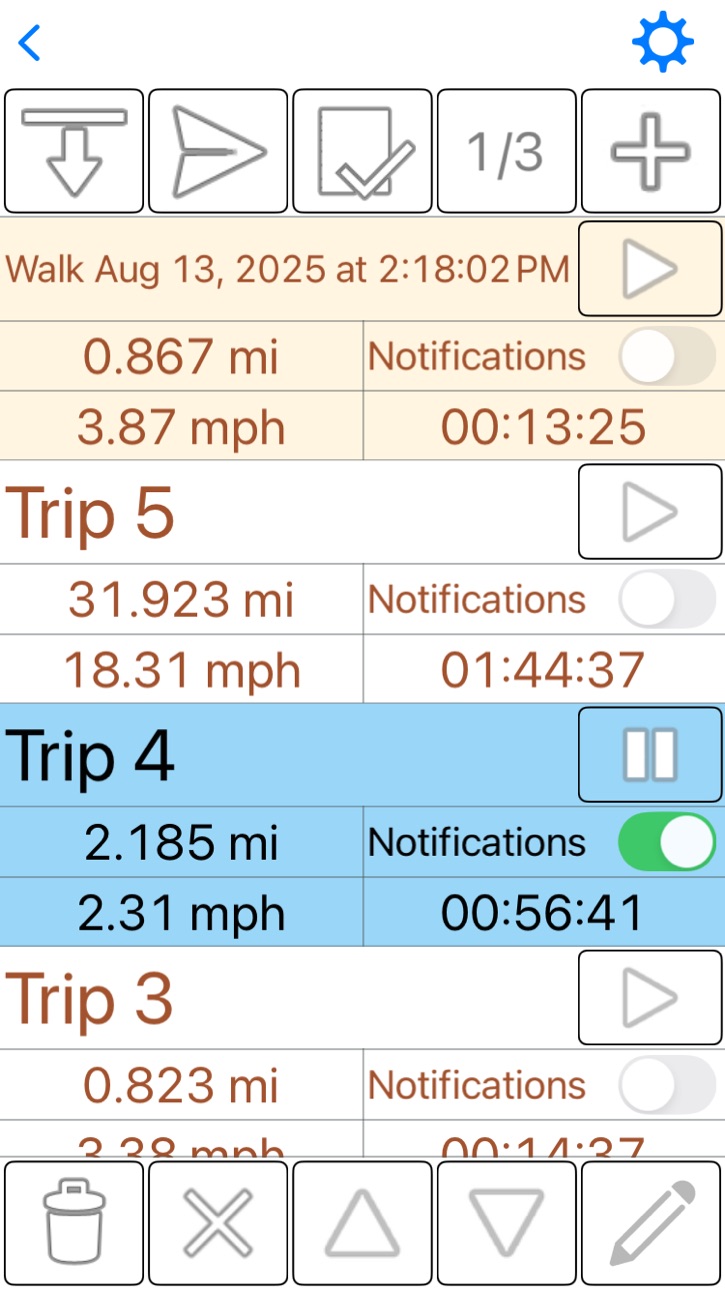
- Ability to have multiple trips. Each trip can be stopped and started independently.
- Receive notifications while the application is closed at distance intervals of your choosing.
- Custom distance unit for each trip.
- Save trips to optionally restore later or for your own records.
Displays:
- Distance
- Time elapsed
- Speed (average or current)
- Displacement (straight line distance from your starting point). This can be hidden.
Distance units include:
- Kilometers
- Miles
- Nautical miles
- Meters
- Feet
Speed units include:
- Kilometers per hour
- Miles per hour
- Nautical miles per hour
- Meters per second
- Feet per second
Other features:
- Large font adjustable display.
- Home screen and lock screen widgets.
- Accurate to within 1 percent when compared to most car odometers under normal driving conditions.
- Approximates distance traveled in some GPS dead spots (such as driving through a tunnel) by adding the as-a-bird flies distance to your trip.
Please also note:
- GPS Odometer does run in the background if you leave it running. Be sure to pause the trip when you are finished or battery life will be negatively affected. The timer stops when the trip is paused.
Please visit the web page for more details.
Accessibility
ipadiphonemacrealityDevicetvoswatch
Version history 14 versions
Build 874665212v2.132025-08-26 06:34:33
- Added refresh and pause buttons to Widgets.
- Added lock screen Widget.
- Better support for newer devices and operating systems.
- Widgets and Notifications are now customizable. (You control what information is displayed)
- New trips are created via 'templates' instead of the 'Trip name to auto increment' setting.
- Please see the support page for more details.
Please send crash reports if crashes occur.
Please contact the developer via email if you have questions or notice any errors or issues.
Build 845887676v2.122021-12-13 04:34:52
- Trips now have 'notes' and 'starting distance' properties.
- Added a customizable Widget.
- Notifications can now be customized.
- Removed the light/dark theme setting. Device level light/dark appearance introduced in iOS 14 makes this redundant.
- New trips are created via 'templates' instead of the 'Trip name to auto increment' setting
- Please see the support page for more details.
Please send crash reports if crashes occur.
Please contact the developer via email if you have questions or notice any errors or issues.
Build 843505893v2.112021-10-20 20:23:16
- Trips now have 'notes' and 'starting distance' properties.
- Added a customizable Widget.
- Notifications can now be customized.
- Removed the light/dark theme setting. Device level light/dark appearance introduced in iOS 14 makes this redundant.
- New trips are created via 'templates' instead of the 'Trip name to auto increment' setting
- Please see the support page for more details.
Please send crash reports if crashes occur.
Please contact the developer via email if you have questions or notice any errors or issues.
Build 832477393v2.102019-08-22 23:21:33
August 2019 update:
- Added landscape and split-screen capability.
- Bug fixes
- - 'Time elapsed' is now saved periodically. Previously, this was only saved whilst 'properly' closing the app. Of course, this also resulted in a very high 'average speed' when 'time elapsed' was near zero.
- - The 'list page' had 2 major issues:
- - - 'Notification interval' was not editable.
- - - Only the first trip in the list could be edited or exported.
- Please see the support page for more details.
Build 832391494v2.92019-08-21 09:03:01
August 2019 update:
- Added landscape and split-screen capability.
- Bug fixes
- - 'Time elapsed' is now saved periodically. Previously, this was only saved whilst 'properly' closing the app. Of course, this also resulted in a very high 'average speed' when 'time elapsed' was near zero.
- - The 'list page' had 2 major issues:
- - - 'Notification interval' was not editable.
- - - Only the first trip in the list could be edited or exported.
- Please see the support page for more details.
Build 825350211v2.82017-12-17 23:02:58
December, 2017:
- Many users seem to have trouble determining if a trip is running or paused so the following changes were made:
- (1) - Upon starting, resuming, or pausing a trip, a temporary notification displays for about 2 seconds.
- (2) - The start/resume button is tinted appropriately. (red if paused, and green if running)
- (3) - While in the paused state, the text is colored slightly red/brown.
- Changed how the waypoint filter works to allow for shorter update intervals and the default setting is now more centrist. (a little false movement is not the end of the world)
- Added limited undo/redo functionality for add/delete trips and re-ordering of the list. Note that you cannot undo resetting a trip.
- The edit trip popup is now much larger on phones.
- If accuracy is poor and Wi-Fi is off, the user is informed that enabling Wi-Fi may improve accuracy.
- If the device is a Wi-Fi only iPad (no satellite GPS receiver), the user is informed.
- Added support for the iPhone X screen dimensions.
- Please see the support page for more details.
Please report any problems or bugs to the developer via email.
Build 823939033v2.72017-10-08 21:18:44
Fix setting menu for iPad.
Build 823790467v2.62017-09-26 02:02:09
Fixed import trip function.
Build 823205803v2.52017-08-08 02:42:04
Added two new settings options. 'Use lock' and 'Require reset confirmation'. Both default to yes.
Minor layout changes.
Added some basic support for VoiceOver, for the visually impaired. This is limited to the main page.
Removed support for iOS 7.
Removed Catalan language.
Several bug fixes.
Build 820208103v1.412017-01-04 00:39:34
More flexible setting options.
More efficient in terms of device CPU, memory, and I/O usage.
List page user interface redesigned.
English:
More flexible setting options.
More efficient in terms of device CPU, memory, and I/O usage.
List page user interface redesigned.
Tutorial/FAQ/Help page link added in app.
Please report any problems or bugs to the developer via email.
Build 813164183v1.322015-09-04 20:33:06
prevent list page from crashing with iOS 8.3+
Build 812994510v1.312015-08-04 19:11:09
fix for iOS 8.3 and 8.4
Build 812531464v1.242015-06-10 21:52:13
English:
- Added the ability to export and restore a trip. See the 3 new buttons at the top of the list page. For now, this is limited to one trip at a time.
- Abbreviations for distance units are now used. For example, 'km' instead of 'kilometre or kilometer' is the abbreviation for most languages.
- By default, number format is now determined by your region. If you prefer another number format, please visit settings -> number format and choose the one the you like (including the previous default)
- Toggle between average speed and current speed on the main screen is now possible without entering settings. Click the unlock and notice the leftmost green popup.
Build 811477012v1.12015-01-16 21:52:34
Price history by region
Currency
Show
Columns
Search
Availability 1 of 1 storefronts
| Region | Language | Price | Ratings | Avg | Version |
|---|---|---|---|---|---|
| US | en-US | USD 4.99 | 26 | 3.4 | 2.13 |
Change log 18 changes · US
✎
releaseNotes updated
- Added refresh and pause buttons to Widgets.
- Added lock screen Widget.
- Better support for newer devices and operating systems.
- Widgets and Notifications
✎
description updated
A simple and easy to use odometer. GPS Odometer only does one thing, and does it well: measure distance traveled. Includes run in background capability. Ideal f
✎
subtitle updated
measure distance traveled
✎
name updated
GPS Odometer Pro
◆
Version 2.13 released
- Added refresh and pause buttons to Widgets.
- Added lock screen Widget.
- Better support for newer devices and operating systems.
- Widgets and Notifications are now customizable. (You control what information is displayed)
- New trips ar
◆
Version 2.12 released
- Trips now have 'notes' and 'starting distance' properties.
- Added a customizable Widget.
- Notifications can now be customized.
- Removed the light/dark theme setting. Device level light/dark appearance introduced in iOS 14 makes this re
◆
Version 2.11 released
- Trips now have 'notes' and 'starting distance' properties.
- Added a customizable Widget.
- Notifications can now be customized.
- Removed the light/dark theme setting. Device level light/dark appearance introduced in iOS 14 makes this re
◆
Version 2.10 released
August 2019 update:
- Added landscape and split-screen capability.
- Bug fixes
- - 'Time elapsed' is now saved periodically. Previously, this was only saved whilst 'properly' closing the app. Of course, this also resulted in a very high 'av
◆
Version 2.9 released
August 2019 update:
- Added landscape and split-screen capability.
- Bug fixes
- - 'Time elapsed' is now saved periodically. Previously, this was only saved whilst 'properly' closing the app. Of course, this also resulted in a very high 'av
◆
Version 2.8 released
December, 2017:
- Many users seem to have trouble determining if a trip is running or paused so the following changes were made:
- (1) - Upon starting, resuming, or pausing a trip, a temporary notification displays for about 2 seconds.
- (2
◆
Version 2.7 released
Fix setting menu for iPad.
◆
Version 2.6 released
Fixed import trip function.
◆
Version 2.5 released
Added two new settings options. 'Use lock' and 'Require reset confirmation'. Both default to yes.
Minor layout changes.
Added some basic support for VoiceOver, for the visually impaired. This is limited to the main page.
Removed support
◆
Version 1.41 released
More flexible setting options.
More efficient in terms of device CPU, memory, and I/O usage.
List page user interface redesigned.
English:
More flexible setting options.
More efficient in terms of device CPU, memory, and I/O usage.
List pa
◆
Version 1.32 released
prevent list page from crashing with iOS 8.3+
◆
Version 1.31 released
fix for iOS 8.3 and 8.4
◆
Version 1.24 released
English:
- Added the ability to export and restore a trip. See the 3 new buttons at the top of the list page. For now, this is limited to one trip at a time.
- Abbreviations for distance units are now used. For example, 'km' instead of
◆
Version 1.1 released