Home › Photo & Video

 US
US
1 of 1 storefronts
Content in en-US
Content in en-US
Information
Preview 3 platforms
iPhone 10 images



iPad 10 images


Mac 4 images


What’s New Version 7.88
[Remove Objects] A lifesaver for clumsy fingers~ Now with auto‑selection! One‑tap multi‑select for a perfectly clean image!
[Interface] The page looks clearer and brighter~ Don't believe it? Come and see for yourself!
[BUG] One‑tap crash fix. Greatly improved user experience!
Description
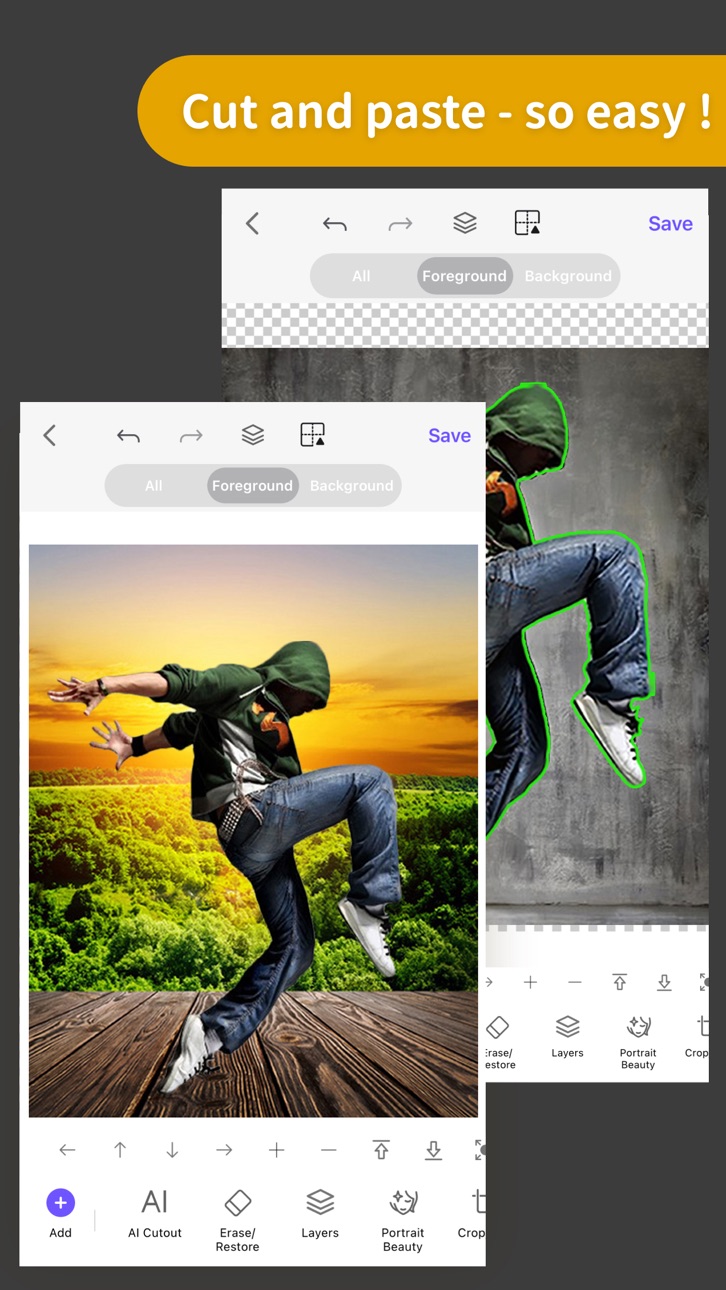
Come and experience the Top 1 professional cutout and photo editing tool in Appstore! With this tool, you will become a master in photo editing area even if you are a beginner. One-click cutout、 multi-layer synthesis of pictures、 making ID photos、collages、 instantly erase redundant passers-by in photos、green screen cutouts、replace the sky··· In addition, a large number of templates and stickers making design extremely simple。
*One-click cutout & batch cutout
-After selecting the picture, you can get the results of the cutout with one click. Buckle out the characters, animals, products, stamps and other content in the picture with one click, and also support batch cutouts, which greatly improves the efficiency of the cutout.
-Manually selection tools: Lasso, instant alpha, eraser, a lot of manual tools to cutout if you are not satisfied with the result of the automatic cutout tool.
-The new "Hair Refine" and "Edge Refine" tools, offering you a first glimpse of how much easier it could be to select hair, fur and other fine details in an image.
*Multi-layer composition
Powerful image synthesis function, seamlessly synthesize multiple pictures, the effect is amazing.
*ID photo
ID camera + multiple ID photo sizes + automatic cutout + modified background color + exquisite male and female formal wear + beauty
*MagicEraser
Don’t worry if you stray passers-by in the photo, "Photo Eraser" helps you erase passers-by with one click and intelligently repair the background.
*100+ filters&effects
There are over 100 filters and effects to make your photos unique!
*23 blend modes
*Powerful photo editor
*Transparent PNG and colorful background JPG support
Knockout Plus subscription
- You can subscribe for new weekly updates (every week, new images will be available for download)
- Payment will be charged to iTunes Account at confirmation of purchase
- You will be able to color all available images for the duration of the subscription
- Subscription automatically renews for the same price and duration period as the original "one week"/"one month"/"one year" package unless auto-renew is turned off at least 24-hours before the end of the current period
- Account will be charged for renewal within 24-hours prior to the end of the current period at the cost of the chosen package (weekly, monthly or yearly package)
- Subscriptions may be managed by the user and auto-renewal may be turned off by going to the user's iTunes Account Settings after purchase
- No cancellation of the current subscription is allowed during active subscription period
- You may cancel a subscription during its free trial period via the subscription setting through your iTunes account. This must be done 24 hours before the end of the subscription period to avoid being charged. Please visit http://support.apple.com/kb/ht4098 for more information
- You may turn off the auto-renewal of your subscription via your iTunes Account Settings. However, you are not able to cancel the current subscription during its active period
- Any unused portion of a free-trial period, will be forfeited when the user purchases a Knockout Plus subscription
Links to our Terms of Service and Privacy Policy can be found below
Privacy Policy:http://www.godimage.mobi/policy
Terms of Use: http://www.godimage.mobi/terms
In-App Purchases US pricing
VIP Membership Subscription
Weekly VIP Membership · 7 days 3-day free trial$4.99
Monthly VIP Membership · Monthly$5.99
Semiannually VIP Membership · 6 months 14-day free trial$16.49
Yearly VIP Membership · Yearly 14-day free trial$26.99
AI Membership-Weekly · 7 days 3-day free trial$9.99
One-Time Purchases
Save HD Image Once$0.99
Universal unlock 1 time$0.99
Save Pics In High Resolution$3.99
Pro Bundle Pack$4.99
Capabilities
In-App PurchasesiMessage
Accessibility
ipadiphonemacrealityDevicetvoswatch
Version history 25 versions
Build 886376549v7.882026-06-04 01:09:01
[Remove Objects] A lifesaver for clumsy fingers~ Now with auto‑selection! One‑tap multi‑select for a perfectly clean image!
[Interface] The page looks clearer and brighter~ Don't believe it? Come and see for yourself!
[BUG] One‑tap crash fix. Greatly improved user experience!
Build 884284482v7.872026-04-20 12:43:48
1.Added AI product image feature: create professional-grade product images in seconds without needing to set up a scene or retake photos.
2.The main interface is now lighter and clearer, with a smoother touch experience.
3.Optimized overall experience and fixed known issues.
Build 882449816v7.852026-03-12 16:52:24
Bug fixes and performance improvements
Build 880431061v7.842026-01-31 02:53:50
1. Introducing AI Ultra Editing Mode with preset AI effects to generate high-quality results in one tap
2. New AI Magic features with curated AI effects for instant creative transformations
3. New AI Atmosphere effects to enhance mood and bring photos to life
4. Bug fixes and performance improvements
Build 880293791v7.832025-12-05 14:36:39
1、Added new visual display content
2、Optimized loading performance for smoother experience
3、Refined interaction details
4、Fixed known issues and improved stability
Build 879485237v7.822025-11-06 11:46:52
1. The all-new Live Cutout feature is now available! Enjoy smarter real-time cutouts with more natural results.
2. The home screen has been redesigned for a smoother and more intuitive experience.
3. Fixed some known issues and improved overall stability.
Build 878927064v7.812025-10-19 12:40:09
1.Fixed the bugs that make crashes and performance improvement.
2.Newly added 'AI Dress-Up' function, one click intelligent dressing, easy to change styles.
3.Newly added 'AI Dress-Up' feature to 'ID Photo' function, making it easy to complete.
4.Newly added 'coloring effect' feature to 'AI coloring' function , making the colors more vivid and lively.
Build 878336406v7.802025-10-02 21:51:45
1.Fixed the bugs that make crashes and performance improvement.
2.Newly added 'AI Dress-Up' function, one click intelligent dressing, easy to change styles.
3.Newly added 'AI Dress-Up' feature to 'ID Photo' function, making it easy to complete.
4.Newly added 'coloring effect' feature to 'AI coloring' function , making the colors more vivid and lively.
Build 878084183v7.792025-09-16 14:52:41
1.Newly added 'AI Dress-Up' function, one click intelligent dressing, easy to change styles.
2.Newly added 'AI Dress-Up' feature to 'ID Photo' function, making it easy to complete.
3.Newly added 'coloring effect' feature to 'AI coloring' function , making the colors more vivid and lively.
4.Fix defects and optimize the interaction details of other features.
Build 877301964v7.782025-08-18 12:49:31
Major update, the highly anticipated AI photo editing feature brings a brand new experience - here's what's new:
1. Newly added 'AI Photo Editing' function, input the required instructions, and intelligently edit the image accurately for you.
2. Added the whole new 'AI Image Generator' function to add a massive number of popular filters types.
3. Added the whole new 'AI Text-to-Image' function to significantly improve processing speed and generation efficiency.
4. Added the whole new 'AI Expand' function to significantly improve processing speed and image expansion effect.
5. Optimize the interactive design of the ' Cutout - Lasso' function for simpler and more convenient operation.
6. Optimize the 'Image Compose - Layers' function to easily view and manage more layers.
7. Bugfix and performance improvement.
Build 875825140v7.772025-08-12 02:15:56
Major update, the highly anticipated AI photo editing feature brings a brand new experience - here's what's new:
1. Newly added 'AI Photo Editing' function, input the required instructions, and intelligently edit the image accurately for you.
2. Added the whole new 'AI Image Generator' function to add a massive number of popular filters types.
3. Added the whole new 'AI Text-to-Image' function to significantly improve processing speed and generation efficiency.
4. Added the whole new 'AI Expand' function to significantly improve processing speed and image expansion effect.
5. Optimize the interactive design of the ' Cutout - Lasso' function for simpler and more convenient operation.
6. Optimize the 'Image Compose - Layers' function to easily view and manage more layers.
7. Fix defects and optimize the interaction details of other features.
Build 874988043v7.762025-05-29 09:08:01
1.Added the [AI Face Restoration] function to intelligently repair blurred or damaged facial details and restore a clear and natural look.
2.Added the elimination effect to the [Remove Objects] function to easily remove blemishes. Come and try it.
3.Fixed defects and optimized the interaction details of other functions.
Build 874337177v7.752025-04-29 13:12:33
Great update! This update brings new features and stability improvements for your greater experience.
In this release:
1.Bug fixes. We've fixed the login error issue.
2.Stability improvements.
New features from previous release:
1. Added the [AI Colorize] function, which intelligently adds colors to black and white images, enhancing visual effects and realism.
2. Added the [Custom Size] function, allowing for custom adjustment of image size when saving to meet the needs of different usage scenarios.
3. [Portrait Beauty - Skin ] Added "Clarity" and "Freckle & Acne", "Whiten" added "Global and Skin" mode, providing more refined beauty adjustment and optimization.
4. Optimize the function and effect of [Portrait Beauty - Freckle & Acne], add an "Automatic" mode, intelligently recognize and accurately remove spots and acne.
Build 873752468v7.732025-04-10 10:21:21
1. Added the [AI Colorize] function, which intelligently adds colors to black and white images, enhancing visual effects and realism.
2. Added the [Custom Size] function, allowing for custom adjustment of image size when saving to meet the needs of different usage scenarios.
3. [Portrait Beauty - Skin ] Added "Clarity" and "Freckle & Acne", "Whiten" added "Global and Skin" mode, providing more refined beauty adjustment and optimization.
4. Optimize the function and effect of [Portrait Beauty - Freckle & Acne], add an "Automatic" mode, intelligently recognize and accurately remove spots and acne.
5. Fix defects and optimize the interaction details of other features.
Build 872277982v7.722025-03-09 14:58:03
1. [Remove Objects] adds a new "text detection" function, which can intelligently identify and easily eliminate text.
2. [Search] adds a new “All Functions" entry on the homepage, which is convenient and efficient.
3. Fix the defects of [Outline], [Blend], and [Edge Feathering] functions and optimize the effects.
4. Optimize the logic and interaction details of [Old Photo Restoration] and [Photo Enhancer] functions.
5. Fix defects and optimize the interaction details of other functions.
Build 871670823v7.712025-02-06 04:02:25
1.The "Outline" feature has been fully upgraded with new styles, making it easy to create a unique visual style.
2.Improved "Magic Wand" and "AI Erase" in "Cutout" feature for more natural edges.
3.Fixed bugs and optimized interaction details of other features.
Build 871478991v7.72025-01-10 01:39:24
1. [Cutout] Added AI mode to the Erase and Restore functions, which can intelligently identify the edges of images for precise erasing or restoration.
2. Fixed defects and optimized the interaction details of other functions.
Build 871028501v7.62025-01-01 03:45:18
1. [Old photo restoration] Upgraded effect, AI intelligent optimization of resolution and image quality.
2. [Search Function ] Newly upgraded, supports quick search function, templates, stickers and other materials, with more efficient operation.
3. Fix defects and optimize the interaction details of other features.
Build 870237033v7.522024-11-16 03:54:21
1. [Text] Added "Font Size" function to easily adjust the text size.
2. [Collage] Added "Seamless" function to make the picture stitching more harmonious and natural.
3. [Cutout] Optimized the "Undo and Redo" function, increased the number of operable steps, and made it more flexible and convenient.
4. Fixed defects and optimized performance to improve user experience.
Build 869381073v7.512024-10-01 13:37:02
Bugfix and performance improvement.
Build 868990640v7.502024-09-18 12:21:07
bugfix and performance improvement.
Build 868420524v7.392024-08-23 09:27:05
bugfix and performance improvement.
Build 868184235v7.382024-08-14 20:02:03
Try the new AI Selection function, which can intelligently identify the target area and easily erase or restore it!
Build 867107585v7.372024-07-04 02:43:59
1. Added the [Preview Area Color] function to the cutout. Try changing the background color of the preview area to assist with cutout
2. Fixed bugs and optimized performance to improve user experience
Build 866681574v7.362024-06-16 14:18:44
1. Optimize the homepage layout to allow you to quickly experience popular templates
2. Optimize the local cutout effect, so you can easily cut out pictures without a network
3. Optimize the background function in the cutout, come and experience rich background materials
4. Bugfix and optimize performance to improve user experience
Price history by region
Currency
Show
Columns
Search
Availability 1 of 1 storefronts
| Region | Language | Price | Ratings | Avg | Version |
|---|---|---|---|---|---|
| US | en-US | Free | 73.7k | 4.6 | 7.88 |
Change log 29 changes · US
✎
releaseNotes updated
[Remove Objects] A lifesaver for clumsy fingers~ Now with auto‑selection! One‑tap multi‑select for a perfectly clean image!
[Interface] The page looks clearer a
✎
description updated
Come and experience the Top 1 professional cutout and photo editing tool in Appstore! With this tool, you will become a master in photo editing area even if you
✎
subtitle updated
AI Background Eraser&Png Maker
✎
name updated
ProKnockOut-Cut Paste Photos
◆
Version 7.88 released
[Remove Objects] A lifesaver for clumsy fingers~ Now with auto‑selection! One‑tap multi‑select for a perfectly clean image!
[Interface] The page looks clearer and brighter~ Don't believe it? Come and see for yourself!
[BUG] One‑tap crash fi
◆
Version 7.87 released
1.Added AI product image feature: create professional-grade product images in seconds without needing to set up a scene or retake photos.
2.The main interface is now lighter and clearer, with a smoother touch experience.
3.Optimized overall
◆
Version 7.85 released
Bug fixes and performance improvements
◆
Version 7.84 released
1. Introducing AI Ultra Editing Mode with preset AI effects to generate high-quality results in one tap
2. New AI Magic features with curated AI effects for instant creative transformations
3. New AI Atmosphere effects to enhance mood and b
◆
Version 7.83 released
1、Added new visual display content
2、Optimized loading performance for smoother experience
3、Refined interaction details
4、Fixed known issues and improved stability
◆
Version 7.82 released
1. The all-new Live Cutout feature is now available! Enjoy smarter real-time cutouts with more natural results.
2. The home screen has been redesigned for a smoother and more intuitive experience.
3. Fixed some known issues and improved ove
◆
Version 7.81 released
1.Fixed the bugs that make crashes and performance improvement.
2.Newly added 'AI Dress-Up' function, one click intelligent dressing, easy to change styles.
3.Newly added 'AI Dress-Up' feature to 'ID Photo' function, making it easy to compl
◆
Version 7.80 released
1.Fixed the bugs that make crashes and performance improvement.
2.Newly added 'AI Dress-Up' function, one click intelligent dressing, easy to change styles.
3.Newly added 'AI Dress-Up' feature to 'ID Photo' function, making it easy to compl
◆
Version 7.79 released
1.Newly added 'AI Dress-Up' function, one click intelligent dressing, easy to change styles.
2.Newly added 'AI Dress-Up' feature to 'ID Photo' function, making it easy to complete.
3.Newly added 'coloring effect' feature to 'AI coloring' fu
◆
Version 7.78 released
Major update, the highly anticipated AI photo editing feature brings a brand new experience - here's what's new:
1. Newly added 'AI Photo Editing' function, input the required instructions, and intelligently edit the image accurately for yo
◆
Version 7.77 released
Major update, the highly anticipated AI photo editing feature brings a brand new experience - here's what's new:
1. Newly added 'AI Photo Editing' function, input the required instructions, and intelligently edit the image accurately for yo
◆
Version 7.76 released
1.Added the [AI Face Restoration] function to intelligently repair blurred or damaged facial details and restore a clear and natural look.
2.Added the elimination effect to the [Remove Objects] function to easily remove blemishes. Come and
◆
Version 7.75 released
Great update! This update brings new features and stability improvements for your greater experience.
In this release:
1.Bug fixes. We've fixed the login error issue.
2.Stability improvements.
New features from previous release:
1. Added t
◆
Version 7.73 released
1. Added the [AI Colorize] function, which intelligently adds colors to black and white images, enhancing visual effects and realism.
2. Added the [Custom Size] function, allowing for custom adjustment of image size when saving to meet the
◆
Version 7.72 released
1. [Remove Objects] adds a new "text detection" function, which can intelligently identify and easily eliminate text.
2. [Search] adds a new “All Functions" entry on the homepage, which is convenient and efficient.
3. Fix the defects of [Ou
◆
Version 7.71 released
1.The "Outline" feature has been fully upgraded with new styles, making it easy to create a unique visual style.
2.Improved "Magic Wand" and "AI Erase" in "Cutout" feature for more natural edges.
3.Fixed bugs and optimized interaction detai
◆
Version 7.7 released
1. [Cutout] Added AI mode to the Erase and Restore functions, which can intelligently identify the edges of images for precise erasing or restoration.
2. Fixed defects and optimized the interaction details of other functions.
◆
Version 7.6 released
1. [Old photo restoration] Upgraded effect, AI intelligent optimization of resolution and image quality.
2. [Search Function ] Newly upgraded, supports quick search function, templates, stickers and other materials, with more efficient oper
◆
Version 7.52 released
1. [Text] Added "Font Size" function to easily adjust the text size.
2. [Collage] Added "Seamless" function to make the picture stitching more harmonious and natural.
3. [Cutout] Optimized the "Undo and Redo" function, increased the number
◆
Version 7.51 released
Bugfix and performance improvement.
◆
Version 7.50 released
bugfix and performance improvement.
◆
Version 7.39 released
bugfix and performance improvement.
◆
Version 7.38 released
Try the new AI Selection function, which can intelligently identify the target area and easily erase or restore it!
◆
Version 7.37 released
1. Added the [Preview Area Color] function to the cutout. Try changing the background color of the preview area to assist with cutout
2. Fixed bugs and optimized performance to improve user experience
◆
Version 7.36 released
1. Optimize the homepage layout to allow you to quickly experience popular templates
2. Optimize the local cutout effect, so you can easily cut out pictures without a network
3. Optimize the background function in the cutout, come and exper