Home › Medical

Information
Preview 2 platforms
iPhone 4 images


iPad 4 images


What’s New Version 1.13
This update adds bug fixes and smaller improvements. We also included a link to our companion product, the Visor Smartphone Stand.
Description
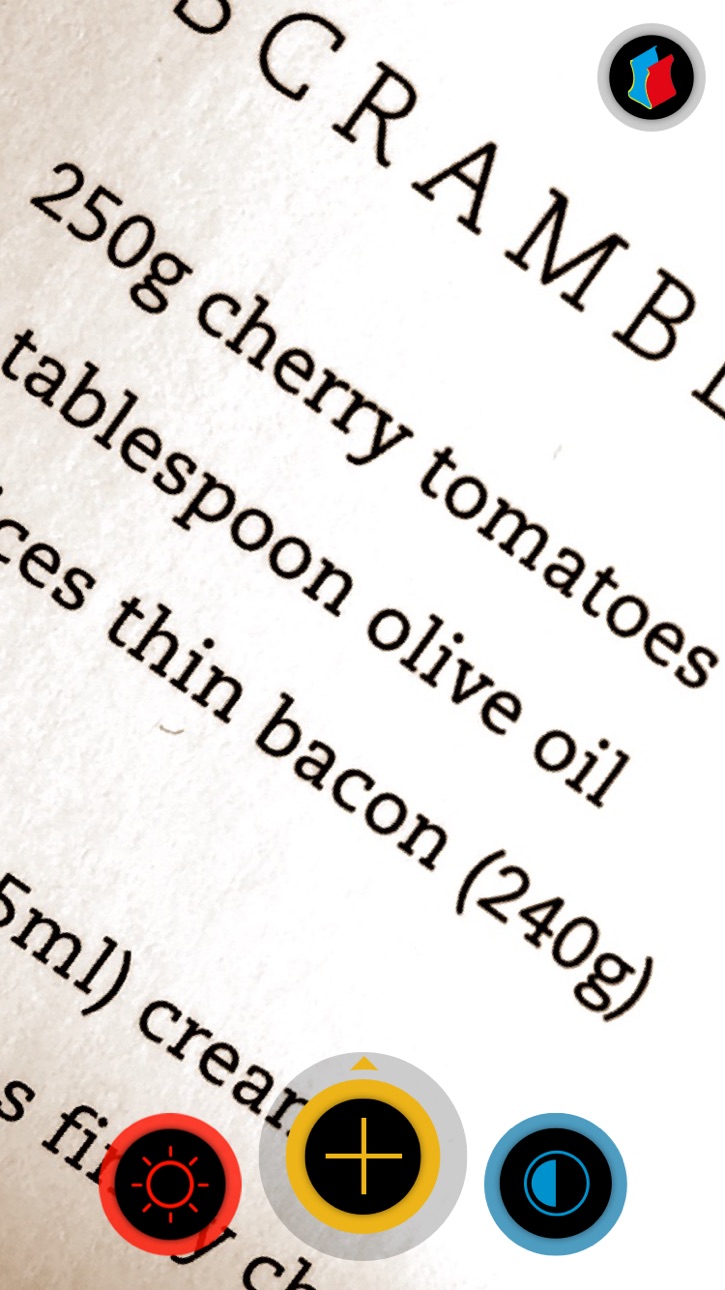
Visor - magnifier app for iPhone, iPad and iPod touch is a mobile magnifying glass and reading aid for people with low vision. Enlarge difficult to read text by 4 magnification levels and change contrast to 5 different viewing modes. Optionally, turn on the LED flash of your device to help you see better in low-light conditions.
Swiping up the yellow plus button reveals screenshot mode.
The 3 large, different colored buttons helps you to get quick access to all functions for easy handling.
‣ 2x to 8x magnification
‣ 5 different color contrast modes: full color, black on white, white on black, yellow on blue & blue on yellow with enhanced contrasts
‣ Manual focus on tap
‣ Autofocus on tap and hold
‣ LED camera light
‣ VoiceOver support
‣ Freeze the image to zoom, enhance contrast and save or share the picture without having to hold the camera pointing at the subject
‣ AirPlay Mirroring support beams the image of visor to your AppleTV onto your television or projector
‣ Tested by people with visual impairments and we are always grateful to hear your feedback too.
How visor works:
Visor uses the built in camera of your iPhone, iPad or iPod touch. Please keep a minimum of 5cm to the object you like to magnify. Otherwise, the camera can not focus the object.
Older iPads don't support the LED camera light.
Accessibility
ipadiphonemacrealityDevicetvoswatch
Version history 14 versions
Build 831550524v1.132019-06-07 21:25:29
This update adds bug fixes and smaller improvements. We also included a link to our companion product, the Visor Smartphone Stand.
Build 827756738v1.122018-07-05 17:16:22
Fixed a crash when saving an image to the Photo Library.
Build 823913073v1.112017-10-25 12:56:36
iPhone X Support
Build 822502909v1.102017-06-12 17:03:05
This update fixes a compatibility issue for devices running iOS 9.
Build 822238904v1.92017-06-08 22:10:34
A long awaited feature is now available.
Focus more on what you want to read – The buttons will fade after a few moments. Tapping on the screen will make them appear again.
Build 819775407v1.82017-01-09 19:20:03
We've added a few more languages.
Build 819455584v1.72016-11-05 01:47:56
¿Habla español?
We've added spanish language.
Build 815268720v1.62015-12-15 04:27:17
IMAGE CAPTURE
We've added the ability to freeze and save images, all while still being able to zoom and enhance the contrast.
‣ Swipe up the yellow plus button and reveal the camera to freeze and save an image.
Version 1.6 fixes a critical bug that lead to crashes when using the feature on an iPad.
Build 812661184v1.52015-12-11 21:01:57
GREAT NEWS!
We've added the ability to freeze and save images, all while still being able to zoom and enhance the contrast.
‣ Swipe up the yellow plus button and reveal the camera to freeze and save an image.
Build 812063957v1.42015-04-09 16:34:22
We added support for AirPlay Mirroring! Turn on AirPlay Mirroring in Control Center, so the camera image of your device is streamed to your big screen at home and you can experience the magnification and enhanced contrast on a whole new level!
Thank you for using visor! The app will never prompt you to leave a review. However, we would greatly appreciate getting feedback from you, either by submitting a review in the App Store or directly via email to visor@visorapp.de!
Build 811990943v1.32015-03-20 18:23:27
We improved VoiceOver support! You now get spoken descriptions of visor's buttons when you have VoiceOver enabled on your device.
Thank you for using visor! The app will never prompt you to leave a review. However, we would greatly appreciate getting feedback from you, either by submitting a review in the App Store or directly via email to visor@visorapp.de!
Build 811870995v1.22015-03-04 22:39:36
* Two new viewing modes: blue on yellow and yellow on blue. We hope to be even more helpful to people with specific visual impairments!
* Fixed crash on iPad 2
Thank you for using visor! The app will never prompt you to leave a review. However, we would greatly appreciate getting feedback from you, either by submitting a review in the App Store or directly via email to visor@visorapp.de!
Build 811556867v1.12015-01-17 18:43:18
* You can now use the LED flash of your device to help you in low-light conditions.
* Tap and hold the camera image to enable continuous autofocus, tap again to switch back to manual.
Thank you for supporting visor! If you have questions or feedback, you can always contact us at visor@sebastianmarr.de. If you like visor, we would highly appreciate a review on the App Store.
Build 810852990v1.02014-12-30 00:58:42
Price history by region
Currency
Show
Columns
Search
Availability 17 of 17 storefronts
| Region | Language | Price | Ratings | Avg | Version |
|---|---|---|---|---|---|
 US US | en-US | USD 17.99 | 12 | 4.5 | 1.13 |
 MY MY | en-GB | MYR 79.9 | 1 | 5.0 | 1.13 |
 BZ BZ | en-GB | USD 17.99 | 0 | — | 1.13 |
 GT GT | es-MX | USD 17.99 | 0 | — | 1.13 |
 HN HN | es-MX | USD 17.99 | 0 | — | 1.13 |
 ID ID | en-GB | IDR 299000 | 0 | — | 1.13 |
 KR KR | ko | KRW 29000 | 0 | — | 1.13 |
 MA MA | en-GB | USD 17.99 | 0 | — | 1.13 |
 MG MG | en-GB | USD 17.99 | 0 | — | 1.13 |
 MO MO | zh-Hant-HK | USD 17.99 | 0 | — | 1.13 |
 RU RU | ru | RUB 1490 | 0 | — | 1.13 |
 SG SG | en-GB | SGD 24.98 | 0 | — | 1.13 |
 SV SV | es-MX | USD 17.99 | 0 | — | 1.13 |
 TD TD | en-GB | USD 17.99 | 0 | — | 1.13 |
 TW TW | zh-Hant-TW | TWD 590 | 0 | — | 1.13 |
 UA UA | en-GB | USD 19.99 | 0 | — | 1.13 |
 VU VU | en-GB | USD 17.99 | 0 | — | 1.13 |
Change log 18 changes · US
✎
releaseNotes updated
This update adds bug fixes and smaller improvements. We also included a link to our companion product, the Visor Smartphone Stand.
✎
description updated
Visor - magnifier app for iPhone, iPad and iPod touch is a mobile magnifying glass and reading aid for people with low vision. Enlarge difficult to read text by
✎
subtitle updated
magnifier for low vision
✎
name updated
visor - magnifier
◆
Version 1.13 released
This update adds bug fixes and smaller improvements. We also included a link to our companion product, the Visor Smartphone Stand.
◆
Version 1.12 released
Fixed a crash when saving an image to the Photo Library.
◆
Version 1.11 released
iPhone X Support
◆
Version 1.10 released
This update fixes a compatibility issue for devices running iOS 9.
◆
Version 1.9 released
A long awaited feature is now available.
Focus more on what you want to read – The buttons will fade after a few moments. Tapping on the screen will make them appear again.
◆
Version 1.8 released
We've added a few more languages.
◆
Version 1.7 released
¿Habla español?
We've added spanish language.
◆
Version 1.6 released
IMAGE CAPTURE
We've added the ability to freeze and save images, all while still being able to zoom and enhance the contrast.
‣ Swipe up the yellow plus button and reveal the camera to freeze and save an image.
Version 1.6 fixes a critica
◆
Version 1.5 released
GREAT NEWS!
We've added the ability to freeze and save images, all while still being able to zoom and enhance the contrast.
‣ Swipe up the yellow plus button and reveal the camera to freeze and save an image.
◆
Version 1.4 released
We added support for AirPlay Mirroring! Turn on AirPlay Mirroring in Control Center, so the camera image of your device is streamed to your big screen at home and you can experience the magnification and enhanced contrast on a whole new lev
◆
Version 1.3 released
We improved VoiceOver support! You now get spoken descriptions of visor's buttons when you have VoiceOver enabled on your device.
Thank you for using visor! The app will never prompt you to leave a review. However, we would greatly appreci
◆
Version 1.2 released
* Two new viewing modes: blue on yellow and yellow on blue. We hope to be even more helpful to people with specific visual impairments!
* Fixed crash on iPad 2
Thank you for using visor! The app will never prompt you to leave a review. How
◆
Version 1.1 released
* You can now use the LED flash of your device to help you in low-light conditions.
* Tap and hold the camera image to enable continuous autofocus, tap again to switch back to manual.
Thank you for supporting visor! If you have questions o
◆
Version 1.0 released