Home › Utilities

 US
US
1 of 1 storefronts
Content in en-US
Content in en-US
Information
Preview 2 platforms
iPhone 5 images


iPad 6 images


What’s New Version 2.7.6
-Fixed an issue where auto-scrolling did not work when inputting with Apple Pencil Pro.
-Fixed an issue where the [Handwriting with Apple Pencil] setting did not work when the Apple Pencil Pro was connected.
-Fixed an issue where the button icon did not appear when entering the iOS search screen under certain conditions.
-Fixed an issue in which the keyboard would switch to a different keyboard when another candidate was selected from the recognition candidate list when using the Japanese dictionary.
Description
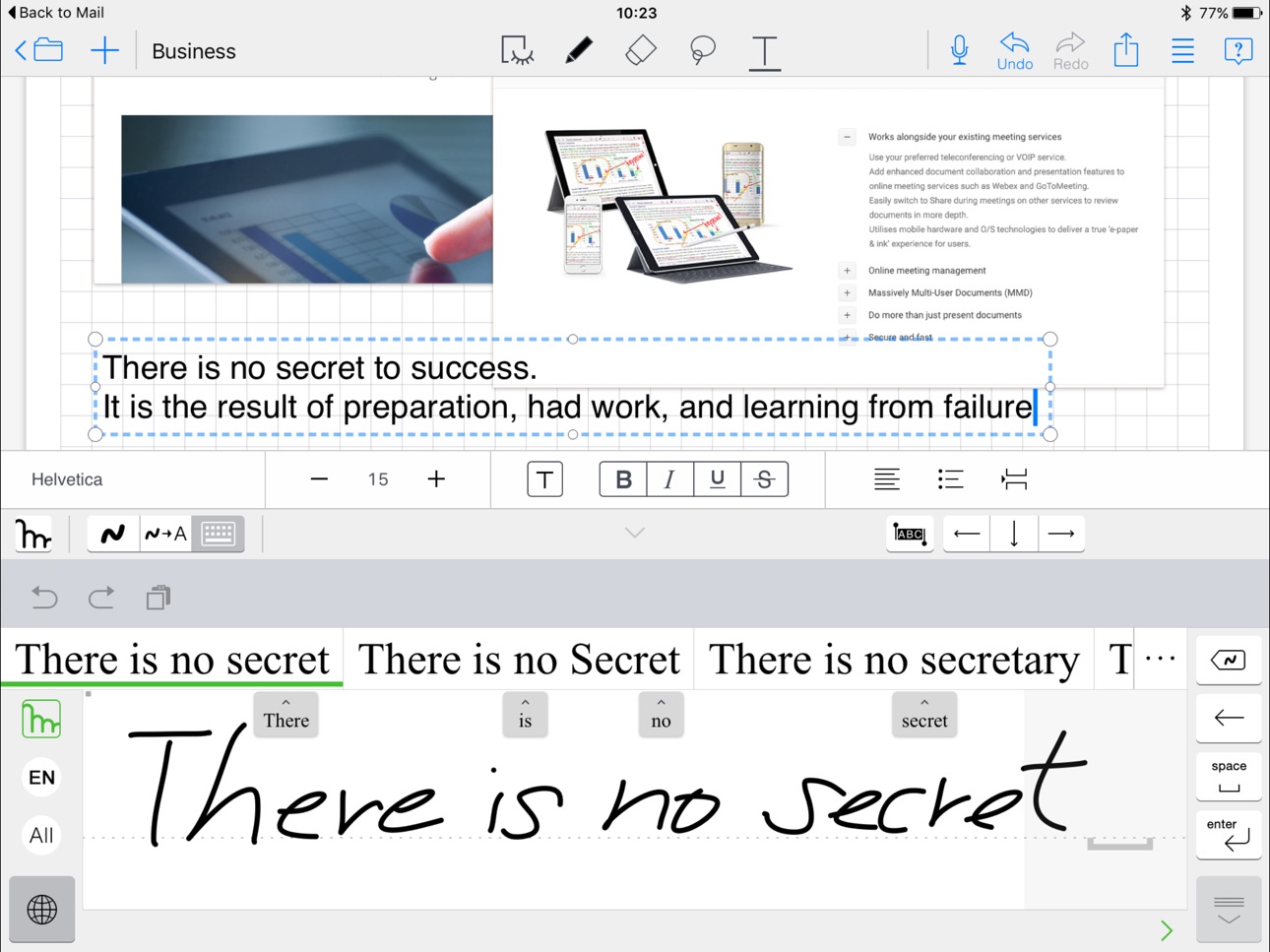
### This is the English handwriting recognition app.
Mazec offers you handwriting input as an alternative to your keyboard within any app on your device. If you want to write an email, make a social post or quickly jot your notes, mazec handwriting input technology offers you a speedy alternative to handwrite the message instead of using a keyboard.
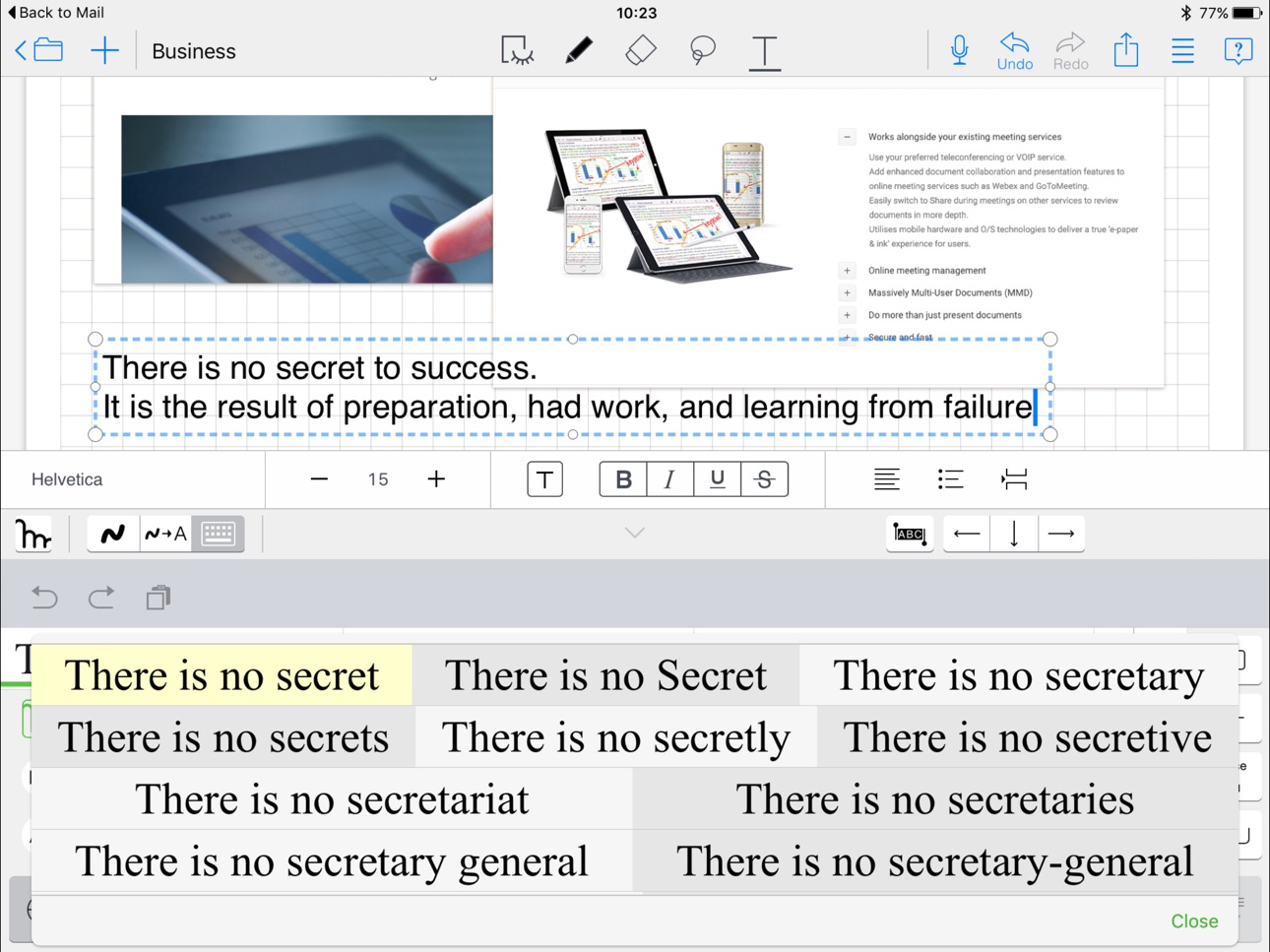
The Mazec handwriting input method app offers extremely accurate handwriting recognition and predictive text to intelligently guess your handwriting on the fly. It even allows you to enrich the dictionary with your own favorite terms and phrases, or your favorite URL’s and email addresses.
Mazec handwriting input method for iOS saves you time writing emails, notes and social posts. Instead of fumbling with a keyboard (which often causes you to use both hands), with mazec all input can be completed with the touch of a finger. Mazec handwriting input provides handwriting conversion while you are on the go. Its advanced technology is due to vast semantic databases built over MyScript, the world leader in handwriting recognition technology.
Mazec handwriting input features include:
1. The most advanced experience for real-time conversion of handwriting to text,
due to MyScript , the leader of handwriting recognition technology.
2. Extremely accurate predictive text due to natively-authored dictionaries of technical terms and popular phraseology
3. Auto and manual learning dictionary
mazec can intelligently “learn” frequently used phrases automatically. You can also ”teach” mazec to memorize short sentences, such as "TYVM" to "Thank you very much" and allows you to customize the user dictionary to your own favorite phrases
4. Emoji input
Mazec includes more than just emoticons, but over 100 selected Emojis in 12 categories. Just write "Emoji" or one of category name as "face", "moon", "animal" etc. , then the list of Emojis will pop up. Categories of Emojis include: Faces, Fingers, Weather, Moons, Animals, Hearts, Balls, Fruit, Flowers, Buildings, Trains and Cars
5. Handwriting Input available to all applications on the device
Because mazec is written as an input method to iOS, it acts as an alternative keyboard within any application on the device that accepts input.
6. Handwriting Emails and Social Posts
Mazec makes writing emails, blogs and social posts quick and fun and saves you time
7. Handwrite Google Searches
With the mazec Handwriting Input app, browsing the internet and conducting Google searches has never been easier
8. Quickly fill out web forms and important documents online
With mazec, it becomes extremely easy and quick to fill out web forms and critical documents online, thus saving time from printing PDF files and scanning to be sent back
9. Multiple languages
The app itself supports English language only. Handwriting recognition add-ons for French, German, Italian, Spanish, Russian, Portuguese, Dutch, Polish, Japanese, Chinese (Simplified & Traditional), and Korean are available as in-app-purchase apps.
We’d love to hear your feedback and feature requests. Email us at: support_anytime@metamoji.com or join our community at https://getsatisfaction.com/mazec
Capabilities
In-App Purchases
Accessibility
ipadiphonemacrealityDevicetvoswatch
Version history 12 versions
Build 868431130v2.7.62024-08-26 00:41:03
-Fixed an issue where auto-scrolling did not work when inputting with Apple Pencil Pro.
-Fixed an issue where the [Handwriting with Apple Pencil] setting did not work when the Apple Pencil Pro was connected.
-Fixed an issue where the button icon did not appear when entering the iOS search screen under certain conditions.
-Fixed an issue in which the keyboard would switch to a different keyboard when another candidate was selected from the recognition candidate list when using the Japanese dictionary.
Build 854999048v2.7.42023-02-21 01:42:55
- Some functions such as Delete and confirmation can be operated with gestures when entering handwriting.
- Improved the accuracy of handwriting recognition (Japanese).
- Improved predictive conversion efficiency (Japanese).
Build 842208574v2.6.22021-05-17 00:55:11
- Fixed an issue in iOS/iPadOS 14.5 that forced the app to quit when typing handwritten in non-Japanese
Build 836856397v2.6.12020-07-20 06:54:51
- Supported Dark Mode
- Supported Floating Keyboard
- Updated the dictionary
- Added "Close mazec" function when using iPhone
Build 828107283v2.3.02018-08-21 05:40:00
- Bug fixes
Build 826133400v2.2.32018-03-01 02:14:44
- Bug fixes
Build 825819606v2.2.22018-01-31 05:09:15
- Hide the Globe icon for iPhone X
- Improved Apple Pencil usability
- Updated handwriting recognition dictionaries
- Bug fixes
Build 819537291v2.1.32016-11-01 06:50:52
- Updated for iOS 10 to switch keyboard
- Minor bug fixes
Build 813196305v2.1.12016-03-17 02:07:15
- Add-ons for 12 languages
- Minor bug fixes
Build 812414967v1.3.32015-05-22 01:44:47
- Bug fixes
Build 812200965v1.1.32015-04-17 03:05:07
- fixed for iOS 8.3
Build 810826249v1.1.22014-12-02 01:41:25
Price history by region
Currency
Show
Columns
Search
Availability 1 of 1 storefronts
| Region | Language | Price | Ratings | Avg | Version |
|---|---|---|---|---|---|
| US | en-US | USD 12.99 | 43 | 3.6 | 2.7.6 |
Change log 16 changes · US
✎
releaseNotes updated
-Fixed an issue where auto-scrolling did not work when inputting with Apple Pencil Pro.
-Fixed an issue where the [Handwriting with Apple Pencil] setting did
✎
description updated
### This is the English handwriting recognition app.
Mazec offers you handwriting input as an alternative to your keyboard within any app on your device. If y
✎
subtitle updated
Handwriting input method
✎
name updated
mazec
◆
Version 2.7.6 released
-Fixed an issue where auto-scrolling did not work when inputting with Apple Pencil Pro.
-Fixed an issue where the [Handwriting with Apple Pencil] setting did not work when the Apple Pencil Pro was connected.
-Fixed an issue where the butt
◆
Version 2.7.4 released
- Some functions such as Delete and confirmation can be operated with gestures when entering handwriting.
- Improved the accuracy of handwriting recognition (Japanese).
- Improved predictive conversion efficiency (Japanese).
◆
Version 2.6.2 released
- Fixed an issue in iOS/iPadOS 14.5 that forced the app to quit when typing handwritten in non-Japanese
◆
Version 2.6.1 released
- Supported Dark Mode
- Supported Floating Keyboard
- Updated the dictionary
- Added "Close mazec" function when using iPhone
◆
Version 2.3.0 released
- Bug fixes
◆
Version 2.2.3 released
- Bug fixes
◆
Version 2.2.2 released
- Hide the Globe icon for iPhone X
- Improved Apple Pencil usability
- Updated handwriting recognition dictionaries
- Bug fixes
◆
Version 2.1.3 released
- Updated for iOS 10 to switch keyboard
- Minor bug fixes
◆
Version 2.1.1 released
- Add-ons for 12 languages
- Minor bug fixes
◆
Version 1.3.3 released
- Bug fixes
◆
Version 1.1.3 released
- fixed for iOS 8.3
◆
Version 1.1.2 released