Home › Education

 US
US
1 of 1 storefronts
Content in en-US
Content in en-US
Information
Preview 2 platforms
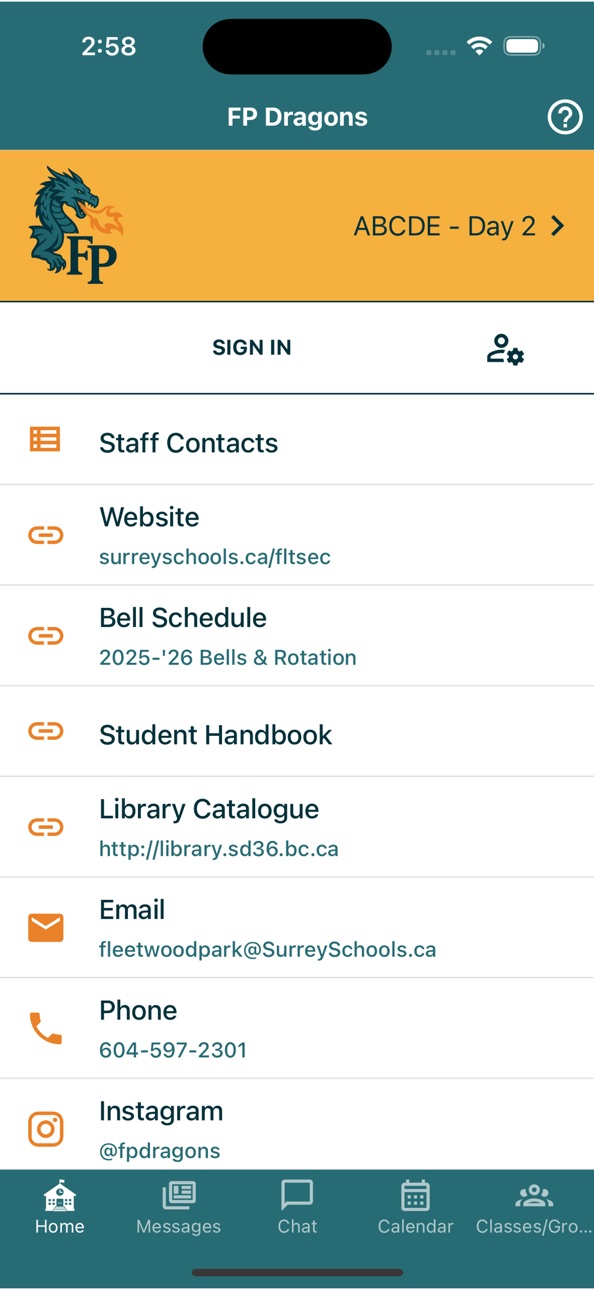
iPhone 3 images


iPad 3 images


What’s New Version 6.4.2
Version 6.4:
- Restored Feedback form.
- Chat improvements (if applicable).
- Translation option fix (if applicable).
- Other fixes and enhancements.
Description
This is the official Fleetwood Park Secondary School mobile app. NOTE: This app is only useful for students, parents, and staff at this school.
Subscribe to updates from your teachers and the school,
and always have up-to-date event calendars and other information at hand.
Other benefits:
* Push notifications will keep you updated about school closures and other important news.
* You’ll always have your school calendars and resources on hand and up-to-date.
* Conveniently e-mail, phone, or navigate to the school, or reach the website, social media, and other online resources.
* Spread the word about school events! To do so, tap on the event on the Calendar screen, then tap the Share icon.
* Want school events in your regular Calendar app? Go to the Calendar screen, tap the Export icon (top right), and follow the instructions.
Visit dragons.appazur.com to learn more.
This is a new product designed for your school. If you have suggestions or problems, we welcome you to contact us using the Feedback feature on the Help screen. Thank you.
Terms and Conditions: dragons.appazur.com/help/terms
Fleetwood Park Secondary School
7940-156 Street
Surrey, BC V3S 3R3
Accessibility
ipadiphonemacrealityDevicetvoswatch
Version history 25 versions
Build 882133025v6.4.22026-02-04 05:36:06
Version 6.4:
- Restored Feedback form.
- Chat improvements (if applicable).
- Translation option fix (if applicable).
- Other fixes and enhancements.
Build 880102721v6.4.02025-11-26 19:04:09
Version 6.4:
- Restored Feedback form.
- Chat improvements (if applicable).
- Translation option fix (if applicable).
- Other fixes and enhancements.
Build 878521451v6.3.02025-09-29 19:44:56
Version 6.3:
- Improved viewing of Calendar event details.
- Calendar: > icon now shown only if there are additional details.
- Calendar: Show block/day or class schedule in color.
- Staff Contacts categories.
- If applicable, initiate Chat from new (+) button on Chat screen.
- Other fixes and enhancements.
Build 877827209v6.2.02025-09-04 09:48:26
Version 6.2:
- Fixes push notification issue.
Version 6:
- Fixes issue accessing links that require authentication.
- Many user interface enhancements.
- Message read/unread status.
- More search capabilies, e.g. staff contacts.
- More messaging capabilities for staff.
Build 877714494v6.1.182025-08-31 17:04:22
Version 6.1.18:
- Removes unintended age restriction.
Version 6:
- Many user interface enhancements.
- Message read/unread status.
- More search capabilies, e.g. staff contacts.
- More messaging capabilities for staff.
Build 877587842v6.1.172025-08-26 21:39:35
Version 6.1:
- Enhancements and bug fixes.
Version 6.0:
- Many user interface enhancements.
- Message read/unread status.
- More search capabilies, e.g. staff contacts.
- More messaging capabilities for staff.
Build 870631917v5.15.22024-11-23 21:59:30
Version 5.15:
- Facebook links now work with the Facebook app.
- Dashboard enhancements and updates for staff.
- If applicable, Chat enhancements and fixes.
Build 870468613v5.15.12024-11-16 17:23:04
Version 5.15:
- Dashboard enhancements and updates for staff.
- If applicable, Chat enhancements and fixes.
Build 868649276v5.14.02024-09-01 09:12:31
Version 5.14:
- If applicable, Microsoft sign in update.
Version 5.13:
- Feature and security updates.
Build 867997281v5.13.02024-08-06 12:42:52
Version 5.13:
- Feature and security updates.
Version 5.12:
- Push notification update. iOS 11+ is now required.
Build 866286540v5.12.02024-05-28 23:10:10
Version 5.12:
- Push notification update. iOS 11+ is now required.
Version 5.11:
- New X (Twitter), Chat icons. Improved link handling in messages.
- Group message lists now support images and icons.
- Other fixes and enhancements.
Build 864945249v5.11.42024-04-04 10:27:37
Version 5.11:
- New X (Twitter), Chat icons. Improved link handling in messages.
- Group message lists now support images and icons.
- Other fixes and enhancements.
Version 5.10:
- Administration update.
Build 862038612v5.9.02023-12-08 13:37:08
Version 5.9:
- Improved experience when opening app from a notification.
- Improved offline message viewing.
- Other fixes and enhancements.
Version 5.8:
- Added End option and Notes field for Hall Pass.
- Staff Contacts can now be accessed via the + icon on the Messages screen.
- When a notification arrives, switch to Messages tab only if user is on a main tab.
- Groups etc tabs now prefixed with "My".
Build 860769711v5.8.22023-10-18 21:29:04
Version 5.8.2:
- Added Hall Pass.
Other recent changes:
- Staff Contacts can now be accessed via the + icon on the Messages screen.
- Groups etc tabs now prefixed with "My".
Build 860651946v5.8.12023-10-13 23:29:42
Version 5.8:
- Added End option and Notes field for Hall Pass.
- Staff Contacts can now be accessed via the + icon on the Messages screen.
- When a notification arrives, switch to Messages tab only if user is on a main tab.
- Groups etc tabs now prefixed with "My".
Version 5.7:
- Removed Assignments. You can access old entries under Help > FAQ > How can I export...
- Other enhancements and fixes.
Build 859147197v5.7.12023-08-14 14:35:44
Version 5.7:
- Removed Assignments feature. You can access old entries under Help > FAQ > How can I export...
- Calendar list view is now called Agenda. All items are now tappable, to ensure you can view long text or access the Share feature.
- The color scheme for category headings (Staff Contacts, Agenda) has been updated.
- Updated some icon colors on Home tab.
- Fixed app issue after deleting account.
- "Toast" alerts now use brand colors.
Build 857145598v5.6.02023-05-17 00:24:19
Version 5.6:
- Fixed splash screen title background color.
- When signing in with a district email, you no longer have to type the domain.
- Calendar permission is no longer required.
- Minor bug fixes and updates.
Version 5.5:
- Improved optional Quick Share feature may now work with schools/classes/groups.
- App now remembers your preferred Calendar view (month/list).
Build 856550940v5.5.02023-04-21 01:13:39
Version 5.5:
- Improved optional Quick Share feature may now work with schools/classes/groups.
- App now remembers your preferred Calendar view (month/list).
- Other fixes and enhancements.
Build 854473354v5.4.72023-01-18 20:54:33
Version 5.4.7:
- Fixed issue with message list on class/group/school screens.
- Fixed map/directions icon.
Build 853219013v5.4.32022-11-08 13:02:41
Version 5.4.3:
- For staff, resolves App Dashboard issues in 5.4.0.
- Improved School/Class/Group details screen. Other fixes.
Other recent changes:
- Links may now open in web browser without leaving the app.
- If you did not allow Push Notifications when prompted, you can now enable them from Settings screen.
- - Other fixes and improvements.
- Wide images may now be shown full width on Messages screen.
Build 853070031v5.4.12022-10-31 16:44:57
Version 5.4.1:
- For staff, resolves App Dashboard issues in 5.4.0.
Other recent changes:
- Links may now open in web browser without leaving the app.
- If you did not allow Push Notifications when prompted, you can now enable them from Settings screen.
- - Other fixes and improvements.
- Wide images may now be shown full width on Messages screen.
Build 852932856v5.4.02022-10-24 00:49:45
Version 5.4:
- Links may now open in web browser without leaving the app.
- If you did not allow Push Notifications when prompted, you can now enable them from Settings screen.
Version 5.3:
- Wide images may now be shown full width on Messages screen.
- If hall pass feature enabled, fixes issue if camera permission denied.
Build 851969083v5.2.52022-09-02 01:08:34
Version 5.2.5:
- Calendar events now have an (i) icon if you can tap for more details.
Other recent updates:
- Images on the Messages tab may now be displayed full width.
- Users may now specify translation preference on the Sign Up screen (if applicable).
- Tap (?) to learn what's changed in the version 5 app re-design.
- Other fixes and improvements.
Build 851750792v5.2.12022-08-23 21:10:42
Version 5.2:
- Messages screen images may now be displayed full width.
- Users may now specify translation preference on the Sign Up screen (if applicable).
- Tap (?) to learn what's changed in the version 5 app re-design.
- Other fixes and improvements.
Build 849061088v5.1.02022-05-13 17:57:29
Version 5.1:
- Fixes an issue where Staff Contacts or other recently changed links may not appear right away on the Information/District screen.
- Show larger images on the Messages screen.
Version 5.0:
- New app design replaced menu with tabs. Tap (?) to learn what's changed in this version.
No pricing data captured yet — comparisons appear once the app has paid storefronts or in-app purchases.
Availability 1 of 1 storefronts
| Region | Language | Price | Ratings | Avg | Version |
|---|---|---|---|---|---|
| US | en-US | Free | 0 | — | 6.4.2 |
Change log 29 changes · US
✎
releaseNotes updated
Version 6.4:
- Restored Feedback form.
- Chat improvements (if applicable).
- Translation option fix (if applicable).
- Other fixes and enhancements.
✎
description updated
This is the official Fleetwood Park Secondary School mobile app. NOTE: This app is only useful for students, parents, and staff at this school.
Subscribe to up
✎
subtitle updated
Fleetwood Park Secondary
✎
name updated
FP Dragons
◆
Version 6.4.2 released
Version 6.4:
- Restored Feedback form.
- Chat improvements (if applicable).
- Translation option fix (if applicable).
- Other fixes and enhancements.
◆
Version 6.4.0 released
Version 6.4:
- Restored Feedback form.
- Chat improvements (if applicable).
- Translation option fix (if applicable).
- Other fixes and enhancements.
◆
Version 6.3.0 released
Version 6.3:
- Improved viewing of Calendar event details.
- Calendar: > icon now shown only if there are additional details.
- Calendar: Show block/day or class schedule in color.
- Staff Contacts categories.
- If applicable, initiate Cha
◆
Version 6.2.0 released
Version 6.2:
- Fixes push notification issue.
Version 6:
- Fixes issue accessing links that require authentication.
- Many user interface enhancements.
- Message read/unread status.
- More search capabilies, e.g. staff contacts.
- More mes
◆
Version 6.1.18 released
Version 6.1.18:
- Removes unintended age restriction.
Version 6:
- Many user interface enhancements.
- Message read/unread status.
- More search capabilies, e.g. staff contacts.
- More messaging capabilities for staff.
◆
Version 6.1.17 released
Version 6.1:
- Enhancements and bug fixes.
Version 6.0:
- Many user interface enhancements.
- Message read/unread status.
- More search capabilies, e.g. staff contacts.
- More messaging capabilities for staff.
◆
Version 5.15.2 released
Version 5.15:
- Facebook links now work with the Facebook app.
- Dashboard enhancements and updates for staff.
- If applicable, Chat enhancements and fixes.
◆
Version 5.15.1 released
Version 5.15:
- Dashboard enhancements and updates for staff.
- If applicable, Chat enhancements and fixes.
◆
Version 5.14.0 released
Version 5.14:
- If applicable, Microsoft sign in update.
Version 5.13:
- Feature and security updates.
◆
Version 5.13.0 released
Version 5.13:
- Feature and security updates.
Version 5.12:
- Push notification update. iOS 11+ is now required.
◆
Version 5.12.0 released
Version 5.12:
- Push notification update. iOS 11+ is now required.
Version 5.11:
- New X (Twitter), Chat icons. Improved link handling in messages.
- Group message lists now support images and icons.
- Other fixes and enhancements.
◆
Version 5.11.4 released
Version 5.11:
- New X (Twitter), Chat icons. Improved link handling in messages.
- Group message lists now support images and icons.
- Other fixes and enhancements.
Version 5.10:
- Administration update.
◆
Version 5.9.0 released
Version 5.9:
- Improved experience when opening app from a notification.
- Improved offline message viewing.
- Other fixes and enhancements.
Version 5.8:
- Added End option and Notes field for Hall Pass.
- Staff Contacts can now be accesse
◆
Version 5.8.2 released
Version 5.8.2:
- Added Hall Pass.
Other recent changes:
- Staff Contacts can now be accessed via the + icon on the Messages screen.
- Groups etc tabs now prefixed with "My".
◆
Version 5.8.1 released
Version 5.8:
- Added End option and Notes field for Hall Pass.
- Staff Contacts can now be accessed via the + icon on the Messages screen.
- When a notification arrives, switch to Messages tab only if user is on a main tab.
- Groups etc ta
◆
Version 5.7.1 released
Version 5.7:
- Removed Assignments feature. You can access old entries under Help > FAQ > How can I export...
- Calendar list view is now called Agenda. All items are now tappable, to ensure you can view long text or access the Share featu
◆
Version 5.6.0 released
Version 5.6:
- Fixed splash screen title background color.
- When signing in with a district email, you no longer have to type the domain.
- Calendar permission is no longer required.
- Minor bug fixes and updates.
Version 5.5:
- Improved
◆
Version 5.5.0 released
Version 5.5:
- Improved optional Quick Share feature may now work with schools/classes/groups.
- App now remembers your preferred Calendar view (month/list).
- Other fixes and enhancements.
◆
Version 5.4.7 released
Version 5.4.7:
- Fixed issue with message list on class/group/school screens.
- Fixed map/directions icon.
◆
Version 5.4.3 released
Version 5.4.3:
- For staff, resolves App Dashboard issues in 5.4.0.
- Improved School/Class/Group details screen. Other fixes.
Other recent changes:
- Links may now open in web browser without leaving the app.
- If you did not allow Push N
◆
Version 5.4.1 released
Version 5.4.1:
- For staff, resolves App Dashboard issues in 5.4.0.
Other recent changes:
- Links may now open in web browser without leaving the app.
- If you did not allow Push Notifications when prompted, you can now enable them from Se
◆
Version 5.4.0 released
Version 5.4:
- Links may now open in web browser without leaving the app.
- If you did not allow Push Notifications when prompted, you can now enable them from Settings screen.
Version 5.3:
- Wide images may now be shown full width on Mess
◆
Version 5.2.5 released
Version 5.2.5:
- Calendar events now have an (i) icon if you can tap for more details.
Other recent updates:
- Images on the Messages tab may now be displayed full width.
- Users may now specify translation preference on the Sign Up screen
◆
Version 5.2.1 released
Version 5.2:
- Messages screen images may now be displayed full width.
- Users may now specify translation preference on the Sign Up screen (if applicable).
- Tap (?) to learn what's changed in the version 5 app re-design.
- Other fixes an
◆
Version 5.1.0 released
Version 5.1:
- Fixes an issue where Staff Contacts or other recently changed links may not appear right away on the Information/District screen.
- Show larger images on the Messages screen.
Version 5.0:
- New app design replaced menu with