Home › Utilities

 US
US
1 of 1 storefronts
Content in en-US
Content in en-US
Information
Preview 2 platforms
iPhone 4 images


iPad 4 images



What’s New Version 1.1
This update from Apple will improve the functionality of this app. No new features are included.
Description
Process of Using Lao Keyboard
1. Go to Setting -> General -> Keyboard
2. Press Keyboard -> Add New Keyboard
3. Choose Lao Keyboard
Description
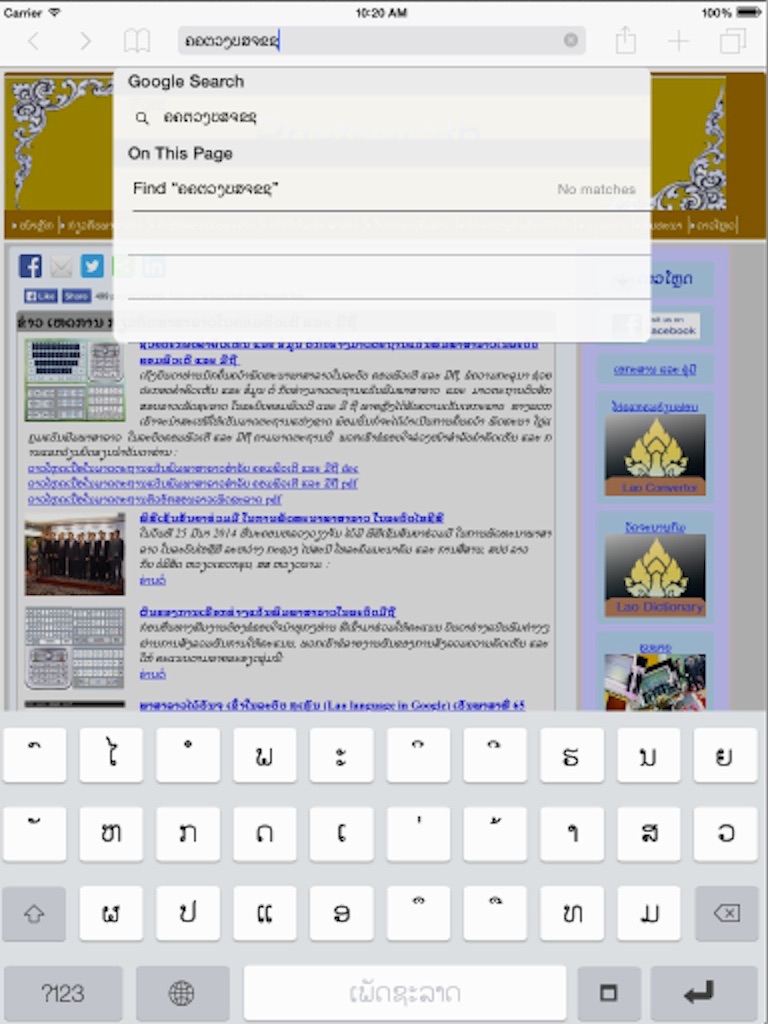
Lao keyboard is a custom keyboard for iOS 8, is a keyboard that allows user to type Lao on any apps of iPhone and iPad.
Feature:
− Provide Lao keyboard with 3 rows and 4 rows layouts
− Supports both portrait and landscape orientations
− Allows user to switch back and forth between Lao keyboard and default keyboard
− Free!
Supported devices: iPhone 4S, iPhone 5, iPhone 5S, iPhone 5C, iPhone 6, iPhone 6 Plus, iPad 2, iPad 3, iPad 4, iPad Air, iPad Mini, iPad Mini 2
Copyright @ Ministry of Posts and Telecommunication, Government of Lao PDR.
Viettel Group
All rights reserved.
Accessibility
ipadiphonemacrealityDevicetvoswatch
Version history 1 versions
Build 742343023v1.12014-11-13 23:06:58
This update from Apple will improve the functionality of this app. No new features are included.
No pricing data captured yet — comparisons appear once the app has paid storefronts or in-app purchases.
Availability 1 of 1 storefronts
| Region | Language | Price | Ratings | Avg | Version |
|---|---|---|---|---|---|
| US | en-US | Free | 13 | 5.0 | 1.1 |
Change log 4 changes · US
✎
releaseNotes updated
This update from Apple will improve the functionality of this app. No new features are included.
✎
description updated
Process of Using Lao Keyboard
1. Go to Setting -> General -> Keyboard
2. Press Keyboard -> Add New Keyboard
3. Choose Lao Keyboard
Description
Lao keyboard is
✎
name updated
Lao Keyboard (MPT)
◆
Version 1.1 released
This update from Apple will improve the functionality of this app. No new features are included.