Home › Photo & Video

 US
US
1 of 1 storefronts
Content in en-US
Content in en-US
Information
Preview 1 platform



iPhone 10 images





What’s New Version 2.2
• Support for latest iPhones and lenses, including depth mode with rear-facing camera on older iPhones using dual wide-angle lenses
• Fix a bug causing images to process in landscape aspect ratio instead of portrait during editing
• Fix a bug where previous edits were not restored during editing a TinType
• Other user interface bug fixes
Description
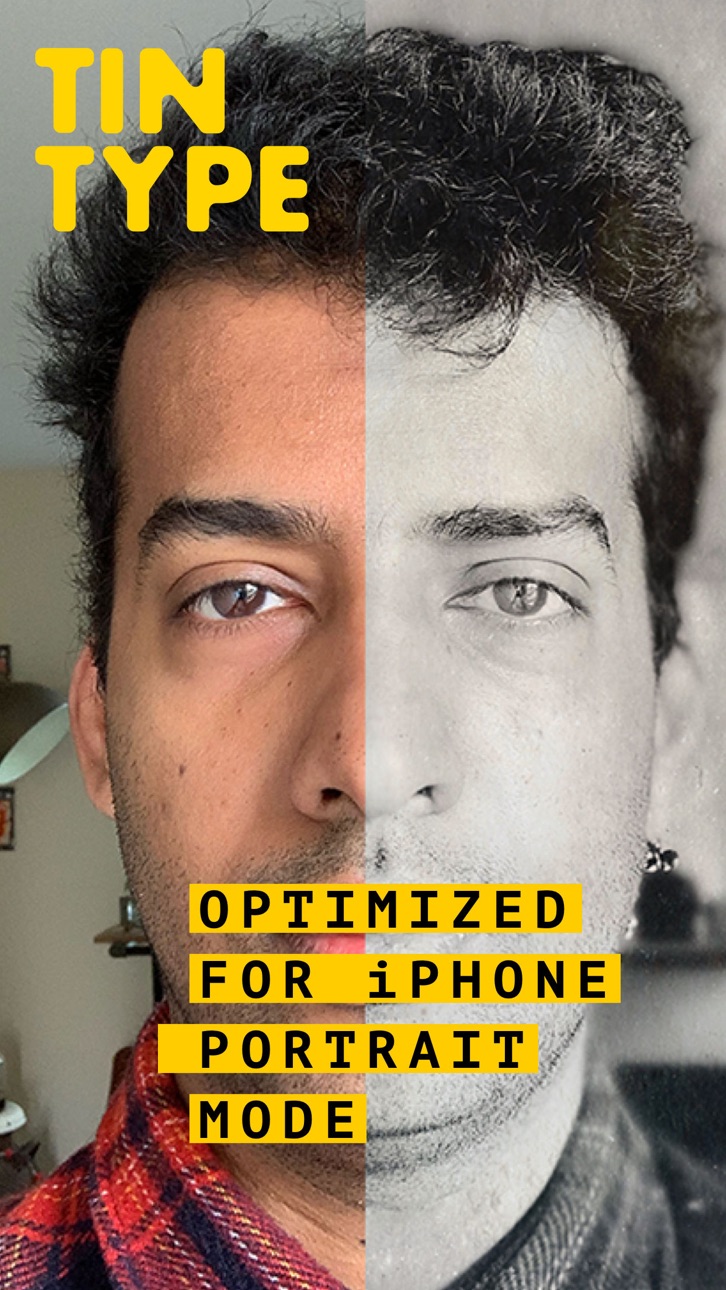
Create hauntingly beautiful, soul capturing portraits with TinType by Hipstamatic. Inspired by daguerreotypes, tintypes, and other photographic processes from over a hundred years ago, TinType faithfully reproduces these amazing images with stunning accuracy.
• Four authentic TinType effects: classic B&W, hand-painted color, high contrast dark B&W, and sepia stained ambrotype
• Fully customizable effect controls: tweak the eye intensity, plate grain, and depth-of-field
• Supports Portrait Mode (on newer iPhones*), for the most authentic TinTypes ever
• Change point of focus while editing (available on images shot in Portrait Mode)
• Full frame or square format
• Capture images or import from your photo library
• Edit right from the Photos app with a photo extension
• Nondestructive photo editing – the original is always saved so you can revert back to the camera raw file at any time
• Easily share to Instagram, Facebook, Twitter, and more
* Portrait Mode capture available on iPhone X, XS, XR, XS Max for front-facing and rear-facing cameras; also supported on iPhone 7 Plus and 8 Plus for rear-facing cameras
Accessibility
ipadiphonemacrealityDevicetvoswatch
Version history 8 versions
Build 849398099v2.22022-05-25 18:36:08
• Support for latest iPhones and lenses, including depth mode with rear-facing camera on older iPhones using dual wide-angle lenses
• Fix a bug causing images to process in landscape aspect ratio instead of portrait during editing
• Fix a bug where previous edits were not restored during editing a TinType
• Other user interface bug fixes
Build 829337985v2.12018-11-29 18:50:16
• Optimized for iPhone X/XR/XS/XS Max
• TinType effect remastered! New Portrait Mode support for the most authentic TinTypes ever (supports front and rear cameras on iPhone X devices, rear camera on iPhone 7 Plus and iPhone 8 Plus)
• New 'Dark' effect
• Support for 'tap to focus' to change what is in focus when editing a TinType with depth data
• Easy access to 'portraits' album for editing Portrait Mode shots from the Apple Camera
• New app icon and other user interface refinements
• Bug fixes and performance improvements
Build 821387969v2.0.22017-03-21 22:27:44
• Fixed a bug where the capture interface could appear slightly shrunken on iPhone 7 Plus (when using 'zoomed' display mode)
• Bug fixes and performance improvements
Build 820978425v2.0.12017-02-17 17:17:36
• Fixed a bug causing a crash on launch if Photos access is turned off
• Fixed a bug causing a crash when attempting to edit a photo stored in iCloud
• Other bug fixes and improvements
Build 820428295v2.02017-01-17 17:32:45
• Brand new analog interface, for more authentic TinType shooting
• Quick pull down "back to camera" gesture from photo library
• New 'TinType' photo album to group all your TinTypes together for quick access
• Bug fixes and performance improvements
Build 789422972v1.12014-11-12 19:29:51
• Ability to save as a copy or version when editing photos
• New 'warm tones' color effect
• More variety in Tintype borders
• New 'shake to randomize' feature when editing
Build 757672682v1.0.12014-10-23 17:34:17
Localized in French, German, Portuguese (Brazil), Korean, Japanese, and Chinese (Simplified and Traditional)
Build 735882665v1.02014-10-21 21:05:42
Price history by region
Currency
Show
Columns
Search
Availability 1 of 1 storefronts
| Region | Language | Price | Ratings | Avg | Version |
|---|---|---|---|---|---|
| US | en-US | USD 0.99 | 3.5k | 4.8 | 2.2 |
Change log 12 changes · US
✎
releaseNotes updated
• Support for latest iPhones and lenses, including depth mode with rear-facing camera on older iPhones using dual wide-angle lenses
• Fix a bug causing images t
✎
description updated
Create hauntingly beautiful, soul capturing portraits with TinType by Hipstamatic. Inspired by daguerreotypes, tintypes, and other photographic processes from o
✎
subtitle updated
Selfie like it's 1899
✎
name updated
TinType by Hipstamatic
◆
Version 2.2 released
• Support for latest iPhones and lenses, including depth mode with rear-facing camera on older iPhones using dual wide-angle lenses
• Fix a bug causing images to process in landscape aspect ratio instead of portrait during editing
• Fix a b
◆
Version 2.1 released
• Optimized for iPhone X/XR/XS/XS Max
• TinType effect remastered! New Portrait Mode support for the most authentic TinTypes ever (supports front and rear cameras on iPhone X devices, rear camera on iPhone 7 Plus and iPhone 8 Plus)
• New 'D
◆
Version 2.0.2 released
• Fixed a bug where the capture interface could appear slightly shrunken on iPhone 7 Plus (when using 'zoomed' display mode)
• Bug fixes and performance improvements
◆
Version 2.0.1 released
• Fixed a bug causing a crash on launch if Photos access is turned off
• Fixed a bug causing a crash when attempting to edit a photo stored in iCloud
• Other bug fixes and improvements
◆
Version 2.0 released
• Brand new analog interface, for more authentic TinType shooting
• Quick pull down "back to camera" gesture from photo library
• New 'TinType' photo album to group all your TinTypes together for quick access
• Bug fixes and performance imp
◆
Version 1.1 released
• Ability to save as a copy or version when editing photos
• New 'warm tones' color effect
• More variety in Tintype borders
• New 'shake to randomize' feature when editing
◆
Version 1.0.1 released
Localized in French, German, Portuguese (Brazil), Korean, Japanese, and Chinese (Simplified and Traditional)
◆
Version 1.0 released