Home › Photo & Video

 US
US
1 of 1 storefronts
Content in en-US
Content in en-US
Information
Preview 2 platforms
iPhone 7 images


iPad 7 images




What’s New Version 2.4
Supported iOS18.
Description
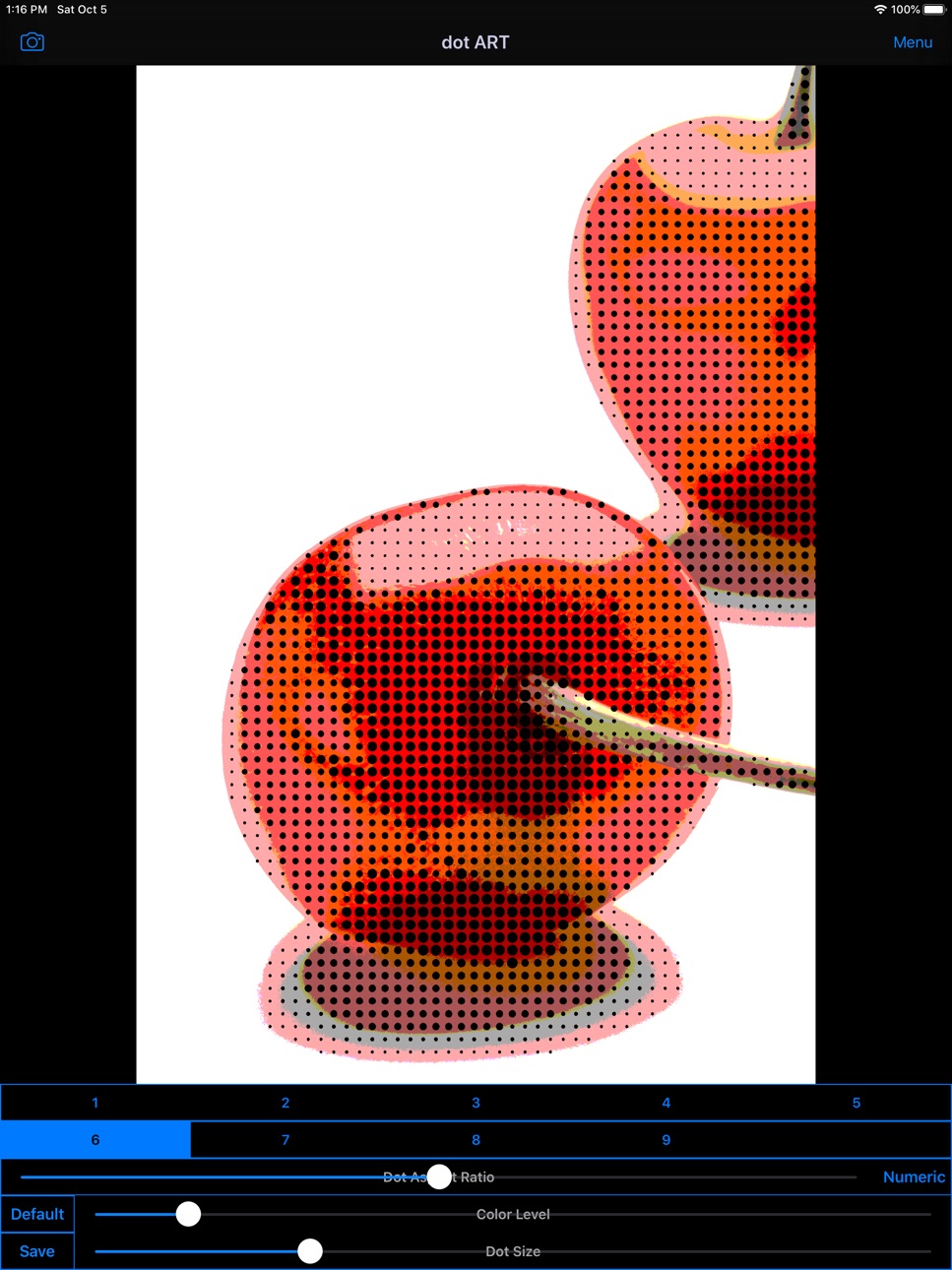
"dot ART" is Art Photo / Movie Editor application that allows you to create "Dot Image / Video", "Mosaic Picture" and "Pop Art" Effects Image and Movie from camera, photographs ,illustrations and videos easily.
You will be able to create "Dot Art Illustration and Movie" that made of round colorful dots, and "Pop Art Effects Illustration and Movie" from your photo, illustration and video by using Art Editor app "dot ART".
If you enjoyed by this App, I'm glad.
■Illustration / Movie list that you can create and edit by using "dot ART".
1.Mosaic Art
Create and edit "Mosaic Art Effects Pictures and Movies", and save it.
you can also create 8 bit game style by reducing color level.
2.Dot Art
Create and edit "Dot Art Effects Images and Movies" that made of round colorful dots, and save it.
You can choose background color from black and white.
*Add-on is required in order to save white background.
3.Halftone Style
Create and edit "Halftone Effects Images and Movies" that dot size is changed by hue, and save it.
You can choose background color from black and white.
*Add-on is required in order to save "halftone effects".
4.Pop Art Style
Create and edit "Pop Art Effects Illustrations and Videos", and save it.
You can create "Pop Art Effects Illustration and Videos" by reducing color level.
*Add-on is required in order to save "Pop Art Effects".
■How to Edit
1. Select image or video you want to edit from "Camera" Button.
2. When Image or video was displayed, select type and adjust to the desired by Sliders.
*If you want to save type "3〜9" , you need to purchase Add-on.
3. When you touch "Save" Button, current image or video will be saved in "Camera Roll".
■About In-app Advertising
Banner Advertising is displayed in Home Screen.
Full Screen Advertising will be displayed, after you have saved the picture.
You can hide these Advertising by purchasing "Additional Function Add-on".
In-App Purchases US pricing
One-Time Purchases
Additional Functions$0.99
Capabilities
In-App Purchases
Accessibility
ipadiphonemacrealityDevicetvoswatch
Version history 20 versions
Build 877825577v2.42025-09-04 12:43:51
Supported iOS18.
Build 856529592v2.32023-04-20 20:16:34
・Supported iOS16.
Build 844289618v2.22021-09-26 00:56:18
Support iOS15.
Build 843283777v2.1.22021-07-27 22:22:26
Updated advertising SDK.
Build 839733744v2.1.12020-12-19 13:49:01
Updated advertising SDK.
Build 837886031v2.12020-09-22 17:34:54
Support iOS14.
Build 836899572v2.02020-07-24 08:58:00
Add the function to edit videos.
Build 833045485v1.82019-10-05 14:29:06
1. Support iOS13.
2. Support Dark Mode on iOS13.
3. Support screen rotation and multitasking on iPad.
Build 829780695v1.7.12018-12-28 21:49:29
Support iPad Pro (3rd gen) screen size.
Build 828766554v1.72018-09-29 14:56:22
Support iOS12.
Build 827491760v1.62018-06-13 18:14:20
Added the function editing aspect ratio of dot.
Build 824202163v1.5.12017-10-31 21:08:43
Support iPhone X screen size.
Build 823770502v1.52017-09-25 15:43:58
Support iOS11.
Build 823452951v1.42017-08-30 21:23:03
・Support iOS10
・Initial value of color level and dot size was changed.
Build 818359263v1.32016-08-04 18:35:11
Support iOS9
Build 811999742v1.2.22015-03-23 17:39:48
Fixed the bug that photo from "My Photo Stream" cannot be selected.
Thank you for bug reporting.
Build 811429085v1.2.12014-12-20 00:05:19
Changed initial value of pop art effect.
Build 811373906v1.22014-12-12 19:24:40
1. Added function of zoom in the Image by pinch-out, and zoom out by pinch-in.
2. Added Interstitial Ad.
Build 745152644v1.12014-10-24 01:27:06
1. Add Default Button.
2. Optimized for iPhone6 and iPhone6 plus.
Build 702802791v1.02014-09-17 23:49:47
Price history by region
Currency
Show
Columns
Search
Availability 1 of 1 storefronts
| Region | Language | Price | Ratings | Avg | Version |
|---|---|---|---|---|---|
| US | en-US | Free | 6 | 2.0 | 2.4 |
Change log 24 changes · US
✎
releaseNotes updated
Supported iOS18.
✎
description updated
"dot ART" is Art Photo / Movie Editor application that allows you to create "Dot Image / Video", "Mosaic Picture" and "Pop Art" Effects Image and Movie from cam
✎
subtitle updated
8 bit Dot Photo / Video Editor
✎
name updated
dot ART - Mosaic Effects App
◆
Version 2.4 released
Supported iOS18.
◆
Version 2.3 released
・Supported iOS16.
◆
Version 2.2 released
Support iOS15.
◆
Version 2.1.2 released
Updated advertising SDK.
◆
Version 2.1.1 released
Updated advertising SDK.
◆
Version 2.1 released
Support iOS14.
◆
Version 2.0 released
Add the function to edit videos.
◆
Version 1.8 released
1. Support iOS13.
2. Support Dark Mode on iOS13.
3. Support screen rotation and multitasking on iPad.
◆
Version 1.7.1 released
Support iPad Pro (3rd gen) screen size.
◆
Version 1.7 released
Support iOS12.
◆
Version 1.6 released
Added the function editing aspect ratio of dot.
◆
Version 1.5.1 released
Support iPhone X screen size.
◆
Version 1.5 released
Support iOS11.
◆
Version 1.4 released
・Support iOS10
・Initial value of color level and dot size was changed.
◆
Version 1.3 released
Support iOS9
◆
Version 1.2.2 released
Fixed the bug that photo from "My Photo Stream" cannot be selected.
Thank you for bug reporting.
◆
Version 1.2.1 released
Changed initial value of pop art effect.
◆
Version 1.2 released
1. Added function of zoom in the Image by pinch-out, and zoom out by pinch-in.
2. Added Interstitial Ad.
◆
Version 1.1 released
1. Add Default Button.
2. Optimized for iPhone6 and iPhone6 plus.
◆
Version 1.0 released