Home › Productivity

 US
US
1 of 1 storefronts
Content in en-US
Content in en-US
Information
Preview 1 platform
iPhone 6 images




What’s New Version 5.82
■ Small bug fixes
Description
OnefuncPlan turns your daily actions into clear, usable insights.
You can start using the app instantly—no email required.
All calculations and AI processing are performed locally on your device.
Key Features
Quick Entry
Capture tasks and ideas instantly, without breaking your flow.
Essential Tools
All the core features you need for schedule and task management.
AI Support
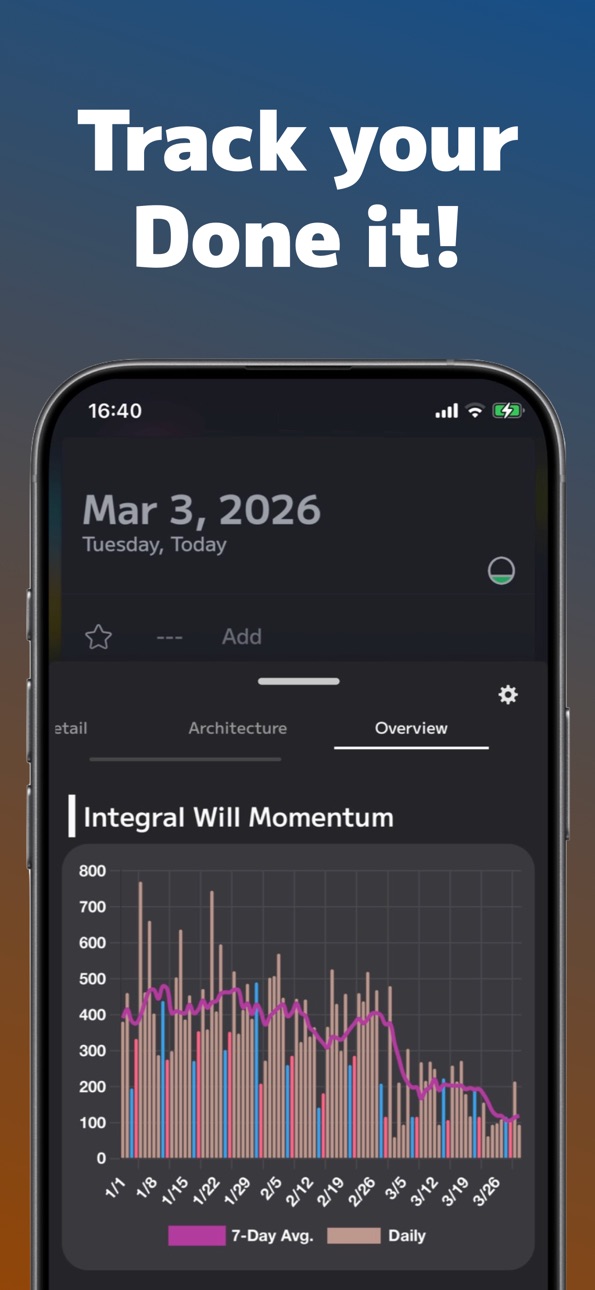
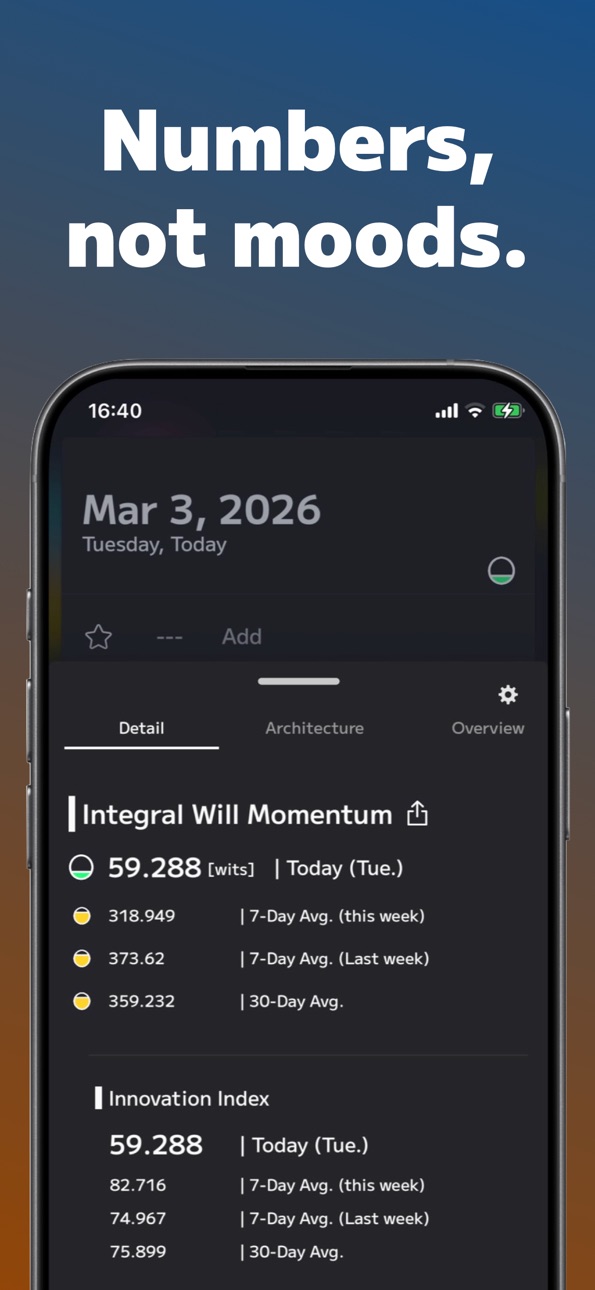
Powered by Volitional Motion Theory (VMT), the app monitors your daily tasks,
keeps track of your workload and stress, and helps you notice small changes in your routine.
Shared Schedules
Share plans with family or colleagues and exchange comments seamlessly.
Also available on macOS, Windows, and the web.
Data syncs automatically across all your devices.
Notes on Permissions
This app temporarily uses location to provide weather information. Location is only used to provide weather info and is optional. By default, your general area is determined from your IP address.
The app may optionally add birthdays from your contacts. No other contact information is accessed.
Paid Features
The app offers two subscription plans that unlock additional features and greater convenience.
Basic Plan:
1. Full-text search for past events
2. Unlimited number of undated event notes and favorite events
3. Ability to reorder the main menu
4. Remove restrictions on automatic event color settings
5. Unlimited creation of shared spaces (previously limited to 2)
6. Increase the maximum characters for monthly notes from 3,000 to 6,000
7. Ability to copy Masterpiece data
8. Edit event menus (iOS only)
9. Add detailed options for activity measurement methods
10. Full access to "Structure Tags" in Analysis
11. Show "wits" (Will Momentum) on the Main screen
Basic Plan is an auto-renewing subscription.
Premium Plan:
1. All Basic features available.
2. Scheduled coordination: Member limit increased from 3 to 33
3. Shared Spaces: Max members increased from 2 to 33
4. Shared Spaces: Max follows increased from 2 to 20
4. Status Screen: Simultaneous user display increased from 3 to 20
5. Extended comment retention for shared events (up to 1 year)
6. Masterpiece: Max task image attachments increased from 1 to 3
Premium Plan is an auto-renewing subscription.
Subscription Information
Paid plans are auto-renewing subscriptions (monthly or yearly).
Payment will be charged to your iTunes account.
You can manage auto-renewal in your iTunes account settings and turn it off after purchase.
Subscriptions automatically renew unless auto-renew is turned off at least 24 hours before the end of the current period.
Your account will be charged for renewal within 24 hours prior to the end of the current period.
According to the iTunes Store’s In-App Subscription Terms and Onefunc’s Terms of Service, paid subscriptions are non-refundable, except where required by law.
If you purchase a subscription during a free trial, any unused portion of the free trial will be forfeited.
Privacy Policy: https://onefunc.com/privacypolicy/
Terms of Service: https://onefunc.com/termsofservice/
In-App Purchases US pricing
OnefuncPlan - Premium Subscription
Basic(1 month) · Monthly$2.99
Basic(1 year) · Yearly$29.99
Premium (1 month) · Monthly$9.99
Premium (3 months) · 3 months$13.99
Premium (6 months) · 6 months$25.99
Premium (1 year) · Yearly$99.99
One-Time Purchases
OnetimePremium$0.99
Onefunc Plan Advance$15.99
Capabilities
In-App Purchases
Accessibility
ipadiphonemacrealityDevicetvoswatch
Version history 25 versions
Build 884847792v5.822026-04-23 18:25:50
■ Small bug fixes
Build 884767893v5.812026-04-22 07:03:03
■ Small design refinements
■ Small bug fixes
Build 884693239v5.802026-04-20 16:30:00
■ Small bug fixes
Build 884570630v5.792026-04-16 16:20:40
■ Small design refinements
■ Small bug fixes
Build 884452610v5.782026-04-13 21:56:02
■ Small design refinements
■ Small bug fixes
Build 884413729v5.772026-04-12 20:09:55
■ Small design refinements
Build 884073459v5.762026-04-04 18:18:53
■ Improved graph display
Build 883934835v5.742026-04-01 12:51:40
■ Small bug fixes
Build 884028601v5.752026-04-01 20:54:37
■ Small bug fixes
Build 883892941v5.732026-03-29 21:00:04
■ Network requests are now more efficient, making the app smoother than ever.
Build 883725754v5.722026-03-26 00:45:51
■ Small bug fixes
Build 883432334v5.712026-03-18 08:37:42
■ New App Icon
We’ve updated our look with a fresh new icon.
■ Icon Customization
You can now change the icon's background color in the Settings menu.
■ Small bug fixes
Build 883218843v5.702026-03-11 04:13:19
■ Small bug fixes
Previous updates
======================================================================5.69
■ Evolution of Status Analysis: New "Structure" Tab
A new "Structure" tab has been added to the Status Analysis screen. You can now visualize the flow of your condition for each scheduled task through graphs, allowing you to intuitively grasp the "motion of your will."
■ Quick Analysis on the Main Screen
Key analysis results are now integrated directly into the task list on the main screen. You can check your current condition the moment you open the app without navigating away.
■ New "Concept" Tab: The Philosophy Behind the App
We have added a dedicated tab explaining the background and philosophy (Volitional Motion Theory: VMT) that drives the development of OnefuncPlan.
■ Full Optimization of Computational Logics
The underlying logic has been significantly updated to improve analysis accuracy. Note: A one-time recalculation of past data (taking a few seconds) will occur upon the first launch. Please wait a moment as this process ensures more precise results.
■ Minor bug fixes
Build 882975786v5.692026-03-08 17:41:23
■ Evolution of Status Analysis: New "Structure" Tab
A new "Structure" tab has been added to the Status Analysis screen. You can now visualize the flow of your condition for each scheduled task through graphs, allowing you to intuitively grasp the "motion of your will."
■ Quick Analysis on the Main Screen
Key analysis results are now integrated directly into the task list on the main screen. You can check your current condition the moment you open the app without navigating away.
■ New "Concept" Tab: The Philosophy Behind the App
We have added a dedicated tab explaining the background and philosophy (Volitional Motion Theory: VMT) that drives the development of OnefuncPlan.
■ Full Optimization of Computational Logics
The underlying logic has been significantly updated to improve analysis accuracy. Note: A one-time recalculation of past data (taking a few seconds) will occur upon the first launch. Please wait a moment as this process ensures more precise results.
■ Minor bug fixes
Build 881689368v5.682026-02-10 17:35:08
■ Enhanced Statistics & Analytics
Added "Time to Flow" to the event details in the Analysis tab. This calculation is based on a model where novel, infrequent activities allow for quicker immersion, while familiar routines may require more time to reach a deep flow state.
Added "Category Count by Weekday" and "Category Count by Hour" charts to the Summary tab, providing a more detailed visualization of your activity rhythms.
■ Optimized Calculation Logic.
Upon the first launch after this update, a one-time recalculation of past status data will occur (taking a few seconds). Please wait a moment for the process to complete to ensure the most accurate analysis results.
■ Small bug fixes
Build 881490088v5.672026-01-15 15:47:43
- Subscription Name Change
The "Pro" plan has been renamed to "Basic."
This is a name change only; all features remain the same.
Current Pro subscribers can continue to use the service as usual.
- Small bug fixes
Build 881354110v5.662026-01-12 18:46:24
- Updated the app’s design and wording.
Build 881334140v5.652026-01-09 07:33:42
- Updated the app’s design and wording.
Build 881266045v5.642026-01-07 07:52:43
- Small bug fixes
Build 881148916v5.632026-01-06 10:02:05
- Small bug fixes
- Small design refinements
Build 881016124v5.622025-12-30 00:26:22
- Small bug fixes
- Updated the app’s design and wording.
Build 880714758v5.612025-12-26 09:41:04
- Some controls have changed
On the main screen (the schedule list shown at launch), you can now swipe left or right to move to yesterday or the next day.
- Small bug fixes
- Updated the app’s design and wording.
Build 880569070v5.602025-12-14 23:52:00
- Added activity graphs
Check your daily activity levels and balance at a glance
- Updated the app’s design and wording.
Build 880450183v5.592025-12-10 22:25:53
- Small bug fixes
- Updated the app’s design and wording.
Build 880403729v5.582025-12-08 04:02:40
- Security improvements
- Small bug fixes
Price history by region
Currency
Show
Columns
Search
Availability 1 of 1 storefronts
| Region | Language | Price | Ratings | Avg | Version |
|---|---|---|---|---|---|
| US | en-US | Free | 3 | 4.0 | 5.82 |
Change log 29 changes · US
✎
releaseNotes updated
■ Small bug fixes
✎
description updated
OnefuncPlan turns your daily actions into clear, usable insights.
You can start using the app instantly—no email required.
All calculations and AI processing a
✎
subtitle updated
Know Yourself Through Action
✎
name updated
OnefuncPlan: VMT Task Planner
◆
Version 5.82 released
■ Small bug fixes
◆
Version 5.81 released
■ Small design refinements
■ Small bug fixes
◆
Version 5.80 released
■ Small bug fixes
◆
Version 5.79 released
■ Small design refinements
■ Small bug fixes
◆
Version 5.78 released
■ Small design refinements
■ Small bug fixes
◆
Version 5.77 released
■ Small design refinements
◆
Version 5.76 released
■ Improved graph display
◆
Version 5.75 released
■ Small bug fixes
◆
Version 5.74 released
■ Small bug fixes
◆
Version 5.73 released
■ Network requests are now more efficient, making the app smoother than ever.
◆
Version 5.72 released
■ Small bug fixes
◆
Version 5.71 released
■ New App Icon
We’ve updated our look with a fresh new icon.
■ Icon Customization
You can now change the icon's background color in the Settings menu.
■ Small bug fixes
◆
Version 5.70 released
■ Small bug fixes
Previous updates
======================================================================5.69
■ Evolution of Status Analysis: New "Structure" Tab
A new "Structure" tab has been added to the Status Analysis screen. You c
◆
Version 5.69 released
■ Evolution of Status Analysis: New "Structure" Tab
A new "Structure" tab has been added to the Status Analysis screen. You can now visualize the flow of your condition for each scheduled task through graphs, allowing you to intuitively gr
◆
Version 5.68 released
■ Enhanced Statistics & Analytics
Added "Time to Flow" to the event details in the Analysis tab. This calculation is based on a model where novel, infrequent activities allow for quicker immersion, while familiar routines may require more t
◆
Version 5.67 released
- Subscription Name Change
The "Pro" plan has been renamed to "Basic."
This is a name change only; all features remain the same.
Current Pro subscribers can continue to use the service as usual.
- Small bug fixes
◆
Version 5.66 released
- Updated the app’s design and wording.
◆
Version 5.65 released
- Updated the app’s design and wording.
◆
Version 5.64 released
- Small bug fixes
◆
Version 5.63 released
- Small bug fixes
- Small design refinements
◆
Version 5.62 released
- Small bug fixes
- Updated the app’s design and wording.
◆
Version 5.61 released
- Some controls have changed
On the main screen (the schedule list shown at launch), you can now swipe left or right to move to yesterday or the next day.
- Small bug fixes
- Updated the app’s design and wording.
◆
Version 5.60 released
- Added activity graphs
Check your daily activity levels and balance at a glance
- Updated the app’s design and wording.
◆
Version 5.59 released
- Small bug fixes
- Updated the app’s design and wording.
◆
Version 5.58 released
- Security improvements
- Small bug fixes