Home › Finance

 US
US
1 of 1 storefronts
Content in en-US
Content in en-US
Information
Preview 1 platform
iPhone 8 images



What’s New Version 26.4
Brands now have their own details with a “People share” section, where you can leave and find tips on how to pay smarter. Find brands in “Best way to pay” by tapping the card icon in Transactions.
We’ve also added refunds in Budgets.
For ideas and questions, join our chat: https://t.me/zenmoneychat_en
Description
Zenmoney is more than just an expense tracker. It’s your personal finance assistant and smart money analyst. It helps you see the full picture, brings clarity to your financial life, and supports your long-term well-being.
Rely on accurate data. When everything is transparent, you can make calm and confident decisions, focused on your real goals and priorities.
Track spending and income automatically
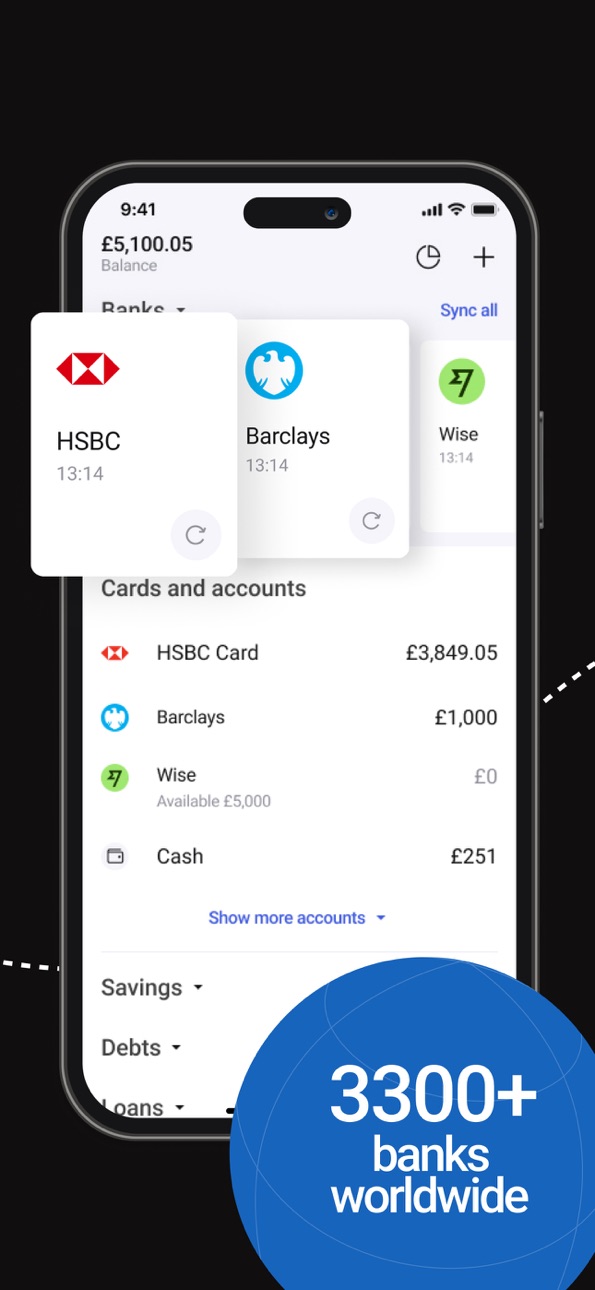
Zenmoney connects all your bank accounts and cards in one place, supporting over 3,300 banks worldwide. It automatically imports and categorises transactions across cards, cash, investments, savings, and even crypto accounts. There’s no need for manual entry — you get a clear, complete picture of your finances at a glance.
You can also customise categories to match your personal needs and enjoy a detailed overview of your spending and income without any routine.
Analyse your spending and understand your habits
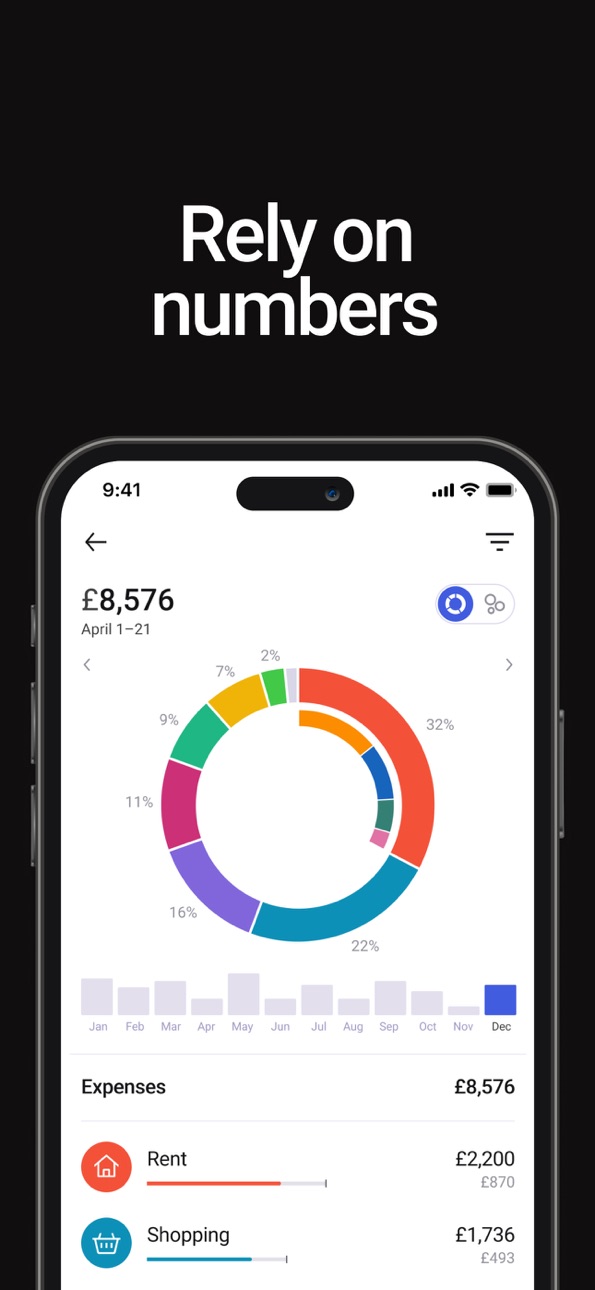
Zenmoney helps you see where your money goes each month and compare your spending across different periods. It highlights trends: which categories are growing, which are shrinking, and what impacts your overall budget the most.
You also get a clear balance of income vs expenses, so you can easily spot if your spending starts to outpace your earnings.
The app tracks your savings progress and shows how your reserves change over time — including how many months you could live without income, helping you build a stronger financial cushion.
Get personalised insights with a AI-powered assistant
Zenmoney features an AI assistant that helps you understand your current financial situation, set goals, and create custom analytical charts — even those not included in standard reports.
It can also analyse and compare spending across categories, generate insights for custom time periods, find old transactions, and suggest expenses you might want to optimise. With this personalised support, you gain a deeper understanding of your finances and make more confident decisions.
Plan your budget and stay on top of future spending
With Zenmoney, you can plan your essential expenses or create a full monthly budget. Choose whichever works best for you. You can schedule future calendar payments or set spending limits for specific categories and goals, and the app calculates your overall budget automatically.
You’ll also see how much disposable income is left for spontaneous spending, and easily decide how much to put into virtual saving pots for each goal.
The AI forecasts future spending based on your habits and history and highlights regular payments, upcoming bills, and subscriptions. All of them appear in a simple bill calendar, helping you avoid late fees and stop paying for subscriptions you no longer use.
Bring Zen to your finances
Zenmoney helps you get a clear view of your finances, plan thoughtfully, and feel at ease with your money.
Instead of a traditional “home bookkeeping” approach, Zenmoney acts as your personal finance assistant. It remembers what matters to you, reminds you about upcoming payments, helps you understand spending patterns, and shows how much you can safely spend or save.
Terms of Use: https://www.apple.com/legal/internet-services/itunes/dev/stdeula/
In-App Purchases US pricing
Zenmoney Premium Subscription
Subscription$1.99
Subscription$5.99
Subscription$8.99
Subscription$9.99
Subscription$19.99
Subscription$39.99
Monthly subscription · Monthly$3.49
Annual subscription · Yearly$19.99
Capabilities
In-App Purchases
Accessibility
ipadiphonemacrealityDevicetvoswatch
Version history 25 versions
Build 887584781v26.42026-06-30 06:17:12
Brands now have their own details with a “People share” section, where you can leave and find tips on how to pay smarter. Find brands in “Best way to pay” by tapping the card icon in Transactions.
We’ve also added refunds in Budgets.
For ideas and questions, join our chat: https://t.me/zenmoneychat_en
Build 886428922v26.32026-06-03 06:32:55
New section: “Best card to pay with”
Choose the card with the highest cashback before you pay. Upload this month’s cashback offers for your cards using a screenshot from your bank, find the brand you need, and Zenmoney will suggest which card is the best one to use.
For ideas and questions, join our chat: https://t.me/zenmoneychat_en
Build 884944449v26.2.12026-05-14 17:59:27
— Brands. Transactions are getting easier to read. You’ll see real company names and icons more often instead of unclear bank descriptions. This makes purchases easier to recognise and helps make your analytics more accurate and useful. For now, you’ll need to confirm replacements manually, but we’re planning to make brand detection automatic later.
— New filter in Transactions. Now available without a subscription.
For ideas and questions, join our chat: https://t.me/zenmoneychat_en
Build 883263430v26.12026-03-16 15:09:55
This is mainly a technical update. We also improved SMS/push recognition and updated details in the “Spending by category” report, for example we brought back category colours.
For ideas and questions, join our chat: https://t.me/zenmoneychat_en
Build 881631431v8.9.12026-01-21 08:58:19
Bug fixes and stability improvements for bank sync.
For ideas and questions, join our chat: https://t.me/zenmoneychat_en
Build 881065397v8.9.02026-01-03 06:48:46
Updated the “Spending by category” report: a new design, more chart options, average comparisons and other improvements.
For ideas and questions, join our chat: https://t.me/zenmoneychat_en
Build 880283759v8.8.12025-12-03 13:08:01
We’ve fixed several issues: brought back category icons when adding a transaction, resolved a crash on app launch, and tidied up a couple of other small things.
Build 879845559v8.8.02025-11-24 10:02:49
New filters in the “Spending by category” report: you can now filter transactions by secondary categories (tags) and by places. This helps you analyse your spending more precisely, for example by specific scenarios (“Vacation”, “Renovation”) or by your favourite shops and cafes.
For ideas and questions, join our chat: https://t.me/zenmoneychat_en
Build 879322271v8.7.12025-11-03 11:14:49
— Switch between current and previous periods in Analytics. Handy when a month has just ended — switch all widgets to last month in one go.
— New “Plans” widget, so all your analytics sit on one screen.
For ideas and questions, join our chat: https://t.me/zenmoneychat_en
Build 878838743v8.7.02025-10-16 08:28:33
— Switch between current and previous periods in Analytics. Handy when a month has just ended — switch all widgets to last month in one go.
— New “Plans” widget, so all your analytics sit on one screen.
For ideas and questions, join our chat: https://t.me/zenmoneychat_en
Build 878172982v8.6.22025-09-21 19:30:08
— New transactions feed: planned transactions are now in a separate tab, with a daily total and a new multi-edit showing the sum of the selected transactions, and more
— Refunds: mark the incoming transaction with the original spending category (e.g. “Eating out”) to reduce the total for that category in analytics
— Category form redesign: you can now archive categories you don’t use
— Filter saving in reports
For ideas and questions, join our chat: https://t.me/zenmoneychat_en
Build 877407458v8.6.12025-08-31 17:37:47
— New transactions feed: planned transactions are now in a separate tab, with a daily total and a new multi-edit showing the sum of the selected transactions, and more
— Refunds: mark the incoming transaction with the original spending category (e.g. “Eating out”) to reduce the total for that category in analytics
— Category form redesign: you can now archive categories you don’t use
— Filter saving in reports
For ideas and questions, join our chat: https://t.me/zenmoneychat_en
Build 874843157v8.5.12025-05-30 11:16:27
Global Analytics filter – choose which accounts and categories to show (hide business, renovation, or any others).
Set it up under Analytics → gear icon → Accounts & Categories.
For ideas and questions, join our chat: https://t.me/zenmoneychat_en
Build 873574721v8.4.02025-03-27 11:40:54
— We have launched a financial assistant available to all paid users. You can ask any questions about your finances, build analytics, and visualize data. The assistant also provides guidance on how to use the app. You can find it in the Analytics section.
— We added a category filter to reports: Income vs Expenses, Period Comparison, and Expense Trends.
— We improved the category selection UI in the transaction card and added a search feature.
— In the Period Comparison section, we added a comparison between 2024 and 2023.
For ideas and questions, join our chat: https://t.me/zenmoneychat_en
Build 872620754v8.3.02025-02-19 12:05:30
— We have launched a financial assistant available to all paid users. You can ask any questions about your finances, build analytics, and visualize data. The assistant also provides guidance on how to use the app. You can find it in the Analytics section.
— We added a category filter to reports: Income vs Expenses, Period Comparison, and Expense Trends.
— We improved the category selection UI in the transaction card and added a search feature.
— In the Period Comparison section, we added a comparison between 2024 and 2023.
For ideas and questions, join our chat: https://t.me/zenmoneychat_en
Build 871440761v6.2.12025-01-02 18:02:14
— You can now tap on a category in the Period Comparison to quickly see which transactions caused your expenses to go up.
— In the Income vs Expenses report, we’ve replaced the unclear numbers above the chart with a simple text status that clearly shows if the trend is rising or falling.
For ideas and questions, join our chat: https://t.me/zenmoneychat_en
Build 871347233v6.2.02024-12-24 13:50:41
— You can now tap on a category in the Period Comparison to quickly see which transactions caused your expenses to go up.
— In the Income vs Expenses report, we’ve replaced the unclear numbers above the chart with a simple text status that clearly shows if the trend is rising or falling.
For ideas and questions, join our chat: https://t.me/zenmoneychat_en
Build 870540542v6.1.02024-11-20 11:27:13
New Report: Spending Trends
Has total spending been increasing for several months in a row? It’s easier to understand the reason when you can immediately see which categories are influencing it. In the new report, we highlight categories with a clear upward trend.
For ideas and questions, join our chat: https://t.me/zenmoneychat_en
Build 869462243v6.0.02024-10-04 12:01:02
Income vs Expenses — new report and widget in Analytics.
For ideas and questions, join our chat: https://t.me/zenmoneychat_en
Build 868596825v5.9.02024-08-30 14:10:11
— Category spending widget: we've given our category spending widget a fresh look, making it easy to see your top spending categories at a glance.
— Profile: we've added a new profile section under "More" that allows you to change your login, password, and email, as well as connect or disconnect your social logins.
— Bug fixes: we've squashed a few bugs that were causing issues with transaction cards.
For ideas and questions, join our chat: https://t.me/zenmoneychat_en
Build 867822443v5.8.02024-07-30 08:21:28
New widgets in Analytics Dashboard:
— Period Comparison — now you can see the difference from the previous month in the dashboard graph.
— Savings — a widget with the trend of your savings over several months, status: growing or decreasing, how long they will last.
For ideas and questions, join our chat: https://t.me/zenmoneychat_en
Build 865545534v5.7.02024-04-29 19:57:58
New report — Comparison of expenses
This new report will help you track your expenses for the current month compared to the previous month. You can see what's increasing, what's decreasing, and what's staying the same. You can also compare other periods, such as how your expenses have changed this month compared to last year.
For ideas and questions, join our chat: https://t.me/zenmoneychat_en
Build 865118682v5.6.12024-04-11 09:26:07
The new and improved report in Analytics — Balance trends
With this report, you can:
— Select groups of accounts and individual accounts
— View balance trends over long periods, get long-term insight into future plans,
— And even see how the balance changes in one of the main world currencies.
For ideas and questions, join our chat: https://t.me/zenmoneychat_en
Build 864287701v5.6.02024-03-08 05:04:38
New Report in Analytics — Balance trends
With this report, you can:
— Select groups of accounts and individual accounts
— View balance trends over long periods, get long-term insight into future plans,
— And even see how the balance changes in one of the main world currencies.
For ideas and questions, join our chat: https://t.me/zenmoneychat_en
Build 862466684v5.5.02023-12-26 19:31:37
Multi-edit plans: now you can edit multiple categories at once.
To find it, go to the Plans section, click the (+) button, and then select "Multi-edit plans".
For ideas and questions, join our chat: https://t.me/zenmoneychat_en
Price history by region
Currency
Show
Columns
Search
Availability 1 of 1 storefronts
| Region | Language | Price | Ratings | Avg | Version |
|---|---|---|---|---|---|
| US | en-US | Free | 150 | 4.6 | 26.4 |
Change log 29 changes · US
✎
releaseNotes updated
Brands now have their own details with a “People share” section, where you can leave and find tips on how to pay smarter. Find brands in “Best way to pay” by ta
✎
description updated
Zenmoney is more than just an expense tracker. It’s your personal finance assistant and smart money analyst. It helps you see the full picture, brings clarity t
✎
subtitle updated
Budgeting with AI assistant
✎
name updated
Zenmoney: expense tracker
◆
Version 26.4 released
Brands now have their own details with a “People share” section, where you can leave and find tips on how to pay smarter. Find brands in “Best way to pay” by tapping the card icon in Transactions.
We’ve also added refunds in Budgets.
For
◆
Version 26.3 released
New section: “Best card to pay with”
Choose the card with the highest cashback before you pay. Upload this month’s cashback offers for your cards using a screenshot from your bank, find the brand you need, and Zenmoney will suggest which c
◆
Version 26.2.1 released
— Brands. Transactions are getting easier to read. You’ll see real company names and icons more often instead of unclear bank descriptions. This makes purchases easier to recognise and helps make your analytics more accurate and useful. For
◆
Version 26.1 released
This is mainly a technical update. We also improved SMS/push recognition and updated details in the “Spending by category” report, for example we brought back category colours.
For ideas and questions, join our chat: https://t.me/zenmoneyc
◆
Version 8.9.1 released
Bug fixes and stability improvements for bank sync.
For ideas and questions, join our chat: https://t.me/zenmoneychat_en
◆
Version 8.9.0 released
Updated the “Spending by category” report: a new design, more chart options, average comparisons and other improvements.
For ideas and questions, join our chat: https://t.me/zenmoneychat_en
◆
Version 8.8.1 released
We’ve fixed several issues: brought back category icons when adding a transaction, resolved a crash on app launch, and tidied up a couple of other small things.
◆
Version 8.8.0 released
New filters in the “Spending by category” report: you can now filter transactions by secondary categories (tags) and by places. This helps you analyse your spending more precisely, for example by specific scenarios (“Vacation”, “Renovation”
◆
Version 8.7.1 released
— Switch between current and previous periods in Analytics. Handy when a month has just ended — switch all widgets to last month in one go.
— New “Plans” widget, so all your analytics sit on one screen.
For ideas and questions, join our ch
◆
Version 8.7.0 released
— Switch between current and previous periods in Analytics. Handy when a month has just ended — switch all widgets to last month in one go.
— New “Plans” widget, so all your analytics sit on one screen.
For ideas and questions, join our ch
◆
Version 8.6.2 released
— New transactions feed: planned transactions are now in a separate tab, with a daily total and a new multi-edit showing the sum of the selected transactions, and more
— Refunds: mark the incoming transaction with the original spending cate
◆
Version 8.6.1 released
— New transactions feed: planned transactions are now in a separate tab, with a daily total and a new multi-edit showing the sum of the selected transactions, and more
— Refunds: mark the incoming transaction with the original spending cate
◆
Version 8.5.1 released
Global Analytics filter – choose which accounts and categories to show (hide business, renovation, or any others).
Set it up under Analytics → gear icon → Accounts & Categories.
For ideas and questions, join our chat: https://t.me/zenmoney
◆
Version 8.4.0 released
— We have launched a financial assistant available to all paid users. You can ask any questions about your finances, build analytics, and visualize data. The assistant also provides guidance on how to use the app. You can find it in the Ana
◆
Version 8.3.0 released
— We have launched a financial assistant available to all paid users. You can ask any questions about your finances, build analytics, and visualize data. The assistant also provides guidance on how to use the app. You can find it in the Ana
◆
Version 6.2.1 released
— You can now tap on a category in the Period Comparison to quickly see which transactions caused your expenses to go up.
— In the Income vs Expenses report, we’ve replaced the unclear numbers above the chart with a simple text status that
◆
Version 6.2.0 released
— You can now tap on a category in the Period Comparison to quickly see which transactions caused your expenses to go up.
— In the Income vs Expenses report, we’ve replaced the unclear numbers above the chart with a simple text status that
◆
Version 6.1.0 released
New Report: Spending Trends
Has total spending been increasing for several months in a row? It’s easier to understand the reason when you can immediately see which categories are influencing it. In the new report, we highlight categories w
◆
Version 6.0.0 released
Income vs Expenses — new report and widget in Analytics.
For ideas and questions, join our chat: https://t.me/zenmoneychat_en
◆
Version 5.9.0 released
— Category spending widget: we've given our category spending widget a fresh look, making it easy to see your top spending categories at a glance.
— Profile: we've added a new profile section under "More" that allows you to change your logi
◆
Version 5.8.0 released
New widgets in Analytics Dashboard:
— Period Comparison — now you can see the difference from the previous month in the dashboard graph.
— Savings — a widget with the trend of your savings over several months, status: growing or decreasing,
◆
Version 5.7.0 released
New report — Comparison of expenses
This new report will help you track your expenses for the current month compared to the previous month. You can see what's increasing, what's decreasing, and what's staying the same. You can also compare
◆
Version 5.6.1 released
The new and improved report in Analytics — Balance trends
With this report, you can:
— Select groups of accounts and individual accounts
— View balance trends over long periods, get long-term insight into future plans,
— And even see how t
◆
Version 5.6.0 released
New Report in Analytics — Balance trends
With this report, you can:
— Select groups of accounts and individual accounts
— View balance trends over long periods, get long-term insight into future plans,
— And even see how the balance change
◆
Version 5.5.0 released
Multi-edit plans: now you can edit multiple categories at once.
To find it, go to the Plans section, click the (+) button, and then select "Multi-edit plans".
For ideas and questions, join our chat: https://t.me/zenmoneychat_en