Home › Business

 US
US
1 of 1 storefronts
Content in en-US
Content in en-US
Information
Preview 3 platforms
iPhone 7 images


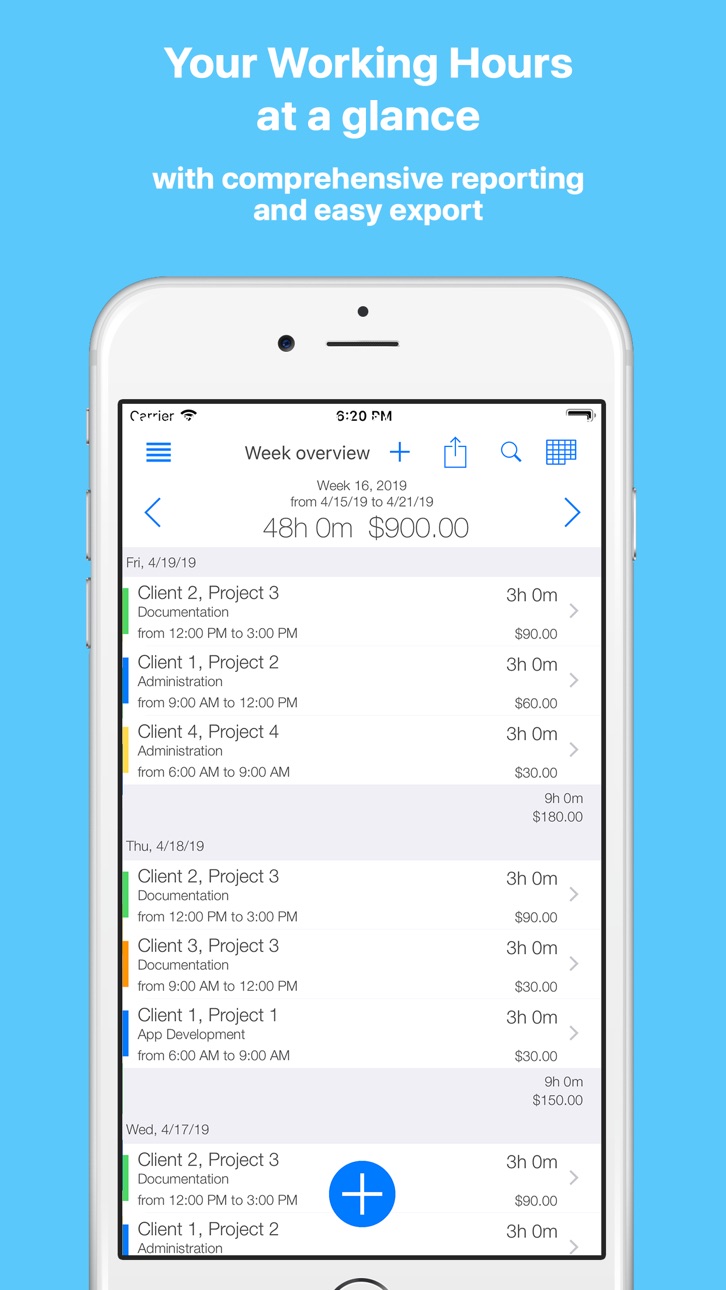


iPad 7 images
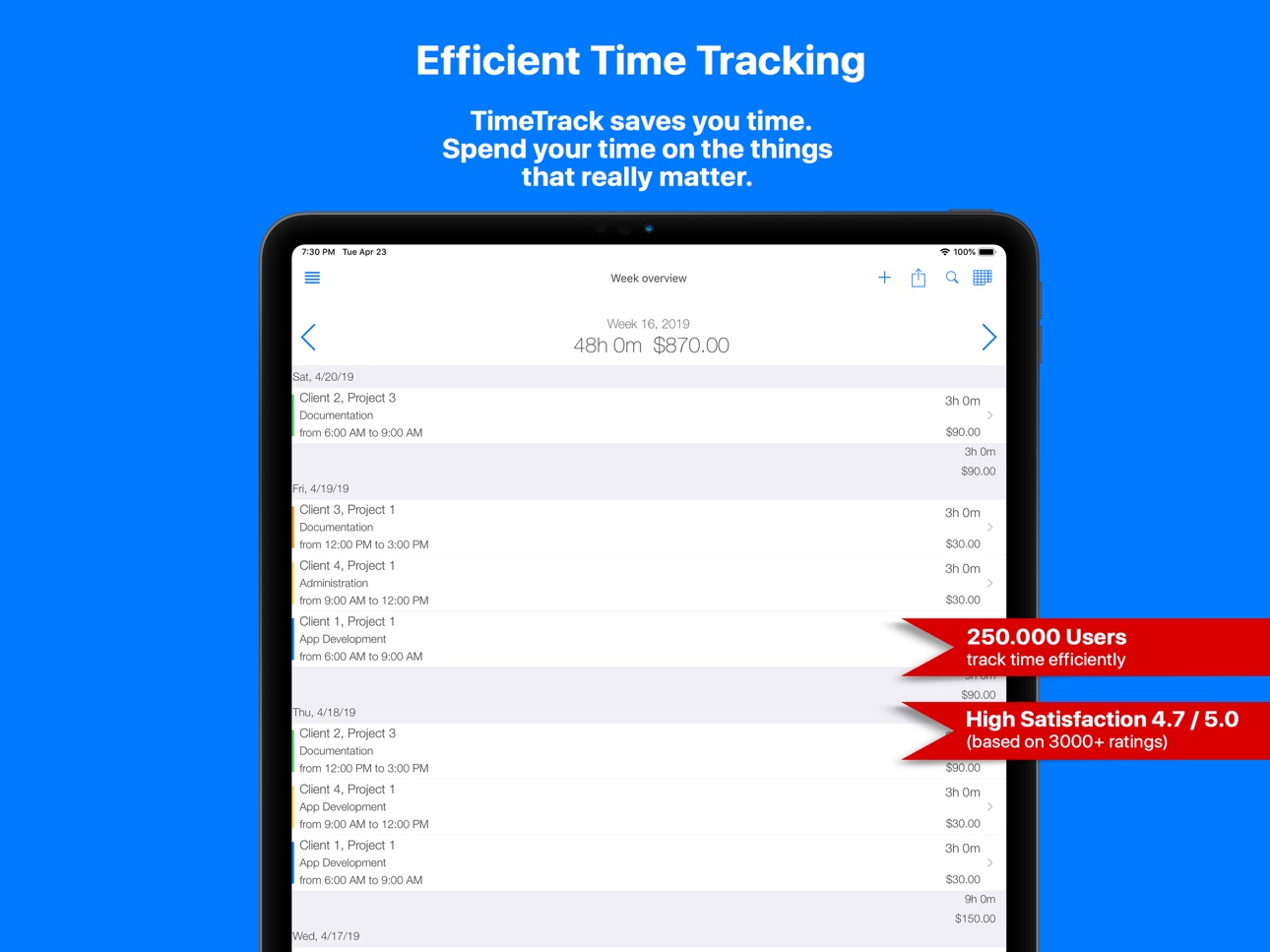
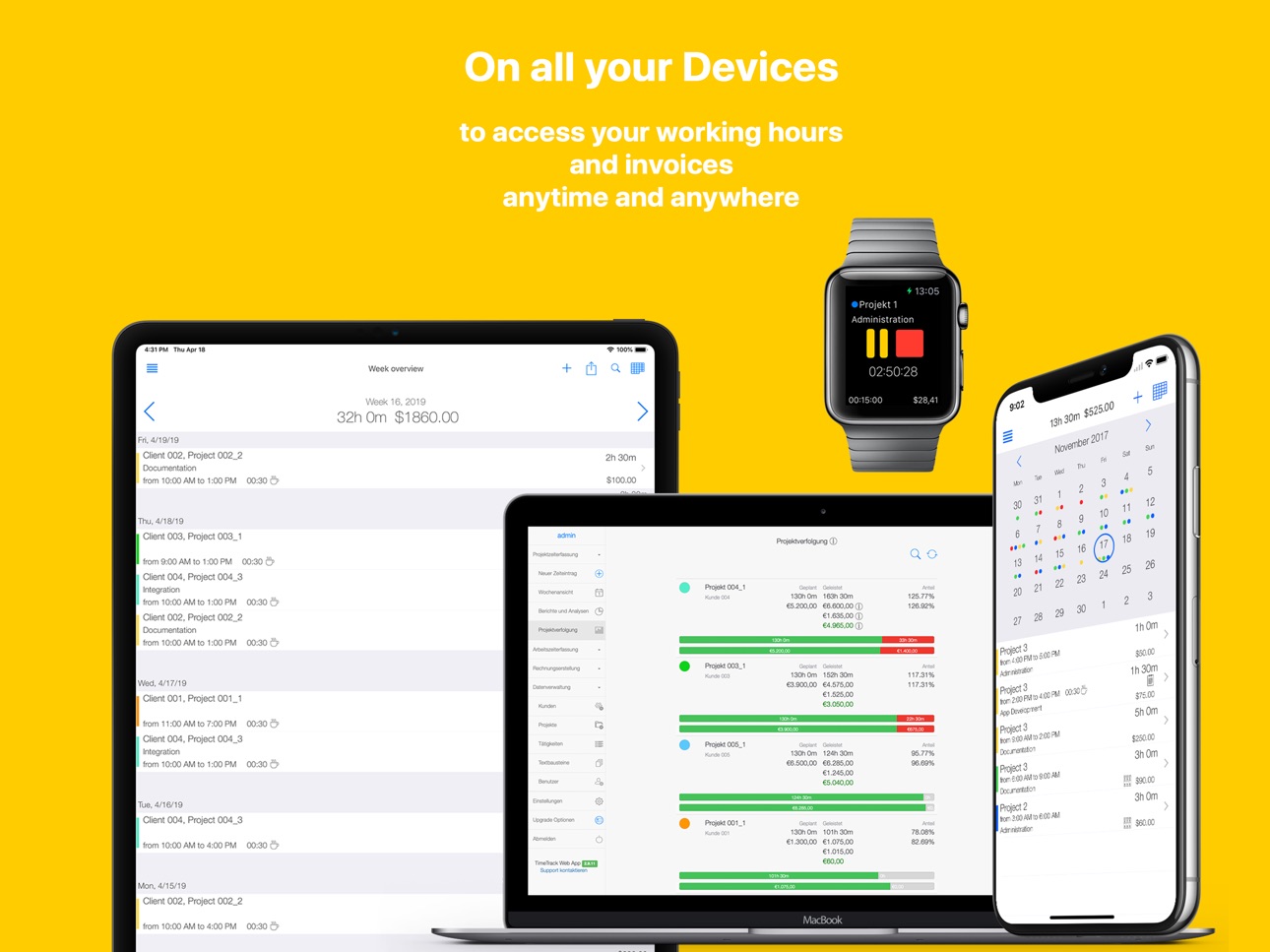

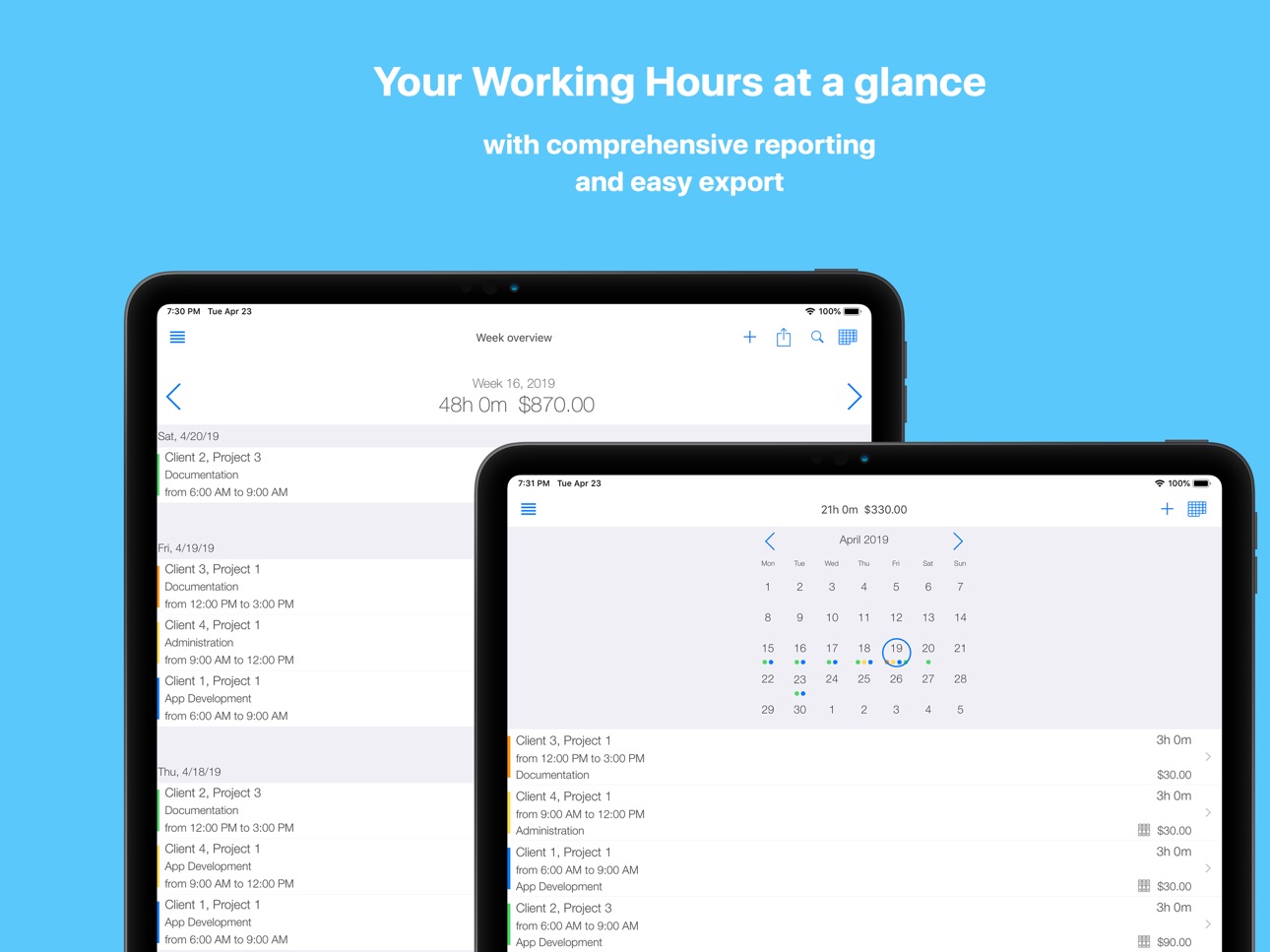


Apple Watch 5 images


What’s New Version 6.0.1
Dear TimeTrack users,
thank you for great feedback. Once again we have a huge update for you:
- automatic GPS based time tracking
You can now create workplaces. When you enter the workplace TimeTrack will automatically start timer for that project. When you exit the workplace TimeTrack will automatically stop the Timer.
You can setup workplaces in Side Menu / Workplaces.
We are happy for your feedback!
6.0.1 - Bugfixes
If you encounter any problems please contact us support@timetrackapp.com
Your TimeTrack Team
Description
TimeTrack is efficient time tracker that optimise your time management and saves your time!
We believe time is too precious to waste it on secondary activities. Spend your time on the things that really matter.
Facts about TimeTrack - Time tracker
• featured by Apple in "Best new apps", "Stay organized", "Simplify everyday tasks" etc.
• more than 500.000 users track time efficiently
• highly recommended 4.7 / 5.0 stars (based on more than 5000+ ratings)
What are the users saying about TimeTrack - Time tracker?
"Professional time tracking and invoicing with TimeTrack is a breeze"
"Intuitive user interface simplifies work hours tracking"
"Hours tracking app with that great flexibility"
"Time tracker adapts to your way of working"
This is how TimeTrack keeps your Time Management efficiently:
• track your time efficently
• anywhere, anytime, on any device, even on your wrist or with "Hey, Siri"
• start and stop timer with one click or with your voice
• hours worked at a glance
• create comprehensive reports with ease
• customize and export your reports
• get paid faster, create invoice from tracked hours
• professional invoices (more then 40 settings to customize your invoice)
• and email it to your client
• fast expenses tracking
• create expense templates
• take photo from receipts
• on all your devices
• iPhone, iPad, Watch, Mac, Safari
• take your business to the next level with TimeTrack Cloud
• project management and controlling
• management reporting and extended invoicing
• sync between all your devices and daily backups
TimeTrack - Feature List:
TIME TRACKING
• efficiently time logging with smart timer / timeclock (no battery draining, offline as well) or GPS
• create time entry manually
• universal (use it on iPhone, iPad, Apple Watch, etc.)
• skins (choose between light or dark design)
• daily, weekly, monthly, yearly, calendar and overtime overview for your working hours
• reports and statistics / analysis of your working hours
• data management for batch data changes
• completely customisable export for timesheet, timecard and time attendance
• vacation, overtime, special entries etc.
• time rounding, automatic pause for punch clock, tip
• default values for clients, projects, tasks, timeclock etc.
• import and export to iOS calendar
• more than 80 settings for flexible time management
• and more ...
INVOICING
• just select time entries you want to invoice
• professional invoice management
• completely customisable PDF invoice
• more than 40 settings for perfect invoice and billing
EXPENSES
• create expenses
• create templates for project expenses
• take photo from receipts
• export expense photos
PROJECT MANAGEMENT
• plan project duration, tasks and budget
• project performance at a glance
• project management reporting and analysis
GENERAL
• Siri, Today Widget, Watch App
• completely integrated with iOS Calendar and Dropbox
• its a time keeper and you can Backup to Dropbox, e-mail and TimeTrack Cloud
• 24/7 support
TIMETRACK CLOUD (in app purchase)
• project management and controlling features
• management reporting and analysis
• additional invoicing features
• web-app platform access
• real time sync between all your devices
TimeTrack Cloud - Subscription and renewal information:
• Payment will be charged to iTunes Account at confirmation of purchase.
• Subscription automatically renews unless auto-renew is turned off at least 24-hours before the end of the current period
• Account will be charged for renewal within 24-hours prior to the end of the current period
• Subscriptions may be managed by the user and auto-renewal may be turned off in user's Account Settings
• https://cloud.timetrackapp.com/termsandconditions/en
• https://www.timetrackapp.com/en/privacy-policy
Pricing:
• monthly ($4,99)
• yearly ($35,99)
Having any problems or any suggestions? We would love to hear from you!
Your TimeTrack - Time tracker Team
In-App Purchases US pricing
TimeTrack Cloud Subscription Subscription
TimeTrack Cloud (1-month) · Monthly$4.99
TimeTrack Cloud (1-year) · Yearly$34.99
One-Time Purchases
Premium (one-time purchase)$3.99
Capabilities
In-App Purchases
Accessibility
ipadiphonemacrealityDevicetvoswatch
Version history 25 versions
Build 836000374v6.0.12020-05-19 00:39:39
Dear TimeTrack users,
thank you for great feedback. Once again we have a huge update for you:
- automatic GPS based time tracking
You can now create workplaces. When you enter the workplace TimeTrack will automatically start timer for that project. When you exit the workplace TimeTrack will automatically stop the Timer.
You can setup workplaces in Side Menu / Workplaces.
We are happy for your feedback!
6.0.1 - Bugfixes
If you encounter any problems please contact us support@timetrackapp.com
Your TimeTrack Team
Build 835973860v6.0.02020-05-16 00:23:56
Dear TimeTrack users,
thank you for great feedback. Once again we have a huge update for you:
- automatic GPS based time tracking
You can now create workplaces. When you enter the workplace TimeTrack will automatically start timer for that project. When you exit the workplace TimeTrack will automatically stop the Timer.
You can setup workplaces in Side Menu / Workplaces.
We are happy for your feedback!
If you encounter any problems please contact us support@timetrackapp.com
Your TimeTrack Team
Build 835044025v5.7.02020-03-13 13:20:07
Dear TimeTrack users,
thank you for great feedback. Once again we have a huge update for you:
- Tags / Hashtags
You can now mark time entries, expenses and invoices with hashtags.
Use those hashtags in reports to find time entries, expenses and invoices.
For example you can mark one time entry with "invoiced" or "important" and find those in reports.
- New overview
You asked and we added new overview - List overview, where you can see all time entries for one day.
- Extended Expenses
Currency convertor for expenses.
You can now add more then one photo for expenses.
- Invoicing overview
Now you have better overview for invoices.
You can find not invoiced time entries and expenses easier.
We are currently preparing geofencing (GPS based time tracking) for next updated. Stay tuned!
If you encounter any problems please contact us support@timetrackapp.com
Your TimeTrack Team
Build 834561794v5.6.02020-02-01 18:33:27
Dear TimeTrack users,
thank you for great feedback. We have huge update for you:
- Reminders
TimeTrack can now remind you on your working days to start the timer and to stop the timer, if it is still running after defined time.
- Time tracker
You can add fotos to timer
- Manual Time entry
You can add fotos to time entries.
You can add customer signature to time entries.
- Invoicing
You can group invoice lines by client, project, task.
You can define invoice file name for export.
Date filter in invoice overview.
- Overviews
You can now export overtime hours from overtime overview.
- Export
Date settings for export will be saved for next time.
We are currently preparing geofencing (GPS based time tracking) for next updated. Stay tuned!
If you encounter any problems please contact us support@timetrackapp.com
Your TimeTrack Team
Build 833666764v5.5.12019-11-19 20:48:12
5.5.1 - we fixed a bug that occasionally comes when time rounding is enabled
5.5.0
Dark Mode - oh yeah!
For frequent flyers: Multiple Time Zone Support
Added new language - Dutch (thanks to Jeroen)
We optimised app start and overall app performance.
All reported bugs fixed.
Your TimeTrack Team
Build 833508005v5.5.02019-11-13 10:29:38
Dark Mode - oh yeah!
For frequent flyers: Multiple Time Zone Support
Added new language - Dutch (thanks to Jeroen)
We optimised app start and overall app performance.
All reported bugs fixed.
Your TimeTrack Team
Build 832726286v5.4.02019-09-13 18:47:44
New fresh Look and Feel.
TimeTrack starts 2x faster and we optimised overall performance.
All reported Bugs fixed.
Your TimeTrack Team
Build 831067471v5.3.02019-04-30 17:32:43
Dear TimeTrack users,
this Update is all about efficiency!
"Hey Siri, start my timer", "Hey Siri, stop my timer", and that's it!
Now you can track time only with your voice, just call Siri.
TimeTrack and Siri are friends now, so we started to track time with Siri and tracked it for the whole week and its great!
When we are in public place with a lot of people, we start timer on Apple Watch.
TimeTrack for Apple Watch has big Update:
• We have Faces for Apple Watch
• Watch App has new cool feature - "fast task switching"
Like in every Update, we fixed all reported bugs.
New Features for efficient time tracking are coming out soon, stay tuned!
If you find a bug, please send us an email, we are happy to hear from you!
Your TimeTrack - Time tracker Team
Build 828853771v5.2.02019-01-04 21:18:08
Dear TimeTrack users, thank you for all your feedback in 2018!
We are starting new year 2019 with one big update!
DEVICE SUPPORT
TimeTrack now supports new 11-inch iPad Pro.
Now we have support for all Apple devices, all iPads, iPhones and Apple Watches.
TIME TRACKING
Timer Notification only comes when your close the app, not when you minimise it.
In Data Management you can now search for tasks.
You can find a button in settings to remove demo data.
EXPENSES
There is new setting for expenses templates. You can specify if client and project should be filled in or not.
TODAY EXTENSION / WIDGET
Default Project and Task will be visible when timer is not running.
APPLE WATCH
Last used clients, projects and tasks is now available on Apple Watch.
Currency will be shown while timer is ticking.
INVOICING
You can now specify the size of your Logo. Check Settings / Company Info
GENERAL
As always, we fixed all reported issues.
A lot more is coming soon!
Please email us if you find any bugs and of course if you have new feature suggestions.
your TimeTrack - Time Tracking team
Build 828833556v5.1.32018-10-06 15:39:25
5.1.3
fixed reported bugs
5.1.0
TimeTrack is iOS 12 and WatchOS 5 ready
TIME TRACKING
- added time zone support. When you are abroad, TimeTrack will recognise that and persist time, so when you come back home, your start and end time remains the same.
- added hint if you try to edit time entries that is already invoiced
INVOICING
- added total line for invoice and setting for it
- now you can use swipe to change invoice state
We fixed reported bugs for Watch App and Widget. E-Mail us if you find any glitches.
We fixed PDF Bug (pause and start and end time overlapping).
5.0.0
WATCH APP
- completely new watch app (adapted to latest WatchOS version)
- now you can use TimeTrack on your watch without iPhone
- TimeTrack syncs data automatically between your watch and iPhone App (new clients and projects will be immediately visible on watch app)
EXPENSES:
- finally you can export all your expense photos as PDF (check settings for this feature)
- fotos are bigger and in better resolution
- take foto feature is optimised
- "payed with" field is now exportable (PDF)
- "notes" field is now exportable (PDF)
CALENDAR
- when importing calendar entry to TimeTrack, notes will be imported as well
- search for calendar event now works better and faster
INVOICING
- "non billable" entries can be added to invoice
- "non billable" entries in invoice have special label
- "flat rate" entries has special label
- you can now export "expenses fotos" and attach them to invoice (check settings for this feature)
- 3 decimals for VAT Number
GENERAL:
- all reported bugs are fixed (let us now if you find anything, please use email for this)
- dropped support for Watch OS 1
A lot more is coming soon - new releases every 2 months!
Please email us if you find any bugs and of course if you have new feature suggestions.
your TimeTrack - Time Tracking team
Build 828693445v5.1.12018-09-28 22:32:12
5.1.1
added setting for export to set notes in new row or in the same as other fields
reported bugs fixed
5.1.0
TimeTrack is iOS 12 and WatchOS 5 ready
TIME TRACKING
- added time zone support. When you are abroad, TimeTrack will recognise that and persist time, so when you come back home, your start and end time remains the same.
- added hint if you try to edit time entries that is already invoiced
INVOICING
- added total line for invoice and setting for it
- now you can use swipe to change invoice state
We fixed reported bugs for Watch App and Widget. E-Mail us if you find any glitches.
We fixed PDF Bug (pause and start and end time overlapping).
5.0.0
WATCH APP
- completely new watch app (adapted to latest WatchOS version)
- now you can use TimeTrack on your watch without iPhone
- TimeTrack syncs data automatically between your watch and iPhone App (new clients and projects will be immediately visible on watch app)
EXPENSES:
- finally you can export all your expense photos as PDF (check settings for this feature)
- fotos are bigger and in better resolution
- take foto feature is optimised
- "payed with" field is now exportable (PDF)
- "notes" field is now exportable (PDF)
CALENDAR
- when importing calendar entry to TimeTrack, notes will be imported as well
- search for calendar event now works better and faster
INVOICING
- "non billable" entries can be added to invoice
- "non billable" entries in invoice have special label
- "flat rate" entries has special label
- you can now export "expenses fotos" and attach them to invoice (check settings for this feature)
- 3 decimals for VAT Number
GENERAL:
- all reported bugs are fixed (let us now if you find anything, please use email for this)
- dropped support for Watch OS 1
A lot more is coming soon - new releases every 2 months!
Please email us if you find any bugs and of course if you have new feature suggestions.
your TimeTrack - Time Tracking team
Build 828681130v5.1.02018-09-22 13:03:40
5.1.0
TimeTrack is iOS 12 and WatchOS 5 ready
TIME TRACKING
- added time zone support. When you are abroad, TimeTrack will recognise that and persist time, so when you come back home, your start and end time remains the same.
- added hint if you try to edit time entries that is already invoiced
INVOICING
- added total line for invoice and setting for it
- now you can use swipe to change invoice state
We fixed reported bugs for Watch App and Widget. E-Mail us if you find any glitches.
We fixed PDF Bug (pause and start and end time overlapping).
5.0.0
WATCH APP
- completely new watch app (adapted to latest WatchOS version)
- now you can use TimeTrack on your watch without iPhone
- TimeTrack syncs data automatically between your watch and iPhone App (new clients and projects will be immediately visible on watch app)
EXPENSES:
- finally you can export all your expense photos as PDF (check settings for this feature)
- fotos are bigger and in better resolution
- take foto feature is optimised
- "payed with" field is now exportable (PDF)
- "notes" field is now exportable (PDF)
CALENDAR
- when importing calendar entry to TimeTrack, notes will be imported as well
- search for calendar event now works better and faster
INVOICING
- "non billable" entries can be added to invoice
- "non billable" entries in invoice have special label
- "flat rate" entries has special label
- you can now export "expenses fotos" and attach them to invoice (check settings for this feature)
- 3 decimals for VAT Number
GENERAL:
- all reported bugs are fixed (let us now if you find anything, please use email for this)
- dropped support for Watch OS 1
A lot more is coming soon - new releases every 2 months!
Please email us if you find any bugs and of course if you have new feature suggestions.
your TimeTrack - Time Tracking team
Build 828443142v5.0.02018-09-04 20:43:17
Dear TimeTrack users, we work hard for past 5 months and now we have one major release - Version 5.0!
Once again thank you for your suggestions and great ideas!
NEW FEATURES for time tracking and invoicing
WATCH APP
- completely new watch app (adapted to latest WatchOS version)
- now you can use TimeTrack on your watch without iPhone
- TimeTrack syncs data automatically between your watch and iPhone App (new clients and projects will be immediately visible on watch app)
EXPENSES:
- finally you can export all your expense photos as PDF (check settings for this feature)
- fotos are bigger and in better resolution
- take foto feature is optimised
- "payed with" field is now exportable (PDF)
- "notes" field is now exportable (PDF)
CALENDAR
- when importing calendar entry to TimeTrack, notes will be imported as well
- search for calendar event now works better and faster
INVOICING
- "non billable" entries can be added to invoice
- "non billable" entries in invoice have special label
- "flat rate" entries has special label
- you can now export "expenses fotos" and attach them to invoice (check settings for this feature)
- 3 decimals for VAT Number
GENERAL:
- all reported bugs are fixed (let us now if you find anything, please use email for this)
- dropped support for Watch OS 1
A lot more is coming soon - new releases every 2 months!
Please email us if you find any bugs and of course if you have new feature suggestions.
your TimeTrack - Time Tracking team
Build 826172715v4.3.12018-03-03 18:41:12
Dear TimeTrack users, once again thank you for your suggestions and great ideas!
4.3.1 small bugfixes
4.3.0
SETTINGS
There are new settings for Calendar sync.
You can now define which information will be saved to you Calendar Entry.
You can now define which information will be imported from Calendar Entry into TimeTrack.
BUGFIXES
We fixed some small bugs and we optimised overall app performance
A lot more is coming soon!
Please email us if you find any bugs and of course if you have new feature suggestions.
your TimeTrack - Time Tracking team
Build 825885235v4.3.02018-02-20 21:13:14
Dear TimeTrack users, once again thank you for your suggestions and great ideas!
SETTINGS
There are new settings for Calendar sync.
You can now define which information will be saved to you Calendar Entry.
You can now define which information will be imported from Calendar Entry into TimeTrack.
BUGFIXES
We fixed some small bugs and we optimised overall app performance
A lot more is coming soon!
Please email us if you find any bugs and of course if you have new feature suggestions.
your TimeTrack - Time Tracking team
Build 825500883v4.2.12018-01-03 01:11:34
Dear TimeTrack users, thank you for your suggestions and great ideas!
We managed to release two updates in december, not only with bugfixes but with new feature as well.
VERSION 4.2.1
Bugfix for , and . in project hour rate
VERSION 4.2.0
EXPENSES
You can now add negative amounts. Just click on price and click on "minus" button.
TIME TRACKING
You can now add negative amounts. Just click on price and click on "minus" button.
SETTINGS
There is new setting for start screen. Now you can set timer as start screen.
TIMETRACK CLOUD SCREEN
When you click on manage subscription you will find you cloud name and cloud address.
Additionally you see your cloud address in TimeTrack Cloud screen.
BUGFIXES
Bugfix for sorting in invoice lines.
Bugfix for invoice settings - sort by.
A lot more is coming soon!
Please email us if you find any bugs and of course if you have new feature suggestions.
your TimeTrack - Time Tracking team
Build 825255122v4.2.02017-12-31 00:03:40
Dear TimeTrack users, thank you for your suggestions and great ideas!
We managed to release two updates in december, not only with bugfixes but with new feature as well.
VERSION 4.2.0
EXPENSES
You can now add negative amounts. Just click on price and click on "minus" button.
TIME TRACKING
You can now add negative amounts. Just click on price and click on "minus" button.
SETTINGS
There is new setting for start screen. Now you can set timer as start screen.
TIMETRACK CLOUD SCREEN
When you click on manage subscription you will find you cloud name and cloud address.
Additionally you see your cloud address in TimeTrack Cloud screen.
BUGFIXES
Bugfix for sorting in invoice lines.
Bugfix for invoice settings - sort by.
A lot more is coming soon!
Please email us if you find any bugs and of course if you have new feature suggestions.
your TimeTrack - Time Tracking team
Build 825072292v4.1.22017-12-07 23:31:39
Dear TimeTrack users, thank you for your suggestions and great ideas!
VERSION 4.1.2
EXPENSES
You can now take photo with camera or choose photo from gallery.
TIME TRACKING
Calendar Overview and Overtime Overview got new Add button
SETTINGS
Clarity for Settings - if setting is not set, the value "not set" is displayed.
We've done it for general settings, invoice settings and company settings.
INVOICING
Invoice settings - Tax now has 3 decimals.
BUGFIXES
Bugfix for semicolon in notes for time entries and expenses
Bugfix for overtime calculation when week spreads over two months.
A lot more is coming soon!
Please email us if you find any bugs and of course if you have new feature suggestions.
your TimeTrack - Time Tracking team
VERSION 4.1.1
We fixed reported bugs and optimised the app for iOS11 und brand new iPhone X, including Face ID
Build 824435415v4.1.12017-11-19 02:49:04
Dear TimeTrack users, thank you for your suggestions and great ideas!
We have got hundreds of emails regarding new features.
In this Update we have fixed reported bugs and optimised the app for iOS11 und brand new iPhone X, including Face ID.
A lot more is coming soon!
Please email us if you find any bugs and of course if you have new feature suggestions.
your TimeTrack - Time Tracking team
Build 824317501v4.1.02017-11-14 23:01:48
Dear TimeTrack users, thank you for your suggestions and great ideas!
We have got hundreds of emails regarding new features.
In this Update we have fixed reported bugs and optimised the app for iOS11 und brand new iPhone X, including Face ID.
A lot more is coming soon!
Please email us if you find any bugs and of course if you have new feature suggestions.
your TimeTrack - Time Tracking team
Build 822098010v4.0.12017-05-11 18:21:44
Dear TimeTrack users, thank you for your suggestions and great ideas!
We have got thousands of emails regarding new features.
We have a lot of new features and some bugfixes.
TIME TRACKING
- Add new Time Entry Button for all overviews in Action Bar
- Filter for "invoiced", "not invoiced", "all" in all overviews
- If time is logged with timer, when you go to edit the time entry you will have an Map icon to see Start and Stop location
- Added Pull to Refresh to Calendar Overview (for syncing)
- Added pause duration and indication in week overview and entries overview
- Create Time Entry with 0 hours (useful for overtime)
- Timer Icon will turn green if timer is running and yellow if you are on a break
- Redesigned Extension/Widget User Interface, now you can see the week summery when timer is not running
- Projects in selection list are sorted alphabetically
- Database fields for future updates added (default calendar for project, color for project, notes for clients and projects etc.)
EXPENSES
- Add new Expense Button in Action Bar
- Show Attachment icon for expenses if photo is attached to expense
INVOICING
- Filter for "draft", "invoiced", "paid", "all" in invoicing overview
- Invoice PDF now has options to display Start Time, End Time, Pause and Notes
- Invoicing search feature is optimised for faster searching
CLIENTS
- Client has new fields, Post Code, City, Country, Free fields that can be shown in PDF invoice.
- Update client info from Contacts on device (even after client already exist in TimeTrack)
BUGFIXES
- Sync Performance optimised and some sync bugs fixed
- Default Pause not set when using Widget or Apple Watch
- Start Time won't change when End Time has been changed
- Pause Spinner has to be used two times in order to set pause duration
- Calendar View not refreshing after sync
- Fixed keyboard show up when Touch ID Unlock didn't work
- Fixed crash on overtime update, happened for some users
- Fixed overtime calculation for some months showing 0 overtime
- Non-billable mark on PDF fixed, now showing X when entry is not billable
- Non-calculable hours on PDF fixed, now showing 0 hours
- Fixed Fotos in expenses, where foto was streched
- show time in decimal format in analysis
4.0.1 - Bugfixes (Dropbox, Calendar)
A lot more is coming soon!
your TimeTrack - Time Tracking team
Build 821619747v4.0.02017-05-03 23:42:55
Dear TimeTrack users, thank you for your suggestions and great ideas!
We have got thousands of emails regarding new features.
We have a lot of new features and some bugfixes.
TIME TRACKING
- Add new Time Entry Button for all overviews in Action Bar
- Filter for "invoiced", "not invoiced", "all" in all overviews
- If time is logged with timer, when you go to edit the time entry you will have an Map icon to see Start and Stop location
- Added Pull to Refresh to Calendar Overview (for syncing)
- Added pause duration and indication in week overview and entries overview
- Create Time Entry with 0 hours (useful for overtime)
- Timer Icon will turn green if timer is running and yellow if you are on a break
- Redesigned Extension/Widget User Interface, now you can see the week summery when timer is not running
- Projects in selection list are sorted alphabetically
- Database fields for future updates added (default calendar for project, color for project, notes for clients and projects etc.)
EXPENSES
- Add new Expense Button in Action Bar
- Show Attachment icon for expenses if photo is attached to expense
INVOICING
- Filter for "draft", "invoiced", "paid", "all" in invoicing overview
- Invoice PDF now has options to display Start Time, End Time, Pause and Notes
- Invoicing search feature is optimised for faster searching
CLIENTS
- Client has new fields, Post Code, City, Country, Free fields that can be shown in PDF invoice.
- Update client info from Contacts on device (even after client already exist in TimeTrack)
BUGFIXES
- Sync Performance optimised and some sync bugs fixed
- Default Pause not set when using Widget or Apple Watch
- Start Time won't change when End Time has been changed
- Pause Spinner has to be used two times in order to set pause duration
- Calendar View not refreshing after sync
- Fixed keyboard show up when Touch ID Unlock didn't work
- Fixed crash on overtime update, happened for some users
- Fixed overtime calculation for some months showing 0 overtime
- Non-billable mark on PDF fixed, now showing X when entry is not billable
- Non-calculable hours on PDF fixed, now showing 0 hours
- Fixed Fotos in expenses, where foto was streched
- show time in decimal format in analysis
A lot more is coming soon!
your TimeTrack - Time Tracking team
Build 816463782v3.2.02016-02-20 11:31:12
Dear TimeTrack users, thank you for your suggestions and great ideas!
3.1.9
DEVICE SUPPORT
TimeTrack now supports iPad Pro!
TIME TRACKING
We made time tracking with a time clock more easier. You can now use a setting to automatically subtract pause from logged time, while using a time clock.
Week overview now has start and end date.
ALL BUGS FIXED
We fixed all reported bugs:
- week number
- issue with Calendar, while using copy feature
- issue with Export for negative hours
- issue with earnings showing in exported file while earnings are turned off
- some overtime issues concerning negative hours
- issue for "last selected project"
A lot more is coming soon!
3.2.0
small bugfix for overtime
your TimeTrack - Time Tracking team
Build 816291476v3.1.92016-02-10 14:41:57
Dear TimeTrack users, thank you for your suggestions and great ideas!
DEVICE SUPPORT
TimeTrack now supports iPad Pro!
TIME TRACKING
We made time tracking with a time clock more easier. You can now use a setting to automatically subtract pause from logged time, while using a time clock.
Week overview now has start and end date.
ALL BUGS FIXED
We fixed all reported bugs:
- week number
- issue with Calendar, while using copy feature
- issue with Export for negative hours
- issue with earnings showing in exported file while earnings are turned off
- some overtime issues concerning negative hours
- issue for "last selected project"
A lot more is coming soon!
your TimeTrack - Time Tracking team
Build 814444963v3.1.82015-12-04 22:39:55
3.1.8: Small bugfixes for iPad Air 2
3.1.7: Thank you for your suggestions and great ideas!
All users of a great iPhone 6S can now use 3D touch to create new time entries.
TimeTrack Cloud is FREE for 14 days, go and create your cloud account
All reported bugs are fixed
A lot more is coming soon!
your TimeTrack team
Price history by region
Currency
Show
Columns
Search
Availability 1 of 1 storefronts
| Region | Language | Price | Ratings | Avg | Version |
|---|---|---|---|---|---|
| US | en-US | Free | 683 | 4.7 | 6.0.1 |
Change log 29 changes · US
✎
releaseNotes updated
Dear TimeTrack users,
thank you for great feedback. Once again we have a huge update for you:
- automatic GPS based time tracking
You can now create workplace
✎
description updated
TimeTrack is efficient time tracker that optimise your time management and saves your time!
We believe time is too precious to waste it on secondary activities.
✎
subtitle updated
Project Time Tracker & Billing
✎
name updated
TimeTrack for Freelancers
◆
Version 6.0.1 released
Dear TimeTrack users,
thank you for great feedback. Once again we have a huge update for you:
- automatic GPS based time tracking
You can now create workplaces. When you enter the workplace TimeTrack will automatically start timer for tha
◆
Version 6.0.0 released
Dear TimeTrack users,
thank you for great feedback. Once again we have a huge update for you:
- automatic GPS based time tracking
You can now create workplaces. When you enter the workplace TimeTrack will automatically start timer for tha
◆
Version 5.7.0 released
Dear TimeTrack users,
thank you for great feedback. Once again we have a huge update for you:
- Tags / Hashtags
You can now mark time entries, expenses and invoices with hashtags.
Use those hashtags in reports to find time entries, expens
◆
Version 5.6.0 released
Dear TimeTrack users,
thank you for great feedback. We have huge update for you:
- Reminders
TimeTrack can now remind you on your working days to start the timer and to stop the timer, if it is still running after defined time.
- Time tr
◆
Version 5.5.1 released
5.5.1 - we fixed a bug that occasionally comes when time rounding is enabled
5.5.0
Dark Mode - oh yeah!
For frequent flyers: Multiple Time Zone Support
Added new language - Dutch (thanks to Jeroen)
We optimised app start and overall app p
◆
Version 5.5.0 released
Dark Mode - oh yeah!
For frequent flyers: Multiple Time Zone Support
Added new language - Dutch (thanks to Jeroen)
We optimised app start and overall app performance.
All reported bugs fixed.
Your TimeTrack Team
◆
Version 5.4.0 released
New fresh Look and Feel.
TimeTrack starts 2x faster and we optimised overall performance.
All reported Bugs fixed.
Your TimeTrack Team
◆
Version 5.3.0 released
Dear TimeTrack users,
this Update is all about efficiency!
"Hey Siri, start my timer", "Hey Siri, stop my timer", and that's it!
Now you can track time only with your voice, just call Siri.
TimeTrack and Siri are friends now, so we start
◆
Version 5.2.0 released
Dear TimeTrack users, thank you for all your feedback in 2018!
We are starting new year 2019 with one big update!
DEVICE SUPPORT
TimeTrack now supports new 11-inch iPad Pro.
Now we have support for all Apple devices, all iPads, iPhones an
◆
Version 5.1.3 released
5.1.3
fixed reported bugs
5.1.0
TimeTrack is iOS 12 and WatchOS 5 ready
TIME TRACKING
- added time zone support. When you are abroad, TimeTrack will recognise that and persist time, so when you come back home, your start and end time remai
◆
Version 5.1.1 released
5.1.1
added setting for export to set notes in new row or in the same as other fields
reported bugs fixed
5.1.0
TimeTrack is iOS 12 and WatchOS 5 ready
TIME TRACKING
- added time zone support. When you are abroad, TimeTrack will recognise
◆
Version 5.1.0 released
5.1.0
TimeTrack is iOS 12 and WatchOS 5 ready
TIME TRACKING
- added time zone support. When you are abroad, TimeTrack will recognise that and persist time, so when you come back home, your start and end time remains the same.
- added hint
◆
Version 5.0.0 released
Dear TimeTrack users, we work hard for past 5 months and now we have one major release - Version 5.0!
Once again thank you for your suggestions and great ideas!
NEW FEATURES for time tracking and invoicing
WATCH APP
- completely new watch
◆
Version 4.3.1 released
Dear TimeTrack users, once again thank you for your suggestions and great ideas!
4.3.1 small bugfixes
4.3.0
SETTINGS
There are new settings for Calendar sync.
You can now define which information will be saved to you Calendar Entry.
You
◆
Version 4.3.0 released
Dear TimeTrack users, once again thank you for your suggestions and great ideas!
SETTINGS
There are new settings for Calendar sync.
You can now define which information will be saved to you Calendar Entry.
You can now define which informa
◆
Version 4.2.1 released
Dear TimeTrack users, thank you for your suggestions and great ideas!
We managed to release two updates in december, not only with bugfixes but with new feature as well.
VERSION 4.2.1
Bugfix for , and . in project hour rate
VERSION 4.2.0
◆
Version 4.2.0 released
Dear TimeTrack users, thank you for your suggestions and great ideas!
We managed to release two updates in december, not only with bugfixes but with new feature as well.
VERSION 4.2.0
EXPENSES
You can now add negative amounts. Just click
◆
Version 4.1.2 released
Dear TimeTrack users, thank you for your suggestions and great ideas!
VERSION 4.1.2
EXPENSES
You can now take photo with camera or choose photo from gallery.
TIME TRACKING
Calendar Overview and Overtime Overview got new Add button
SETTI
◆
Version 4.1.1 released
Dear TimeTrack users, thank you for your suggestions and great ideas!
We have got hundreds of emails regarding new features.
In this Update we have fixed reported bugs and optimised the app for iOS11 und brand new iPhone X, including Face
◆
Version 4.1.0 released
Dear TimeTrack users, thank you for your suggestions and great ideas!
We have got hundreds of emails regarding new features.
In this Update we have fixed reported bugs and optimised the app for iOS11 und brand new iPhone X, including Face
◆
Version 4.0.1 released
Dear TimeTrack users, thank you for your suggestions and great ideas!
We have got thousands of emails regarding new features.
We have a lot of new features and some bugfixes.
TIME TRACKING
- Add new Time Entry Button for all overviews in A
◆
Version 4.0.0 released
Dear TimeTrack users, thank you for your suggestions and great ideas!
We have got thousands of emails regarding new features.
We have a lot of new features and some bugfixes.
TIME TRACKING
- Add new Time Entry Button for all overviews in A
◆
Version 3.2.0 released
Dear TimeTrack users, thank you for your suggestions and great ideas!
3.1.9
DEVICE SUPPORT
TimeTrack now supports iPad Pro!
TIME TRACKING
We made time tracking with a time clock more easier. You can now use a setting to automatically subt
◆
Version 3.1.9 released
Dear TimeTrack users, thank you for your suggestions and great ideas!
DEVICE SUPPORT
TimeTrack now supports iPad Pro!
TIME TRACKING
We made time tracking with a time clock more easier. You can now use a setting to automatically subtract p
◆
Version 3.1.8 released
3.1.8: Small bugfixes for iPad Air 2
3.1.7: Thank you for your suggestions and great ideas!
All users of a great iPhone 6S can now use 3D touch to create new time entries.
TimeTrack Cloud is FREE for 14 days, go and create your cloud acc