Home › Utilities

 US
US
1 of 1 storefronts
Content in en-US
Content in en-US
Information
Preview 2 platforms
iPhone 6 images


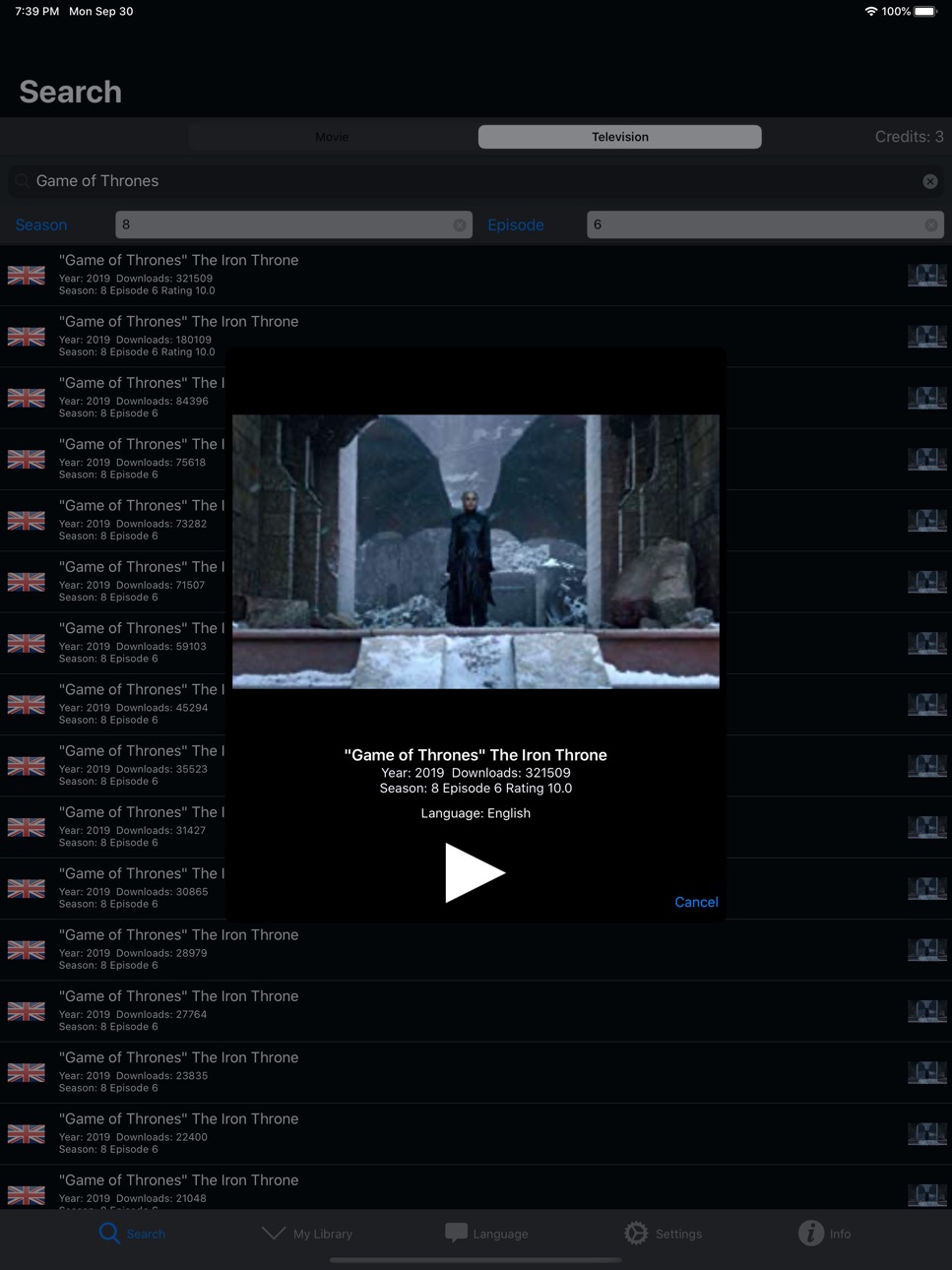
iPad 6 images




What’s New Version 3.2.0
Lots of changes and fixes to make Subtitles Viewer better than ever!
Description
View subtitles on your iOS device synchronized with television or movies on your TV, or at the cinema. Brilliant for when you're at a cinema watching a movie, and you need subtitles in your native language! Great for the hard of hearing and deaf community.
Satisfied users have described this app as "awesome" and "a godsend".
Subtitles available in English, Spanish(Español), Arabic(العربية), Bengali, Chinese(中文), Danish(dansk), Dutch(Nederlands), French(français), German(Deutsch), Greek(ελληνικά), Japanese(日本語), Javanese(basa Jawa), Hebrew(עברית), Italian(italiano), Korean(한국어), Malay(bahasa Melayu), Polish(język polski), Portuguese(português), Punjabi, Russian(русский язык), Sweden(Svenska), Thai(ไทย), Turkish(Türkçe) and Vietnamese(Tiếng Việt).
Subtitles are downloaded from the huge database of subtitles at opensubtitles.org. As subtitles are contributed to opensubtitles by volunteers, the time it takes for subtitles to become available after a movie release can vary.
Download three subtitles for free. Credits for more downloads are available via in-app purchases.
Australian users: Searching and downloading subtitles is currently blocked by Australian ISPs, more details here: http://subtitlesviewer.com/subtitlesAustralia.html
Capabilities
In-App Purchases
Accessibility
ipadiphonemacrealityDevicetvoswatch
Version history 25 versions
Build 855490518v3.2.02023-03-20 12:49:27
Lots of changes and fixes to make Subtitles Viewer better than ever!
Build 838382954v3.1.02020-10-27 21:43:57
Increased row height on iPhone in search and library tabs.
Added movie poster thumb to library items
Build 834032162v3.0.82019-12-20 15:53:14
Resolved issue with Arabic subtitles
Build 833931387v3.0.72019-12-12 11:25:09
Improved search interface on iPad
Build 833512568v3.0.62019-11-10 18:27:45
Fixed uploading bug.
Build 833299168v3.0.52019-10-24 10:13:43
Updated App Preview.
Build 832987705v3.0.42019-10-02 08:37:57
Fixed bugs for iOS 9 and iOS 10 users!
Build 830036555v3.0.32019-02-09 15:55:17
Improvements, minor bug fixes. Added message for Australian users.
Build 829395074v3.0.02018-11-28 16:18:26
Many improvements in this major version update! Here are some:
• Added hearing loss symbol to relevant subtitles.
• Deselect all languages to see subtitles in all possible languages!
• Improved decoding of subtitles when downloading, for languages such as Greek.
• Choose encoding of subtitles when uploading in the settings tab.
Build 825424179v2.7.02018-08-25 12:44:32
Added traditional Chinese subtitles
Added Indonesian subtitles
Fixed issue with Greek subtitles
Fixed issue with DropBox
Removed status bar while playing subtitles
Fixed layout issue with info screen
Fixed subtitle layout issue on iPads
Build 824425287v2.6.02017-11-16 23:34:46
Open subtitles files in Subtitles Viewer from Mail or Files.
Subtitles now have ratings.
Fixed bugs.
Build 822630527v2.5.02017-06-22 16:59:12
Thanks for your feedback!
An additional play button has been added to start a movie from the start of movie and not just from the first dialogue.
Fixed movie/tv show posters issue.
Minimum version of iOS is now iOS 9.
Addressed deprecated code.
Build 819451446v2.4.02016-10-28 15:03:10
Fixed Chinese, Arabic and Japanese subtitles
Added Chinese bilingual (Chinese + English)
Build 816682243v2.3.02016-03-14 19:36:54
Use your selfie stick as a remote control to play and pause the subtitles!
Swipe left and right to go to the next subtitle!
Build 816269409v2.2.02016-02-01 15:42:07
Now you can preview a subtitle! If you don’t like it, reject it with the cross button and get your credit back!
Resolved issue with some subtitles
Resolved issue with some Japanese subtitles
Further resolved issue with opensubtitles.org
Build 815461126v2.1.62015-12-28 18:32:43
Update due to issue with downloads from opensubtitles.org
Build 814837166v2.1.52015-12-05 01:06:33
Accessibility / voiceover for visually impaired
Resolved upload via dropbox file format issues
Improved explanations of search/download issues
Improved television program search process
Added Video Previews
Build 813526804v2.12015-10-13 22:31:30
Added subtitles for Japanese(日本語), Korean(한국어), Punjabi and Hindi.
Added localizations for Japanese(日本語) and Korean(한국어).
Updates for iOS 9
Bug fixes
Build 813217852v2.0.22015-09-08 16:16:37
Thanks for all the support!
Added Dutch language.
Increased default subtitle font size on iPhone.
Bug fix:No popup for unsuccessful searches
Build 813139324v2.0.12015-08-27 00:06:43
Thanks for all the support!
Bug fix:Crash on search
Bug fix:Incorrectly navigating to App Store
Build 811681542v2.0.02015-04-10 13:27:49
Huge update for Subtitles Viewer 2.0!
• New dark design
• Upload subtitles via Dropbox
• New player controls - slider to skip to time-code
• Added movie posters to search results
• Added requested features
• Bug fixes
Build 811446680v1.2.12014-12-21 19:15:45
Look out for new look coming soon!
Resolved in this version:
* bug when changing language
Build 811193397v1.22014-12-14 22:15:50
Improvements and bug fixes.
Compatibility with iPhone 6 and iPhone 6+.
Fixed bug where subtitles were flying past too quickly.
Build 608112677v1.12014-06-26 22:58:59
Thanks to everyone for the great feedback and reviews.
In this version we have added new languages - Finnish and Hungarian. We've added text sizes to the video player and added some more to the info tab.
Also, we've resolved bugs and made improvements to Subtitles Viewer. Enjoy!
Build 586342699v1.02014-06-06 23:20:41
No pricing data captured yet — comparisons appear once the app has paid storefronts or in-app purchases.
Availability 1 of 1 storefronts
| Region | Language | Price | Ratings | Avg | Version |
|---|---|---|---|---|---|
| US | en-US | Free | 388 | 4.4 | 3.2.0 |
Change log 28 changes · US
✎
releaseNotes updated
Lots of changes and fixes to make Subtitles Viewer better than ever!
✎
description updated
View subtitles on your iOS device synchronized with television or movies on your TV, or at the cinema. Brilliant for when you're at a cinema watching a movie, a
✎
name updated
Subtitles Viewer!
◆
Version 3.2.0 released
Lots of changes and fixes to make Subtitles Viewer better than ever!
◆
Version 3.1.0 released
Increased row height on iPhone in search and library tabs.
Added movie poster thumb to library items
◆
Version 3.0.8 released
Resolved issue with Arabic subtitles
◆
Version 3.0.7 released
Improved search interface on iPad
◆
Version 3.0.6 released
Fixed uploading bug.
◆
Version 3.0.5 released
Updated App Preview.
◆
Version 3.0.4 released
Fixed bugs for iOS 9 and iOS 10 users!
◆
Version 3.0.3 released
Improvements, minor bug fixes. Added message for Australian users.
◆
Version 3.0.0 released
Many improvements in this major version update! Here are some:
• Added hearing loss symbol to relevant subtitles.
• Deselect all languages to see subtitles in all possible languages!
• Improved decoding of subtitles when downloading, for la
◆
Version 2.7.0 released
Added traditional Chinese subtitles
Added Indonesian subtitles
Fixed issue with Greek subtitles
Fixed issue with DropBox
Removed status bar while playing subtitles
Fixed layout issue with info screen
Fixed subtitle layout issue on iPads
◆
Version 2.6.0 released
Open subtitles files in Subtitles Viewer from Mail or Files.
Subtitles now have ratings.
Fixed bugs.
◆
Version 2.5.0 released
Thanks for your feedback!
An additional play button has been added to start a movie from the start of movie and not just from the first dialogue.
Fixed movie/tv show posters issue.
Minimum version of iOS is now iOS 9.
Addressed deprecated
◆
Version 2.4.0 released
Fixed Chinese, Arabic and Japanese subtitles
Added Chinese bilingual (Chinese + English)
◆
Version 2.3.0 released
Use your selfie stick as a remote control to play and pause the subtitles!
Swipe left and right to go to the next subtitle!
◆
Version 2.2.0 released
Now you can preview a subtitle! If you don’t like it, reject it with the cross button and get your credit back!
Resolved issue with some subtitles
Resolved issue with some Japanese subtitles
Further resolved issue with opensubtitles.org
◆
Version 2.1.6 released
Update due to issue with downloads from opensubtitles.org
◆
Version 2.1.5 released
Accessibility / voiceover for visually impaired
Resolved upload via dropbox file format issues
Improved explanations of search/download issues
Improved television program search process
Added Video Previews
◆
Version 2.1 released
Added subtitles for Japanese(日本語), Korean(한국어), Punjabi and Hindi.
Added localizations for Japanese(日本語) and Korean(한국어).
Updates for iOS 9
Bug fixes
◆
Version 2.0.2 released
Thanks for all the support!
Added Dutch language.
Increased default subtitle font size on iPhone.
Bug fix:No popup for unsuccessful searches
◆
Version 2.0.1 released
Thanks for all the support!
Bug fix:Crash on search
Bug fix:Incorrectly navigating to App Store
◆
Version 2.0.0 released
Huge update for Subtitles Viewer 2.0!
• New dark design
• Upload subtitles via Dropbox
• New player controls - slider to skip to time-code
• Added movie posters to search results
• Added requested features
• Bug fixes
◆
Version 1.2.1 released
Look out for new look coming soon!
Resolved in this version:
* bug when changing language
◆
Version 1.2 released
Improvements and bug fixes.
Compatibility with iPhone 6 and iPhone 6+.
Fixed bug where subtitles were flying past too quickly.
◆
Version 1.1 released
Thanks to everyone for the great feedback and reviews.
In this version we have added new languages - Finnish and Hungarian. We've added text sizes to the video player and added some more to the info tab.
Also, we've resolved bugs and made
◆
Version 1.0 released