Home › Utilities

StrongVPN — The Strongest VPN
Privacy. Freedom. Security.
 US
US
1 of 1 storefronts
Content in en-US
Content in en-US
Information
Preview 2 platforms
iPhone 8 images



iPad 8 images




What’s New Version 2.9.0
We never stop doing code cleanup, bug fixes, and general improvements. Have a problem? Email us at support@strongvpn.com, and we’ll give you a hand.
Description
StrongVPN is your fast and easy tool for unlimited privacy online. Stay safe with the best VPN for iPhone and iPad. Use StrongVPN to protect your data from ISP spying and cybercrime while you use vulnerable Wi-Fi networks. Enjoy the added ability to browse the web unrestricted worldwide, all while staying private and secure with the best VPN. Established in 1995, StrongVPN is one of the oldest and most trusted names in the VPN industry.
Privacy On All Devices
StrongVPN is supported on a wide variety of devices. Get started with our easy-to-use VPN setup guides to begin securing your internet connection within minutes. We also allow you to have twelve simultaneous connections, so you won’t have to sacrifice the privacy of one device for another.
Zero Logs for True Privacy
Your privacy is our priority. Unlike other VPNs, StrongVPN will never track, store, or spy on your browsing data while you’re connected to our VPN. We own our own secure server network, meaning that your private information is protected from any third parties.
Fastest VPN Speeds
Our network optimization makes our VPN deliver the fastest speeds, all while continuing to secure your browsing activity. Enjoy the internet without being throttled by your ISP and other pesky lags.
Subscriptions
You will be charged on your iTunes account at purchase confirmation. Subscription automatically renews unless auto-renew is turned off at least 24-hours before the end of the current subscription. Renewal will be charged 24-hours prior to the end of the current period, for the originally charged amount. Subscriptions can be managed from your iTunes account settings.
StrongVPN offers both 1 month and 12 month auto-renewable VPN subscriptions, available through In-App Purchase.
Terms of Service:
https://strongvpn.com/tos.html
In-App Purchases US pricing
Strong Subscription
VPN 1 Month Auto-Renewable Subcription · Monthly$9.99
1 Year Auto-Renewable Subcription · Yearly$69.99
Capabilities
In-App Purchases
Accessibility
ipadiphonemacrealityDevicetvoswatch
Version history 25 versions
Build 886453513v2.9.02026-06-08 22:08:31
We never stop doing code cleanup, bug fixes, and general improvements. Have a problem? Email us at support@strongvpn.com, and we’ll give you a hand.
Build 878050240v2.8.02025-09-17 18:29:10
We never stop doing code cleanup, bug fixes, and general improvements. Have a problem? Email us at support@strongvpn.com, and we’ll give you a hand.
Build 853858094vStrong iOS 2.7.02022-12-13 22:49:39
We never stop doing code cleanup, bug fixes, and general improvements. Have a problem? Email us at support@strongvpn.com, and we’ll give you a hand.
Build 845929985v2.6.02021-12-16 16:13:41
+ Improved compatibility with iOS 15
+ We never stop doing code cleanup, bug fixes, and general improvements. Have a problem? Email us at support@strongvpn.com and we’ll give you a hand.
Build 834941340v2.5.12020-03-25 20:16:53
In the latest release you’ll find:
- Added support for the WireGuard® protocol
- Integration of the StrongVPN Help Knowledge Base
- Improved accessibility on smaller devices
- Added Siri Shortcut support for connecting/disconnecting the VPN
We never stop doing code cleanup, bug fixes, and general improvements. Have a problem? Email us at support@strongvpn.com and we’ll give you a hand.
Build 834651033v2.5.02020-03-02 18:24:15
In the latest release you’ll find:
- Added support for the WireGuard® protocol
- Integration of the StrongVPN Help Knowledge Base
- Improved accessibility on smaller devices
- Added Siri Shortcut support for connecting/disconnecting the VPN
We never stop doing code cleanup, bug fixes, and general improvements. Have a problem? Email us at support@strongvpn.com and we’ll give you a hand.
Build 834240157v2.4.12020-01-08 00:11:38
In the latest release you'll find:
- Light Mode and Dark Mode themes added for iOS 13
- In-app chat support to make assistance even easier
- Device diagnostics can be disabled and erased entirely
- Spanish language support added
We never stop doing code cleanup, bug fixes, and general improvements. Have a problem? Email us at support@strongvpn.com and we'll give you a hand.
Build 833119603v2.4.02019-10-28 18:16:50
In the latest release you'll find:
- Light Mode and Dark Mode support for iOS 13
- In-app chat support to make assistance even easier
- Device diagnostics can be disabled and erased completely
- Added language support for Spanish
We never stop doing code cleanup, bug fixes, and general improvements. Have a problem? Email us at support@strongvpn.com and we'll give you a hand.
Build 830270534v2.2.22019-03-05 19:13:06
In the latest release you’ll find:
- iOS 12 Password Manager integration
- Updated Terms of Service
- Improved connection to the StrongVPN service worldwide
We never stop doing code cleanup, bug fixes, and general improvements. Have a problem? Email us at support@strongvpn.com and we’ll give you a hand.
Build 828803934v2.2.12018-10-09 17:30:09
In the latest release you’ll find:
* Various bug fixes and performance improvements.
* Please be aware that as of November, any updates will require iOS 10 or greater.
We never stop doing code cleanup and general optimization. Have a problem? Email us at support@strongvpn.com and we’ll give you a hand.
Build 828309104v2.2.02018-08-27 15:01:34
Thanks for trusting StrongVPN to secure your connection. We update the StrongVPN app as often as possible to make it more reliable for you. In the latest release you’ll find:
- App diagnostics data is now removable. Navigate to 'Settings’ —> ‘Diagnostics’, and select the trash icon in the upper right to delete diagnostic files.
We never stop doing code cleanup, bug fixes, and general optimization. This release specifically addresses connection issues following an improperly updated server list, and signup errors when registering with an existing email address. This update also resolves an bug with the filter reset button.
Have a problem? Email us at support@strongvpn.com and we’ll give you a hand.
Build 826806915v2.1.02018-05-17 17:11:59
New in 2.1.0:
* On-Demand functionality to keep your connection secured automatically!
* New diagnostics panel to help diagnose application issues with support
* Enhancements and fixes that improve reliability and performance
Build 826339111v2.0.12018-04-13 00:21:06
New in 2.0.1:
Added support for iPad landscape mode.
Squashed a few bugs that creeped into the last release.
New in 2.0.0:
BEST AVAILABLE SERVER
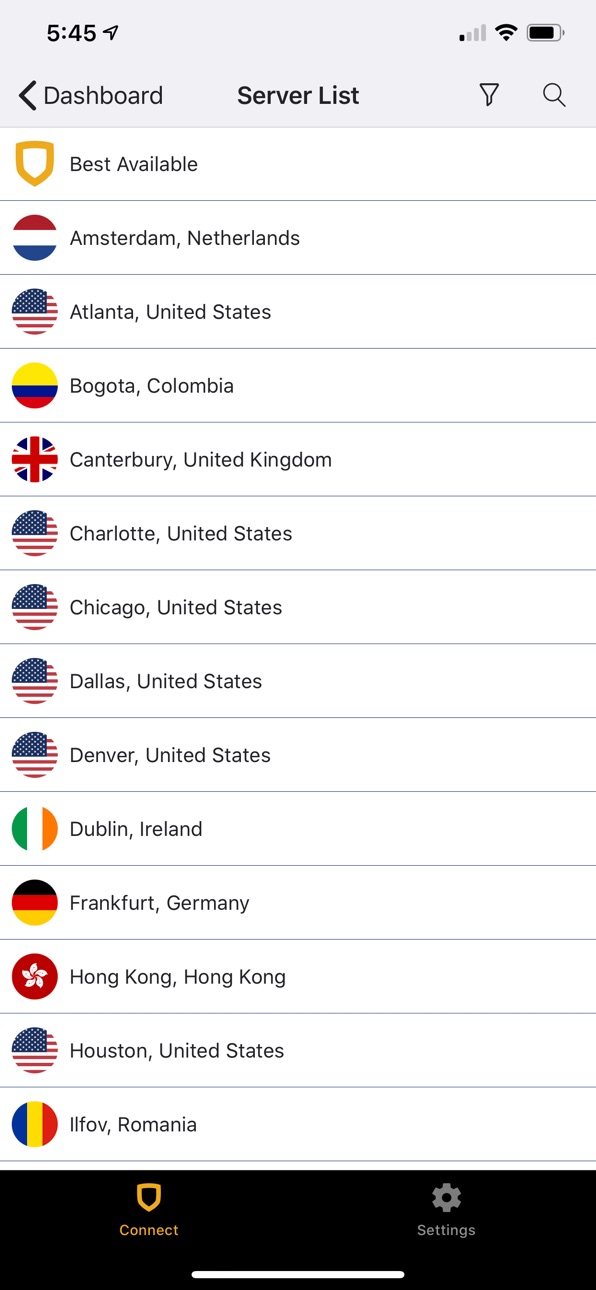
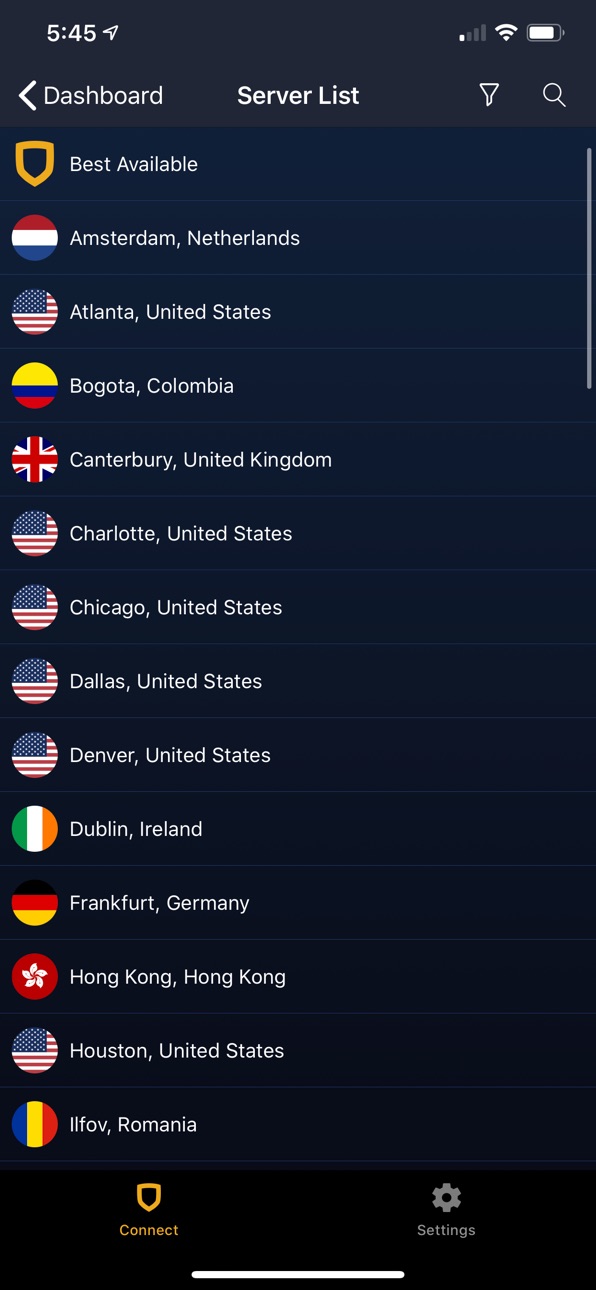
Let StrongVPN determine the best server for you depending on your location, or enjoy the freedom to connect to a specific city.
NEW SERVER LIST
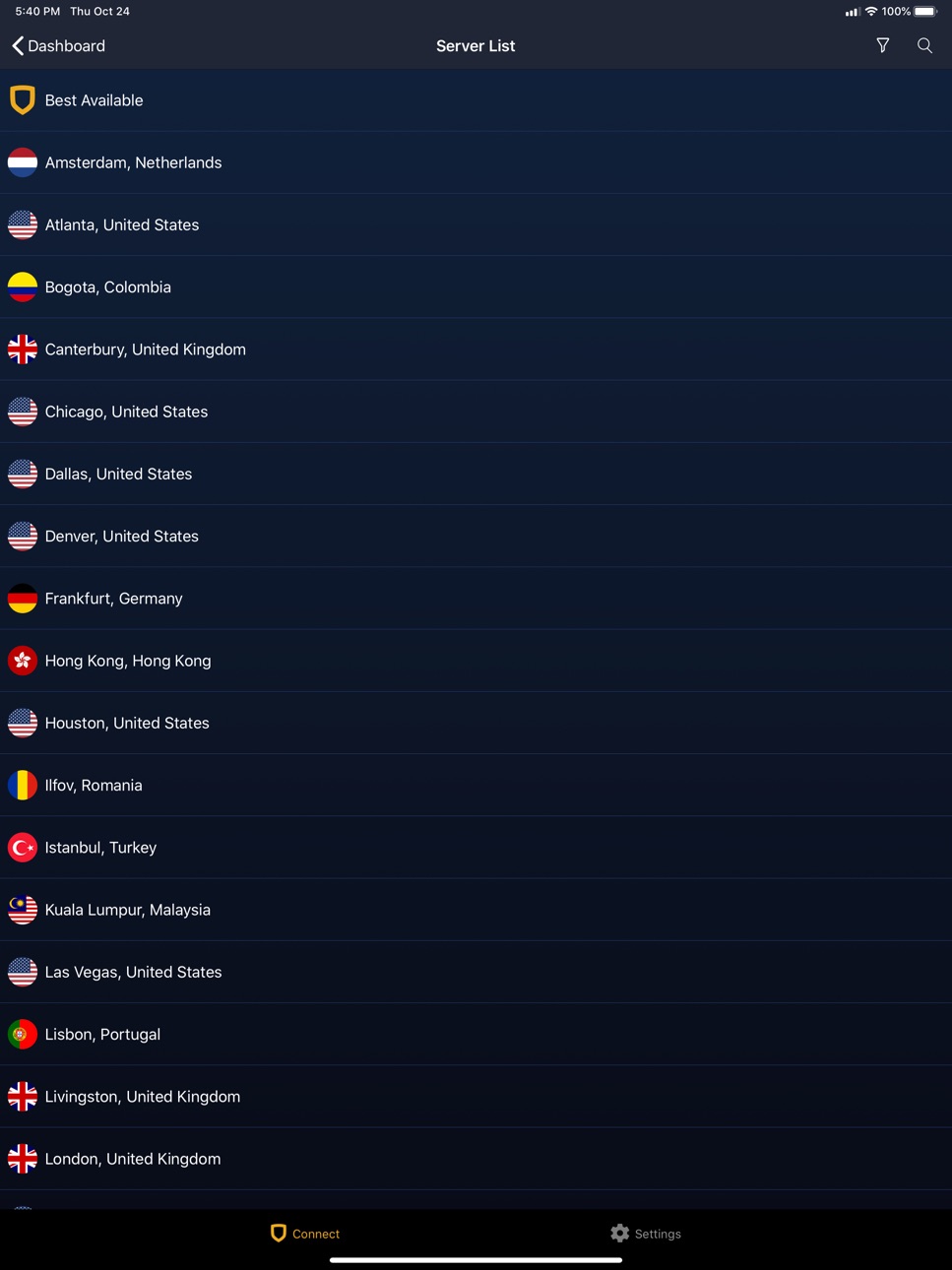
If you'd rather choose your server location, you can now open the server selector screen to pick from a wide variety of locations around the globe. Sort this list by either city or country to find the best location for you.
NEW TAB-BASED NAVIGATION
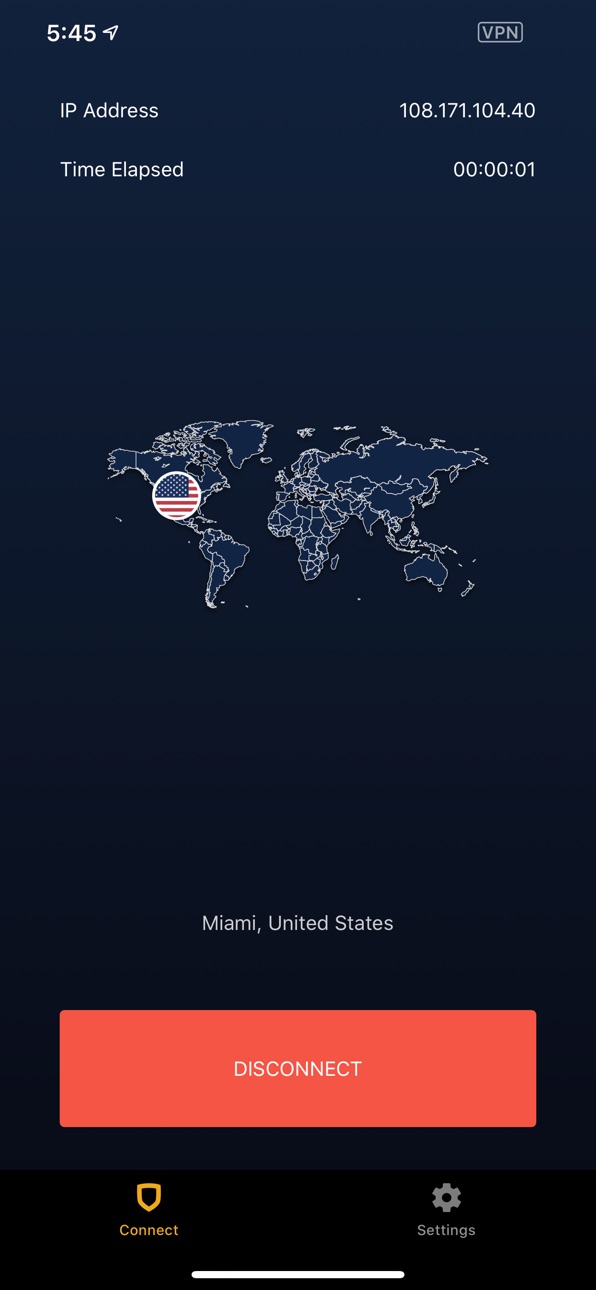
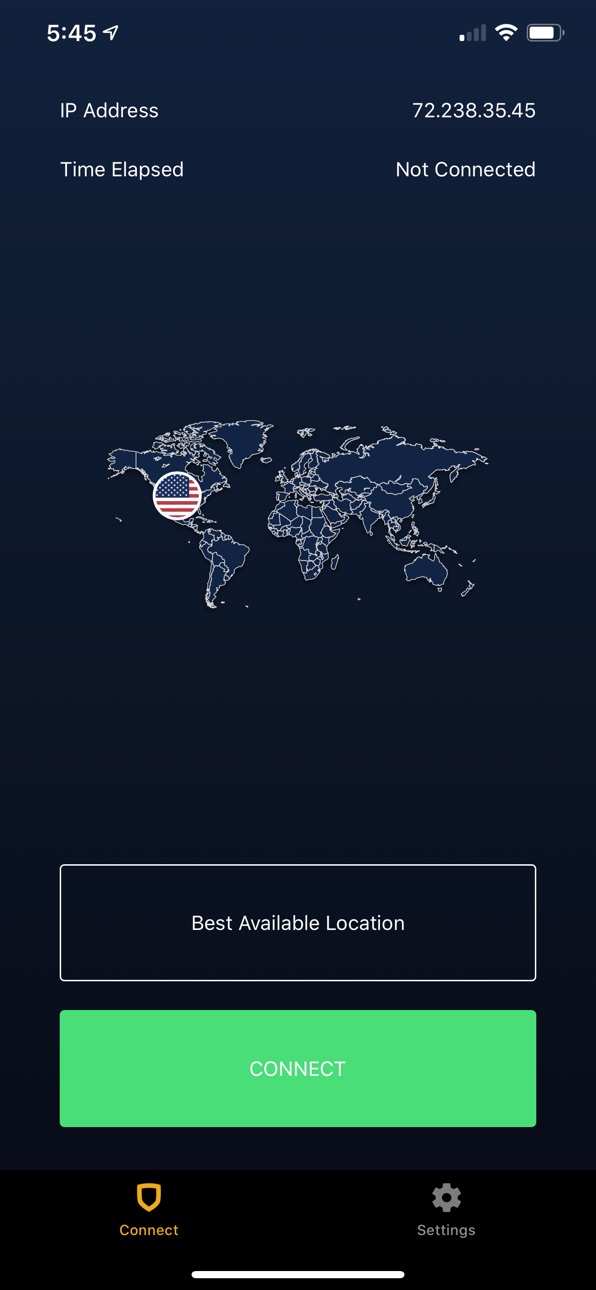
Gain quick access to the major areas of the app with our new tab bar based navigation. Simply tap the Strong shield at the bottom left to access the new Dashboard and everything related to your connection. The right tab is reserved for all of StrongVPN's settings. These two tabs are always available and give you quick access to everything you might need.
NEW DASHBOARD SCREEN
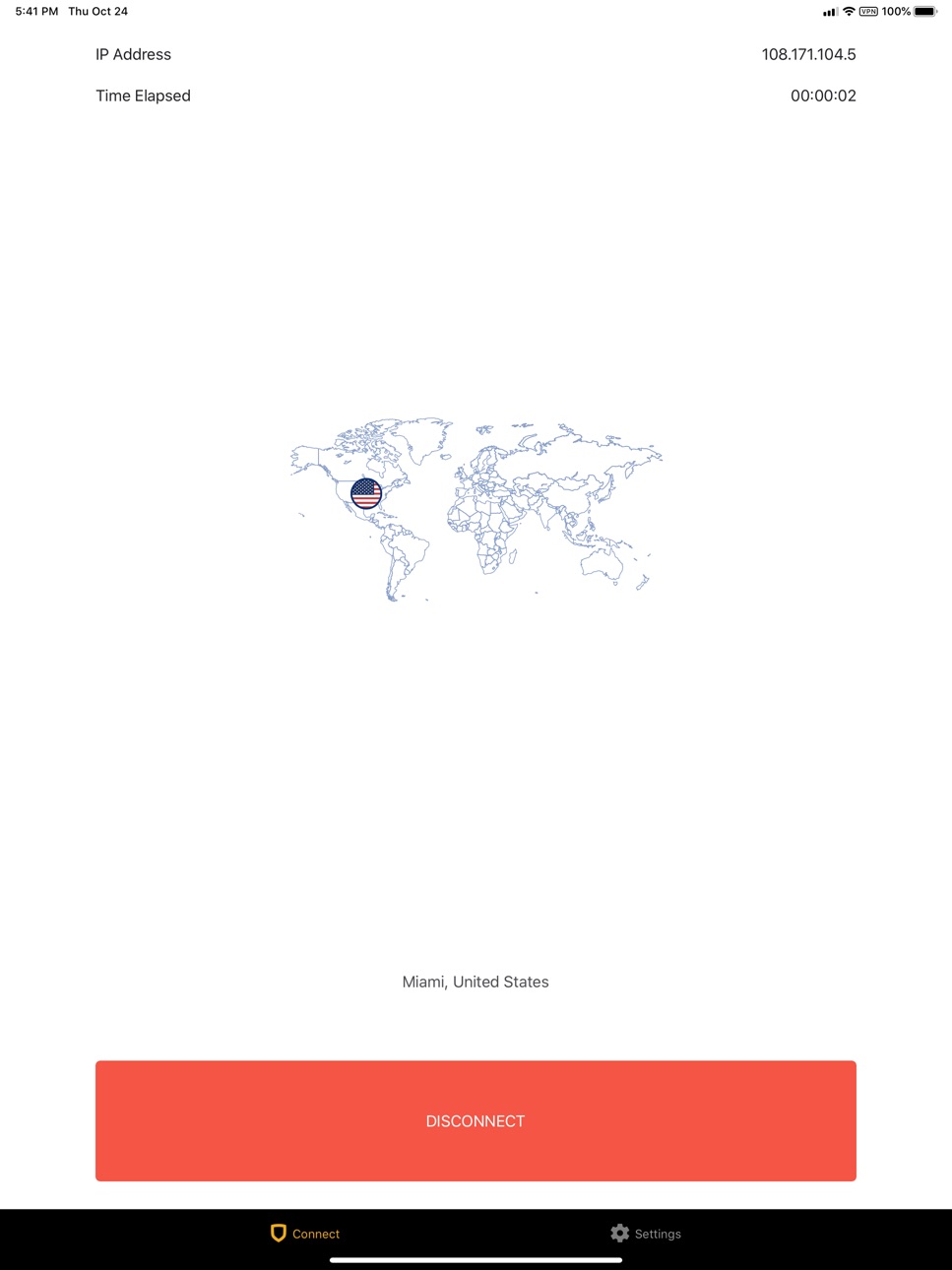
Our new Dashboard makes it easy to view the state of your connection. View your current IP address and the time elapsed of the connection (if the VPN is engaged). You can also view either your current location on a world map (if not connected) or the location of your VPN connection (when connected).
NEW SETTINGS SCREEN
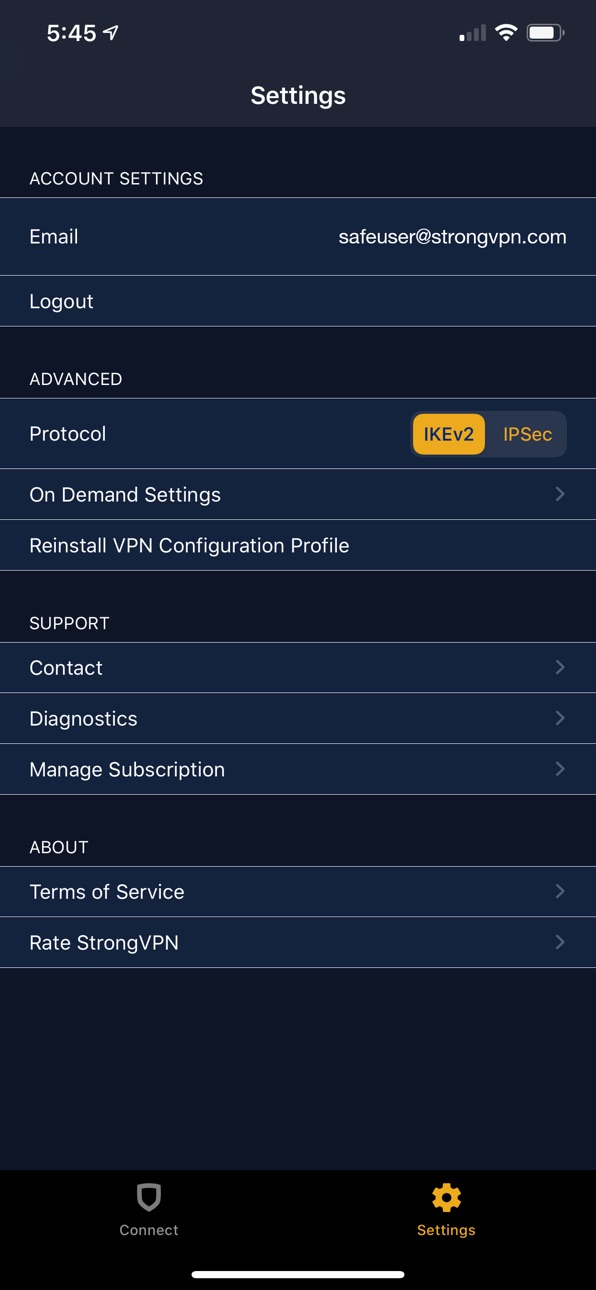
Check your account settings, log out of StrongVPN, control your connection details, and contact support if you have an issue with your app install or your account - all from the new and convenient settings screen. Access the screen by simply tapping on the gear icon, always accessible at the bottom right of the app.
Build 826088921v2.0.02018-03-15 03:01:11
BEST AVAILABLE SERVER
Let StrongVPN determine the best server for you depending on your location, or enjoy the freedom to connect to a specific city.
NEW SERVER LIST
If you'd rather choose your server location, you can now open the server selector screen to pick from a wide variety of locations around the globe. Sort this list by either city or country to find the best location for you.
NEW TAB-BASED NAVIGATION
Gain quick access to the major areas of the app with our new tab bar based navigation. Simply tap the Strong shield at the bottom left to access the new Dashboard and everything related to your connection. The right tab is reserved for all of StrongVPN's settings. These two tabs are always available and give you quick access to everything you might need.
NEW DASHBOARD SCREEN
Our new Dashboard makes it easy to view the state of your connection. View your current IP address and the time elapsed of the connection (if the VPN is engaged). You can also view either your current location on a world map (if not connected) or the location of your VPN connection (when connected).
NEW SETTINGS SCREEN
Check your account settings, log out of StrongVPN, control your connection details, and contact support if you have an issue with your app install or your account - all from the new and convenient settings screen. Access the screen by simply tapping on the gear icon, always accessible at the bottom right of the app.
Build 822990672v1.5.62017-07-24 01:36:07
UI Updates:
- iPad landscape support and split view multitasking.
- Hamburger settings menu was removed in favor of a settings table.
- Integrated standard system behavior when displaying views.
- About view updated to display top navigation bar and an activity indicator while loading.
- Dashboard UI reorganized.
- Dashboard buttons look more like buttons to distinguish from static text.
- Added Done button to top left of subscription view to return to sign up.
- Settings, account selection, and server selection display as form sheets on the iPad in larger widths.
Bug Fixes:
- Crash on About for pre iOS 10 devices
- Declining the installation of the VPN Profile no longer causes infinite alert prompts until installed.
- Prevented the "continue" button from being selected before selecting a subscription on the subscription view.
- Cancelling creating an account on the subscription view will no longer lock up the UI.
- Login and sign up views move the input fields above the keyboard if it would otherwise be
Build 822655932v1.5.52017-07-10 23:54:57
UI Updates:
- iPad landscape support and split view multitasking.
- Hamburger settings menu was removed in favor of a settings table.
- Integrated standard system behavior when displaying views.
- About view updated to display top navigation bar and an activity indicator while loading.
- Dashboard UI reorganized.
- Dashboard buttons look more like buttons to distinguish from static text.
- Added Done button to top left of subscription view to return to sign up.
- Settings, account selection, and server selection display as form sheets on the iPad in larger widths.
Bug Fixes:
- Declining the installation of the VPN Profile no longer causes infinite alert prompts until installed.
- Prevented the "continue" button from being selected before selecting a subscription on the subscription view.
- Cancelling creating an account on the subscription view will no longer lock up the UI.
- Login and sign up views move the input fields above the keyboard if it would otherwise be
Build 820652168v1.5.42017-01-24 19:04:36
• Fixed a small In-App Purchase crash.
Build 819665466v1.5.32016-11-19 01:46:37
• Added Restore Purchases Button in Settings
• Fixed an Issue where "Stay Signed In" was not working properly
• Improved IAP Experience.
Build 819256935v1.5.22016-11-01 19:42:52
Users now have the ability to purchase a subscription in the app
Build 815287984v1.5.12016-01-18 07:01:54
* Improved on boarding - Get an easy tutorial on how to use StrongVPN on your iPhone or iPad.
* Added support for IKEv2 protocols.
* Stability and Performance Improvements
* Squashed a few bugs
Build 812601927v1.3.22015-06-18 03:03:25
1.3.2:
- Minor internal fixes and performance boosts.
1.3.1:
- Fixed rare crash in switching servers and logging in.
1.3.0:
- IKEv2 support for Open accounts.
- Fixes for IKEv1 (IPSec) connectivity issues.
- Fixes for backgrounding issues.
- Settings pane to tweak IPSec connection preferences.
- Improved feedback during network operations.
Build 811834808v1.3.12015-02-27 21:27:15
1.3.1:
- Fixed rare crash in switching servers and logging in.
1.3.0:
- IKEv2 support for Open accounts.
- Fixes for IKEv1 (IPSec) connectivity issues.
- Fixes for backgrounding issues.
- Settings pane to tweak IPSec connection preferences.
- Improved feedback during network operations.
Build 811747771v1.3.02015-02-17 16:35:43
1.3.0:
- IKEv2 support for Open accounts.
- Fixes for IKEv1 (IPSec) connectivity issues.
- Fixes for backgrounding issues.
- Settings pane to tweak IPSec connection preferences.
- Improved feedback during network operations.
1.2.2:
- Resolve compatibility issues with iOS 8.0.2.
1.2.1:
- Connection state persistence now fixed for OpenVPN/IPSec users.
- Legacy profiles now removed upon migration to iOS 8.
- Various iOS 8-related fixes and enhancements.
Build 724182659v1.2.22014-09-29 23:36:34
1.2.2:
- Resolve compatibility issues with iOS 8.0.2.
1.2.1:
- Connection state persistence now fixed for OpenVPN/IPSec users.
- Legacy profiles now removed upon migration to iOS 8.
- Various iOS 8-related fixes and enhancements.
1.2.0:
- Support for iOS 8.
1.1.5:
- Backend communication improvements.
- Resolve edge case condition in which scrolling too fast or far on the tutorial pages would cause the application to crash.
1.1.4:
- Resolve an issue in which responses indicating an error would cause the application to crash.
1.1.3:
- Resolved an issue where changing your account's password could result in crashing on startup.
- App will now log itself out automatically if it detects the loaded password is no longer valid.
1.1.2:
- Continued improvement of network backend resiliency.
1.1.1:
- Login issues should be resolved for users on certain networks.
1.1.0:
- Native iPad compatibility - this is a big one!
- Switch cities with one touch, right in the app!
- User interface for PPTP/L2TP accounts is now more consistent.
- Spotty internet connection? We've got you covered with improved backend resilience.
- Backgrounds now displayed for all 48 accessible cities.
- Miscellaneous bugfixes and improvements - too many to list!
Build 717743258v1.2.12014-09-24 20:33:25
1.2.1:
- Connection state persistence now fixed for OpenVPN/IPSec users.
- Legacy profiles now removed upon migration to iOS 8.
- Various iOS 8-related fixes and enhancements.
1.2.0:
- Support for iOS 8.
1.1.5:
- Backend communication improvements.
- Resolve edge case condition in which scrolling too fast or far on the tutorial pages would cause the application to crash.
1.1.4:
- Resolve an issue in which responses indicating an error would cause the application to crash.
1.1.3:
- Resolved an issue where changing your account's password could result in crashing on startup.
- App will now log itself out automatically if it detects the loaded password is no longer valid.
1.1.2:
- Continued improvement of network backend resiliency.
1.1.1:
- Login issues should be resolved for users on certain networks.
1.1.0:
- Native iPad compatibility - this is a big one!
- Switch cities with one touch, right in the app!
- User interface for PPTP/L2TP accounts is now more consistent.
- Spotty internet connection? We've got you covered with improved backend resilience.
- Backgrounds now displayed for all 48 accessible cities.
- Miscellaneous bugfixes and improvements - too many to list!
Price history by region
Currency
Show
Columns
Search
Availability 1 of 1 storefronts
| Region | Language | Price | Ratings | Avg | Version |
|---|---|---|---|---|---|
| US | en-US | Free | 6.5k | 4.4 | 2.9.0 |
Change log 29 changes · US
✎
releaseNotes updated
We never stop doing code cleanup, bug fixes, and general improvements. Have a problem? Email us at support@strongvpn.com, and we’ll give you a hand.
✎
description updated
StrongVPN is your fast and easy tool for unlimited privacy online. Stay safe with the best VPN for iPhone and iPad. Use StrongVPN to protect your data from ISP
✎
subtitle updated
Privacy. Freedom. Security.
✎
name updated
StrongVPN — The Strongest VPN
◆
Version 2.9.0 released
We never stop doing code cleanup, bug fixes, and general improvements. Have a problem? Email us at support@strongvpn.com, and we’ll give you a hand.
◆
Version 2.8.0 released
We never stop doing code cleanup, bug fixes, and general improvements. Have a problem? Email us at support@strongvpn.com, and we’ll give you a hand.
◆
Version Strong iOS 2.7.0 released
We never stop doing code cleanup, bug fixes, and general improvements. Have a problem? Email us at support@strongvpn.com, and we’ll give you a hand.
◆
Version 2.6.0 released
+ Improved compatibility with iOS 15
+ We never stop doing code cleanup, bug fixes, and general improvements. Have a problem? Email us at support@strongvpn.com and we’ll give you a hand.
◆
Version 2.5.1 released
In the latest release you’ll find:
- Added support for the WireGuard® protocol
- Integration of the StrongVPN Help Knowledge Base
- Improved accessibility on smaller devices
- Added Siri Shortcut support for connecting/disconnecting the VP
◆
Version 2.5.0 released
In the latest release you’ll find:
- Added support for the WireGuard® protocol
- Integration of the StrongVPN Help Knowledge Base
- Improved accessibility on smaller devices
- Added Siri Shortcut support for connecting/disconnecting the VP
◆
Version 2.4.1 released
In the latest release you'll find:
- Light Mode and Dark Mode themes added for iOS 13
- In-app chat support to make assistance even easier
- Device diagnostics can be disabled and erased entirely
- Spanish language support added
We never
◆
Version 2.4.0 released
In the latest release you'll find:
- Light Mode and Dark Mode support for iOS 13
- In-app chat support to make assistance even easier
- Device diagnostics can be disabled and erased completely
- Added language support for Spanish
We never
◆
Version 2.2.2 released
In the latest release you’ll find:
- iOS 12 Password Manager integration
- Updated Terms of Service
- Improved connection to the StrongVPN service worldwide
We never stop doing code cleanup, bug fixes, and general improvements. Have a pro
◆
Version 2.2.1 released
In the latest release you’ll find:
* Various bug fixes and performance improvements.
* Please be aware that as of November, any updates will require iOS 10 or greater.
We never stop doing code cleanup and general optimization. Have a prob
◆
Version 2.2.0 released
Thanks for trusting StrongVPN to secure your connection. We update the StrongVPN app as often as possible to make it more reliable for you. In the latest release you’ll find:
- App diagnostics data is now removable. Navigate to 'Settings’
◆
Version 2.1.0 released
New in 2.1.0:
* On-Demand functionality to keep your connection secured automatically!
* New diagnostics panel to help diagnose application issues with support
* Enhancements and fixes that improve reliability and performance
◆
Version 2.0.1 released
New in 2.0.1:
Added support for iPad landscape mode.
Squashed a few bugs that creeped into the last release.
New in 2.0.0:
BEST AVAILABLE SERVER
Let StrongVPN determine the best server for you depending on your location, or enjoy the fr
◆
Version 2.0.0 released
BEST AVAILABLE SERVER
Let StrongVPN determine the best server for you depending on your location, or enjoy the freedom to connect to a specific city.
NEW SERVER LIST
If you'd rather choose your server location, you can now open the serv
◆
Version 1.5.6 released
UI Updates:
- iPad landscape support and split view multitasking.
- Hamburger settings menu was removed in favor of a settings table.
- Integrated standard system behavior when displaying views.
- About view updated to display top navigatio
◆
Version 1.5.5 released
UI Updates:
- iPad landscape support and split view multitasking.
- Hamburger settings menu was removed in favor of a settings table.
- Integrated standard system behavior when displaying views.
- About view updated to display top navigatio
◆
Version 1.5.4 released
• Fixed a small In-App Purchase crash.
◆
Version 1.5.3 released
• Added Restore Purchases Button in Settings
• Fixed an Issue where "Stay Signed In" was not working properly
• Improved IAP Experience.
◆
Version 1.5.2 released
Users now have the ability to purchase a subscription in the app
◆
Version 1.5.1 released
* Improved on boarding - Get an easy tutorial on how to use StrongVPN on your iPhone or iPad.
* Added support for IKEv2 protocols.
* Stability and Performance Improvements
* Squashed a few bugs
◆
Version 1.3.2 released
1.3.2:
- Minor internal fixes and performance boosts.
1.3.1:
- Fixed rare crash in switching servers and logging in.
1.3.0:
- IKEv2 support for Open accounts.
- Fixes for IKEv1 (IPSec) connectivity issues.
- Fixes for backgrounding is
◆
Version 1.3.1 released
1.3.1:
- Fixed rare crash in switching servers and logging in.
1.3.0:
- IKEv2 support for Open accounts.
- Fixes for IKEv1 (IPSec) connectivity issues.
- Fixes for backgrounding issues.
- Settings pane to tweak IPSec connection preferen
◆
Version 1.3.0 released
1.3.0:
- IKEv2 support for Open accounts.
- Fixes for IKEv1 (IPSec) connectivity issues.
- Fixes for backgrounding issues.
- Settings pane to tweak IPSec connection preferences.
- Improved feedback during network operations.
1.2.2:
- Re
◆
Version 1.2.2 released
1.2.2:
- Resolve compatibility issues with iOS 8.0.2.
1.2.1:
- Connection state persistence now fixed for OpenVPN/IPSec users.
- Legacy profiles now removed upon migration to iOS 8.
- Various iOS 8-related fixes and enhancements.
1.2
◆
Version 1.2.1 released
1.2.1:
- Connection state persistence now fixed for OpenVPN/IPSec users.
- Legacy profiles now removed upon migration to iOS 8.
- Various iOS 8-related fixes and enhancements.
1.2.0:
- Support for iOS 8.
1.1.5:
- Backend communicati