Home › Business

 US
US
1 of 1 storefronts
Content in en-US
Content in en-US
Information
Preview 2 platforms
iPhone 4 images


iPad 4 images


What’s New Version 5.0
- Bug fixes and UI improvements to streamline with latest iOS.
We are thankful to all users for their valuable feedback :)
Description
Winmail Reader is ultimate tool for reading "winmail.dat" attachment files on iPhones, iPads and iPod touch. Winmail Reader decodes "winmail.dat" file, and allows any attachments contained in them to be opened, read, saved or e-mailed.
* * * Winmail Reader for Mac is also available on the Mac App Store. * * *
Winmail.dat files are in fact TNEF format (Transport Neutral Encapsulation Format). Microsoft Outlook e-mail program for Windows send e-mails as TNEF. Most other e-mail programs, including Mail, do not understand TNEF. If your e-mail program doesn't understand TNEF, you may only see an attachment named "winmail.dat" that you cannot open. The easy-to-use solution to circumvent this problem is provided by Winmail Reader.
FEATURES:
◆ Decodes "winmail.dat" files and list all attachments contained in it including email message.
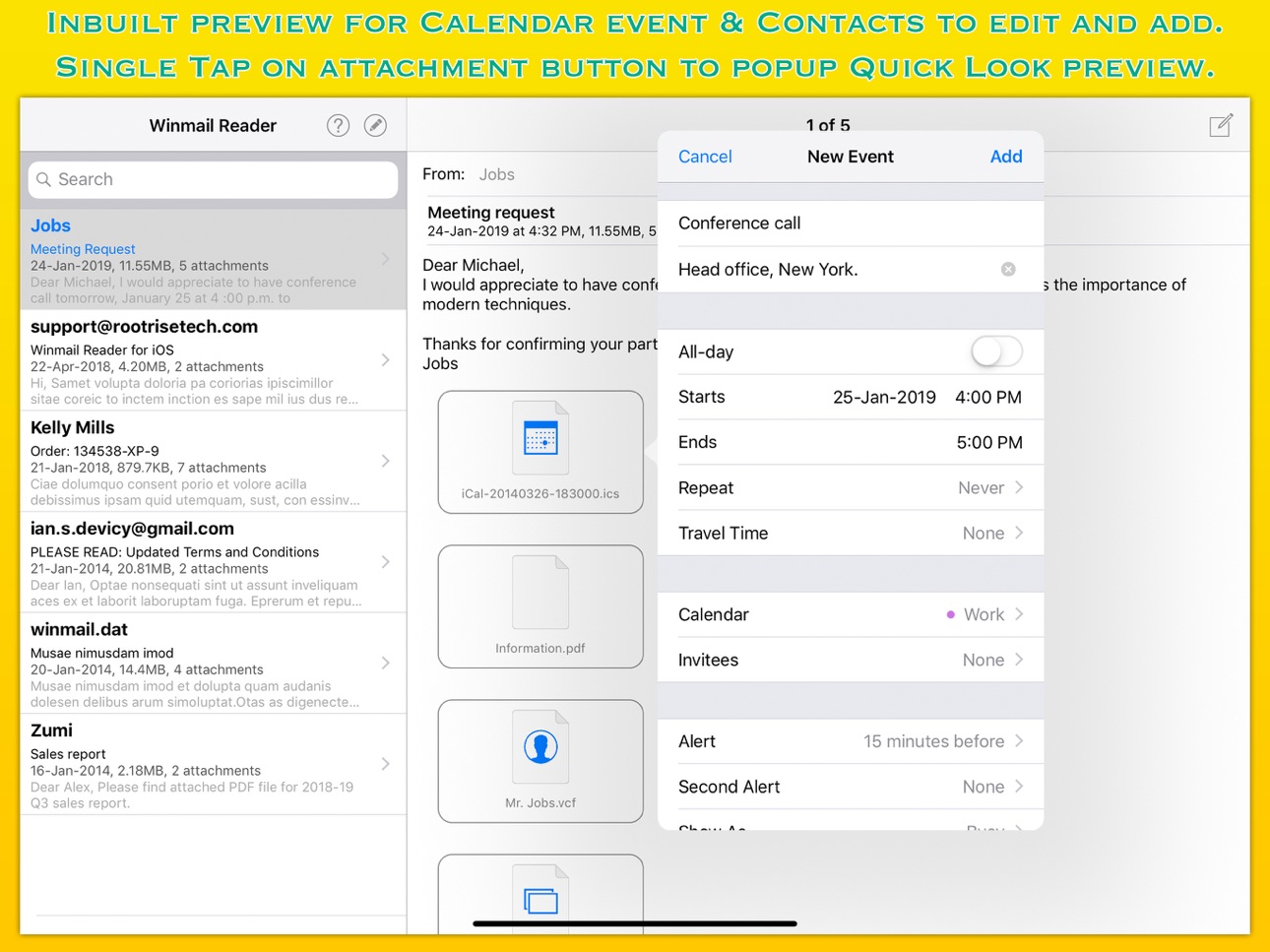
◆ Inbuilt quick-look preview to view attachments. Tap on attachment button to popup quick-look preview.
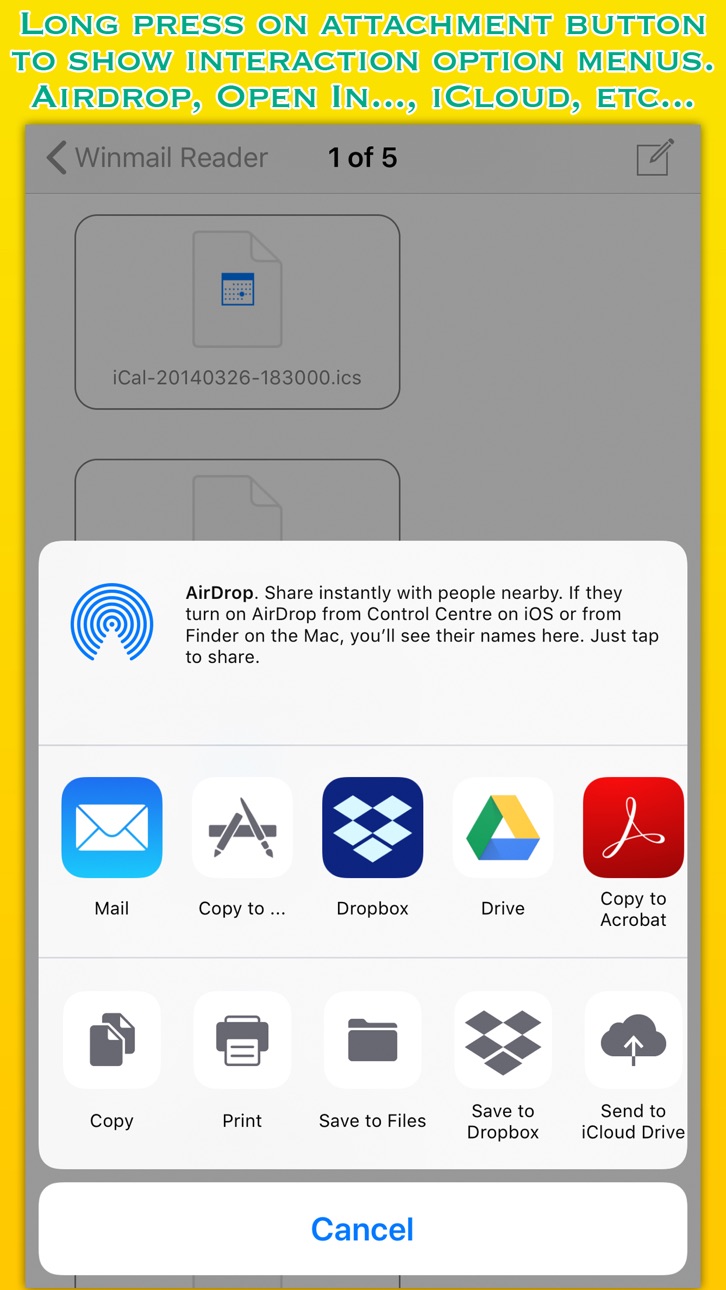
◆ Allows attachments files to Copy to… another application, Save to Files, Copy, Print, share file to nearby iOS devices via AirDrop and more... Long press on attachment button to show share action options.
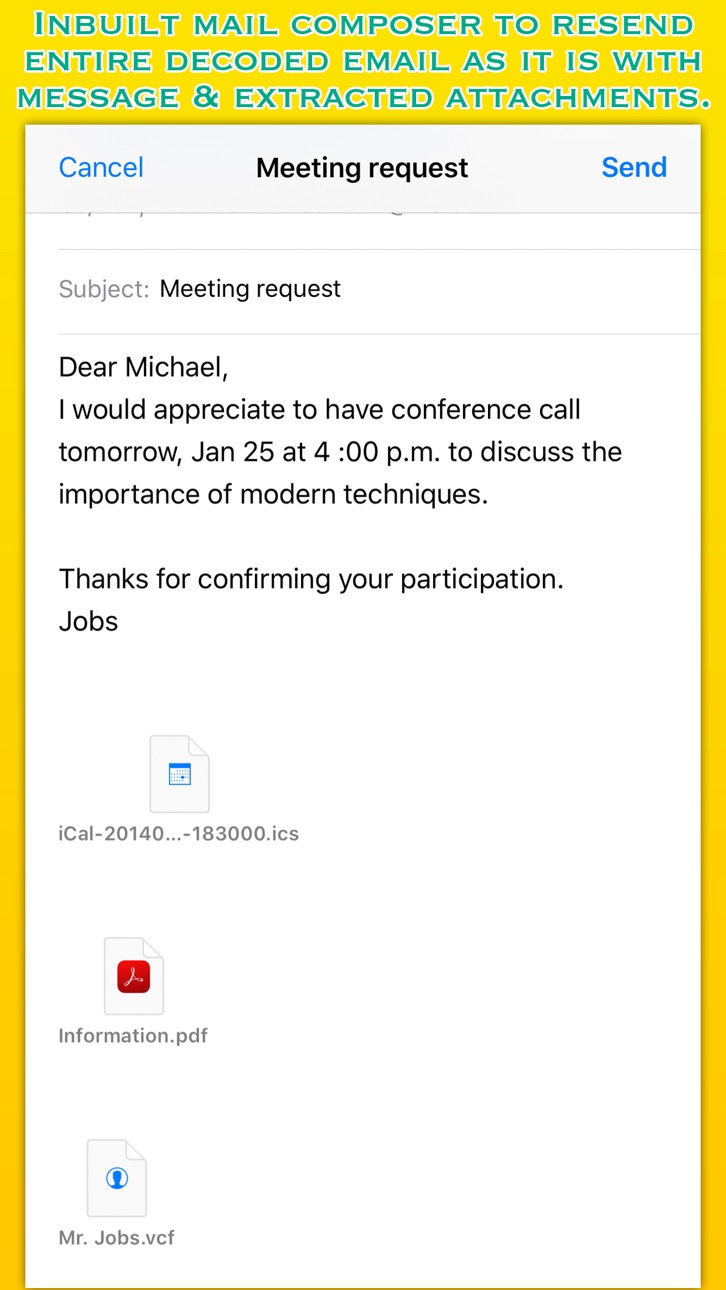
◆ Resend entire decoded email as it is with message and extracted attachments.
◆ Creates, edit and adds Microsoft Outlook Appointment and Meeting to iOS Calendar. It also reads embedded note.
◆ Creates and adds contact address card into iOS Contacts.
◆ Reads nested message in full RTF format as separate file.
Accessibility
ipadiphonemacrealityDevicetvoswatch
Version history 16 versions
Build 881695258v5.02026-01-22 22:17:38
- Bug fixes and UI improvements to streamline with latest iOS.
We are thankful to all users for their valuable feedback :)
Build 857267549v4.12023-05-22 22:48:11
- Bug fixes and improved stability.
- Refined app icon.
Thank you all users for your feedback :)
Build 843414113v4.02021-08-03 21:57:33
- Added option to import and open one or more .dat files stored on your iOS device and cloud storage drives.
- Fixed an issue that would cause empty list of attachments.
- Fixed an issue that could extract attachments without attributes.
- Fixed an issue casing app quit when opening dat file having unknown type MAPI attributes.
- Fixed a crash that could occur due to memory underflow while reading file attributes.
- Improved stability.
- Other bug fixes and improvements. Thank you all users for your feedback :)
Build 834496343v3.0.12020-01-28 16:05:04
- [Fixed] App crash issue on some devices.
What's New in Version 3.0
- Refined user interface with iOS 13 System Dark appearance compatibility.
- Many improvements in winmai.dat extraction. Faster and accurate extraction.
- Other bug fixes. Thank you all users for your feedback :)
Build 834482072v3.02020-01-25 05:00:25
- Refined user interface with iOS 13 System Dark appearance compatibility.
- Many improvements in winmai.dat extraction. Faster and accurate extraction.
- Other bug fixes. Thank you all users for your feedback :)
Build 832757760v2.12019-09-14 14:38:37
- Fixed user reported issue regarding unable to open extracted attachment images.
- Other improvements.
Build 830062417v2.02019-01-30 10:26:22
- Addressed an issue related to adding an extracted .vcf contact into Contacts.
- Addressed an issue related to adding an extracted .ics calendar event into Calendar.
- Other improvements.
Build 817177078v1.92016-04-27 16:17:25
- Now can open and extract nested encoded winmail.dat files.
Build 812258279v1.82015-04-29 23:52:09
- File specific issue addressed.
Build 811945081v1.72015-04-01 02:27:23
- Integration of iCloud for devices running iOS 8 or later. You can now export extracted attachment documents in iCloud within application.
Build 810832117v1.62014-11-26 23:59:00
- Added support to extract embedded OLE object as separate attachment.
- [Fixed] Calendar add event showing shifted alert date and time due to variation in time zone. Issue specific to some time zone value in .ics attachment.
Build 810769987v1.52014-11-24 22:30:26
- [Fixed] Calendar add event showing shifted alert date and time due to variation in time zone. Issue specific to some time zone value in .ics attachment.
Build 740112648v1.42014-10-14 21:09:44
- Optimized for iOS 8.
- Optimized for iPhone 6 and iPhone 6 Plus.
- Other improvements.
Build 663082757v1.3.22014-08-12 23:13:46
- Minor bug fix for showing .ics attachment having repeat day of the week event.
Build 600052647v1.3.12014-06-17 17:49:33
- Added support to handle nested TNEF attachments.
Build 444292660v1.32014-05-06 22:55:30
Price history by region
Currency
Show
Columns
Search
Availability 1 of 1 storefronts
| Region | Language | Price | Ratings | Avg | Version |
|---|---|---|---|---|---|
| US | en-US | USD 1.99 | 256 | 4.5 | 5.0 |
Change log 20 changes · US
✎
releaseNotes updated
- Bug fixes and UI improvements to streamline with latest iOS.
We are thankful to all users for their valuable feedback :)
✎
description updated
Winmail Reader is ultimate tool for reading "winmail.dat" attachment files on iPhones, iPads and iPod touch. Winmail Reader decodes "winmail.dat" file, and allo
✎
subtitle updated
Open a winmail.dat file
✎
name updated
Winmail Reader
◆
Version 5.0 released
- Bug fixes and UI improvements to streamline with latest iOS.
We are thankful to all users for their valuable feedback :)
◆
Version 4.1 released
- Bug fixes and improved stability.
- Refined app icon.
Thank you all users for your feedback :)
◆
Version 4.0 released
- Added option to import and open one or more .dat files stored on your iOS device and cloud storage drives.
- Fixed an issue that would cause empty list of attachments.
- Fixed an issue that could extract attachments without attributes.
◆
Version 3.0.1 released
- [Fixed] App crash issue on some devices.
What's New in Version 3.0
- Refined user interface with iOS 13 System Dark appearance compatibility.
- Many improvements in winmai.dat extraction. Faster and accurate extraction.
- Other bug fixe
◆
Version 3.0 released
- Refined user interface with iOS 13 System Dark appearance compatibility.
- Many improvements in winmai.dat extraction. Faster and accurate extraction.
- Other bug fixes. Thank you all users for your feedback :)
◆
Version 2.1 released
- Fixed user reported issue regarding unable to open extracted attachment images.
- Other improvements.
◆
Version 2.0 released
- Addressed an issue related to adding an extracted .vcf contact into Contacts.
- Addressed an issue related to adding an extracted .ics calendar event into Calendar.
- Other improvements.
◆
Version 1.9 released
- Now can open and extract nested encoded winmail.dat files.
◆
Version 1.8 released
- File specific issue addressed.
◆
Version 1.7 released
- Integration of iCloud for devices running iOS 8 or later. You can now export extracted attachment documents in iCloud within application.
◆
Version 1.6 released
- Added support to extract embedded OLE object as separate attachment.
- [Fixed] Calendar add event showing shifted alert date and time due to variation in time zone. Issue specific to some time zone value in .ics attachment.
◆
Version 1.5 released
- [Fixed] Calendar add event showing shifted alert date and time due to variation in time zone. Issue specific to some time zone value in .ics attachment.
◆
Version 1.4 released
- Optimized for iOS 8.
- Optimized for iPhone 6 and iPhone 6 Plus.
- Other improvements.
◆
Version 1.3.2 released
- Minor bug fix for showing .ics attachment having repeat day of the week event.
◆
Version 1.3.1 released
- Added support to handle nested TNEF attachments.
◆
Version 1.3 released