Home › Productivity

 US
US
1 of 1 storefronts
Content in en-US
Content in en-US
Information
Preview 2 platforms
iPhone 6 images




iPad 6 images


What’s New Version 4.1
• Fixed an issue where files sent to AES Crypt wouldn’t always appear in the app
• Added a new setting to optionally disable the encrypt/decrypt popup when sending files
• Improved purchase page legal text for Dark Mode
Description
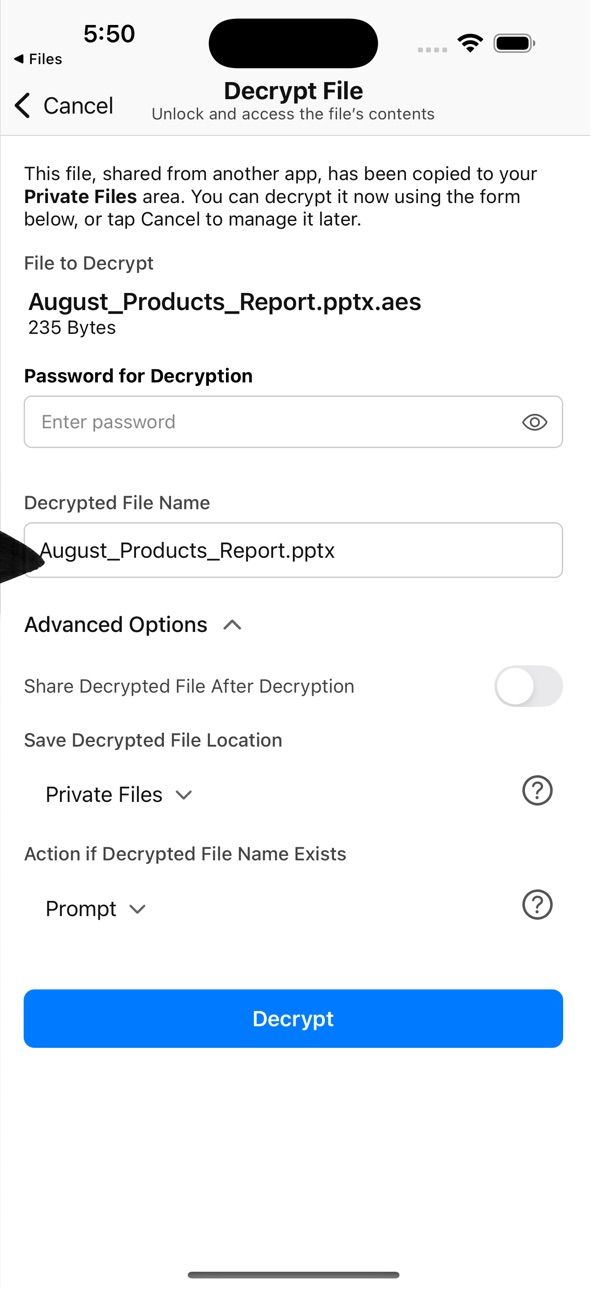
AESCrypt for iOS lets you decrypt and preview files encrypted with AESCrypt.com on your iPhone or iPad. Open encrypted files from Dropbox, Drive, Email, and other apps with ease.
An in-app upgrade enables encryption directly from your device — protect documents, photos, and more, then share securely to your favorite cloud service.
AESCrypt uses the industry-standard Advanced Encryption Standard (AES) to provide strong, cross-platform file security across Windows, macOS, Linux, and mobile devices.
Whether you’re backing up sensitive files to the cloud or storing private documents locally, AESCrypt gives you simple, powerful protection.
Free Features (Decryption)
• Adds AESCrypt as an “Open In…” option for .aes files, allowing you to decrypt files stored in Dropbox, Drive, Email, and other apps
• Saves decrypted files in the app for preview or export to other apps
• Supports quick actions: rename or swipe to delete
• Performs DoD 5220.22-M secure wipe before deleting files
• Previews most major file types (PDF, JPG, MOV, PNG, TXT, and more)
• Displays decryption date and file size for each file
In-App Upgrade Features (Encryption)
• Encrypt files directly on your iOS device and store them securely within the app
• Take a photo with the camera and immediately encrypt it for safe storage
• Adds AESCrypt as an “Open In…” option for all file types, enabling encryption from other apps (Pages, Numbers, Keynote, etc.)
• Export encrypted files and photos to your installed cloud apps (Dropbox, Drive, iCloud, etc.)
• Touch ID / Face ID support to keep in-app files protected
Notes
• This app decrypts files encrypted with AESCrypt.com or by this app only
• Encryption in this app requires the in-app upgrade
• Supports the standard AES Crypt file format across desktop and mobile. Files encrypted outside the AES Crypt ecosystem are not supported
• For support or feature requests, visit the Discussion Forum at AESCrypt.com
LEGAL
The duration and price of each subscription are displayed in the AES Crypt app under Settings → “AES Crypt (Paid Full Version)” at the time of purchase. Payment will be charged to your Apple ID account upon confirmation of purchase. Subscriptions automatically renew unless canceled at least 24 hours before the end of the current billing period. You can manage or cancel your subscription at any time in your Apple ID account settings after purchase.
Terms of Use (EULA): https://www.apple.com/legal/internet-services/itunes/dev/stdeula/
Privacy Policy: https://aescrypt.datafromthings.com/privacy.html
In-App Purchases US pricing
Annual Encryption Access Subscription
1-Year Ability to Encrypt Files · Yearly$0.99
One-Time Purchases
Lifetime Ability to Encrypt Files$5.99
Capabilities
In-App Purchases
Accessibility
ipadiphonemacrealityDevicetvoswatch
Version history 6 versions
Build 879814216v4.12025-11-17 19:45:16
• Fixed an issue where files sent to AES Crypt wouldn’t always appear in the app
• Added a new setting to optionally disable the encrypt/decrypt popup when sending files
• Improved purchase page legal text for Dark Mode
Build 878515494v4.02025-10-09 01:26:50
-Full support for AESCrypt 4.x (Stream Format 3)
-Seamless integration with the iOS Files app – encrypt and decrypt files directly in “On My iPhone”
-Added Light & Dark Mode support
-New flexibility for inbound files: choose whether to save files locally or simply process them through the app without storing them
Build 818595531v2.22016-08-23 16:03:13
This update from Apple will improve the functionality of this app. No new features are included.
-Fixed bug ocassionally when encrypted file is sent to the app from another app, the decryption password popup would not always be shown on the first attempt.
-Added the file name being encrypted or decrypted to the password prompt popup window. This is useful when a file is sent in from another app because it makes it clear for which file you are entering the password.
Build 818571075v2.12016-08-20 03:22:08
-Added support for Touch ID.
-Created a work-around for a reoccurring Google Drive bug where the .aes extension gets removed by Google before sending the encrypted file to AESCrypt.
-Updated the help menu option to display a website with blogs and videos of tips and tricks to get the most our of AESCrypt for iOS.
-Misc Bug Fixes.
Build 717212916v2.02014-10-05 20:27:27
What changed in this version:
-Bug fixes.
-Fixed app crash issue when decrypting on an iOS8 device.
-When you delete a file in the app, a DoD 5220.22-M Data Wipe is done on the file data before deleting the file.
New features with a single one time in-app purchase/upgrade:
-Added support for file encryption. There is now a section for encrypted files and a section for decrypted files. You can easily encrypt and decrypt these files at any time.
-You can use the camera to take and encrypt a picture all from inside the app.
-You can select an existing photo from your camera roll to be encrypted.
-AESCrypt is now an "Open In..." option for all file types thus letting AESCrypt encrypt any file you send to it from other applications such as Pages, Numbers or Keynote.
-You can export encrypted files and encrypted pictures to other cloud storage apps you have installed so they are secure in the cloud.
Build 284452632v1.02014-01-10 19:35:41
Price history by region
Currency
Show
Columns
Search
Availability 1 of 1 storefronts
| Region | Language | Price | Ratings | Avg | Version |
|---|---|---|---|---|---|
| US | en-US | Free | 28 | 2.8 | 4.1 |
Change log 10 changes · US
✎
releaseNotes updated
• Fixed an issue where files sent to AES Crypt wouldn’t always appear in the app
• Added a new setting to optionally disable the encrypt/decrypt popup when send
✎
description updated
AESCrypt for iOS lets you decrypt and preview files encrypted with AESCrypt.com on your iPhone or iPad. Open encrypted files from Dropbox, Drive, Email, and oth
✎
subtitle updated
Encrypt & Decrypt Files
✎
name updated
AES Crypt
◆
Version 4.1 released
• Fixed an issue where files sent to AES Crypt wouldn’t always appear in the app
• Added a new setting to optionally disable the encrypt/decrypt popup when sending files
• Improved purchase page legal text for Dark Mode
◆
Version 4.0 released
-Full support for AESCrypt 4.x (Stream Format 3)
-Seamless integration with the iOS Files app – encrypt and decrypt files directly in “On My iPhone”
-Added Light & Dark Mode support
-New flexibility for inbound files: choose whether to save
◆
Version 2.2 released
This update from Apple will improve the functionality of this app. No new features are included.
-Fixed bug ocassionally when encrypted file is sent to the app from another app, the decryption password popup would not always be shown on th
◆
Version 2.1 released
-Added support for Touch ID.
-Created a work-around for a reoccurring Google Drive bug where the .aes extension gets removed by Google before sending the encrypted file to AESCrypt.
-Updated the help menu option to display a website with bl
◆
Version 2.0 released
What changed in this version:
-Bug fixes.
-Fixed app crash issue when decrypting on an iOS8 device.
-When you delete a file in the app, a DoD 5220.22-M Data Wipe is done on the file data before deleting the file.
New features with a single
◆
Version 1.0 released