Home › Graphics & Design

Graffiti Fonts - Graffwriter
Lettering, Photos, Art, Design
 US
US
1 of 1 storefronts
Content in en-US
Content in en-US
Information
Preview 2 platforms
iPhone 10 images


iPad 10 images



What’s New Version 1.5.2
Graffwriter 1.5.2 now features full integration with the iOS Files app so you can more easily access downloaded commercial fonts and saved files across multiple devices and apps.
Description
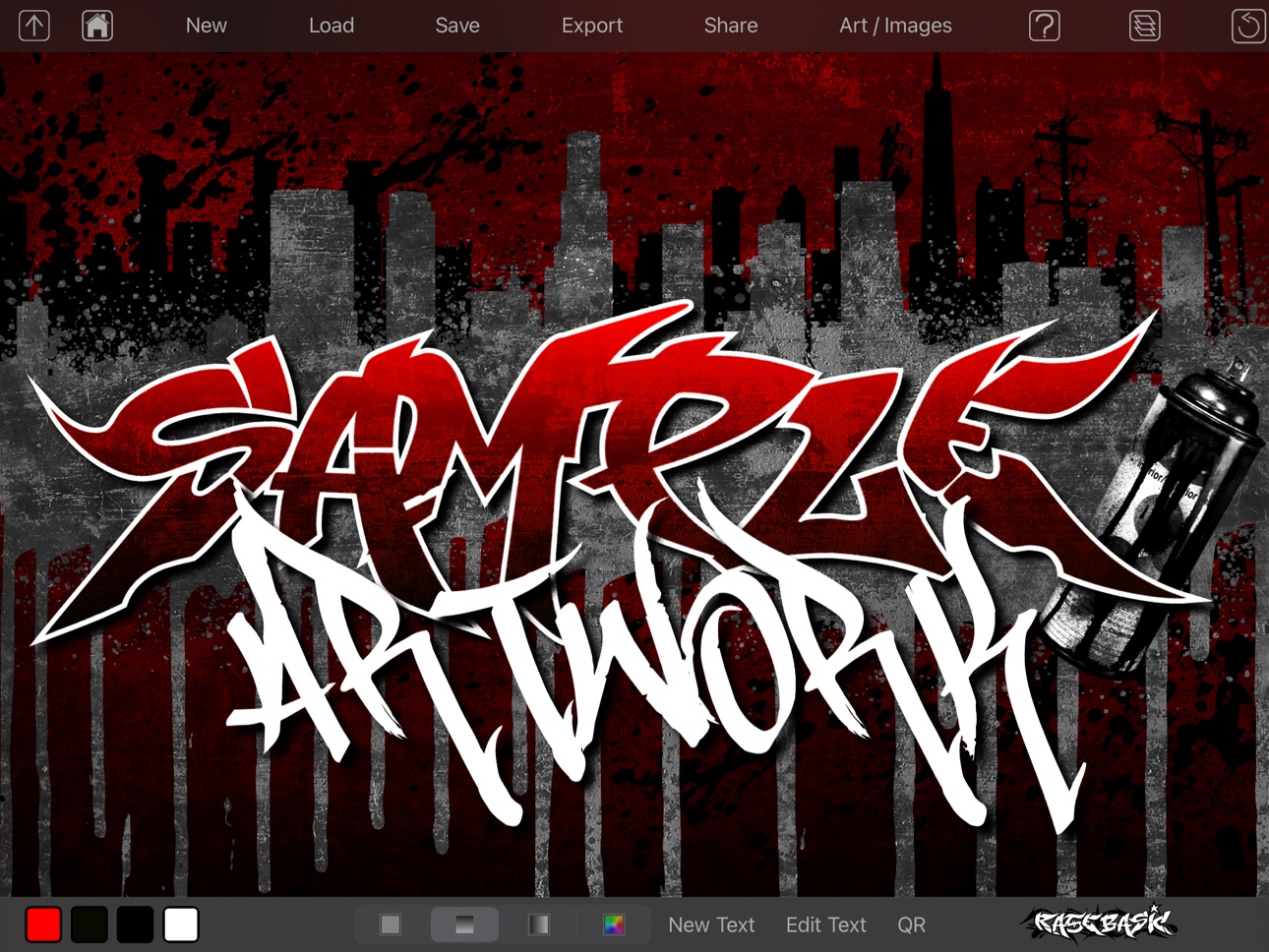
Graffwriter™ is an easy & powerful graphic design app featuring the official Graffiti Fonts® collection, the world's first & biggest collection of authentic graffiti style typefaces, designed by graffiti writers with decades of experience. With this free app you can easily design anything with an unlimited number of words, phrases, illustrations, stencils, stock images, textures, cityscapes, paint splatters & drips, QR barcodes, style templates, and your own photos to create fully custom, high resolution art & graphics in seconds.
With simple controls for unlimited layers of text & images, color, gradients, filters & effects, blend modes, textures, layer locking, transformations, layout & pre-made artwork templates you can create an endless number of original designs. Export, save or share your artwork, all for free.
There are no ads & we do not collect any data from users. Personal/non-commercial use of this free app is unrestricted, commercial licensing is available & any purchased content can be easily restored if your device is lost or damaged or if the app is deleted with no account set up or subscription required. The app does not gather any data from you.
Graffwriter starts you off with tons of free content & features.
Free Content
• 10 free Graffiti Fonts®
• 12 Free Background Images
• 12 Free Cityscapes
• 12 Free Stencils
• 12 Free Illustrations
• 12 Free Paint Splatters
• 16 Free Texture Images
• 12 Free Artwork templates - just enter your text
• Over 240 high quality, iOS system fonts
• 200 Free credits to purchase more fonts & art
• New, free fonts & images immediately downloadable through the app
Free Features
• Add unlimited words or phrases to each design
• Choose a Graffiti Font® or system font for each piece of text
• Use any of the over 240 system fonts on your device.
• Customize colors & effects for text and artwork
• Convert any text into a QR bar code
• Color, move, scale, rotate & apply effects to QR bar codes.
• Move, scale, and rotate any object
• Unlimited, moveable, lockable layers
• 25 Sophisticated layer blend modes
• Unlimited text, images, QR codes & art objects in each design
• Import any photo or image from your device
• Use image filters & effects to enhance text & images
• Infinite undo, reverse any number of steps in your design.
• Easily duplicate or remove any layer.
• Adjust the opacity of any text object or image & use transparency in gradients.
Free to Save, Export & Share
• Save an unlimited number of files
• Export your designs into high resolution JPG or PNG format
• All exported artwork is free for non-commercial use
• Transfer editable Graffwriter files to/from your desktop
• Transfer & share editable files between your IOS devices
• Export artwork & re-import for further processing
• Export the full screen design or crop to the size of your design
In addition to all the free content & features this app accesses the exclusive Graffiti Fonts® collection: an ever expanding, regularly updated collection of premium fonts & art available via free download & in-app purchase. Every piece of content & feature can be individually, permanently unlocked or our subscription options can unlock all content & features.
Upgrades Available via in-app purchase:
• High-res/PNG export for professional quality, print-ready designs
• Premium Graffiti Fonts® available for in-app use starting at $0.99
• Hundreds of background images, Textures, Stencils, Cityscapes, Illustrations, Paint Splatters and more.
• Purchase, download, & transfer commercial quality OpenType fonts to your desktop computer.
• Purchase any desktop font & get the in-app versions installed into Graffwriter for free.
• Purchase additional image filters & effects to enhance your photos & artwork for only $0.99 each.
• Subscribe to unlock all current & future content & features
Privacy Policy: https://ios.graffwriter.com/docs/privacy.htm
Terms of Use / EULA: https://www.apple.com/legal/internet-services/itunes/dev/stdeula/
In-App Purchases US pricing
Subscription Options Subscription
Unlock All Content · Monthly$9.99
Unlock All Content & Features · Monthly$14.99
One-Time Purchases
Ballers Graffiti Font (for app use only)$1.99
FatCap Graffiti Font (for app use only)$1.99
Ruckus Graffiti Font (for app use only)$2.99
SKinArt Graffiti Font (for app use only)$2.99
Unlock All Clip-Art$2.99
Unlock All Stock Images$2.99
Unlock All Paint Content$2.99
Unlock PNG Export$9.99
Capabilities
In-App Purchases
Accessibility
ipadiphonemacrealityDevicetvoswatch
Version history 25 versions
Build 880246345v1.5.22025-12-02 05:04:43
Graffwriter 1.5.2 now features full integration with the iOS Files app so you can more easily access downloaded commercial fonts and saved files across multiple devices and apps.
Build 874600857v1.5.02025-05-08 08:46:50
We've added the all new ManyStyles™ font. This advanced graffiti handstyle features more than eight full alphabets, hundreds of characters in all with advanced automatic features to optimize every word or phrase that you type. We've also added the unique Descent™ font for creating stylish, downward-reading calligraphic graffiti pieces. Descent also includes advanced automatic features. This version also includes a number of upgrades to some of the Clip-Art and image categories and various maintenance updates.
Build 873338637v1.4.92025-03-18 19:39:04
Graffwriter 1.4.9 further improves upon our new color controls to provide more precise control over colors via a color mixer, a swatch menu that remembers your last four color selections, numeric RGB input, hex color codes and more. This version also introduces a convenient preview feature for layer blend modes that allows you to see the results of the blend modes right in the menu before applying them. We've also make a number of performance improvements throughout the app.
Build 870025228v1.4.82024-10-29 14:01:40
Graffwriter 1.4.7 introduces improved color controls that provide more precise control over colors via a color mixer, a swatch menu that remembers your last four color selections, numeric RGB input, hex color codes and more. This version also introduces a convenient preview feature for layer blend modes that allows you to see the results of the blend modes right in the menu before applying them. We've also make a number of performance improvements.
Build 869599789v1.4.72024-10-10 16:53:20
Graffwriter 1.4.7 introduces improved color controls that provide more precise control over colors via a color mixer, a swatch menu that remembers your last four color selections, numeric RGB input, hex color codes and more. This version also introduces a convenient preview feature for layer blend modes that allows you to see the results of the blend modes right in the menu before applying them. We've also make a number of performance improvements.
Build 868515842v1.4.52024-08-27 13:43:45
Graffwriter 1.4.5 brings performance enhancements and updates for the latest versions of iOS and upgrades to recently added features. You can now apply the full array of image filters to text layers including: pixelate, blur, halftone etc. These non-destructive filters can be easily removed or adjusted just like they can with images. You can even alter the text, colors & other settings with the filter still applied. We've also improved the PNG import/Export functionality, streamlined & updated integration with Photos to improve the importing of your own images & added an Auto-Save feature that will save your progress anytime the app goes into the background. This will help avoid any loss of your work if your session is unexpectedly interrupted & you forgot to save. We've made a number of other changes under the hood to improve the addition of new fonts and new image content.
Build 865814649v1.4.42024-05-13 16:50:25
Graffwriter Version 1.4.4 brings performance enhancements and updates for the latest versions of iOS and upgrades to recently added features. You can now apply the full array of image filters to text layers including: pixelate, blur, halftone etc. These non-destructive filters can be easily removed or adjusted just like they can with images. You can even alter the text, colors & other settings with the filter still applied. We've also improved the PNG import/Export functionality, streamlined & updated integration with Photos to improve the importing of your own images & added an Auto-Save feature that will save your progress anytime the app goes into the background. This will help avoid any loss of your work if your session is unexpectedly interrupted & you forgot to save. We've made a number of other changes under the hood to improve the addition of new fonts and new image content & made it possible to update all your fonts to the latest version using the existing "Restore Purchases" function.
Build 863986404v1.4.32024-02-25 15:52:34
Version 1.4.3, improves the performance of our recent update which added several new features. You can now apply the full array of image filters to text layers including: pixelate, blur, halftone etc. These non-destructive filters can be easily removed or adjusted just like they can with images. You can even alter the text, colors & other settings with the filter still applied. We've also improved the PNG import/Export functionality, streamlined & updated integration with Photos to improve the importing of your own images & added an Auto-Save feature that will save your progress anytime the app goes into the background. This will help avoid any loss of your work if your session is unexpectedly interrupted & you forgot to save. We've made a number of other changes under the hood to improve the addition of new fonts and new image content & made it possible to update all your fonts to the latest version using the existing "Restore Purchases" function.
Build 862541536v1.4.22023-12-28 20:59:03
In Version 1.4.2, We've cleaned up a couple of bugs with the recent update which added the ability to apply the full array of image filters to text layers. Now you can apply pixelate, blur, halftone etc. filters to any fonts in your designs. These non-destructive filters can be easily removed or adjusted just like they can with images. You can even alter the text, colors & other settings with the filter still applied. We've also improved the PNG import/Export functionality, streamlined & updated integration with Photos to improve the importing of your own images & added an Auto-Save feature that will save your progress anytime the app goes into the background. This will help avoid any loss of your work if your session is unexpectedly interrupted & you forgot to save. We've made a number of other changes under the hood to improve the addition of new fonts and new image content & made it possible to update all your fonts to the latest version using the existing "Restore Purchases" function.
Build 862055439v1.4.12023-12-26 23:50:32
In Version 1.4.0, We've cleaned up a couple of bugs with the recent update which added the ability to apply the full array of image filters to text layers. Now you can apply pixelate, blur, halftone etc. filters to any fonts in your designs. These non-destructive filters can be easily removed or adjusted just like they can with images. You can even alter the text, colors & other settings with the filter still applied. We've also improved the PNG import/Export functionality, streamlined & updated integration with Photos to improve the importing of your own images & added an Auto-Save feature that will save your progress anytime the app goes into the background. This will help avoid any loss of your work if your session is unexpectedly interrupted & you forgot to save. We've made a number of other changes under the hood to improve the addition of new fonts and new image content & made it possible to update all your fonts to the latest version using the existing "Restore Purchases" function.
Build 857643638v1.3.82023-12-06 21:06:57
In Version 1.3.8, we've added the ability to apply the full array of image filters to text layers. Now you can apply pixelate, blur, halftone etc. filters to any fonts in your designs. These non-destructive filters can be easily removed or adjusted just like they can with images. You can even alter the text, colors & other settings with the filter still applied. We've also improved the PNG import/Export functionality, streamlined & updated integration with Photos to improve the importing of your own images & added an Auto-Save feature that will save your progress anytime the app goes into the background. This will help avoid any loss of your work if your session is unexpectedly interrupted & you forgot to save. We've made a number of other changes under the hood to improve the addition of new fonts and new image content & made it possible to update all your fonts to the latest version using the existing "Restore Purchases" function.
Build 852973668v1.3.32022-10-26 18:31:55
Version 1.3.3 includes our new Texture feature which provides access to over 100 textures that can be applied to any layer or any number of layers. The texture feature is made to work with Graffwriter's new Blend Modes to add grit & detail to your designs. You can add as many textures as you like to any design, move, scale or rotate textures, or even change the blend mode, use textures as background images or vice versa. We've also upgraded & expanded some of the existing Graffiti Fonts® & images and made a number of improvements to the general speed & stability of the app.
Build 852692753v1.3.22022-10-19 15:18:18
Version 1.3.2 includes our new Texture feature which provides access to over 100 textures that can be applied to any layer or any number of layers. The texture feature is made to work with Graffwriter's new Blend Modes to add grit & detail to your designs. You can add as many textures as you like to any design, move, scale or rotate textures, or even change the blend mode, use textures as background images or vice versa. We've also upgraded & expanded some of the existing Graffiti Fonts® & images and made a number of improvements to the general speed & stability of the app.
Build 851018847v1.3.02022-07-22 21:30:42
We've added a subscription option to unlock all content and features with a single purchase. All existing options for unlocking premium content and features are still available. Subscription is not required. All content & features can still be accessed without a subscription. Under the hood, we've completely re-written Graffwriter™ from the ground up to modernize the code, speed up the app and enhance performance.
Build 842795834v1.2.72021-07-20 20:29:54
We've added 4 new sophisticated Graffiti Fonts® with extensive character sets & OpenType features as well as upgrades to many of the existing fonts. We've also introduced a layer locking feature to ease the design process when using many layers of fonts, photos, artwork & backgrounds. This version also contains dozens of new layer Blend Modes that can be applied to any element of your designs for added texture, realism & control. The update also introduces a single purchase to unlock all premium fonts at once for a substantial discount and a number of additional performance enhancements across the apps many features including enhancements to the PNG export and an updated help section.
Build 842149202v1.2.62021-06-12 03:56:07
We've added 4 new sophisticated Graffiti Fonts® with extensive character sets & OpenType features as well as upgrades to many of the existing fonts. We've also introduced a layer locking feature to ease the design process when using many layers of fonts, photos, artwork & backgrounds. This version also contains dozens of new layer Blend Modes that can be applied to any element of your designs for added texture, realism & control. The update also introduces a single purchase to unlock all premium fonts at once for a substantial discount and a number of additional performance enhancements across the apps many features.
Build 841729373v1.2.52021-04-30 01:20:29
We've enhanced the performance of the PNG export option & the free design templates. This version also improves the functionality of all image & font downloads, both free & purchased as well as the saving & loading of files. You'll also see various improvements to the user interface and updates to several fonts. Ver. 1.2.5 resolves several bugs that effected some users with recent IOS versions.
Build 838089115v1.2.42020-10-06 15:24:09
This is a bug-fix release which improves the performance of PNG exports, in-app font downloads & Style Templates.
Build 838048311v1.2.32020-10-04 14:09:28
This is a bug-fix release which improves the performance of PNG exports, in-app font downloads & Style Templates.
Build 834254650v1.2.22020-03-27 15:55:27
This update provides better compatibility with the latest devices & IOS versions as well as a number of performance enhancements and updates to our Graffiti Fonts.
Build 829788195v1.1.92018-12-29 11:22:24
This is a bug-fix release for our recent update which had a bug in the color controls that sometimes caused the app to crash. We suggest all users install this update.
Build 829731789v1.1.82018-12-21 15:57:15
1.1.8 is a bug-fix release that solves an issue with exporting designs to Photos under IOS12 as well as some other minor content & interface issues.
Build 829123488v1.1.72018-11-01 16:49:18
This version brings bug fixes & improvements for IOS 12 and above.
Build 820814588v1.1.52017-02-06 02:42:36
1.1.3 is a simple optimization update with improvements to several fonts.
Build 819018749v1.1.22016-09-28 15:42:29
What’s new in Graffwriter 1.1.2
In the latest version 1.1.2 we have added a number of new features & continued to refine the apps existing capabilities.
1.) Infinite Undo - You can now undo your last change or even step back one change at a time all the way back to where you started.
2.) Layer Duplication - With a single tap you can now duplicate any layer in your design. No matter if it is a text layer, art layer, QR code or even one of your own imported photos just tap the + icon on the layers menu to make a copy.
3.) Upgraded Fonts & Artwork - Several of the free fonts have been upgraded for better speed, appearance & performance as have some of the purchasable fonts. We’ve also fine-tuned some of the background & clip-art images for better performance.
4.) Cleaner Controls - Minor changes have been made throughout the app to improve the look, feel & functionality of the interface. We’ve simplified & streamlined various screens & menus & improved the color controls.
Price history by region
Currency
Show
Columns
Search
Availability 1 of 1 storefronts
| Region | Language | Price | Ratings | Avg | Version |
|---|---|---|---|---|---|
| US | en-US | Free | 2.1k | 4.8 | 1.5.2 |
Change log 29 changes · US
✎
releaseNotes updated
Graffwriter 1.5.2 now features full integration with the iOS Files app so you can more easily access downloaded commercial fonts and saved files across multiple
✎
description updated
Graffwriter™ is an easy & powerful graphic design app featuring the official Graffiti Fonts® collection, the world's first & biggest collection of authentic gra
✎
subtitle updated
Lettering, Photos, Art, Design
✎
name updated
Graffiti Fonts - Graffwriter
◆
Version 1.5.2 released
Graffwriter 1.5.2 now features full integration with the iOS Files app so you can more easily access downloaded commercial fonts and saved files across multiple devices and apps.
◆
Version 1.5.0 released
We've added the all new ManyStyles™ font. This advanced graffiti handstyle features more than eight full alphabets, hundreds of characters in all with advanced automatic features to optimize every word or phrase that you type. We've also a
◆
Version 1.4.9 released
Graffwriter 1.4.9 further improves upon our new color controls to provide more precise control over colors via a color mixer, a swatch menu that remembers your last four color selections, numeric RGB input, hex color codes and more. This ve
◆
Version 1.4.8 released
Graffwriter 1.4.7 introduces improved color controls that provide more precise control over colors via a color mixer, a swatch menu that remembers your last four color selections, numeric RGB input, hex color codes and more. This version al
◆
Version 1.4.7 released
Graffwriter 1.4.7 introduces improved color controls that provide more precise control over colors via a color mixer, a swatch menu that remembers your last four color selections, numeric RGB input, hex color codes and more. This version al
◆
Version 1.4.5 released
Graffwriter 1.4.5 brings performance enhancements and updates for the latest versions of iOS and upgrades to recently added features. You can now apply the full array of image filters to text layers including: pixelate, blur, halftone etc.
◆
Version 1.4.4 released
Graffwriter Version 1.4.4 brings performance enhancements and updates for the latest versions of iOS and upgrades to recently added features. You can now apply the full array of image filters to text layers including: pixelate, blur, halfto
◆
Version 1.4.3 released
Version 1.4.3, improves the performance of our recent update which added several new features. You can now apply the full array of image filters to text layers including: pixelate, blur, halftone etc. These non-destructive filters can be ea
◆
Version 1.4.2 released
In Version 1.4.2, We've cleaned up a couple of bugs with the recent update which added the ability to apply the full array of image filters to text layers. Now you can apply pixelate, blur, halftone etc. filters to any fonts in your designs
◆
Version 1.4.1 released
In Version 1.4.0, We've cleaned up a couple of bugs with the recent update which added the ability to apply the full array of image filters to text layers. Now you can apply pixelate, blur, halftone etc. filters to any fonts in your designs
◆
Version 1.3.8 released
In Version 1.3.8, we've added the ability to apply the full array of image filters to text layers. Now you can apply pixelate, blur, halftone etc. filters to any fonts in your designs. These non-destructive filters can be easily removed or
◆
Version 1.3.3 released
Version 1.3.3 includes our new Texture feature which provides access to over 100 textures that can be applied to any layer or any number of layers. The texture feature is made to work with Graffwriter's new Blend Modes to add grit & detail
◆
Version 1.3.2 released
Version 1.3.2 includes our new Texture feature which provides access to over 100 textures that can be applied to any layer or any number of layers. The texture feature is made to work with Graffwriter's new Blend Modes to add grit & detail
◆
Version 1.3.0 released
We've added a subscription option to unlock all content and features with a single purchase. All existing options for unlocking premium content and features are still available. Subscription is not required. All content & features can still
◆
Version 1.2.7 released
We've added 4 new sophisticated Graffiti Fonts® with extensive character sets & OpenType features as well as upgrades to many of the existing fonts. We've also introduced a layer locking feature to ease the design process when using many la
◆
Version 1.2.6 released
We've added 4 new sophisticated Graffiti Fonts® with extensive character sets & OpenType features as well as upgrades to many of the existing fonts. We've also introduced a layer locking feature to ease the design process when using many la
◆
Version 1.2.5 released
We've enhanced the performance of the PNG export option & the free design templates. This version also improves the functionality of all image & font downloads, both free & purchased as well as the saving & loading of files. You'll also see
◆
Version 1.2.4 released
This is a bug-fix release which improves the performance of PNG exports, in-app font downloads & Style Templates.
◆
Version 1.2.3 released
This is a bug-fix release which improves the performance of PNG exports, in-app font downloads & Style Templates.
◆
Version 1.2.2 released
This update provides better compatibility with the latest devices & IOS versions as well as a number of performance enhancements and updates to our Graffiti Fonts.
◆
Version 1.1.9 released
This is a bug-fix release for our recent update which had a bug in the color controls that sometimes caused the app to crash. We suggest all users install this update.
◆
Version 1.1.8 released
1.1.8 is a bug-fix release that solves an issue with exporting designs to Photos under IOS12 as well as some other minor content & interface issues.
◆
Version 1.1.7 released
This version brings bug fixes & improvements for IOS 12 and above.
◆
Version 1.1.5 released
1.1.3 is a simple optimization update with improvements to several fonts.
◆
Version 1.1.2 released
What’s new in Graffwriter 1.1.2
In the latest version 1.1.2 we have added a number of new features & continued to refine the apps existing capabilities.
1.) Infinite Undo - You can now undo your last change or even step back one change a