Home › Photo & Video

 US
US
1 of 1 storefronts
Content in en-US
Content in en-US
Information
Preview 2 platforms
iPhone 4 images



iPad 4 images


What’s New Version 5.6
Fix for a potential crash when a keyboard is connected to the device.
Description
Remove the audio tracks from your existing videos in a quick and easy way, while keeping the video resolution and quality intact.
Very useful, before sharing on your favorite social network, when:
• you don't want your friends to hear everything that was said during the video.
• you want to remove an annoying background noise, to focus on the images only.
The Input video can be imported from your device in several ways.
The modified version (if there is one) or the original version of the video are both available.
The camera can be used directly to record a video if needed.
You can also connect your device to your computer in order to drag and drop specific videos (Files feature).
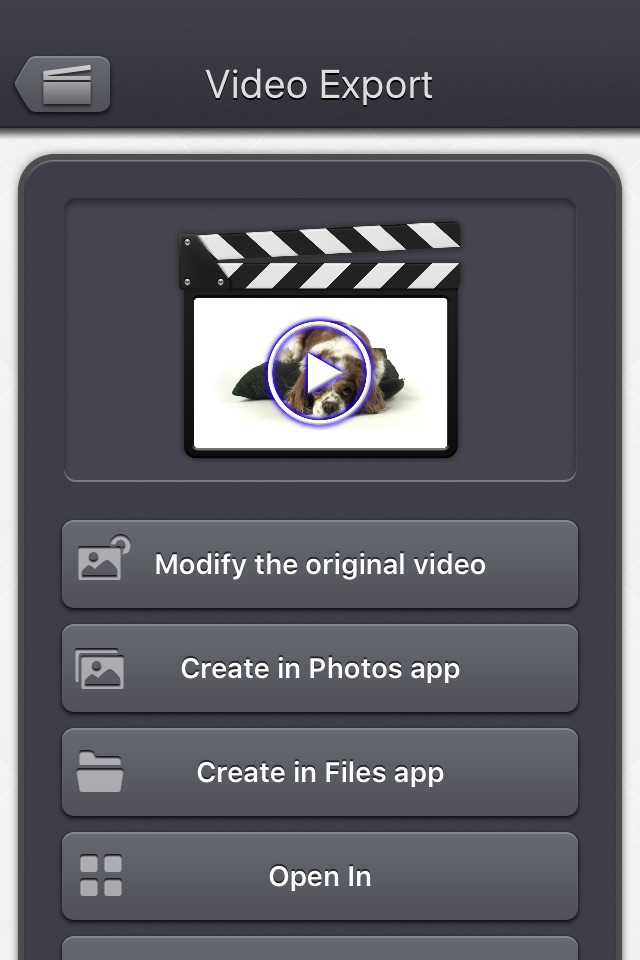
The output video can be exported in several ways.
Create a new video in the Photo app or in the Files app.
Directly modify the input video by adding an edited version.
Share the video to another application.
This application can run, on your iPhone and your iPad, as a standalone application, a Photo Extension, or as an Action Extension (from the compatible applications like the Photo app).
Portrait and Landscape orientations are supported in all screens.
Dark mode of iOS13 is supported.
You will find the original and intuitive user interface, common to all our videos applications.
These applications have been featured many times by Apple and various websites.
Accessibility
ipadiphonemacrealityDevicetvoswatch
Version history 19 versions
Build 847138943v5.62022-02-12 20:03:16
Fix for a potential crash when a keyboard is connected to the device.
Build 846216851v5.52021-12-26 12:25:04
iOS 15.2 related fixes
(sometimes, the app could not launch correctly)
Build 839765434v5.4.12020-12-26 02:04:36
Fix for a possible application crash when an HEVC video is used as input (on a device that cannot encode HEVC videos).
Build 839351015v5.42020-11-30 02:51:41
Support for iPhone 12 zoom mode.
Build 834307144v5.2.22020-01-11 01:18:42
Small fixes and improvements.
Build 833324489v5.2.12019-10-31 08:05:18
• Potential fix for a regression (introduced in iOS13.2), preventing the export of some GPS information.
Build 833163589v5.22019-10-17 18:22:29
Thank you for using Video Audio Remover - HD!
Here are the changes since last time:
• The modified version of the video (if any) is now the version opened by default, when selecting a video thumbnail in the app.
If you want to open the original video instead, you can long press on the video thumbnail to access the dedicated option.
Selecting a Video from the Photo picker will give you the option to choose the modified or original version, when relevant.
• It is now possible, in the export video screen, to choose to modify the original video, or to create a new video (like before).
• Some elements (or their touch area) are slightly bigger for an easier manipulation.
• Small fixes and improvements.
Build 832871563v5.12019-09-24 22:11:13
• Dark mode of iOS13 is supported.
Build 831952293v5.0.22019-07-10 18:52:43
Fix for Live Photos import on iOS versions lower than iOS 10.
Build 831771176v5.0.12019-07-03 17:21:06
Minor corrections and improvements.
Build 830798763v5.02019-04-15 20:40:15
Thank you for using Video Audio Remover!
Here are the changes since last time:
• Ability to navigate back by swiping the finger from the left side of the screen.
• In the video selection screen: you can preview the video, get information and access options (such as delete) by pressing and holding down a video thumbnail.
• When selecting a video, a cloud icon is now displayed under the thumbnail, if the video must be downloaded before opening it.
• When the video is opened from the Files application (or file selector), it is no longer temporarily duplicated internally.
• Improved support for exotic videos (bitrate / framerate / clean aperture / pixel aspect ratio related improvements).
• Improved support for slo-mo videos on older devices such as the 1st generation ipad Pro or iphone 6.
• Fix to avoid a delay before the video selection screen is displayed when there are a lot of videos to display.
• Smaller fixes and improvements.
Build 829120761v4.02018-11-25 16:41:35
Here are the new features of this version 4.0 :
- Media can be imported into the application using the standard photo picker (its content is similar to Apple's Photo application).
- Media can be imported into the application using the standard file picker (its content is similar to that of Apple's Files application).
- When the media is saved to the camera roll, it is automatically associated to an album named "Video Audio Remover".
- The previously selected video is now highlighted in blue in the video selection screen.
- iTunes File Sharing has been renamed File, since it is now possible to access media using Apple's File application as well.
- The iTunes File Sharing folder is now visible/modifiable in the Apple Files application.
- The exported video will be HEVC if the input video is HEVC.
- The filename of the exported video file is now prefixed by the original filename of the source video, followed by the current date and time.
- The request for review popup is displayed less often.
- A small tutorial is displayed while using the app to learn the basics.
- The duration of the video is now displayed below the thumbnail in the video selection screen.
- Smaller fixes and improvements
If you like Video Audio Remover, please leave a comment on the App Store, and let your friends know about the app :)
Thank you!
Build 824745794v3.0.12017-11-23 16:54:45
Stability improvements
Build 824427050v3.02017-11-16 16:55:46
Here is the latest version of Video Audio Remover!
I hope that you will enjoy the following content:
- Improvements for iOS11 and iPhone X.
- GPS and date of creation are kept when the media is added to the Camera Roll.
- Videos are now sorted by modification date in the "Recently Added" folder and by creation date in the other folders (Photos/Favorites/LivePhotos).
- Various fixes and improvements.
Build 816481504v2.12016-03-03 17:37:44
This 2.1 version adds small fixes and improvements.
And still from 2.0, a lot of great iOS 9 features :
* New : Photo Cloud compatibility. All your videos, even the ones in the cloud can be used in the app.
* New : 3D Touch support. A new Quick Action is available in the main screen : open the most recent video in your Camera Roll.
* New : Live Photos support. It is possible to open the video part included in a Live Photo, like you are used to do it with your videos.
* New : Extensions : A live Photo can also be imported directly from other applications like the Photo app.
* New : iPad Pro compatibility. Enjoy the app on the big screen of your iPad Pro.
* New : Multitasking support. Thanks to Split View, use another application at the same time. The layout of the app is adjusted accordingly.
* New : App Thinning & bitcode support. The disk space taken by the app has been highly reduced.
* Various fixes and improvements.
If you like this application, don't forget to add/update your reviews.
Thank you for your support !
Build 814607527v2.02015-12-17 07:01:03
This new 2.0 version brings compatibility to a lot of great iOS 9 features :
* New : Photo Cloud compatibility. All your videos, even the ones in the cloud can be used in the app.
* New : 3D Touch support. A new Quick Action is available in the main screen : open the most recent video in your Camera Roll.
* New : Live Photos support. It is possible to open the video part included in a Live Photo, like you are used to do it with your videos.
* New : Extensions : A live Photo can also be imported directly from other applications like the Photo app.
* New : iPad Pro compatibility. Enjoy the app on the big screen of your iPad Pro.
* New : Multitasking support. Thanks to Split View, use another application at the same time. The layout of the app is adjusted accordingly.
* New : App Thinning & bitcode support. The disk space taken by the app has been highly reduced.
* Various fixes and improvements.
If you like this application, don't forget to add/update your reviews.
Thank you for your support !
Build 812950141v1.22015-09-03 06:02:47
* New : Action Extension. It is now possible to remove the audio of your videos and export them, directly inside another application (like the Photo app).
* New : Photo Extension. It is now possible to remove the audio of the selected video, directly inside the Photo app.
* Correction : Petites améliorations et meilleure stabilité de l'application.
If you like this application, don't forget to add/update your reviews.
Thank you for your support !
Build 717122669v1.12014-10-23 06:36:47
iOS8 adaptation.
iPhone 6 and iPhone 6 plus support.
Build 80844361v1.02013-10-15 23:13:57
Price history by region
Currency
Show
Columns
Search
Availability 1 of 1 storefronts
| Region | Language | Price | Ratings | Avg | Version |
|---|---|---|---|---|---|
| US | en-US | USD 1.99 | 165 | 4.8 | 5.6 |
Change log 23 changes · US
✎
releaseNotes updated
Fix for a potential crash when a keyboard is connected to the device.
✎
description updated
Remove the audio tracks from your existing videos in a quick and easy way, while keeping the video resolution and quality intact.
Very useful, before sharing on
✎
subtitle updated
Remove audio track (sounds)
✎
name updated
Video Audio Remover - HD
◆
Version 5.6 released
Fix for a potential crash when a keyboard is connected to the device.
◆
Version 5.5 released
iOS 15.2 related fixes
(sometimes, the app could not launch correctly)
◆
Version 5.4.1 released
Fix for a possible application crash when an HEVC video is used as input (on a device that cannot encode HEVC videos).
◆
Version 5.4 released
Support for iPhone 12 zoom mode.
◆
Version 5.2.2 released
Small fixes and improvements.
◆
Version 5.2.1 released
• Potential fix for a regression (introduced in iOS13.2), preventing the export of some GPS information.
◆
Version 5.2 released
Thank you for using Video Audio Remover - HD!
Here are the changes since last time:
• The modified version of the video (if any) is now the version opened by default, when selecting a video thumbnail in the app.
If you want to open the or
◆
Version 5.1 released
• Dark mode of iOS13 is supported.
◆
Version 5.0.2 released
Fix for Live Photos import on iOS versions lower than iOS 10.
◆
Version 5.0.1 released
Minor corrections and improvements.
◆
Version 5.0 released
Thank you for using Video Audio Remover!
Here are the changes since last time:
• Ability to navigate back by swiping the finger from the left side of the screen.
• In the video selection screen: you can preview the video, get information
◆
Version 4.0 released
Here are the new features of this version 4.0 :
- Media can be imported into the application using the standard photo picker (its content is similar to Apple's Photo application).
- Media can be imported into the application using the stan
◆
Version 3.0.1 released
Stability improvements
◆
Version 3.0 released
Here is the latest version of Video Audio Remover!
I hope that you will enjoy the following content:
- Improvements for iOS11 and iPhone X.
- GPS and date of creation are kept when the media is added to the Camera Roll.
- Videos are now s
◆
Version 2.1 released
This 2.1 version adds small fixes and improvements.
And still from 2.0, a lot of great iOS 9 features :
* New : Photo Cloud compatibility. All your videos, even the ones in the cloud can be used in the app.
* New : 3D Touch support. A new
◆
Version 2.0 released
This new 2.0 version brings compatibility to a lot of great iOS 9 features :
* New : Photo Cloud compatibility. All your videos, even the ones in the cloud can be used in the app.
* New : 3D Touch support. A new Quick Action is available i
◆
Version 1.2 released
* New : Action Extension. It is now possible to remove the audio of your videos and export them, directly inside another application (like the Photo app).
* New : Photo Extension. It is now possible to remove the audio of the selected video
◆
Version 1.1 released
iOS8 adaptation.
iPhone 6 and iPhone 6 plus support.
◆
Version 1.0 released