Home › Photo & Video

 US
US
1 of 1 storefronts
Content in en-US
Content in en-US
Information
Preview 1 platform
iPhone 9 images


What’s New Version 2.3.9
- Now supports iPhone 17, iPhone Air, iPhone 17 Pro, iPhone 17 Pro Max.
- Supports iOS26.
Description
*** For all Instagram Video Lovers !! ***
"Squaready for Video" allows you to post entire videos on Instagram without Square cropping.
In addition, the version 2.0 supports creation of Wallpapers to be set for iPhone lock screen. You can easily create a wallpaper specific to your model, taking into account the screen size and the Clock position. From now on, please enjoy and use "Squaready for Video" by all means besides for Instagram.
BEST FOR INSTAGRAMMERS
‣ Make a rectangle video into square shape Insta-size by adding white margins.
‣ Crop the video to a square shape by scaling freely with pinch operation.
‣ Step-zoom function that can automatically set to a specific aspect ratio by simple tapping (+) or (-)
‣ Video Rotation (every 90 degrees) .
SMART AND NEAT EDITING
‣ Can load "Live Photos" video part.
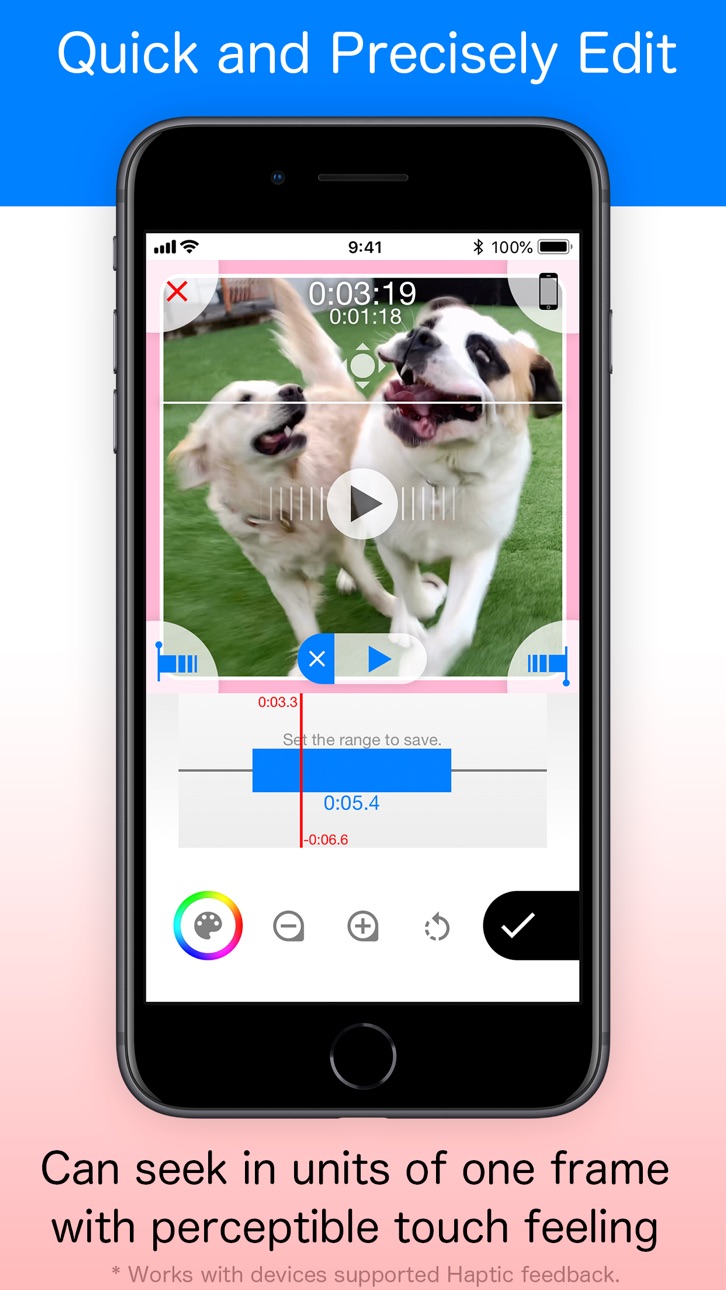
‣ Can quickly and precisely set the starting point of the conversion.
‣ Also can trim the video by setting Start/End points. (up to 5 min)
‣ Real-time high-speed processing that can specify editing points quickly.
‣ Jog function that can accurately search editing point in a unit of 1 frame.
VARIOUS EXPORTS
‣ Save as standard video format
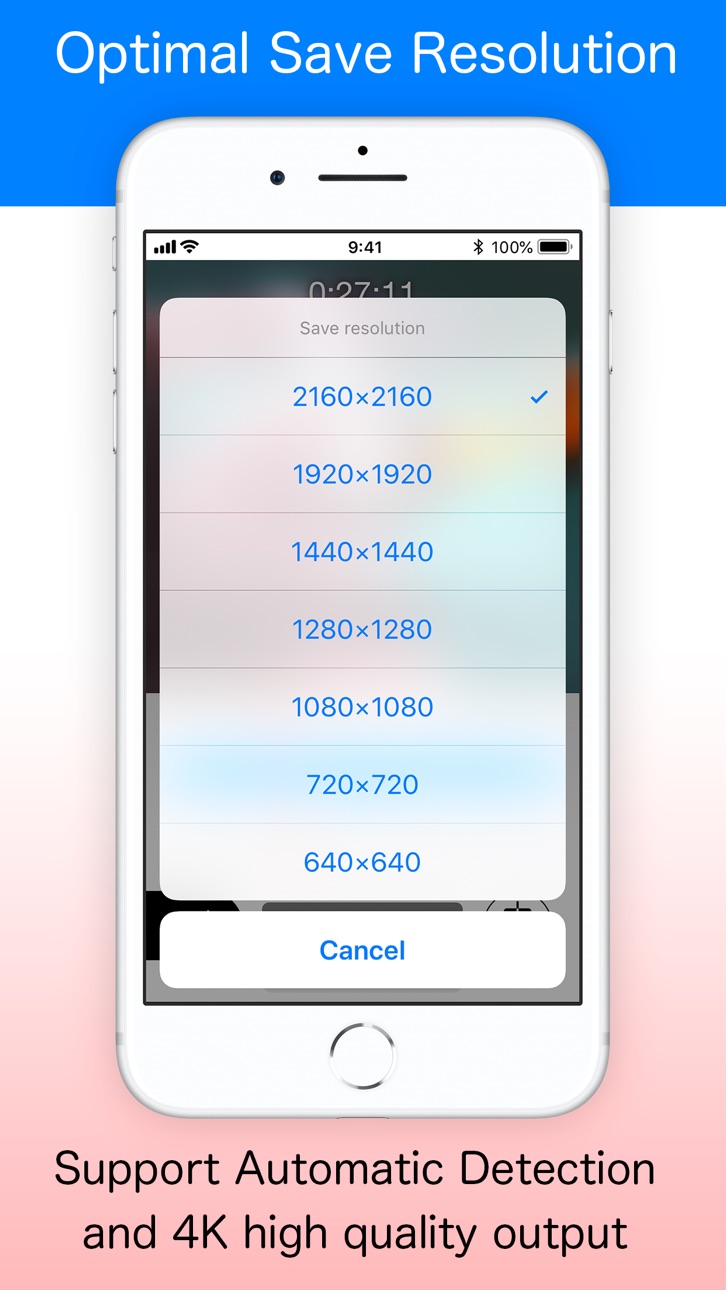
‣ It can be export as high quality as possible for each model. It supports up to Full HD (1080p) in standard, maximum 4K (2160p) in latest high power models.
‣ Save as a Live Photos (key photo changeable)
‣ Save as a photo (still image)
BEAUTIFUL BACKGROUND
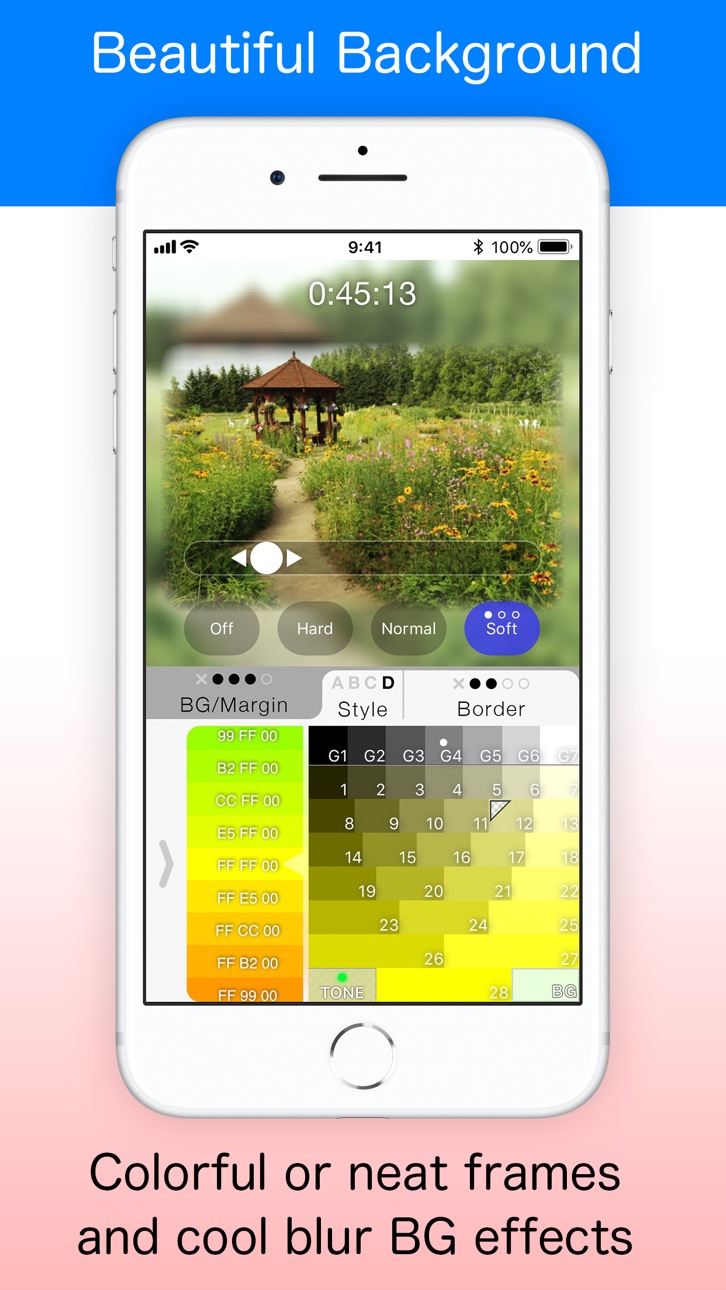
‣ You can change the background color and border type
‣ Blurred background video
‣ Can apply TONE (color) filter matched to border color
‣ TONE (color) filter can be applied to blurred background
COMMITTED TO SOUND
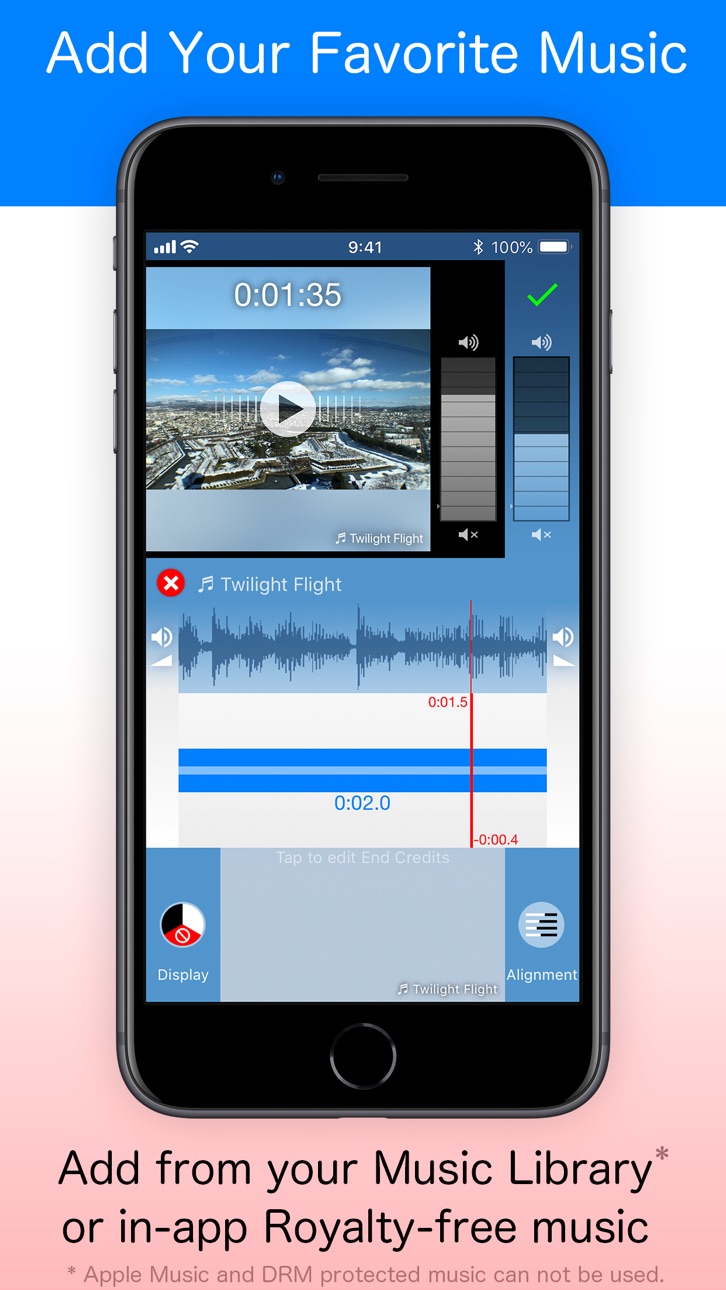
‣ Can add your favorite music
‣ It contains some royalty-free music
‣ Possible to mute only the video sound
ENJOY YOUR WALLPAPERS
‣ Can create Still Wallpaper images from Video that has been correctly aligned for each iPhone model
‣ Ability to accurately align when setting wallpaper with iOS standard Photo app or Settings app
In-App Purchases US pricing
One-Time Purchases
Upgrade to Pro version$3.99
Capabilities
In-App Purchases
Accessibility
ipadiphonemacrealityDevicetvoswatch
Version history 25 versions
Build 878485727v2.3.92025-09-28 02:37:35
- Now supports iPhone 17, iPhone Air, iPhone 17 Pro, iPhone 17 Pro Max.
- Supports iOS26.
Build 874575611v2.3.82025-05-13 16:08:50
- Now supports iPhone 16e.
- Fixed an issue where videos recorded at uncommon frame rates would fail to save.
Build 870386682v2.3.72024-11-16 18:50:17
- Support for iOS 18 and iPhone 16 series.
- Fixed a minor issue.
Build 862549132v2.3.62023-12-29 15:07:16
- Fixed some minor issues.
Build 853058470v2.3.52022-10-31 21:53:07
- Wallpaper mode is now available on iPhone 14 series.
- The guide image that shows the layout of lock screen items (clocks, widgets, music players, etc.) has been renewed to match the new lock screen of iOS 16. It is displayed when you touch the edit image in wallpaper mode.
- Since "Live Wallpaper" is no longer supported on iOS 16, only still images can be saved when using wallpaper mode on iOS 16.
- Rounded corners of margin/border types B and C have been changed from simple circular arcs to iOS unique beautiful curves that look smoother. The type B was adjusted to fit precisely the rounded corners of each message in Notification Center, and the type C automatically fits precisely to the rounded display edges of iPhone models with Face ID.
- Changed the margin preset value on iOS 16 wallpaper mode. Especially Size 3 matched to the margin width of Notification Center. These value can be changed on the in-app settings screen (Gear icon).
- Not only Margins, but also Border preset values can now be individually customized for all 4 sizes. You can change them on the in-app settings screen.
- When the wallpaper mode is selected on the aspect ratio change screen, the setting values for the top and bottom edges are now displayed.
- Fixed some other minor issues.
Build 852123685v2.3.42022-09-13 21:51:13
- iOS 16 support. iOS 16 no longer supports animated wallpapers. Still images captured from videos can be set as wallpaper as before.
Build 849686834v2.3.32022-06-02 01:09:52
- Fixed minor issues and improved performance.
Build 847515446v2.3.22022-03-04 23:21:10
- Fixed minor issues and improved performance.
Build 846221167v2.3.12021-12-28 14:24:32
- Supported for iOS15.
- Wallpaper mode is now available on the iPhone 13 series.
- Fixed some minor issues.
Build 843392921v2.3.02021-08-04 05:42:27
- Added "Frame Grab" function. You can easily save one frame of a video as a still image (photo) just by tapping the camera icon. It also supports high-quality 4K video and slow-motion video.
Build 842431986v2.2.62021-05-31 07:46:39
- Fixed some non-fatal issues.
Build 842211239v2.2.52021-05-21 12:21:20
- Fixed the issue that video files with incomplete embedded profiles such as generated by Snow app could not be saved correctly.
Build 841954643v2.2.42021-05-02 13:31:44
- Supported iOS14.5.
- Fixed some minor issues.
Build 841463854v2.2.32021-04-16 18:46:13
- Wallpaper mode is now supported with the iPhone 12 series.
- Tweaked wallpaper placement for the latest iOS version.
- Improved to correctly convert HDR videos to SDR quality.
- Fixed a issue that sometimes it was not possible to save in the correct color when saving.
- Fixed a issue at the first startup.
- Support for App Tracking Transparency.
- Other minor issues have been fixed.
Build 837837351v2.2.22020-09-21 17:09:58
- Support for iOS14.
Build 836626206v2.2.12020-06-30 06:16:14
Version 2.2.1
- Fixed minor issues.
Version 2.2.0
- Added the function to save even as a rectangle. It supports videos, still images, and Live Photos.
* Suported aspect ratios are: 16:9, 3:2, 4:3, 5:4, 1:1, 4:5, 3:4, 2:3, 9:16, and device-specific wallpaper sizes.
- Improved the screen transition when still images are saved, making it easier to operate when capturing still images repeatedly from a video.
Build 836614221v2.2.02020-06-29 09:26:37
- Added the function to save even as a rectangle. It supports videos, still images, and Live Photos.
* Suported aspect ratios are: 16:9, 3:2, 4:3, 5:4, 1:1, 4:5, 3:4, 2:3, 9:16, and device-specific wallpaper sizes.
- Improved the screen transition when still images are saved, making it easier to operate when capturing multiple still images from a video.
Build 835765842v2.1.12020-04-30 18:53:29
- Support for iPhone SE (2nd).
Build 833393547v2.1.02019-12-16 20:30:48
- Live wallpapers can now be created on iPhone XR / 11 / 11 Pro / 11 Pro Max.
- Added "Share as Video" to the function picker that appears after tapping the check button. Use it when you want to share video to other apps without saving to album.
- Video files can now be loaded from the iOS “Files” app (iOS13 and later only). You can find "Files" icon by tapping the album name displayed at the top of the video picker screen.
- Added new "Type E" border effect. It can be found at the color picker screen. This is an effect that blurs only the edges that are not touching the edge of the screen.
- The wallpaper mode has been expanded to allow more flexible layout. For example, you can create a wallpaper that makes Face ID sensor housing (notch) inconspicuous, or a wallpaper that places images in position that avoid the music player window on the lock screen.
- Background / Margin Size Preset Value can be changed from the setting screen in this app.
- Many bug fixes and fine-tuned wallpaper position for each device.
Build 832462004v2.0.22019-08-22 02:55:55
Version 2.0.2:
- Fixed small issues.
- Add an information for Marketing URL.
Version 2.0.1:
- Stock of Reward type ads has increased, and it has become possible to Free upgrade to Pro version stably.
- Fixed a small issue that occurred when importing video from other apps via "Open in SquareadyV" found in its Share menu.
Version 2.0.0:
While retaining the ease of use and familiarity of the past, it has been redesigned to 2.0 by adding a number of useful new features such as still image capture from videos and creation of "Live Wallpaper".
- UI design has been renewed.
- Supported the screen size for iPhone X / XR / XS / XS Max.
- Paid in-app purchase "Ad-Free" has been renamed to "Upgrade to Pro version".
- You can upgrade to the Pro version for free by watching the rewarded video.
- The main operation are corresponded to haptic feedback. ( work only the device with Taptic Engine)
- It became possible to zoom in / out by pinch operation.
- Long tap on (+) or (-), now auto fit to the vertical / horizontal edge of the screen.
- The recommended save size is now automatically selected according to the zooming status.
- It is now possible to change the border color while fixing the TONE color.
- It is now possible to restore the previous edit state at app startup.
- Various other minor fixes have been made to improve operability and stability.
The following are dedicated features of the Pro version (both paid and free):
- [Pro] Live Wallpaper designing function (on non-3D-Touch devices will be still wallpaper)
- [Pro] 3-types of wallpaper design modes are selectable; such as Full-screen, Clock safe
- [Pro] New ideas to enable accurate wallpaper settings on iOS standard Photos app and Settings app.
- [Pro] Function to avoid enlargement during 3D touch with Lock screen
- [Pro] Live Photos support (Load/Save)
- [Pro] Export a long-time Live Photos (more than 3 sec)
- [Pro] Function to change key photo
- [Pro] Photo (still picture) capture from video
- [Pro] Stepless adjustment for background blur (0 to 50)
- [Pro] High resolution output (4K/2160p, 1920p, 1440p, 1280p)
- [Pro] Real-time display of Save resolution while zooming
Build 832153609v2.0.12019-07-29 07:25:29
Version 2.0.1:
- Stock of Reward type ads has increased, and it has become possible to Free upgrade to Pro version stably.
- Fixed a small issue that occurred when importing video from other apps via "Open in SquareadyV" found in its Share menu.
Version 2.0.0:
While retaining the ease of use and familiarity of the past, it has been redesigned to 2.0 by adding a number of useful new features such as still image capture from videos and creation of "Live Wallpaper".
- UI design has been renewed.
- Supported the screen size for iPhone X / XR / XS / XS Max.
- Paid in-app purchase "Ad-Free" has been renamed to "Upgrade to Pro version".
- You can upgrade to the Pro version for free by watching the rewarded video.
- The main operation are corresponded to haptic feedback. ( work only the device with Taptic Engine)
- It became possible to zoom in / out by pinch operation.
- Long tap on (+) or (-), now auto fit to the vertical / horizontal edge of the screen.
- The recommended save size is now automatically selected according to the zooming status.
- It is now possible to change the border color while fixing the TONE color.
- It is now possible to restore the previous edit state at app startup.
- Various other minor fixes have been made to improve operability and stability.
The following are dedicated features of the Pro version (both paid and free):
- [Pro] Live Wallpaper designing function (on non-3D-Touch devices will be still wallpaper)
- [Pro] 3-types of wallpaper design modes are selectable; such as Full-screen, Clock safe
- [Pro] New ideas to enable accurate wallpaper settings on iOS standard Photos app and Settings app.
- [Pro] Function to avoid enlargement during 3D touch with Lock screen
- [Pro] Live Photos support (Load/Save)
- [Pro] Export a long-time Live Photos (more than 3 sec)
- [Pro] Function to change key photo
- [Pro] Photo (still picture) capture from video
- [Pro] Stepless adjustment for background blur (0 to 50)
- [Pro] High resolution output (4K/2160p, 1920p, 1440p, 1280p)
- [Pro] Real-time display of Save resolution while zooming
Build 831430996v2.0.02019-07-19 11:57:16
While retaining the ease of use and familiarity of the past, it has been redesigned to 2.0 by adding a number of useful new features such as still image capture from videos and creation of "Live Wallpaper".
- UI design has been renewed.
- Supported the screen size for iPhone X / XR / XS / XS Max.
- Paid in-app purchase "Ad-Free" has been renamed to "Upgrade to Pro version".
- You can upgrade to the Pro version for free by watching the rewarded video.
- The main operation are corresponded to haptic feedback. ( work only the device with Taptic Engine)
- It became possible to zoom in / out by pinch operation.
- Long tap on (+) or (-), now auto fit to the vertical / horizontal edge of the screen.
- The recommended save size is now automatically selected according to the zooming status.
- It is now possible to change the border color while fixing the TONE color.
- It is now possible to restore the previous edit state at app startup.
- Various other minor fixes have been made to improve operability and stability.
The following are dedicated features of the Pro version (both paid and free):
- [Pro] Live Wallpaper designing function (on non-3D-Touch devices will be still wallpaper)
- [Pro] 3-types of wallpaper design modes are selectable; such as Full-screen, Clock safe
- [Pro] New ideas to enable accurate wallpaper settings on iOS standard Photos app and Settings app.
- [Pro] Function to avoid enlargement during 3D touch with Lock screen
- [Pro] Live Photos support (Load/Save)
- [Pro] Export a long-time Live Photos (more than 3 sec)
- [Pro] Function to change key photo
- [Pro] Photo (still picture) capture from video
- [Pro] Stepless adjustment for background blur (0 to 50)
- [Pro] High resolution output (4K/2160p, 1920p, 1440p, 1280p)
- [Pro] Real-time display of Save resolution while zooming
Build 828266869v1.6.22018-08-19 07:01:54
- Improved stability and usability for File selector.
- "Tap the center of the startup screen" has been added as an operation to open File selector.
- Other, numerous fine modifications have been made to improve operability and stability.
Build 827298902v1.6.12018-05-25 21:27:54
- Updated to comply with EU General Data Protection Regulation (GDPR). * It affects only users in the European Economic Area (EEA).
Build 818841771v1.6.02018-04-11 18:26:20
- Support for slo-mo videos.
- Fixed the saving process bug.
Price history by region
Currency
Show
Columns
Search
Availability 1 of 1 storefronts
| Region | Language | Price | Ratings | Avg | Version |
|---|---|---|---|---|---|
| US | en-US | Free | 220 | 4.3 | 2.3.9 |
Change log 29 changes · US
✎
releaseNotes updated
- Now supports iPhone 17, iPhone Air, iPhone 17 Pro, iPhone 17 Pro Max.
- Supports iOS26.
✎
description updated
*** For all Instagram Video Lovers !! ***
"Squaready for Video" allows you to post entire videos on Instagram without Square cropping.
In addition, the versio
✎
subtitle updated
Video editor for Instagram
✎
name updated
Squaready for Video
◆
Version 2.3.9 released
- Now supports iPhone 17, iPhone Air, iPhone 17 Pro, iPhone 17 Pro Max.
- Supports iOS26.
◆
Version 2.3.8 released
- Now supports iPhone 16e.
- Fixed an issue where videos recorded at uncommon frame rates would fail to save.
◆
Version 2.3.7 released
- Support for iOS 18 and iPhone 16 series.
- Fixed a minor issue.
◆
Version 2.3.6 released
- Fixed some minor issues.
◆
Version 2.3.5 released
- Wallpaper mode is now available on iPhone 14 series.
- The guide image that shows the layout of lock screen items (clocks, widgets, music players, etc.) has been renewed to match the new lock screen of iOS 16. It is displayed when you tou
◆
Version 2.3.4 released
- iOS 16 support. iOS 16 no longer supports animated wallpapers. Still images captured from videos can be set as wallpaper as before.
◆
Version 2.3.3 released
- Fixed minor issues and improved performance.
◆
Version 2.3.2 released
- Fixed minor issues and improved performance.
◆
Version 2.3.1 released
- Supported for iOS15.
- Wallpaper mode is now available on the iPhone 13 series.
- Fixed some minor issues.
◆
Version 2.3.0 released
- Added "Frame Grab" function. You can easily save one frame of a video as a still image (photo) just by tapping the camera icon. It also supports high-quality 4K video and slow-motion video.
◆
Version 2.2.6 released
- Fixed some non-fatal issues.
◆
Version 2.2.5 released
- Fixed the issue that video files with incomplete embedded profiles such as generated by Snow app could not be saved correctly.
◆
Version 2.2.4 released
- Supported iOS14.5.
- Fixed some minor issues.
◆
Version 2.2.3 released
- Wallpaper mode is now supported with the iPhone 12 series.
- Tweaked wallpaper placement for the latest iOS version.
- Improved to correctly convert HDR videos to SDR quality.
- Fixed a issue that sometimes it was not possible to save in
◆
Version 2.2.2 released
- Support for iOS14.
◆
Version 2.2.1 released
Version 2.2.1
- Fixed minor issues.
Version 2.2.0
- Added the function to save even as a rectangle. It supports videos, still images, and Live Photos.
* Suported aspect ratios are: 16:9, 3:2, 4:3, 5:4, 1:1, 4:5, 3:4, 2:3, 9:16, and device-
◆
Version 2.2.0 released
- Added the function to save even as a rectangle. It supports videos, still images, and Live Photos.
* Suported aspect ratios are: 16:9, 3:2, 4:3, 5:4, 1:1, 4:5, 3:4, 2:3, 9:16, and device-specific wallpaper sizes.
- Improved the screen tr
◆
Version 2.1.1 released
- Support for iPhone SE (2nd).
◆
Version 2.1.0 released
- Live wallpapers can now be created on iPhone XR / 11 / 11 Pro / 11 Pro Max.
- Added "Share as Video" to the function picker that appears after tapping the check button. Use it when you want to share video to other apps without saving to a
◆
Version 2.0.2 released
Version 2.0.2:
- Fixed small issues.
- Add an information for Marketing URL.
Version 2.0.1:
- Stock of Reward type ads has increased, and it has become possible to Free upgrade to Pro version stably.
- Fixed a small issue that occurred whe
◆
Version 2.0.1 released
Version 2.0.1:
- Stock of Reward type ads has increased, and it has become possible to Free upgrade to Pro version stably.
- Fixed a small issue that occurred when importing video from other apps via "Open in SquareadyV" found in its Share
◆
Version 2.0.0 released
While retaining the ease of use and familiarity of the past, it has been redesigned to 2.0 by adding a number of useful new features such as still image capture from videos and creation of "Live Wallpaper".
- UI design has been renewed.
-
◆
Version 1.6.2 released
- Improved stability and usability for File selector.
- "Tap the center of the startup screen" has been added as an operation to open File selector.
- Other, numerous fine modifications have been made to improve operability and stability.
◆
Version 1.6.1 released
- Updated to comply with EU General Data Protection Regulation (GDPR). * It affects only users in the European Economic Area (EEA).
◆
Version 1.6.0 released
- Support for slo-mo videos.
- Fixed the saving process bug.