Home › Photo & Video

 US
US
1 of 1 storefronts
Content in en-US
Content in en-US
Information
Apple ID680502514
Bundle IDcom.arjunaweb.beforeAfterProSlideriPhone
SellerSeller
Min iOS12.2
Min macOS11.0
Device familiesiphone, ipad, ipod
Released2013-08-07
Copyright© 2019 Bogdan Dobrea
Privacy policyLink ↗
Preview 2 platforms
iPhone 8 images



iPad 8 images


What’s New Version 3.2.4
iOS Fixes
Description
Important: please read the app's description before acquiring the app.
The manual sliding functionality is only available inside the app (you will not be able to drag the slider after sharing the slideshow video on a social platform).
The app is compatible with iPhone 5s, iPad 5th gen, iPad Mini 2nd gen or newer devices.
Try before you buy: look for Before and After Photo Compare
Main features of Before and After Pro Slider:
- no ads
- easy to use with detailed How To Use screen
- English and Russian language support
- the settings and slides are automatically saved and will be used when you start the app again
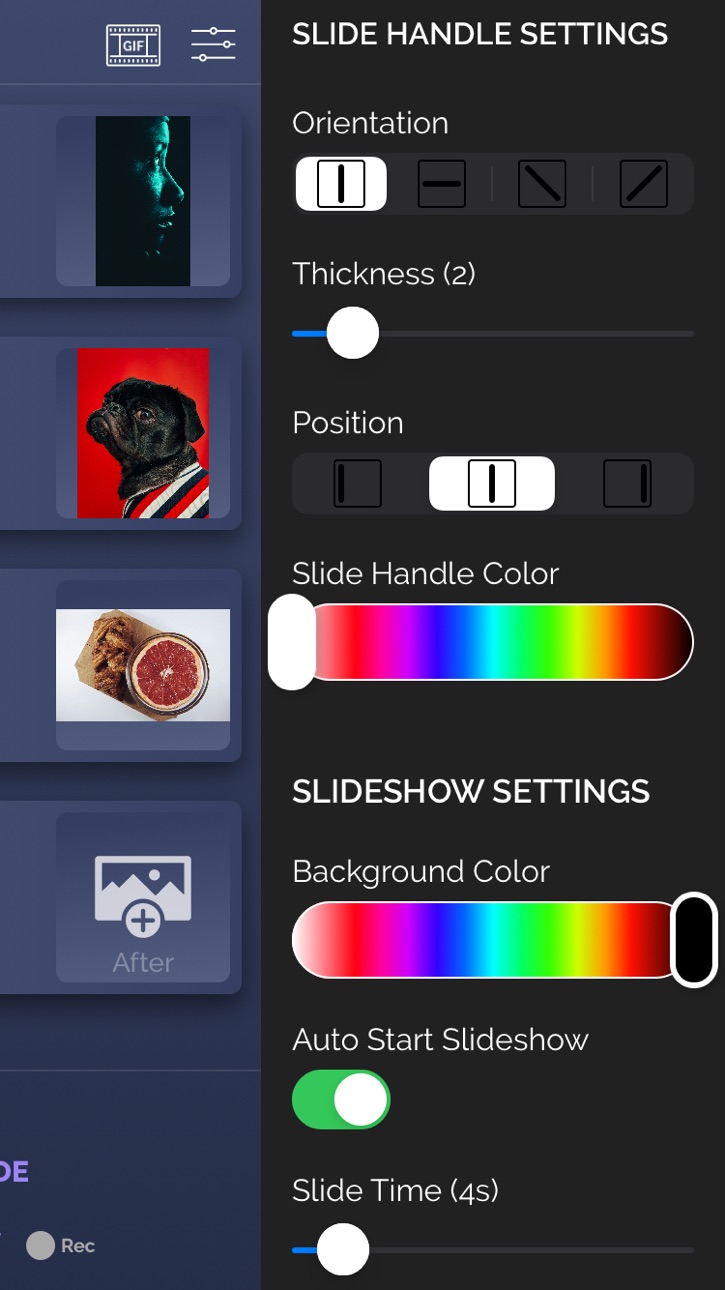
- 2 Image Compare mode where you can manually drag the slider (vertically, horizontally, oblique or reverted oblique). In this screen you can access the Side by Side mode by pressing the button in the bottom right corner
- Slideshow mode where you can present your before/after slides (30 max) in an animated way. The reveal animation will run by itself for each slide.
- you can preview the existing before/after image when taking a new picture
- you can control the direction of each slide in the slideshow and also you can duplicate the last slide
- you can record the slideshow and then trim it before saving or sharing it.
- you can convert your recorded slideshow (or any other video) to an animated GIF
- ability to save/share a snapshot of the current slide. Only a screenshot will be saved/shared, so you won't have the slider functionality when you perform this operation.The recording feature is built into iOS and it can behave strangely sometimes, so please be aware of this. If you experience issues, a device restart is required.
How to use:
- tap on the before/after image slots to load the images from the Library (or take a new one with the camera). You can load both before/after images at the same time (if both slots are open). Optionally, you can load a logo (for best results, use a png image with transparency) that will be shown in one of the corners when you are in Slideshow mode
- modify the slide handle/slideshow settings to match your needs
- once both images are loaded, tap on the Compare button and drag the slider with your finger
- to create Slideshow, the before and after images for the current slide must be present (valid only for the first slide). Once the images are loaded and you altered to settings to match your preferenes, tap on the Slideshow button and watch it run automatically. To add a new slide, tap on the Add Slide button at the bottom of the screen and then add images to it. You can edit the slides order by going into the Edit mode (top left button)
- to add background music to the Slideshow, from the side menu, tap the Pick Song button and load a song from your device's library. Next time you press the Slideshow button, the song will play.
- to hide the top and bottom control bars in 2 Image Compare/Slideshow mode, tap on the eye icon in the top right corner. To show them again, double tap or long press on the device's screen
- To record, activate the Rec button and then press the Slideshow button. The recording will stop once the slideshow is finished, and you will be presented with the resulting video. From there you will be able to trim it before saving/sharing it.
- To export a slideshow recording to GIF, then press the GIF button in the top right corner, load the slideshow video, trim it (20 seconds maximum), then press EXPORT GIF button and then save/share it.
The app is suitable for those who want to compare the before and after images (to see weight loss or diet/fitness program results, makeup or aesthetic transformation etc) or to impress their friends/bosses/clients with the work they've done, by presenting them the stages of their work in a cool way.
If you're having trouble loading images, try turning on the User Regular Image Picker switch in the side menu settings.
Enjoy this app and don't forget to contact us through the app's contact form if you have something to say!
Accessibility
ipadiphonemacrealityDevicetvoswatch
Version history 25 versions
Build 857932293v3.2.42023-06-19 20:07:17
iOS Fixes
Build 840740843v3.2.32021-03-04 19:52:07
- music permission bug fix
Build 838070728v3.2.22020-10-05 06:03:47
- ios 14 update
- added the abilit to center the logo and to change it's size
Build 836057767v3.2.12020-05-22 04:44:54
- added the ability to preview the existing before/after image when taking a new picture, in order to create a better before/after composition
- bug fixes
Build 834147681v3.22020-01-03 10:07:47
New Feature: GIF Export! You can export your slideshow video (or any other video) to an animated gif. Check out the example in the How to Use screen
Build 834075473v3.1.12019-12-19 19:41:34
- fixed slideshow bug
Build 833898634v3.12019-12-06 23:01:27
- New features: now you can control the scroll animation direction for each slide and also duplicate the last slide.
You can now create back&forth animations (check How to Use screen for more help). Big thanks to all who suggested this feature!
- Bug fixes & improvements
Build 832207997v3.0.62019-08-01 10:17:30
- fixed a bug where the music from Apple Music was not being played in Slideshow mode
Build 831957493v3.0.52019-07-16 14:43:14
- bugfixes
- Russian language support
Build 831873064v3.0.42019-07-03 13:54:49
- added the Side by Side button in the Compare screen so that you can see b/a images side by side (top-down or left-right)
- added the Use Regular Image Picker switch in the Settings. Use this if you are having trouble with the default image picker. The regular image picker can only pick 1 image at a time
Build 831469675v3.0.32019-05-29 16:25:35
- now you can load both before/after images for the same slide at the same time (if both slots are free)
- added the option to pick a song from the device's library to use it as a background audio for the slideshow
- other bugfixes
Build 831264596v3.0.22019-05-12 03:38:35
- fixed bug on iPad device where one image would dissapear after rotating the device
- other small fixes
- please support the app by writing a fair review on the AppStore; contact us if you find any issues
Build 830768628v3.0.12019-04-02 04:30:45
- bug fixes
Build 830699633v3.02019-03-26 19:03:57
- major redesign of the app
- fixed bugs regarding the Slideshow Recording. If you still experience issues after this update, please contact us
- your feedback if important, please contact us for any suggestions or issues
Build 827242946v2.1.12018-06-01 20:05:03
- fixed bug that prevented slider to not animate correctly on some language cultures
- fixed iPhone X slideshow bug that caused incorrect image masking for Horizontal and Oblique orientations
Build 827221592v2.1.02018-05-21 17:26:43
- added the options to offset the logo image
- added support for iPhone X
- bugfixes
Build 826153546v2.0.92018-03-02 00:02:59
- fixed a bug where the app would crash when pressing the back button in the slideshow screen
Build 826097901v2.0.82018-02-26 15:49:27
- bugfixes
Build 825564848v2.0.72018-01-08 20:37:45
- bugfixes
- added the option to revert to the regular image picker
Build 825352076v2.0.62017-12-18 14:37:57
- added the Record button on the main screen. If you enable it and press the Slideshow button, the app will record the slideshow. Please note that recording is made through an operating system built in function, and may not work properly on some devices. If this happens, please try restarting the app and device and try recording again
- added the ability to load 2 images simultaneously (before/after images) to speed up things
- bugfixes
Build 825160729v2.0.52017-12-04 15:19:06
- fixed some bugs that were causing crashes on a couple of devices
- please remember that starting with iOS 11, you can record the slideshow using the operating system's record screen function that you can access through the control center. You won't see the red record button in the slideshow mode
Build 823789546v2.0.42017-10-03 06:28:04
- now you can load your logo (transparent png preferably) and place it in one of the slideshow's corners
- starting with iOS 11 you can only use the operating system's built in screen recording function (see How to Use popup for more info); in-app recording feature is only available for iOS 10
- bug fixes
Build 821401424v2.0.32017-03-22 14:48:51
- added 2 new sliding modes: oblique \ and reverted oblique /
- bug fixes
Build 821025208v2.0.22017-02-24 19:55:03
- fixed Facebook sharing and image picker bug
- added Instagram sharing
Build 820971485v2.0.12017-02-19 08:09:08
- added Record video function for the Slideshow
- now you can load 2 images (the before and after slots for each slide) at the same time
- bug fixes
Price history by region
Currency
Show
Columns
Search
Availability 1 of 1 storefronts
| Region | Language | Price | Ratings | Avg | Version |
|---|---|---|---|---|---|
| US | en-US | USD 0.99 | 30 | 3.2 | 3.2.4 |
Change log 29 changes · US
✎
releaseNotes updated
iOS Fixes
✎
description updated
Important: please read the app's description before acquiring the app.
The manual sliding functionality is only available inside the app (you will not be able
✎
subtitle updated
Record before/after slideshows
✎
name updated
Before and After Pro Slider
◆
Version 3.2.4 released
iOS Fixes
◆
Version 3.2.3 released
- music permission bug fix
◆
Version 3.2.2 released
- ios 14 update
- added the abilit to center the logo and to change it's size
◆
Version 3.2.1 released
- added the ability to preview the existing before/after image when taking a new picture, in order to create a better before/after composition
- bug fixes
◆
Version 3.2 released
New Feature: GIF Export! You can export your slideshow video (or any other video) to an animated gif. Check out the example in the How to Use screen
◆
Version 3.1.1 released
- fixed slideshow bug
◆
Version 3.1 released
- New features: now you can control the scroll animation direction for each slide and also duplicate the last slide.
You can now create back&forth animations (check How to Use screen for more help). Big thanks to all who suggested this fea
◆
Version 3.0.6 released
- fixed a bug where the music from Apple Music was not being played in Slideshow mode
◆
Version 3.0.5 released
- bugfixes
- Russian language support
◆
Version 3.0.4 released
- added the Side by Side button in the Compare screen so that you can see b/a images side by side (top-down or left-right)
- added the Use Regular Image Picker switch in the Settings. Use this if you are having trouble with the default imag
◆
Version 3.0.3 released
- now you can load both before/after images for the same slide at the same time (if both slots are free)
- added the option to pick a song from the device's library to use it as a background audio for the slideshow
- other bugfixes
◆
Version 3.0.2 released
- fixed bug on iPad device where one image would dissapear after rotating the device
- other small fixes
- please support the app by writing a fair review on the AppStore; contact us if you find any issues
◆
Version 3.0.1 released
- bug fixes
◆
Version 3.0 released
- major redesign of the app
- fixed bugs regarding the Slideshow Recording. If you still experience issues after this update, please contact us
- your feedback if important, please contact us for any suggestions or issues
◆
Version 2.1.1 released
- fixed bug that prevented slider to not animate correctly on some language cultures
- fixed iPhone X slideshow bug that caused incorrect image masking for Horizontal and Oblique orientations
◆
Version 2.1.0 released
- added the options to offset the logo image
- added support for iPhone X
- bugfixes
◆
Version 2.0.9 released
- fixed a bug where the app would crash when pressing the back button in the slideshow screen
◆
Version 2.0.8 released
- bugfixes
◆
Version 2.0.7 released
- bugfixes
- added the option to revert to the regular image picker
◆
Version 2.0.6 released
- added the Record button on the main screen. If you enable it and press the Slideshow button, the app will record the slideshow. Please note that recording is made through an operating system built in function, and may not work properly on
◆
Version 2.0.5 released
- fixed some bugs that were causing crashes on a couple of devices
- please remember that starting with iOS 11, you can record the slideshow using the operating system's record screen function that you can access through the control center.
◆
Version 2.0.4 released
- now you can load your logo (transparent png preferably) and place it in one of the slideshow's corners
- starting with iOS 11 you can only use the operating system's built in screen recording function (see How to Use popup for more info);
◆
Version 2.0.3 released
- added 2 new sliding modes: oblique \ and reverted oblique /
- bug fixes
◆
Version 2.0.2 released
- fixed Facebook sharing and image picker bug
- added Instagram sharing
◆
Version 2.0.1 released
- added Record video function for the Slideshow
- now you can load 2 images (the before and after slots for each slide) at the same time
- bug fixes