Home › Utilities

 US
US
1 of 1 storefronts
Content in en-US
Content in en-US
Information
Preview 1 platform
iPhone 7 images




What’s New Version 1.8.1
Improved Settings privacy, trust wording, and main screen layout
Description
Hide My Text helps you keep sensitive messages private before they leave your phone.
Write your message, choose a trusted contact, and Hide My Text turns it into hidden encrypted text. Send that hidden text through WhatsApp, Telegram, email, SMS, or any app you already use. Only the trusted contact you paired with can reveal it.
Hide My Text is local-first:
No account.
No email.
No phone number.
No server storing your keys.
No cloud message history.
Your encryption keys stay on your device. Contacts are added by invitation link or QR code, and both sides can compare a safety phrase before trusting each other.
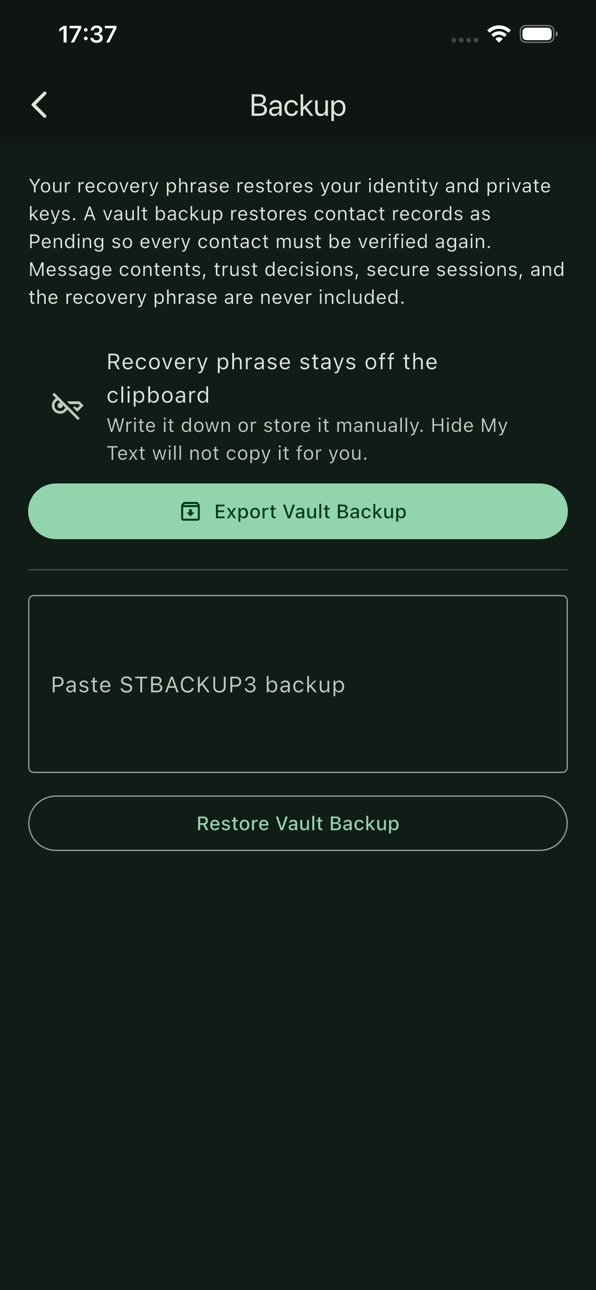
You can also create a recovery phrase and encrypted vault backup so you can restore your identity and contacts if you change phones. Restored contacts return as pending and must be verified again.
Hide My Text does not replace your messaging apps. It adds a private layer before you send.
Accessibility
ipadiphonemacrealityDevicetvoswatch
Version history 2 versions
Build 887986994v1.8.12026-07-08 21:30:53
Improved Settings privacy, trust wording, and main screen layout
Build 887306398v1.02026-07-07 07:37:53
No pricing data captured yet — comparisons appear once the app has paid storefronts or in-app purchases.
Availability 1 of 1 storefronts
| Region | Language | Price | Ratings | Avg | Version |
|---|---|---|---|---|---|
| US | en-US | Free | 0 | — | 1.8.1 |
Change log 6 changes · US
✎
releaseNotes updated
Improved Settings privacy, trust wording, and main screen layout
✎
description updated
Hide My Text helps you keep sensitive messages private before they leave your phone.
Write your message, choose a trusted contact, and Hide My Text turns it in
✎
subtitle updated
New Generation Of Texting
✎
name updated
Hide My Text
◆
Version 1.8.1 released
Improved Settings privacy, trust wording, and main screen layout
◆
Version 1.0 released