Home › Photo & Video

 US
US
1 of 1 storefronts
Content in en-US
Content in en-US
Information
Preview 2 platforms
iPhone 5 images


iPad 5 images


What’s New Version 1.0.1
UI refinements and bug fixes.
Description
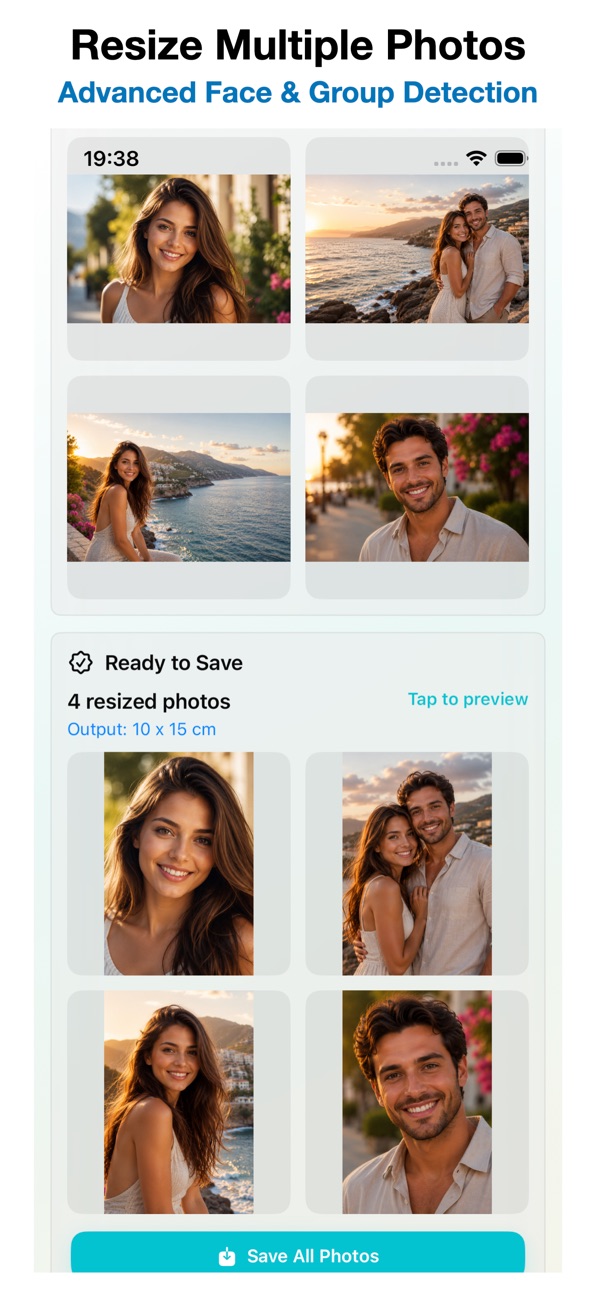
Crop, resize and fit multiple photos at once.
Advanced Face & Group Detection automatically centers faces and groups for improved framing and professional-looking results.
Features:
• Batch resize multiple photos at once
• Smart Crop with automatic face and group detection
• Automatic or manual surroundings adjustment
• Portrait, Landscape and Original orientation support
• Center Crop mode for products, objects and landscapes
• JPEG, PNG and PDF export
• High Quality (300 DPI) and Ultra Quality (600 DPI) output
• Target photo size control for smaller file sizes
• Batch watermark support with text or image logos
• Save to Photos or directly to custom albums
• Ready-to-use print, social media and business presets
• Save and instantly restore personalized presets
• Custom sizes in centimeters, inches or pixels
Whether you need photos for printing, online uploads, social media or business use, MultiPhoto Fit makes batch photo processing fast, accurate and easy.
In-App Purchases US pricing
One-Time Purchases
Lifetime Pro$9.99
Capabilities
In-App Purchases
Accessibility
ipadiphonemacrealityDevicetvoswatch
Version history 2 versions
Build 887302179v1.02026-07-07 08:31:50
Build 887953871v1.0.12026-07-07 18:37:03
UI refinements and bug fixes.
Price history by region
Currency
Show
Columns
Search
Availability 1 of 1 storefronts
| Region | Language | Price | Ratings | Avg | Version |
|---|---|---|---|---|---|
| US | en-US | Free | 0 | — | 1.0.1 |
Change log 6 changes · US
✎
releaseNotes updated
UI refinements and bug fixes.
✎
description updated
Crop, resize and fit multiple photos at once.
Advanced Face & Group Detection automatically centers faces and groups for improved framing and professional-look
✎
subtitle updated
Face & Group Detection
✎
name updated
MultiPhoto Fit
◆
Version 1.0.1 released
UI refinements and bug fixes.
◆
Version 1.0 released