Home › Navigation

 US
US
 AGen-GB
 AIen-GB
 AOen-GB
 ARes-MX
 BBen-GB
 BFen-GB
 BJen-GB
 BOes-MX
 BRpt-BR
 BSen-GB
 BWen-GB
 BZen-GB
 CDen-GB
 CGen-GB
 CIfr-FR
 CLes-MX
 CMfr-FR
 COes-MX
 CRes-MX
 CVen-GB
 DMen-GB
 DOes-MX
 DZen-GB
 ECes-MX
 GAfr-FR
 GDen-GB
 GHen-GB
 GMen-GB
 GTes-MX
 GWen-GB
 GYen-GB
 HNes-MX
 JMen-GB
 KEen-GB
 KNen-GB
 KYen-GB
 LCen-GB
 LRen-GB
 LYen-GB
 MAen-GB
 MGen-GB
 MLen-GB
 MSen-GB
 MUen-GB
 MWen-GB
 MXes-MX
 MZen-GB
 NAen-GB
 NEen-GB
 NGen-GB
 NIes-MX
 PAes-MX
 PEes-MX
 PYes-MX
 SLen-GB
 SNen-GB
 SRen-GB
 SVes-MX
 TCen-GB
 TDen-GB
 TNen-GB
 TTen-GB
 TZen-GB
 UGen-GBUSen-US
 UYen-GB
 VCen-GB
 VEes-MX
 VGen-GB
 ZMen-GB
 ZWen-GB
71 of 71 storefronts
Content in en-US
Content in en-US
Information
Preview 2 platforms
iPhone 9 images


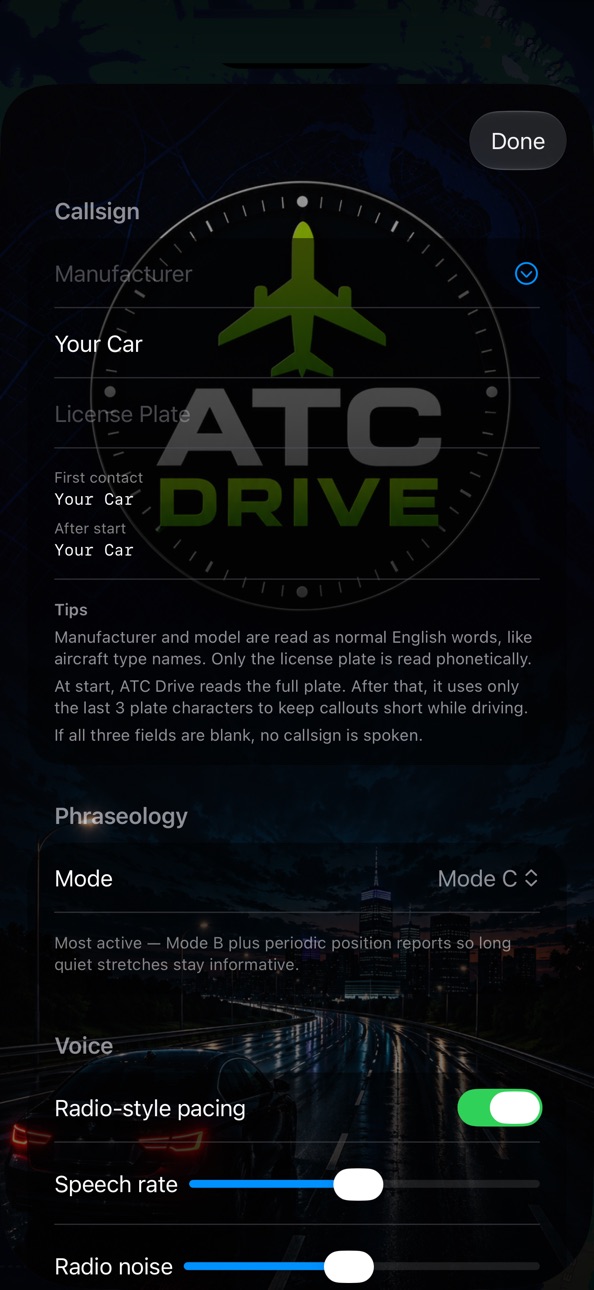
iPad 8 images


What’s New Version 1.3
• Now works with CarPlay. Your ATC-style voice guidance stays the same, now with the airspace-overlaid map and glass-cockpit-style instruments shown on your car's display.
• Choose the voices you want. In Settings, browse the English voices installed on your device, preview them, and pick your favorites.
• You can now keep your music or podcasts at full volume while guidance speaks. (The option to briefly lower other audio during voice guidance is still available too.)
• Improved the map and instrument display.
• Fixed an issue where the map's direction of travel could drift from straight up during navigation.
Description
ATC Drive turns everyday driving into a pilot-training-style experience. It gives you your own vehicle callsign, controller-style phraseology, and a glass-cockpit-style display. Letters and numbers are read using real aviation ATC pronunciation, so it can even help student private pilots practice radio comprehension. Beyond being fun for aviation enthusiasts, it conveys more by voice than an ordinary navigation app, which can reduce how often you glance at the screen while driving — it was designed with safer driving in mind.
HOW IT WORKS
- Search for a destination like any navigation app, and ATC Drive reads your turn-by-turn guidance aloud as aviation-radio-style ATC calls.
- Major car makers are preset, so you can quickly set your vehicle's make, model, and plate; this becomes your callsign and is spoken using the NATO phonetic alphabet.
- Transponder mode lets you choose how often guidance speaks.
- Customize the voices in detail. ATC Drive uses the voices installed on your iPhone or iPad, so add voices to your device as needed.
- With CarPlay, your car's display becomes a glass-cockpit-style navigation screen.
KEY FEATURES
- ATC radio-style turn-by-turn driving guidance
- Your own vehicle callsign and radio phraseology
- ATIS-style weather readout for your destination
- Airport-approach and airspace-entry callouts
- Radio noise and radio-style pacing (optional)
- Saved places, favorites, and recent searches
- iPhone and iPad support
- CarPlay support
FREE TO TRY
ATC Drive includes your first 3 guided drives free. A one-time purchase unlocks unlimited drives. Your purchase is tied to your Apple Account and available on all your devices signed in to that account.
Weather data is provided by Apple Weather.
ATC Drive is an entertainment app for driving, not a real air-traffic-control or aviation product. Always follow road conditions and traffic laws while driving, and do not operate the app while driving.
In-App Purchases US pricing
One-Time Purchases
ATC Drive Pro$4.99
Capabilities
In-App Purchases
Accessibility
ipadiphonemacrealityDevicetvoswatch
Version history 4 versions
Build 887915188v1.32026-07-09 18:43:09
• Now works with CarPlay. Your ATC-style voice guidance stays the same, now with the airspace-overlaid map and glass-cockpit-style instruments shown on your car's display.
• Choose the voices you want. In Settings, browse the English voices installed on your device, preview them, and pick your favorites.
• You can now keep your music or podcasts at full volume while guidance speaks. (The option to briefly lower other audio during voice guidance is still available too.)
• Improved the map and instrument display.
• Fixed an issue where the map's direction of travel could drift from straight up during navigation.
Build 887717323v1.22026-07-02 18:51:18
* Optimized the voice selection algorithm.
* Added individual volume controls for each voice in Settings.
* Improved usability by adding three volume levels and a mute option to the speaker button on the navigation screen.
* Fixed minor bugs.
Build 887539852v1.12026-06-28 16:54:58
• You can now choose the spoken-guidance voice. In Settings, select from the English voices installed on your device.
• Guidance now prefers more natural, easier-to-understand voices. Adding higher-quality voices (Enhanced / Premium) on your device makes the readout even more natural — Settings shows you how.
• Improved the in-navigation map display.
• Fixed a bug where setting a new destination after ending navigation wasn't applied.
• Minor bug fixes and stability improvements.
Build 887259119v1.02026-06-25 00:47:31
Price history by region
Currency
Show
Columns
Search
Availability 71 of 71 storefronts
| Region | Language | Price | Ratings | Avg | Version |
|---|---|---|---|---|---|
| AG | en-GB | Free | 0 | — | 1.3 |
| AI | en-GB | Free | 0 | — | 1.3 |
| AO | en-GB | Free | 0 | — | 1.3 |
| AR | es-MX | Free | 0 | — | 1.3 |
| BB | en-GB | Free | 0 | — | 1.3 |
| BF | en-GB | Free | 0 | — | 1.3 |
| BJ | en-GB | Free | 0 | — | 1.3 |
| BO | es-MX | Free | 0 | — | 1.3 |
| BR | pt-BR | Free | 0 | — | 1.3 |
| BS | en-GB | Free | 0 | — | 1.3 |
| BW | en-GB | Free | 0 | — | 1.3 |
| BZ | en-GB | Free | 0 | — | 1.3 |
| CD | en-GB | Free | 0 | — | 1.3 |
| CG | en-GB | Free | 0 | — | 1.3 |
| CI | fr-FR | Free | 0 | — | 1.3 |
| CL | es-MX | Free | 0 | — | 1.3 |
| CM | fr-FR | Free | 0 | — | 1.3 |
| CO | es-MX | Free | 0 | — | 1.3 |
| CR | es-MX | Free | 0 | — | 1.3 |
| CV | en-GB | Free | 0 | — | 1.3 |
| DM | en-GB | Free | 0 | — | 1.3 |
| DO | es-MX | Free | 0 | — | 1.3 |
| DZ | en-GB | Free | 0 | — | 1.3 |
| EC | es-MX | Free | 0 | — | 1.3 |
| GA | fr-FR | Free | 0 | — | 1.3 |
| GD | en-GB | Free | 0 | — | 1.3 |
| GH | en-GB | Free | 0 | — | 1.3 |
| GM | en-GB | Free | 0 | — | 1.3 |
| GT | es-MX | Free | 0 | — | 1.3 |
| GW | en-GB | Free | 0 | — | 1.3 |
| GY | en-GB | Free | 0 | — | 1.3 |
| HN | es-MX | Free | 0 | — | 1.3 |
| JM | en-GB | Free | 0 | — | 1.3 |
| KE | en-GB | Free | 0 | — | 1.3 |
| KN | en-GB | Free | 0 | — | 1.3 |
| KY | en-GB | Free | 0 | — | 1.3 |
| LC | en-GB | Free | 0 | — | 1.3 |
| LR | en-GB | Free | 0 | — | 1.3 |
| LY | en-GB | Free | 0 | — | 1.3 |
| MA | en-GB | Free | 0 | — | 1.3 |
| MG | en-GB | Free | 0 | — | 1.3 |
| ML | en-GB | Free | 0 | — | 1.3 |
| MS | en-GB | Free | 0 | — | 1.3 |
| MU | en-GB | Free | 0 | — | 1.3 |
| MW | en-GB | Free | 0 | — | 1.3 |
| MX | es-MX | Free | 0 | — | 1.3 |
| MZ | en-GB | Free | 0 | — | 1.3 |
| NA | en-GB | Free | 0 | — | 1.3 |
| NE | en-GB | Free | 0 | — | 1.3 |
| NG | en-GB | Free | 0 | — | 1.3 |
| NI | es-MX | Free | 0 | — | 1.3 |
| PA | es-MX | Free | 0 | — | 1.3 |
| PE | es-MX | Free | 0 | — | 1.3 |
| PY | es-MX | Free | 0 | — | 1.3 |
| SL | en-GB | Free | 0 | — | 1.3 |
| SN | en-GB | Free | 0 | — | 1.3 |
| SR | en-GB | Free | 0 | — | 1.3 |
| SV | es-MX | Free | 0 | — | 1.3 |
| TC | en-GB | Free | 0 | — | 1.3 |
| TD | en-GB | Free | 0 | — | 1.3 |
| TN | en-GB | Free | 0 | — | 1.3 |
| TT | en-GB | Free | 0 | — | 1.3 |
| TZ | en-GB | Free | 0 | — | 1.3 |
| UG | en-GB | Free | 0 | — | 1.3 |
| US | en-US | Free | 0 | — | 1.3 |
| UY | en-GB | Free | 0 | — | 1.3 |
| VC | en-GB | Free | 0 | — | 1.3 |
| VE | es-MX | Free | 0 | — | 1.3 |
| VG | en-GB | Free | 0 | — | 1.3 |
| ZM | en-GB | Free | 0 | — | 1.3 |
| ZW | en-GB | Free | 0 | — | 1.3 |
Change log 8 changes · US
✎
releaseNotes updated
• Now works with CarPlay. Your ATC-style voice guidance stays the same, now with the airspace-overlaid map and glass-cockpit-style instruments shown on your car
✎
description updated
ATC Drive turns everyday driving into a pilot-training-style experience. It gives you your own vehicle callsign, controller-style phraseology, and a glass-cockp
✎
subtitle updated
ATC radio-style driving nav
✎
name updated
ATC Drive
◆
Version 1.3 released
• Now works with CarPlay. Your ATC-style voice guidance stays the same, now with the airspace-overlaid map and glass-cockpit-style instruments shown on your car's display.
• Choose the voices you want. In Settings, browse the English voices
◆
Version 1.2 released
* Optimized the voice selection algorithm.
* Added individual volume controls for each voice in Settings.
* Improved usability by adding three volume levels and a mute option to the speaker button on the navigation screen.
* Fixed minor bug
◆
Version 1.1 released
• You can now choose the spoken-guidance voice. In Settings, select from the English voices installed on your device.
• Guidance now prefers more natural, easier-to-understand voices. Adding higher-quality voices (Enhanced / Premium) on you
◆
Version 1.0 released