Home › Music

 US
US
1 of 1 storefronts
Content in en-US
Content in en-US
Information
Preview 1 platform
iPhone 4 images



What’s New Version 2.1
New features:
- Multi-samples! Import a series of samples to combine them into a multi-sample (only available on EP-1320 and EP-40)
- EP-40 support with loop mode, Supertone, and multi-samples
- Share, save, and backup Bank Snapshots
- Native iOS actions: long-press or swipe on Sample rows or Bank Snapshots to rename, share, or delete; haptics on UI controls; improved accessibility labels
Fixes:
- Improved cache performance
- Improved wav zooming, trim handle snapping, and more predictible cycle grabs
- Prevent upward scaling fidelity artifacts
- Edit sample could get stuck on a previous sample
- Moving multiple samples could crash the device
- The pad label was incorrect
Description
Best Friend is the unrivalled companion app for Teenage Engineering EP-Series Samplers. Connect your EP-133, EP-40, or EP-1320 via USB-C to see your waveforms and pad settings, upload new files, and edit samples.
Best Friend is an extended display and feature augmentation app for the physical EP-133, EP-40, or EP-1320. Connecting to one of these devices is REQUIRED for the app to function. USB-C to Lightning not currently supported by Teenage Engineering. You must use a USB-C to USB-C cable.
Pad Features:
- See an entire bank of samples at once
- Save a snapshot of samples loaded on bank to share and recall later
- See the sample waveform along with its name and length
- See and edit the trim window
- See and edit the attack and release window
- See and adjust volume, pitch, pan, mute, play mode, time-stretch, and MIDI channel
- See Supertone settings on your EP-40
Sample Editing Features:
- Build and edit multi-samples on the EP-1320 or EP-40
- Use Repitch to reduce the file size
- Permanent cropping
- Increase volume with normalize
- Reverse playback
- Convert stereo to mono
- Change sample rate
- Apply 3-band EQ
- Save default pad settings
Sample Management Features:
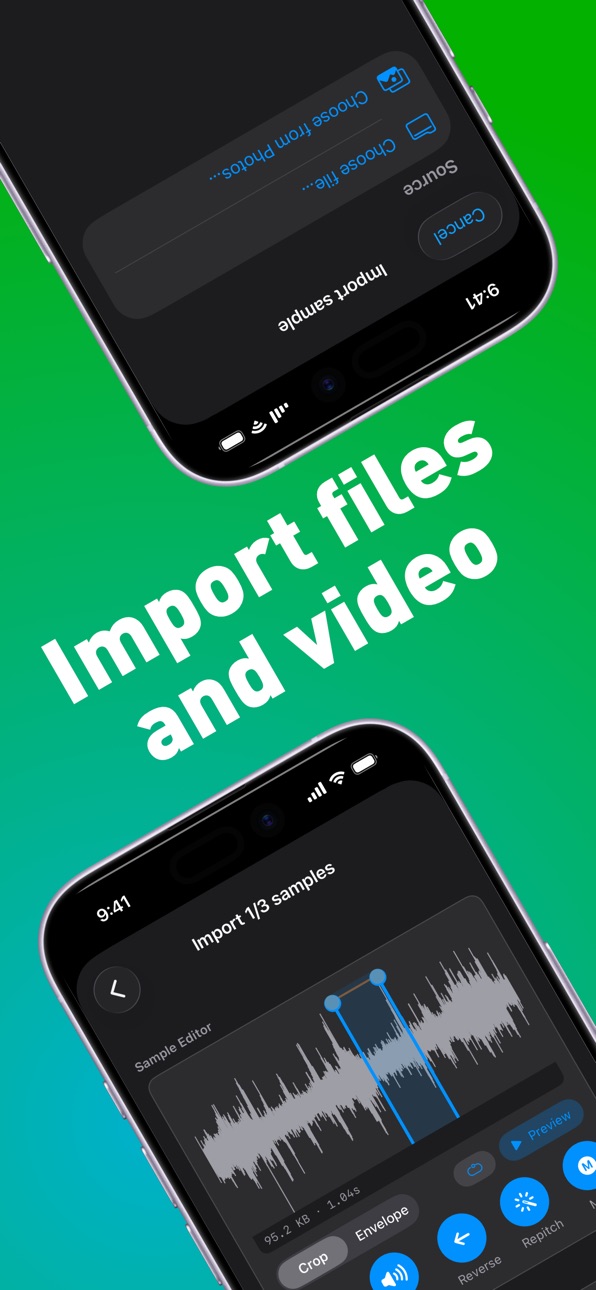
- Bulk upload samples from your Files and Videos
- Extract audio from your Videos
- Replace samples in place
- Bulk delete samples
- Bulk move samples
- Bulk share samples
Best Friend is not affiliated with Teenage Engineering in any way.
Accessibility
ipadiphonemacrealityDevicetvoswatch
Version history 3 versions
Build 887936658v2.12026-07-07 21:06:42
New features:
- Multi-samples! Import a series of samples to combine them into a multi-sample (only available on EP-1320 and EP-40)
- EP-40 support with loop mode, Supertone, and multi-samples
- Share, save, and backup Bank Snapshots
- Native iOS actions: long-press or swipe on Sample rows or Bank Snapshots to rename, share, or delete; haptics on UI controls; improved accessibility labels
Fixes:
- Improved cache performance
- Improved wav zooming, trim handle snapping, and more predictible cycle grabs
- Prevent upward scaling fidelity artifacts
- Edit sample could get stuck on a previous sample
- Moving multiple samples could crash the device
- The pad label was incorrect
Build 887213591v1.02026-07-02 17:03:05
Build 887753519v2.02026-07-02 23:53:28
New features:
- Save Bank Snapshots to quickly reload a previous bank of samples.
- Move, delete, and share multiple samples from the Sample List screen.
- See all loaded samples per Bank.
- Zoom into samples. Pinch to zoom in. Double-tap to zoom out. While zoomed in, swipe to pan around the wav. While zoomed out, move the cycle region by tapping the centre of the highlighted region.
- Support for firmware v2.5: Previews play through USB Audio; 40s sample time for mono; Lo/Med/Hi sample rate options; reverse playback in Time Mode.
- Trigger Previews in Import and Edit Sample by cycling through the Bank Pads.
- Revamped icons. See your selected project on the Pad screen icon.
Fixes:
- Disconnecting your sampler no longer requires app restart to reconnect.
- Improved wav render performance.
- Improved sample caching performance.
Price history by region
Currency
Show
Columns
Search
Availability 1 of 1 storefronts
| Region | Language | Price | Ratings | Avg | Version |
|---|---|---|---|---|---|
| US | en-US | USD 7.99 | 0 | — | 2.1 |
Change log 7 changes · US
✎
releaseNotes updated
New features:
- Multi-samples! Import a series of samples to combine them into a multi-sample (only available on EP-1320 and EP-40)
- EP-40 support with loop mo
✎
description updated
Best Friend is the unrivalled companion app for Teenage Engineering EP-Series Samplers. Connect your EP-133, EP-40, or EP-1320 via USB-C to see your waveforms a
✎
subtitle updated
EP-133 companion app
✎
name updated
Best Friend
◆
Version 2.1 released
New features:
- Multi-samples! Import a series of samples to combine them into a multi-sample (only available on EP-1320 and EP-40)
- EP-40 support with loop mode, Supertone, and multi-samples
- Share, save, and backup Bank Snapshots
- Nati
◆
Version 2.0 released
New features:
- Save Bank Snapshots to quickly reload a previous bank of samples.
- Move, delete, and share multiple samples from the Sample List screen.
- See all loaded samples per Bank.
- Zoom into samples. Pinch to zoom in. Double-tap t
◆
Version 1.0 released