Home › Education

 US
US
1 of 1 storefronts
Content in en-US
Content in en-US
Information
Apple ID6782076871
Bundle IDcom.qingdu.japanese
SellerSeller
Min iOS18.0
Min macOS15.0
Device familiesiphone
Released2026-07-01
Copyright© 2026 Qingdu Studio
Privacy policyLink ↗
Preview 1 platform
iPhone 4 images


What’s New Version 1.3
Fixed an issue where the screen layout shrank when the keyboard appeared while editing text. The keyboard now overlays the screen, so the source and translation cards keep their size.
Description
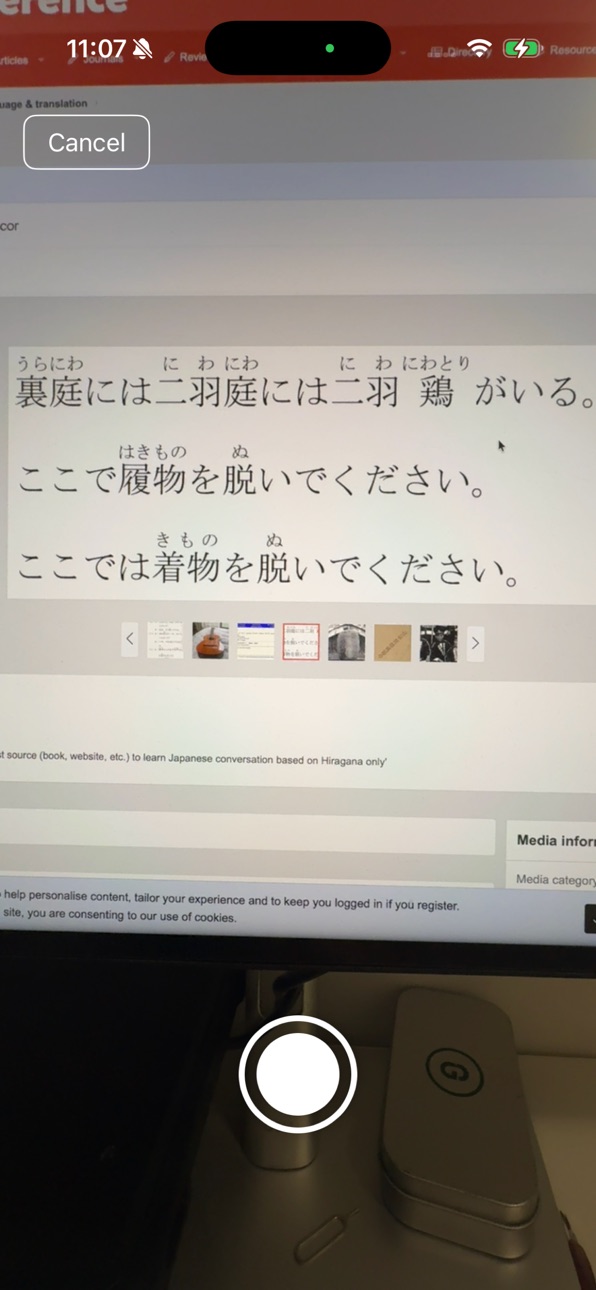
Seidoku AI turns your camera into a Japanese OCR, romaji, pronunciation, and translation assistant.
Take a photo of any Japanese text — textbooks, signs, menus, or notes — and Seidoku AI instantly recognizes it with high accuracy, reads it aloud in natural native pronunciation, and provides a translation. Built especially for learners who want to read along and improve as they go.
KEY FEATURES
- AI-Powered OCR — Advanced AI recognition delivers exceptionally high accuracy
- Furigana Removal — Automatically filters out the furigana printed above kanji, extracting only clean Japanese text
- Romaji Reading — Shows the yomigana of every word in romaji, so you always know how to pronounce it
- Native Pronunciation — Listen to clear, natural text-to-speech for every sentence
- Instant Translation — Understand what you're reading right away
- Edit & Refine — Adjust recognized text for perfect accuracy
- Simple & Fast — No login, no account, no clutter. Just open and read
WHY SEIDOKU AI?
Many textbooks print furigana above or beside the kanji, which confuses ordinary OCR tools. Seidoku AI intelligently removes this noise and extracts only the Japanese text you need — then gives you the romaji reading so you can read it with confidence, every time.
WHO IS IT FOR?
Seidoku AI is designed for learners of Japanese who study with physical textbooks and want a faster, more accurate way to look up, hear, and understand kanji. Whether you're a beginner mastering hiragana and katakana or an intermediate learner reading native materials, Seidoku AI helps you read with confidence.
Start reading Japanese today — just snap a photo and tap.
Terms of Use: https://www.apple.com/legal/internet-services/itunes/dev/stdeula/
In-App Purchases US pricing
Seidoku Premium Subscription
Yearly Premium · Yearly$34.99
Monthly Premium · Monthly$4.99
Capabilities
In-App Purchases
Accessibility
ipadiphonemacrealityDevicetvoswatch
Version history 3 versions
Build 887848708v1.32026-07-05 20:24:22
Fixed an issue where the screen layout shrank when the keyboard appeared while editing text. The keyboard now overlays the screen, so the source and translation cards keep their size.
Build 887815344v1.22026-07-04 21:32:52
• Faster translations: an instant preview translation appears right after you take a photo, then it's automatically replaced with a more accurate AI translation.
• The Translation tab now comes first and is shown by default.
Build 887191268v1.12026-07-02 02:02:34
Price history by region
Currency
Show
Columns
Search
Availability 1 of 1 storefronts
| Region | Language | Price | Ratings | Avg | Version |
|---|---|---|---|---|---|
| US | en-US | Free | 0 | — | 1.3 |
Change log 7 changes · US
✎
releaseNotes updated
Fixed an issue where the screen layout shrank when the keyboard appeared while editing text. The keyboard now overlays the screen, so the source and translation
✎
description updated
Seidoku AI turns your camera into a Japanese OCR, romaji, pronunciation, and translation assistant.
Take a photo of any Japanese text — textbooks, signs, menus
✎
subtitle updated
Kanji OCR, Furigana & Romaji
✎
name updated
Seidoku AI: Japanese Reader
◆
Version 1.3 released
Fixed an issue where the screen layout shrank when the keyboard appeared while editing text. The keyboard now overlays the screen, so the source and translation cards keep their size.
◆
Version 1.2 released
• Faster translations: an instant preview translation appears right after you take a photo, then it's automatically replaced with a more accurate AI translation.
• The Translation tab now comes first and is shown by default.
◆
Version 1.1 released