Home › Utilities

 US
US
1 of 1 storefronts
Content in en-US
Content in en-US
Information
Preview 2 platforms
iPhone 3 images


iPad 3 images


What’s New Version 1.0.1
Fixed minor issues related to sending data to Koyomi-Link and improved behavior when the connection is unstable.
Description
1. Key Features
CalcLink - Calculator for Windows is a calculator app that lets you quickly send calculation results from your iPhone or iPad to a Windows PC, and also use your device as a numpad-style input helper.
Instead of stopping at calculation, CalcLink helps you enter results directly into Windows or use your iPhone or iPad as a simple input pad.
It is useful for spreadsheets, accounting software, browser forms, and other PC tasks that involve frequent numeric input.
2. Overview
CalcLink works as a standard calculator, and by connecting with the Windows app Koyomi-Link, it can send calculation results and numpad input to your Windows PC.
You can choose between Direct Input and Copy and Paste sending modes.
You can also add Enter or Tab after sending a value, making repetitive data entry smoother.
Even without Windows integration, CalcLink can be used as a regular calculator and scientific calculator.
3. Feature List
- Standard calculator
- Scientific calculator
- Tax included / tax excluded calculation
- Memory functions
- Send calculation results to Windows
- Direct Input / Copy and Paste sending modes
- Enter / Tab after sending
- Numpad-style Windows input helper
- Tab / Enter / Backspace / Delete / arrow keys
- Copy / Paste operations
- Japanese and English support
4. Feature Details
■ Standard Calculator
CalcLink provides a simple and easy-to-use calculator for everyday arithmetic.
It also supports tax included / tax excluded calculation and memory functions, making it useful for shopping, office work, and accounting tasks.
■ Scientific Calculator
In addition to standard calculation, CalcLink includes a scientific calculator mode.
You can switch modes within the same app when you need more advanced calculations.
■ Send Results to Windows
By connecting with Koyomi-Link, CalcLink can send calculation results to your Windows PC.
You can choose between Direct Input and Copy and Paste sending modes.
■ Enter / Tab After Sending
CalcLink can automatically add Enter or Tab after sending a calculation result.
This is useful when you want to send a value and move to the next cell or input field in spreadsheets, accounting software, or forms.
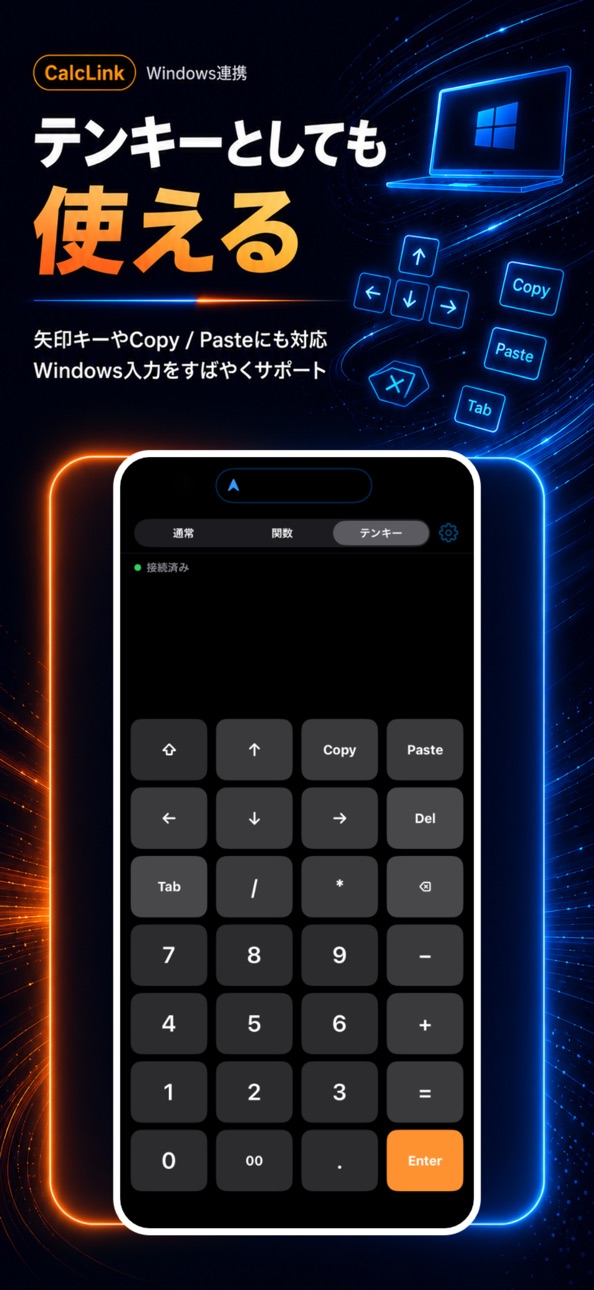
■ Numpad-Style Windows Input Helper
The numpad tab lets you send numbers and symbols to Windows.
It also supports Tab, Enter, Backspace, Delete, arrow keys, Copy, and Paste, allowing your iPhone or iPad to work as a simple numpad and input helper.
5. Summary
CalcLink - Calculator for Windows is designed for users who want to calculate at hand and quickly enter the result into a Windows PC.
You can use it as a regular calculator, and enable Windows integration or numpad input support when needed.
It is recommended for anyone who wants to make numeric input during PC work smoother and faster.
Note: Windows integration requires the separate Windows app Koyomi-Link.
Accessibility
ipadiphonemacrealityDevicetvoswatch
Version history 2 versions
Build 887439567v1.0.12026-06-25 17:58:56
Fixed minor issues related to sending data to Koyomi-Link and improved behavior when the connection is unstable.
Build 887109698v1.02026-06-20 00:01:11
No pricing data captured yet — comparisons appear once the app has paid storefronts or in-app purchases.
Availability 1 of 1 storefronts
| Region | Language | Price | Ratings | Avg | Version |
|---|---|---|---|---|---|
| US | en-US | Free | 0 | — | 1.0.1 |
Change log 6 changes · US
✎
releaseNotes updated
Fixed minor issues related to sending data to Koyomi-Link and improved behavior when the connection is unstable.
✎
description updated
1. Key Features
CalcLink - Calculator for Windows is a calculator app that lets you quickly send calculation results from your iPhone or iPad to a Windows PC,
✎
subtitle updated
Send results to Windows
✎
name updated
CalcLink - Calculator for PC
◆
Version 1.0.1 released
Fixed minor issues related to sending data to Koyomi-Link and improved behavior when the connection is unstable.
◆
Version 1.0 released