Home › Finance

 US
US
1 of 1 storefronts
Content in en-US
Content in en-US
Information
Apple ID6780538389
Bundle IDcom.mingzhan.MoneyMind
SellerSeller
Min iOS17.2
Min macOS14.2
Device familiesiphone
Released2026-06-18
Copyright© 2026 Haiyan Zhao
Privacy policyLink ↗
Preview 1 platform
iPhone 9 images




What’s New Version 2.0
重大更新 | 更新前请先备份数据
本次为大版本升级,涉及数据存储结构变化。为确保万无一失,更新前请先备份你的数据。
备份方法:打开 App,进入「设置 - 导出数据」,选择 JSON 格式,导出并保存到「文件」或 iCloud。
更新后如需恢复:进入「设置 - 导出数据」,切到「导入」,选择该 JSON 文件,选「覆盖」导入。
M Budget 2.0 — 多设备同步,记账更聪明
iCloud 自动同步
- 全新接入 iCloud,多台设备(iPhone / iPad)登录同一 Apple ID 即可自动同步账目——记一笔,处处可见。无需手动操作,换机、重装数据也不丢。
全新标签系统
- 记账、转账都能打标签,一笔支出多维归类
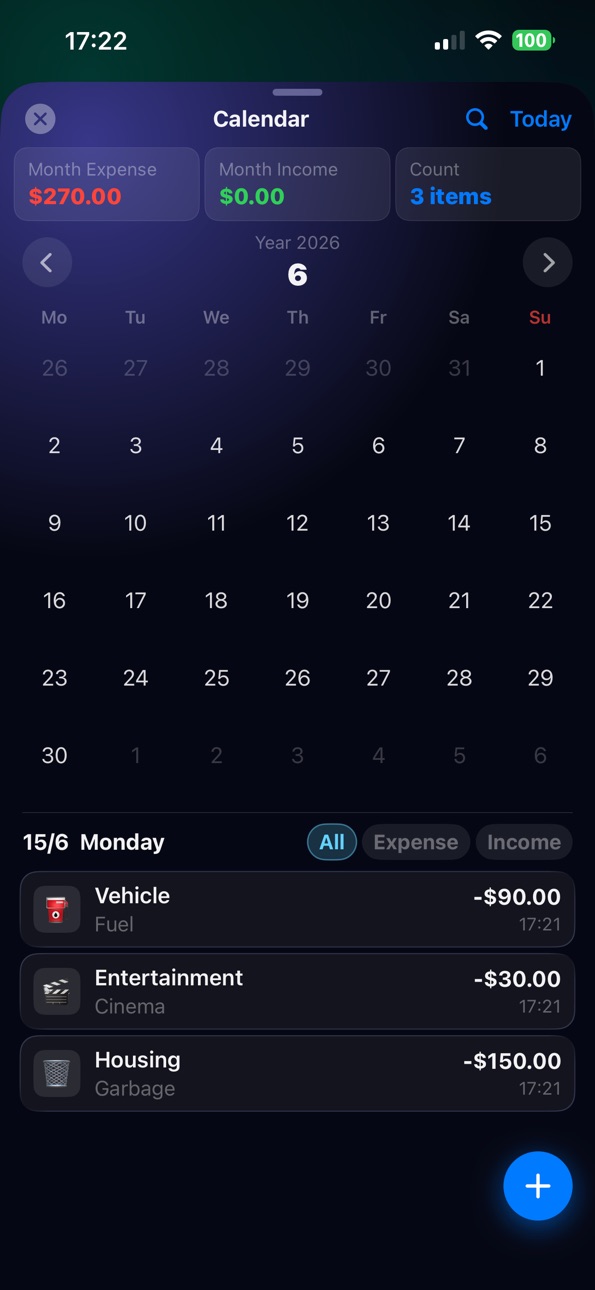
- 首页 / 日历 / 全部记录均可搜索,并按 全局 / 分类 / 备注 / 标签 切换搜索范围
- 设置里新增「标签管理」,统一重命名、删除、查看使用次数
- 导出数据可按指定标签筛选,报销对账一键搞定
预算页全面升级
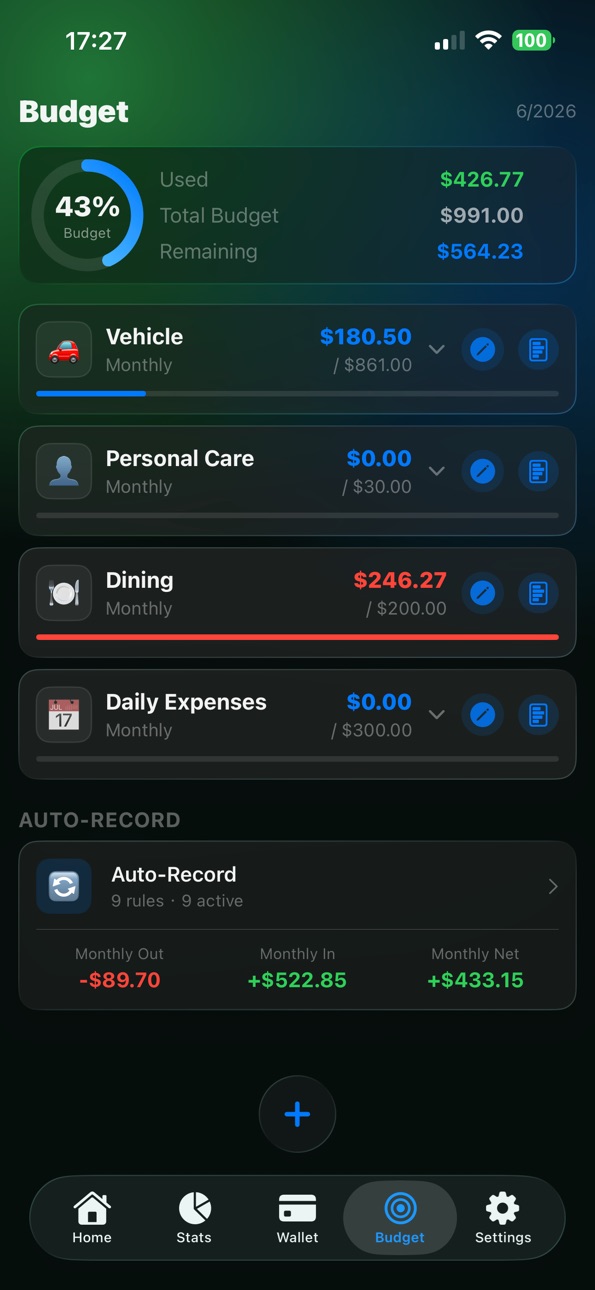
- 月度 / 年度视图一键切换,年度预算自动汇总,长期规划一目了然
- 支持设置总预算,与分类预算并存,整体花销随时掌握
- 顶部自由切换年份与月份,回看任意时段的预算与支出
- 分类预算长按弹出快捷菜单(编辑 / 隐藏 / 删除),还能隐藏不常用分类,列表更清爽
记账体验升级
- 新增内置计算器键盘,记账时直接加减乘除,算完即记
- 数字键盘按键更大更好按
- 转账也支持添加照片 / 录音 / 标签
- 自动记账支持储蓄卡 → 投资账户定投转账,资产互转自动完成
- 自动记账按收入 / 支出分组展示,更直观
主题与多用户
- 全新「薄荷」清新浅色主题,可在设置中切换
- 新建用户可选择「继承现有分类」或「只用系统默认」,并能按用户显示 / 隐藏分类
其他改进
- 设置新增「反馈建议 / 联系作者」,问题建议直达开发者
- 新增新西兰元、马来西亚林吉特等货币
- 多项细节打磨与稳定性修复,使用更顺手
---
English
M Budget 2.0 — Sync Across Devices, Smarter Budgets
Automatic iCloud Sync
- M Budget now syncs through iCloud. Sign in with the same Apple ID on your iPhone and iPad and records sync automatically — add an entry once, see it everywhere. No manual steps, and your data stays safe when you switch or reinstall.
New Tagging System
- Add tags to entries and transfers to organize spending across categories
- Search on Home / Calendar / All Records, and switch scope between All / Category / Note / Tag
- New Tag Manager in Settings to rename, delete, and view usage counts
- Export filtered by a specific tag — perfect for expense reports
- Export filtered by a specific tag — perfect for expense reports
Major Budget Upgrade
- One-tap switch between Monthly and Yearly views, with yearly budgets totaled automatically
- Set an overall Total Budget alongside category budgets to keep the big picture in view
- Freely switch between any year and month to review any period
- Long-press a category budget for quick actions (Edit / Hide / Delete), and hide categories you don't use
Better Entry Experience
- Built-in calculator keypad — do the math right while adding an entry
- Larger, easier-to-tap number keys
- Transfers now support photos / audio / tags
- Recurring transfers (e.g. savings card → investment account) for automatic, scheduled investing
- Recurring entries grouped by income / expense for a clearer overview
Themes & Multi-User
- New "Mint" fresh light theme, switchable in Settings
- When creating a user, choose to inherit your categories or start with defaults; show / hide categories per user
More
- New "Feedback / Contact" in Settings to reach the developer directly
- Added currencies including NZD and MYR
- Various refinements and stability fixes
Description
M Budget 是一款好看又简单的记账 App——把你的钱都管在一处,把你的数据都留在设备上。
几秒记一笔,用清晰的图表看清钱花在哪,账户、预算、账单一手掌握。无需注册、没有广告、不做追踪。
你会爱上它的理由
• 极速记账——3 步记下一笔支出或收入,支持分类与子分类
• 日历视图——一眼看清每日花销,左右滑动切换月份
• 强大统计——按月 / 季 / 年的饼图与柱状图
• 净资产——追踪所有账户、资产与负债、储蓄走势
• 预算——设定额度,超支前及时提醒
把钱用得更明白
• 多账户钱包:银行、现金、信用卡、贷款、定期存款
• 信用卡 / 贷款自动还款,逐期月供清晰可查
• 自动记账:工资、房租、订阅一次设定,定期自动记
• 贷款 / 存款计算器,内置多国预设
• 多币种,实时汇率
• 支持 CSV 银行账单导入;导出 CSV / JSON / PDF / Excel
隐私至上的设计
• 100% 设备本地存储——你的财务数据从不离开 iPhone
• 无账号、无服务器、无广告、不收集数据
• 可选 iCloud 备份与恢复(你的 iCloud,你做主)
• 可用 Face ID / Touch ID 锁定 App
为每个人打造
• 主屏幕与锁屏小组件
• 多用户档案
• 支持 12 种语言
免费下载,从今天起掌控你的钱。
M Budget is a beautifully simple expense tracker that keeps all your money in one place — and all your data on your device.
Log a transaction in seconds, see where your money goes with clear charts, and stay on top of every account, budget, and bill.
No account sign-up, no ads, no tracking.
WHY YOU'LL LOVE IT
• Fast logging — add an expense or income in 3 taps, with categories & subcategories
• Calendar view — see daily spending at a glance, swipe between months
• Powerful stats — pie & bar charts by month, quarter, or year
• Net worth — track all accounts, assets vs. liabilities, and savings trends
• Budgets — set limits and get notified before you overspend
DO MORE WITH YOUR MONEY
• Multi-account wallet: bank, cash, credit cards, loans, fixed deposits
• Credit card & loan auto-repayment, with monthly payments tracked
• Recurring transactions for salary, rent, subscriptions
• Loan & savings calculators with multi-country presets
• Multi-currency with live exchange rates
• CSV bank import; export to CSV, JSON, PDF, Excel
PRIVATE BY DESIGN
• 100% on-device storage — your finances never leave your iPhone
• No account, no server, no ads, no data collection
• Optional iCloud backup & restore (your iCloud, your control)
• Lock the app with Face ID / Touch ID
MADE FOR EVERYONE
• Home & Lock Screen widgets
• Multiple user profiles
• 12 languages
Download free and take control of your money today.
Accessibility
ipadiphonemacrealityDevicetvoswatch
Version history 2 versions
Build 887246343v2.02026-06-30 13:14:13
重大更新 | 更新前请先备份数据
本次为大版本升级,涉及数据存储结构变化。为确保万无一失,更新前请先备份你的数据。
备份方法:打开 App,进入「设置 - 导出数据」,选择 JSON 格式,导出并保存到「文件」或 iCloud。
更新后如需恢复:进入「设置 - 导出数据」,切到「导入」,选择该 JSON 文件,选「覆盖」导入。
M Budget 2.0 — 多设备同步,记账更聪明
iCloud 自动同步
- 全新接入 iCloud,多台设备(iPhone / iPad)登录同一 Apple ID 即可自动同步账目——记一笔,处处可见。无需手动操作,换机、重装数据也不丢。
全新标签系统
- 记账、转账都能打标签,一笔支出多维归类
- 首页 / 日历 / 全部记录均可搜索,并按 全局 / 分类 / 备注 / 标签 切换搜索范围
- 设置里新增「标签管理」,统一重命名、删除、查看使用次数
- 导出数据可按指定标签筛选,报销对账一键搞定
预算页全面升级
- 月度 / 年度视图一键切换,年度预算自动汇总,长期规划一目了然
- 支持设置总预算,与分类预算并存,整体花销随时掌握
- 顶部自由切换年份与月份,回看任意时段的预算与支出
- 分类预算长按弹出快捷菜单(编辑 / 隐藏 / 删除),还能隐藏不常用分类,列表更清爽
记账体验升级
- 新增内置计算器键盘,记账时直接加减乘除,算完即记
- 数字键盘按键更大更好按
- 转账也支持添加照片 / 录音 / 标签
- 自动记账支持储蓄卡 → 投资账户定投转账,资产互转自动完成
- 自动记账按收入 / 支出分组展示,更直观
主题与多用户
- 全新「薄荷」清新浅色主题,可在设置中切换
- 新建用户可选择「继承现有分类」或「只用系统默认」,并能按用户显示 / 隐藏分类
其他改进
- 设置新增「反馈建议 / 联系作者」,问题建议直达开发者
- 新增新西兰元、马来西亚林吉特等货币
- 多项细节打磨与稳定性修复,使用更顺手
---
English
M Budget 2.0 — Sync Across Devices, Smarter Budgets
Automatic iCloud Sync
- M Budget now syncs through iCloud. Sign in with the same Apple ID on your iPhone and iPad and records sync automatically — add an entry once, see it everywhere. No manual steps, and your data stays safe when you switch or reinstall.
New Tagging System
- Add tags to entries and transfers to organize spending across categories
- Search on Home / Calendar / All Records, and switch scope between All / Category / Note / Tag
- New Tag Manager in Settings to rename, delete, and view usage counts
- Export filtered by a specific tag — perfect for expense reports
- Export filtered by a specific tag — perfect for expense reports
Major Budget Upgrade
- One-tap switch between Monthly and Yearly views, with yearly budgets totaled automatically
- Set an overall Total Budget alongside category budgets to keep the big picture in view
- Freely switch between any year and month to review any period
- Long-press a category budget for quick actions (Edit / Hide / Delete), and hide categories you don't use
Better Entry Experience
- Built-in calculator keypad — do the math right while adding an entry
- Larger, easier-to-tap number keys
- Transfers now support photos / audio / tags
- Recurring transfers (e.g. savings card → investment account) for automatic, scheduled investing
- Recurring entries grouped by income / expense for a clearer overview
Themes & Multi-User
- New "Mint" fresh light theme, switchable in Settings
- When creating a user, choose to inherit your categories or start with defaults; show / hide categories per user
More
- New "Feedback / Contact" in Settings to reach the developer directly
- Added currencies including NZD and MYR
- Various refinements and stability fixes
Build 886996621v1.02026-06-18 07:33:54
No pricing data captured yet — comparisons appear once the app has paid storefronts or in-app purchases.
Availability 1 of 1 storefronts
| Region | Language | Price | Ratings | Avg | Version |
|---|---|---|---|---|---|
| US | en-US | Free | 1 | 5.0 | 2.0 |
Change log 6 changes · US
✎
releaseNotes updated
重大更新 | 更新前请先备份数据
本次为大版本升级,涉及数据存储结构变化。为确保万无一失,更新前请先备份你的数据。
备份方法:打开 App,进入「设置 - 导出数据」,选择 JSON 格式,导出并保存到「文件」或 iCloud。
更新后如需恢复:进入「设置 - 导出数据」,切到「导入」,选择该 JSON 文件,选「
✎
description updated
M Budget 是一款好看又简单的记账 App——把你的钱都管在一处,把你的数据都留在设备上。
几秒记一笔,用清晰的图表看清钱花在哪,账户、预算、账单一手掌握。无需注册、没有广告、不做追踪。
你会爱上它的理由
• 极速记账——3 步记下一笔支出或收入,支持分类与子分类
• 日历视图——一眼看清每日花销,左右滑动切
✎
subtitle updated
Money Manager & Net Worth
✎
name updated
M Budget: Expense Tracker
◆
Version 2.0 released
重大更新 | 更新前请先备份数据
本次为大版本升级,涉及数据存储结构变化。为确保万无一失,更新前请先备份你的数据。
备份方法:打开 App,进入「设置 - 导出数据」,选择 JSON 格式,导出并保存到「文件」或 iCloud。
更新后如需恢复:进入「设置 - 导出数据」,切到「导入」,选择该 JSON 文件,选「覆盖」导入。
M Budget 2.0 — 多设备同步,记账更聪明
iCloud 自动同步
- 全新接入 iCloud,多台设备(iPhone /
◆
Version 1.0 released