Home › Photo & Video

 US
US
1 of 1 storefronts
Content in en-US
Content in en-US
Information
Apple ID6780512173
Bundle IDcom.hippocampus.gridcamera
SellerSeller
Min iOS13.0
Min macOS11.0
Device familiesiphone, ipod
Released2026-06-15
Copyright© 2026 hippocampus
Privacy policyLink ↗
Preview 1 platform
iPhone 3 images


What’s New Version 1.1
This update makes shooting easier.
◆ Zoom, made simple
Tap the zoom buttons (1×, 2×, and more) to jump straight to the magnification you
want. The current zoom is always shown, and two-finger pinch still works too.
◆ See your shots instantly
A built-in gallery lets you review the photos you just took without leaving the
app — swipe through them, zoom in, share, or delete.
◆ Gentle portrait filters
Your originals stay untouched. Turn on one of six natural-looking filters whenever
you like — what you see on screen is exactly what gets saved.
Description
"Can you take a picture of me?" — never a scary question again.
Grid Camera doesn't teach composition. It makes composition knowledge
unnecessary. Put the person inside the on-screen guide box and press the
shutter. Head near the top of the box, feet on the bottom line — that alone
gives you a stable full-body portrait with no facial distortion.
◆ 3 seconds to the shutter
The app opens straight into the camera. No sign-up, no forced tutorial, no
settings maze. Every default is already right.
◆ The 5-8 composition guide
Head in the center cell of the 3×3 grid, feet on the bottom edge of the cell
below — a proven portrait composition rule, built into a single guide box.
Just fit the person inside it.
◆ What you see is what you save
Preview, grid, and crop always match. The composition the screen promises is
exactly what lands in your gallery. The default is the untouched original, and
even with a filter on, what you see on screen is exactly what gets saved.
◆ Familiar camera language
Tap to focus, drag for exposure, AE/AF lock, and a level indicator — they all
work exactly like your built-in camera. Nothing new to learn.
◆ Perfectly level shots
The built-in level shows your device tilt in real time and confirms with a
visual + haptic cue the moment you're level.
◆ Make it yours
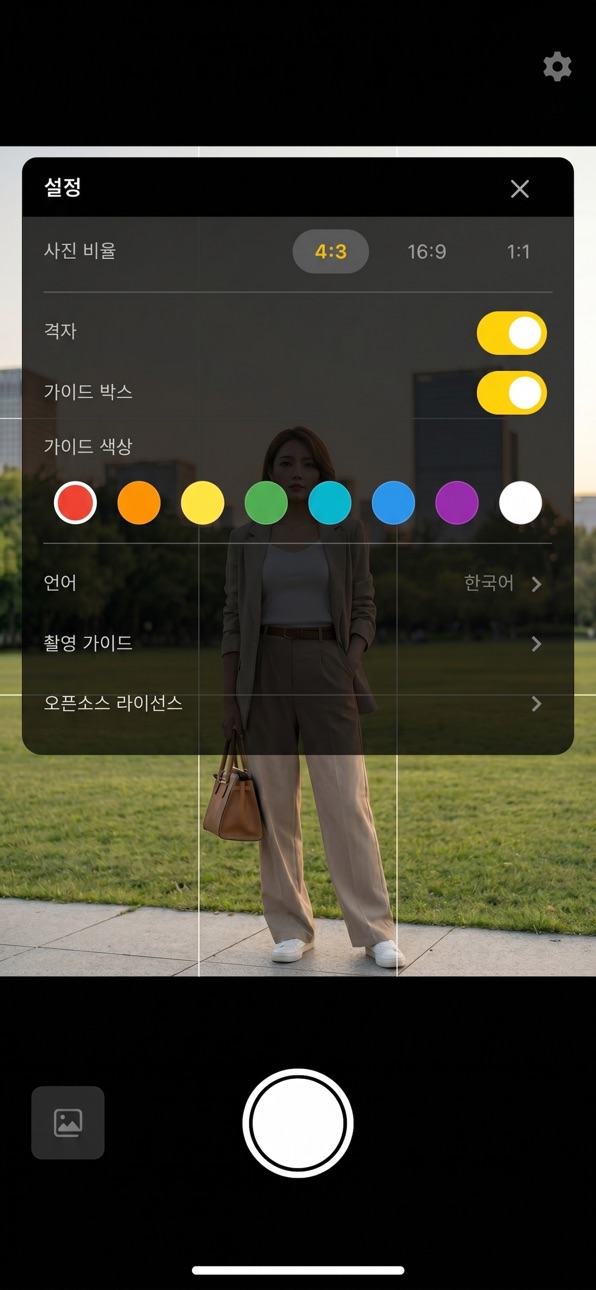
Eight grid color presets and 4:3 / 16:9 / 1:1 aspect ratios. Settings apply
instantly.
◆ Complete privacy
This app has no networking capability at all. Photos and settings stay on
your device only — no ads, no tracking, no analytics.
On your travels or in everyday life — be the designated photographer your
friends actually trust.
Accessibility
ipadiphonemacrealityDevicetvoswatch
Version history 2 versions
Build 887544159v1.12026-06-28 16:59:01
This update makes shooting easier.
◆ Zoom, made simple
Tap the zoom buttons (1×, 2×, and more) to jump straight to the magnification you
want. The current zoom is always shown, and two-finger pinch still works too.
◆ See your shots instantly
A built-in gallery lets you review the photos you just took without leaving the
app — swipe through them, zoom in, share, or delete.
◆ Gentle portrait filters
Your originals stay untouched. Turn on one of six natural-looking filters whenever
you like — what you see on screen is exactly what gets saved.
Build 886992936v1.02026-06-15 23:35:46
No pricing data captured yet — comparisons appear once the app has paid storefronts or in-app purchases.
Availability 1 of 1 storefronts
| Region | Language | Price | Ratings | Avg | Version |
|---|---|---|---|---|---|
| US | en-US | Free | 0 | — | 1.1 |
Change log 6 changes · US
✎
releaseNotes updated
This update makes shooting easier.
◆ Zoom, made simple
Tap the zoom buttons (1×, 2×, and more) to jump straight to the magnification you
want. The current zoom
✎
description updated
"Can you take a picture of me?" — never a scary question again.
Grid Camera doesn't teach composition. It makes composition knowledge
unnecessary. Put the pers
✎
subtitle updated
Frame in the box, just shoot
✎
name updated
Grid Camera – Portrait Guide
◆
Version 1.1 released
This update makes shooting easier.
◆ Zoom, made simple
Tap the zoom buttons (1×, 2×, and more) to jump straight to the magnification you
want. The current zoom is always shown, and two-finger pinch still works too.
◆ See your shots instan
◆
Version 1.0 released