Home › Utilities

 US
US
1 of 1 storefronts
Content in en-US
Content in en-US
Information
Preview 2 platforms
iPhone 5 images


iPad 5 images



What’s New Version 4.0
Version 4.0 introduces a full version. dB Logger is now free to download and fully usable for live measurement — the real-time meter, gauge, spectrum, spectrogram, analyzer and dosimeter are all free and unlimited. The free version also lets you record, export and film video for up to 30 seconds, so you can try the whole workflow; those trial clips, exports and reports carry a small "Trial" mark, and the free version keeps two days of dosimeter history. Unlock the full version with a single one-time purchase — no subscription, ever — for unlimited recording, unlimited CSV/WAV/PDF export, full-length video with no watermark, the full dose history, and no ads. If you already bought "Remove Ads", thank you — you're upgraded to the full version automatically at no charge; just tap Restore Purchases in Settings if it doesn't show right away. Thanks for the feedback — keep it coming at bekserviceltd@gmail.com.
Description
Free to download. One-time unlock. No subscription, ever.
dB Logger turns your phone into a professional-grade sound level meter, frequency analyzer and noise logger — with no account, no cloud, and no subscription, ever.
Most sound apps measure your phone's audio AFTER the operating system has "cleaned it up" with echo cancellation, noise suppression and automatic gain. dB Logger doesn't. It captures RAW, UNPROCESSED audio — from the built-in mic or an external USB-C measurement microphone — so what you see reflects the real acoustic field.
WHAT PEOPLE USE IT FOR
• Measure a noisy neighbor, upstairs bass, or HOA / tenant nuisance — log it over time and export a timestamped CSV + PDF report to attach to a complaint.
• Check whether a concert, gig, gym class, bar or restaurant is loud enough to risk your hearing — and how long is safe.
• Find out if your baby's white-noise machine is too loud at the crib, and how far to move it.
• Assess a room like a consultant: NR and NC single-figure ratings from octave bands for HVAC and building-services work.
• Track workplace noise exposure against OSHA, NIOSH or EU limits with the built-in dosimeter.
• Check a sound system, studio, AV install or science project with a live spectrum and weighted levels.
MEASURE
• Real-time dB-A, dB-C, dB-Z with selectable update rate (200 ms to 10 s)
• Fast / Slow / Impulse time weighting; current, AVG (Leq), MAX and PEAK
• NR (Noise Rating) and NC (Noise Criteria) single-figure room ratings
• A noise-source guesser that tells you WHAT is loud, not just how loud
VISUALIZE
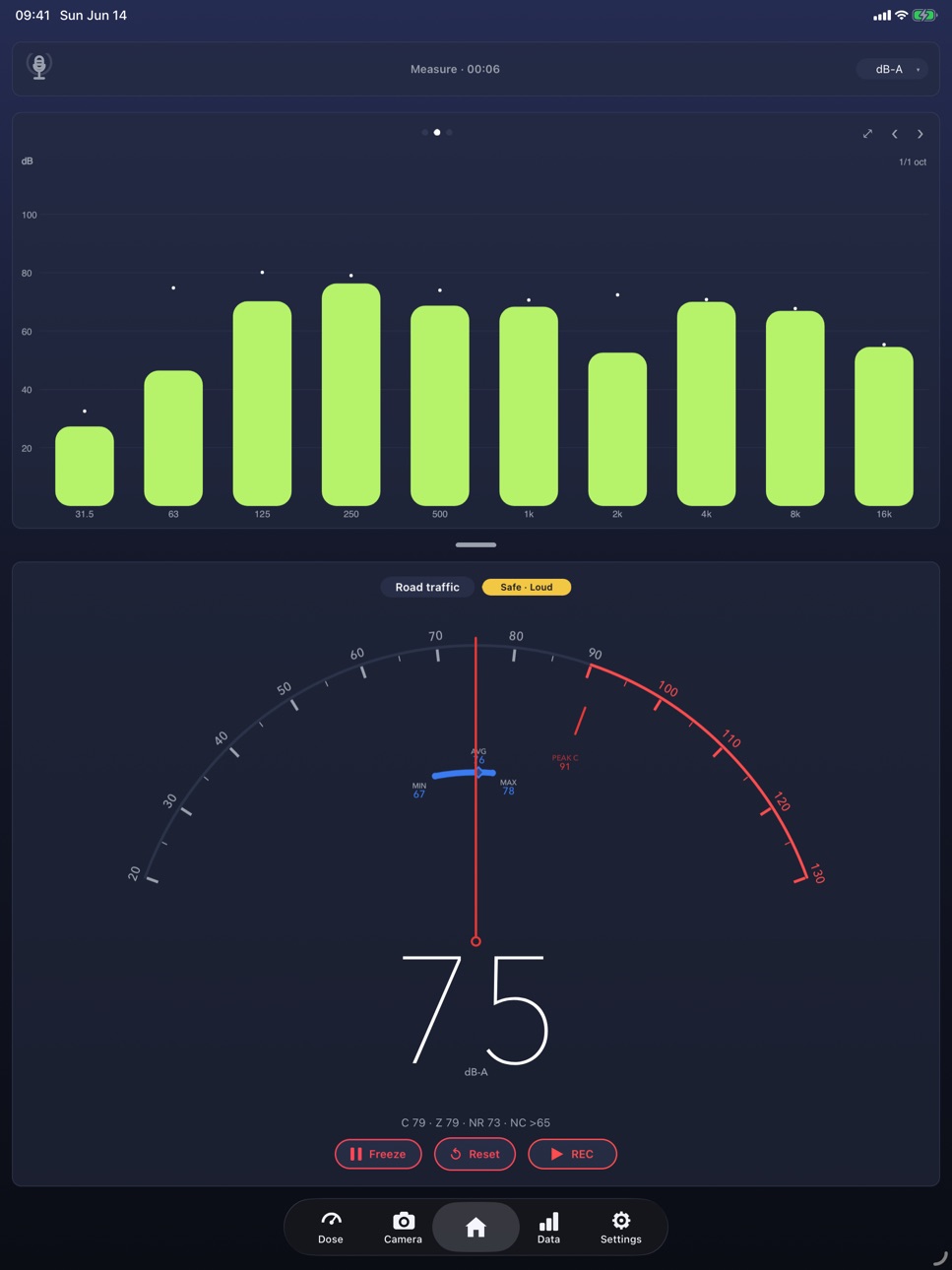
• Live FFT spectrum, 20 Hz – 20 kHz, with peak-hold and peak detection
• 1/1 & 1/3-octave equalizer with per-band peak caps
• Scrolling time-history graph, color-coded by level
• A clean analog dB gauge with AVG / MAX / PEAK
LOG, REPORT & SHARE
• Log metrics to CSV and raw audio to lossless WAV, independently
• Browse saved sessions and generate PDF / CSV reports
• Noise Camera: snap a photo or record a video with the live dB reading burned in — clear evidence, easy to share
BUILT RIGHT
• Guided + manual calibration, saved per microphone profile
• USB-C external measurement-mic support, with a visible input picker so you always know which mic you are measuring with
• 42 languages; light / dark and Glass / Classic themes
• On-device and private — no account, no cloud; your audio and readings never leave your phone unless you choose to share them
FREE vs FULL VERSION
dB Logger is free to download and fully usable for live measurement — the meter, gauge, spectrum, spectrogram, analyzer and dosimeter are all free and unlimited. The free version also lets you record, export and film video for up to 30 seconds so you can try the whole workflow; those trial clips, exports and reports carry a small "Trial" mark, and the free version keeps two days of dosimeter history. Unlock the full version with a single one-time purchase — no subscription, ever — for unlimited recording, unlimited CSV/WAV/PDF export, full-length video with no watermark, the complete dose history, and no ads. Already bought "Remove Ads"? You're upgraded to the full version automatically, at no charge.
Accuracy note: a smartphone microphone is not a certified Class 1/2 (IEC 61672) sound level meter. dB Logger targets reproducible, calibrated relative measurement with standards-correct weighting and rating math. For regulatory or compliance decisions, verify with certified instrumentation.
Capabilities
In-App Purchases
Accessibility
ipadiphonemacrealityDevicetvoswatch
Version history 12 versions
Build 887454981v4.02026-06-30 17:24:59
Version 4.0 introduces a full version. dB Logger is now free to download and fully usable for live measurement — the real-time meter, gauge, spectrum, spectrogram, analyzer and dosimeter are all free and unlimited. The free version also lets you record, export and film video for up to 30 seconds, so you can try the whole workflow; those trial clips, exports and reports carry a small "Trial" mark, and the free version keeps two days of dosimeter history. Unlock the full version with a single one-time purchase — no subscription, ever — for unlimited recording, unlimited CSV/WAV/PDF export, full-length video with no watermark, the full dose history, and no ads. If you already bought "Remove Ads", thank you — you're upgraded to the full version automatically at no charge; just tap Restore Purchases in Settings if it doesn't show right away. Thanks for the feedback — keep it coming at bekserviceltd@gmail.com.
Build 887303931v3.72026-06-23 17:02:23
Version 3.7 adds detail to the graphs. The equalizer/analyzer now has a third zoom level: tap it to cycle 1/1 → 1/3 → 1/6 octave bands, where 1/6 (61 bands from 20 Hz to 20 kHz) helps you separate close tones — the chip top-right shows the current mode. On the spectrogram you'll find a new draggable frequency cursor: grab the horizontal line and slide it up or down onto a bright streak to read off that streak's frequency, shown live in Hz/kHz. The line is dashed so the streak stays visible underneath, and the knob lights up while you're holding it. Horizontal swipes still page between graphs as before. Thanks for the feedback — keep it coming at bekserviceltd@gmail.com.
Build 887264032v3.52026-06-22 15:50:42
Version 3.5 introduces Remote measurement — use one device as a wireless probe and measure from another. Turn any iPhone or iPad into a probe that streams its calibrated microphone over your Wi-Fi network, then measure the sound on a second device as if the mic were its own, calibration and all. Tap the microphone badge on the meter to Share this device's mic or Connect to a nearby one — nearby probes appear automatically, or you can type an IP address. If the probe stops sharing or goes out of range, the app falls back to your own microphone automatically. This version also makes the app display in your language: if your device wasn't set to English the interface was appearing in English, and it's now fully translated across all supported languages. Plus startup and stability fixes. Thanks for the feedback — keep it coming at bekserviceltd@gmail.com.
Build 887236189v3.32026-06-21 17:12:35
Version 3.3 is a big round of fixes and refinements from your feedback. Calibration status now reads consistently across every device: it shows "Preset" when your exact model has a built-in calibration value, and "Using default calibration" otherwise. The dosimeter's Start, Pause, Reset and Save buttons now match the main meter, and both the dose screen and the dose report show when measurement started and when the report was generated. There's a new Help section explaining where your device's microphone is and how to aim it for accurate readings. You can now check for updates from Settings, the Diagnostics screen shows the microphone currently in use, and you can delete a recording straight from its details screen. We also fixed Restore Purchases so it no longer triggers a store sign-in prompt every time you open Settings. Thanks for the feedback — keep it coming at bekserviceltd@gmail.com.
Build 887221464v3.12026-06-20 17:39:11
Version 3.1 adds a live waveform to the Home screen, so you can see the actual sound as you measure it — it appears the moment you open the app, not only while recording. We've also refined how the app works with external USB measurement microphones: it now follows your iPhone or iPad's live audio route automatically, so the instant you plug in a measurement mic it becomes the active input with its own calibration applied — there's no picker to fumble with — and we've tightened the per-microphone input-gain handling so calibrated levels stay accurate and repeatable. The app is now called "dB Logger" — "dB" is the correct way to write decibels (and avoids being mistaken for a database tool). Thanks for the feedback — keep it coming at bekserviceltd@gmail.com.
Build 887231285v3.22026-06-20 21:23:41
Version 3.2 fixes a crash that could happen when you stopped a recording very soon after starting it — recordings now always finish and save cleanly, every time. Thanks for the feedback — keep it coming at bekserviceltd@gmail.com.
Build 887166998v3.02026-06-19 23:51:29
Version 3.0 makes external measurement microphones work properly on iPhone and iPad. When you connect a USB measurement mic — such as the Dayton iMM-6C — and pick it in the app, dbLogger now captures that exact microphone. Previously iOS could quietly keep using a different input, so a reading was measured on one mic but calibrated for another; the microphone you choose and the microphone you hear are now always the same one, each with its own calibration. We also stop iOS from over-amplifying a USB mic's input gain, which had been making some external mics read more than 20 dB too high, so your calibrated levels are accurate and repeatable. dbLogger now follows the live audio route, so the mic shown on screen always matches the one actually recording even after you plug or unplug it, and the microphone picker is more reliable across the board. The Diagnostics screen now shows the active input gain and the negotiated capture source to help confirm everything is set up correctly. Thanks for the feedback — keep it coming at bekserviceltd@gmail.com.
Build 887118615v2.62026-06-18 16:49:12
Bug fixes and improvements.
Build 886859303v2.42026-06-17 03:23:33
A round of fixes from your feedback. The sound-classification label on the meter now appears right away (showing "Listening…" while it settles) instead of looking blank. The microphone icon up top no longer occasionally draws clipped. Exporting a recording as M4A or MP3 now shows a progress dialog with a time estimate and a Cancel button, so a long conversion never looks frozen. External measurement microphones (such as the Dayton iMM-6C) can now always be calibrated — the calibrate option is no longer hidden — and each microphone keeps its own calibration, so calibrating one never changes another. The dosimeter's dose percentage no longer overlaps itself inside the ring, and a steady pure tone is correctly described as a tonal whine rather than an alarm. Plus assorted refinements.
Build 887108531v2.52026-06-17 22:59:22
Bug fixes and improvements.
Build 886821290v1.12026-06-11 20:33:04
• New Glass look — switch between Glass and Classic in Settings
• Redesigned meter dial with a record button that shows elapsed time
• Graphs: dB axes, frequency marks (50 Hz–20 kHz), elapsed time and larger readouts
• New Z (unweighted) display option and clearer time-weighting labels
• Microphone picker now lists measurement-capable mics only, with a live mic indicator
• Step-by-step calibration guide in the Calibration Wizard
• Rotate the phone 180° to point the bottom mic at the source
• Stability fixes — exporting while recording no longer crashes
Build 886703509v1.02026-06-10 20:30:53
No pricing data captured yet — comparisons appear once the app has paid storefronts or in-app purchases.
Availability 1 of 1 storefronts
| Region | Language | Price | Ratings | Avg | Version |
|---|---|---|---|---|---|
| US | en-US | Free | 2 | 5.0 | 4.0 |
Change log 16 changes · US
✎
releaseNotes updated
Version 4.0 introduces a full version. dB Logger is now free to download and fully usable for live measurement — the real-time meter, gauge, spectrum, spectrogr
✎
description updated
Free to download. One-time unlock. No subscription, ever.
dB Logger turns your phone into a professional-grade sound level meter, frequency analyzer and noise
✎
subtitle updated
Raw dBA SPL meter
✎
name updated
dB Logger: Sound Level Meter
◆
Version 4.0 released
Version 4.0 introduces a full version. dB Logger is now free to download and fully usable for live measurement — the real-time meter, gauge, spectrum, spectrogram, analyzer and dosimeter are all free and unlimited. The free version also let
◆
Version 3.7 released
Version 3.7 adds detail to the graphs. The equalizer/analyzer now has a third zoom level: tap it to cycle 1/1 → 1/3 → 1/6 octave bands, where 1/6 (61 bands from 20 Hz to 20 kHz) helps you separate close tones — the chip top-right shows the
◆
Version 3.5 released
Version 3.5 introduces Remote measurement — use one device as a wireless probe and measure from another. Turn any iPhone or iPad into a probe that streams its calibrated microphone over your Wi-Fi network, then measure the sound on a second
◆
Version 3.3 released
Version 3.3 is a big round of fixes and refinements from your feedback. Calibration status now reads consistently across every device: it shows "Preset" when your exact model has a built-in calibration value, and "Using default calibration"
◆
Version 3.2 released
Version 3.2 fixes a crash that could happen when you stopped a recording very soon after starting it — recordings now always finish and save cleanly, every time. Thanks for the feedback — keep it coming at bekserviceltd@gmail.com.
◆
Version 3.1 released
Version 3.1 adds a live waveform to the Home screen, so you can see the actual sound as you measure it — it appears the moment you open the app, not only while recording. We've also refined how the app works with external USB measurement mi
◆
Version 3.0 released
Version 3.0 makes external measurement microphones work properly on iPhone and iPad. When you connect a USB measurement mic — such as the Dayton iMM-6C — and pick it in the app, dbLogger now captures that exact microphone. Previously iOS co
◆
Version 2.6 released
Bug fixes and improvements.
◆
Version 2.5 released
Bug fixes and improvements.
◆
Version 2.4 released
A round of fixes from your feedback. The sound-classification label on the meter now appears right away (showing "Listening…" while it settles) instead of looking blank. The microphone icon up top no longer occasionally draws clipped. Expor
◆
Version 1.1 released
• New Glass look — switch between Glass and Classic in Settings
• Redesigned meter dial with a record button that shows elapsed time
• Graphs: dB axes, frequency marks (50 Hz–20 kHz), elapsed time and larger readouts
• New Z (unweighted) di
◆
Version 1.0 released