Home › Productivity

 US
US
1 of 1 storefronts
Content in en-US
Content in en-US
Information
Preview 3 platforms
iPhone 5 images



iPad 4 images


Apple Watch 3 images


What’s New Version 1.1.1
What's new:
- More generous free tier: create up to 8 record types, save up to 500 records, with all analytics charts unlocked for free
- Lower prices: monthly, yearly, and lifetime unlocks are all roughly half off, with deeper savings on the yearly plan (priced in your local currency)
Fixes:
- Fixed an issue where the paywall could appear with a zoom-from-corner animation glitch
Description
Tracely is a minimalist personal tracker: anything you want to follow can become a record type you define yourself.
[Three Ways to Record]
- Count — cups of coffee, sets of push-ups
- Measure — weight, focus time, running distance, with built-in time / mass / length / volume unit conversion, plus your own custom units
- Check-in — sleep early, read, meditate: one tap a day
[Log It in Two Seconds]
- The "+" in the tab bar jumps straight to entry, with preset steps for quick amounts; back-date any moment, and fix or delete a mistake anytime.
[Your Board, Your Data Home]
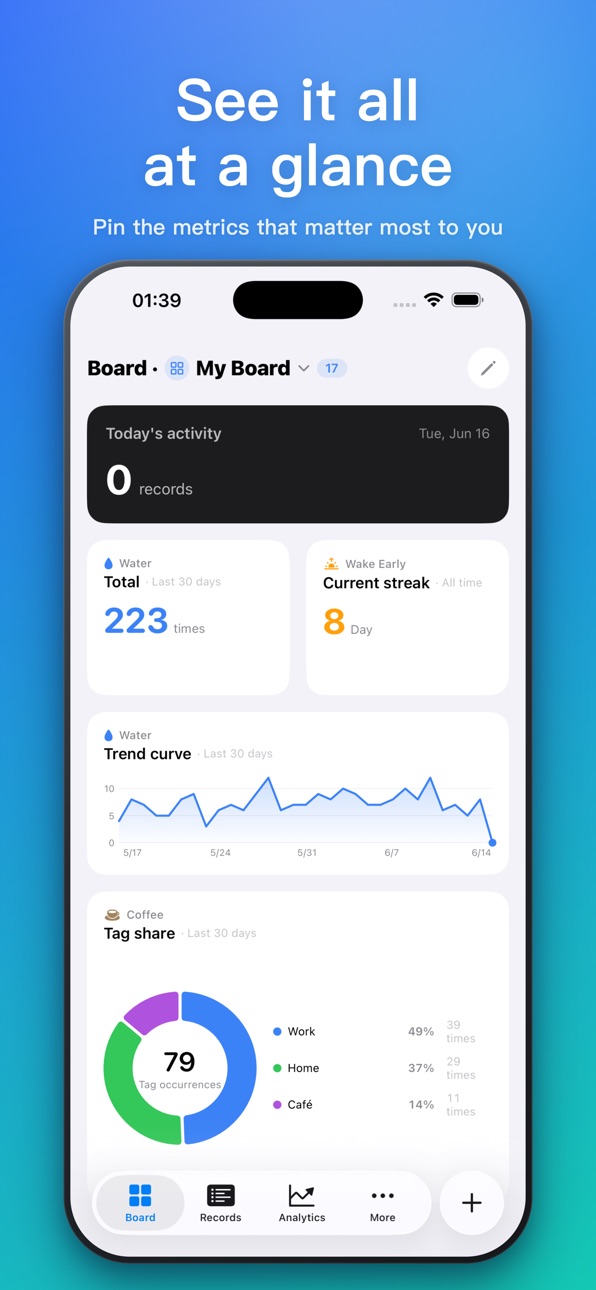
- Pin the metrics you care about as cards: today's count, goal ring, mini trend, streak days… Drag cards to reorder, switch sizes, and keep multiple boards.
[Analytics That Make Your Frequency Clear]
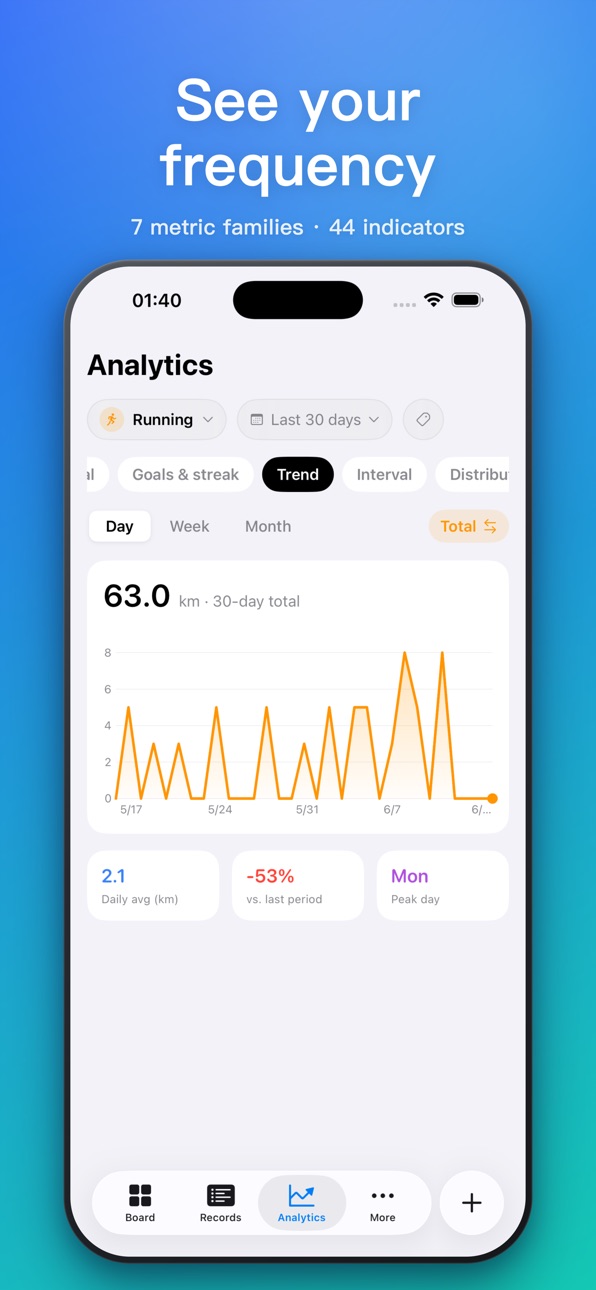
- 7 metric families, 44 indicators: totals and averages, trends, time-of-day distribution, interval patterns, streaks and longest records, goal completion, and a calendar heatmap — auto-fitted to each record type.
[Your Data Is Safe]
- Local storage + private iCloud database sync; the developer can never access any of your data
- Full backup export/import, with optional AES encryption
- No ads, no third-party analytics SDKs
[Apple Watch]
- Pick the types to show on your wrist from your phone, log with a raise of the wrist, and entries sync back to iPhone automatically.
[iPad]
- Native iPad layout: sidebar navigation, a "Types | Details" two-column records area; boards and every page flow into multiple columns as the screen widens — the whole picture at a glance.
-------------------
Free includes:
- 8 record types
- 1 board
- 500 records and all metrics
Tracely Pro (optional subscription or one-time purchase) unlocks:
- Unlimited types and records
- Multiple boards
- Encrypted backups
- Watch type push
- Subscriptions renew automatically and can be canceled anytime in your App Store account settings; payment is charged to your Apple ID at confirmation of purchase
-------------------
- Terms of Use: https://www.apple.com/legal/internet-services/itunes/dev/stdeula/
- Privacy Policy: https://app.lonelyman.site/tracely/privacy
Capabilities
In-App Purchases
Accessibility
ipadiphonemacrealityDevicetvoswatch
Version history 3 versions
Build 887102958v1.1.12026-06-17 23:03:54
What's new:
- More generous free tier: create up to 8 record types, save up to 500 records, with all analytics charts unlocked for free
- Lower prices: monthly, yearly, and lifetime unlocks are all roughly half off, with deeper savings on the yearly plan (priced in your local currency)
Fixes:
- Fixed an issue where the paywall could appear with a zoom-from-corner animation glitch
Build 886966373v1.1.02026-06-16 16:02:05
New
- Brand-new widgets: place any analytics indicator on your Home Screen, Lock Screen, and Control Center to see its chart and value at a glance — and log a quick entry right from the Lock Screen or Control Center
- Siri & Shortcuts: add an entry with Siri, the Shortcuts app, or the Action Button without opening Tracely
- Spotlight search: find your record types in system search and jump straight to logging
- Smoother dashboard management: one place to manage your boards, clearer board creation, and duplicate-name protection
- Follows your system language: sample data and card titles now show in your language
Improvements & fixes
- Fixed some indicator names displaying incorrectly on non-Chinese devices
- Fixed occasional duplicate or double-default dashboards when switching boards
- Improved input reliability with third-party keyboards (e.g. WeChat keyboard)
- Fixed text truncation on the smallest widget size
- Fixed a brief blank area when returning from the records page, a misplaced upgrade prompt on the Backup page, and screen flicker when tapping "Add record" in the tab bar
Build 886683814v1.0.02026-06-13 23:01:55
No pricing data captured yet — comparisons appear once the app has paid storefronts or in-app purchases.
Availability 1 of 1 storefronts
| Region | Language | Price | Ratings | Avg | Version |
|---|---|---|---|---|---|
| US | en-US | Free | 0 | — | 1.1.1 |
Change log 7 changes · US
✎
releaseNotes updated
What's new:
- More generous free tier: create up to 8 record types, save up to 500 records, with all analytics charts unlocked for free
- Lower prices: monthly,
✎
description updated
Tracely is a minimalist personal tracker: anything you want to follow can become a record type you define yourself.
[Three Ways to Record]
- Count — cups of co
✎
subtitle updated
Habits, counts & measures
✎
name updated
Tracely: Count & Track
◆
Version 1.1.1 released
What's new:
- More generous free tier: create up to 8 record types, save up to 500 records, with all analytics charts unlocked for free
- Lower prices: monthly, yearly, and lifetime unlocks are all roughly half off, with deeper savings on t
◆
Version 1.1.0 released
New
- Brand-new widgets: place any analytics indicator on your Home Screen, Lock Screen, and Control Center to see its chart and value at a glance — and log a quick entry right from the Lock Screen or Control Center
- Siri & Shortcuts: add
◆
Version 1.0.0 released