Home › Entertainment

 US
US
1 of 1 storefronts
Content in en-US
Content in en-US
Information
Preview 2 platforms
iPhone 5 images




iPad 5 images


What’s New Version 1.3.2
What's New in Voxbend 1.3.2
Preview Readiness — the Studio now shows exactly what the Preview button will do before you tap it: load the built-in demo, preview the current clip, stop playback, or wait while recording/exporting. This makes demo playback clearer on iPad and on devices where microphone access is unavailable or denied.
The build keeps the Pitch Analyser, custom Effect Lab, 16 built-in voices, clip trimming, favorites, library search, and on-device export workflow.
All changes are on-device. No account, no network, no ads.
Description
Bend your voice. Crack everyone up.
Voxbend is the fast, funny voice changer for iPhone and iPad. Record yourself, tap an effect, and hear an instant transformation — then send a clean clip into any chat or post. No sign-up, no subscription, no internet required. Just press record and play.
WHY YOU'LL LOVE IT
• Preview Readiness — the Studio tells you exactly whether Preview will load the demo, play your current clip, stop playback, or wait while recording/exporting.
• Instant, genuinely funny effects — tap a preset and you hear it immediately.
• One-tap shareable clips — perfect for group chats, voice notes, reactions, and social.
• Re-bend without re-recording — your original take is saved, so you can try a different effect on the same clip anytime.
• A toy that feels premium — a real waveform, smooth animations, satisfying haptics, and a polished dark interface.
16 HAND-TUNED VOICES
Chipmunk, Helium, Monster, Robot, Alien, Telephone, Cave, Underwater, Slow-mo, Ghost, DJ Radio, Villain, Fairy, Narrator, Elf, and Original.
PRO AUDIO TOOLS
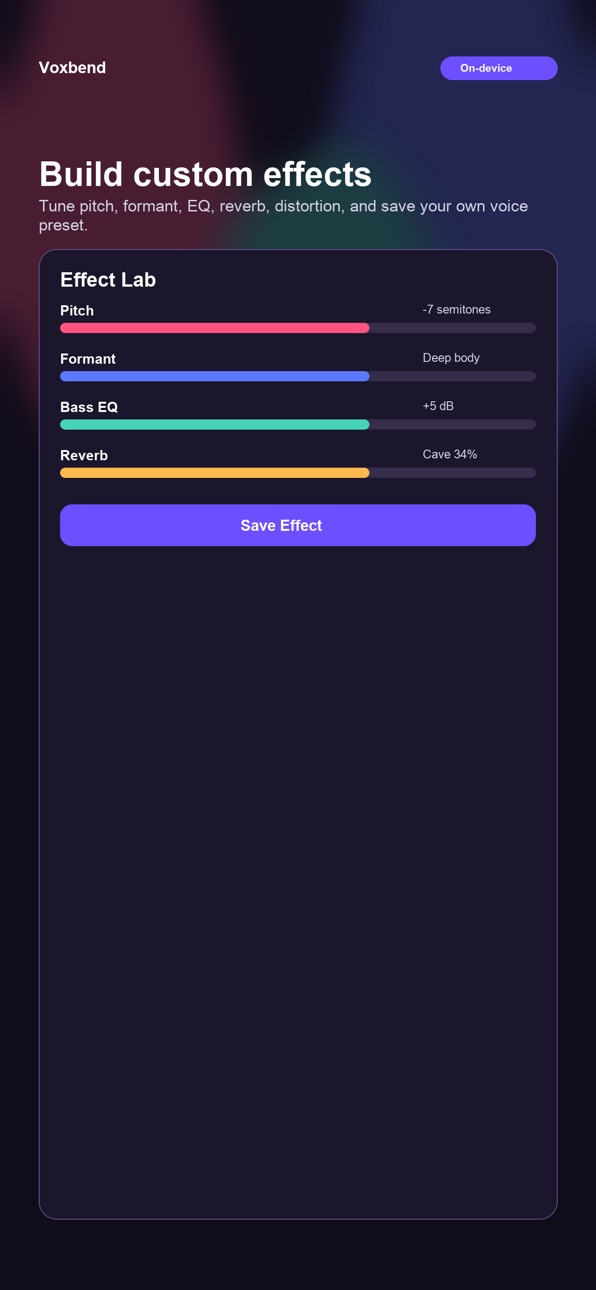
Use the Pitch Analyser to see the musical center of your voice, vocal range, note histogram, and inferred voice type. Build your own sound in Effect Lab with pitch, speed, formant shift, EQ, reverb, distortion, and ring modulation. Trim clips with waveform handles, favorite effects, search your Library, and re-bend saved recordings later.
HOW IT WORKS
1. Tap the big button and say something fun.
2. Tap Preview to load a demo or hear your own clip.
3. Tap any effect tile to transform the sound.
4. Save it to your Library, trim it, analyze pitch, or share a clean audio file anywhere.
PRIVATE BY DESIGN
Voxbend runs on your device. There is no account, no network connection, and no tracking. Your voice never leaves your phone unless you choose to share a clip. The whole thing works in Airplane Mode.
NO MIC? NO PROBLEM.
Tap Preview or choose Play a demo clip and audition every effect on a built-in sample.
Record. Bend. Share.
Accessibility
ipadiphonemacrealityDevicetvoswatch
Version history 6 versions
Build 887540393v1.3.22026-07-07 07:26:18
What's New in Voxbend 1.3.2
Preview Readiness — the Studio now shows exactly what the Preview button will do before you tap it: load the built-in demo, preview the current clip, stop playback, or wait while recording/exporting. This makes demo playback clearer on iPad and on devices where microphone access is unavailable or denied.
The build keeps the Pitch Analyser, custom Effect Lab, 16 built-in voices, clip trimming, favorites, library search, and on-device export workflow.
All changes are on-device. No account, no network, no ads.
Build 887476187v1.3.12026-06-27 23:38:49
This update sharpens the interface: the iPad layout now uses a centered, comfortable reading width instead of stretching edge to edge, plus small display fixes. iPhone is unchanged.
Build 887150191v1.32026-06-23 06:08:16
What's New in Voxbend 1.3
Pitch Analyser - a first-of-its-kind feature for a voice changer: tap -> "Analyse pitch" on any clip to see the musical note at the centre of your voice, your vocal range (lowest and highest notes detected), a bar chart of every note hit, and your inferred voice type (Baritone, Tenor, Alto, Soprano, and more). Based on the Yin pitch-detection algorithm used in professional audio software. Works on your own recordings and the demo clip.
Two new effects - Narrator (warm, velvet broadcaster: deepened pitch, formant drop, and a rich low-shelf boost) and Elf (mischievously high and tinny: big pitch jump, bright formant, and light bit-brush grit). Brings the built-in effect count to 16.
All changes are on-device. No account, no network, no ads.
Build 886968207v1.22026-06-15 14:27:17
What's New in Voxbend 1.2
Clip Trimmer — trim any recording without leaving the app. In the Studio tap ⋯ → "Trim clip"; in the Library open any saved clip and tap ⋯ → "Trim clip." Drag the start and end handles over the waveform, watch the timing update live, then tap Trim. The trimmed file replaces the original at the same quality — no extra apps needed.
Favourite Presets — long-press any effect tile and choose "Add to Favourites." A heart badge marks it, and favourites float to the top of the grid automatically so your go-to effects are always one tap away.
Library Search & Sort — type in the search bar to filter saved clips by title or effect name. Tap the sort icon to reorder by newest, oldest, name A–Z, or longest first. Your preference is saved.
All changes happen on-device. No account, no network, no ads.
Build 886935283v1.12026-06-14 17:01:08
What's New in Voxbend 1.1
Effect Lab — build your own voice effect from scratch. Dial in pitch (±24 semitones), speed, formant shift, reverb, distortion, ring mod, and a 3-band EQ, then save it as a named custom effect. Your effects appear alongside the built-ins in the Studio and Library.
Formant Shift — a new control that changes the resonance of your voice independently of its pitch. Shift down for a bigger, deeper body; shift up for a thinner, brighter character. All 14 built-in effects now use it to sound richer.
3-Band EQ — shape bass (200 Hz), mid (2 kHz), and treble (8 kHz) on any recording, built right into the Effect Lab and baked into every preset.
Two new built-in effects — Villain (dark, cavernous) and Fairy (bright, ethereal) showcase the new formant-shift range.
All changes happen on-device. No account, no network, no ads.
Build 886472166v1.02026-06-09 18:45:53
Price history by region
Currency
Show
Columns
Search
Availability 1 of 1 storefronts
| Region | Language | Price | Ratings | Avg | Version |
|---|---|---|---|---|---|
| US | en-US | USD 0.99 | 0 | — | 1.3.2 |
Change log 10 changes · US
✎
releaseNotes updated
What's New in Voxbend 1.3.2
Preview Readiness — the Studio now shows exactly what the Preview button will do before you tap it: load the built-in demo, preview
✎
description updated
Bend your voice. Crack everyone up.
Voxbend is the fast, funny voice changer for iPhone and iPad. Record yourself, tap an effect, and hear an instant transform
✎
subtitle updated
Funny voice changer & FX
✎
name updated
Voxbend
◆
Version 1.3.2 released
What's New in Voxbend 1.3.2
Preview Readiness — the Studio now shows exactly what the Preview button will do before you tap it: load the built-in demo, preview the current clip, stop playback, or wait while recording/exporting. This makes
◆
Version 1.3.1 released
This update sharpens the interface: the iPad layout now uses a centered, comfortable reading width instead of stretching edge to edge, plus small display fixes. iPhone is unchanged.
◆
Version 1.3 released
What's New in Voxbend 1.3
Pitch Analyser - a first-of-its-kind feature for a voice changer: tap -> "Analyse pitch" on any clip to see the musical note at the centre of your voice, your vocal range (lowest and highest notes detected), a ba
◆
Version 1.2 released
What's New in Voxbend 1.2
Clip Trimmer — trim any recording without leaving the app. In the Studio tap ⋯ → "Trim clip"; in the Library open any saved clip and tap ⋯ → "Trim clip." Drag the start and end handles over the waveform, watch the
◆
Version 1.1 released
What's New in Voxbend 1.1
Effect Lab — build your own voice effect from scratch. Dial in pitch (±24 semitones), speed, formant shift, reverb, distortion, ring mod, and a 3-band EQ, then save it as a named custom effect. Your effects appear
◆
Version 1.0 released