Home › Travel

Tail ID: Aircraft Spotter
Identify any plane instantly
 US
US
1 of 1 storefronts
Content in en-US
Content in en-US
Information
Preview 1 platform
iPhone 5 images




What’s New Version 0.1.16
Big reliability release:
• Videos and photos are never lost to a bad connection — they upload automatically when you're back online
• Fixed landscape captures getting stuck with no way back
• Share cards now always include your photo
• Faster captures, better manual registration entry, and clearer error messages
• Settings, sign-in, and more now translated in 20 languages
Description
Tail ID is the camera-first aviation identification app — the simplest answer to the question everyone asks around airplanes: what kind of plane is that?
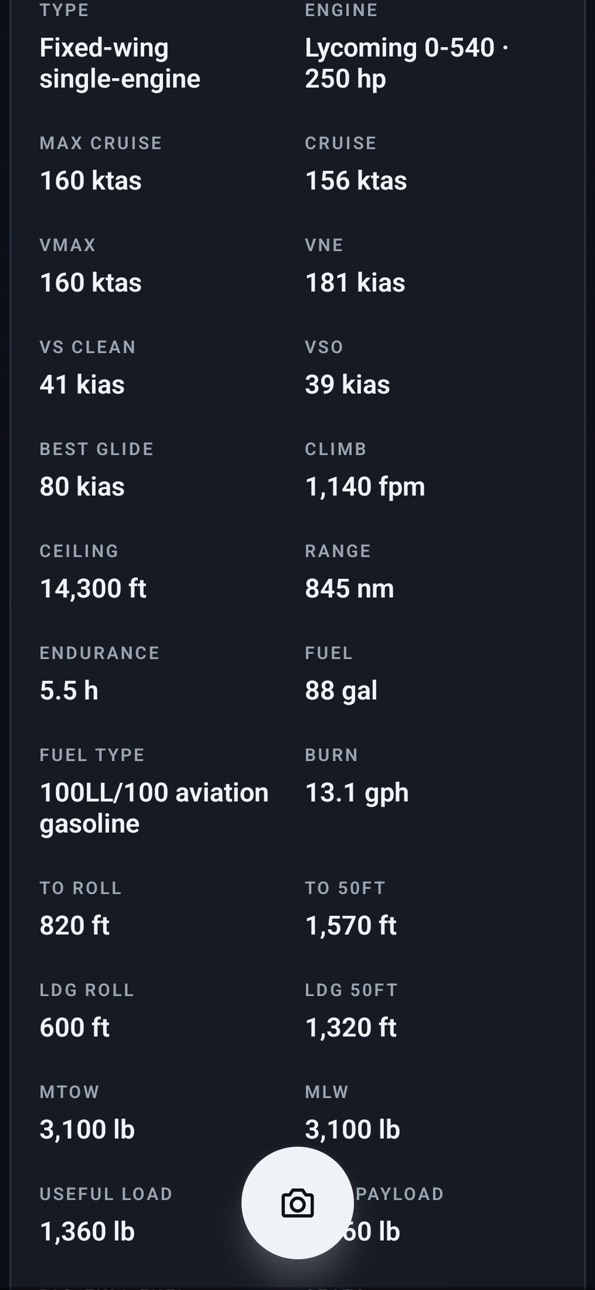
Point your phone at any aircraft, tap once, and instantly see a clean profile — registration, make, model, year, engine type, horsepower, cruise speed, range, seats, owner where available, recent flight activity, photos, and videos.
No aviation knowledge required. No login required for identification. The app uses AI vision (not just text recognition) so it still works when the tail number is angled, partially obscured, or the photo isn't perfect.
KEY FEATURES
• Point-and-tap aircraft identification, powered by AI vision
• Reads the tail number even when it's small, angled, or partially hidden
• Full aircraft profile: engine, performance, weights, dimensions, range
• Owner and registration data where publicly available
• Recent ADS-B flight activity, airport footprint map, monthly flight hours
• Personal aviation logbook of every aircraft you've captured
• Achievements when you spot a new make, a rare aircraft, or the first photo of an aircraft on Tail
• Pinch zoom + .6×/1×/2×/5× stops, video mode, image stabilization, HDR
• Auto-rotates the framing target with your phone — works even when screen orientation is locked
• 20-language UI (auto-detects your phone's language)
• Part of the Tail family alongside TailExchange, TailPhotos, and TailVideos
FOR
• Pilots who want to know what's parked next to them on the ramp
• Plane spotters who want a clean digital logbook
• Airshow attendees who want to capture and catalog dozens of aircraft in a session
• Aircraft owners who want to see their plane's public flight history
Accessibility
ipadiphonemacrealityDevicetvoswatch
Version history 6 versions
Build 888161342v0.1.162026-07-11 23:10:12
Big reliability release:
• Videos and photos are never lost to a bad connection — they upload automatically when you're back online
• Fixed landscape captures getting stuck with no way back
• Share cards now always include your photo
• Faster captures, better manual registration entry, and clearer error messages
• Settings, sign-in, and more now translated in 20 languages
Build 887167727v0.1.122026-06-23 17:09:50
Fixes the shutter so capturing and identifying works reliably on iPhone and iPad. Also: a cleaner capture sound, a friendlier first-catch badge, and the new personal logbook you can browse and manage anytime — tap any capture for details, with delete and a 30-day undo.
Build 887022572v0.1.72026-06-16 17:58:25
Fixes the shutter so capturing and identifying works reliably on iPhone and iPad. Also: a cleaner capture sound, a friendlier first-catch badge, and the new personal logbook you can browse and manage anytime — tap any capture for details, with delete and a 30-day undo.
Build 886959472v0.1.32026-06-15 14:44:22
Point your phone at any aircraft and instantly know what it is — registration, make, model, specs, owner, and recent flights. Now with a personal logbook you can browse and manage anytime (tap any capture for details, with delete + undo), AI-vision identification, and a 20-language UI. No login needed to identify.
Build 886998039v0.1.42026-06-15 21:50:56
Fixes the shutter so capturing and identifying works reliably on iPhone and iPad. Also: a cleaner capture sound, a friendlier first-catch badge, and the new personal logbook you can browse and manage anytime — tap any capture for details, with delete and a 30-day undo.
Build 886459288v0.1.02026-06-12 16:50:22
No pricing data captured yet — comparisons appear once the app has paid storefronts or in-app purchases.
Availability 1 of 1 storefronts
| Region | Language | Price | Ratings | Avg | Version |
|---|---|---|---|---|---|
| US | en-US | Free | 2 | 5.0 | 0.1.16 |
Change log 10 changes · US
✎
releaseNotes updated
Big reliability release:
• Videos and photos are never lost to a bad connection — they upload automatically when you're back online
• Fixed landscape captures g
✎
description updated
Tail ID is the camera-first aviation identification app — the simplest answer to the question everyone asks around airplanes: what kind of plane is that?
Point
✎
subtitle updated
Identify any plane instantly
✎
name updated
Tail ID: Aircraft Spotter
◆
Version 0.1.16 released
Big reliability release:
• Videos and photos are never lost to a bad connection — they upload automatically when you're back online
• Fixed landscape captures getting stuck with no way back
• Share cards now always include your photo
• Fast
◆
Version 0.1.12 released
Fixes the shutter so capturing and identifying works reliably on iPhone and iPad. Also: a cleaner capture sound, a friendlier first-catch badge, and the new personal logbook you can browse and manage anytime — tap any capture for details, w
◆
Version 0.1.7 released
Fixes the shutter so capturing and identifying works reliably on iPhone and iPad. Also: a cleaner capture sound, a friendlier first-catch badge, and the new personal logbook you can browse and manage anytime — tap any capture for details, w
◆
Version 0.1.4 released
Fixes the shutter so capturing and identifying works reliably on iPhone and iPad. Also: a cleaner capture sound, a friendlier first-catch badge, and the new personal logbook you can browse and manage anytime — tap any capture for details, w
◆
Version 0.1.3 released
Point your phone at any aircraft and instantly know what it is — registration, make, model, specs, owner, and recent flights. Now with a personal logbook you can browse and manage anytime (tap any capture for details, with delete + undo), A
◆
Version 0.1.0 released