Home › Navigation

 US
US
1 of 1 storefronts
Content in en-US
Content in en-US
Information
Preview 2 platforms
iPhone 9 images


iPad 10 images




What’s New Version 1.2.1
New
• Live journey tracking — tap Start on a planned route or saved favourite to follow your trip in real time; get alerts when your bus is approaching, when to alight or change, and when you've arrived
• Live Activity on the Lock Screen and in the Dynamic Island while a journey is active
Improvements
• Smaller app download — map tiles now load from the cloud
Fixes
• Fixed Circle Line routes sometimes looping the line twice — e.g. Esplanade → Serangoon now takes Circle Line once
Description
SG Bus & MRT helps you get around Singapore with real-time bus arrivals, MRT tools, and door-to-door trip planning in one simple app.
BUS ARRIVALS
• Live arrival times from LTA DataMall
• Find nearby bus stops on the map
• Search by stop code, stop name, or bus service number — with smarter matching for common abbreviations (opp, bef, aft, jct)
• See seat availability with colour-coded load indicators
• Wheelchair-accessible and bus type badges
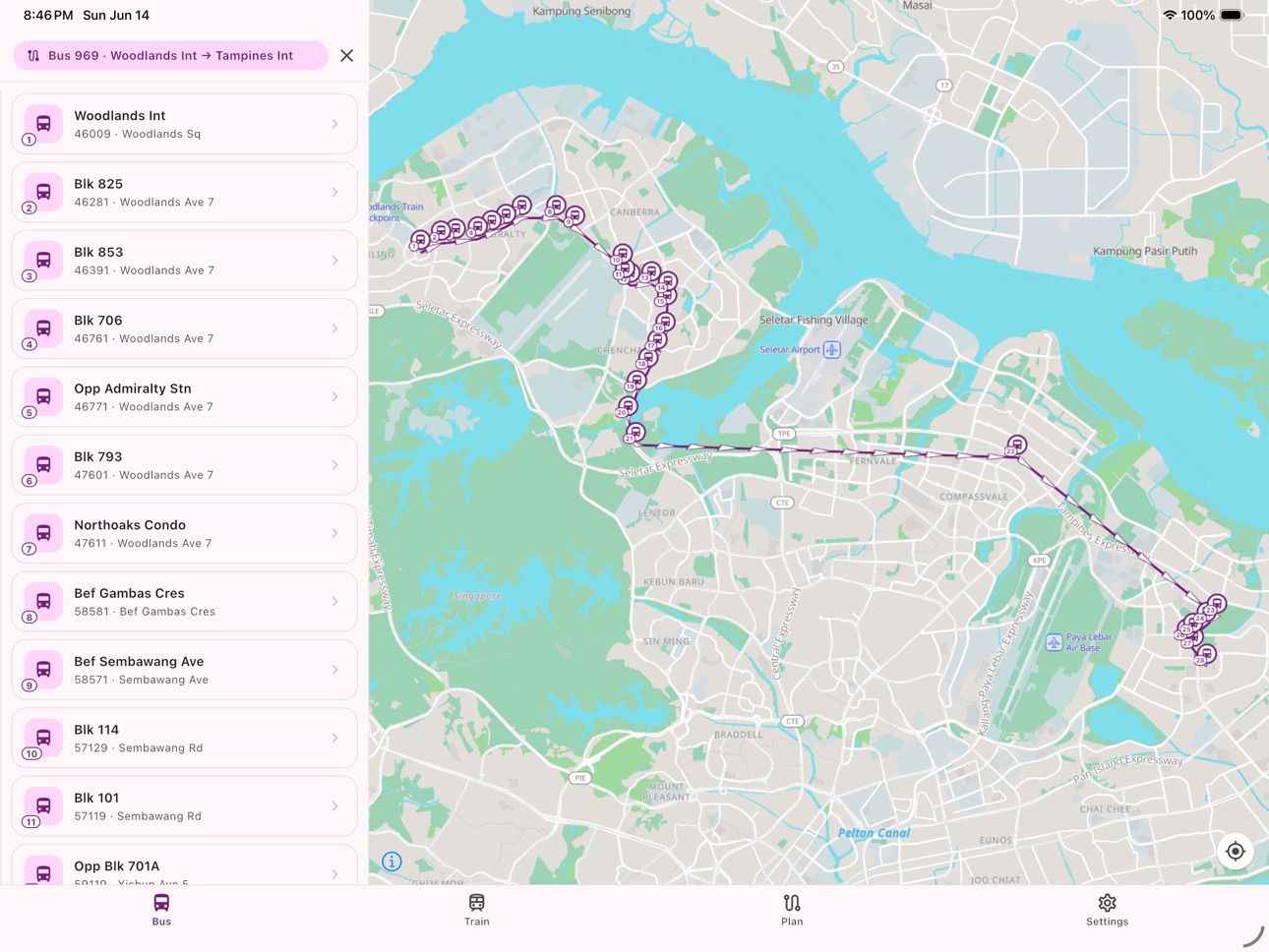
• View bus operating hours and show the route on the map
• Auto-refresh while you view a stop
TRIP PLANNING
• Plan door-to-door journeys across bus, MRT, and walking
• Search from and to addresses, or start from your current location
• Compare suggested routes with travel time, step-by-step legs, and a map of the full journey
• Live bus arrivals on journey legs, and train service advisories on affected routes
• Save favourite journeys for quick replanning later
• Live journey tracking — tap Start on a planned route or saved favourite to follow your trip in real time
• Alerts when your bus is approaching, when to alight or change, and when you've arrived
• iOS Live Activity on the Lock Screen and in the Dynamic Island while a journey is active
MRT & TRAINS
• Browse MRT and LRT lines and stations
• Plan routes between stations with estimated travel time
• View station crowd levels where available
• See train service advisories on your route
• Save favourite train routes for quick access
MAP & LOCATION
• Interactive map centred on Singapore with place names and roads
• See bus stops and train lines around you
• Follow your location on the map when you need it
• Light and dark map themes
• Auto, Light, or Dark app theme in Settings
FAVOURITES & WIDGETS
• Save favourite bus stops, train routes, and planned journeys
• Favourites sort nearest-first when your location is available
• Jump back to what you use every day
• iOS home screen widgets for live arrivals at your favourite bus stops
BUILT FOR SINGAPORE
• Designed for daily commutes, quick stop checks, and full journey planning
• Uses official Singapore open transport data
OPTIONAL SUPPORT
• Remove banner ads with a one-time in-app purchase
• Buy me a coffee to support development (optional tip)
Note: This app is an independent tool and is not affiliated with or endorsed by LTA, SMRT, or SBS Transit. Arrival times, crowd data, and journey suggestions may vary.
Capabilities
In-App Purchases
Accessibility
ipadiphonemacrealityDevicetvoswatch
Version history 10 versions
Build 887775732v1.2.12026-07-04 05:01:04
New
• Live journey tracking — tap Start on a planned route or saved favourite to follow your trip in real time; get alerts when your bus is approaching, when to alight or change, and when you've arrived
• Live Activity on the Lock Screen and in the Dynamic Island while a journey is active
Improvements
• Smaller app download — map tiles now load from the cloud
Fixes
• Fixed Circle Line routes sometimes looping the line twice — e.g. Esplanade → Serangoon now takes Circle Line once
Build 887467047v1.2.02026-06-26 16:36:38
New
• Dark theme — choose Auto, Light, or Dark under Settings → Display → App theme; the app adapts across bus, train, plan, settings, and the map with easy-to-read text and icons
Improvements
• Plan From: Current location now snaps to the nearest street address before routing, so journeys from parks and landmarks work better
• Plan live arrivals show whether the next bus is Single, Double, or Bendy — matching the Bus tab
• Following your location on the map no longer resets which way the map is facing — use the face-north button when you want to point north again
Fixes
• Plan shows a helpful message when no public transport route exists, and suggests trying a nearby street or landmark as your starting point
• Fixed the Bus tab staying on the loading spinner when there are no nearby stops and you switch to Train and back
Build 887264716v1.1.92026-06-23 16:15:37
Home Screen Widget
• Redesigned widget with a purple header band, mascot icon, and proper light/dark colour tokens
• Tapping the widget now reliably opens the app and expands the correct bus stop
Plan Journey
• Fixed favourite routes not showing the "not in operation" banner when all buses on a leg were unavailable
• Fixed map panning feeling sluggish with the bus card open while the panel is collapsed
• Fixed Favourites collapsing sluggishly with Live arrivals open
• Fixed From/To fields sometimes needing multiple taps to focus
• Smoother Favourites panel with many saved routes — shows a loading placeholder while route cards build
Bug Fixes
• Fixed a crash when switching tabs with the ad banner visible
• Fixed an occasional glitch on the Plan tab that could cause the screen to flicker
Build 887222537v1.1.62026-06-20 16:50:13
• Fixed Plan showing "Bus not in operation" when another bus on the same leg was still running
• Fixed Plan suggesting very different routes as alternatives — a short trip no longer shows a much longer service with the same stop count
• Fixed missing alternative bus numbers when schedule data was incomplete but the bus was still running with live arrivals
Build 887084478v1.1.52026-06-17 17:45:45
• More reliable Bus tab location on launch, tab switches, and reopening the app
• Location stays active when switching between Bus, Train, and Plan on iOS
• Favourite routes in Plan now appear on the map when expanded
• Clearer expand/collapse controls on Live arrivals
• Friendlier place names in Plan search and favourites
• Check for updates in Settings
Build 887045601v1.1.32026-06-16 20:24:42
Bug Fixes & Improvements
• Fixed location puck rotation and responsiveness on the Bus screen
• Fixed map not auto-zooming to your location on first launch
• Fixed LRT loop lines incorrectly showing the same station for first and last stop
• Improved bus stop names accuracy
• Fixed Plan tab location input focus issues
• Filtered out walk-only routes and duplicate suggestions from Plan results
• Added fade-in animation to the Settings bottom sheet
Build 886965400v1.1.22026-06-15 17:21:03
• Fixed an intermittent crash on iPhone when opening the app, switching tabs, or viewing a route on the map
If you haven't updated since 1.1.0:
• New Plan tab — door-to-door trips across bus, MRT, and walking
• Save favourite journeys, with live bus arrivals and train advisories on your route
• Smarter bus stop search and nearest-first favourites
• Estimated travel time on train directions
• iOS home screen widget for favourite bus stops
Build 886946235v1.1.02026-06-14 23:23:39
Plan
• New Plan tab — plan door-to-door trips across bus, MRT, and walking
• Search from and to addresses, or start from your current location
• Suggested routes with travel time, step-by-step legs, and a map of the full journey
• Save favourite journeys for quick replanning later
• Live bus arrivals on journey legs, and train service advisories on affected routes
Train
• Route directions now show estimated travel time (e.g. Est. ~15 mins), based on typical MRT and LRT segment times
Search
• Smarter bus stop search — understands common abbreviations like opp, bef, aft, and jct, and ranks better matches first
• Search stays responsive while typing, even with the full stop list
Favourites
• Bus stop and train route favourites automatically sort nearest-first when your location is available
Settings
• Rate Us opens the App Store listing so you can leave a review
Location
• Location permission is requested when you turn on map follow, not at launch
• Clearer message when location access is unavailable
iPad
• Nearby bus stops use a wider search radius on iPad and larger tablets, so more stops appear around you on the map
Performance
• GPS follow mode uses platform-tuned update settings for smoother tracking with less battery use
Fixes
• Fixed an iOS crash when switching tabs while the map was loading
• Fixed the train location dot sometimes missing when switching from Directions to Favourites
Build 886709066v1.0.42026-06-09 18:18:12
What's New in Version 1.0.4
Map improvements
• Maps now show place names, road names, and points of interest for easier navigation
• Cleaner Bus and Train maps — duplicate basemap stop/station icons are hidden so your app's markers stand out
Train tab fixes
• Train line routes display correctly on the map again
• Sengkang and Punggol LRT stations show the correct grey colour in All Lines view
• Location follow now behaves like the Bus tab — active on load, and turns off when you pan the map
Stability & polish
• Fixed a crash when switching quickly between Bus and Train tabs
• Fixed location dot staying stuck on screen when zooming into bus stop clusters
Build 886434093v1.0.32026-06-08 14:12:09
No pricing data captured yet — comparisons appear once the app has paid storefronts or in-app purchases.
Availability 1 of 1 storefronts
| Region | Language | Price | Ratings | Avg | Version |
|---|---|---|---|---|---|
| US | en-US | Free | 0 | — | 1.2.1 |
Change log 14 changes · US
✎
releaseNotes updated
New
• Live journey tracking — tap Start on a planned route or saved favourite to follow your trip in real time; get alerts when your bus is approaching, when to
✎
description updated
SG Bus & MRT helps you get around Singapore with real-time bus arrivals, MRT tools, and door-to-door trip planning in one simple app.
BUS ARRIVALS
• Live arriv
✎
subtitle updated
Real-Time Bus & MRT ETA
✎
name updated
SG Bus & MRT
◆
Version 1.2.1 released
New
• Live journey tracking — tap Start on a planned route or saved favourite to follow your trip in real time; get alerts when your bus is approaching, when to alight or change, and when you've arrived
• Live Activity on the Lock Screen an
◆
Version 1.2.0 released
New
• Dark theme — choose Auto, Light, or Dark under Settings → Display → App theme; the app adapts across bus, train, plan, settings, and the map with easy-to-read text and icons
Improvements
• Plan From: Current location now snaps to the
◆
Version 1.1.9 released
Home Screen Widget
• Redesigned widget with a purple header band, mascot icon, and proper light/dark colour tokens
• Tapping the widget now reliably opens the app and expands the correct bus stop
Plan Journey
• Fixed favourite routes not s
◆
Version 1.1.6 released
• Fixed Plan showing "Bus not in operation" when another bus on the same leg was still running
• Fixed Plan suggesting very different routes as alternatives — a short trip no longer shows a much longer service with the same stop count
• Fix
◆
Version 1.1.5 released
• More reliable Bus tab location on launch, tab switches, and reopening the app
• Location stays active when switching between Bus, Train, and Plan on iOS
• Favourite routes in Plan now appear on the map when expanded
• Clearer expand/colla
◆
Version 1.1.3 released
Bug Fixes & Improvements
• Fixed location puck rotation and responsiveness on the Bus screen
• Fixed map not auto-zooming to your location on first launch
• Fixed LRT loop lines incorrectly showing the same station for first and last stop
•
◆
Version 1.1.2 released
• Fixed an intermittent crash on iPhone when opening the app, switching tabs, or viewing a route on the map
If you haven't updated since 1.1.0:
• New Plan tab — door-to-door trips across bus, MRT, and walking
• Save favourite journeys, wit
◆
Version 1.1.0 released
Plan
• New Plan tab — plan door-to-door trips across bus, MRT, and walking
• Search from and to addresses, or start from your current location
• Suggested routes with travel time, step-by-step legs, and a map of the full journey
• Save favo
◆
Version 1.0.4 released
What's New in Version 1.0.4
Map improvements
• Maps now show place names, road names, and points of interest for easier navigation
• Cleaner Bus and Train maps — duplicate basemap stop/station icons are hidden so your app's markers stand o
◆
Version 1.0.3 released