Home › Developer Tools

 US
US
1 of 1 storefronts
Content in en-US
Content in en-US
Information
Apple ID6775024014
Bundle IDcom.codetoinvent.codeide
SellerSeller
Min iOS13.0
Min macOS11.0
Device familiesiphone, ipad, ipod
Released2026-06-09
Copyright© 2026 CodeToInvent
Privacy policyLink ↗
Preview 2 platforms
iPhone 7 images


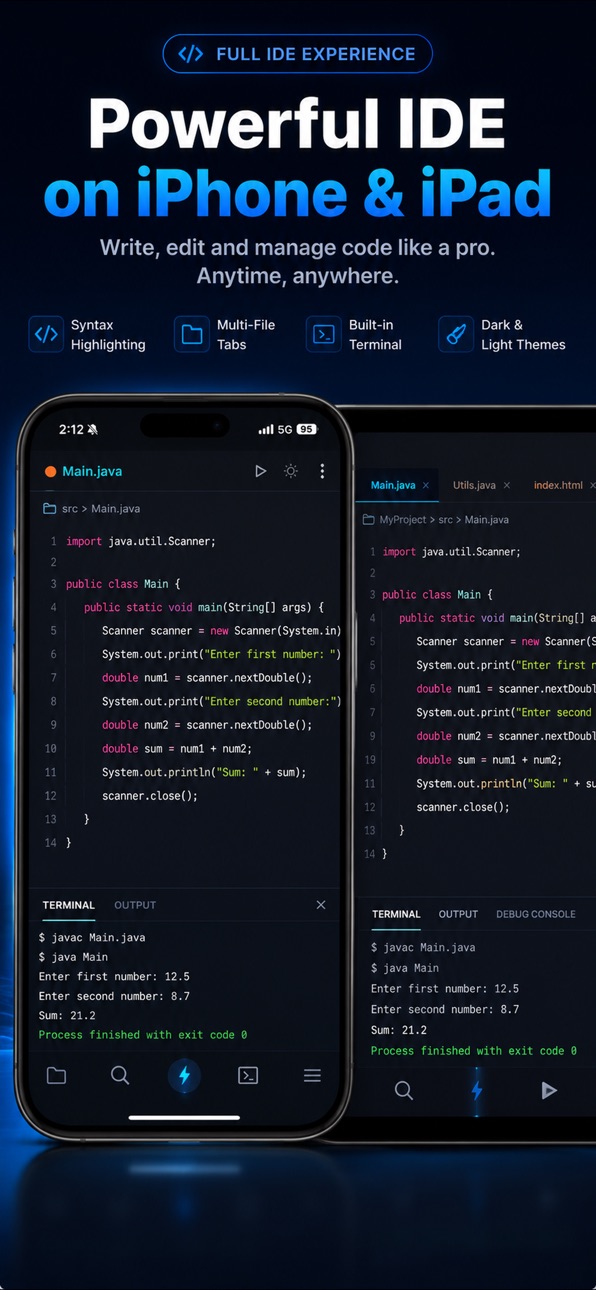


iPad 7 images


What’s New Version 5.8.0
What's New
• Bug fixes and UI improvements
Thanks for using Code IDE!
Description
Code IDE brings a complete programming environment to your iPhone and iPad. Write, compile, and run code in 50+ languages — including Python, Java, C++, and JavaScript. Your built-in AI Agent autonomously plans, builds, and debugs entire projects for you.
AUTONOMOUS AI CODING AGENT
Your AI Agent handles complete project workflows — from scaffolding to debugging:
• Auto-Build Projects — Describe what you want. The AI creates the full folder structure, files, and boilerplate automatically.
• PLAN Mode & AUTO Mode — Review a detailed technical blueprint before execution, or let the agent run end-to-end autonomously.
• AI Debugging — The agent scans your file tree, pinpoints logic errors, and applies patches automatically.
• AI Memory — The agent remembers your coding style and project context across sessions for a personalised experience.
• Human-in-the-Loop — Granular permission settings and approval prompts mean the AI never acts without your consent.
PROFESSIONAL MOBILE IDE
A desktop-class code editor and compiler designed for mobile:
• Fast Compiler — Instantly compile and run Java, Python, C++, HTML, JavaScript, Kotlin, Rust, Go, and 40+ more.
• Live Web Preview — Build and preview HTML, CSS, and JavaScript apps with real-time rendering. Visualise data with Mermaid Diagrams, 3D graphics, and charts.
• Smart Code Editor — Syntax highlighting, auto-indent, bracket matching, code completion, pinch-to-zoom, and multi-tab editing.
• Advanced File Explorer — Manage, move, and organise large multi-file codebases like a desktop IDE.
• Workspace Sync — Import local projects and access your workspace directly from the Files app.
• Template Gallery — Start new projects instantly with ready-to-run code templates.
• Themes & Fonts — Fully customisable editor with high-contrast developer themes and fonts.
50+ PROGRAMMING LANGUAGES
• Popular — Java, Python, C++, HTML5, CSS3, JavaScript
• Mobile & Systems — Kotlin, C, C#, Swift, Rust, Go
• Web & Scripting — TypeScript, PHP, Ruby, Shell, Lua
• Data & Docs — JSON, XML, Markdown, Mermaid, Visual Basic, and more
LOCALISED IN 19 LANGUAGES
English, Arabic, Bengali, German, Spanish, French, Hindi, Indonesian, Italian, Japanese, Korean, Dutch, Polish, Portuguese (Brazil), Russian, Turkish, Ukrainian, Vietnamese, and Chinese (Simplified).
PRIVATE & RELIABLE
Your files are saved on your device, and no account is required to start. Web projects preview on-device; compiling other languages and using AI features securely send the relevant code to cloud services to return your results, where it is used only to fulfil your request. Built for fast startup and a smooth experience across iPhone and iPad.
BUILT FOR
• Developers who need a full IDE on iPhone and iPad
• Students learning Java, Python, C++, or web development
• Engineers who want a reliable mobile compiler
• Anyone who wants to build real projects on the go
Download Code IDE and start building today.
Terms of Use (EULA): https://www.apple.com/legal/internet-services/itunes/dev/stdeula/
Capabilities
In-App Purchases
Accessibility
ipadiphonemacrealityDevicetvoswatch
Version history 5 versions
Build 887906770v5.8.02026-07-07 05:40:17
What's New
• Bug fixes and UI improvements
Thanks for using Code IDE!
Build 887067922v5.72026-06-18 06:29:17
What's New
• Improved AI coding assistance
• Enhanced compiler performance
• Better code editor stability
• Bug fixes and UI improvements
Thanks for using Code IDE!
Build 886974189v5.62026-06-15 18:35:45
Smoother, faster, better. We've tuned compile times, stabilized
the AI Copilot, and squashed bugs across all 50+ languages.
Enjoying Code IDE? Leave us a rating — it means the world.
Build 886832157v5.5.12026-06-12 19:06:52
iPad Supercharged! We have spent this update heavily focusing on our iPad users to bring you a desktop-class coding experience:
All-New AI Copilot UI: On iPad, your AI Copilot now opens in a beautiful, centered floating window rather than stretching across the bottom of the screen, making it much easier to chat with your AI assistant while viewing your code.
Intelligent Split-Screen: The output terminal now seamlessly hides itself when you have no files open, giving you a beautiful, distraction-free empty state that takes full advantage of the iPad's large screen.
Squashed Bugs: Fixed a rare issue where the AI Copilot sheet could accidentally open twice, and banished a layout crash that could occur when resuming the app.
Enjoying Code IDE? We'd love it if you left us a quick rating or review on the App Store! Every star helps us bring you more features.
Build 886328718v5.5.02026-06-10 01:07:52
No pricing data captured yet — comparisons appear once the app has paid storefronts or in-app purchases.
Availability 1 of 1 storefronts
| Region | Language | Price | Ratings | Avg | Version |
|---|---|---|---|---|---|
| US | en-US | Free | 5 | 5.0 | 5.8.0 |
Change log 9 changes · US
✎
releaseNotes updated
What's New
• Bug fixes and UI improvements
Thanks for using Code IDE!
✎
description updated
Code IDE brings a complete programming environment to your iPhone and iPad. Write, compile, and run code in 50+ languages — including Python, Java, C++, and Jav
✎
subtitle updated
AI Code Editor & Compiler
✎
name updated
Code IDE: Python Java C++ Html
◆
Version 5.8.0 released
What's New
• Bug fixes and UI improvements
Thanks for using Code IDE!
◆
Version 5.7 released
What's New
• Improved AI coding assistance
• Enhanced compiler performance
• Better code editor stability
• Bug fixes and UI improvements
Thanks for using Code IDE!
◆
Version 5.6 released
Smoother, faster, better. We've tuned compile times, stabilized
the AI Copilot, and squashed bugs across all 50+ languages.
Enjoying Code IDE? Leave us a rating — it means the world.
◆
Version 5.5.1 released
iPad Supercharged! We have spent this update heavily focusing on our iPad users to bring you a desktop-class coding experience:
All-New AI Copilot UI: On iPad, your AI Copilot now opens in a beautiful, centered floating window rather than
◆
Version 5.5.0 released