Home › Lifestyle

 US
US
1 of 1 storefronts
Content in en-US
Content in en-US
Information
Preview 2 platforms
iPhone 10 images

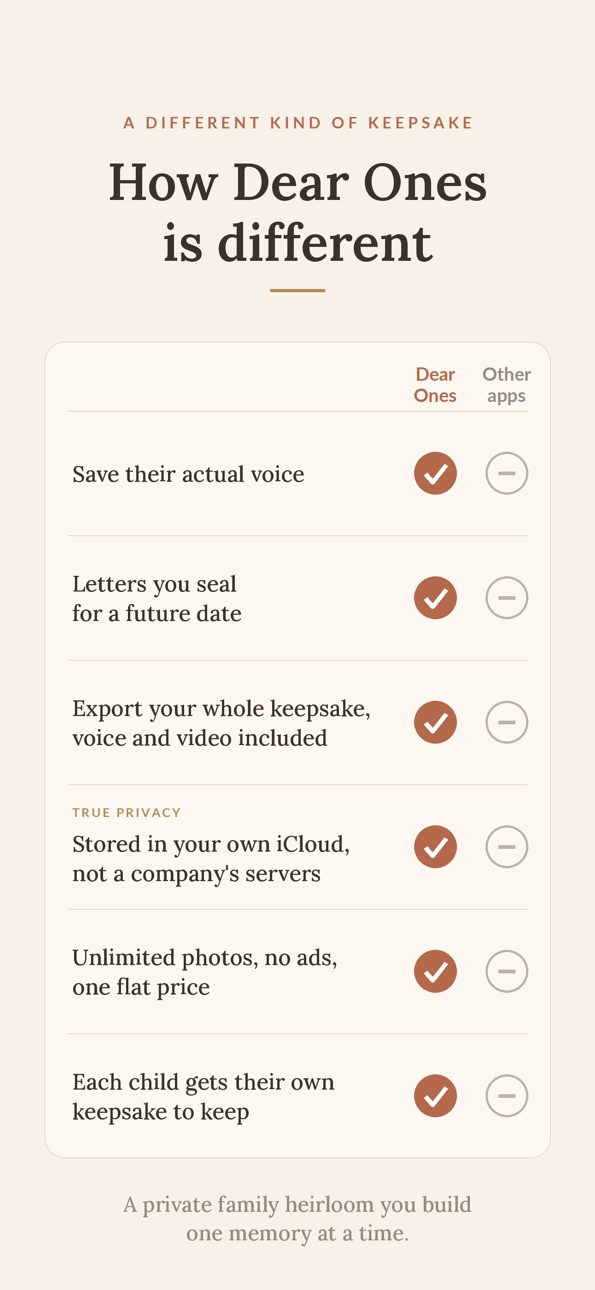


iPad 10 images


What’s New Version 2.3.2
This update adds a few things families asked for:
• A built-in photo editor to crop, zoom, and rotate any photo.
• Delete a single photo from an entry that has several, instead of removing the whole entry.
• Add letters, quotes, and notes directly inside an album.
• Photos brought into an album from your library are no longer stamped with one shared caption, so you can caption each one on its own.
• Add an optional date of death for a family member, which keeps their age from continuing to count up.
Description
A treasured keepsake for every member of the family, to keep now and hand down someday. Letters written for today or sealed for later, plus photos, videos, voice notes, quotes, and milestones. This is the place to save them all.
Dear Ones is a private family heirloom for everything you want to remember, and everything you want to tell your children or grandchildren someday.
Not a feed. Not a photo backup. A keepsake in the making, for every one of them.
WHAT YOU CAN SAVE
- Quotes. Remember the exact thing she said. Tag it to the child who said it.
- Milestones. First steps, first words, graduation, the day he went off to college.
- Photos and short videos. Up to ten photos per entry, with a caption underneath.
- Voice notes. Tell the story of the day they were born. Record the cute things they say. They get to hear it in your voice, and you get to hear it in theirs.
- Selfie videos. Talk to one of them directly. Save it for someday.
- Letters. Write a letter for today, or for someday. Seal it for their wedding day, their 18th birthday, the day they leave home.
HOW TO USE IT
Capture is quick. Open the app, pick what kind of memory it is, tap save. Tag it to the family timeline, an individual timeline, or both, or keep it private just for you.
Scrolling through your timeline feels like opening a book and reading your family story. Letters render in serif, cursive, or handwritten. Pick the font that feels like you wrote it.
Each family member gets their own thread, and you choose where every memory goes.
SHARE WITH THE PEOPLE YOU LOVE
Give grandma a code and the timelines you choose will open in her own copy of the app. You decide who sees what, and how much they can do.
- One code can unlock any mix of timelines: the family timeline, one person's, or several at once.
- Each code is view only, or view and add memories. Your choice.
- Anything family members add waits for your approval before it joins your keepsake.
- Change what a code unlocks, or revoke it entirely, anytime.
- Viewing is free for them. One subscription covers your whole family.
KEEP IT, OR HAND IT OVER
Export a timeline as a file to keep: a PDF of your photos, quotes, letters, and milestones, with the voice and video saved alongside. Printing to a physical book is coming in a future update.
WHY A MOM BUILT THIS
Dear Ones was built by a mom who wanted to keep all the moments with her kids (and future grandkids) in a way that was simple, private, and done with a tap. It is for the one whose phone is full of photos and whose head is full of scattered stories, the baby book that never got filled in, the voice memos she will never scroll back to find. Dear Ones is where all of that can finally live, be remembered, and be passed on.
FOR YOUR FAMILY ONLY
Dear Ones is a private family keepsake. No public feed. Nothing shared off your device except what you choose to share, with the people you choose to share it with.
SUBSCRIPTION
Family plan: $7.99 a month or $59 a year. One family per subscription. 14-day free trial. Family Sharing enabled. Cancel anytime in Settings, Apple Account, Subscriptions.
What the subscription unlocks: unlimited entries, unlimited children, photo and voice attachments, scheduled letter delivery, co-parent contributions, and family sharing codes.
PRIVACY
Dear Ones shows no ads, does not track you, does not sell data, and never uses AI to write your memories for you. If you turn on family sharing, only the entries you share (and compressed copies of their photos and recordings) are stored on our servers so the family you invited can see them. Entries you mark private never leave your device.
From Next Frontier Builders. Made for the mom who wants to remember everything and needs a simple way to do it.
In-App Purchases US pricing
Dear Ones Family Subscription
Family Monthly · Monthly 14-day free trial$7.99
Family Annual · Yearly 14-day free trial$59.99
Capabilities
In-App Purchases
Accessibility
ipadiphonemacrealityDevicetvoswatch
Version history 14 versions
Build 887696801v2.3.22026-07-01 20:12:33
This update adds a few things families asked for:
• A built-in photo editor to crop, zoom, and rotate any photo.
• Delete a single photo from an entry that has several, instead of removing the whole entry.
• Add letters, quotes, and notes directly inside an album.
• Photos brought into an album from your library are no longer stamped with one shared caption, so you can caption each one on its own.
• Add an optional date of death for a family member, which keeps their age from continuing to count up.
Build 887453599v2.3.12026-06-25 23:02:02
Preview video on welcome screen is now easier to play.
Build 886962933v2.3.02026-06-15 17:17:35
A simple refresh to make Dear Ones easier to find your way around.
New Home screen. Open the app to this week's prompt and quick ways to get where you're going.
Build 886924060v2.2.02026-06-14 02:26:34
A couple new things we think you'll love:
A weekly question to help you remember. Once a week, Dear Ones offers a simple question to capture a moment, with an optional reminder you can turn on or off.
A quick walk-through. New here? Dear Ones can now show you around and point at each part of the app as you go.
Build 886882712v2.1.02026-06-12 21:03:34
Your keepsake now has a stronger iCloud backup.
- Your whole timeline backs up to your private iCloud in a new way that keeps working even if Apple's automatic sync runs into trouble on a device.
- New on the Family tab: an iCloud backup card that shows when your last backup finished, with a Back up now button and a detail screen, so you always know your memories are safe.
- Setting up a new phone is clearer. If we find your backup, you can restore it with one tap.
Build 886806831v2.0.12026-06-11 17:15:03
Family sharing just got better.
• Family members who join with a code now see the same timeline you do, with search, a photo grid, and a filter for each child
• They can add memories right from the timeline. You tap Accept and the memory is saved to your keepsake for everyone to see
Build 886787992v2.0.02026-06-10 22:17:31
Dear Ones 2.0 brings family sharing.
- Share timelines with the people you love. Create a code that unlocks the family timeline, one child's timeline, or several at once.
- You choose what each code allows: view only, or view and add memories.
- Memories your family adds wait for your approval before they join your keepsake.
- Viewing and contrinbuting is free for code holders. They can even start a keepsake of their own in the same app (with their own subscription, or one shared through Apple Family Sharing).
- Change or revoke any code anytime from the Family tab.
Build 886699945v1.4.12026-06-09 16:36:34
• Setting a cover photo in a multi-photo entry now works with one tap.
• You can now delete an entry off one timeline without removing it from the others.
Build 886744016v1.4.22026-06-09 22:26:05
Dictation now adds to what you've already written instead of replacing it.
Photos, videos, and voice notes now save to your phone right away, even when iCloud is taking a moment, and finish backing up on their own.
Build 886656050v1.4.02026-06-08 17:13:43
- New "How Dear Ones works" page on the Family tab describes every feature.
- Rearrange your albums: press and drag photos into the order you want.
Build 886625196v1.1.02026-06-07 17:50:27
This update makes your timeline easier to move through as your family's memories grow:
• Search your memories by a keyword
• Jump straight to any month with a tap
• Switch between the classic list and a new grid view
Build 886647342v1.3.02026-06-07 22:53:26
ALBUMS: Gather memories into collections of your own making, like a beach trip or a holiday. Albums can hold anything from your timeline (photos, videos, quotes, letters, voice notes), and everything stays right where it was on the timeline too, or add additional photos from your camera roll. Find Albums in a new button at the top of your Timeline.
SHARE AN ALBUM: Send any album as a keepsake, the same way you share a timeline: a formatted PDF book of its photos and words, plus any videos and voice notes, ready to AirDrop or message.
iCLOUD SYNC: Your entries now back up to your private iCloud. Get a new phone or reinstall the app, and your family's timeline comes with you.
Build 886594729v1.0.12026-06-06 16:17:42
Nothing is new. I just fixed a typo in the description and changed a little bit of the description wording.
Build 886297543v1.02026-06-05 19:56:24
Price history by region
Currency
Show
Columns
Search
Availability 1 of 1 storefronts
| Region | Language | Price | Ratings | Avg | Version |
|---|---|---|---|---|---|
| US | en-US | Free | 2 | 5.0 | 2.3.2 |
Change log 18 changes · US
✎
releaseNotes updated
This update adds a few things families asked for:
• A built-in photo editor to crop, zoom, and rotate any photo.
• Delete a single photo from an entry that has
✎
description updated
A treasured keepsake for every member of the family, to keep now and hand down someday. Letters written for today or sealed for later, plus photos, videos, voic
✎
subtitle updated
Journal, letters, and photos
✎
name updated
Dear Ones: Family Memory Saver
◆
Version 2.3.2 released
This update adds a few things families asked for:
• A built-in photo editor to crop, zoom, and rotate any photo.
• Delete a single photo from an entry that has several, instead of removing the whole entry.
• Add letters, quotes, and notes
◆
Version 2.3.1 released
Preview video on welcome screen is now easier to play.
◆
Version 2.3.0 released
A simple refresh to make Dear Ones easier to find your way around.
New Home screen. Open the app to this week's prompt and quick ways to get where you're going.
◆
Version 2.2.0 released
A couple new things we think you'll love:
A weekly question to help you remember. Once a week, Dear Ones offers a simple question to capture a moment, with an optional reminder you can turn on or off.
A quick walk-through. New here? Dear O
◆
Version 2.1.0 released
Your keepsake now has a stronger iCloud backup.
- Your whole timeline backs up to your private iCloud in a new way that keeps working even if Apple's automatic sync runs into trouble on a device.
- New on the Family tab: an iCloud backup c
◆
Version 2.0.1 released
Family sharing just got better.
• Family members who join with a code now see the same timeline you do, with search, a photo grid, and a filter for each child
• They can add memories right from the timeline. You tap Accept and the memory i
◆
Version 2.0.0 released
Dear Ones 2.0 brings family sharing.
- Share timelines with the people you love. Create a code that unlocks the family timeline, one child's timeline, or several at once.
- You choose what each code allows: view only, or view and add memor
◆
Version 1.4.2 released
Dictation now adds to what you've already written instead of replacing it.
Photos, videos, and voice notes now save to your phone right away, even when iCloud is taking a moment, and finish backing up on their own.
◆
Version 1.4.1 released
• Setting a cover photo in a multi-photo entry now works with one tap.
• You can now delete an entry off one timeline without removing it from the others.
◆
Version 1.4.0 released
- New "How Dear Ones works" page on the Family tab describes every feature.
- Rearrange your albums: press and drag photos into the order you want.
◆
Version 1.3.0 released
ALBUMS: Gather memories into collections of your own making, like a beach trip or a holiday. Albums can hold anything from your timeline (photos, videos, quotes, letters, voice notes), and everything stays right where it was on the timeline
◆
Version 1.1.0 released
This update makes your timeline easier to move through as your family's memories grow:
• Search your memories by a keyword
• Jump straight to any month with a tap
• Switch between the classic list and a new grid view
◆
Version 1.0.1 released
Nothing is new. I just fixed a typo in the description and changed a little bit of the description wording.
◆
Version 1.0 released