Home › Productivity

 US
US
1 of 1 storefronts
Content in en-US
Content in en-US
Information
Apple ID6774285018
Bundle IDKIKI.readloom.app
SellerSeller
Min iOS16.6
Min macOS14.6
Device familiesiphone, ipad
Released2026-06-07
Copyright© Nanthicha Chantasila
Privacy policyLink ↗
Preview 2 platforms
iPhone 7 images




iPad 5 images


What’s New Version 1.2.2
What's New in This Version
Stability & Data Safety
• Fixed a bug on iPadOS 18 where switching to the OCR tab would erase all Book Editor edits
• Tapping "Start OCR" on a project with existing content now asks for confirmation before overwriting
• "Rebuild Book" now shows a confirmation dialog before resetting chapters — and supports Undo to recover
• Fixed PDF disappearing after closing and reopening a project
Bug Fixes
• Fixed project deletion executing without confirmation on iOS 26 and iPadOS 17
• Fixed bulk project deletion skipping the confirmation dialog on iPadOS 17
• Fixed "Delete Chapter" having no confirmation in both list view and continuous scroll mode
• Fixed merging two chapters silently dropping the second chapter's title
• Fixed the "Replace All" button label showing the wrong text when deleting (now correctly shows "Delete All")
• Fixed "Replace All" confirmation potentially failing to appear on iPadOS 17
• Fixed random "Footnotes" chapters appearing in EPUB exports
Improvements
• The "+" button now adds a new chapter directly below the selected chapter, not always at the end
• Auto-save now shows a subtle "Saved" badge so you know your work is safe
• Error messages now display in full — no more cut-off text in the notification banner
• Chapter paragraph count now correctly shows only text paragraphs
• The "Keyword" chapter detection field now shows an example placeholder
• Switching languages in the onboarding guide no longer resets to the first page
Description
Readloom turns your PDFs into clean, editable text and exports as EPUB - right on your iPhone or iPad.
Have a PDF you want to read on your Kindle, Xteink, or any e-reader but the text in PDF is too small? Readloom scans the pages with OCR, automatically splits the content into chapters, and lets you export everything as an EPUB or TXT file in minutes.
What you can do:
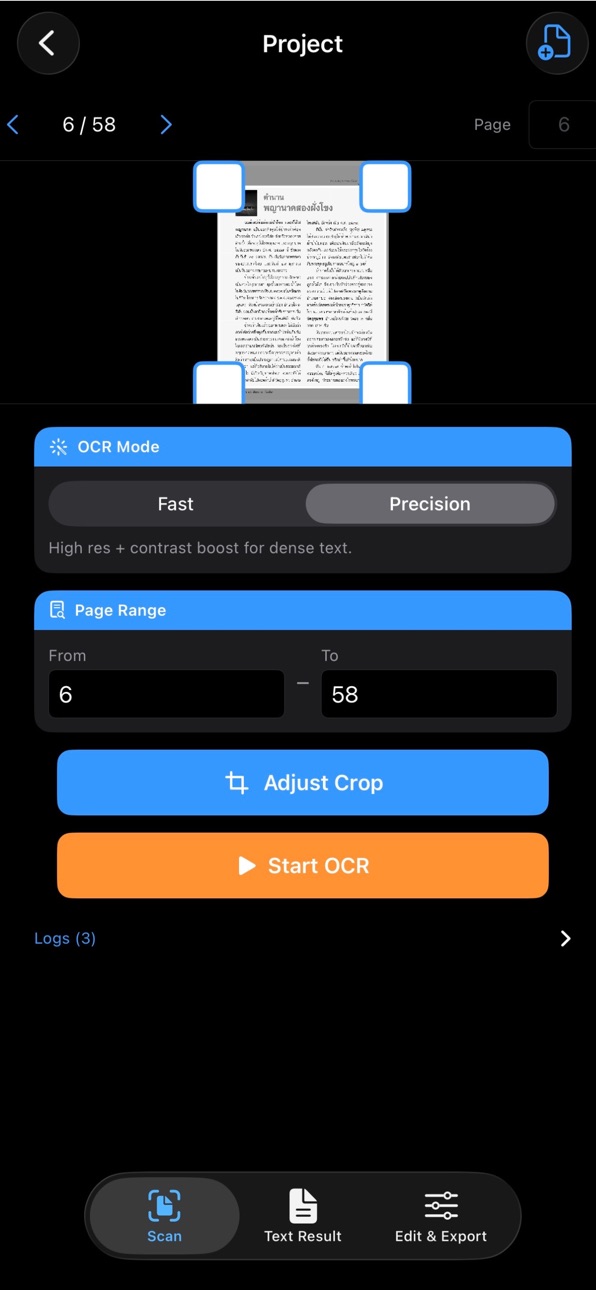
• Scan any PDF with OCR - choose Fast mode for speed or Precision for accuracy
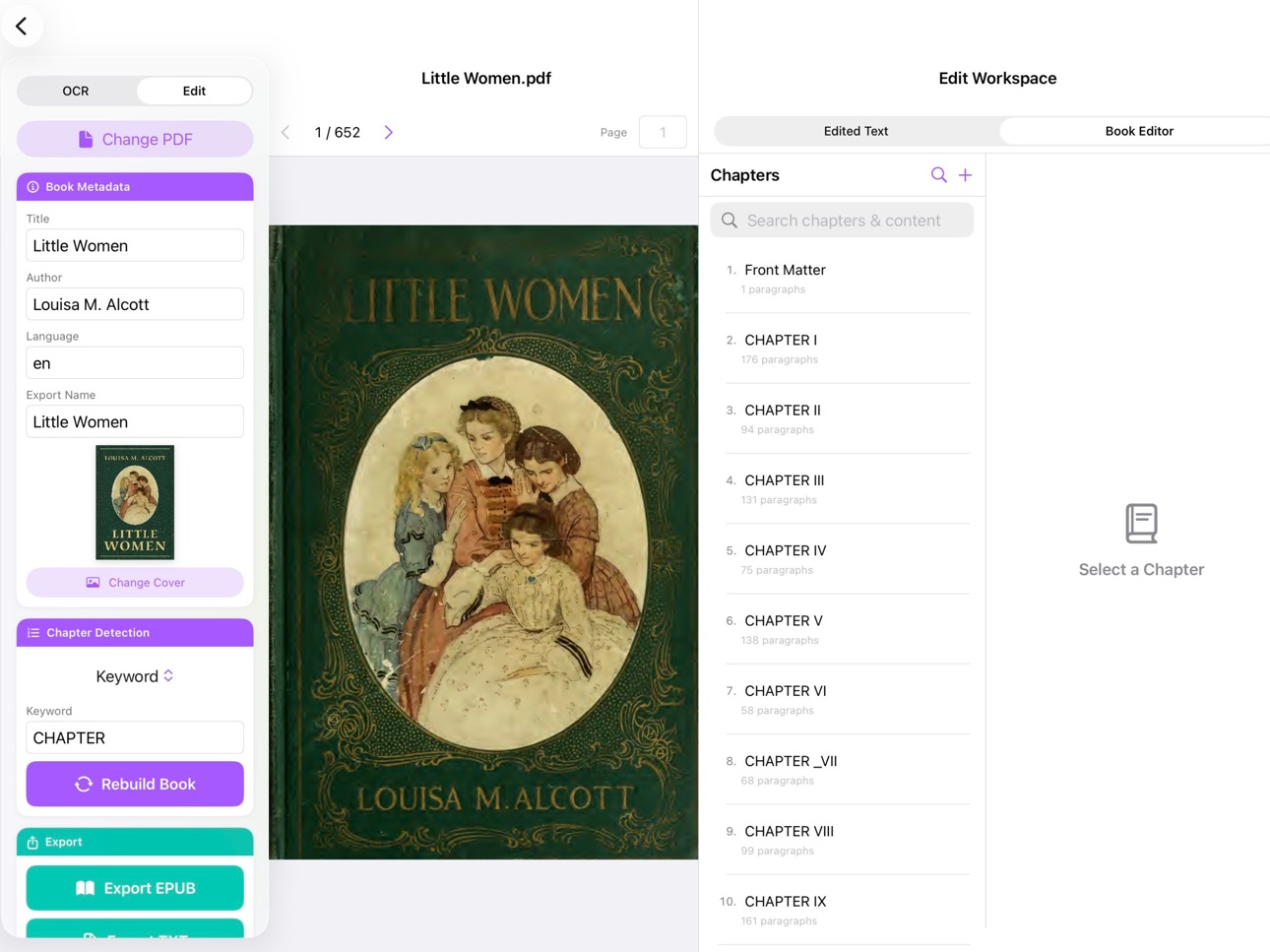
• Auto-detect chapters from numbered headings or keywords
• Supports Thai text - including Thai chapter keywords like "บทที่" and "ตอนที่"
• Edit chapter titles and clean up text before exporting
• Export as EPUB (open on any e-reader or reading app) or plain TXT
• Pick a custom cover image for each project
• Everything stays in your device.
How it works:
1. Open a PDF from your Files app
2. Set your page range and tap Start OCR
3. Readloom automatically finds and organizes the chapters - or you can set them manually
4. Review, edit, and export (send to your kindle or e-reader)
Free to get started:
Your first two projects support up to 350 pages each — no sign-up required. Upgrade to Readloom Pro with a one-time payment for unlimited pages and unlimited projects, forever.
No subscription. No hidden fees. Pay once, use forever.
For personal use only. Please respect all applicable laws.
Capabilities
In-App Purchases
Accessibility
ipadiphonemacrealityDevicetvoswatch
Version history 5 versions
Build 887837544v1.2.22026-07-05 03:37:28
What's New in This Version
Stability & Data Safety
• Fixed a bug on iPadOS 18 where switching to the OCR tab would erase all Book Editor edits
• Tapping "Start OCR" on a project with existing content now asks for confirmation before overwriting
• "Rebuild Book" now shows a confirmation dialog before resetting chapters — and supports Undo to recover
• Fixed PDF disappearing after closing and reopening a project
Bug Fixes
• Fixed project deletion executing without confirmation on iOS 26 and iPadOS 17
• Fixed bulk project deletion skipping the confirmation dialog on iPadOS 17
• Fixed "Delete Chapter" having no confirmation in both list view and continuous scroll mode
• Fixed merging two chapters silently dropping the second chapter's title
• Fixed the "Replace All" button label showing the wrong text when deleting (now correctly shows "Delete All")
• Fixed "Replace All" confirmation potentially failing to appear on iPadOS 17
• Fixed random "Footnotes" chapters appearing in EPUB exports
Improvements
• The "+" button now adds a new chapter directly below the selected chapter, not always at the end
• Auto-save now shows a subtle "Saved" badge so you know your work is safe
• Error messages now display in full — no more cut-off text in the notification banner
• Chapter paragraph count now correctly shows only text paragraphs
• The "Keyword" chapter detection field now shows an example placeholder
• Switching languages in the onboarding guide no longer resets to the first page
Build 887533666v1.2.12026-06-27 23:40:51
Bug Fixes
• Fixed EPUB exports occasionally containing unexpected extra chapters
• Fixed project deletion not working on iPadOS 17
Build 887195513v1.22026-06-19 23:39:59
Continuous Scroll Editor
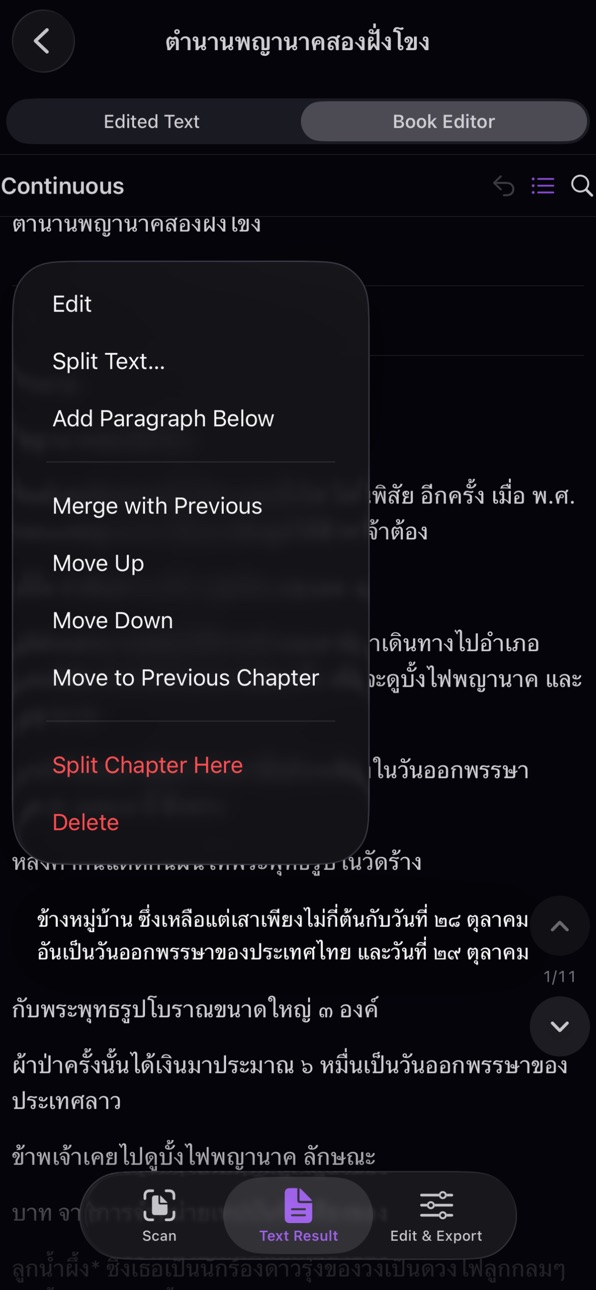
Read and edit your entire book in one uninterrupted scroll — no more tapping into individual chapters. Floating ▲ / ▼ buttons jump between chapters instantly with a chapter counter showing your position.
Full-Screen Paragraph Editing
Paragraphs now open in a dedicated full-screen editor with Done / Cancel buttons, making it easy to work on long text without being cramped in a small cell.
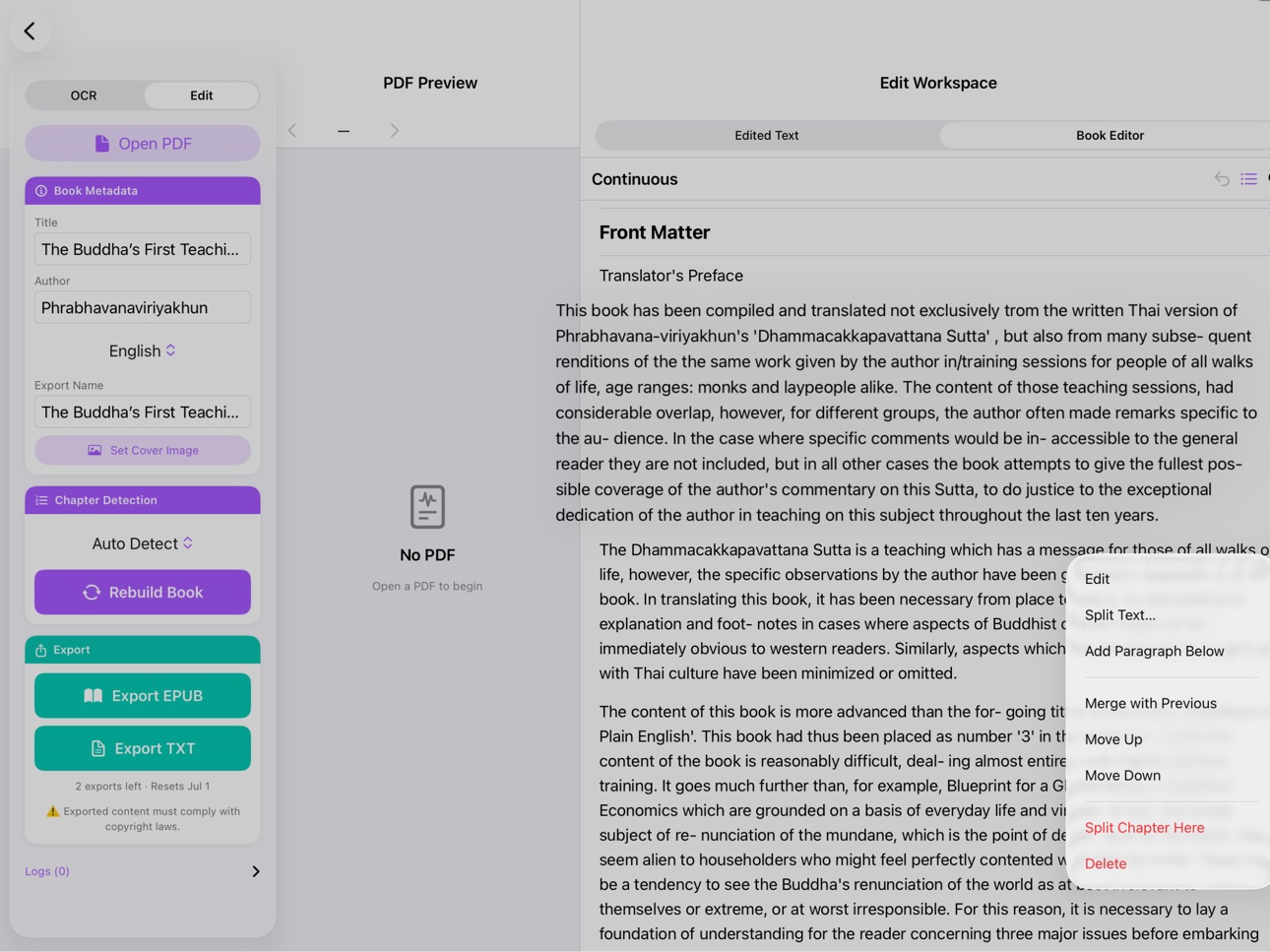
New Paragraph Tools (long-press any paragraph)
• Split a paragraph into two with "Split Text…"
• Move a paragraph to the previous chapter
• Add a new paragraph below and start editing it immediately
• Delete individual paragraphs
• Merge a chapter with the next chapter
Find & Replace Everywhere
Find & Replace now works in both the Book Editor and the Edited Text tab. In continuous mode, the current match is highlighted in orange so you always know where you are.
Thai Number Detection Restored
The ๑๒๓ Thai Digits chapter detection mode is now working correctly.
Performance
• Text editing in the Edited Text tab is significantly faster and no longer lags on long documents
• Searching and scrolling in large books is smoother throughout
Bug Fixes
• Rebuilding the book no longer wipes paragraph edits
• Deleting projects on iPadOS 17 now works reliably
• Chapter title edits are fully undoable
• TXT export no longer adds a spurious "Front Matter" heading
• Reordering chapters while search is active no longer moves the wrong chapter
• iPad no longer gets stuck in continuous mode with no way to exit
• Chapter navigation counter stays accurate after merging or deleting chapters
Build 886939586v1.12026-06-15 14:43:48
Bug Fixes
• Fixed a crash that occurred when the "From" page was set higher than the "To" page in the scan range
• Fixed the Done button on iPhone number pad disappearing while typing page numbers
• Fixed the "Other" language option in book metadata not saving correctly
Book Editor Improvements
• Paragraph edits and Replace All are now fully undoable — tap the undo button to reverse any text change
• Undo button is now accessible inside every chapter, not just the chapter list
• Replace All now shows a confirmation dialog with the number of occurrences before making changes — replacing with an empty term clearly warns "Delete All"
• On iPad, the selected chapter no longer loses its selection after rebuilding the book
Settings & Limits
• Settings page now shows your monthly reset date so you know exactly when your free limits refresh
Language Support
• Language picker now includes Chinese, Japanese, Korean, Lao, Vietnamese, Burmese, Khmer, Indonesian, Malay, and Hindi — no more manual code entry
Build 886252849v1.02026-06-07 21:36:56
No pricing data captured yet — comparisons appear once the app has paid storefronts or in-app purchases.
Availability 1 of 1 storefronts
| Region | Language | Price | Ratings | Avg | Version |
|---|---|---|---|---|---|
| US | en-US | Free | 0 | — | 1.2.2 |
Change log 9 changes · US
✎
releaseNotes updated
What's New in This Version
Stability & Data Safety
• Fixed a bug on iPadOS 18 where switching to the OCR tab would erase all Book Editor edits
• Tapping "Start
✎
description updated
Readloom turns your PDFs into clean, editable text and exports as EPUB - right on your iPhone or iPad.
Have a PDF you want to read on your Kindle, Xteink, or a
✎
subtitle updated
PDF to EPUB Convertor
✎
name updated
Readloom - Convert PDF to EPUB
◆
Version 1.2.2 released
What's New in This Version
Stability & Data Safety
• Fixed a bug on iPadOS 18 where switching to the OCR tab would erase all Book Editor edits
• Tapping "Start OCR" on a project with existing content now asks for confirmation before overwr
◆
Version 1.2.1 released
Bug Fixes
• Fixed EPUB exports occasionally containing unexpected extra chapters
• Fixed project deletion not working on iPadOS 17
◆
Version 1.2 released
Continuous Scroll Editor
Read and edit your entire book in one uninterrupted scroll — no more tapping into individual chapters. Floating ▲ / ▼ buttons jump between chapters instantly with a chapter counter showing your position.
Full-Scree
◆
Version 1.1 released
Bug Fixes
• Fixed a crash that occurred when the "From" page was set higher than the "To" page in the scan range
• Fixed the Done button on iPhone number pad disappearing while typing page numbers
• Fixed the "Other" language option in book
◆
Version 1.0 released