Home › Photo & Video

 US
US
1 of 1 storefronts
Content in en-US
Content in en-US
Information
Preview 2 platforms
iPhone 4 images



iPad 4 images


What’s New Version 1.0.1
New name, big update!
• Free exports are now FULL resolution (JPEG) — no more downscaling
• Pinch to zoom in and confirm the sharpest frame before exporting
• Jump to an exact time or frame number
• Haptic feedback on steps + hardware-keyboard arrow stepping on iPad
• Exported photos keep the video's original capture date, so they sort correctly
• Reliability improvements
Thanks for using the app!
Description
Pull a pixel-perfect photo from any video.
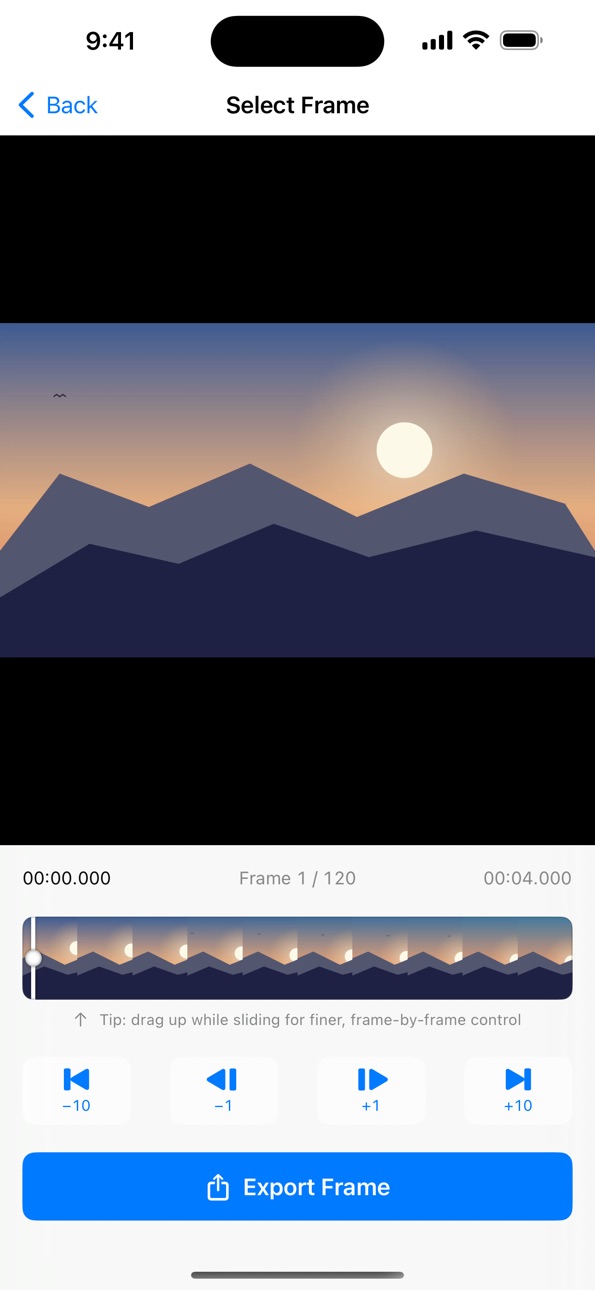
Video to Photo: Frame Grab lets you scrub through any video, step frame by frame to the exact moment, and save it as a high-quality photo. For the shots a screenshot can't get — sports finishes, your kid's or pet's split-second expression, real estate from a walkthrough, a clean frame off a screen recording, anything you filmed in 4K and want one sharp still from.
FREE — AND FULL RESOLUTION
• Export at full native resolution as JPEG, free — no forced downscaling
• Pick any video from your Photos library or the Files app
• Scrub a visual filmstrip — drag upward for finer, frame-by-frame control
• Step by single frames (±1, ±10) or jump to an exact time or frame number
• Pinch to zoom in and verify the sharpest frame before you export
• Haptic feedback and hardware-keyboard arrow stepping on iPad
• Keeps the video's original capture date so photos sort by when they were filmed
PRO
A free trial unlocks the rest:
• PNG (lossless) and HEIC formats
• Frame Library that saves your exports and syncs across your devices via iCloud
• No ads
WORKS EVERYWHERE
Designed for iPhone, made to feel right on iPad. Works with HDR, 4K, slow-motion and portrait video — orientation and aspect ratio are always preserved.
— SUBSCRIPTION TERMS —
Pro is an auto-renewable subscription:
• Pro Monthly — $1.99 / month
• Pro Yearly — $10.99 / year
Both include a 7-day free trial for first-time subscribers. Payment is charged to your Apple ID at confirmation of purchase. Subscriptions renew automatically unless cancelled at least 24 hours before the end of the current period. Manage or cancel anytime in Settings.
Terms of Use: https://www.apple.com/legal/internet-services/itunes/dev/stdeula/
Privacy Policy: https://mwsupplylimited.github.io/videoframeexport/privacy.html
In-App Purchases US pricing
Video Frame Export Pro Subscription
Pro Yearly · Yearly 7-day free trial$10.99
Pro Monthly · Monthly 7-day free trial$1.99
Capabilities
In-App Purchases
Accessibility
ipadiphonemacrealityDevicetvoswatch
Version history 2 versions
Build 886540915v1.0.12026-06-23 20:19:48
New name, big update!
• Free exports are now FULL resolution (JPEG) — no more downscaling
• Pinch to zoom in and confirm the sharpest frame before exporting
• Jump to an exact time or frame number
• Haptic feedback on steps + hardware-keyboard arrow stepping on iPad
• Exported photos keep the video's original capture date, so they sort correctly
• Reliability improvements
Thanks for using the app!
Build 886251514v1.02026-06-04 14:00:13
Price history by region
Currency
Show
Columns
Search
Availability 1 of 1 storefronts
| Region | Language | Price | Ratings | Avg | Version |
|---|---|---|---|---|---|
| US | en-US | Free | 0 | — | 1.0.1 |
Change log 6 changes · US
✎
releaseNotes updated
New name, big update!
• Free exports are now FULL resolution (JPEG) — no more downscaling
• Pinch to zoom in and confirm the sharpest frame before exporting
•
✎
description updated
Pull a pixel-perfect photo from any video.
Video to Photo: Frame Grab lets you scrub through any video, step frame by frame to the exact moment, and save it as
✎
subtitle updated
Extract HD Still & Screenshot
✎
name updated
Video to Photo: Frame Grab
◆
Version 1.0.1 released
New name, big update!
• Free exports are now FULL resolution (JPEG) — no more downscaling
• Pinch to zoom in and confirm the sharpest frame before exporting
• Jump to an exact time or frame number
• Haptic feedback on steps + hardware-keyb
◆
Version 1.0 released