Home › Productivity

 US
US
1 of 1 storefronts
Content in en-US
Content in en-US
Information
Preview 1 platform
iPhone 5 images



What’s New Version v1.1
• Screen recording : tap Record on your iPhone to record your Mac's screen. Saves to Desktop automatically.
• 4 new controls : Lock Screen, Show Desktop, Mission Control, and Empty Trash are now available as tiles.
• Website tiles : add any website as a tile. Tap it on your iPhone to open it on your Mac instantly.
• Menu bar only mode : PhoneDeck now lives quietly in your menu bar. No Dock icon cluttering your taskbar.
• Open at Login : PhoneDeck starts automatically with your Mac.
• Closing the window no longer disconnects : red button hides the window, your iPhone stays connected.
• Drag to reorder pages : rearrange your pages in the sidebar by dragging.
• Bug fixes : more apps detected in the library (VS Code, Adobe, Steam, PCSX2), orientation now correct on launch.
Description
PhoneDeck needs two free apps to work : this iPhone app + the Mac companion app at phonedeck.io .
Both are 100% free, forever. No account needed.
Stuck or something not working? DM me directly on Instagram @PhoneDeckApp - I reply personally, usually within a few hours.
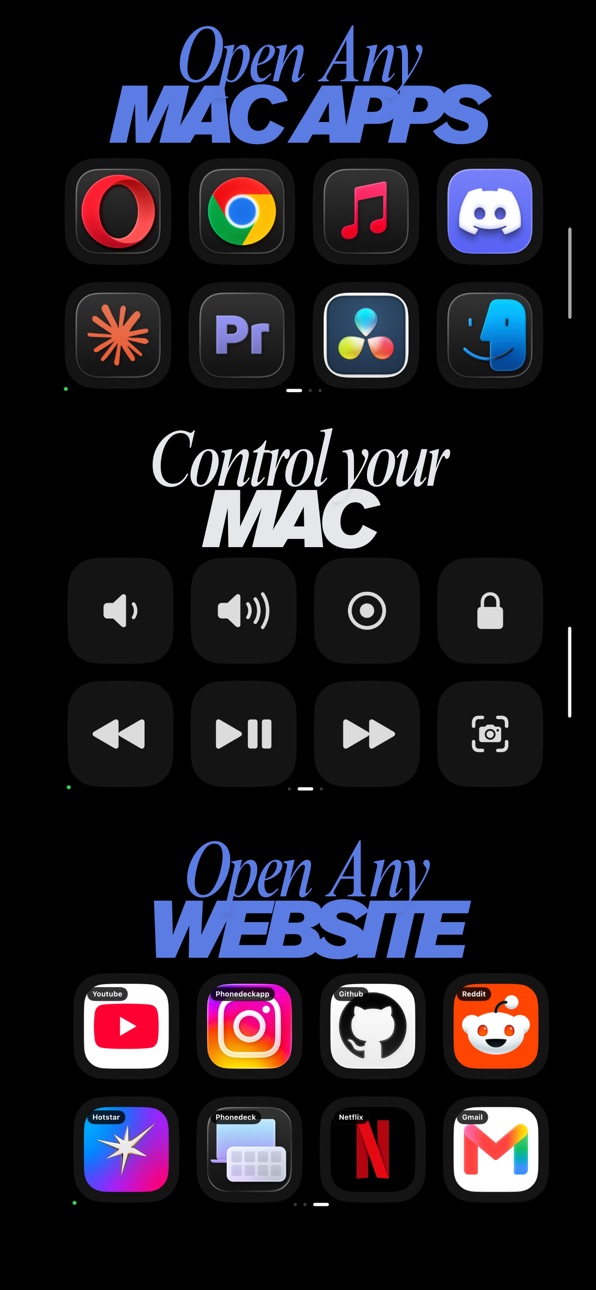
Turn your iPhone into a wireless Mac controller. Launch any Mac app, trigger system controls, open any website all with one tap.
Think Stream Deck, but you already own the hardware.
--------------------------
HOW IT WORKS
--------------------------
• Install this app on your iPhone
• Download the Mac app from phonedeck.io (free DMG)
• Open both apps on the same WiFi - they pair automatically
• Drag any Mac app, control, or website onto a tile
• Tap your iPhone to launch
No account. No cloud. No subscription. No data leaves your devices.
--------------------------
WHAT YOU CAN DO
--------------------------
APPS : Launch any Mac app with one tap. VS Code, Figma, Cursor, Premiere, Photoshop, Slack — anything installed on your Mac.
CONTROLS : 16 built-in Mac controls: volume, brightness, keyboard backlight, media play/pause/next/previous, screenshot, screen recording, dictation, lock screen, show desktop, mission control, empty trash.
WEBSITES : Drag any URL onto a tile. YouTube, ChatGPT, Linear, Figma files, your dashboards — one tap and it opens on your Mac.
PAGES : Organize tiles into pages. One for Design, one for Dev, one for Music. Swipe between them on your iPhone.
--------------------------
WHY IT'S DIFFERENT
--------------------------
• Free forever. No subscription, no Pro tier, no ads, no tracking.
• Works over local WiFi. No account, no cloud, no data collection.
• Auto-updates on Mac : bug fixes ship the same day.
• Built by one indie developer. Every feature is something a user asked for.
--------------------------
WHAT YOU NEED
--------------------------
• An iPhone running iOS 17 or later
• A Mac running macOS 14+ or later
• Both devices on the same WiFi network
• The PhoneDeck Mac app from phonedeck.io (free download)
--------------------------
Made by one developer in Mumbai. Constantly updated. Feature requests welcome at phonedeck.io/request-feature or DM @PhoneDeckApp on Instagram.
Accessibility
ipadiphonemacrealityDevicetvoswatch
Version history 2 versions
Build 886617961vv1.12026-06-07 17:19:54
• Screen recording : tap Record on your iPhone to record your Mac's screen. Saves to Desktop automatically.
• 4 new controls : Lock Screen, Show Desktop, Mission Control, and Empty Trash are now available as tiles.
• Website tiles : add any website as a tile. Tap it on your iPhone to open it on your Mac instantly.
• Menu bar only mode : PhoneDeck now lives quietly in your menu bar. No Dock icon cluttering your taskbar.
• Open at Login : PhoneDeck starts automatically with your Mac.
• Closing the window no longer disconnects : red button hides the window, your iPhone stays connected.
• Drag to reorder pages : rearrange your pages in the sidebar by dragging.
• Bug fixes : more apps detected in the library (VS Code, Adobe, Steam, PCSX2), orientation now correct on launch.
Build 886139727v1.02026-05-30 21:43:33
No pricing data captured yet — comparisons appear once the app has paid storefronts or in-app purchases.
Availability 1 of 1 storefronts
| Region | Language | Price | Ratings | Avg | Version |
|---|---|---|---|---|---|
| US | en-US | Free | 1 | 5.0 | v1.1 |
Change log 5 changes · US
✎
releaseNotes updated
• Screen recording : tap Record on your iPhone to record your Mac's screen. Saves to Desktop automatically.
• 4 new controls : Lock Screen, Show Desktop, Missio
✎
description updated
PhoneDeck needs two free apps to work : this iPhone app + the Mac companion app at phonedeck.io .
Both are 100% free, forever. No account needed.
Stuck or som
✎
name updated
PhoneDeck
◆
Version v1.1 released
• Screen recording : tap Record on your iPhone to record your Mac's screen. Saves to Desktop automatically.
• 4 new controls : Lock Screen, Show Desktop, Mission Control, and Empty Trash are now available as tiles.
• Website tiles : add any
◆
Version 1.0 released